Sub-Module 2.2: The Immutable Fortress — Zero-CVE with ACS Enforcement
Introduction
Every organisation running containers on Kubernetes faces the same operational burden: a constant stream of CVE advisories against base image packages that the application never calls. Patching apt, systemd, or glibc inside a Python runtime image is not security — it is technical debt theatre. You are patching code your application does not use, on a schedule dictated by upstream maintainers you do not control.
This sub-module introduces a fundamentally different posture. Instead of reactively patching an ever-growing attack surface, you proactively eradicate the attack surface by switching to Project Hummingbird distroless images that ship only what the application actually needs. You then lock that posture in place using Red Hat Advanced Cluster Security (ACS) admission controllers so that no legacy, bloated image can re-enter your cluster.
What You Will Build
Phase 1: Deploy legacy Python API (python:3.11-buster)
  -> ACS scan reveals fixable CVEs from unused Python packaging tools (pip, setuptools, wheel)

Phase 2: Rebuild with Hummingbird distroless multi-stage
  -> ACS scan reveals ZERO fixable CVEs

Phase 3: Author ACS enforcement policies
  -> Cluster rejects any image with fixable CVEs > 0
  -> Cluster rejects any image without a verifiable SBOM

Phase 4: Attempt to redeploy the legacy image
  -> ACS admission controller BLOCKS the deployment
Prerequisites
-
OpenShift 4.21 cluster with ACS (RHACS) operator installed and Central accessible (see Appendix B: ACS Setup)
-
ocCLI authenticated to the cluster (provided by the Showroom terminal) -
skopeoandcurlavailable (provided by the Showroom terminal) -
roxctlCLI (pre-installed in the Showroom terminal) -
syftandcosign(installed to~/binin Exercise 5 below)
Exercise 1: Prepare the Environment
Step 0: Log In to the Cluster
Verify you are logged in to the OpenShift cluster. If the Showroom terminal is not already authenticated, run:
oc login -u {user} -p {password} https://api.cluster-PROVIDE-GUID.example.com:6443 --insecure-skip-tls-verifyConfirm the login succeeded:
oc whoamiStep 1: Switch to your Lab Namespace
oc project {user}-hummingbird-acs-labNow using project "{user}-hummingbird-acs-lab" on server "https://api.cluster-PROVIDE-GUID.example.com:6443".Step 2: Set Registry Variables
Look up the on-cluster Quay registry route and configure your registry credentials. These variables are used throughout this module for building, pushing, and deploying images:
echo export WORKSHOP_REGISTRY="{quay_hostname}" >>$HOME/.bashrc
echo export REGISTRY_USER="{quay_user}" >>$HOME/.bashrc
echo export REGISTRY_PASSWORD="{quay_password}" >>$HOME/.bashrc
echo export REGISTRY_AUTH_FILE=$HOME/.config/containers/auth.json >>$HOME/.bashrc
source $HOME/.bashrc

mkdir -p $(dirname $REGISTRY_AUTH_FILE)

echo ${WORKSHOP_REGISTRY}
echo ${REGISTRY_USER}

skopeo login -u "${REGISTRY_USER}" -p "${REGISTRY_PASSWORD}" "${WORKSHOP_REGISTRY}" --tls-verify=falseWORKSHOP_REGISTRY={quay_hostname}
REGISTRY_USER={quay_user}
Login Succeeded!Step 3: Verify roxctl CLI
Verify that roxctl is installed:
roxctl versionroxctl: 4.x.x
Step 4: Configure roxctl CLI
Set the ACS Central endpoint and API token so that roxctl can communicate with your ACS installation:
echo export ROX_ENDPOINT={rhacs_route}:443 >>$HOME/.bashrc
echo export ROX_API_TOKEN={rhacs_api_token} >>$HOME/.bashrc
source $HOME/.bashrc

echo "ROX_ENDPOINT=${ROX_ENDPOINT}"
echo "ROX_API_TOKEN=${ROX_API_TOKEN:0:20}..."
Verify connectivity:
roxctl central whoami --insecure-skip-tls-verifyUserID:
auth-token:6cfeaeed-6052-46a1-86d4-998132a186fb
User name:
anonymous bearer token "{user}" with roles [Admin] (jti: 6cfeaeed-6052-46a1-86d4-998132a186fb, expires: 2026-05-08T09:29:05Z)
Roles:
- Admin
Access:
rw Access
rw Alert|
If you open a new terminal or your session disconnects, all |
Step 5: Download Helper Scripts
Several exercises use helper scripts to parse JSON output from roxctl and the ACS REST API. Create them now so you can reference them with simple one-line commands later.
Script 1 — Scan summary (parses roxctl image scan JSON output):
mkdir -p ~/acs-fortress-lab && cd ~/acs-fortress-lab

cat > acs-scan-summary.py << 'PYEOF'
#!/usr/bin/env python3
import json, sys
data = json.load(sys.stdin)
summary = data.get("result", {}).get("summary", {})
vulns = data.get("result", {}).get("vulnerabilities", [])
fixable = sum(1 for v in vulns if v.get("componentFixedVersion"))
if "--brief" in sys.argv:
    print(f"  Components: {summary.get('TOTAL-COMPONENTS', 'N/A')}"
          f"  |  Vulnerabilities: {summary.get('TOTAL-VULNERABILITIES', 0)}"
          f"  |  Fixable: {fixable}")
else:
    print(f"Total components:       {summary.get('TOTAL-COMPONENTS', 'N/A')}")
    print(f"Total vulnerabilities:  {summary.get('TOTAL-VULNERABILITIES', 0)}")
    print(f"Critical:               {summary.get('CRITICAL', 0)}")
    print(f"Important:              {summary.get('IMPORTANT', 0)}")
    print(f"Moderate:               {summary.get('MODERATE', 0)}")
    print(f"Low:                    {summary.get('LOW', 0)}")
    print(f"Fixable vulnerabilities: {fixable}")
PYEOF
Script 2 — Admission controller check (reads ACS /v1/clusters API):
cat > acs-check-admission.py << 'PYEOF'
#!/usr/bin/env python3
import json, sys
data = json.load(sys.stdin)
cluster = data["clusters"][0]
ac = cluster.get("dynamicConfig", {}).get("admissionControllerConfig", {})
print(f"Cluster:              {cluster['name']}")
print(f"Admission controller: {ac.get('enabled', False)}")
print(f"Scan inline:          {ac.get('scanInline', False)}")
print(f"Enforce on updates:   {ac.get('enforceOnUpdates', False)}")
PYEOF
Script 3 — Provenance inspector (reads skopeo inspect --raw manifest):
cat > acs-inspect-provenance.py << 'PYEOF'
#!/usr/bin/env python3
import json, sys
try:
    manifest = json.load(sys.stdin)
except json.JSONDecodeError as e:
    print(f"Error: could not parse manifest JSON ({e})")
    sys.exit(1)
if manifest.get("mediaType") == "application/vnd.oci.image.index.v1+json":
    found = False
    for m in manifest.get("manifests", []):
        ann = m.get("annotations", {})
        artifact_type = m.get("artifactType", "")
        if "vnd.sigstore" in json.dumps(ann) or "sbom" in artifact_type.lower():
            found = True
            print(f"  Artifact: {artifact_type or 'unknown'}")
            print(f"  Digest:   {m.get('digest', 'unknown')}")
            print()
    if not found:
        print("No SBOM or sigstore attestations found in the manifest index.")
else:
    print("Single-arch manifest (inspect child manifests for attestations)")
PYEOF
Script 4 — Policy creation (creates enforcement policies via ACS API):
cat > acs-create-policies.sh << 'SHEOF'
#!/usr/bin/env bash
set -euo pipefail
: "${ROX_API_TOKEN:?ROX_API_TOKEN is not set}"
: "${ACS_ROUTE:?ACS_ROUTE is not set}"
: "${LAB_NAMESPACE:?LAB_NAMESPACE is not set}"
: "${POLICY_SUFFIX:?POLICY_SUFFIX is not set}"
API="${ACS_ROUTE}/v1/policies"
AUTH="Authorization: Bearer ${ROX_API_TOKEN}"
create_policy() {
  local json_file="$1"
  local name
  name=$(python3 -c "import json; print(json.load(open('${json_file}'))['name'])")
  existing=$(curl -sk -H "${AUTH}" "${API}" | \
    python3 -c "import json,sys; ids=[p['id'] for p in json.load(sys.stdin).get('policies',[]) if p['name']=='${name}']; print(ids[0] if ids else '')" 2>/dev/null)
  if [ -n "${existing}" ]; then
    echo "Policy '${name}' already exists (id: ${existing}). Ensuring enforcement..."
    curl -sk -H "${AUTH}" "${API}/${existing}" | \
      python3 -c "
import json, sys
p = json.load(sys.stdin)
desired = ['SCALE_TO_ZERO_ENFORCEMENT']
if p.get('enforcementActions') == desired:
    print('  Enforcement already set.')
else:
    p['enforcementActions'] = desired
    json.dump(p, open('/tmp/policy-update.json','w'))
    print('  Updating enforcement...')
" 2>/dev/null
    if [ -f /tmp/policy-update.json ]; then
      curl -sk -X PUT -H "${AUTH}" -H "Content-Type: application/json" \
        "${API}/${existing}" -d @/tmp/policy-update.json > /dev/null
      rm -f /tmp/policy-update.json
      echo "  Enforcement enabled."
    fi
    return 0
  fi
  response=$(curl -sk -X POST -H "${AUTH}" -H "Content-Type: application/json" "${API}" -d @"${json_file}")
  echo "${response}" | python3 -c "
import json, sys
d = json.load(sys.stdin)
if 'id' in d:
    print(f\"Created policy: {d.get('name', 'unknown')} (id: {d['id']})\")
else:
    print(f\"Error: {d.get('message', d)}\")
"
}
cat > /tmp/acs-policy-zero-cve.json << EOF
{"name":"Zero Fixable CVEs Required - ${POLICY_SUFFIX}","description":"Reject deployments where the image has any fixable CVE.","severity":"CRITICAL_SEVERITY","categories":["Vulnerability Management"],"lifecycleStages":["DEPLOY"],"enforcementActions":["SCALE_TO_ZERO_ENFORCEMENT"],"eventSource":"NOT_APPLICABLE","disabled":false,"scope":[{"namespace":"${LAB_NAMESPACE}"}],"policySections":[{"sectionName":"Fixable CVE threshold","policyGroups":[{"fieldName":"Fixed By","booleanOperator":"OR","negate":false,"values":[{"value":".*"}]},{"fieldName":"CVSS","booleanOperator":"OR","negate":false,"values":[{"value":">= 0.000000"}]}]}]}
EOF
echo "=== Creating policy: Zero Fixable CVEs Required - ${POLICY_SUFFIX} ==="
create_policy /tmp/acs-policy-zero-cve.json
cat > /tmp/acs-policy-scan-required.json << EOF
{"name":"Image Scan Required - ${POLICY_SUFFIX}","description":"Reject deployments where the image has not been scanned by ACS.","severity":"HIGH_SEVERITY","categories":["DevOps Best Practices"],"lifecycleStages":["DEPLOY"],"enforcementActions":["SCALE_TO_ZERO_ENFORCEMENT"],"eventSource":"NOT_APPLICABLE","disabled":false,"scope":[{"namespace":"${LAB_NAMESPACE}"}],"policySections":[{"sectionName":"Scan status","policyGroups":[{"fieldName":"Unscanned Image","booleanOperator":"OR","negate":false,"values":[{"value":"true"}]}]}]}
EOF
echo "=== Creating policy: Image Scan Required - ${POLICY_SUFFIX} ==="
create_policy /tmp/acs-policy-scan-required.json
echo ""
echo "Done. Verify in ACS UI: Platform Configuration -> Policy Management"
SHEOF
Verify the scripts were created:
ls -1 acs-*acs-check-admission.py acs-create-policies.sh acs-inspect-provenance.py acs-scan-summary.py
|
These scripts avoid multi-line copy-paste problems when running commands from the browser. Each uses a quoted heredoc ( |
Exercise 2: Deploy the Anti-Pattern (Legacy Python API)
This exercise deliberately deploys a vulnerable application. The goal is to make the problem visceral before introducing the solution.
Step 1: Create the Python REST API
mkdir -p ~/acs-fortress-lab && cd ~/acs-fortress-lab

cat > app.py << 'PYEOF'
from http.server import HTTPServer, BaseHTTPRequestHandler
import json, os

class APIHandler(BaseHTTPRequestHandler):
    def do_GET(self):
        if self.path == "/healthz":
            self._respond(200, {"status": "healthy"})
        elif self.path == "/api/v1/greeting":
            self._respond(200, {"message": "Hello from the Immutable Fortress lab"})
        else:
            self._respond(404, {"error": "not found"})

    def _respond(self, code, body):
        self.send_response(code)
        self.send_header("Content-Type", "application/json")
        self.end_headers()
        self.wfile.write(json.dumps(body).encode())

if __name__ == "__main__":
    port = int(os.environ.get("PORT", "8080"))
    server = HTTPServer(("0.0.0.0", port), APIHandler)
    print(f"Listening on :{port}")
    server.serve_forever()
PYEOF
Step 2: Write the Legacy Containerfile
This Containerfile uses python:3.11-buster, a full Debian-based image packed with OS-level packages the application will never use:
cat > Containerfile.legacy << 'EOF'
FROM quay.io/takinosh/python3.11-buster:latest
WORKDIR /app
COPY app.py .
RUN chmod 644 app.py && chown 1001:0 app.py
EXPOSE 8080
USER 1001
CMD ["python3", "app.py"]
EOF|
OpenShift SCC Compatibility: The |
Step 3: Create Registry Secret
The Quay repository is private. OpenShift needs credentials both to push images during builds and to pull images at deployment time:
oc create secret docker-registry quay-pull-secret \
  --docker-server=${WORKSHOP_REGISTRY} \
  --docker-username=${REGISTRY_USER} \
  --docker-password=${REGISTRY_PASSWORD} \
  -n {user}-hummingbird-acs-lab 2>/dev/null || echo "Secret already exists"

oc secrets link default quay-pull-secret --for=pull -n {user}-hummingbird-acs-lab
oc secrets link builder quay-pull-secret -n {user}-hummingbird-acs-lab
Step 4: Build and Push the Legacy Image
The Showroom terminal does not include podman, so we use OpenShift’s built-in Binary Build strategy. This uploads your local files and builds the Containerfile on-cluster using a builder pod, then pushes directly to Quay.
|
Before running the commands below, confirm your registry variables are still set from Step 2: If either line prints blank or |
# Guard: fail loudly if registry variables are not set
if [ -z "${WORKSHOP_REGISTRY}" ] || [ -z "${REGISTRY_USER}" ]; then
  echo "ERROR: WORKSHOP_REGISTRY or REGISTRY_USER is not set."
  echo "       Re-run Step 2 to restore your registry environment variables."
  exit 1
fi

# Remove any pre-existing BuildConfig (which may have a stale/wrong image reference)
oc delete bc/legacy-python-api -n {user}-hummingbird-acs-lab 2>/dev/null || true

oc new-build --strategy=docker --binary=true \
  --name=legacy-python-api \
  --to-docker --to="${WORKSHOP_REGISTRY}/${REGISTRY_USER}/legacy-python-api:vulnerable" \
  -n {user}-hummingbird-acs-lab

oc set build-secret --push bc/legacy-python-api quay-pull-secret -n {user}-hummingbird-acs-lab 2>/dev/null || true

cp Containerfile.legacy Dockerfile
oc start-build legacy-python-api --from-dir=. --follow --wait -n {user}-hummingbird-acs-lab
rm -f Dockerfile|
|
Verify the image appears in Quay with its security scan:
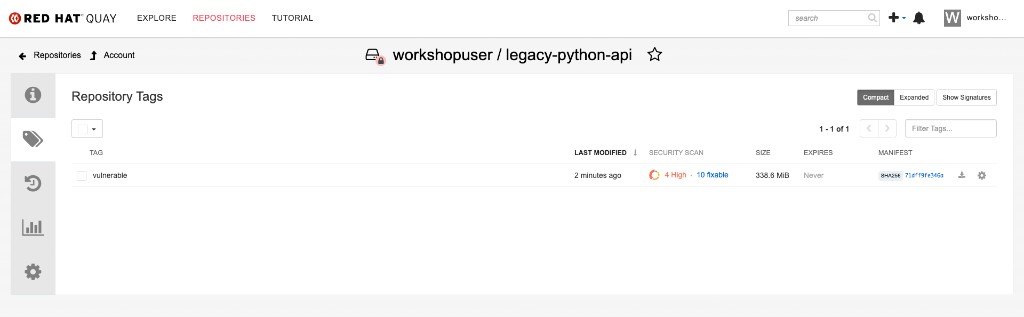
Click on the security scan column to view the CVE details. The python:3.11-buster base image carries multiple fixable vulnerabilities:
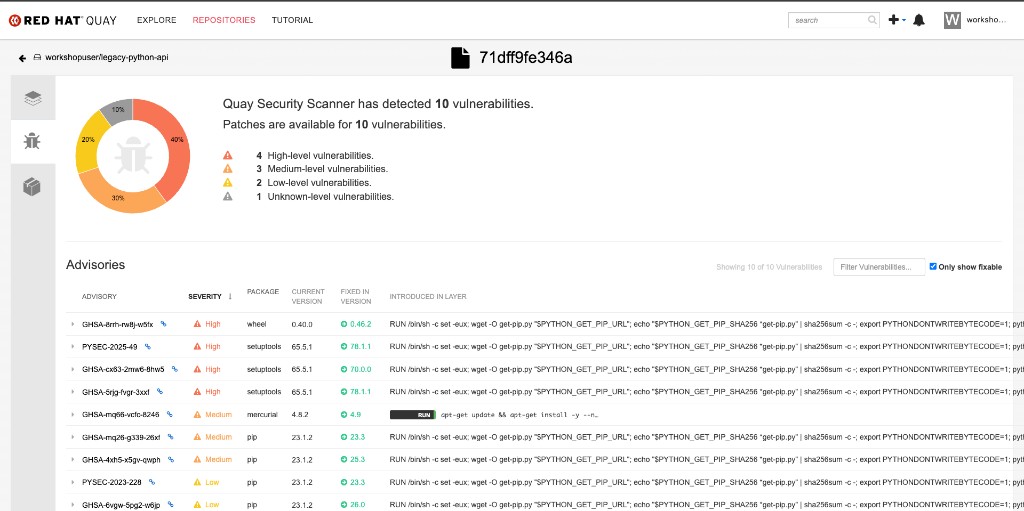
Step 5: Deploy to OpenShift
cat << EOF | oc apply -f -
apiVersion: apps/v1
kind: Deployment
metadata:
  name: legacy-python-api
  namespace: {user}-hummingbird-acs-lab
  labels:
    app: legacy-python-api
    tier: legacy
spec:
  replicas: 1
  selector:
    matchLabels:
      app: legacy-python-api
  template:
    metadata:
      labels:
        app: legacy-python-api
        tier: legacy
    spec:
      containers:
      - name: api
        image: ${WORKSHOP_REGISTRY}/${REGISTRY_USER}/legacy-python-api:vulnerable
        ports:
        - containerPort: 8080
        livenessProbe:
          httpGet:
            path: /healthz
            port: 8080
          initialDelaySeconds: 5
        readinessProbe:
          httpGet:
            path: /healthz
            port: 8080
          initialDelaySeconds: 3
---
apiVersion: v1
kind: Service
metadata:
  name: legacy-python-api
  namespace: {user}-hummingbird-acs-lab
spec:
  selector:
    app: legacy-python-api
  ports:
  - port: 8080
    targetPort: 8080
---
apiVersion: route.openshift.io/v1
kind: Route
metadata:
  name: legacy-python-api
  namespace: {user}-hummingbird-acs-lab
spec:
  to:
    kind: Service
    name: legacy-python-api
  port:
    targetPort: 8080
  tls:
    termination: edge
EOF
Step 6: Verify the Legacy Deployment
Wait for the deployment to become ready:
oc rollout status deployment/legacy-python-api -n {user}-hummingbird-acs-lab --timeout=120sGet the application route:
LEGACY_ROUTE=$(oc get route legacy-python-api -n {user}-hummingbird-acs-lab -o jsonpath='{.spec.host}')
echo "Legacy API URL: https://${LEGACY_ROUTE}"
Query the API endpoints:
echo "=== Greeting Endpoint ==="
curl -sk "https://${LEGACY_ROUTE}/api/v1/greeting" | python3 -m json.tool

echo ""
echo "=== Health Check ==="
curl -sk "https://${LEGACY_ROUTE}/healthz" | python3 -m json.tool

echo ""
echo "=== 404 Handler (unknown path) ==="
curl -sk "https://${LEGACY_ROUTE}/api/v1/nonexistent" | python3 -m json.tool=== Greeting Endpoint ===
{
"message": "Hello from the Immutable Fortress lab"
}
=== Health Check ===
{
"status": "healthy"
}
=== 404 Handler (unknown path) ===
{
"error": "not found"
}
|
You can also open the API in your browser:
|
The API works perfectly. Now let’s see what is lurking beneath the surface.
Exercise 3: Scan with ACS — Exposing Hidden Technical Debt
Step 1: Scan the Legacy Image with roxctl
roxctl image scan \
  --image=${WORKSHOP_REGISTRY}/${REGISTRY_USER}/legacy-python-api:vulnerable \
  --insecure-skip-tls-verify \
--output=tableCOMPONENT VERSION CVE SEVERITY CVSS FIXED VERSION setuptools 65.5.1 CVE-2024-6345 IMPORTANT 8.8 70.0.0 setuptools 65.5.1 CVE-2025-47273 IMPORTANT 8.8 78.1.1 wheel 0.40.0 CVE-2026-24049 IMPORTANT 7.1 0.46.2 mercurial 4.8.2 CVE-2019-3902 MODERATE 5.9 4.9 pip 23.1.2 CVE-2023-5752 MODERATE 5.5 23.3 ... WARN: A total of N unique vulnerabilities were found in N components
|
The key insight: you will see multiple fixable CVEs in this scan, all from Python packaging tools — Beyond Python-level CVEs, the base image also contains a full Debian OS layer (apt, bash, glibc, coreutils, and hundreds of other packages — visible when scanning with You are carrying the security burden of a full OS and packaging toolchain for an application that requires only a language runtime. |
Step 2: Check the Image in ACS Dashboard
Open the RHACS Central dashboard in your browser.
Click the {rhacs_route} link to open the RHACS Central dashboard in a separate window.
Select openshift-oauth for the auth provider and click Log in.
On the Keycloak login screen use the following credentials, then click Sign in:
{user}{password}Allow the requested permissions.
After logging in, you will see the ACS Dashboard showing cluster-wide security metrics — policy violations, images at most risk, and deployments at most risk:
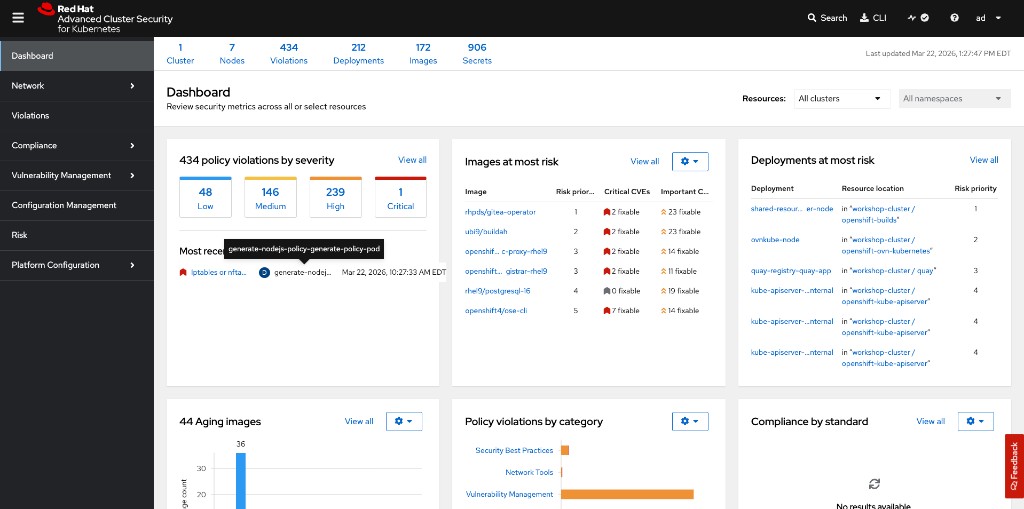
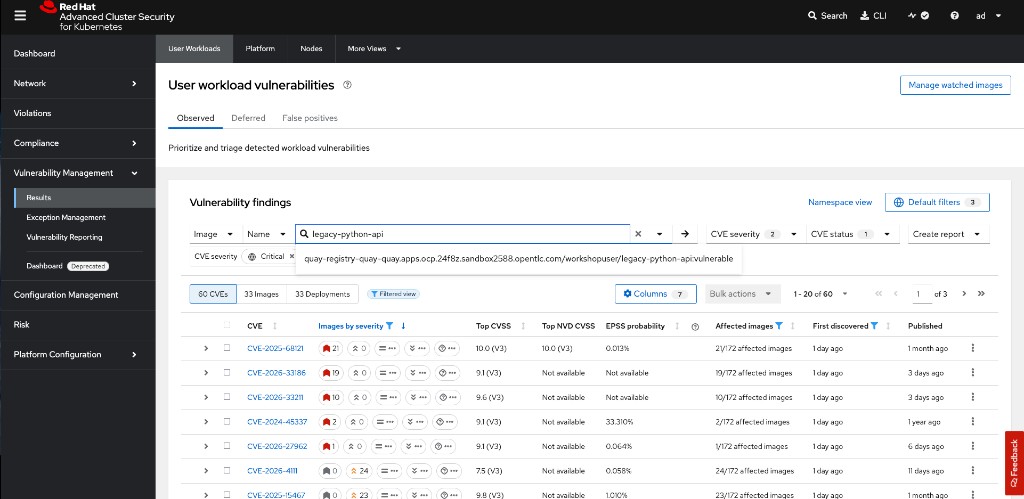
Now navigate to the legacy image vulnerabilities:
-
Click Vulnerability Management → Results in the left sidebar
-
Search for
legacy-python-apiin the Image Name filter -
You will see the CVEs across the image, including Important and Moderate severity findings:
Filter to show only fixable Critical and Important CVEs to see the most actionable findings:
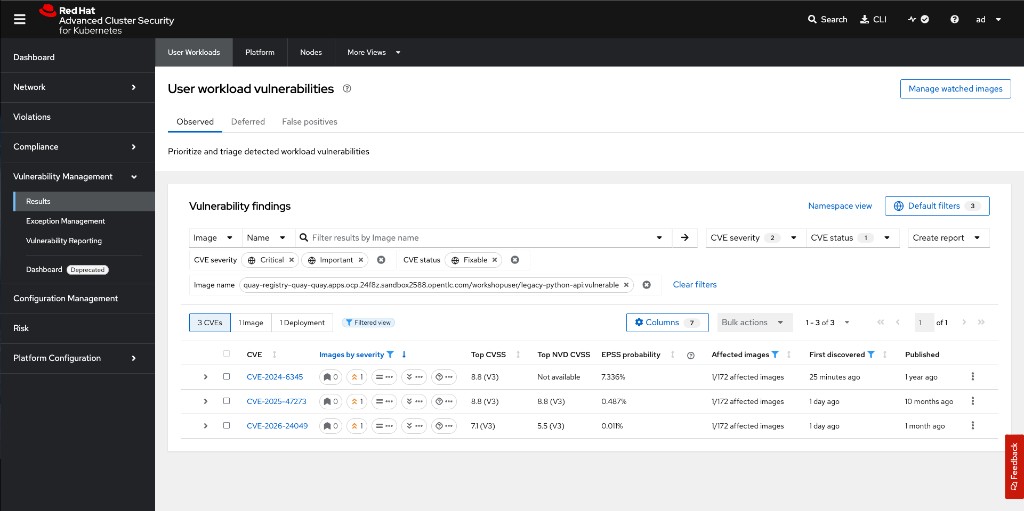
|
These CVEs come from Python packaging tools ( |
Step 3: Count the Fixable CVEs
roxctl image scan \
  --image=${WORKSHOP_REGISTRY}/${REGISTRY_USER}/legacy-python-api:vulnerable \
  --insecure-skip-tls-verify \
--output=json | python3 acs-scan-summary.pyTotal components: <N> Total vulnerabilities: <N> Critical: <N> Important: <N> Moderate: <N> Low: <N> Fixable vulnerabilities: <N>
|
The exact numbers depend on when the base image was last updated and the current state of the CVE databases. The key takeaway is that there are multiple fixable vulnerabilities — all from packages bundled in the base image that your application never uses at runtime. |
Remember these numbers. You will compare them against the Hummingbird image shortly.
Exercise 4: Build the Immutable Fortress (Hummingbird Multi-Stage)
Step 1: Write the Distroless Containerfile
cd ~/acs-fortress-lab

cat > Containerfile.fortress << 'EOF'
# Stage 1: Builder -- install dependencies in a full image
FROM quay.io/takinosh/python3.11-slim:latest AS builder
WORKDIR /build
COPY app.py .
RUN chmod 644 app.py

# Stage 2: Runtime -- copy only what the app needs into Hummingbird
FROM registry.access.redhat.com/hi/python:latest
COPY --from=builder --chmod=644 /build/app.py /app/app.py
WORKDIR /app
EXPOSE 8080
USER 1001
ENTRYPOINT ["python3", "/app/app.py"]
EOF|
Why JSON array syntax for ENTRYPOINT/CMD? Hummingbird images are distroless — they contain no shell ( Docker/Podman interprets this as This invokes the Python interpreter directly via the kernel’s |
Step 2: Build and Push the Hummingbird Image
oc new-build --strategy=docker --binary=true \
  --name=fortress-python-api \
  --to-docker --to="${WORKSHOP_REGISTRY}/${REGISTRY_USER}/fortress-python-api:zero-cve" \
  -n {user}-hummingbird-acs-lab &>/dev/null || true

oc set build-secret --push bc/fortress-python-api quay-pull-secret -n {user}-hummingbird-acs-lab 2>/dev/null || true

cp Containerfile.fortress Dockerfile
oc start-build fortress-python-api --from-dir=. --follow --wait -n {user}-hummingbird-acs-lab
rm -f Dockerfile
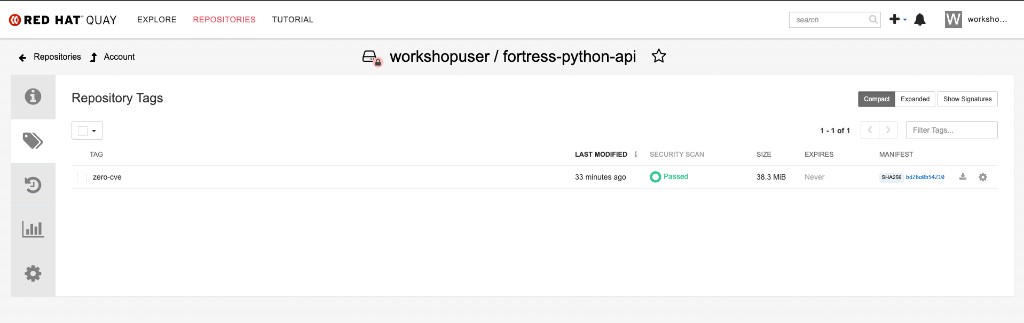
Verify the fortress image in Quay. Notice the zero-cve tag with a Passed security scan and a dramatically smaller size (38 MB vs 339 MB):
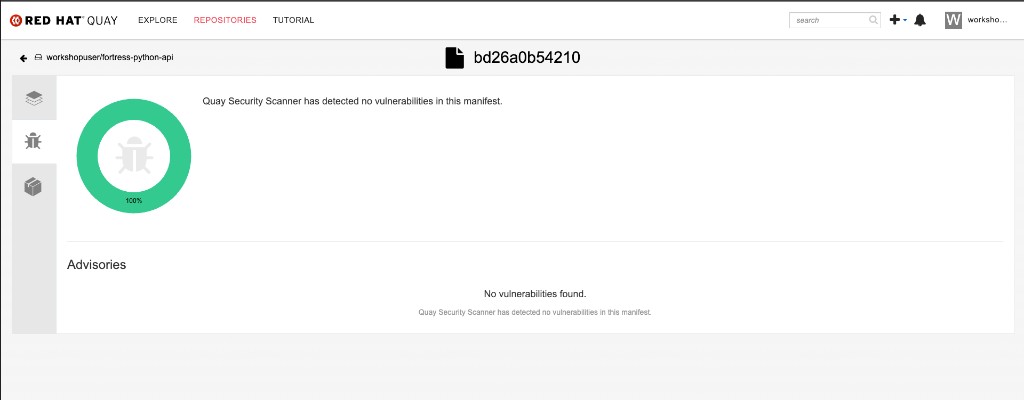
Click the security scan to confirm — zero vulnerabilities detected:
Step 3: Compare Image Sizes
Since images were built on-cluster (not locally), we query the registry for size information:
echo "=== Image Size Comparison ==="
echo ""
echo "Legacy (python:3.11-buster):"
skopeo inspect --tls-verify=false \
  --creds="${REGISTRY_USER}:${REGISTRY_PASSWORD}" \
  docker://${WORKSHOP_REGISTRY}/${REGISTRY_USER}/legacy-python-api:vulnerable 2>/dev/null | python3 -c "
import json, sys
try:
    d = json.load(sys.stdin)
    layers = d.get('Layers', d.get('LayersData', []))
    print(f'  Layers: {len(layers)}')
    print(f'  Created: {d.get(\"Created\", \"N/A\")[:19]}')
except (json.JSONDecodeError, KeyError):
    print('  (inspect failed -- check registry credentials)')
"

echo ""
echo "Fortress (Hummingbird distroless):"
skopeo inspect --tls-verify=false \
  --creds="${REGISTRY_USER}:${REGISTRY_PASSWORD}" \
  docker://${WORKSHOP_REGISTRY}/${REGISTRY_USER}/fortress-python-api:zero-cve 2>/dev/null | python3 -c "
import json, sys
try:
    d = json.load(sys.stdin)
    layers = d.get('Layers', d.get('LayersData', []))
    print(f'  Layers: {len(layers)}')
    print(f'  Created: {d.get(\"Created\", \"N/A\")[:19]}')
except (json.JSONDecodeError, KeyError):
    print('  (inspect failed -- check registry credentials)')
"=== Image Size Comparison === Legacy (python:3.11-buster): Layers: ~10 Created: <timestamp> Fortress (Hummingbird distroless): Layers: ~30-40 Created: <timestamp>
|
The Hummingbird image has more layers than the legacy custom base because it is built from a full RHEL-based RPM stack (the Project Hummingbird build pipeline). Layer count is not the same as attack surface. The Hummingbird image’s RPM packages are purpose-built minimal variants with the |
Exercise 5: Inspect SBOM and Provenance
Hummingbird images built through the Konflux software factory ship with cryptographically signed SBOMs and SLSA provenance metadata. Even when building locally, you can generate and compare SBOMs.
Step 0: Install syft
The syft CLI generates SBOMs (Software Bills of Materials) from container images. Install it to your local ~/bin:
curl -sSfL https://raw.githubusercontent.com/anchore/syft/main/install.sh | sh -s -- -b $HOME/bin
export PATH="$HOME/bin:$PATH"
syft version
Log into the Quay registry with syft:
syft login -u {quay_user} -p {quay_password} {quay_hostname}Step 1: Generate SBOMs for Both Images
Since images were built on-cluster, we scan them directly from the Quay registry. The SYFT_REGISTRY_INSECURE_SKIP_TLS_VERIFY variable handles the self-signed certificate:
export SYFT_REGISTRY_INSECURE_SKIP_TLS_VERIFY=true

echo "=== Legacy image SBOM ==="
syft scan registry:${WORKSHOP_REGISTRY}/${REGISTRY_USER}/legacy-python-api:vulnerable -o table | head -30
echo ""
LEGACY_COUNT=$(syft scan registry:${WORKSHOP_REGISTRY}/${REGISTRY_USER}/legacy-python-api:vulnerable -o json 2>/dev/null | python3 -c "import json,sys; print(len(json.load(sys.stdin).get('artifacts',[])))")
echo "Total packages in legacy image: $LEGACY_COUNT"
echo "=== Hummingbird image SBOM ==="
syft scan registry:${WORKSHOP_REGISTRY}/${REGISTRY_USER}/fortress-python-api:zero-cve -o table | head -30
echo ""
FORTRESS_COUNT=$(syft scan registry:${WORKSHOP_REGISTRY}/${REGISTRY_USER}/fortress-python-api:zero-cve -o json 2>/dev/null | python3 -c "import json,sys; print(len(json.load(sys.stdin).get('artifacts',[])))")
echo "Total packages in Hummingbird image: $FORTRESS_COUNT"Legacy image: ~430-460 packages (Debian Buster + Python toolchain) Hummingbird image: ~50-60 packages (RHEL minimal RPMs — Python runtime only)
Step 2: Install cosign and Inspect Hummingbird Upstream Provenance
Hummingbird images published by Red Hat through the Konflux pipeline include attached SBOM attestations, signatures, and SLSA provenance. First, install the cosign CLI, then inspect the upstream image supply chain.
Install cosign:
COSIGN_VERSION=v2.4.1
curl -sL "https://github.com/sigstore/cosign/releases/download/${COSIGN_VERSION}/cosign-linux-amd64" \
  -o $HOME/bin/cosign

chmod +x $HOME/bin/cosign
cosign version
Now inspect the Hummingbird image supply chain:
cosign tree registry.access.redhat.com/hi/python:latest📦 Supply Chain Security Related artifacts for an image: registry.access.redhat.com/hi/python:latest └── 💾 Attestations for an image tag: ...python:sha256-<digest>.att └── 🍒 sha256:<attestation-digest> └── 🔐 Signatures for an image tag: ...python:sha256-<digest>.sig └── 🍒 sha256:<signature-digest> └── 📦 SBOMs for an image tag: ...python:sha256-<digest>.sbom └── 🍒 sha256:<sbom-digest>
This shows three types of supply chain artifacts attached to the image:
-
Attestations (
.att) — SLSA build provenance recording the source commit, build system, and builder identity -
Signatures (
.sig) — Cosign keyless signatures verifying the image was built by a trusted pipeline -
SBOMs (
.sbom) — Software Bill of Materials listing every component in the image
|
If Note that |
|
SLSA Provenance records exactly which source commit, build system, and builder identity produced the image. Combined with the SBOM, this provides a complete, cryptographically verifiable chain from source code to deployed artifact. The Konflux software factory automates this for every Hummingbird release. |
Exercise 6: The Zero-CVE Moment
Step 1: Deploy the Hummingbird Image
cat << EOF | oc apply -f -
apiVersion: apps/v1
kind: Deployment
metadata:
  name: fortress-python-api
  namespace: {user}-hummingbird-acs-lab
  labels:
    app: fortress-python-api
    tier: fortress
spec:
  replicas: 1
  selector:
    matchLabels:
      app: fortress-python-api
  template:
    metadata:
      labels:
        app: fortress-python-api
        tier: fortress
    spec:
      containers:
      - name: api
        image: ${WORKSHOP_REGISTRY}/${REGISTRY_USER}/fortress-python-api:zero-cve
        ports:
        - containerPort: 8080
        livenessProbe:
          httpGet:
            path: /healthz
            port: 8080
          initialDelaySeconds: 5
        readinessProbe:
          httpGet:
            path: /healthz
            port: 8080
          initialDelaySeconds: 3
        securityContext:
          allowPrivilegeEscalation: false
          runAsNonRoot: true
          capabilities:
            drop: ["ALL"]
          seccompProfile:
            type: RuntimeDefault
---
apiVersion: v1
kind: Service
metadata:
  name: fortress-python-api
  namespace: {user}-hummingbird-acs-lab
spec:
  selector:
    app: fortress-python-api
  ports:
  - port: 8080
    targetPort: 8080
---
apiVersion: route.openshift.io/v1
kind: Route
metadata:
  name: fortress-python-api
  namespace: {user}-hummingbird-acs-lab
spec:
  to:
    kind: Service
    name: fortress-python-api
  port:
    targetPort: 8080
  tls:
    termination: edge
EOF

oc rollout status deployment/fortress-python-api -n {user}-hummingbird-acs-lab --timeout=120s
Step 2: Verify the Application
ROUTE=$(oc get route fortress-python-api -n {user}-hummingbird-acs-lab -o jsonpath='{.spec.host}')
echo "Waiting for router to propagate..."
sleep 10
curl -sk "https://${ROUTE}/api/v1/greeting"{"message": "Hello from the Immutable Fortress lab"}
Identical functionality. Radically different security posture.
Step 3: Scan the Hummingbird Image with ACS
|
ACS enriches newly deployed images in the background after they are admitted to the cluster. If |
roxctl image scan \
  --image=${WORKSHOP_REGISTRY}/${REGISTRY_USER}/fortress-python-api:zero-cve \
  --insecure-skip-tls-verify \
--output=tableScan results for image: .../fortress-python-api:zero-cve (TOTAL-COMPONENTS: 0, TOTAL-VULNERABILITIES: 0, LOW: 0, MODERATE: 0, IMPORTANT: 0, CRITICAL: 0) +-----------+---------+-----+----------+------+------+---------------+----------+---------------+ | COMPONENT | VERSION | CVE | SEVERITY | CVSS | LINK | FIXED VERSION | ADVISORY | ADVISORY LINK | +-----------+---------+-----+----------+------+------+---------------+----------+---------------+
Zero components. Zero vulnerabilities. The attack surface has been eradicated, not managed.
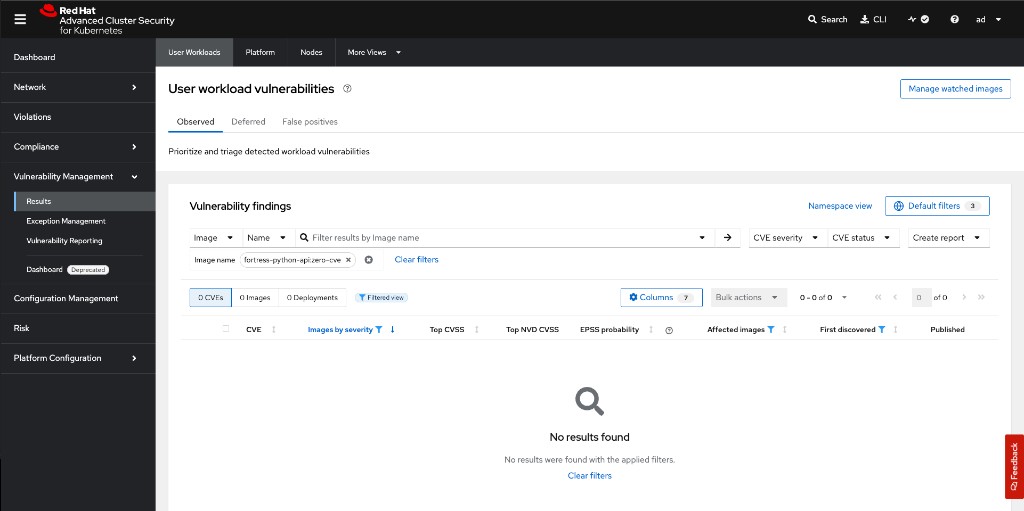
Verify in the ACS dashboard — search for fortress-python-api:zero-cve under Vulnerability Management → Results. You should see 0 CVEs, 0 Images affected:
echo "=== Side-by-Side Comparison ==="
echo ""
echo "Legacy (python:3.11-buster):"
roxctl image scan \
  --image=${WORKSHOP_REGISTRY}/${REGISTRY_USER}/legacy-python-api:vulnerable \
  --insecure-skip-tls-verify \
  --output=json 2>/dev/null | python3 acs-scan-summary.py --brief

echo ""
echo "Fortress (Hummingbird distroless):"
roxctl image scan \
  --image=${WORKSHOP_REGISTRY}/${REGISTRY_USER}/fortress-python-api:zero-cve \
  --insecure-skip-tls-verify \
--output=json 2>/dev/null | python3 acs-scan-summary.py --brief|
This is the paradigm shift. The vulnerability count did not drop because you patched faster — it dropped because the vulnerable code no longer exists in the image. There is nothing to patch. The attack surface has been eradicated, not managed. |
Exercise 7: Enforce the Posture with ACS Policies
A zero-CVE scan is only as valuable as the policy that prevents regression. In this exercise you create two ACS policies that make the zero-CVE posture mandatory at the admission control level.
Step 1: Verify ACS Admission Controller
Verify the admission controller configuration via the ACS API:
curl -sk -H "Authorization: Bearer {rhacs_api_token}" \
"{rhacs_route}/v1/clusters" | python3 acs-check-admission.pyCluster: production Admission controller: True Scan inline: True Enforce on updates: True
|
If the admission controller shows |
Steps 2-3: Create Enforcement Policies
This script creates two policies via the ACS REST API, scoped to your personal lab namespace:
-
Zero Fixable CVEs Required - {user} (Critical) — blocks any deployment where the image has fixable CVEs
-
Image Scan Required - {user} (High) — blocks any deployment where the image has not been scanned
Run the helper script, passing your namespace and policy suffix via environment variables:
ACS_ROUTE={rhacs_route}
ROX_API_TOKEN={rhacs_api_token}
export ACS_ROUTE ROX_API_TOKEN
export LAB_NAMESPACE="{user}-hummingbird-acs-lab"
export POLICY_SUFFIX="{user}"

bash acs-create-policies.sh=== Creating policy: Zero Fixable CVEs Required - <your-user> === Created policy: Zero Fixable CVEs Required - <your-user> (id: <uuid>) === Creating policy: Image Scan Required - <your-user> === Created policy: Image Scan Required - <your-user> (id: <uuid>) Done. Verify in ACS UI: Platform Configuration -> Policy Management
=== Creating policy: Zero Fixable CVEs Required - <your-user> ===
Policy 'Zero Fixable CVEs Required - <your-user>' already exists (id: <uuid>). Ensuring enforcement...
  Enforcement enabled.
=== Creating policy: Image Scan Required - <your-user> ===
Policy 'Image Scan Required - <your-user>' already exists (id: <uuid>). Ensuring enforcement...
  Enforcement enabled.

Done. Verify in ACS UI: Platform Configuration -> Policy Management
|
If the policies already exist, the script ensures enforcement is enabled ( |
Verify in the ACS dashboard under Platform Configuration → Policy Management. Search for your policy name:
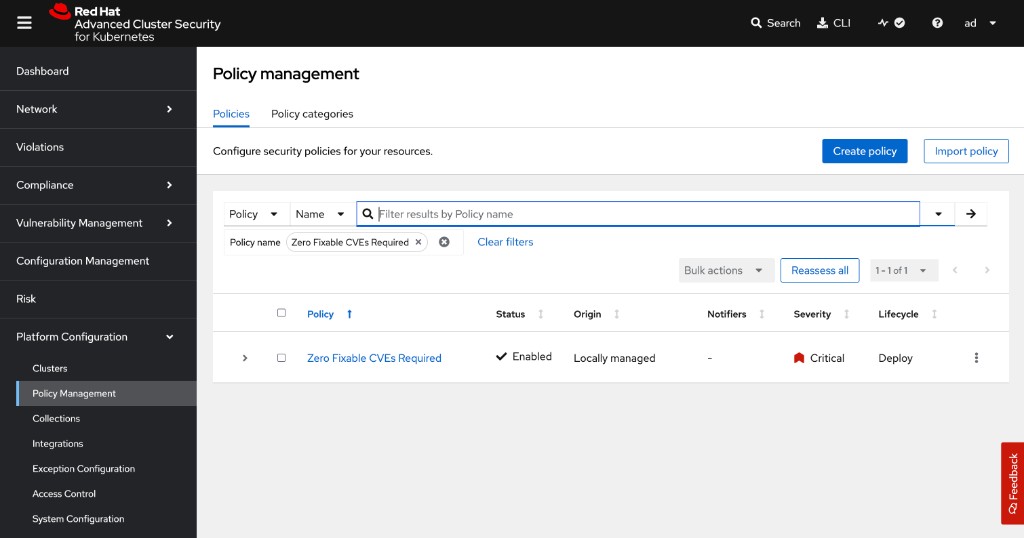
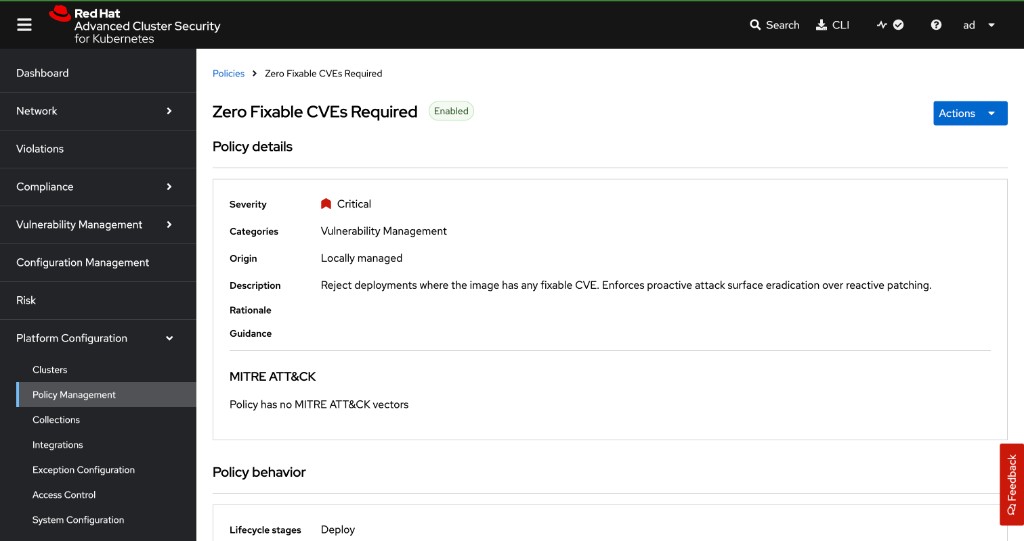
Click the policy to see its details — severity, description, lifecycle stage, and enforcement action:
|
Enforcement Action: Both policies use |
|
UI alternative: You can also create these policies manually in the ACS dashboard: Navigate to Platform Configuration → Policy Management → Create Policy: Policy 1:
Policy 2:
|
Step 4: Verify Policies Are Active
ACS_ROUTE={rhacs_route}

for POLICY_NAME in "Zero Fixable CVEs Required - {user}" "Image Scan Required - {user}"; do
  POLICY_ID=$(curl -sk -H "Authorization: Bearer ${ROX_API_TOKEN}" \
    "${ACS_ROUTE}/v1/policies" | \
    python3 -c "import json,sys; [print(p['id']) for p in json.load(sys.stdin).get('policies',[]) if p['name']=='${POLICY_NAME}']" 2>/dev/null)
  curl -sk -H "Authorization: Bearer ${ROX_API_TOKEN}" \
    "${ACS_ROUTE}/v1/policies/${POLICY_ID}" | \
    python3 -c "
import json, sys
p = json.load(sys.stdin)
enf = [e for e in p.get('enforcementActions',[]) if e != 'UNSET_ENFORCEMENT']
print(f'{p[\"name\"]:<50} {p[\"severity\"]:<20} {\", \".join(enf) or \"INFORM\"}')"
doneZero Fixable CVEs Required - <your-user> CRITICAL_SEVERITY SCALE_TO_ZERO_ENFORCEMENT Image Scan Required - <your-user> HIGH_SEVERITY SCALE_TO_ZERO_ENFORCEMENT
Both policies are now active and will be evaluated by the admission controller on every deployment create or update in your hummingbird-acs-<your-user> namespace.
You can also verify in the ACS UI: navigate to Platform Configuration → Policy Management and search for your username to find both policies.
Exercise 8: Prove the Guardrails (Simulated Pipeline Failure)
This is the definitive test. You will attempt to redeploy the original vulnerable image. The ACS admission controller must block it.
Step 1: Attempt to Update an Existing Deployment
Try swapping the fortress image for the vulnerable legacy image. The admission controller should block it:
echo "=== Attempting to deploy vulnerable legacy image ==="
echo "This SHOULD fail if ACS policies are enforced correctly."
echo ""

oc set image deployment/fortress-python-api \
  api=${WORKSHOP_REGISTRY}/${REGISTRY_USER}/legacy-python-api:vulnerable \
  -n {user}-hummingbird-acs-lab 2>&1

echo ""
echo "Exit code: $?"=== Attempting to deploy vulnerable legacy image ===
This SHOULD fail if ACS policies are enforced correctly.
error: failed to patch image update to pod template: admission webhook
"policyeval.stackrox.io" denied the request:
The attempted operation violated one or more enforced policies, described below:
Policy: Zero Fixable CVEs Required - <your-user>
- Description:
↳ Reject deployments where the image has any fixable CVE.
- Violations:
- Fixable CVE-2024-6345 (CVSS 8.8) (severity Important) found in component
'setuptools' (version 65.5.1) in container 'api', resolved by version 70.0.0
- Fixable CVE-2025-47273 (CVSS 8.8) (severity Important) found in component
'setuptools' (version 65.5.1) in container 'api', resolved by version 78.1.1
- Fixable CVE-2026-24049 (CVSS 7.1) (severity Important) found in component
'wheel' (version 0.40.0) in container 'api', resolved by version 0.46.2
- Fixable CVE-2019-3902 (CVSS 5.9) (severity Moderate) found in component
'mercurial' (version 4.8.2) in container 'api', resolved by version 4.9
- Fixable CVE-2023-5752 (CVSS 5.5) (severity Moderate) found in component
'pip' (version 23.1.2) in container 'api', resolved by version 23.3
... (additional CVEs listed) ...
In case of emergency, add the annotation
{"admission.stackrox.io/break-glass": "ticket-1234"} to your deployment
Step 2: Attempt to Create a New Deployment
Also try creating an entirely new deployment with the vulnerable image. This confirms the policy blocks both updates and new deployments:
cat << EOF | oc apply -f - 2>&1
apiVersion: apps/v1
kind: Deployment
metadata:
  name: legacy-regression-test
  namespace: {user}-hummingbird-acs-lab
  labels:
    app: legacy-regression-test
spec:
  replicas: 1
  selector:
    matchLabels:
      app: legacy-regression-test
  template:
    metadata:
      labels:
        app: legacy-regression-test
    spec:
      containers:
      - name: api
        image: ${WORKSHOP_REGISTRY}/${REGISTRY_USER}/legacy-python-api:vulnerable
        ports:
        - containerPort: 8080
EOF

echo ""
echo "Exit code: $?"Error from server (Failed currently enforced policies from RHACS):
error when creating "STDIN": admission webhook "policyeval.stackrox.io"
denied the request:
The attempted operation violated one or more enforced policies, described below:
Policy: Zero Fixable CVEs Required - <your-user>
- Description:
↳ Reject deployments where the image has any fixable CVE.
- Violations:
- Fixable CVE-2024-6345 (CVSS 8.8) (severity Important) found in component
'setuptools' (version 65.5.1) in container 'api', resolved by version 70.0.0
- Fixable CVE-2025-47273 (CVSS 8.8) (severity Important) found in component
'setuptools' (version 65.5.1) in container 'api', resolved by version 78.1.1
- Fixable CVE-2026-24049 (CVSS 7.1) (severity Important) found in component
'wheel' (version 0.40.0) in container 'api', resolved by version 0.46.2
... (additional CVEs listed) ...
In case of emergency, add the annotation
{"admission.stackrox.io/break-glass": "ticket-1234"} to your deployment
|
Both steps should be blocked. The specific CVEs listed will vary depending on the image scan date, but you should see multiple fixable vulnerabilities from components like |
|
This is the proof. The admission webhook denied both the image update and the new deployment. In a real CI/CD pipeline, this blocks the deployment step, fails the pipeline, and surfaces the policy violation in your CI dashboard. The vulnerable image never reaches the cluster. The operational model has shifted:
|
Step 3: Verify the Fortress Remains Intact
Confirm that your Hummingbird deployment is still running and serving traffic:
oc get deployment fortress-python-api -n {user}-hummingbird-acs-lab

ROUTE=$(oc get route fortress-python-api -n {user}-hummingbird-acs-lab -o jsonpath='{.spec.host}')
curl -sk "https://${ROUTE}/api/v1/greeting"NAME READY UP-TO-DATE AVAILABLE AGE
fortress-python-api 1/1 1 1 ...
{"message": "Hello from the Immutable Fortress lab"}
Step 4: View Policy Violations
Query the policy violations via the ACS REST API:
ACS_ROUTE={rhacs_route}

curl -sk -H "Authorization: Bearer ${ROX_API_TOKEN}" \
  "${ACS_ROUTE}/v1/alerts?query=Namespace:{user}-hummingbird-acs-lab" | \
  python3 -c "
import json, sys
data = json.load(sys.stdin)
for a in data.get('alerts', []):
    policy = a['policy']['name']
    state = a['state']
    enf = a.get('enforcementAction', 'none')
    dep = a.get('deployment', {}).get('name', '?')
    print(f'Policy: {policy}')
    print(f'  State: {state}  |  Enforcement: {enf}  |  Deployment: {dep}')
    print()
"Policy: Zero Fixable CVEs Required - <your-user> State: ATTEMPTED | Enforcement: FAIL_DEPLOYMENT_CREATE_ENFORCEMENT | Deployment: legacy-regression-test Policy: Zero Fixable CVEs Required - <your-user> State: ATTEMPTED | Enforcement: FAIL_DEPLOYMENT_UPDATE_ENFORCEMENT | Deployment: fortress-python-api Policy: Zero Fixable CVEs Required - <your-user> State: ACTIVE | Enforcement: SCALE_TO_ZERO_ENFORCEMENT | Deployment: legacy-python-api
|
You can also view violations visually in the ACS Central UI. Navigate to Violations in the left sidebar:
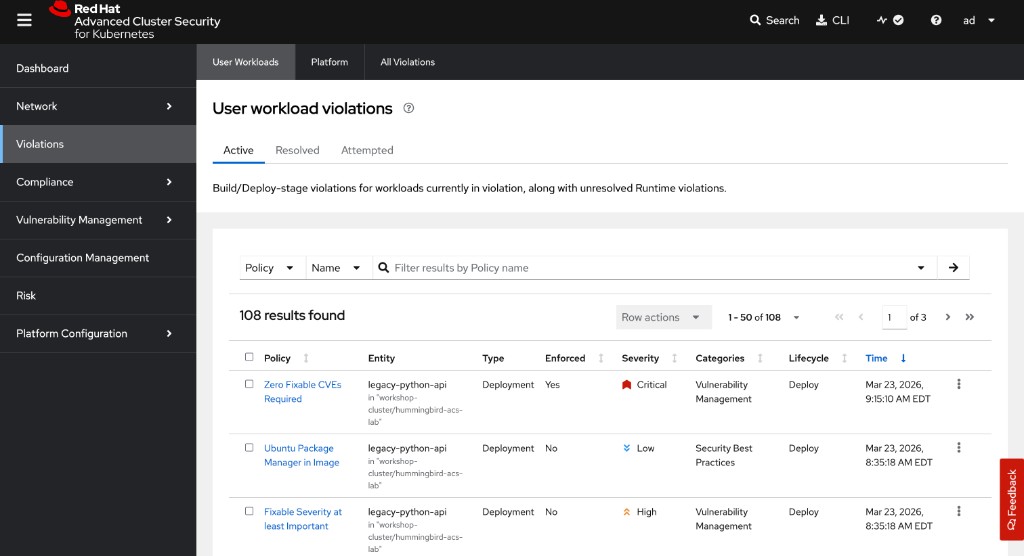
Click on your Zero Fixable CVEs Required violation to see the individual CVEs that triggered it:
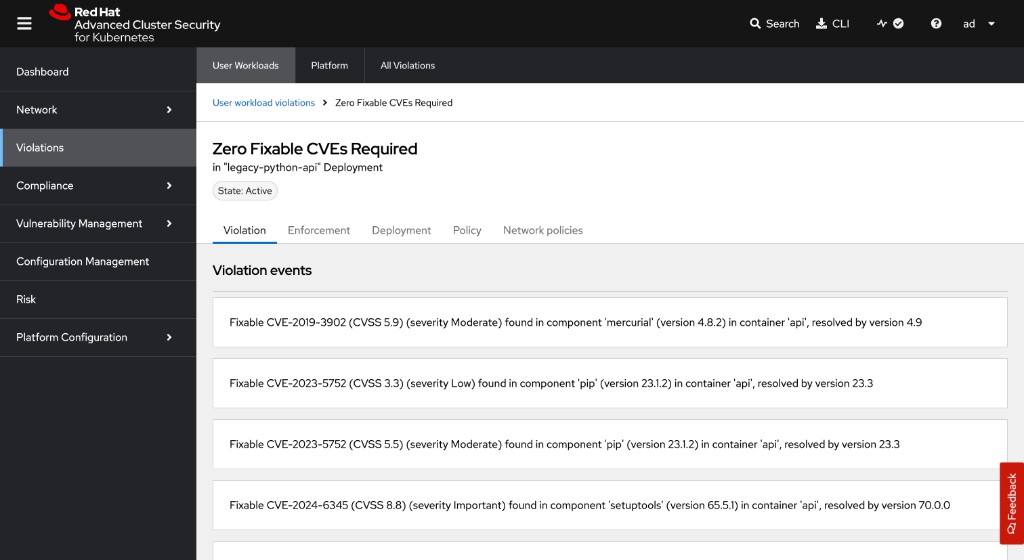
Switch to the Enforcement tab to see the enforcement action taken:
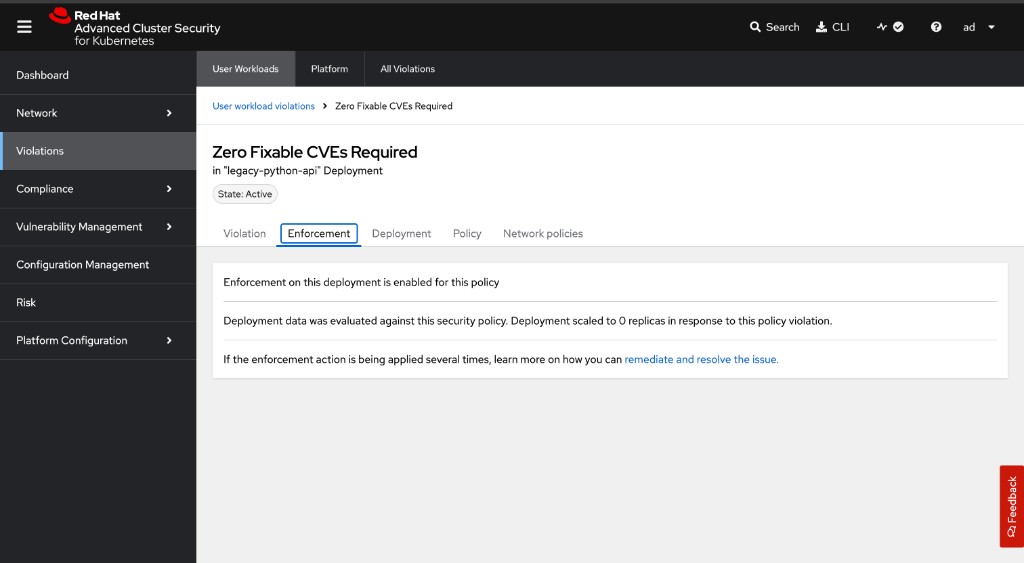
|
Why is You may notice the original
This is the correct security model. Admission control is a gate, not a kill switch. For existing workloads, use the Violations dashboard to identify and remediate them through your normal change management process. |
|
Production Alert Integration: Configure ACS to send violation alerts to your SIEM, Slack, or PagerDuty using the API or UI: This closes the loop: build → verify → enforce → alert. For detailed notifier configuration options, see the ACS API documentation. |
Summary
Congratulations! You have completed Sub-Module 2.2 — The Immutable Fortress.
✓ Deployed a legacy Python API built on python:3.11-buster
✓ Scanned with ACS and observed fixable CVEs from unused Python packaging tools bundled in the base image
✓ Rewrote the application using a Hummingbird distroless multi-stage build
✓ Learned strict JSON exec form for ENTRYPOINT/CMD in shell-less images
✓ Compared SBOM package counts: ~430 (legacy) vs ~20 (Hummingbird)
✓ Inspected SLSA provenance and cryptographic SBOM attestations
✓ Achieved a zero fixable CVE scan with the Hummingbird image
✓ Authored ACS policies requiring zero fixable CVEs and mandatory image scanning
✓ Proved the guardrails by observing ACS block a non-compliant deployment
✓ Verified the Hummingbird deployment remained unaffected
The Vulnerability Treadmill Is Optional:
Legacy base images force you onto a never-ending patch cycle for code your application does not use. Hummingbird distroless images break this cycle by eliminating the unused code entirely.
Defence in Depth with ACS:
-
Build time: Multi-stage builds produce minimal images
-
Scan time: ACS/roxctl validates the zero-CVE posture
-
Deploy time: Admission controllers enforce the posture as policy
-
Runtime: Distroless images resist exploitation (no shell, no package manager, no utilities)
From Reactive to Proactive:
The operational mindset shifts from "how fast can we patch?" to "there is nothing to patch." This is not incremental improvement — it is a fundamental change in how container security is practised.
Troubleshooting
Issue: roxctl cannot reach ACS Central
curl -sk https://$ROX_ENDPOINT/v1/metadata
oc get route -n stackrox
Issue: Admission controller not blocking deployments
oc get ValidatingWebhookConfiguration -l app.kubernetes.io/name=stackrox -o yaml

oc logs -n stackrox deploy/admission-control
Issue: Policy not triggering on deployment
ACS_ROUTE={rhacs_route}
curl -sk -H "Authorization: Bearer ${ROX_API_TOKEN}" \
  "${ACS_ROUTE}/v1/policies" | \
  python3 -c "import json,sys; [print(p['name'], p['disabled']) for p in json.load(sys.stdin).get('policies',[]) if 'zero fixable' in p['name'].lower()]"

oc get events -n {user}-hummingbird-acs-lab --sort-by=.metadata.creationTimestamp | tail -20
Issue: Hummingbird image fails to start (exec format error)
Ensure you are using JSON array syntax for ENTRYPOINT/CMD. Shell form will not work in distroless images:
# Correct (exec form)
ENTRYPOINT ["python3", "/app/app.py"]

# Wrong (shell form -- requires /bin/sh)
ENTRYPOINT python3 /app/app.py