Module 3: Full Automation — AI-Assisted Remediation
Duration: 30 minutes
Lab access and credentials (click to expand)
Everything below is already running. The tabs on the right of this Showroom window open each component in place, which is easier to follow than switching browser windows — the links are there if you prefer your own tab.
| Component | Credentials |
|---|---|
OpenShift Console — Pipelines, Topology |
|
|
|
admin / |
|
|
|
|
|
|
|
|
|
(no login required) |
Your GUID is %GUID%, and it appears in most of the names you will meet:
the GitLab group acme-%GUID%, the running applications in {user}-app, and
the build pipelines in build-%GUID%.
Module 2 ended with a deliberate limitation: Renovate found one dependency in one repository and asked you to merge it. That works until the day Lightwell publishes forty remediations across sixty repositories, and "ask a human to merge it" stops being a strategy.
This module walks through the same remediation event, handled by the platform instead of by you. An Ansible Orchestrator workflow opens a Snow incident, asks Trusted Profile Analyzer which applications are actually affected, applies each application’s own approval policy, and dispatches an AI agent to write the merge request. The pipeline then tests the change and writes the results back into the merge request body, so that when a human is asked to decide, they are reading evidence rather than guessing.
You will remediate two of your three applications:
-
benefits-mgmt-app— internal HR application, risk classLOW, policyauto_approve. The platform merges it without you. -
wire-transfer-svc— payment-critical and PCI-scoped, risk classHIGH, policyneeds_approval. The platform does everything except the last step, and then waits for you.
That contrast is the point of the module. Automation is not about removing the human — it is about making sure the human is only interrupted when their judgement is actually worth something.
Foundations
Before diving into the hands-on steps, this section compares what changes between the quick win approach and the full automation approach, introduces the orchestration pipeline and the two applications you will remediate — one low-risk that merges automatically, one higher-risk that waits for your approval.
| Stage | Quick Win (Module 2) | Full Automation (this module) |
|---|---|---|
Trigger |
Renovate polls the artifact manager on a schedule |
The artifact manager fires a |
Who finds the affected apps |
Renovate reads one repository’s |
TPA is queried for every SBOM containing the component |
Who writes the fix |
Renovate’s regex manager |
The |
What the merge request says |
A one-line version bump |
CVE, CVSS, risk class, and a validation table filled in by the pipeline |
Who approves |
Always you |
Per-app policy — |
Audit trail |
Git history only |
A Snow incident, commented at every stage |
Build, sign, deploy |
Shared — Tekton, OCI registry, ArgoCD, TPA |
Shared — identical |
The back half of both paths is the same. Full automation only replaces who decides what to change and whether it may ship.
The Orchestrated Pipeline
Event-Driven Ansible is deliberately thin here. It is a sensor: it recognises the .rhlw artifact event and triggers a job template, which posts to an Ansible Orchestrator webhook. Everything after that is a node on an Orchestrator canvas, recorded as it runs.
Your project contains three workflows, not one, and the split is the first thing worth understanding:
| Workflow | Runs when |
|---|---|
Lightwell Remediation — Start |
A remediated artifact is published. Ends when the merge requests are ready. |
— Merged |
A merge request is merged — by you or by the Orchestrator. Follows the build through. |
— Deploy |
ArgoCD reports the application healthy. Closes the incident out. |
They are separate because the Orchestrator cannot pause a run and resume it on an outside event. Rather than hold a job open for the hours a human review might take, each stage is its own short execution, woken by a webhook. The Snow incident is what ties them back into one story.
component CREATED"] EDA["Event-Driven Ansible
(sensor only)"] PREP["Prepare Remediation
SNOW parent · query TPA · classify · child incidents"] LOOP{{"For each affected app"}} IMP["Impact Analyzer
AI agent opens the MR"] VER["MR Verifier"] APPR{"Auto-approve?"} AUTO["Merge MR
(auto-approved)"] WAIT["SNOW — awaiting
GitLab merge"] HUMAN(["Human merges
in GitLab"]) NX --> EDA --> PREP --> LOOP LOOP --> IMP --> VER --> APPR APPR -->|auto_approve| AUTO APPR -->|needs_approval| WAIT -.-> HUMAN style HUMAN fill:#f8d7da,stroke:#b02a37,stroke-width:2px style AUTO fill:#d1e7dd,stroke:#146c43 style IMP fill:#cfe2ff,stroke:#0d6efd,stroke-width:2px
All the preparation — opening the parent incident, asking TPA which applications contain the component, classifying each against its policy, raising a child incident per application — is a single Prepare Remediation node. It is one Ansible job running several plays, so the canvas shows you the decision points rather than the plumbing.
The merge — by the Orchestrator or by you — is where the full automation path rejoins the quick win path:
(AO or human)"]) LC1["Merged: SNOW — MR merged"] POLL["Poll Build Status
watches PaC commit status"] PIPE["Tekton build-push-to-main
build · SBOM · sign · push · promote"] LC2["SNOW — build succeeded"] ARGO["ArgoCD syncs
new imageTag"] LC3["Deploy: SNOW — deploy Healthy"] FIN["SNOW finalize
parent Resolved"] MG --> LC1 --> POLL MG --> PIPE PIPE -.commit status.-> POLL POLL --> LC2 PIPE --> ARGO --> LC3 --> FIN style FIN fill:#d1e7dd,stroke:#146c43
The Merged workflow does not get a webhook when the build finishes — Tekton does not send one. Instead it polls the GitLab commit status that Pipelines-as-Code already mirrors from the PipelineRun. That is why one Merged execution can run for several minutes: it is watching your build.
The report-generator-app you remediated in Module 2 never enters this loop. Its policy marks Renovate as the remediation owner, so the classify step records it and skips it. Two tools, one portfolio, no collisions.
|
Two Applications, Two Policies
Each repository carries a .lightwell/policy.json file. It is the primary control that decides whether a human is interrupted — but it is not the only one. If any step in the merge request pipeline fails (unit tests, regression scan, licence compliance), the merge is blocked regardless of policy, and the change requires human review:
| Application | remediation_owner |
approval |
riskClass and why |
|---|---|---|---|
|
|
|
|
|
|
|
|
|
|
— |
|
The policy travels with the code, in the repository, reviewed like any other change. There is no approval matrix in a wiki that nobody has opened since the last audit.
Open .lightwell/policy.json in acme-%GUID%/wire-transfer-svc in GitLab before you start. It is a single JSON object with four fields, and it is the entire governance model for this lab.
|
What Is Actually Running
Before changing anything, look at what you are about to change. Switch to the OpenShift Console tab on the right (or open it in a new tab) and sign in with {user} / {password} if needed.
In the left-hand menu choose Workloads → Topology, then set Project to {user}-app. That namespace holds the running Acme applications — not the build pipelines, not the orchestration, just the three deployments serving traffic:
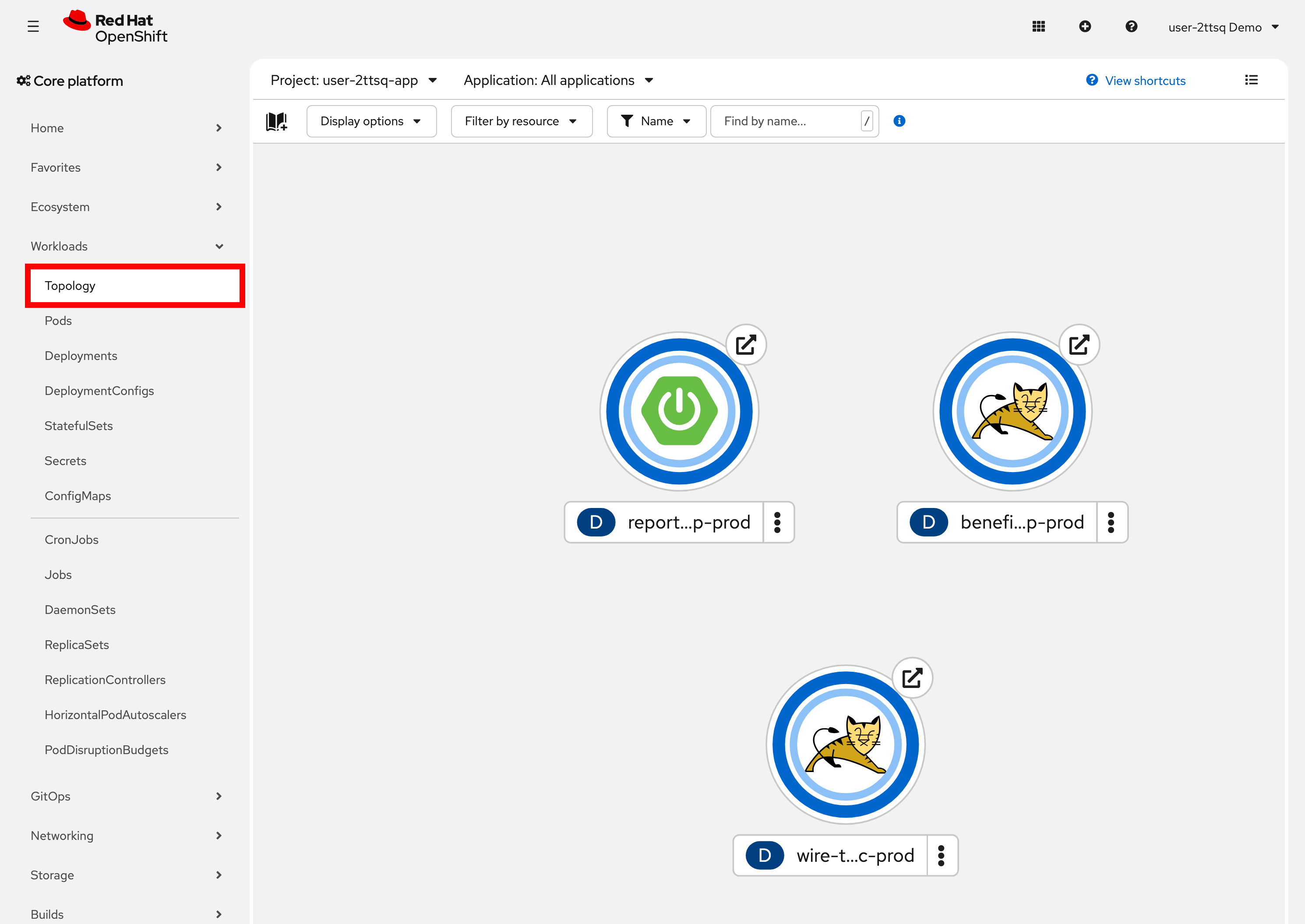
Each blue ring is one deployment, and a complete ring means every pod it expects is running. The icon in the middle is the runtime: the two Tomcat cats are the WAR applications, benefits-mgmt-app-prod and wire-transfer-svc-prod, and the Spring Boot leaf is report-generator-app-prod, a JAR. These are the same three applications whose policies you just read.
Click the ring for benefits-mgmt-app-prod. A panel opens on the right:
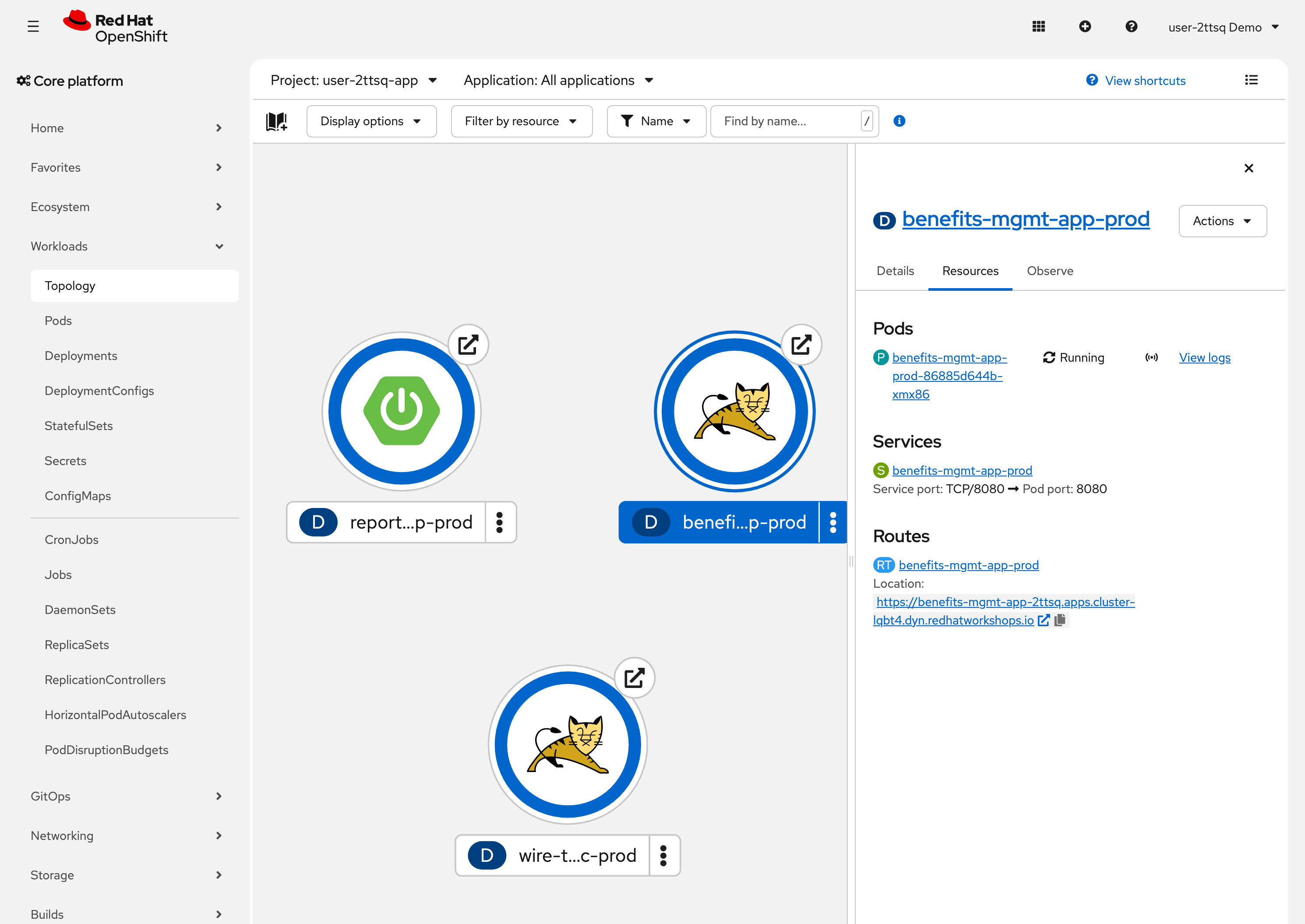
Under Resources you get the three things worth knowing: the Pod and whether it is Running, the Service that routes to it, and the Route it is reachable on. View logs is next to the pod if you want to watch it start.
|
Leave this view as it is — we will come back to it. Nothing here changes while the remediation runs — the agent is working in GitLab, not in the cluster. The pod you are looking at now is the old one, still running the vulnerable dependency. Later in this module, after the merge request is merged and the build completes, ArgoCD will replace it. Come back to this view then: the deployment name is unchanged, but the pod name will be different, because it is a different pod running a different image. That substitution — with nobody touching the cluster — is the whole point of the exercise. |
Logging In to OpenShift
The commands in this module use oc (the OpenShift CLI) to interact with your cluster. If you already logged in during Module 2 and the terminal still shows your user name for oc whoami, skip this step. Otherwise log in as your tenant user by running the following command in the terminal on the right:
oc login -u {user} -p {password} https://kubernetes.default.svc:443 --insecure-skip-tls-verifyYou should see Login successful and your user name displayed. This gives you access to your dedicated namespaces on the cluster.
Without a login, oc falls back to the Showroom pod’s own service account, which cannot read your artifact manager. The script below stops with an error telling you to come back here. The session is also lost if the Showroom pod restarts, so come back here if that error appears later in the module.
|
Remediating a Low-Risk Application
Start with the easy one. Playing the Lightwell release engineer role once more, you will publish a remediated build of a dependency that benefits-mgmt-app declares directly in its pom.xml.
Run the following command in the terminal on the right:
curl -sSL https://showroom-{user}-showroom.{openshift_cluster_ingress_domain}/modules/_attachments/publish-remediation.sh \
  | bash -s -- \
  org.apache.commons:commons-text:1.9 \
  rhlw-00001 \
  "Apache Commons Text"
This is the same script you used in Module 2. It publishes the remediated JAR to the lightwell-remediated repository in your artifact manager and pushes the matching OSV advisories to TPA.
The webhook fires on component created. Re-publishing the same group, artifact and version does nothing at all — the artifact manager has already seen it. If you need to run this module twice, increment the suffix (rhlw-00002) so a genuinely new component is created.
|
Watching the Orchestrator Canvas
Switch to the Ansible Orchestrator tab on the right (or open it in a new tab) and log in with {user} / {password}. Your project is lightwell-%GUID%, and it holds the three workflows listed earlier.
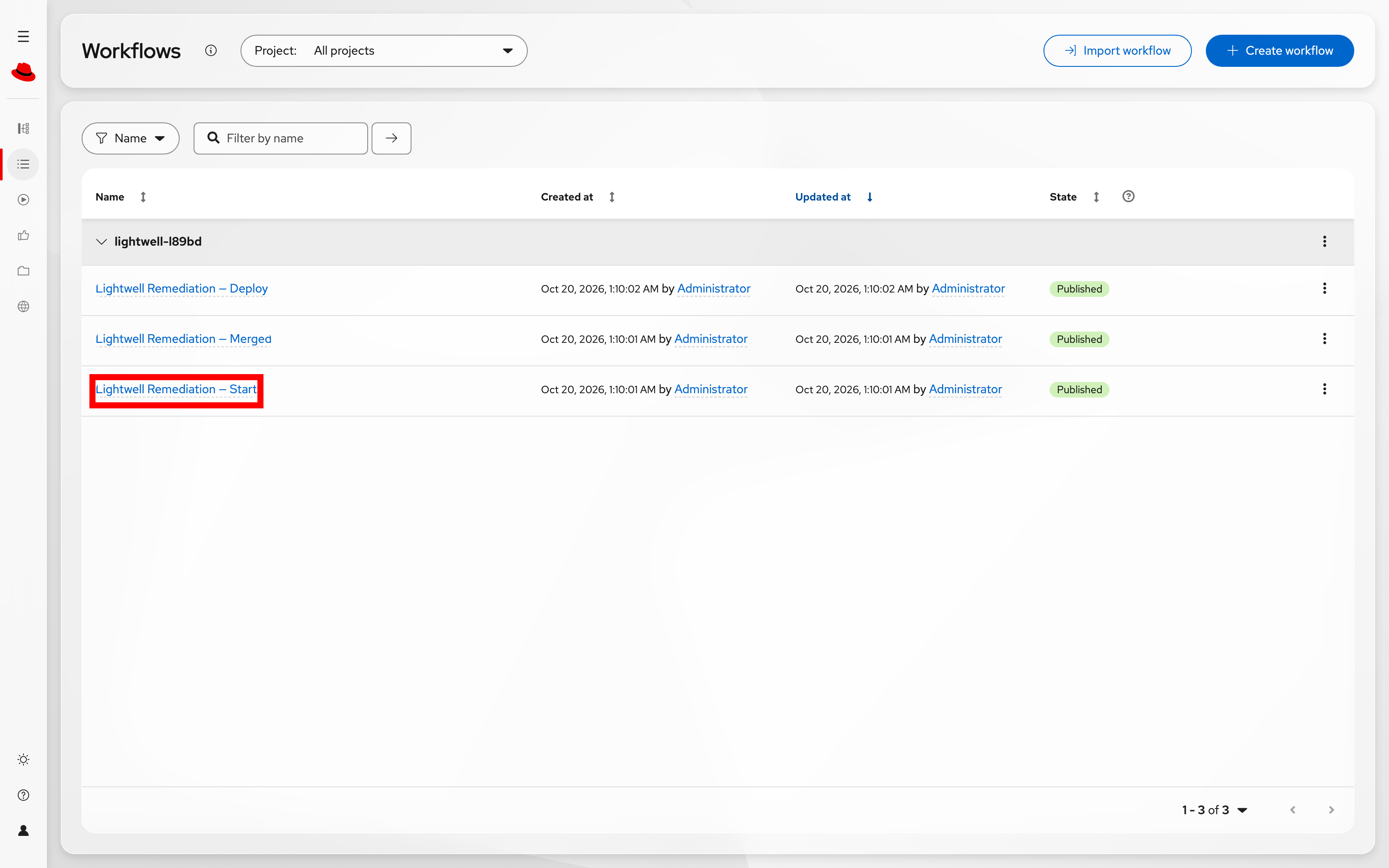
Click Lightwell Remediation — Start, then open the Runs view to see the executions this remediation produced. There are three, one per workflow, and they completed at different times — Start first, then Merged, then Deploy as each webhook arrived.
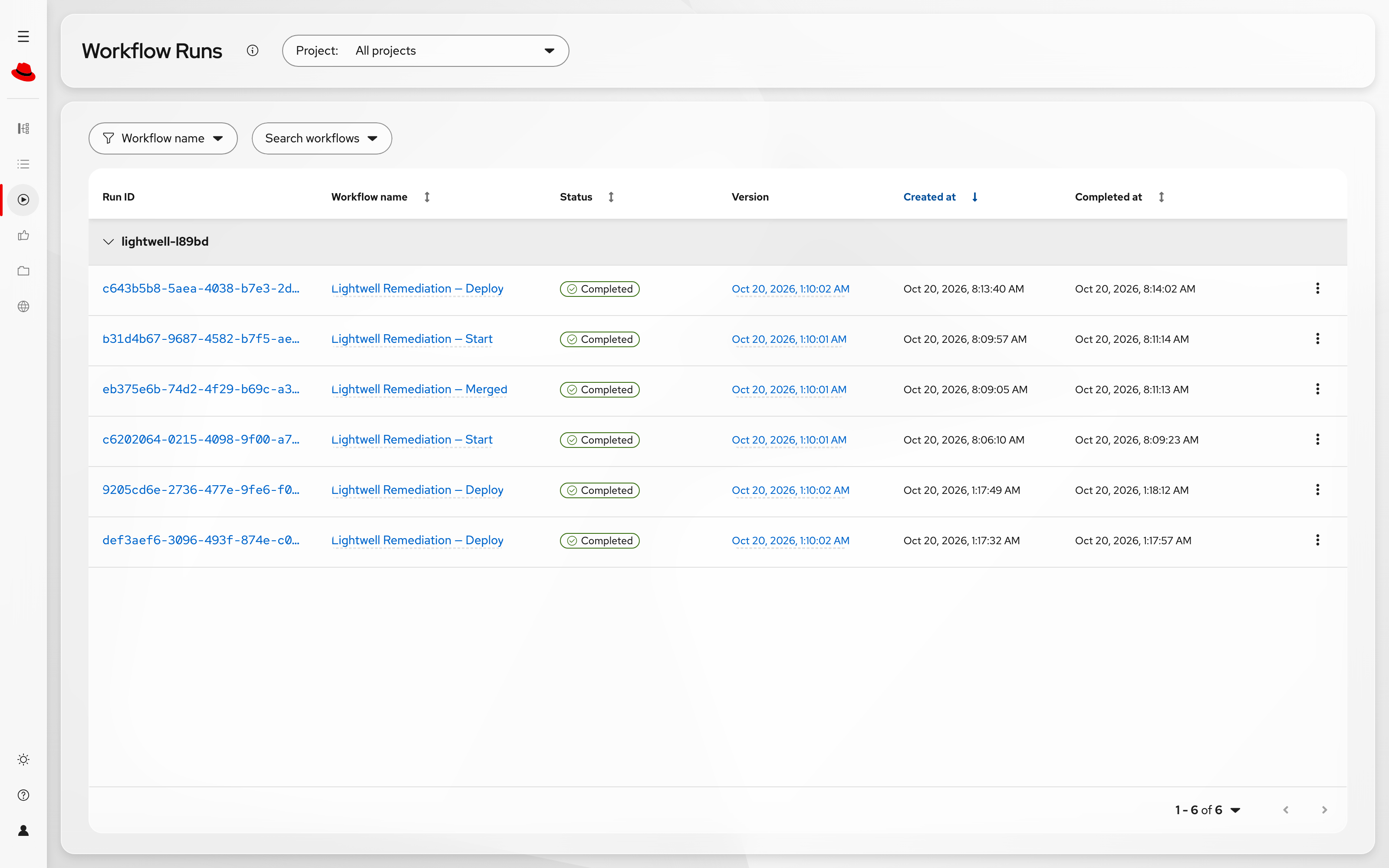
Within a few seconds of the artifact landing you should see a new execution. Watch the nodes light up in order:
-
Prepare Remediation — one job that opens the parent incident, queries TPA, classifies each returned repository against its
.lightwell/policy.json, and raises a child incident per affected application -
For each affected app — a loop over the applications the Orchestrator owns
-
Impact Analyzer — the agent opens the merge request
-
MR Verifier — the merge request is checked and the validation table filled in
-
Auto-approve? — the branch that decides whether a human is involved at all
Open the Start run. The canvas shows the shape of the flow, and the Run details table underneath names each node as it completes:
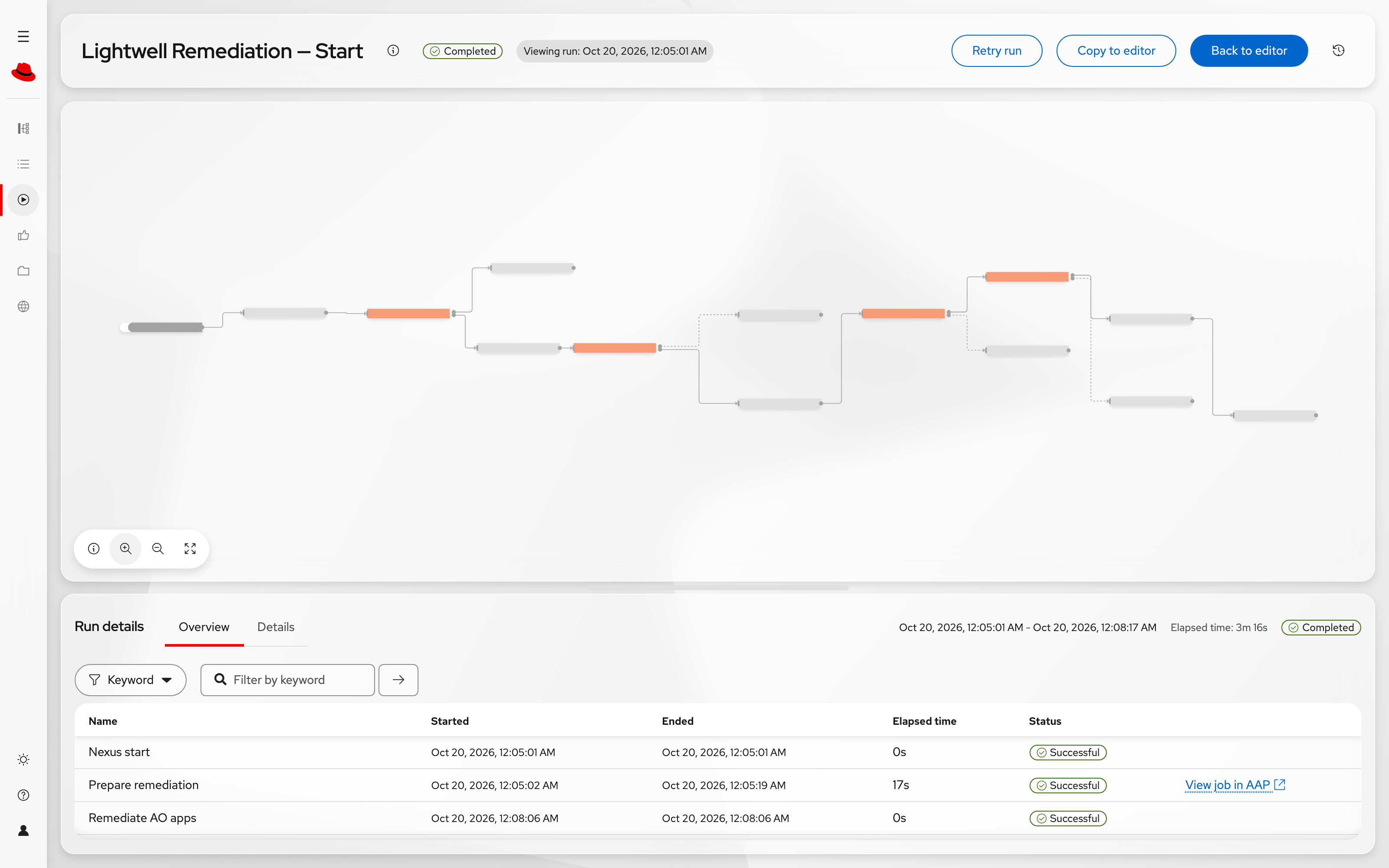
| The canvas is fit to the window, so node labels are small. Use the zoom control at the bottom left to read them — zoomed in, each node shows which AAP job template it runs. |
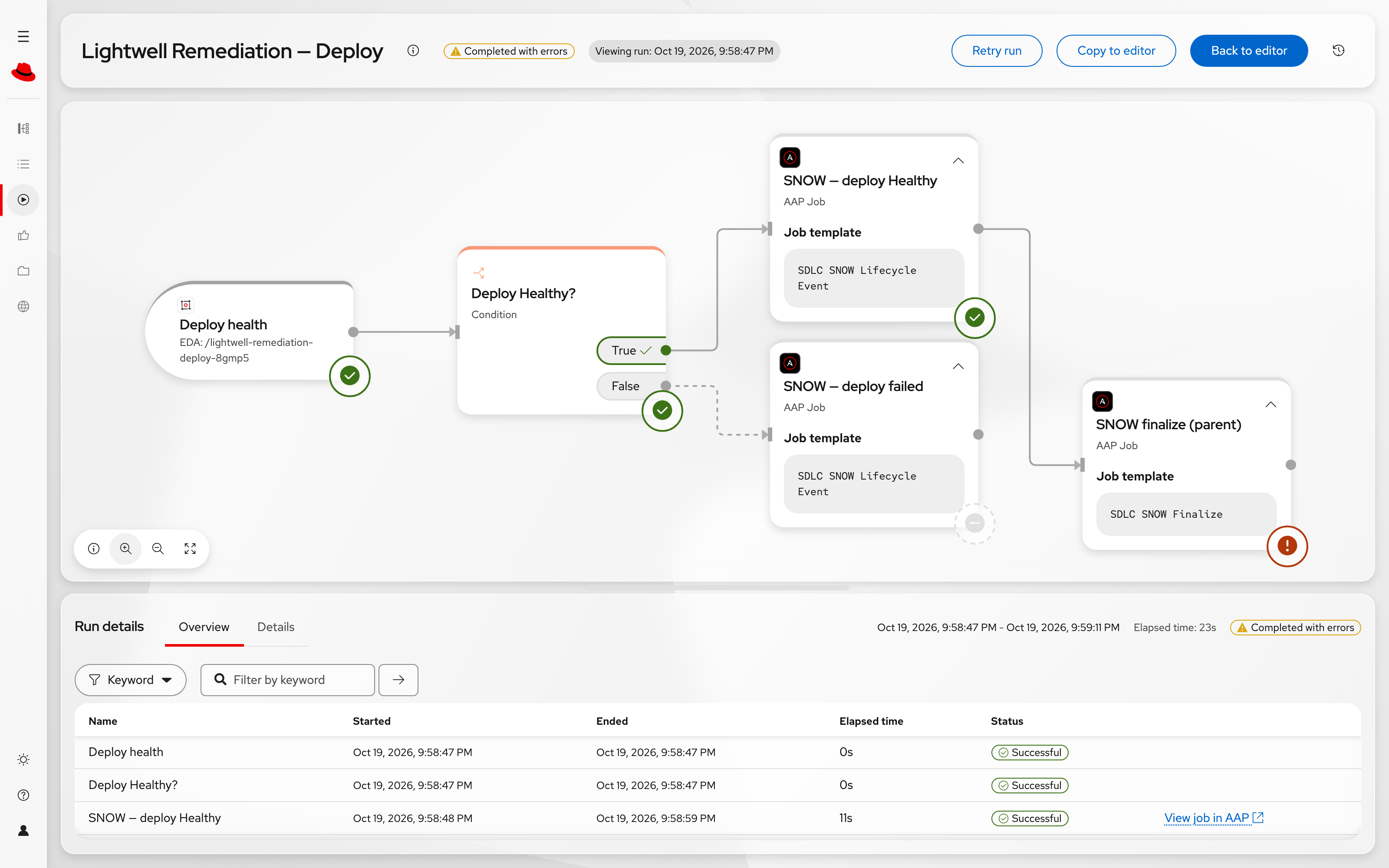
The candidate list comes from TPA and nowhere else. If TPA has no SBOM containing the component, the loop has nothing to iterate over — the Orchestrator will not invent an application to remediate.
The Incident Opens Before the Change Does
Look at the order again. Opening the parent incident is the first thing Prepare Remediation does — before TPA is queried, before anything is classified, before a single line of anyone’s pom.xml is read. The platform raises the ticket and then does the work, which is the opposite of how most automation behaves.
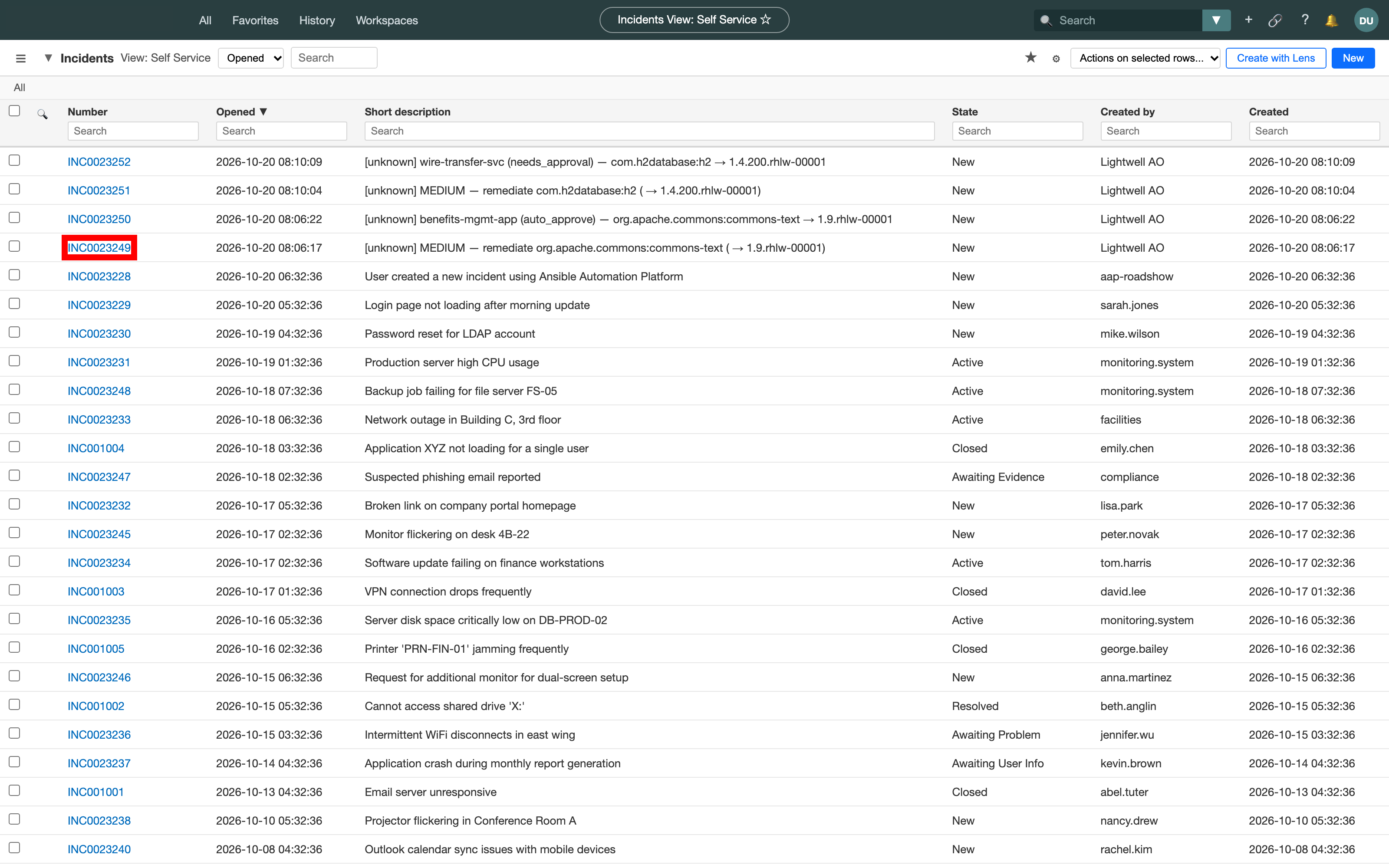
Switch to the Snow tab on the right (or open it in a new tab) — no login required. Your incident is at the top of the list, with the most recent state.
What you are looking at is a small hierarchy, not one ticket:
-
A parent incident for the remediation event itself — one artifact, one Lightwell publication, one thread to follow.
-
A child incident per affected application, created straight after classify, once the Orchestrator knows which applications are genuinely in scope.
The children are where the detail goes. Each application’s loop iteration comments on its own child as it completes — merge request opened, verifier passed, awaiting merge — so two applications remediated from one event do not interleave their history into a single unreadable timeline. The parent gets short milestone notes with links down into the children, and nothing else. An operator reads the parent to find out where things are, and opens a child to find out what happened.
The comments are not just prose, either. Open one and the merge request, the pipeline run and (later) the ArgoCD application and the running route are all clickable, so the ticket is a working console rather than a transcript.
Your two incidents are at the top of the list, both raised by Lightwell AO (Ansible Orchestrator). Open the parent — the one whose description starts with remediate:
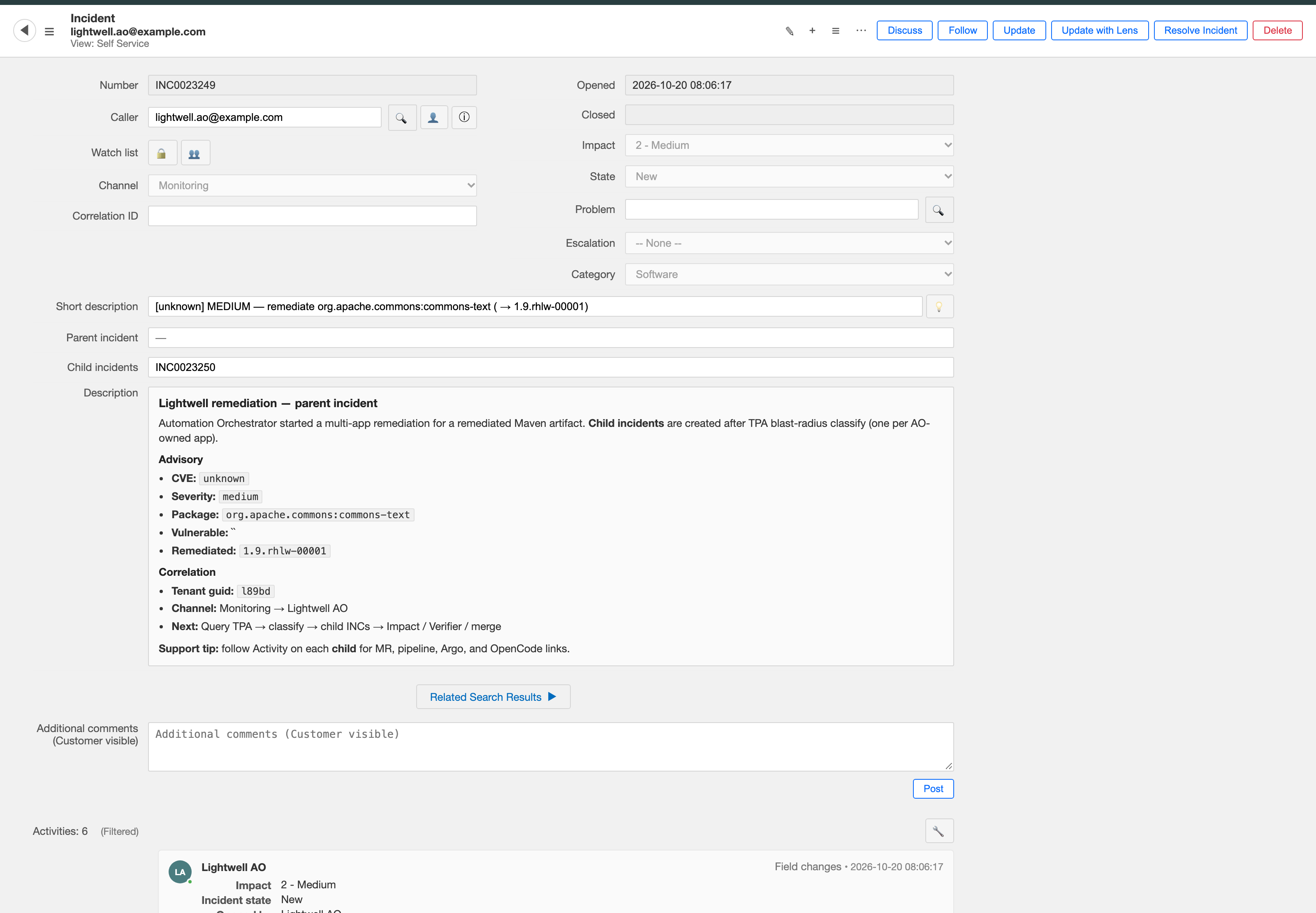
Now follow the Child incidents link. The child is where the per-application detail lives — the policy that applied, the merge request, and what the agent reported:
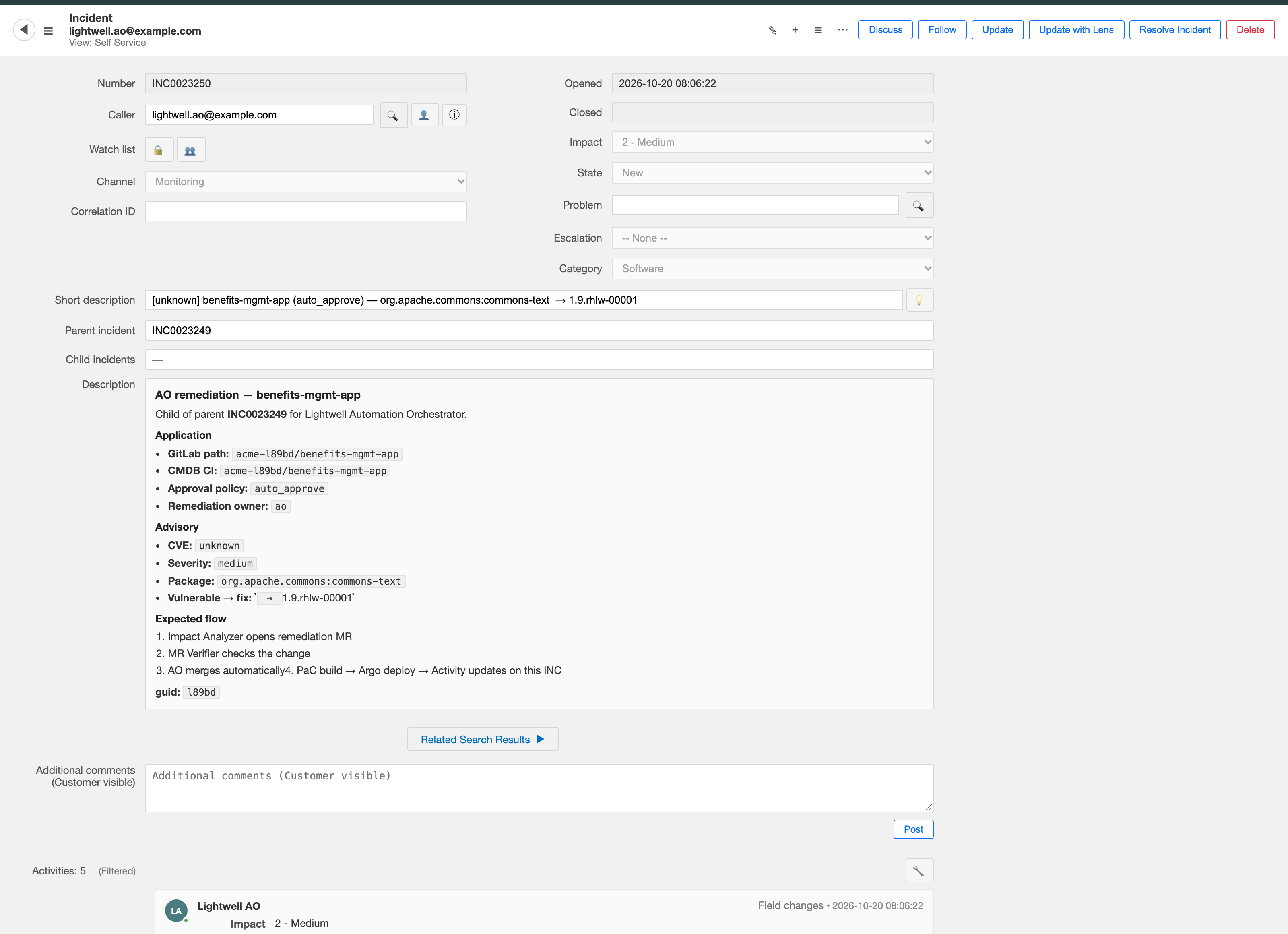
This is the part that tends to matter most to the people who sign off on automation. The audit trail is not reconstructed from git history afterwards — it is written as the work happens, by the thing doing the work. Nothing in this flow is retrofitted to look compliant.
Leave the tab open. You will come back to it at the end, and the shape of what has accumulated there is the point.
The Merge Request the Agent Wrote
In the loop, the Orchestrator tasks the impact-analyzer agent with creating the fix. The agent reads the application’s pom.xml, bumps the dependency to the remediated .rhlw version, pushes a branch, and opens a merge request.
Switch to the GitLab tab on the right (or open it in a new tab) and go to acme-%GUID%/benefits-mgmt-app → Merge requests. If the list is empty, the Orchestrator has already auto-merged it — click the Merged tab to find it. The title follows a fixed shape:
[LW] 🟢 Bump commons-text to 1.9.rhlw-00001 to fix CVE-2022-42889Yours will name the dependency you just published, with its own .rhlw number.
The coloured dot is the application’s Acme Inc. risk class, not the severity of the CVE. That distinction is easy to miss and worth pausing on: CVE-2022-42889 is a critical-severity flaw, yet this merge request is green, because benefits-mgmt-app is a low-risk application and the fix is therefore allowed to merge itself. The wire-transfer-svc merge request later in this module carries a 🔴 for the opposite reason. A reviewer scanning twenty merge requests is triaging by what the change can break, not by how frightening the CVE sounds.
The diff itself is almost boring — the same single-line pom.xml change Renovate made in Module 2. The interesting part is the description, which is the artifact a human is actually expected to read:
| Section | What it carries |
|---|---|
Summary |
Package, current version, remediated version, a link to the CVE, CVSS score, Lightwell risk score, and the SBOM impact |
Vulnerability Details |
What the CVE is and how the remediated build addresses it |
Automated Validation |
An eight-row table of checks. At this point every row reads |
Risk Assessment |
The application’s Acme Inc. risk class and the rationale from its policy file |
Recommended Action |
Derived, not guessed: a failed check means do not merge; a |
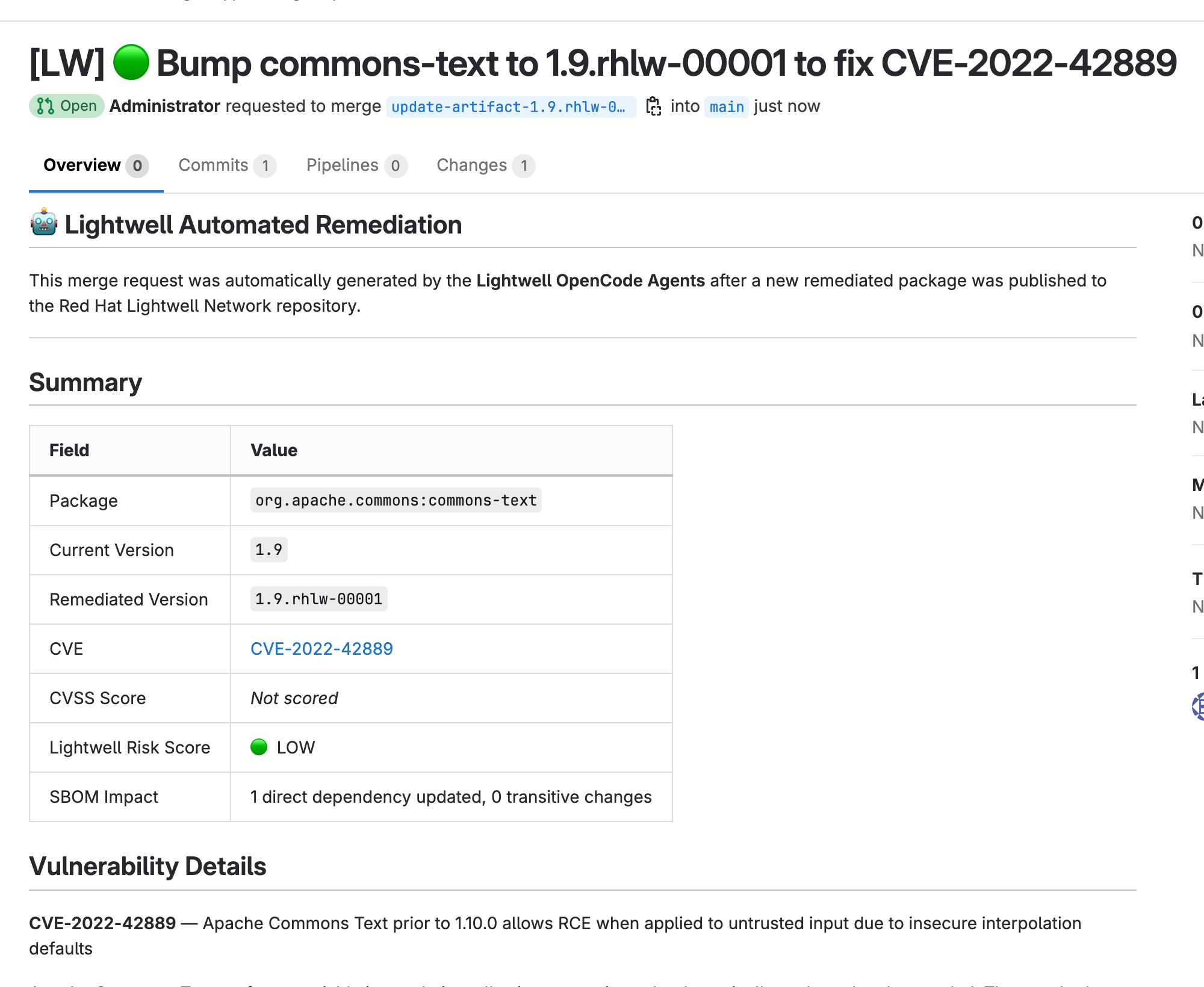
Scroll to Automated Validation. When the agent first opens the merge request, every row says Pending — the agent proposed the change but did not test it. If the pipeline has already started or finished by the time you look, some or all rows will show real results instead (for example, 4/4 tests passed). Either way, the point is the same: the table is filled by the pipeline, not by the agent:
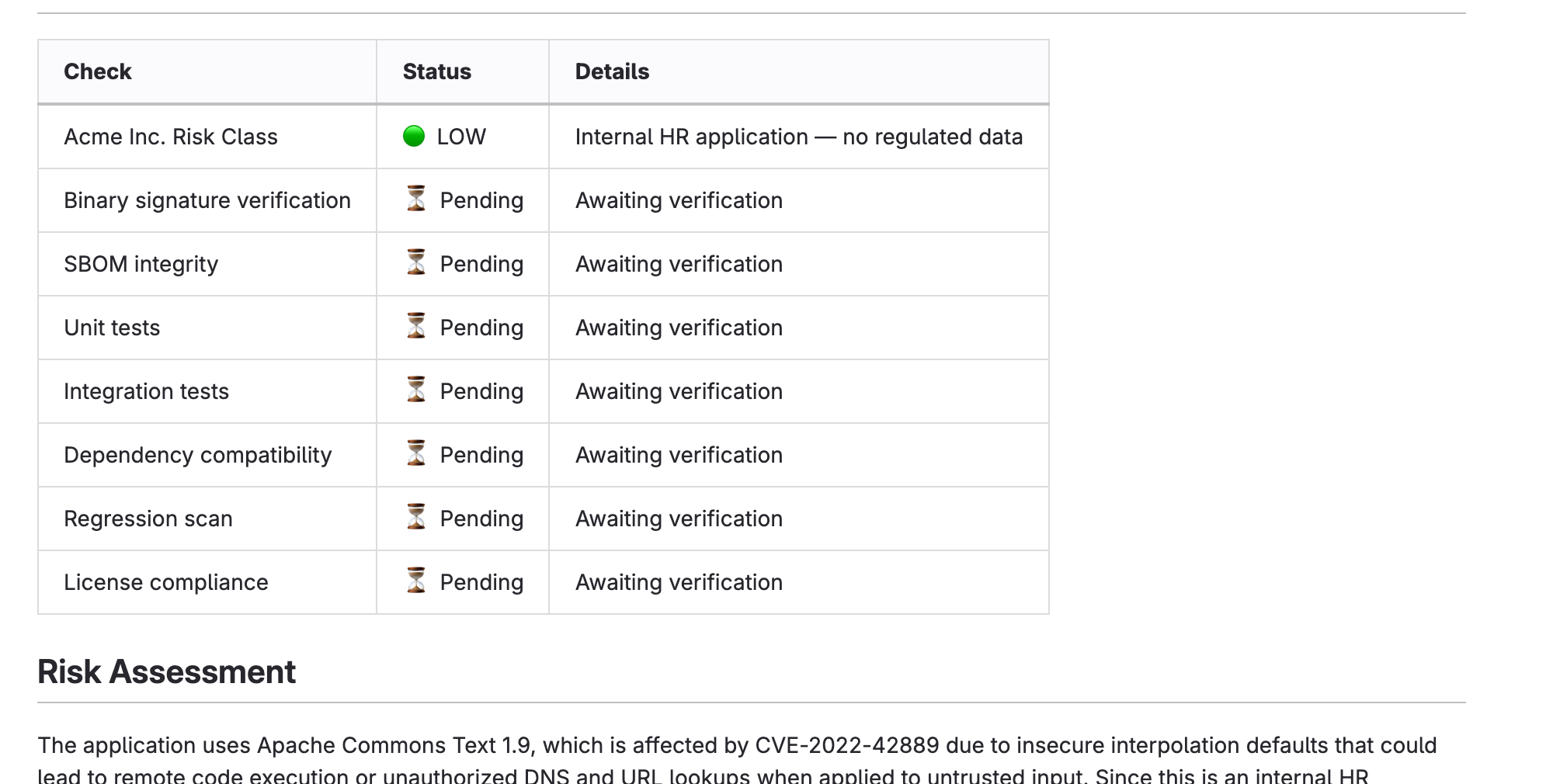
| The advisory data comes from a TPA lookup, not from the model. If your TPA has no advisory for the component, the Summary reads "not referenced" and "not scored" rather than a plausible-looking number. The agent is explicitly instructed not to invent security data — a fabricated CVSS score in an audit trail is worse than a blank one. |
The Pipeline Fills in the Validation Table
The merge request is created before any testing has happened, so every row in the Automated Validation table starts as Pending. A Pipelines-as-Code pipeline, build-pull-request, runs against the open merge request, executes mvn verify together with the CycloneDX SBOM plugin, and then rewrites that one section of the description with real results.
While You Wait: Following the Checks
Scroll to the bottom of the merge request. For the next minute or two it looks like this:
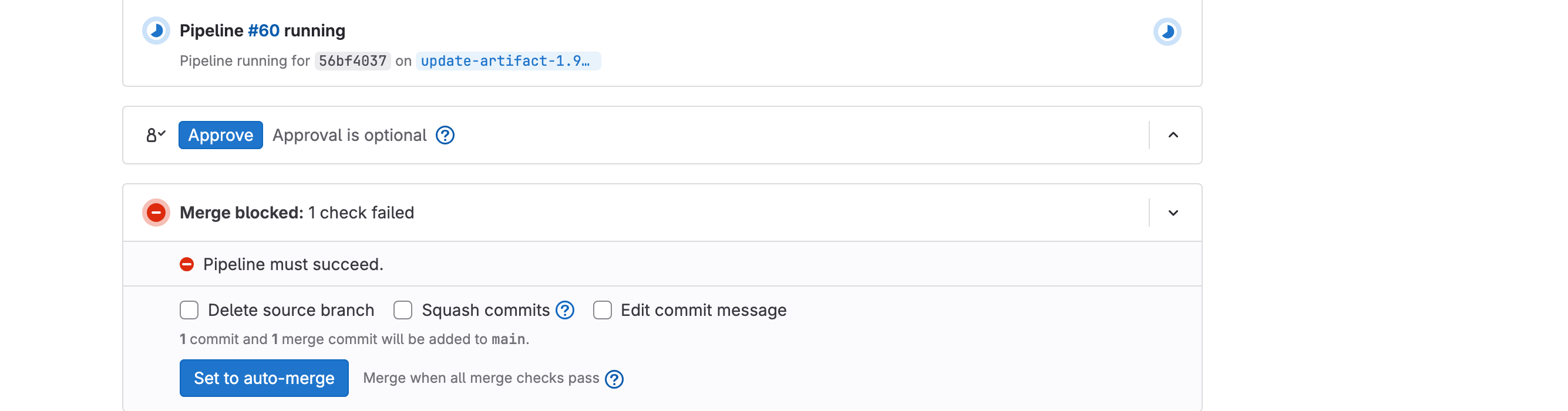
Merge blocked: 1 check failed — Pipeline must succeed. Nothing has gone wrong. The pipeline is still running, and GitLab will not let anyone merge — you, a colleague, or the Orchestrator — until it reports success. The wording is unfortunate: "1 check failed" here means "the required check has not passed yet", not "a test broke".
This is the whole point of the gate. Evidence arrives before the decision, not after it. Notice also Set to auto-merge: you can commit to the merge now and let GitLab carry it out the moment the checks pass. You are never asked to choose between waiting and trusting.
Rather than watch a spinner, follow what is actually happening. Click Pipeline #<n> in that widget:
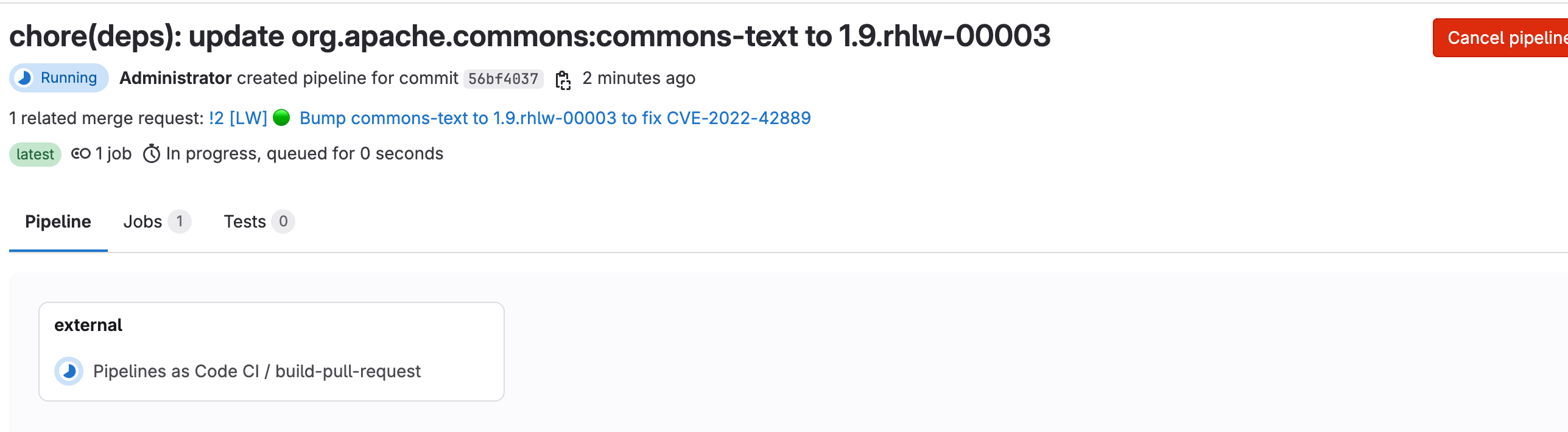
One stage, named external, running Pipelines as Code CI / build-pull-request. "External" is the interesting word: there is no .gitlab-ci.yml in this repository and no GitLab runner involved. The build is executing on OpenShift as a Tekton PipelineRun, and Pipelines-as-Code is mirroring its status back here so that GitLab has something to gate on. The merge gate and the build are deliberately in different systems.
To watch the build itself, open the OpenShift Console tab, navigate to Pipelines → Pipelines → PipelineRuns, and select the build-%GUID% project:
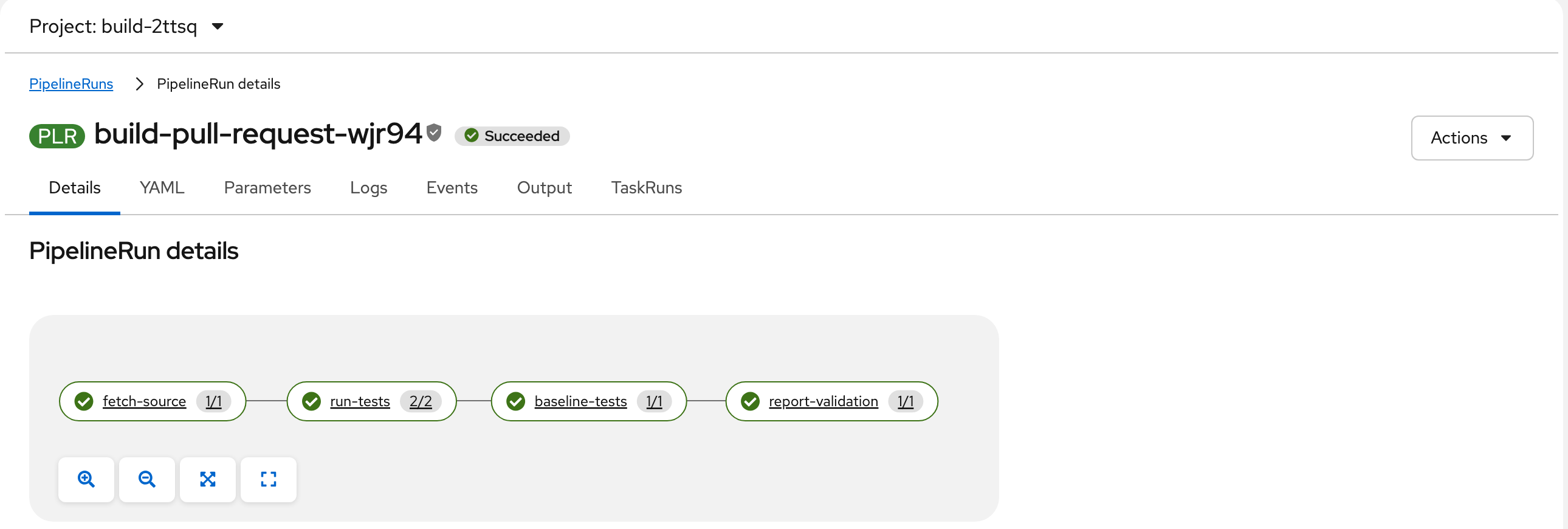
Four tasks, and they map directly onto the table you are waiting for:
-
fetch-source— clones the merge request branch -
run-tests—mvn verifyplus the CycloneDX SBOM, against the remediated dependency -
baseline-tests— the same tests again against the dependency version you are replacing. This is what makes Regression scan a comparison rather than an assumption, and it is why the pipeline takes roughly twice as long as a plain build -
report-validation— writes the results into the merge request, and fails the pipeline if any row is not green
That last task is the one holding your Merge button. Once it passes, the gate opens.
Refresh the merge request and the table will have filled in:
| Check | What it actually measures |
|---|---|
Acme Inc. Risk Class |
The |
Binary signature verification |
An integrity check — the published JAR is compared against the checksum the artifact manager recorded for it. The lab mirror ships no detached GPG signature, so this is not a cryptographic signature check and is labelled accordingly. |
SBOM integrity |
A CycloneDX SBOM is generated in the same build and asserted to list the bumped coordinate |
Unit tests |
|
Integration tests |
|
Dependency compatibility |
Asserts that what the |
Regression scan |
Re-runs the whole suite against the target branch’s |
License compliance |
Compares the licence declared by the base POM against the remediated POM, normalised so that equivalent phrasings do not raise a false alarm |
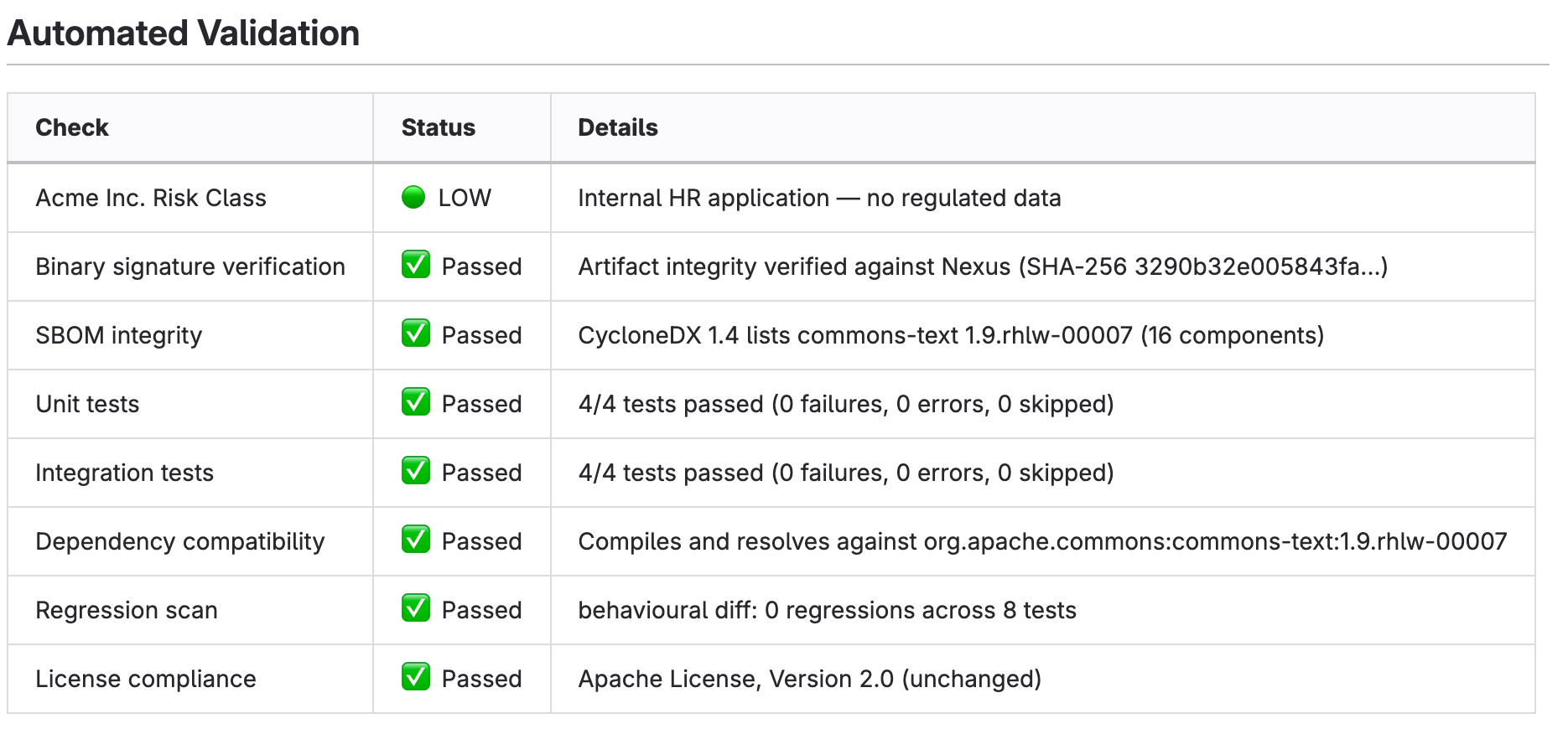
Every one of those rows is measured. Nothing is ever reported green without having been measured, which is the only reason the table is worth putting in front of a reviewer at all — and a row that could not be established says so, rather than quietly reading Passed.
|
The regression scan is why this pipeline takes about twice as long as you might expect: it builds the application a second time against the dependency version you are replacing, so that "no behavioural change" is a comparison rather than an assumption. Roughly ninety seconds in total.
The Low-Risk Application Merges Itself
Back on the Orchestrator canvas, the MR Verifier node confirms the merge request is healthy and every check reported, then the Auto-approve? condition reads the approval value that travelled with the application’s own policy.
For benefits-mgmt-app that value is auto_approve, so the canvas takes the green branch to Merge MR (auto-approved). The Orchestrator marks the merge request ready and merges it. No human is asked, and no human is notified. The child incident gets a comment recording the merge, and the loop moves on to the next application.
Switch back to the GitLab tab and open the merge request again. The block you watched earlier has cleared and the merge has already happened — performed by the automation account, with you never touching it:
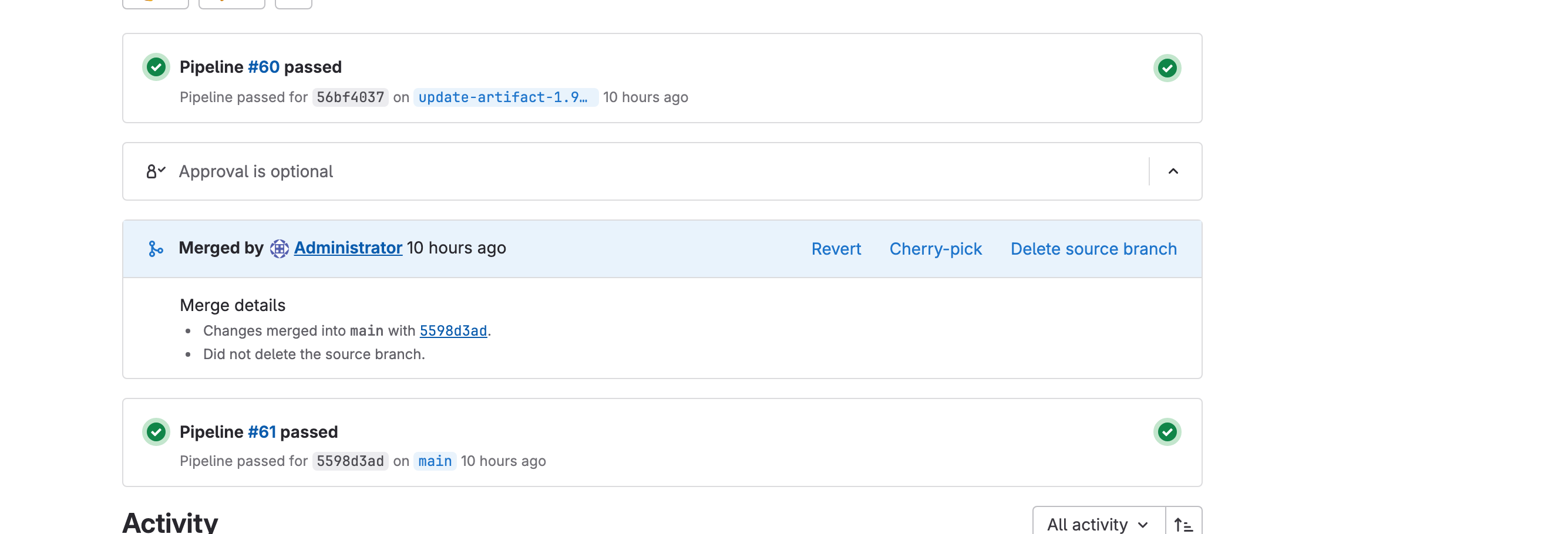
Read those three panels top to bottom, because they are in causal order:
-
Pipeline #60 passed on
update-artifact-1.9…— the branch build finished and every row of the table went green. Only now is merging possible at all. -
Merged by Administrator — the Orchestrator took the gate the moment it opened.
-
Pipeline #61 passed on
main— merging started a second, different build: the one that produces the image you will deploy.
Check the timestamps while you are there. The merge happened roughly two minutes after the request was opened, not seconds — the Orchestrator was waiting for build-pull-request to report before it merged. It could not have jumped that queue even if it had tried.
This is the volume case, and it is the whole economic argument for the platform. An internal HR application, a compatible rebuild of a library, every automated check green: there is no decision here that a person adds value to, so no person is asked. Multiply that by forty remediations a week and the time saved is not the merge click — it is the context switch that surrounds it.
|
The decision is made from |
Build, Sign, Promote, Deploy
Merging to main starts the build pipeline. Switch to the OpenShift Console tab on the right (or open it in a new tab), navigate to Pipelines → Pipelines, select the PipelineRuns tab, and make sure the build-%GUID% namespace is selected. You should see the run for benefits-mgmt-app:
-
Build — compiles the application against the remediated dependency
-
Generate SBOM — CycloneDX SBOM, uploaded to your TPA instance
-
Sign — Tekton Chains signs the image via Trusted Artifact Signer, with no long-lived signing key
-
Push — the signed image goes to the OCI registry
-
Promote —
promote-to-deployment-repobumps the application’simageTagin theacme-deploymentrepository
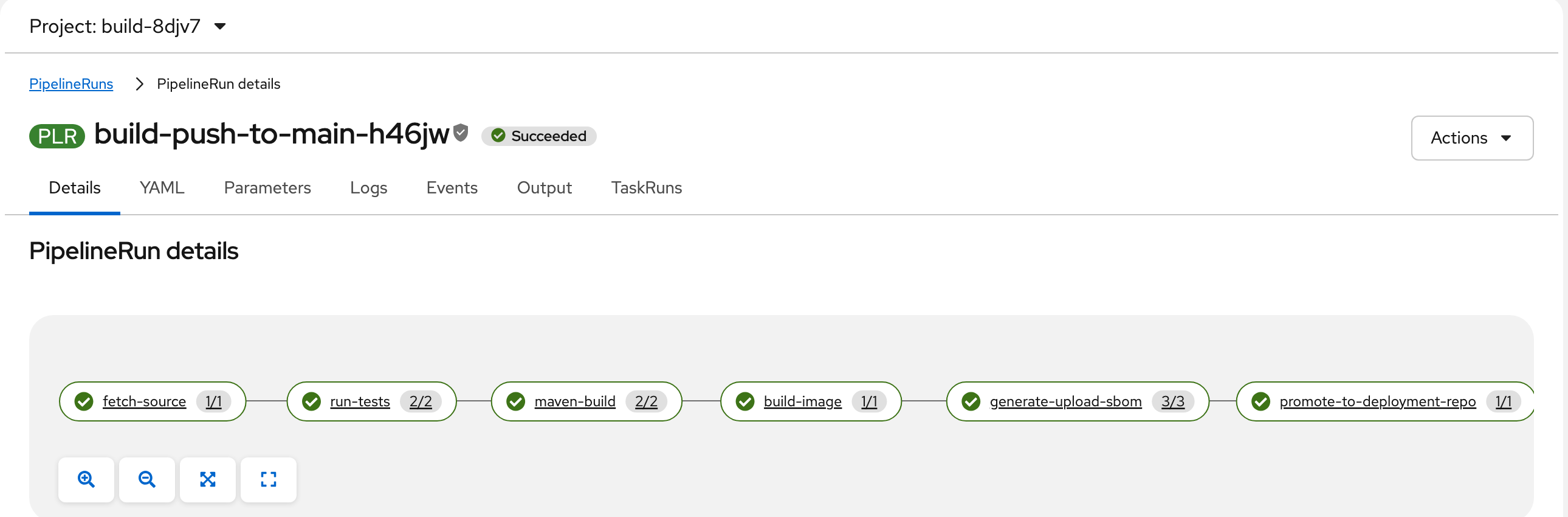
The task graph has one more box than the list above: run-tests and maven-build are separate tasks, and there is no sign task at all. Signing happens out of band — Tekton Chains observes the completed run and signs the image afterwards, which is why the signature shows up as the small shield badge next to the PipelineRun name rather than as a step you can watch.
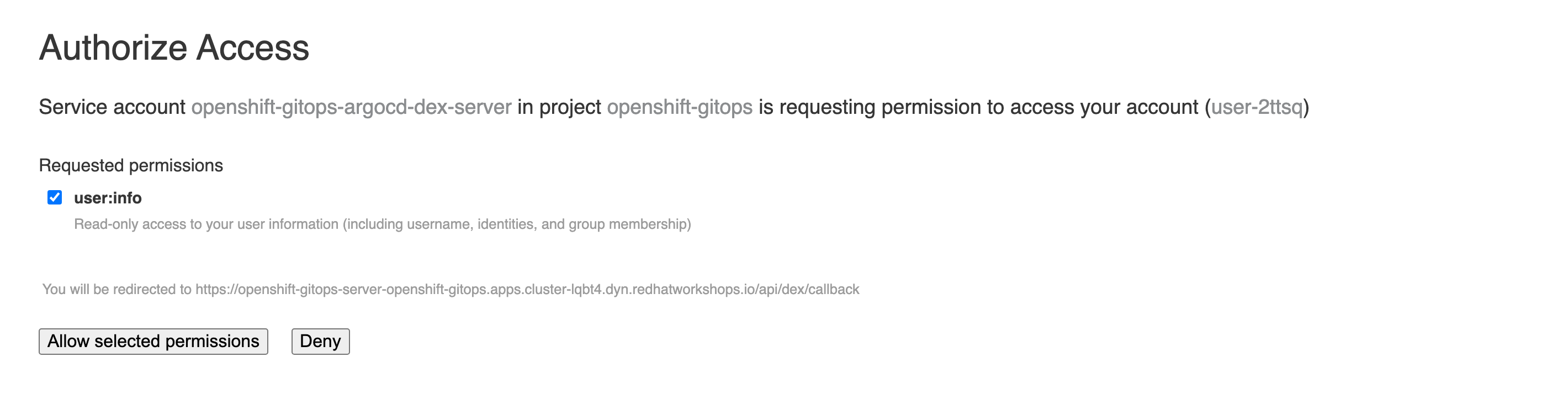
That last step is what closes the loop. The pipeline does not deploy anything — it makes a git commit in the deployment repository, and ArgoCD does the rest. Switch to the ArgoCD tab on the right (or open it in a new tab). Choose Log in via OpenShift. The first time you do this, OpenShift asks you to approve the connection:
|
This screen appears once, on your first ArgoCD login, and it is expected. ArgoCD is asking OpenShift to confirm who you are — |
Find the acme-apps-%GUID% application and look at the two panels at the top:
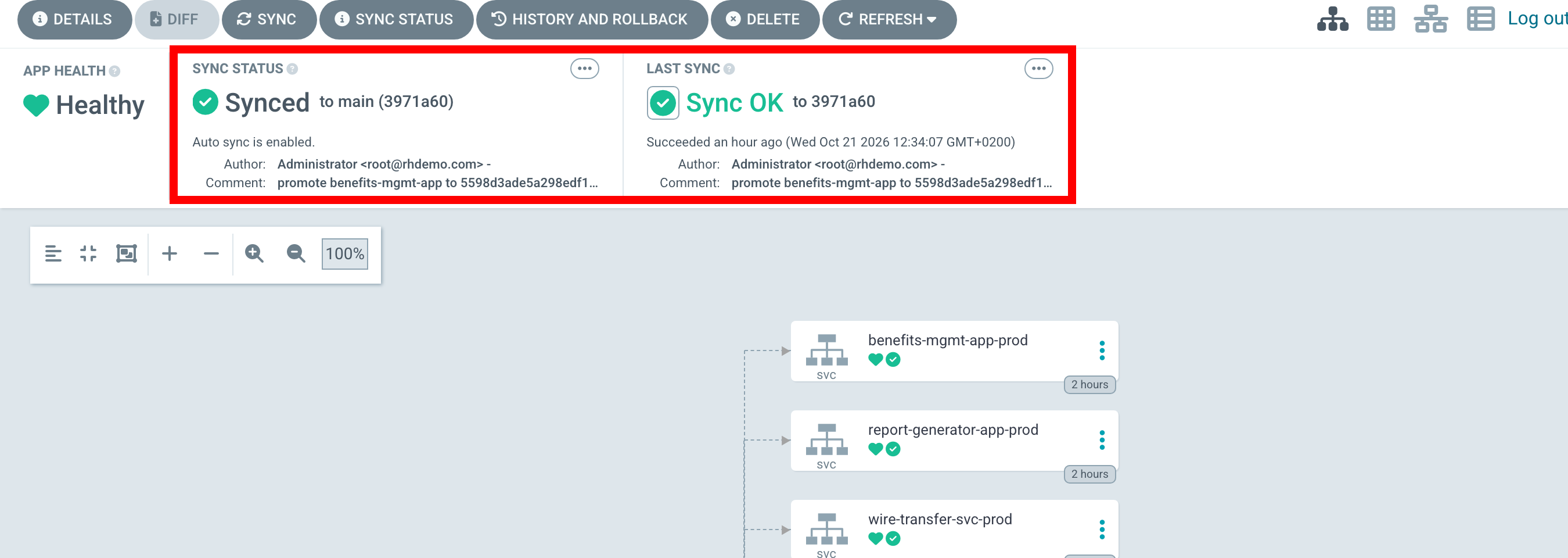
Sync Status reads Synced and Last Sync reads Sync OK, but the useful part is the commit quoted under both: promote benefits-mgmt-app to 5598d3ade…, authored minutes ago. That is the pipeline’s promote-to-deployment-repo task writing the new image digest into the deployment repository, and the sync beside it is ArgoCD noticing and rolling the deployment in your {user}-app namespace.
Nothing here was triggered by a person, and the pipeline deployed nothing. It changed a file in git; ArgoCD reconciled the cluster to match. The answer to "what is running, and why" is a commit.
Now go back to the Topology view from earlier and refresh it. The deployment is still called benefits-mgmt-app-prod and the ring is still complete — but click it and compare the pod name with the one you noted earlier. It is different. The old pod is gone and a new one is serving traffic, built from the remediated dependency, and nobody connected to the cluster to make that happen.
The application keeps serving traffic throughout. That is not a staging trick: the remediated dependency is the real upstream library with the fix applied, so the application genuinely runs on it.
Remediating a High-Risk Application
Publish a remediation for a dependency that wire-transfer-svc declares — the payment-critical, PCI-scoped service. Run the following command in the terminal on the right:
curl -sSL https://showroom-{user}-showroom.{openshift_cluster_ingress_domain}/modules/_attachments/publish-remediation.sh \
  | bash -s -- \
  com.h2database:h2:1.4.200 \
  rhlw-00001 \
  "H2 Database Engine"
Everything you just watched happens again, identically: incident opened, TPA queried, application classified, agent dispatched, merge request opened, pipeline runs, validation table filled in. Follow it on the canvas if you like — it is the same shape.
Then the run stops.
The Judgement Call
On the canvas, the Auto-approve? condition does not see auto_approve, so it takes the other branch: a comment on the child incident recording that the merge request is ready and awaiting a GitLab merge. Then the execution ends.
Read that again, because it is easy to misread as a failure. The Orchestrator has not crashed, timed out, or parked a job that is burning a worker somewhere. It has done everything it is permitted to do and stopped. The merge request is open in GitLab with your name on it, and nothing further happens in this entire platform until a person acts.
Open the Lightwell Remediation — Start run for this trigger and zoom in on the right-hand side of the canvas. The False branch of Auto-approve? carries the green tick, and the path onward to Merge GitLab MR (auto_approve) is dashed, meaning it was never taken:
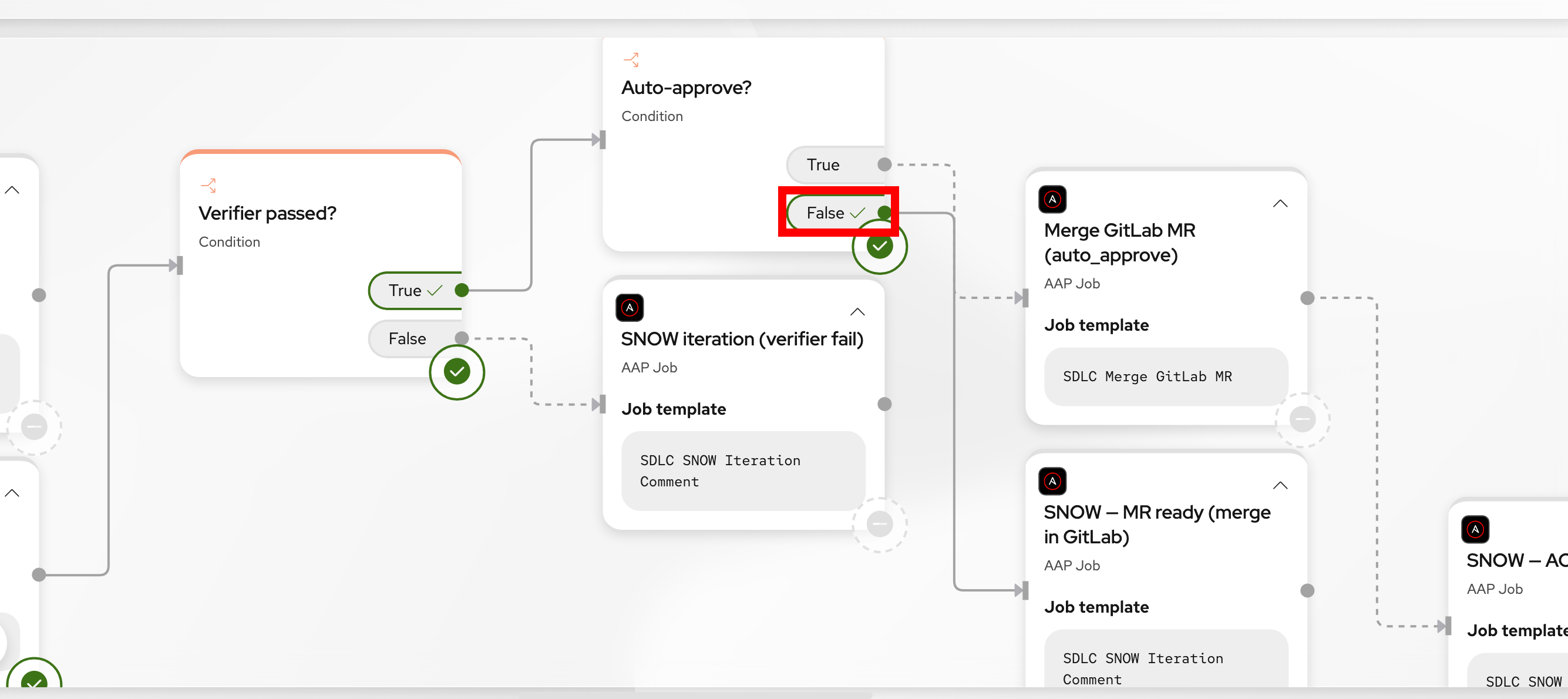
Compare that with the low-risk run earlier, where the same condition ticked True and ran straight into Merge GitLab MR. The green tick marks the branch that was taken — it is a record of a decision, not an error.
|
The pause lives in GitLab, not in the Orchestrator. There is no approve button on the canvas and no task in a queue waiting for you to tick it. The human gate is the merge request itself — the artifact that actually carries the evidence — rather than a prompt in an automation tool that quotes a ticket number at you. |
Check Snow first. The child incident for wire-transfer-svc records that the merge request is ready and hands the decision to you — please review and merge in GitLab when you are satisfied; CI/CD will continue from there:
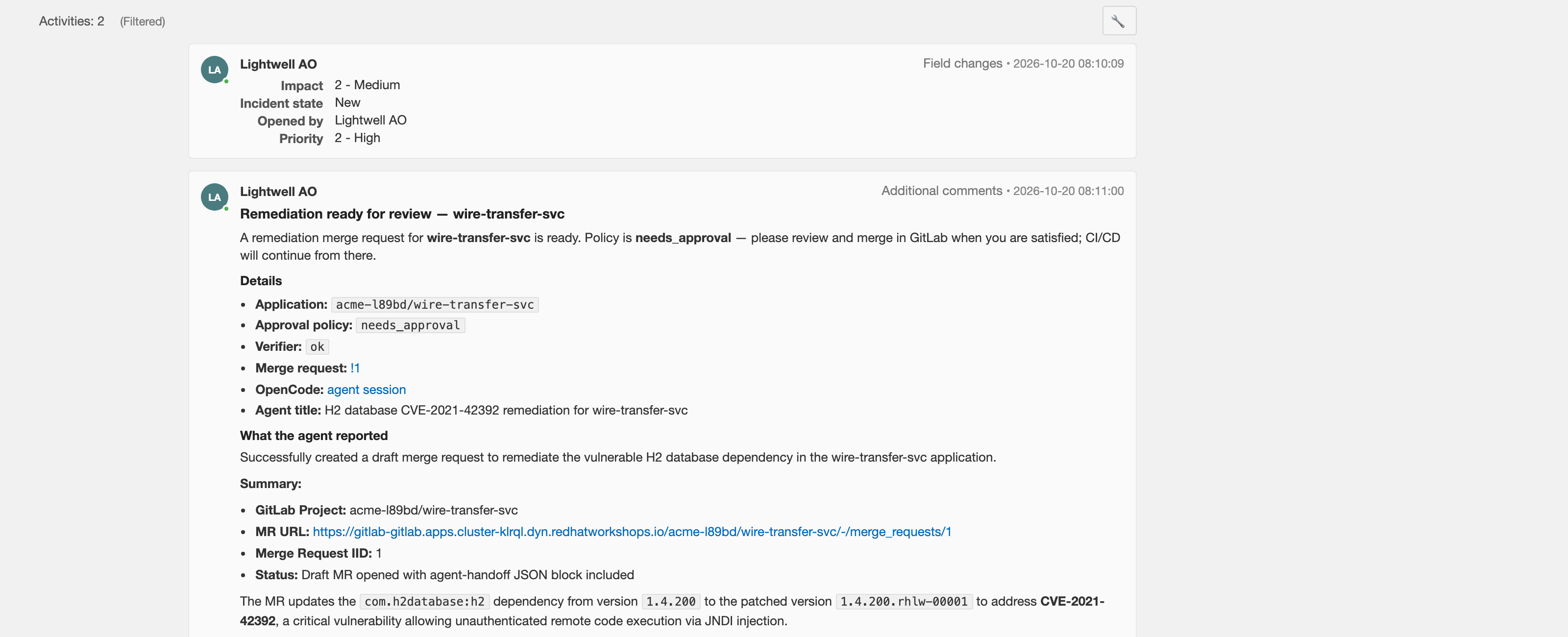
Now go and read the merge request in acme-%GUID%/wire-transfer-svc. Everything you need is in one page:
-
The diff — a single version bump in
pom.xml, the upstream version unchanged -
The CVE and its CVSS score, pulled from TPA rather than from the model
-
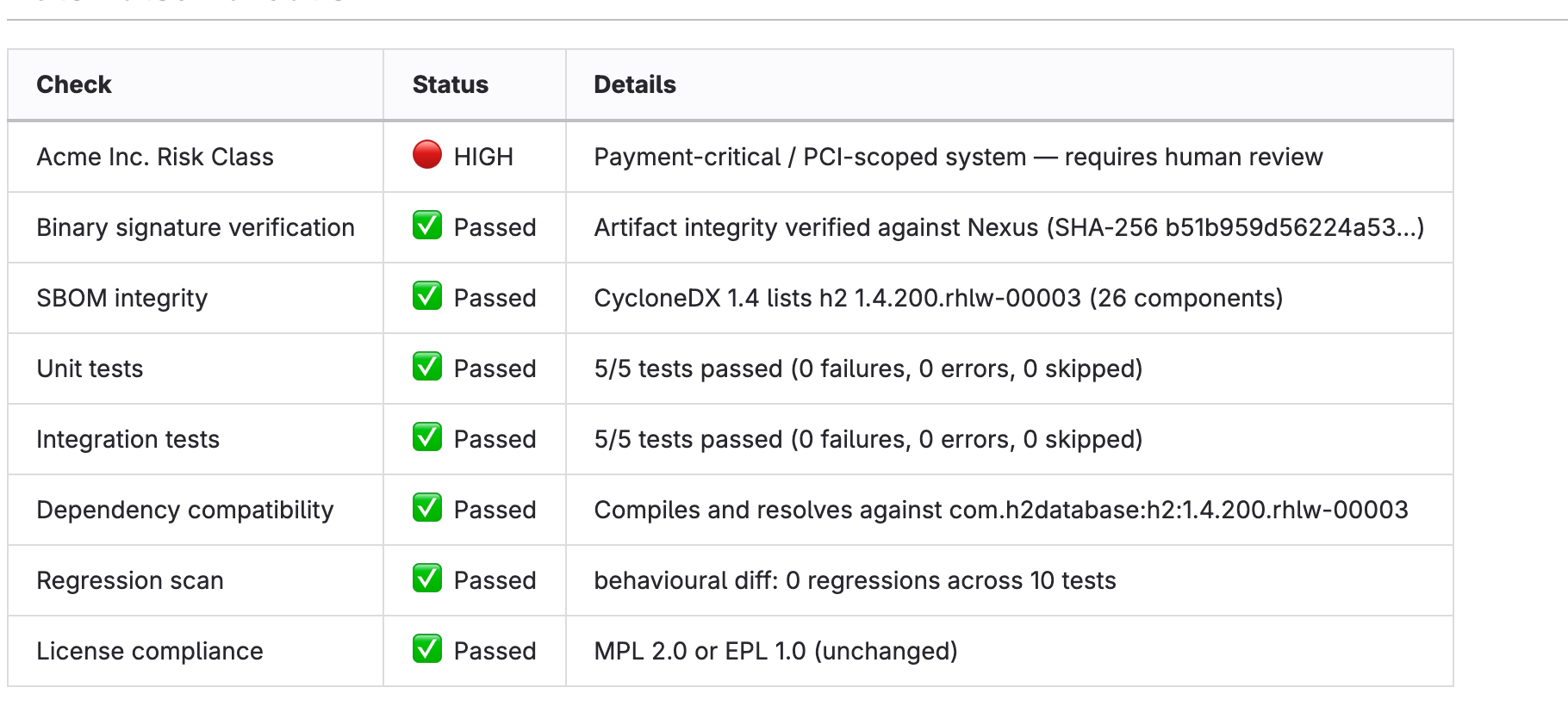
The validation table — unit tests, integration tests, SBOM integrity, licence compliance and dependency compatibility, all measured on this exact change
-
The risk class,
HIGH, with its rationale: payment-critical, PCI-scoped -
The recommended action, which says human review required precisely because the risk class is
HIGH— not because anything failed
Read that last point again, because it is the whole argument. Every automated check passed. The platform still refused to merge it. The policy says that on a system that moves customer money a person signs off even on a change that looks perfect, and the platform is not allowed to talk itself out of that — not even with a full table of green ticks to point at.
Note the Recommended Action block at the bottom. For benefits-mgmt-app it said the change was safe to take. Here it reads:
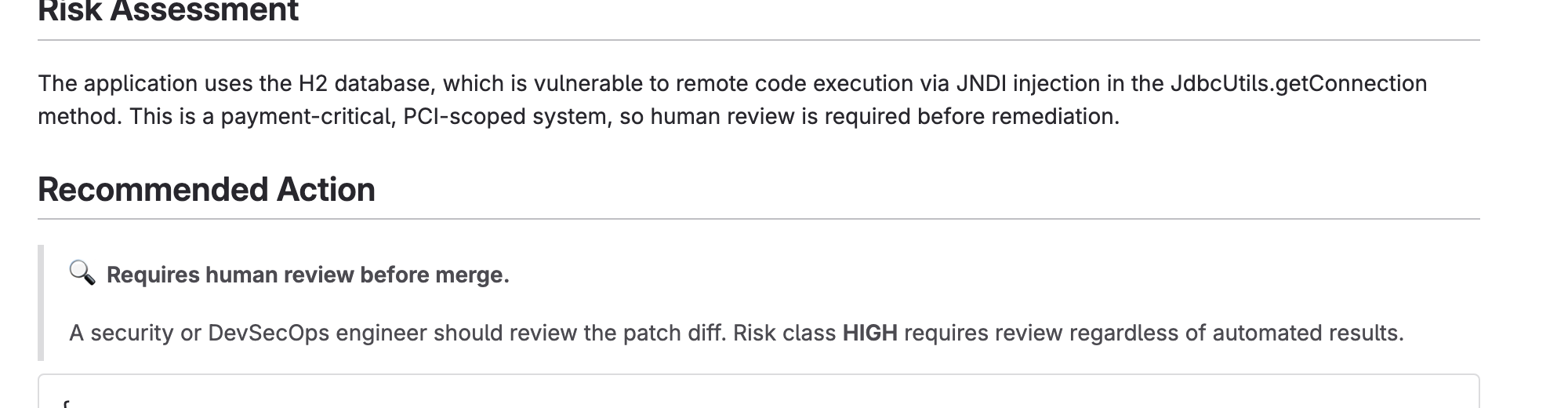
🔍 Requires human review before merge. A security or DevSecOps engineer should review the patch diff. Risk class HIGH requires review regardless of automated results.
Work through the page in order:
-
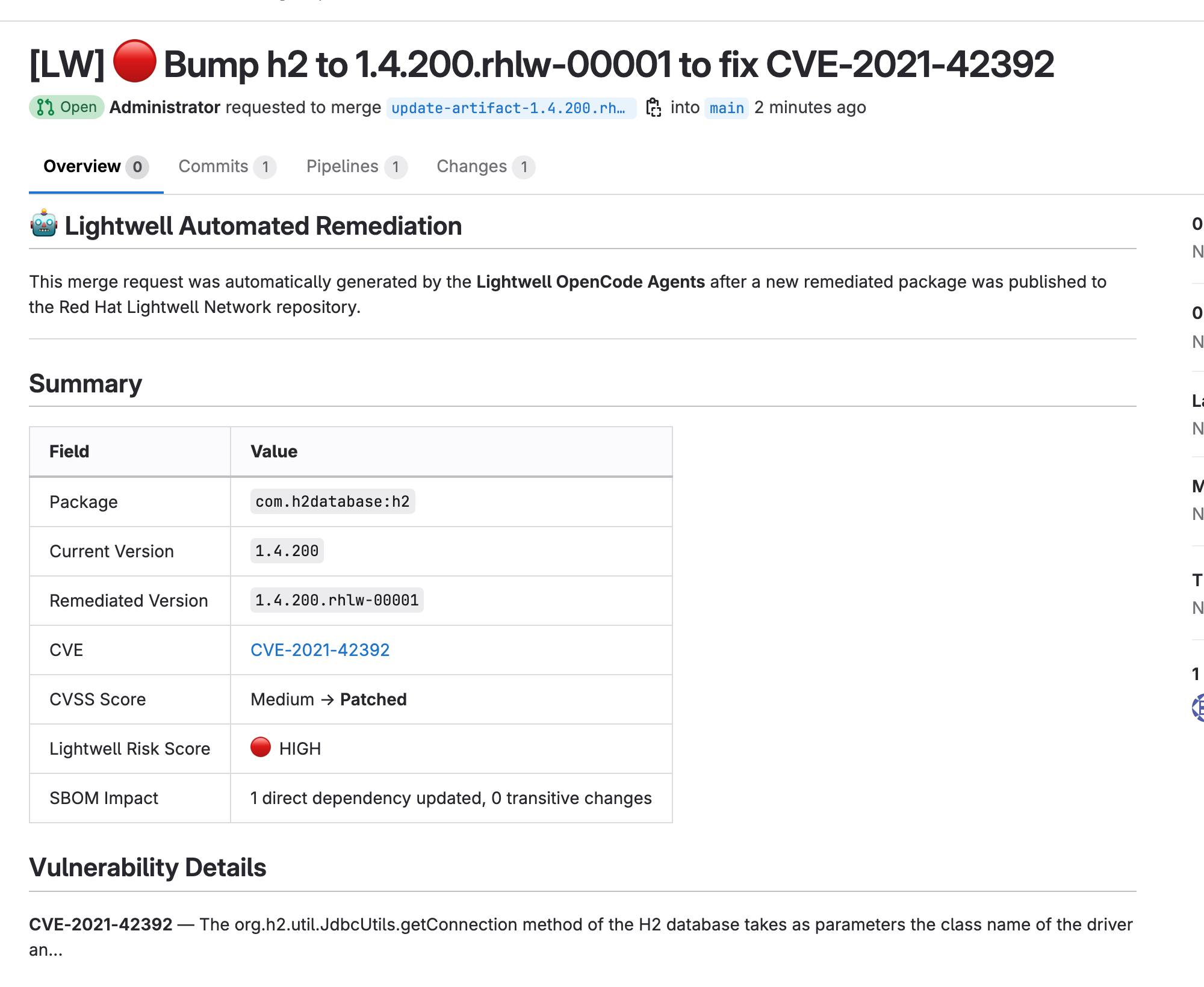
Read the Summary. The CVE is a real one, linked to the Red Hat advisory, with its severity — not a number the model made up:
-
Check the evidence. Every check passed, measured on this exact change:
-
Read the verdict. The Risk Assessment explains the exposure in plain language, and the Recommended Action states the policy outright:
-
Make the call, then merge it yourself. Scroll to the bottom of the merge request and click Merge:

If the Merge button is greyed out, the checks have not finished. You cannot merge until the pipeline succeeds and every row of the validation table reads
Passed— enforced by GitLab, not by convention. Merging through the API is blocked too, which is why the Orchestrator could not jump the queue for the low-risk application either.Allow roughly 90 seconds from when the merge request appeared. A row still reading
Pending,WarningorFailedkeeps the pipeline red and the button disabled. If it still looks stuck after a couple of minutes, read the table rather than the button — it names the check that is holding things up.This is the one place in the lab where you are the gate, so it is worth being clear what you are being asked to approve: not whether the tests passed — the platform already refused to let you merge until they did — but whether this change, on this system, is one you are willing to sign your name to.
"Regardless of automated results" is the policy in one phrase. Every check passed. None of that changes the answer.
That click is the only manual step in the entire module, and it is the one the whole design exists to protect. Everything up to it was preparation so that your decision is informed; everything after it is automation again.
From here it is the same spine as the low-risk application: merging fires the GitLab webhook, Event-Driven Ansible relays it, and a short Orchestrator run records the merge on the child incident. build-push-to-main builds, generates the SBOM, signs via Tekton Chains, pushes to the OCI registry and promotes the imageTag into acme-deployment; ArgoCD syncs and the new pod rolls out in {user}-app. Each stage reports back as it completes.
Proving It in TPA
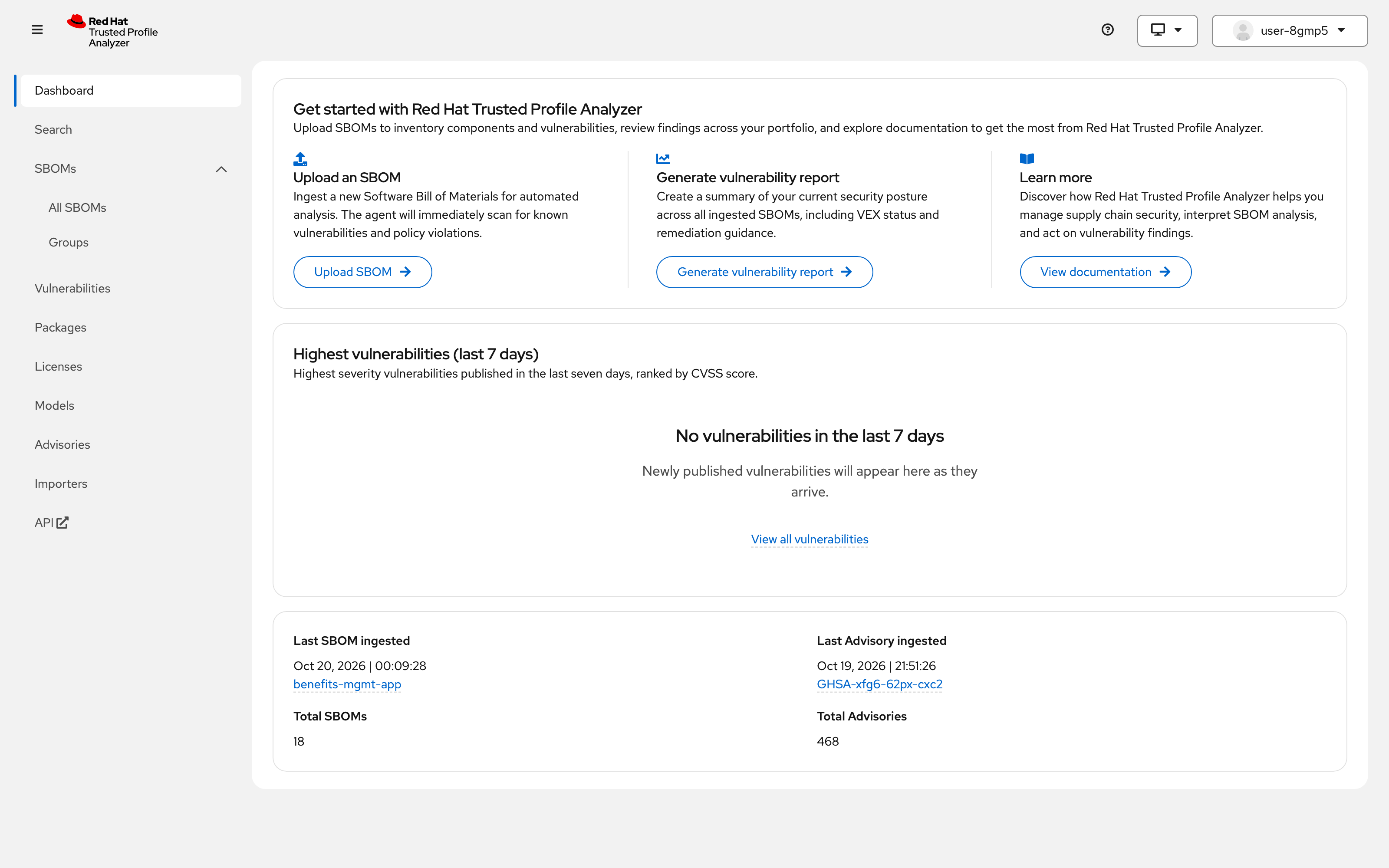
Switch to the TPA tab on the right (or open it in a new tab). Sign in through SSO with {user} / {password} if needed. The dashboard tells you how much it is holding for this tenant, and when the last SBOM arrived — which should be the build you just watched:
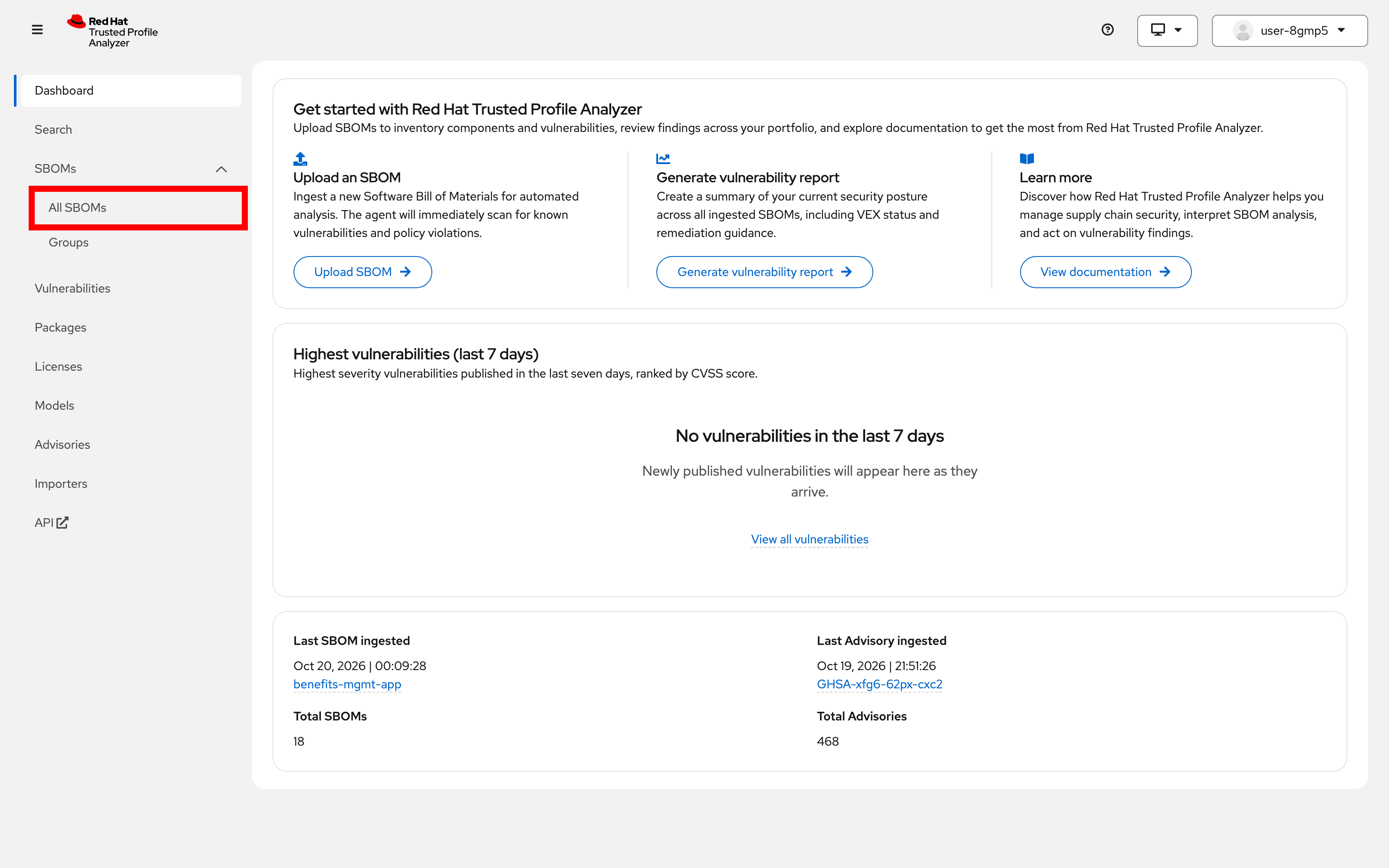
In the left-hand navigation, expand SBOMs and choose All SBOMs:
Every build each application has ever produced is listed, with its dependency and vulnerability counts. On a fresh tenant that is a short list, and both of the applications you just remediated appear twice — once as shipped, once as rebuilt.
You do not need to open anything to see the result — the list itself is the evidence. For each application the original build and the remediated one sit next to each other, so the before and after are on one screen:
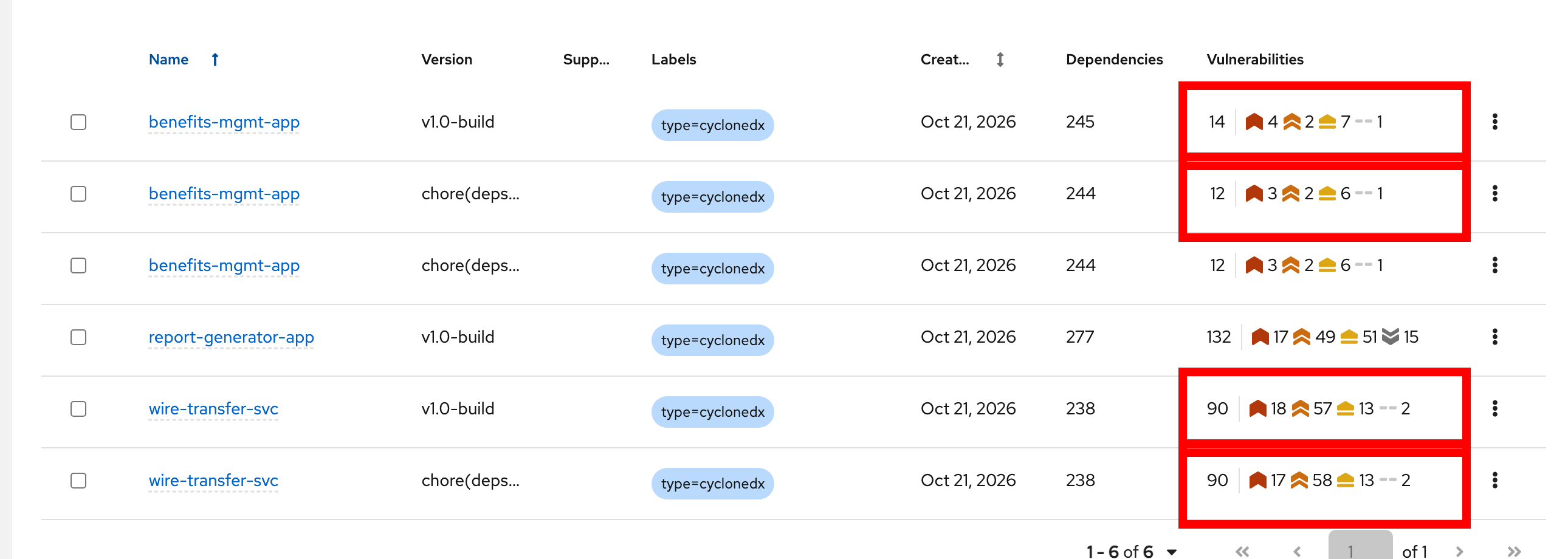
v1.0-build is the application as it shipped; chore(deps)… is the build produced after remediation. Same application, one dependency different:
| Application | Build | Dependencies | Vulnerabilities |
|---|---|---|---|
|
|
245 |
14 — 4 critical |
|
244 |
12 — 3 critical |
|
|
|
238 |
90 — 18 critical |
|
238 |
90 — 17 critical |
The two tell different stories, and the difference is worth understanding.
For benefits-mgmt-app the headline number moves: two vulnerabilities fewer, one of them critical, and one dependency fewer. The vulnerable commons-text is gone and the .rhlw build stands in its place.
For wire-transfer-svc the total does not move at all. It stays at 90, with one critical becoming one high. That is not a failed remediation — it is an honest picture of a payment system carrying 238 dependencies and a long tail of known issues that this one fix was never going to touch. The build changed; the backlog did not.
|
A count is not proof, and this is the clearest place in the lab to see why. TPA can only subtract advisories it actually holds. If a component has no advisory in this tenant’s dataset, the number is unchanged even though the dependency genuinely changed — and on an application with 90 findings, a single remediation barely registers. The reliable evidence is the SBOM contents: open either build and search the component list for the coordinate. The vulnerable version is absent and the |
Notice what none of this required: nobody wrote a report and nobody updated a spreadsheet.
The verification is not a separate exercise bolted on at the end. The pipeline uploaded the SBOM as part of the build, which means the evidence for the next remediation is already in place. That is what makes the loop a loop.
The Incident Closes Last
Switch back to the Snow tab on the right (or open it in a new tab).
The parent incident is now Resolved. Read its thread from the top — it is deliberately short, a sequence of milestones with links down into the children:
-
The incident was raised the moment the artifact manager announced the artifact — before anything was known about who was affected
-
Child tickets were opened, one per application TPA said was genuinely affected
-
Each application reached a reviewable merge request
-
Merge, build and deploy were each noted as they landed
-
The parent moved to Resolved once ArgoCD reported the application Healthy
Now open a child. That is where the work actually is: the merge request link, the CVE, the verifier outcome, the pipeline run, the ArgoCD application and the route the fixed code is now serving on. The parent tells an operator where things stand; the child tells them what happened.
Notice what resolved it. Not the merge, and not a green pipeline — the deploy. SNOW finalize only runs in the Deploy workflow, so the ticket stays open until the remediated code is actually running. A build that passes and never ships does not close anything.
That is also why three workflows rather than one long-running job. The Start run ends when the merge requests are ready; merge and deploy arrive later as webhooks and start their own short executions. The incident is what stitches them back into a single story — which is precisely the job a ticket is supposed to do.
| The child incidents stay open. Only the parent is resolved today; per-application close on deploy success is not wired up. If you are demonstrating this to an auditor, show them the parent and let them click down. |
|
This is the slide that usually lands in front of a risk or compliance team. Nobody had to be asked for the evidence, and nobody had to assemble it afterwards. The incident was open before the change existed, it accumulated every decision and measurement along the way, and it closed when the fix was live — produced entirely as a side effect of doing the work. |
Summary
You have just run the Full Automation path end to end:
-
You published a remediated artifact; the artifact manager raised a
component CREATEDevent -
Event-Driven Ansible acted as a sensor and started the Orchestrator workflow
-
The Orchestrator opened a Snow incident before proposing any change
-
TPA answered which applications were genuinely affected, from SBOM data
-
Each application was classified against its own
.lightwell/policy.json -
The
impact-analyzeragent opened a merge request carrying CVE data, risk class and a validation table -
The
build-pull-requestpipeline tested the change and wrote the real results back into that table -
benefits-mgmt-appwas auto-approved and merged by the Orchestrator, without you -
wire-transfer-svcpassed every check, and its merge request still said human review was required, so it waited for you to merge it in GitLab -
Both were built, signed, promoted and deployed by the same pipeline and ArgoCD
-
The parent incident resolved once ArgoCD reported the deployment Healthy, carrying a complete, timestamped trail
What This Actually Buys You
The difference from the quick win path is not "AI wrote the merge request". It is three things:
-
Scope — the system knows which applications contain the component, because it asked TPA rather than scanning a single repository.
-
Evidence — by the time a human looks at the change, the tests have run and the results are in the merge request. The reviewer reads measurements, not promises.
-
Proportionality — attention is spent where it changes the outcome. An internal HR application merges itself. A PCI-scoped payment service does not, and no amount of green ticks changes that.
Scale is what makes this necessary. One remediation a week is a Renovate problem. Forty a week across sixty repositories, each needing a risk judgement and an audit trail, is an orchestration problem — and the only way a human stays in the loop at that volume is if the loop stops bothering them about benefits-mgmt-app.
Continue to Module 4: Wrap-Up.