MCP Gateway
Feature Overview
The MCP Gateway, part of Red Hat Connectivity Link, builds on top of the routing capabilities of Envoy — a conformance-tested implementation of the Kubernetes Gateway API — to handle the Model Context Protocol. It enables platform engineers and teams to expose MCP servers via a gateway as secure, protected services, just as they do with existing RESTful APIs. This extends the benefits of the Envoy proxy to AI agent systems that require data or need to perform actions through backend MCP servers, providing server federation, tool discovery, team-based access control, authentication, rate limiting, and policy enforcement — all without requiring changes to the backend MCP servers.
                          ┌─────────────────────────────────┐
                          │        MCP Gateway              │
  AI Clients              │  ┌───────────┐  ┌────────────┐  │    Backend MCP Servers
  ─────────               │  │  Auth     │  │  Rate      │  │    ────────────────────
                          │  │  Policy   │  │  Limit     │  │
  Claude ──┐              │  │ (Keycloak)│  │ (per-user) │  │  ┌────────────────────┐
           │   ┌───────┐  │  └───────────┘  └────────────┘  │  │ inventory (5 tools)│
  Cursor ──┼──▶│ HTTP  │──▶   ┌──────────────────────────┐  ├─▶│ payments  (5 tools)│
           │   │ :80   │  │   │  Tool Router + Broker    │  │  │ accounts  (5 tools)│
  FastMCP ─┘   └───────┘  │   │  (prefix-based routing)  │  │  └────────────────────┘
                          │   └──────────────────────────┘  │
                          │        ▼ traces                 │  ┌──────────┐
                          │     ┌──────┐                    │  │  Keycloak │
                          │     │Jaeger│                    │  └──────────┘
                          │     └──────┘                    │
                          └─────────────────────────────────┘

  user1 (team-a) ──▶ inventory + accounts tools
  user2 (team-b) ──▶ payments tools only
Your environment includes:
-
3 mock MCP servers —
inventory(warehouse management),payments(transaction processing),accounts(customer management) — each with 5 tools -
Federated gateway — aggregates all servers into a single endpoint with prefix-based tool routing (
inventory_,payments_,accounts_) -
Keycloak OIDC authentication — bearer token auth with per-user rate limiting
-
Team-based authorization —
user1(team-a: inventory + accounts) anduser2(team-b: payments only) enforced via JWT claims -
Jaeger tracing — distributed traces for every MCP request
Before You Begin
All commands in this section should be run in the terminal on the right side of this window.
-
If opencode is still open in the terminal from the previous module, leave it. In the opencode session, type
/exit:/exit -
Verify the FastMCP CLI is available (it was pre-installed during environment provisioning):
fastmcp version -
Set up environment variables and persist them to
~/.bashrc(in case your terminal session disconnects):export SSO_URL="https://sso.{openshift_cluster_ingress_domain}" export SERVER=https://mcp-gateway.{openshift_cluster_ingress_domain}/mcp export USER1_TOKEN=$(curl -sk "${SSO_URL}/realms/keycloak/protocol/openid-connect/token" \ -d "grant_type=password&client_id=mcp-gateway&client_secret=mcp-gateway-secret&username=user1&password=user1pass" \ | jq -r '.access_token') export USER2_TOKEN=$(curl -sk "${SSO_URL}/realms/keycloak/protocol/openid-connect/token" \ -d "grant_type=password&client_id=mcp-gateway&client_secret=mcp-gateway-secret&username=user2&password=user2pass" \ | jq -r '.access_token') cat >> ~/.bashrc << EOF export SSO_URL=$SSO_URL export SERVER=$SERVER export USER1_TOKEN=$USER1_TOKEN export USER2_TOKEN=$USER2_TOKEN EOF echo "============================================================" echo "Tokens generated (valid for 8 hours)" echo "SERVER=$SERVER" echo "============================================================"If your terminal disconnects, the environment variables will be restored automatically when you reconnect. -
Verify the MCP Gateway and mock servers are running:
oc get pods -n mock-mcp-servers && \
oc get mcpserverregistrations -n mock-mcp-servers
You should see
inventory,payments, andaccountsall showingREADY: True. -
Explore the Connectivity Link console plugin. The MCP Gateway console plugin extends the OpenShift web console with a dedicated UI for managing gateway resources. It provides an overview dashboard, policy management views, a policy topology graph, and API deployment tracking (API deployments are not used in this environment — only MCP Gateway resources).
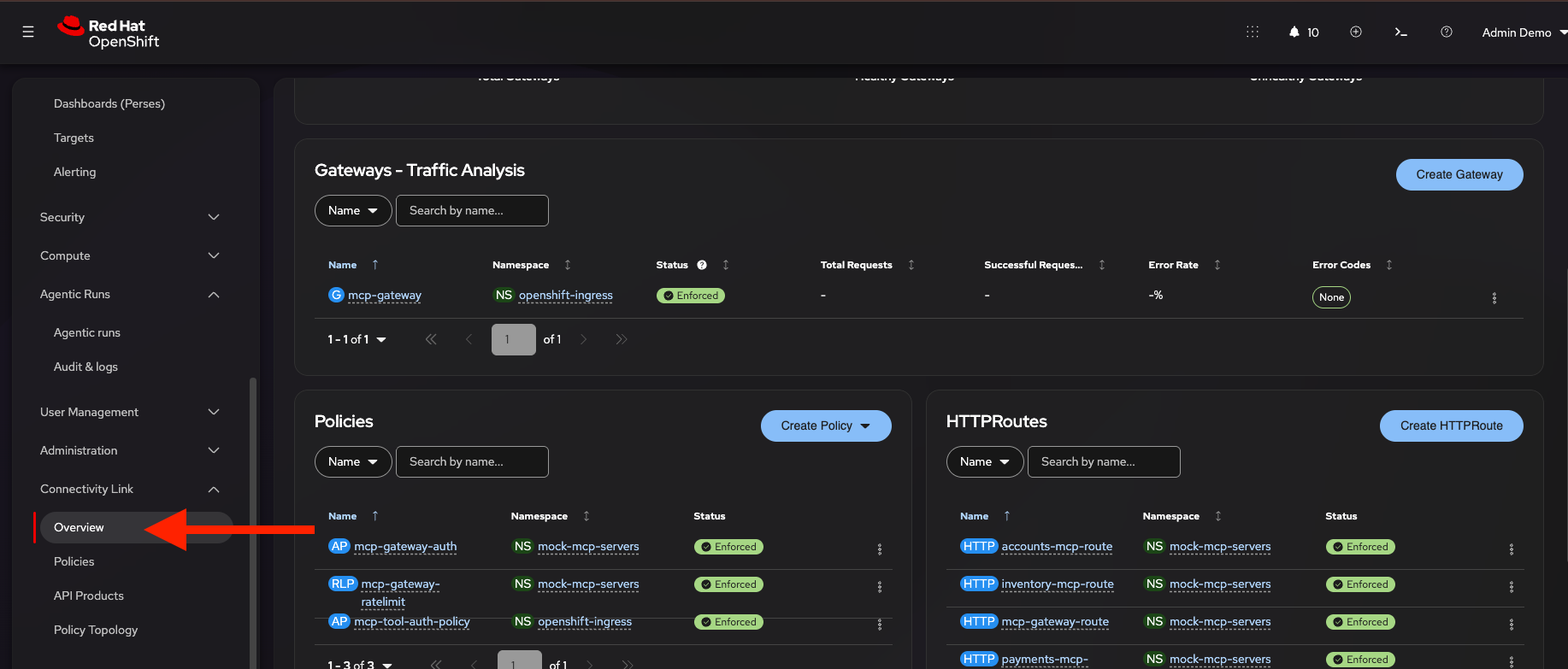
Navigate to Connectivity Link > Overview in the OpenShift console and select All Projects from the project dropdown to see a dashboard of gateway health, policy counts, and HTTPRoute summary across the cluster.
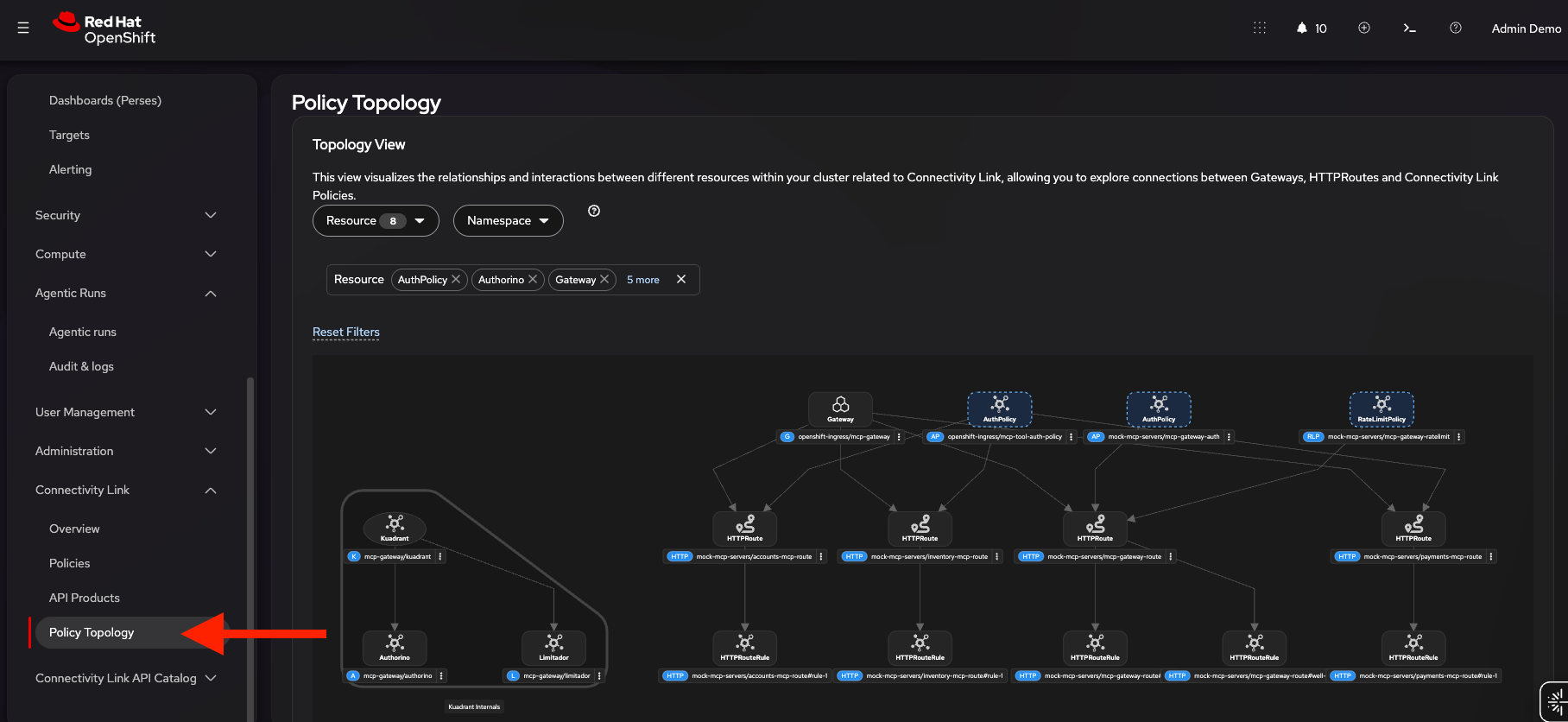
Then navigate to Connectivity Link > Policy Topology to see a visual graph of how the MCP Gateway, its HTTPRoutes for the mock MCP servers (inventory, payments, accounts), and the attached policies (AuthPolicy, RateLimitPolicy) relate to each other.
Hands-on Exercises
Exercise 1: Connect to the MCP Gateway
In this exercise, you will connect to the federated MCP Gateway endpoint and verify it responds with a valid MCP handshake.
-
Verify the gateway rejects unauthenticated requests:
fastmcp list $SERVER --auth noneYou should see a connection error — the gateway returns
401 Unauthorizedwithout a valid token. -
Now connect with your token:
fastmcp list $SERVER --auth $USER1_TOKENYou should see 17 tools listed — 5 from each of the 3 mock servers, plus 2 gateway discovery tools (
discover_toolsandselect_tools).
The gateway accepts any MCP-compatible client using the same URL and bearer token.
Exercise 2: Discover and Invoke Federated Tools
The gateway federates tools from all registered MCP servers, applying a prefix to each tool name to avoid collisions.
-
List all available tools:
fastmcp list $SERVER --auth $USER1_TOKENNotice the prefixes:
inventory_,payments_,accounts_— these map to the MCPServerRegistration names. -
Call a tool from the inventory server:
fastmcp call $SERVER inventory_list_products --auth $USER1_TOKENThe gateway routes the call to the inventory mock server and returns product data.
-
Try another tool from a different server to verify federation:
fastmcp call $SERVER accounts_list_accounts --auth $USER1_TOKEN
Each tool call is routed to the correct backend server transparently. The client only needs to know the gateway endpoint. In Exercise 4, you will see how team-based authorization restricts which servers each user can access.
Exercise 3: OIDC Authentication
The gateway enforces OAuth 2.0 / OIDC authentication via Keycloak. Unauthenticated requests are rejected, and the gateway auto-discovers the OIDC configuration from the Keycloak issuer URL.
-
Verify the OIDC discovery endpoint:
curl -sk ${SSO_URL}/realms/keycloak/.well-known/openid-configuration | jq '{issuer, token_endpoint, jwks_uri}'The gateway uses this endpoint to validate JWT tokens without manual JWKS configuration.
-
Verify that requests without a token are rejected:
fastmcp list $SERVER --auth noneYou should see a connection error — the gateway returns
401 Unauthorized. -
Verify that your token is accepted:
fastmcp list $SERVER --auth $USER1_TOKENYou should see the full list of 17 tools — confirming your token is valid.
Tokens are issued by Keycloak and validated by the gateway’s AuthPolicy — no token configuration is needed on the backend MCP servers.
Exercise 4: Team Isolation — Role-Based Tool Authorization
Access to individual tools is controlled by Keycloak groups and client roles. Each user’s JWT token contains a resource_access claim that lists which tools they can call.
-
user1 (team-a) — can access inventory + accounts tools (10 tools)
-
user2 (team-b) — can access payments tools only (5 tools)
-
Query the live Keycloak configuration to see the group-to-tool mappings. This accesses the Keycloak admin API to show each user’s group membership and the tools they are authorized to call — this is fully configurable through the Keycloak admin console:
ADMIN_USER=$(oc get secret keycloak-initial-admin -n keycloak -o jsonpath='{.data.username}' | base64 -d)
ADMIN_PASS=$(oc get secret keycloak-initial-admin -n keycloak -o jsonpath='{.data.password}' | base64 -d)
TOKEN=$(curl -sk "${SSO_URL}/realms/master/protocol/openid-connect/token" \
  -d "grant_type=password&client_id=admin-cli&username=${ADMIN_USER}&password=${ADMIN_PASS}" \
  | jq -r '.access_token')

kc() { curl -sk -H "Authorization: Bearer ${TOKEN}" "${SSO_URL}/admin/realms/keycloak/$1"; }

G='\033[0;32m' C='\033[0;36m' Y='\033[1;33m' W='\033[1;37m' R='\033[0m'
printf "${W}%-10s %-8s %s${R}\n" "User" "Group" "Accessible Tools"
printf "${W}%-10s %-8s %s${R}\n" "-------" "------" "----------------"
for user in user1 user2; do
  USER_ID=$(kc "users?username=${user}&exact=true" | jq -r '.[0].id')
  kc "users/${USER_ID}/groups" | jq -r '.[].name' | while read group; do
    GROUP_ID=$(kc "groups?search=${group}" | jq -r '.[0].id')
    TOOLS=$(kc "clients" | jq -r '.[] | select(.clientId | contains("mock-mcp")) | .id' | while read cid; do
      kc "groups/${GROUP_ID}/role-mappings/clients/${cid}" | jq -r '.[].name' 2>/dev/null
    done | sed 's/tool://' | sort | paste -sd, -)
    printf "${G}%-10s ${Y}%-8s ${C}%s${R}\n" "$user" "$group" "$TOOLS"
  done
done
This shows that
user1belongs toteam-aand can call all inventory and accounts tools (10 tools), whileuser2belongs toteam-band can only call payments tools (5 tools). These mappings are enforced by the gateway’s AuthPolicy using CEL expressions that inspect the JWTresource_accessclaim. -
First, verify that user1 can call an inventory tool:
fastmcp call $SERVER inventory_list_products --auth $USER1_TOKENThis should succeed — user1 has inventory access.
-
Now try a payments tool — this should fail:
fastmcp call $SERVER payments_list_transactions --auth $USER1_TOKENUser1 does not have payments access. You should see an authorization error.
-
Using the
user2token (generated in Before You Begin), verify user2 can call payments but not inventory:fastmcp call $SERVER payments_list_transactions --auth $USER2_TOKENfastmcp call $SERVER inventory_list_products --auth $USER2_TOKENThe first call should succeed; the second should fail with an authorization error.
-
Team isolation is enforced without separate namespaces or gateways — a single federated gateway uses JWT claims to control per-tool access.
Exercise 5: Per-User Rate Limiting
The gateway enforces per-user rate limits based on the JWT sub claim. Each user has an independent request quota — one user hitting their limit does not affect others.
-
First, inspect the RateLimitPolicy that is currently in effect:
oc get ratelimitpolicy mcp-gateway-ratelimit -n mock-mcp-servers -o json | jq '.spec'Notice the
per-userlimit withlimit: 30andwindow: 1m— this means each user is allowed 30 requests per minute. Thecountersfield usesauth.identity.subto track each user independently. -
Now send 50 rapid requests as user1 to exceed the limit:
for i in $(seq 1 50); do
  CODE=$(curl -sk -o /dev/null -w '%{http_code}' --max-time 5 \
    $SERVER -X POST -H "Content-Type: application/json" \
    -H "Authorization: Bearer $USER1_TOKEN" \
    -d '{"jsonrpc":"2.0","id":0,"method":"initialize","params":{"protocolVersion":"2025-03-26","capabilities":{},"clientInfo":{"name":"test","version":"1.0"}}}')
  if [ "$CODE" = "200" ]; then
    echo -e "Request ${i}: \033[32mHTTP ${CODE} OK\033[0m"
  elif [ "$CODE" = "429" ]; then
    echo -e "Request ${i}: \033[31mHTTP ${CODE} RATE LIMITED\033[0m"
  else
    echo -e "Request ${i}: \033[33mHTTP ${CODE}\033[0m"
  fi
done
The first 30 requests show green
200 OK, then requests 31+ show red429 RATE LIMITED.You may hit the rate limit before request 30 if previous exercises consumed some of your per-minute quota. The important thing is that the limit is hit and you see the transition from green 200to red429. -
Inspect the rate limit headers returned on a 429 response:
curl -svk $SERVER -X POST -H "Content-Type: application/json" \
  -H "Authorization: Bearer $USER1_TOKEN" \
  -d '{"jsonrpc":"2.0","id":0,"method":"initialize","params":{"protocolVersion":"2025-03-26","capabilities":{},"clientInfo":{"name":"test","version":"1.0"}}}' 2>&1 \
  | grep -iE '< HTTP|< x-ratelimit'
You should see:
-
x-ratelimit-limit: 30, 30;w=60;name="per-user"— 30 requests per 60-second window -
x-ratelimit-remaining: 0— quota exhausted -
x-ratelimit-reset: <seconds>— seconds until the window resets
-
-
While user1 is rate-limited, verify that user2 can still make requests:
fastmcp list $SERVER --auth $USER2_TOKENEach user has an independent counter.
-
Before continuing, increase the rate limit to 200 requests/minute so it doesn’t interfere with the remaining exercises:
oc get ratelimitpolicy mcp-gateway-ratelimit -n mock-mcp-servers -o json \
  | jq '.spec.limits["per-user"].rates[0].limit = 200' \
  | oc replace -f -
Exercise 6: Policy Hot-Reload
MCP Gateway policies can be updated at runtime without restarting the gateway. Changes take effect within 15 seconds. In this exercise, we will modify the same RateLimitPolicy from Exercise 5 and observe the new limit take effect almost immediately.
-
Check the current rate limit:
oc get ratelimitpolicy mcp-gateway-ratelimit -n mock-mcp-servers -o json \ | jq '{limit: .spec.limits["per-user"].rates[0].limit, window: .spec.limits["per-user"].rates[0].window, counter: .spec.limits["per-user"].counters[0].expression}' -
Update the rate limit to 5 requests/minute:
oc get ratelimitpolicy mcp-gateway-ratelimit -n mock-mcp-servers -o json \ | jq '.spec.limits["per-user"].rates[0].limit = 5' \ | oc replace -f - -
Wait 15 seconds, then test — you should see 429 after just 5 requests:
echo "Waiting 15 seconds for policy hot-reload..." sleep 15 echo "Testing new rate limit:" for i in $(seq 1 10); do CODE=$(curl -sk -o /dev/null -w '%{http_code}' --max-time 5 \ $SERVER -X POST -H "Content-Type: application/json" \ -H "Authorization: Bearer $USER1_TOKEN" \ -d '{"jsonrpc":"2.0","id":0,"method":"initialize","params":{"protocolVersion":"2025-03-26","capabilities":{},"clientInfo":{"name":"test","version":"1.0"}}}') if [ "$CODE" = "200" ]; then echo -e "Request ${i}: \033[32mHTTP ${CODE} OK\033[0m" elif [ "$CODE" = "429" ]; then echo -e "Request ${i}: \033[31mHTTP ${CODE} RATE LIMITED\033[0m" else echo -e "Request ${i}: \033[33mHTTP ${CODE}\033[0m" fi done -
Clean up by deleting the modified RateLimitPolicy — OpenShift GitOps (Argo CD) will automatically restore the original definition:
oc delete ratelimitpolicy mcp-gateway-ratelimit -n mock-mcp-serversWait a moment for ArgoCD to recreate it, then verify it’s back:
oc get ratelimitpolicy mcp-gateway-ratelimit -n mock-mcp-servers -o json \
  | jq '.spec.limits["per-user"].rates[0].limit'
If the reconciliation is too slow, change the rate limit back to 200 requests/minute with this command: oc get ratelimitpolicy mcp-gateway-ratelimit -n mock-mcp-servers -o json \ | jq '.spec.limits["per-user"].rates[0].limit = 200' \ | oc replace -f -
Policy changes are reconciled by the MCP Gateway operator and applied without any gateway restart or downtime.
Exercise 7: OpenTelemetry Tracing with Jaeger
The MCP Gateway emits OpenTelemetry traces for every request, providing visibility into the request flow from client through the gateway to backend MCP servers.
-
Generate some traffic:
fastmcp call $SERVER inventory_list_products --auth $USER1_TOKEN fastmcp call $SERVER accounts_list_accounts --auth $USER1_TOKEN fastmcp call $SERVER inventory_check_stock_alerts --auth $USER1_TOKEN -
Click Jaeger UI to open it, or paste the URL below into a new browser tab:
https://jaeger-mock-mcp-servers.{openshift_cluster_ingress_domain} -
Select the
mcp-gatewayservice, then selectmcp-router.tool-callfrom the Operation dropdown, and click Find Traces. This filters to only the tool call traces (excluding initialize and tools/list requests).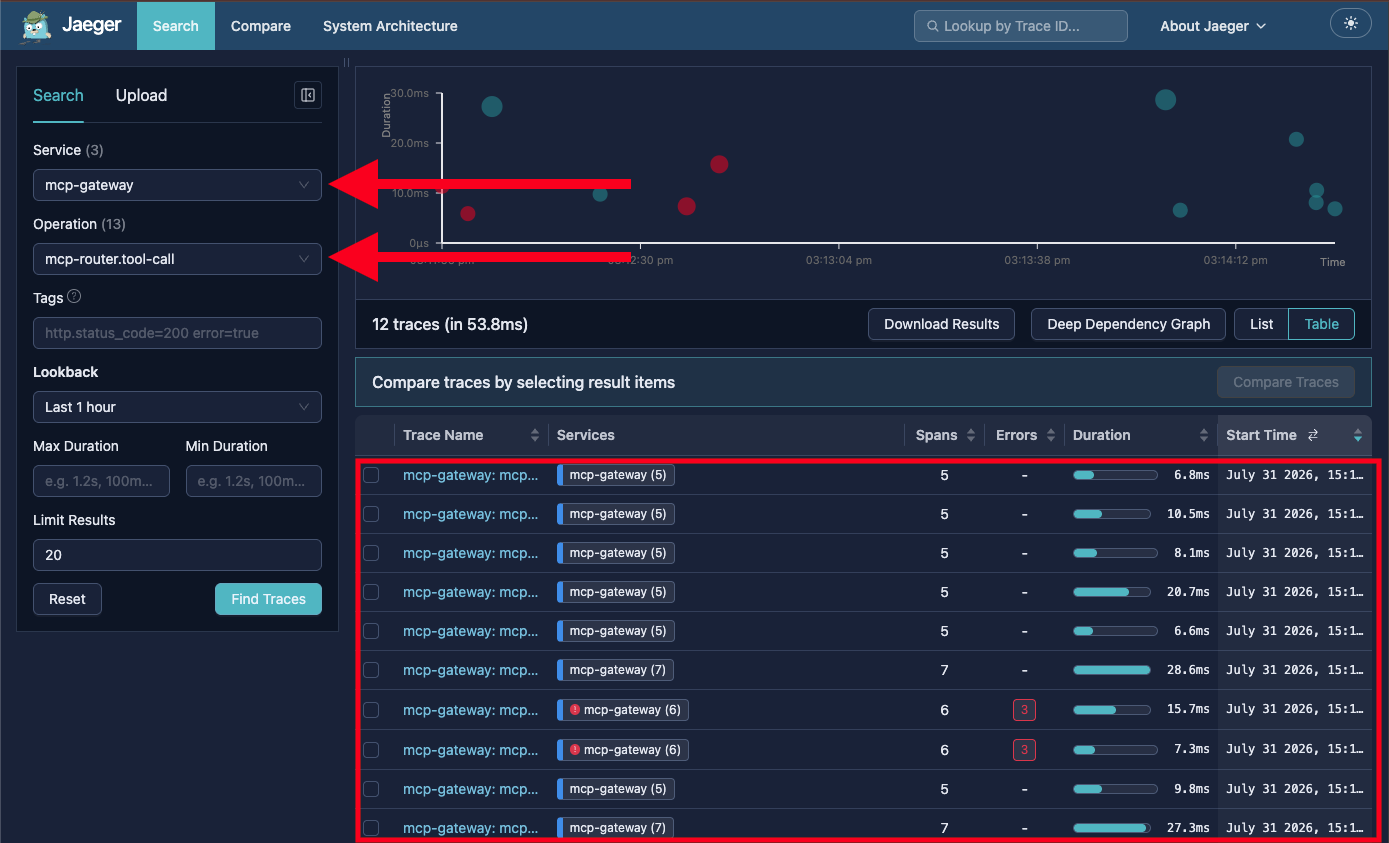
You may also see the earlier rate-limited failures highlighted in red — this is expected and provides a useful view of how the gateway enforces policy.
-
Click on a trace with multiple spans — tool call traces show the full span hierarchy:
-
mcp-router.process— top-level request processing -
mcp-router.route-decision— broker passthrough vs tool call routing -
mcp-router.tool-call— tool call with backend session managementEach span includes MCP-specific tags:
mcp.method.name,mcp.server(e.g.,mock-mcp-servers/inventory),mcp.route, andmcp.session.id.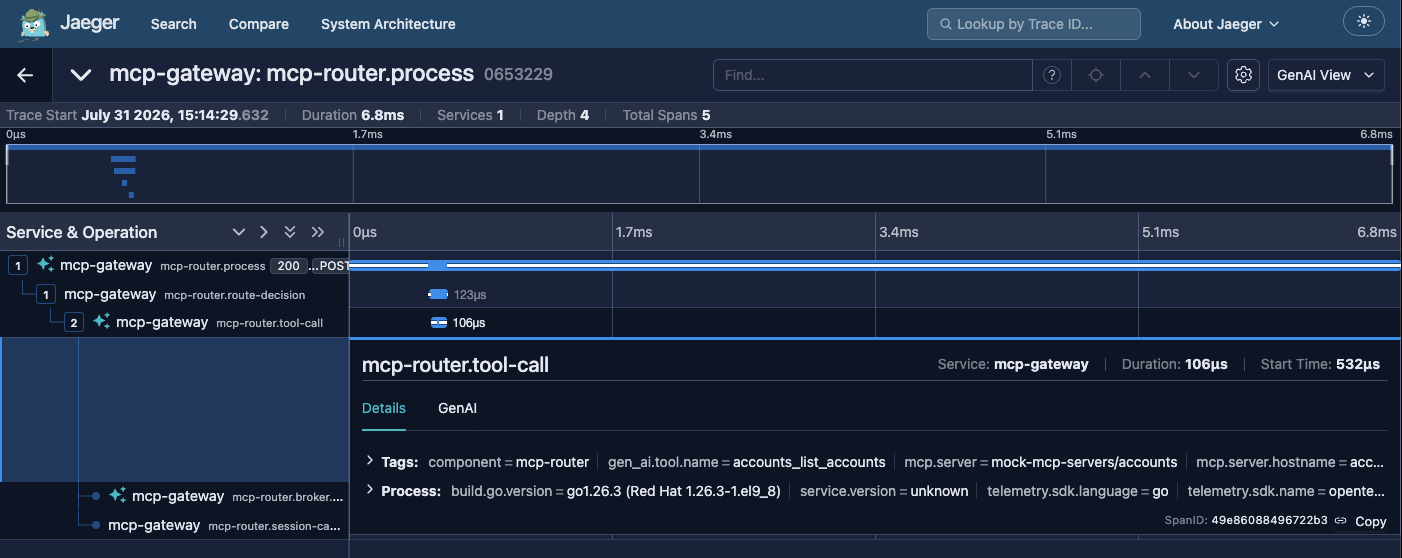
-
Traces provide end-to-end visibility into request flow, making it easy to diagnose latency issues, identify failing backends, and understand routing decisions.
Exercise 8: Graceful Degradation
When a backend MCP server becomes unavailable, the gateway gracefully removes its tools from the federated tool set while keeping other servers operational.
-
Verify the current tool count:
fastmcp list $SERVER --auth $USER1_TOKENThe first line of output shows
Tools (17)— confirming all three backend servers are available. -
Scale down the inventory server:
oc scale deployment inventory-mcp -n mock-mcp-servers --replicas=0 -
Wait approximately 60 seconds for the gateway to detect the unavailability, then list tools again:
sleep 60
fastmcp list $SERVER --auth $USER1_TOKEN
The 5
inventory_tools should be gone, butpayments_andaccounts_tools continue to work normally. -
Scale the inventory server back up:
oc scale deployment inventory-mcp -n mock-mcp-servers --replicas=1After approximately 60 seconds, the inventory tools will reappear.
The gateway provides graceful degradation without any client-side error handling — unavailable servers are silently removed from the tool set and restored when they recover.
Exercise 9: Connect an AI Client (opencode)
MCP-compatible AI clients can connect to the gateway and interact with the mock MCP servers through natural language. So you don’t need to install or pay for a client on your own machine, your environment includes an mcp-cli pod running opencode, an open source AI coding agent. It is pre-configured with the lab’s LLM and with the gateway as an MCP server named mcp-gateway.
-
Verify the
mcp-clipod is running:oc get pods -n mcp-cli -
Start opencode in the pod, passing your
user1token from the terminal:oc exec -it -n mcp-cli deploy/mcp-cli -- env GATEWAY_MCP_TOKEN=$USER1_TOKEN opencodeThe token is only set for this opencode session. opencode connects to the gateway at startup, and gateway tools appear with an
mcp-gateway_prefix (for examplemcp-gateway_inventory_list_products).If your terminal disconnects while opencode is running, or opencode does not start (the screen stays blank), an earlier opencode session is probably still running in the
mcp-clipod and blocking new ones. Delete the pod — it is recreated automatically — and wait for the new one to be ready:oc delete pod -n mcp-cli -l app=mcp-cli oc rollout status deployment/mcp-cli -n mcp-cliThen run the start command above again.
-
Try these natural language prompts:
-
"What products are in the warehouse inventory?"
-
"Are there any stock alerts I should know about?"
-
"Show me today’s payment summary" — this should fail (user1 doesn’t have payments access)
-
"What is the account status for Acme Corp?"
-
"Check if GlobalTech Industries has enough credit for a $10,000 order"
-
-
Leave opencode. In the opencode session, type
/exit:/exit -
To repeat the exercise as
user2, start it again withGATEWAY_MCP_TOKEN=$USER2_TOKEN— this time the payments prompt succeeds and the inventory and accounts prompts fail. -
When you are done, leave opencode. In the opencode session, type
/exit:/exit
The AI automatically discovers tools, selects the right one for each query, and routes the request through the gateway — with authentication and team isolation enforced transparently.
Known Limitations
-
Tool calls use hairpin routing through the gateway — the backend session is established via the gateway’s internal service
-
HTTPS on the Gateway listener itself requires a wildcard TLS certificate which ACME providers reject for deeply nested OpenShift domains — TLS is instead terminated at the OpenShift router, through an edge Route in front of the gateway
-
Rate limit
Retry-Afterheader is not natively supported — usex-ratelimit-resetfrom the IETF draft-03 headers instead -
Broker-level Prometheus metrics (
mcp_broker_*) are not available in the Red Hat tech preview build
Key Takeaways
-
The MCP Gateway federates multiple MCP servers behind a single authenticated endpoint
-
Team isolation is enforced via Keycloak groups and JWT claims — no separate namespaces needed
-
Per-user rate limiting uses the JWT
subclaim for independent counters -
Policies (auth, rate limit) can be updated at runtime without gateway restart
-
OpenTelemetry traces provide full request-level observability through Jaeger
-
Graceful degradation automatically removes unavailable servers from the tool set
-
Any MCP-compatible client (FastMCP CLI, opencode, Claude, Cursor) can connect with a URL and bearer token