Module 3: Agentic Application Operations — Investigate a Broken Deployment
Start here: Log in to OpenShift
Open the Showroom Terminal tab and authenticate using your assigned workshop credentials before running any other oc commands:
oc login --server=https://api.cluster-%GUID%.example.com:6443 --username=user-guid --password='password' --insecure-skip-tls-verifyVerify that oc whoami returns user-guid. This is a disposable lab environment: the `-p` option can expose your password in shell history and process listings. Do not reuse this password on a personal or production cluster.
In Module 1 you deployed National Parks through the OpenShift 5 console. In Module 2 you deployed an independent complete National Parks stack through Gitea and OpenShift GitOps. Both stacks should now work.
Your next responsibility is operating the application. A new ParksMap release has been deployed, but it never becomes ready. The API and database still work. You will reproduce this incident safely in your own GitOps namespace, use OpenShift Lightspeed to investigate it, compare a real AgenticRun with conventional evidence, and repair the fault through Git.
This is an application-focused adaptation of the OpenShift 5 Agentic Troubleshooting lab. The source lab includes automatically triggered investigations from Alertmanager and a human approval workflow. In this shared multi-student workshop we use an on-demand, analysis-only run instead: no changes to cluster-wide alert routing, agentic approval policies or other students' applications.
Estimated time: 40 minutes. AgenticRun is student-owned only when an instructor has verified sandbox namespace isolation and enabled student RBAC; otherwise use the instructor demo/read-only fallback.
| Time | Mission |
|---|---|
6 min |
1 — Establish a two-namespace application baseline and inspect shared resource usage. |
7 min |
2 — Commit a deliberately incorrect ParksMap readiness port and watch GitOps reconcile. |
9 min |
3 — Ask Lightspeed to investigate using live, verifiable application evidence. |
10 min |
4 — Review an on-demand AgenticRun: analysis, proposal, evidence and human approval boundary. |
8 min |
5 — Repair the YAML through Gitea, verify the rollout and compare with the baseline. |
Learning objectives
After completing this module you should be able to:
-
Explain why a new Pod can be Running but not Ready, leaving a Deployment rollout stuck while an old healthy Pod may continue serving the Route.
-
Use a Git commit to introduce and correct a reproducible application-only readiness incident.
-
Distinguish OpenShift GitOps sync from Deployment health and HTTP availability.
-
Use Lightspeed Troubleshooting with live MCP tools to investigate Pod events, readiness probes and application logs; verify any AI conclusion with oc.
-
Explain the difference between conversational troubleshooting and a persisted AgenticRun, including the Analysis → Proposed → human decision lifecycle.
-
Compare the resource requests and limits of both applications against the existing shared ClusterResourceQuota without creating new quota resources.
|
Safe scope: two independent applications
Your first application stays in {user}-demo. The GitOps application lives in {user}-gitops, and its Argo CD instance and Application resource also live in {user}-gitops.
|
|
Agentic features are a separately verified prerequisite
OpenShift Lightspeed Troubleshooting with the MCP server can be available without the Agentic Operator, AgenticRun API, Agentic Runs console plug-in, oc agentic CLI or alert adapter. Their installation, permissions and support status depend on the actual workshop cluster, not on the presence of OpenShift 5 alone. The core investigation in Missions 2, 3 and 5 works with GitOps, oc and Lightspeed. Mission 4 offers an analysis-only AgenticRun in the student’s own GitOps namespace only when securely authorized, plus an instructor demonstration and complete read-only fallback. No student needs cluster-administrator credentials. |
|
Instructor/lab-developer shortcut for repeated Module 3 testing
If you are rehearsing Module 3 onward and do not want to click through Modules 1 and 2 again, run the student-only baseline helper from a terminal authenticated as user-guid: It safely reuses already healthy Deployments, or provisions a known-good National Parks stack in {user}-demo and an Auto-Sync GitOps copy in {user}-gitops. If the student Gitea main is stale, the script refuses to modify workloads; use --sync-gitea only when explicitly resetting that student’s GitOps full-stack source. Existing workshop projects, Gitea and Argo CD must already be provisioned. The helper deliberately does not inject Module 3’s readiness fault or create AgenticRuns. See docs/instructor/module03-fast-forward-bootstrap.md for the preflight and recovery limits. This shortcut is for rehearsal, not a replacement for students completing the preceding training activities. |
Before you begin: confirm your student context
After the login at the beginning of this module, confirm that the terminal uses the assigned user-guid student identity.
oc whoami

STUDENT="$(oc whoami)"
case "$STUDENT" in
  user-*) ;;
  *) echo "Use your assigned user-<guid> account, not an admin or Showroom ServiceAccount." >&2; exit 1 ;;
esac

export LAB_NAMESPACE="$STUDENT-demo"
export GITOPS_NAMESPACE="$STUDENT-gitops"
export ARGOCD_NAMESPACE="$STUDENT-gitops"
export ARGOCD_APP=national-parks-settings

printf 'Original app: %s\nGitOps app: %s\nArgo CD Application project: %s\n' \
  "$LAB_NAMESPACE" "$GITOPS_NAMESPACE" "$ARGOCD_NAMESPACE"

oc get deployments -n "$LAB_NAMESPACE"
oc get deployments -n "$GITOPS_NAMESPACE"
oc get application "$ARGOCD_APP" -n "$ARGOCD_NAMESPACE" \
  -o json | jq -r '[.status.sync.status, .status.health.status] | join(" / ")'
Expected baseline: the GitOps namespace has mongodb-nationalparks, nationalparks and parksmap at 1/1 Ready. The Argo CD Application is normally Synced / Healthy. The original application in {user}-demo is still healthy.
If either application is already unhealthy, do not inject the incident: complete Module 2 recovery with your instructor first.
Mission 1: Capture a two-namespace baseline (6 minutes)
Before investigating a failed rollout, capture evidence from a known-good application. Your baseline lets you prove later that only the intended frontend changed.
-
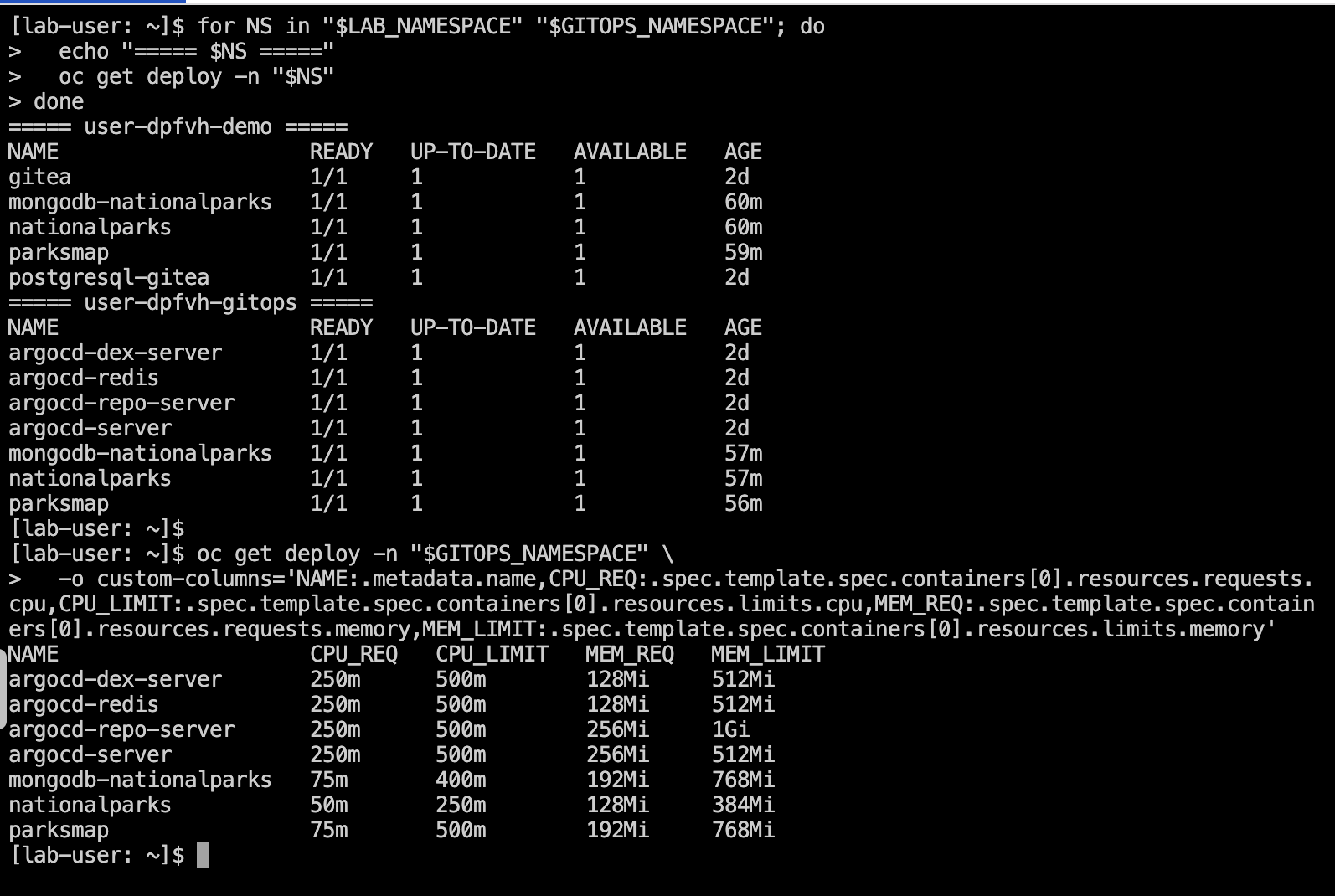
Compare the running application Deployments:
for NS in "$LAB_NAMESPACE" "$GITOPS_NAMESPACE"; do
  echo "===== $NS ====="
  oc get deploy -n "$NS"
done

oc get deploy -n "$GITOPS_NAMESPACE" \
  -o custom-columns='NAME:.metadata.name,CPU_REQ:.spec.template.spec.containers[0].resources.requests.cpu,CPU_LIMIT:.spec.template.spec.containers[0].resources.limits.cpu,MEM_REQ:.spec.template.spec.containers[0].resources.requests.memory,MEM_LIMIT:.spec.template.spec.containers[0].resources.limits.memory'
The GitOps stack is deliberately small. Your actual values may differ if the instructor has released a newer resource profile. Do not change requests or limits for this incident.
-
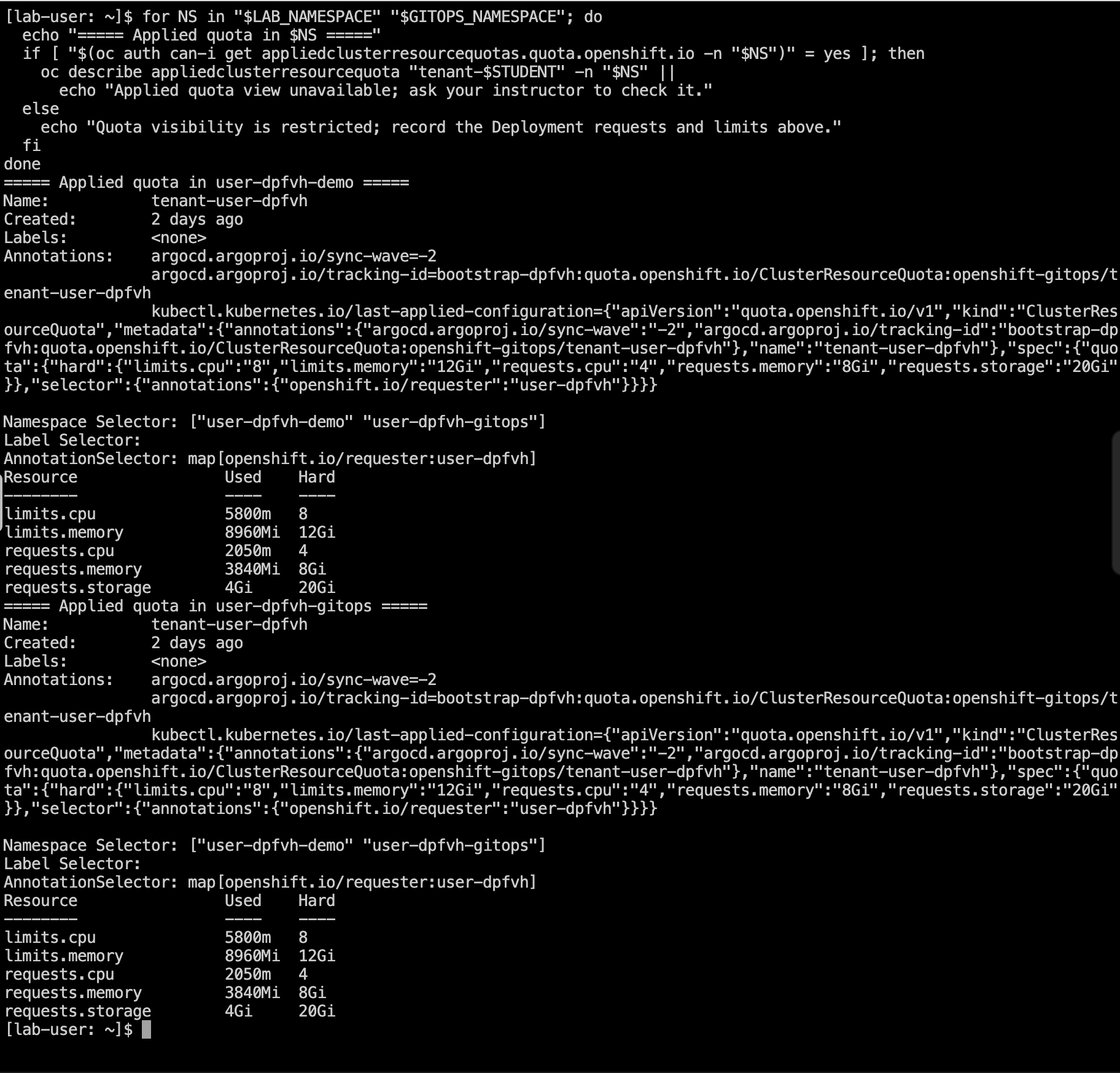
Inspect the existing shared quota through its namespaced AppliedClusterResourceQuota view. Students normally cannot read the cluster-scoped ClusterResourceQuota object:
for NS in "$LAB_NAMESPACE" "$GITOPS_NAMESPACE"; do
  echo "===== Applied quota in $NS ====="
  if [ "$(oc auth can-i get appliedclusterresourcequotas.quota.openshift.io -n "$NS")" = yes ]; then
    oc describe appliedclusterresourcequota "tenant-$STUDENT" -n "$NS" ||
      echo "Applied quota view unavailable; ask your instructor to check it."
  else
    echo "Quota visibility is restricted; record the Deployment requests and limits above."
  fi
done
The workshop quota covers both projects: 4 CPU requests, 8 CPU limits, 8Gi memory requests, 12Gi memory limits and 20Gi storage requests. Existing Gitea, Argo CD, Showroom and other components also consume quota. Quota used values are not the same as measured CPU or memory usage. The two project views show the same shared tenant quota, so do not add their Used values together.
A Forbidden result for the cluster-scoped ClusterResourceQuota is expected with a student login. Do not request elevated privileges. If the namespaced quota view is also restricted or unavailable, use the already recorded Deployment requests and limits and continue; the instructor can confirm shared quota headroom before the deliberate rollout fault.
-
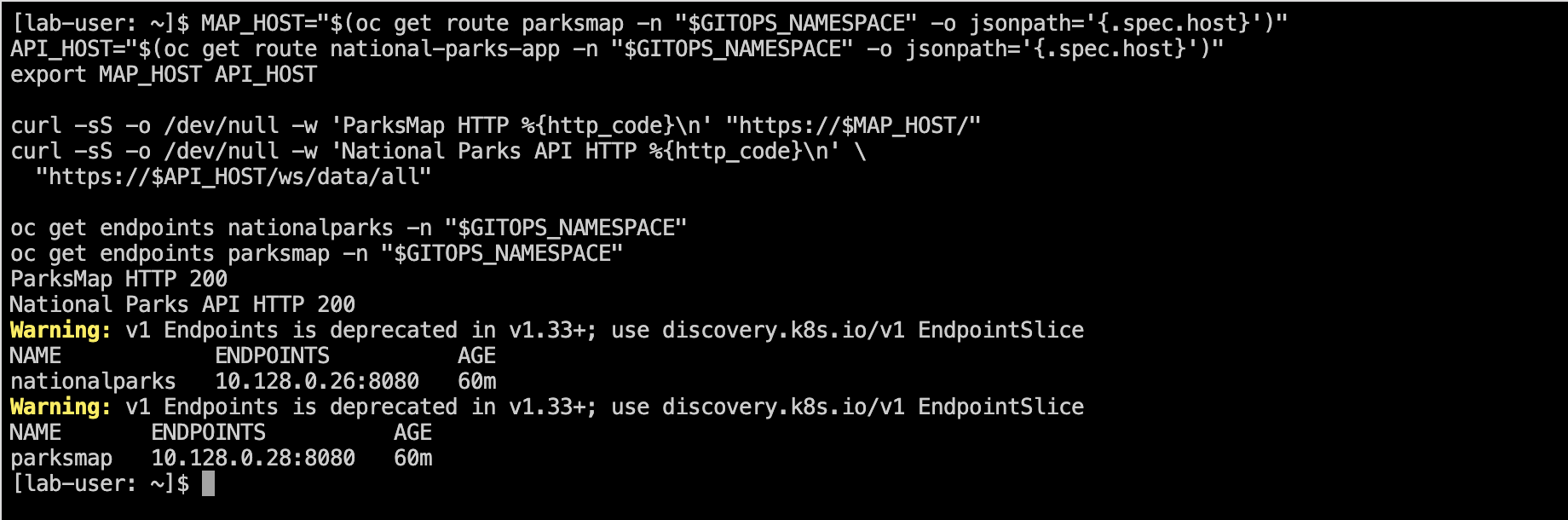
Record the API and frontend Routes and check that they respond:
MAP_HOST="$(oc get route parksmap -n "$GITOPS_NAMESPACE" -o jsonpath='{.spec.host}')"
API_HOST="$(oc get route national-parks-app -n "$GITOPS_NAMESPACE" -o jsonpath='{.spec.host}')"
export MAP_HOST API_HOST

curl -sS -o /dev/null -w 'ParksMap HTTP %{http_code}\n' "https://$MAP_HOST/"
curl -sS -o /dev/null -w 'National Parks API HTTP %{http_code}\n' \
  "https://$API_HOST/ws/data/all"

oc get endpoints nationalparks -n "$GITOPS_NAMESPACE"
oc get endpoints parksmap -n "$GITOPS_NAMESPACE"
Expected: ParksMap and the API respond successfully (normally HTTP 200). Both Services have at least one ready endpoint. If park data is missing, investigate the PostSync seed Job from Module 2 before continuing.
Checkpoint 1: Both namespaces are present, you recorded workload requests/limits (and applied shared-quota values when visible), all three GitOps Deployments are Ready and both Routes work.
Predict: Does a memory limit of 768Mi mean that the Pod is currently using 768Mi?
Details
Answer: No. A limit is a maximum enforced at runtime; it does not measure live usage. Requests reserve scheduling capacity, limits cap consumption, and the namespaced AppliedClusterResourceQuota view (when permitted) shows charged requests/limits across the shared quota.
Mission 2: Deploy a deliberate ParksMap readiness fault (7 minutes)
An updated ParksMap release is deployed but its new Pod never becomes Ready. With the default RollingUpdate strategy, Kubernetes normally keeps the previous healthy Pod running, which means the Route may continue returning HTTP 200 while the rollout remains stuck. You will reproduce this subtle operational failure by probing the wrong container port.
This is a controlled misconfiguration of a single readiness probe. It does not break the MongoDB credentials, Python backend, PV, or original Module 1 app.
-
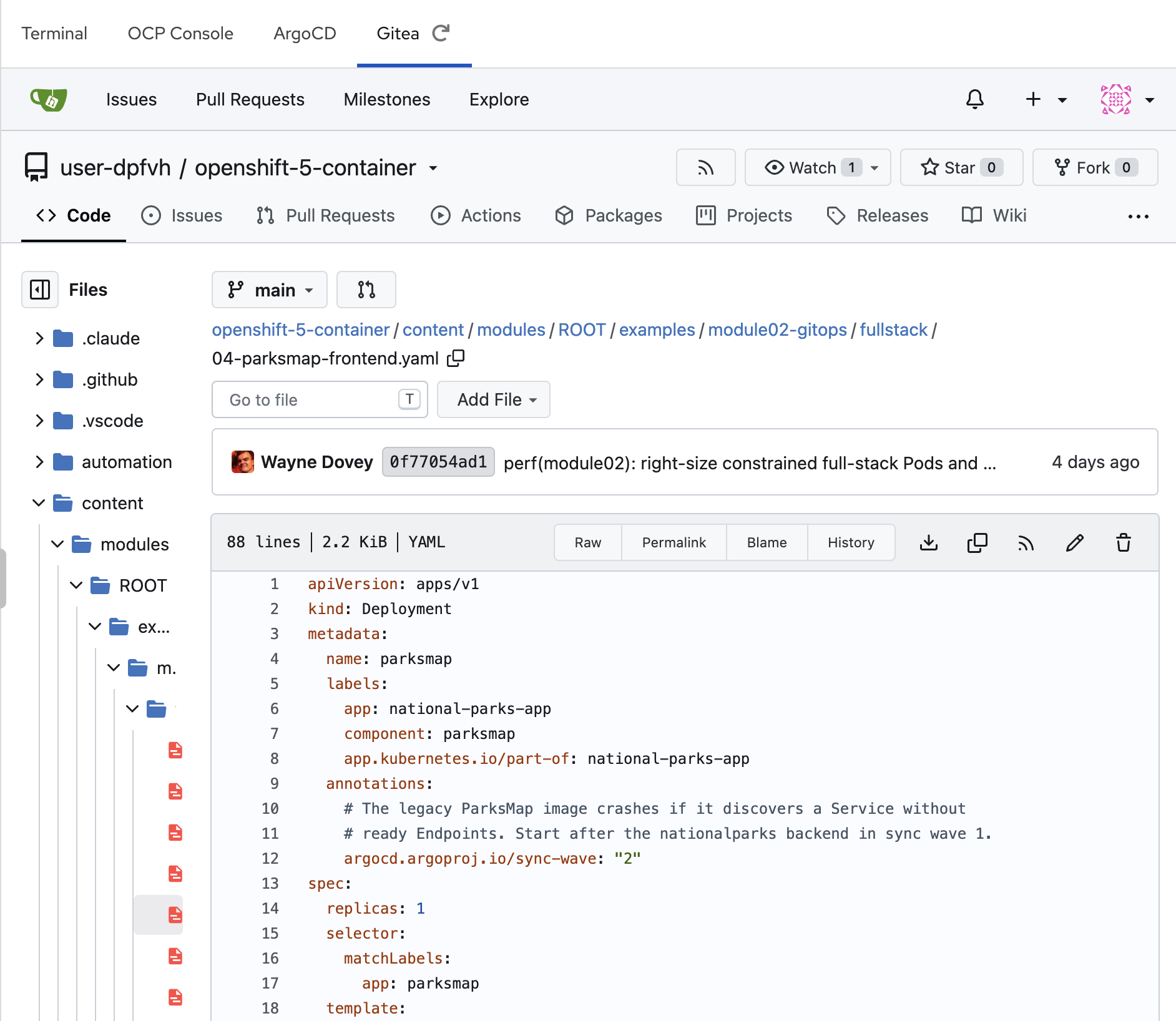
In the OpenShift console, open Gitea. Enter your own {user}/openshift-5-container repository. Select branch main and open:
content/modules/ROOT/examples/module02-gitops/fullstack/04-parksmap-frontend.yamlImportant: This is the student Gitea copy imported in Module 2, not the upstream GitHub repository. Ensure you are editing only your own account.
-
Locate the ParksMap Deployment’s readinessProbe:
readinessProbe:
  tcpSocket:
    port: http
  initialDelaySeconds: 10
  periodSeconds: 10
Change only the port value to 18080:
readinessProbe:
  tcpSocket:
    port: 18080
  initialDelaySeconds: 10
  periodSeconds: 10
Keep the container’s real containerPort: 8080, the Service and the GitOps sync wave unchanged. Commit directly to your student Gitea main branch with message:
lab(module03): simulate ParksMap readiness probe mismatch
-
Watch the result of automatic GitOps reconciliation. Return to GitOps → Applications → national-parks-settings in project {user}-gitops. Do not click manual Sync; Auto-Sync is already enabled.
oc get application "$ARGOCD_APP" -n "$ARGOCD_NAMESPACE" -o json | jq '{
  sync: .status.sync.status,
  health: .status.health.status,
  revision: .status.sync.revision,
  message: .status.operationState.message
}'

oc get deploy,pods -n "$GITOPS_NAMESPACE"
oc get deployment parksmap -n "$GITOPS_NAMESPACE" \
  -o json | jq '.spec.template.spec.containers[0].readinessProbe'
Expected: the new ParksMap Pod will be Running but 0/1 Ready, while the old Pod can remain 1/1 Ready. In that case oc get deployment parksmap may still report 1/1 available, but its rollout has not completed. The new probe connects to 18080 while the application listens on 8080. Argo CD can be Synced but Progressing/Degraded, or briefly OutOfSync; compare the actual Deployment conditions and revision rather than assuming Synced means ready.
-
Collect the actual diagnostic evidence:
oc describe deployment parksmap -n "$GITOPS_NAMESPACE"
oc get pods -n "$GITOPS_NAMESPACE" -l app=parksmap
oc get replicasets -n "$GITOPS_NAMESPACE" -l app=parksmap
oc rollout status deployment/parksmap -n "$GITOPS_NAMESPACE" --timeout=30s   || echo "Expected: the new ParksMap rollout is still blocked"
oc get events -n "$GITOPS_NAMESPACE" --sort-by=.lastTimestamp | tail -25

oc get endpoints parksmap -n "$GITOPS_NAMESPACE"
oc get deploy mongodb-nationalparks nationalparks -n "$GITOPS_NAMESPACE"
oc get deploy -n "$LAB_NAMESPACE"
The event may report a connection refused on port 18080. Do not assume the Route is down: RollingUpdate normally preserves the old ready replica and its parksmap Service endpoint until the new Pod becomes Ready. The Route may return HTTP 200 despite the failed deployment revision. If the old replica has gone away, the Route may instead fail. The database and API should remain 1/1 Ready, and {user}-demo must remain unaffected.
|
If the new Pod never appears
A shared ClusterResourceQuota can reject a replacement Pod when a Deployment briefly needs both old and new replicas. Check the Pod’s creation events, quota headroom and Deployment conditions; do not raise the quota for the student or scale unrelated workloads. Tell your instructor if you see exceeded quota or must specify limits.cpu. This is a different failure from the deliberately incorrect readiness port. |
Checkpoint 2: Your student Git commit is visible, the new ParksMap Pod’s readiness probe targets 18080, the rollout is incomplete, and MongoDB and the backend remain healthy. Record whether the old frontend is still serving traffic.
Mission 3: Agentic-style investigation with Lightspeed (9 minutes)
Use the OpenShift Lightspeed chat in the console. Choose Troubleshooting mode if the mode selector is available and connected to live MCP tools. Unlike generic Q&A, an evidence-backed investigation should retrieve the actual cluster state rather than guess from a description.
-
Submit this prompt with your own student namespace:
Investigate why the latest deployment/parksmap rollout
is stuck in namespace user-guid-gitops. A new Pod is
Running but its readiness probe fails after a GitOps
commit. The old Pod may still serve HTTP 200.
MongoDB and the nationalparks API still work.

Use live read-only Kubernetes tools to inspect:
1. Deployment, ReplicaSet and old/new Pod readiness,
   conditions and recent events;
2. the actual readinessProbe and container port;
3. the ParksMap Service endpoints and whether the old
   replica is still serving the Route;
4. relevant application logs and GitOps Application status
   if you have access.

Identify the most likely root cause, cite each tool's
observations, explain why Synced need not mean Healthy,
and propose the smallest change in the student Gitea
manifest. Do not execute, patch, delete, scale or create
anything. Do not read Secrets.
-
Review the tool calls and their outputs. If Lightspeed asks permission to run a read-only tool, review the tool name and arguments first. Do not approve a mutating tool. If a tool is unavailable or forbidden, ask it to state that limitation instead of inventing results.
-
Challenge the AI to prove its diagnosis:
Before recommending a fix, distinguish evidence from assumptions. Which readiness port is configured for parksmap in user-guid-gitops, which port actually serves the app, and where does the GitOps source live? Can you prove MongoDB and nationalparks are still healthy? Do not make any changes. -
Verify the answer independently:
oc get deployment parksmap -n "$GITOPS_NAMESPACE" -o json | jq '{
  containerPort: .spec.template.spec.containers[0].ports[0].containerPort,
  readinessProbe: .spec.template.spec.containers[0].readinessProbe,
  limits: .spec.template.spec.containers[0].resources.limits
}'

oc get endpoints parksmap -n "$GITOPS_NAMESPACE" -o yaml
oc get deploy mongodb-nationalparks nationalparks parksmap -n "$GITOPS_NAMESPACE"
A high-quality explanation names the field spec.template.spec.containers[0].readinessProbe.tcpSocket.port, wrong value 18080, and correct container port 8080 (named http in the original manifest). It must distinguish the new unhealthy ReplicaSet from the old healthy ReplicaSet and must not mistake this for an ingress-controller outage.
Checkpoint 3: You have an evidence-backed diagnosis from Lightspeed or from the same read-only oc checks, with any AI tool limitations recorded.
Predict: Should an assistant change the readiness probe just because it sounds confident?
Details
Answer: No. Verify the live YAML, Pod events and Gitea source. A correct diagnosis is not permission to mutate the cluster. The repair remains a reviewed Git commit.
Mission 4: Launch or review an analysis-only AgenticRun (10 minutes)
A persisted AgenticRun records investigation status and evidence. You may create and view your own run only after the instructor confirms namespace-constrained sandbox permissions and enables student RBAC. An installed oc agentic plugin is not sufficient; the analysis sandbox must not be able to inspect other students' workloads.
Check student-local capability
oc api-resources --api-group=agentic.openshift.io
oc auth can-i create agenticruns.agentic.openshift.io -n "$GITOPS_NAMESPACE"
oc auth can-i get agenticruns.agentic.openshift.io -n "$GITOPS_NAMESPACE"
command -v oc-agentic >/dev/null && oc agentic version || echo "Optional CLI unavailable"
Expected on the original shared workshop cluster: student permissions will say no. This is deliberate until the instructor has verified secure per-tenant AgenticRun analysis. Do not grant yourself cluster-admin permissions or create resources in openshift-lightspeed.
+ image::module03-s11-agenticrun-student-rbac.svg[S11: Check AgenticRun visibility - screenshot placeholder, width=850]
Student-created run: only after explicit instructor authorization
If the cluster has passed its security gate and both can-i checks say yes, create only an analysis stage in the student’s own GitOps namespace:
if [ "$(oc auth can-i create agenticruns.agentic.openshift.io -n "$GITOPS_NAMESPACE")" = yes ]; then
  cat <<YAML | oc create -n "$GITOPS_NAMESPACE" -f -
apiVersion: agentic.openshift.io/v1alpha1
kind: AgenticRun
metadata:
  generateName: parksmap-readiness-
  namespace: $GITOPS_NAMESPACE
spec:
  request: >-
    Investigate the new parksmap Pod's failed readiness probe
    in $GITOPS_NAMESPACE only. Compare configured TCP port
    18080 with actual container port 8080, check old/new ReplicaSets,
    events and GitOps status, and recommend the smallest Gitea
    source correction. Do not make changes, access Secrets or
    inspect other student namespaces.
  analysis:
    agent: default
YAML
else
  echo "AgenticRun: not available / not authorized — use instructor demonstration."
fi
If enabled, list only your records:
if [ "$(oc auth can-i list agenticruns.agentic.openshift.io -n "$GITOPS_NAMESPACE")" = yes ]; then
  oc get agenticruns,analysisresults -n "$GITOPS_NAMESPACE"
  oc agentic run list -n "$GITOPS_NAMESPACE"
fi
If Agentic Runs are unavailable
The instructor may show a single analysis-only run from their authorized terminal using automation/scripts/create-module03-agentic-run.sh and the previously prepared broken ParksMap Deployment. Their run remains separate in openshift-lightspeed. If either the operator, provider, sandbox isolation or student RBAC is missing, do not enable self-service just to finish a workshop mission. Use Lightspeed Troubleshooting from Mission 3 and direct oc evidence. Record AgenticRun: not available / not authorized.
| Review | What to confirm |
|---|---|
Request and namespace |
It targets only your student project |
Evidence |
It identifies the 18080 probe, actual port 8080 and old/new ReplicaSets |
Proposed repair |
Restore port: http in Gitea |
Approval boundary |
There is no spec.execution or spec.verification stage |
Do not click Execute Remediation. An analysis-only run records a suggestion; the actual correction is still the student Gitea commit.
+ image::module03-s12-agenticrun-analysis-proposal.svg[S12: Student analysis-only run or instructor fallback - screenshot placeholder, width=850]
Checkpoint 4: You inspected a real analysis-only AgenticRun if permitted, or documented why student creation is unavailable, without mutating any workload.
Mission 5: Repair through Gitea and verify recovery (8 minutes)
You diagnosed a bad readiness probe. Now restore only that probe through the same student GitOps source.
-
Return to your own Gitea main branch and open:
content/modules/ROOT/examples/module02-gitops/fullstack/04-parksmap-frontend.yamlRestore the original named port:
readinessProbe:
  tcpSocket:
    port: http
  initialDelaySeconds: 10
  periodSeconds: 10
Commit:
fix(module03): restore ParksMap readiness port
-
Verify the new Git revision is reconciled, without patching a Kubernetes Deployment:
oc get application "$ARGOCD_APP" -n "$ARGOCD_NAMESPACE" -o json | jq '{
  sync: .status.sync.status,
  health: .status.health.status,
  revision: .status.sync.revision,
  operation: .status.operationState.phase
}'

oc get deployment parksmap -n "$GITOPS_NAMESPACE" \
  -o json | jq '.spec.template.spec.containers[0].readinessProbe'
oc rollout status deployment/parksmap -n "$GITOPS_NAMESPACE" --timeout=180s
oc get deploy,pods -n "$GITOPS_NAMESPACE"
The Deployment should return to 1/1 Ready; GitOps should settle at Synced / Healthy. If an earlier failed sync operation blocks progress, the instructor can inspect its revision and terminate the stale operation before Auto-Sync attempts the new commit. Do not delete a PVC or Secret.
-
Verify the application from the user’s perspective and the original app remains intact:
curl -sS -o /dev/null -w 'ParksMap HTTP %{http_code}\n' "https://$MAP_HOST/"
curl -sS -o /dev/null -w 'National Parks API HTTP %{http_code}\n' \
  "https://$API_HOST/ws/data/all"

oc get deploy -n "$LAB_NAMESPACE"
oc get deploy -n "$GITOPS_NAMESPACE"
if [ "$(oc auth can-i get appliedclusterresourcequotas.quota.openshift.io -n "$GITOPS_NAMESPACE")" = yes ]; then
  oc describe appliedclusterresourcequota "tenant-$STUDENT" -n "$GITOPS_NAMESPACE" ||
    echo "Quota view unavailable; instructor can verify the shared quota."
else
  echo "Shared quota view restricted; Deployment requests/limits were already recorded."
fi
HTTP 200 from ParksMap and a non-empty JSON array from the API are stronger evidence than Running alone. If these checks fail, do not mark the incident resolved.
Incident evidence card
Fill out the comparison from your own environment:
| Signal | During bad Git revision | After repair |
|---|---|---|
Student Gitea readiness port |
18080 |
http (8080) |
ParksMap rollout |
New Pod 0/1; old Pod may remain 1/1 |
New Pod 1/1; rollout complete |
ParksMap Service endpoints |
Old ready endpoint may remain |
Endpoint for repaired release |
MongoDB / National Parks API |
Unaffected, 1/1 |
Still 1/1 |
Argo CD source revision |
Bad commit SHA |
Repair commit SHA |
Argo CD sync vs health |
May be Synced but Degraded |
Synced / Healthy |
Lightspeed or AgenticRun |
Diagnosis and evidence |
Verification or recorded limitation |
Original {user}-demo |
Unchanged |
Unchanged |
Checkpoint 5: You have returned the GitOps stack to a healthy state and can show two independent applications working within the existing shared tenant quota.
Predict: Which state proves the application is usable?
Details
Answer: No single status is sufficient. Synced proves desired and live manifests agree; Healthy and 1/1 Ready show Kubernetes-level health; a successful Route response and actual park data prove the user-facing workflow works.
Troubleshooting
| Symptom | What to check / next action |
|---|---|
Git commit does not change the live Deployment |
Verify your student Gitea main, the Application source/revision, Auto-Sync and the path fullstack/04-parksmap-frontend.yaml. Upstream GitHub merges do not automatically update student Gitea copies. |
ParksMap Route still returns HTTP 200 |
Expected during RollingUpdate: the old ready replica can remain in service. Check the new Pod’s 18080 readiness failure, the two ReplicaSets and oc rollout status; do not claim a failure solely from Route availability. |
Another failure appears: OOMKilled or NullPointerException |
Inspect previous container logs and events. An OOM is distinct from this readiness incident; the original ParksMap discovery bug was caused by an incorrectly labelled API Route. The Route should not carry type: parksmap-backend. |
exceeded quota or no new Pod |
Inspect Deployment/Pod events and the namespaced AppliedClusterResourceQuota if visible. Ask the instructor to verify the shared quota when restricted. Rollouts may temporarily need extra room; do not change quota settings. |
Lightspeed cannot read the namespace |
Confirm oc whoami, project selection, MCP integration, tool permissions and whether the AI actually invoked live tools. Use direct oc evidence if not. |
AgenticRun API not present or creation Forbidden |
Continue with Lightspeed Troubleshooting and the evidence comparison; ask instructor for an enabled demo, but do not grant global RBAC. |
AgenticRun shows Proposed, Failed or NoActionRequired |
Review actual run conditions and analysis output; phase and diagnosis vary. Do not claim remediation happened unless there is execution evidence. |
AgenticRun observes the wrong namespace |
Stop using the findings. Recheck the run request; the instructor may create a separate run with the correct target. Do not modify an existing request, which is immutable. |
Repair committed but Argo CD is still Degraded |
Verify the live probe returned to http, check Pod events and whether an older failed sync operation prevents reconciliation. Ask instructor to recover Auto-Sync safely. |
ParksMap Ready but the map has no parks |
Check the National Parks API data endpoint and the Module 2 data-seeding Job. Pod readiness alone does not prove data is present. |
Completion check
You are ready for Module 4 when you can show:
-
Two student namespaces hosting separate National Parks applications, without any new ResourceQuota, LimitRange or cluster policy changes.
-
A GitOps bad commit and a repair commit affecting only the ParksMap readiness probe, with evidence of a stalled rollout rather than an assumed Route outage.
-
Evidence explaining Running versus Ready, Synced versus Healthy, and route availability versus user-facing functionality.
-
A Lightspeed investigation grounded in at least two live evidence sources, with tool limitations acknowledged.
-
An analysis-only AgenticRun proposal or a clearly documented integration/RBAC limitation.
-
Both application stacks healthy after the repair, with a check of the shared quota.
Module 4 introduces a separate, lightweight WeatherNow application with its own GitOps Application and a new readiness incident. Module 5 uses WeatherNow for an image-pull failure. Both National Parks stacks stay healthy.