Speech Models
Deploy and test the Speech to Text (Whisper) and Text to Speech (Higgs-Audio) models using RHOAI.
These two models form the speech layer of the voice agent pipeline:
User Speech → [Whisper STT] → Text → [LLM Agent] → Text → [Higgs-Audio TTS] → Speech| Model | Type | GPU | API Endpoint |
|---|---|---|---|
Whisper |
Speech to Text |
MIG 1g.18gb |
|
Higgs-Audio |
Text to Speech |
MIG 2g.35gb |
|
Run the Notebook
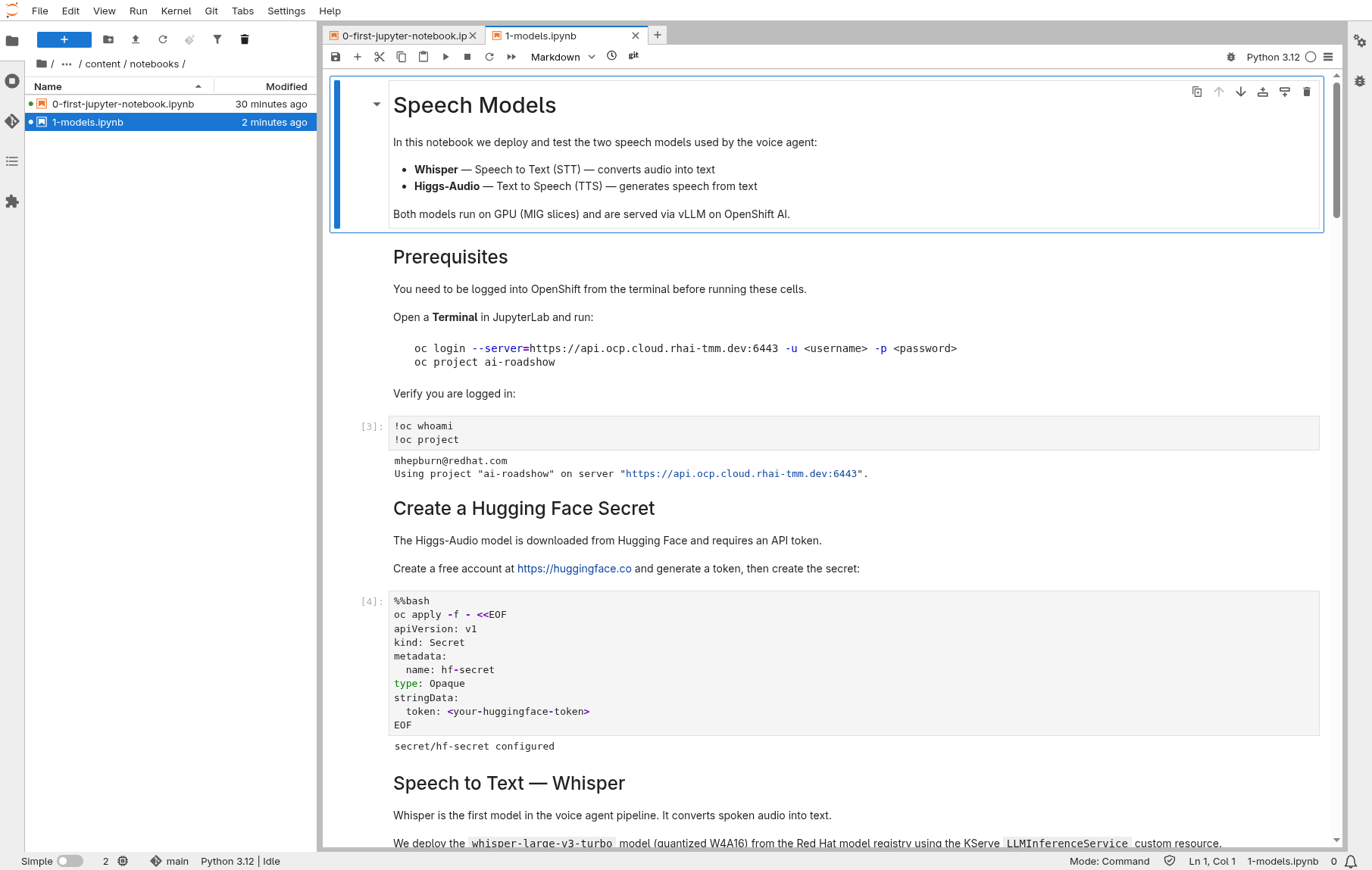
The fastest way through this section is the notebook. It deploys both models, waits for them, and tests the APIs — all from your workbench.
Prerequisites
Open a Terminal in JupyterLab and clone the repository:
git clone https://github.com/rhai-code/voice-agents.gitOpen and run
In the File Explorer, navigate to voice-agents/content/notebooks/ and open:
Run all cells (Run > Run All Cells). The notebook will:
-
Create the Hugging Face secret
-
Deploy Whisper and verify it is ready
-
Generate a test WAV and transcribe it with Whisper
-
Deploy Higgs-Audio and verify it is ready
-
Send text to the TTS endpoint and play the audio inline
-
Measure TTS generation speed (gen x)
|
Models need GPU resources (MIG slices) and take a few minutes to start. Re-run the wait cells until you see |
If the notebook completes successfully, skip to Pizza Shop Demo. The rest of this page describes each step in detail.
Step-by-step Reference
Go back to the Terminal in your workbench.
Speech to Text — Whisper
Whisper converts spoken audio into text. We deploy the whisper-large-v3-turbo model (quantized W4A16) from the Red Hat model registry using the KServe LLMInferenceService custom resource. It runs on a small GPU slice (MIG 1g.18gb).
Test
Get the model URL and service account token:
export MODEL_URL=https://inference.apps.ocp.cloud.rhai-tmm.dev/voice-agents/whisperExport your MaaS API token:
export STT_TOKEN=$(oc get secret maas-secret -o jsonpath='{.data.stt-token}' | base64 -d)
echo "Token obtained: ${STT_TOKEN:0:20}..."
Send an audio file to the transcription endpoint:
curl -s -X POST ${MODEL_URL}/v1/audio/transcriptions \
  -H "Authorization: Bearer ${STT_TOKEN}" \
  --form file=@/opt/app-root/src/voice-agents/ai-voice-agent/backend/belinda.wav \
  --form model=whisper | jq .
Expected response:
{
  "text": " \"'Twas the night before my birthday. Hooray! It's almost here! It may not be a holiday, but it's the best day of the year.'\"",
  "usage": {
    "type": "duration",
    "seconds": 11
  }
}
Text to Speech — Higgs-Audio
Higgs-Audio generates natural-sounding speech from text, completing the voice agent loop. It runs as a standard Kubernetes Deployment with vLLM on a GPU (MIG 2g.35gb slice) and downloads the model from Hugging Face.
Test
Send a text prompt to the TTS endpoint and save the audio to a file:
curl -X POST https://higgs-audio-predictor-voice-agents.apps.ocp.cloud.rhai-tmm.dev/v1/audio/speech \
  -H "Content-Type: application/json" \
  -d '{
    "model": "higgs-audio-v2-generation-3B-base",
    "voice": "belinda",
    "input": "What would you like on your pizza?",
    "response_format": "pcm"
  }' \
  --output - | ffmpeg -f s16le -ar 24000 -ac 1 -i pipe:0 test-tts.wav
This sends text to the TTS model, receives PCM audio (signed 16-bit, 24kHz, mono), and converts it to WAV. Download test-tts.wav through JupyterLab to play it locally.
Measure TTS Generation Speed (gen x)
For a real-time voice agent, TTS must generate audio faster than real-time — otherwise the user hears silence while waiting. We measure this as gen x:
gen x = audio seconds produced / wall clock seconds elapsed
A gen x of 1.0 means real-time. Above 1.0 means the model generates faster than playback — the higher the better. Below 1.0 and the user will experience latency gaps.
Send a few prompts and measure the generation speed:
for prompt in \
  "What would you like on your pizza?" \
  "Your order has been placed and will be ready in about twenty minutes." \
  "We have pepperoni, mushrooms, olives, onions, and extra cheese available as toppings."
do
  START=$(date +%s%N)
  curl -s -X POST https://higgs-audio-predictor-voice-agents.apps.ocp.cloud.rhai-tmm.dev/v1/audio/speech \
    -H "Content-Type: application/json" \
    -d "{\"model\":\"higgs-audio-v2-generation-3B-base\",\"voice\":\"belinda\",\"input\":\"${prompt}\",\"response_format\":\"pcm\"}" \
    --output /tmp/tts-bench.pcm
  END=$(date +%s%N)

  WALL_MS=$(( (END - START) / 1000000 ))
  PCM_BYTES=$(stat -c%s /tmp/tts-bench.pcm)
  AUDIO_MS=$(( PCM_BYTES * 1000 / (24000 * 2) ))
  GEN_X=$(awk "BEGIN {printf \"%.1f\", ${AUDIO_MS}.0 / ${WALL_MS}.0}")
  echo "${prompt}: audio=${AUDIO_MS}ms wall=${WALL_MS}ms gen_x=${GEN_X}x"
done
On a MIG 2g.35gb slice, expect gen x values around 2–3x real-time once the model is warm (the first request may be slower due to model warm-up).