Sub-Module 2.4: SELinux Policy CI/CD with Tekton
Introduction
In Module 1, you generated udica SELinux policies manually on a developer workstation. At platform scale, that approach doesn’t work — you need policies generated automatically as part of CI/CD, versioned in Git, and distributed across cluster nodes.
This sub-module bridges the gap: you’ll create a Tekton Task that generates udica policies alongside image builds, then deploy with seLinuxOptions referencing the generated policy type.
Tekton Task: udica-policy-generate
Step 1: Apply the Tekton Task
This Task runs the built image briefly, captures podman inspect output, and feeds it to udica to produce a CIL policy file:
cat << 'EOF' | oc apply -f -
apiVersion: tekton.dev/v1
kind: Task
metadata:
  name: udica-policy-generate
  namespace: {user}-hummingbird-builds
  labels:
    app.kubernetes.io/part-of: hummingbird-workshop
spec:
  description: >-
    Generate a custom SELinux CIL policy for a container image using udica.
    The task inspects the image configuration and produces a policy scoped
    to the image's actual port, mount, and capability requirements.
  params:
    - name: IMAGE
      type: string
      description: "Fully qualified image reference (registry/repo:tag or @sha256:...)"
    - name: POLICY_NAME
      type: string
      description: "Name for the generated SELinux policy (alphanumeric + underscores)"
    - name: PORTS
      type: string
      description: "Comma-separated list of ports the container exposes"
      default: "8080"
    - name: MOUNTS
      type: string
      description: "Comma-separated host paths the container bind-mounts (empty if none)"
      default: ""
  results:
    - name: POLICY_CIL
      description: "Contents of the generated .cil policy file"
    - name: IMAGE_DIGEST
      description: "Digest of the inspected image"
    - name: POLICY_TYPE
      description: "SELinux type to use in seLinuxOptions (policy_name.process)"
  steps:
    - name: generate-policy
      image: registry.redhat.io/rhel9/toolbox:latest
      securityContext:
        privileged: true
      script: |
        #!/usr/bin/env bash
        set -euo pipefail

        echo "=== Installing udica ==="
        dnf install -y -q udica podman container-selinux

        IMAGE="$(params.IMAGE)"
        POLICY="$(params.POLICY_NAME)"
        PORTS="$(params.PORTS)"
        MOUNTS="$(params.MOUNTS)"

        echo "=== Pulling image: $IMAGE ==="
        podman pull "$IMAGE"

        DIGEST=$(podman inspect "$IMAGE" --format '{{.Digest}}')
        echo -n "$DIGEST" > $(results.IMAGE_DIGEST.path)

        echo "=== Running container for inspection ==="
        RUN_ARGS=("--name" "udica-inspect" "--env" "container=podman")

        # Add port mappings
        IFS=',' read -ra PORT_LIST <<< "$PORTS"
        for p in "${PORT_LIST[@]}"; do
          [ -n "$p" ] && RUN_ARGS+=("-p" "${p}:${p}")
        done

        # Add mount mappings if specified
        if [ -n "$MOUNTS" ]; then
          IFS=',' read -ra MOUNT_LIST <<< "$MOUNTS"
          for m in "${MOUNT_LIST[@]}"; do
            [ -n "$m" ] && mkdir -p "$m" && RUN_ARGS+=("-v" "${m}:${m}:rw,Z")
          done
        fi

        podman run -d "${RUN_ARGS[@]}" "$IMAGE" || true
        sleep 3

        echo "=== Generating udica policy: $POLICY ==="
        podman inspect udica-inspect | udica "$POLICY"

        echo "=== Generated CIL policy ==="
        cat "${POLICY}.cil"

        cp "${POLICY}.cil" /workspace/policy.cil
        cat "${POLICY}.cil" > $(results.POLICY_CIL.path)
        echo -n "${POLICY}.process" > $(results.POLICY_TYPE.path)

        echo ""
        echo "=== Policy type for seLinuxOptions: ${POLICY}.process ==="

        podman stop udica-inspect 2>/dev/null || true
        podman rm udica-inspect 2>/dev/null || true
EOFtask.tekton.dev/udica-policy-generate created
Create the SELinux Policy Pipeline
Step 3: Create the Pipeline
Wrap the Task in a Pipeline so it appears in the OpenShift Pipelines dashboard:
cat << 'EOF' | oc apply -f -
apiVersion: tekton.dev/v1
kind: Pipeline
metadata:
  name: selinux-policy-pipeline
  namespace: {user}-hummingbird-builds
  labels:
    app.kubernetes.io/part-of: hummingbird-workshop
spec:
  params:
    - name: IMAGE
      type: string
      description: "Fully qualified image reference"
    - name: POLICY_NAME
      type: string
      description: "Name for the generated SELinux policy"
    - name: PORTS
      type: string
      description: "Comma-separated list of ports"
      default: "8080"
    - name: MOUNTS
      type: string
      description: "Comma-separated host paths (empty if none)"
      default: ""
  tasks:
    - name: generate-policy
      taskRef:
        name: udica-policy-generate
      params:
        - name: IMAGE
          value: "$(params.IMAGE)"
        - name: POLICY_NAME
          value: "$(params.POLICY_NAME)"
        - name: PORTS
          value: "$(params.PORTS)"
        - name: MOUNTS
          value: "$(params.MOUNTS)"
EOFpipeline.tekton.dev/selinux-policy-pipeline created
Run the Policy Generation Pipeline
Step 5: Create a PipelineRun
Generate a policy for the Node.js application built in Sub-Module 2.3:
|
The |
cat << 'EOF' | oc apply -f -
apiVersion: tekton.dev/v1
kind: PipelineRun
metadata:
  name: generate-nodejs-policy
  namespace: {user}-hummingbird-builds
spec:
  pipelineRef:
    name: selinux-policy-pipeline
  params:
    - name: IMAGE
      value: "{quay_hostname}/{quay_user}/secure-nodejs:latest"
    - name: POLICY_NAME
      value: "hummingbird_nodejs"
    - name: PORTS
      value: "8080"
    - name: MOUNTS
      value: ""
EOF
Step 6: Monitor the PipelineRun
oc get pipelinerun generate-nodejs-policy -n {user}-hummingbird-builds -wWait until the STATUS shows True (Succeeded), then press Ctrl+C.
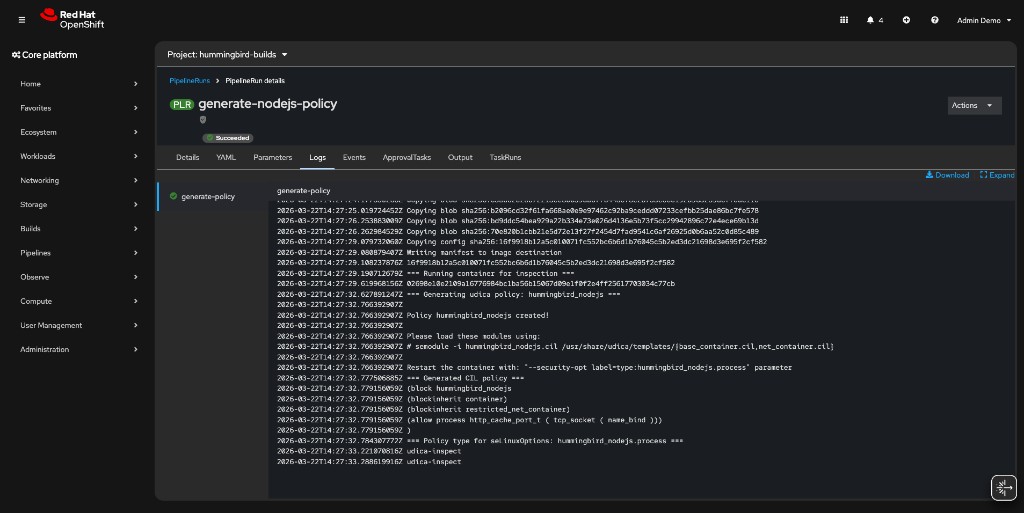
You can also watch the PipelineRun in the OpenShift console under Pipelines → PipelineRuns in the {user}-hummingbird-builds namespace:
Step 7: View the Generated Policy
The Task results (CIL policy, digest, policy type) are stored in the TaskRun. Retrieve them:
TASKRUN=$(oc get pipelinerun generate-nodejs-policy -n {user}-hummingbird-builds \
  -o jsonpath='{.status.childReferences[0].name}')
oc get taskrun $TASKRUN -n {user}-hummingbird-builds \
  -o jsonpath='{.status.results}' | python3 -m json.tool
The POLICY_CIL result contains the generated CIL policy. The POLICY_TYPE result gives you the SELinux type name (hummingbird_nodejs.process) to use in your Deployment spec.
View the detailed logs:
oc logs ${TASKRUN}-pod -n {user}-hummingbird-builds -c step-generate-policy|
If the pod name above doesn’t match, find it with: |
Pipeline Integration
The udica-policy-generate Task fits naturally into a Shipwright/Tekton pipeline after the image build step. The flow is:
[Git Push] → [Shipwright BuildRun]
  ↓
[Image Built & Pushed to Registry]
  ↓
[udica-policy-generate Task]
  ↓
[CIL Policy in PipelineRun Results]
  ↓
[Commit .cil to Git Repo]  →  [GitOps Sync]
  ↓
[MachineConfig loads policy on nodes]
  ↓
[Deployment with seLinuxOptions]
In a full pipeline, a subsequent Task would:
-
Read the
POLICY_CILresult from the udica Task -
Commit it to a Git repository under
selinux/<policy>.cil -
Trigger a GitOps sync (ArgoCD/OpenShift GitOps) that applies a MachineConfig
Deploying with seLinuxOptions
Step 8: Update the Deployment
Once the CIL policy is loaded on cluster nodes (via MachineConfig or manually), reference it in your Deployment’s pod spec.
|
The In production, create a custom SCC that allows only |
cat << 'EOF' | oc apply -f -
apiVersion: apps/v1
kind: Deployment
metadata:
  name: nodejs-selinux
  namespace: {user}-hummingbird-builds
  labels:
    app: nodejs-selinux
spec:
  replicas: 2
  selector:
    matchLabels:
      app: nodejs-selinux
  template:
    metadata:
      labels:
        app: nodejs-selinux
    spec:
      containers:
        - name: app
          image: {quay_hostname}/{quay_user}/secure-nodejs:latest
          ports:
            - containerPort: 8080
          resources:
            requests:
              memory: "64Mi"
              cpu: "100m"
            limits:
              memory: "128Mi"
              cpu: "500m"
          securityContext:
            runAsNonRoot: true
            allowPrivilegeEscalation: false
            capabilities:
              drop:
                - ALL
            seLinuxOptions:
              type: hummingbird_nodejs.process
EOF|
The |
Step 9: Verify the Deployment
oc get pods -l app=nodejs-selinux -n {user}-hummingbird-buildsNAME READY STATUS RESTARTS AGE nodejs-selinux-6c8776cf85-xxxxx 0/1 CreateContainerError 0 30s nodejs-selinux-6c8776cf85-yyyyy 0/1 CreateContainerError 0 30s
|
The The pods fail with:
This means the SELinux type The key takeaway: the Tekton pipeline automates policy generation; MachineConfig automates policy distribution. Together they complete the SELinux CI/CD workflow. Clean up the failing deployment: |
Cluster-Wide Policy Distribution
In production OpenShift clusters, MachineConfig loads CIL policies on every worker node during provisioning. This ensures the SELinux type is available before any pod requests it.
MachineConfig Template
apiVersion: machineconfiguration.openshift.io/v1
kind: MachineConfig
metadata:
  name: 99-hummingbird-selinux-policy
  labels:
    machineconfiguration.openshift.io/role: worker
spec:
  config:
    ignition:
      version: 3.2.0
    storage:
      files:
        - path: /etc/selinux/hummingbird_nodejs.cil
          mode: 0644
          contents:
            source: data:text/plain;charset=utf-8;base64,<BASE64_ENCODED_CIL>
    systemd:
      units:
        - name: load-hummingbird-selinux.service
          enabled: true
          contents: |
            [Unit]
            Description=Load Hummingbird SELinux policies
            After=selinux-autorelabel.service

            [Service]
            Type=oneshot
            ExecStart=/usr/sbin/semodule -i /etc/selinux/hummingbird_nodejs.cil \
              /usr/share/udica/templates/base_container.cil \
              /usr/share/udica/templates/net_container.cil
            RemainAfterExit=true

            [Install]
WantedBy=multi-user.target-
Writes the CIL policy file to
/etc/selinux/on every worker node -
Creates a systemd unit that loads the policy via
semoduleon boot -
Ensures the SELinux type is available before pods are scheduled
|
Applying a MachineConfig triggers a rolling reboot of worker nodes. In production, coordinate this with maintenance windows. The Machine Config Operator handles the rollout automatically. |
GitOps Pattern for SELinux Policies
Repository Structure
The recommended structure commits CIL policies alongside application manifests:
application-repo/
├── Containerfile
├── src/
│   └── ...
├── selinux/
│   ├── hummingbird_nodejs.cil        # generated by udica-policy-generate Task
│   └── load-policy.sh                # helper for manual loading
└── k8s/
    ├── deployment.yaml                # references seLinuxOptions.type
    ├── machineconfig.yaml             # distributes .cil to nodes
    └── kustomization.yaml
|
A working reference implementation of this structure is available at sample-nodejs-hummingbird. It includes the Tekton Task, Pipeline, PipelineRun template, Deployment, MachineConfig, and generated CIL policy from this sub-module. |
load-policy.sh Helper
#!/bin/bash
set -euo pipefail

POLICY_DIR="$(dirname "$0")"

for cil in "$POLICY_DIR"/*.cil; do
  POLICY_NAME=$(basename "$cil" .cil)
  echo "Loading policy: $POLICY_NAME"
  sudo semodule -i "$cil" \
    /usr/share/udica/templates/{base_container.cil,net_container.cil}
done

echo "All policies loaded successfully"
sudo semodule -l | grep hummingbird
GitOps Workflow
-
Build pipeline generates the image and triggers
udica-policy-generate -
Commit step writes the
.cilfile to theselinux/directory in Git -
ArgoCD/OpenShift GitOps detects the change and applies the MachineConfig
-
Machine Config Operator rolls out the policy to worker nodes
-
Deployment references
seLinuxOptions.typeand runs under the custom policy
This ensures every image version has a matching, auditable SELinux policy.
Summary
Congratulations! You’ve completed Sub-Module 2.4.
✅ Created a Tekton Task for automated udica policy generation
✅ Ran the Task against a built Hummingbird image
✅ Viewed the generated CIL policy in TaskRun results
✅ Deployed with seLinuxOptions referencing the custom policy
✅ Understood MachineConfig for cluster-wide policy distribution
✅ Learned the GitOps pattern for versioned SELinux policies
CI/CD Policy Generation:
* Generate SELinux policies automatically during image builds
* Policy generation is deterministic: same image config produces the same CIL
* udica-policy-generate Task captures ports, mounts, and capabilities from the image
Production Distribution:
* MachineConfig loads policies on all worker nodes at boot
* seLinuxOptions.type in the pod spec activates the policy
* GitOps ensures policies are versioned and auditable
End-to-End Security: * Hummingbird minimal image (attack surface reduction) * Shipwright/Tekton automated builds (supply chain integrity) * SBOM + vulnerability scanning (compliance and visibility) * udica SELinux policies (kernel-level access control) * Image signing (provenance verification)
Next: Enforce Zero-CVE with ACS
Continue to the final required exercise:
Prove the zero-CVE posture by deploying a legacy vulnerable image alongside a Hummingbird image, then enforce admission control policies with Red Hat Advanced Cluster Security (~25 min).
Next Steps for Production
Implement GitOps:
* Integrate Shipwright with ArgoCD/OpenShift GitOps
* Automate deployments and policy distribution on successful builds
* Version control all manifests including .cil files
Set Up Webhooks: * Trigger builds automatically on git commits * Use Tekton Triggers for event-driven builds and policy regeneration
Configure Admission Control: * Deploy ACS/Stackrox for policy enforcement * Require signed images for production namespaces * Enforce resource limits and security contexts
Additional Resources
Tekton Pipelines: * Tekton Documentation * OpenShift Pipelines
SELinux on Kubernetes: * Kubernetes SELinux Labels * OpenShift SCCs
udica Documentation: * udica GitHub Repository
Shipwright Builds: * Builds for OpenShift * Shipwright Documentation
Reference Implementation: * sample-nodejs-hummingbird — Node.js application with SELinux CI/CD manifests (Tekton, Deployment, MachineConfig, CIL policy)
Troubleshooting
Issue: TaskRun fails with permission errors
oc get taskrun generate-nodejs-policy -o yaml | grep -A5 status

oc adm policy add-scc-to-user privileged -z pipeline -n {user}-hummingbird-builds
Issue: SELinux type not found on node
oc debug node/<node-name> -- chroot /host semodule -l | grep hummingbird

oc get machineconfig 99-hummingbird-selinux-policy
oc get machineconfigpool worker
Issue: MachineConfig not rolling out
oc get machineconfigpool worker -o yaml | grep -A10 status

oc get nodes -o wide
Thank You!
Thank you for completing the Zero CVE Hummingbird Workshop!
You now have the skills to build, secure, harden, and deploy container applications using Project Hummingbird at both local and platform scales.
For questions, feedback, or contributions: * Project Hummingbird: https://www.redhat.com/en/technologies/linux-platforms/enterprise-linux/hummingbird