Content Discovery
Learning objectives
By the end of this module, you’ll be able to:
-
Grant content discovery permissions through portal RBAC
-
Explain what content discovery means in Automation Portal
-
Browse Git repositories available to your organization from the portal
-
Explore collections in the portal catalog, including filters
In Modules 1-3 you focused on configuring and running self-service automation with RBAC, personas, surveys, and custom templates. In this module, you will unlock content discovery for the portal-users role, then browse Git repositories and collections in the portal catalog.
What is content discovery?
Ansible content rarely lives in one place:
-
Private Automation Hub holds Red Hat certified and validated collections
-
GitHub / GitLab holds playbooks, roles, custom collections, and CI configuration
-
Individual teams often know about “their” repos, but others cannot find them
Content discovery continuously syncs that content into a single, searchable catalog so users can see what is available to them. Administrators choose what is discoverable and how sync runs (on a schedule or on demand). Governance stays with the AAP / platform team; discovery is the user-facing catalog.
Automation Portal’s content discovery brings those sources into one view so teams can browse what the platform already provides.
Sidebar items such as Git Repositories, Collections, and Execution Environments only appear for users whose portal role includes those permissions.
In this module you will grant that access to portal-users. Leave portal-rhel-team unchanged so you can see how RBAC controls who gets content discovery.
Grant content discovery permissions
Log in to the Automation Portal as {aap_admin_username} with password {aap_admin_password}.
-
Expand Administration and open RBAC.
-
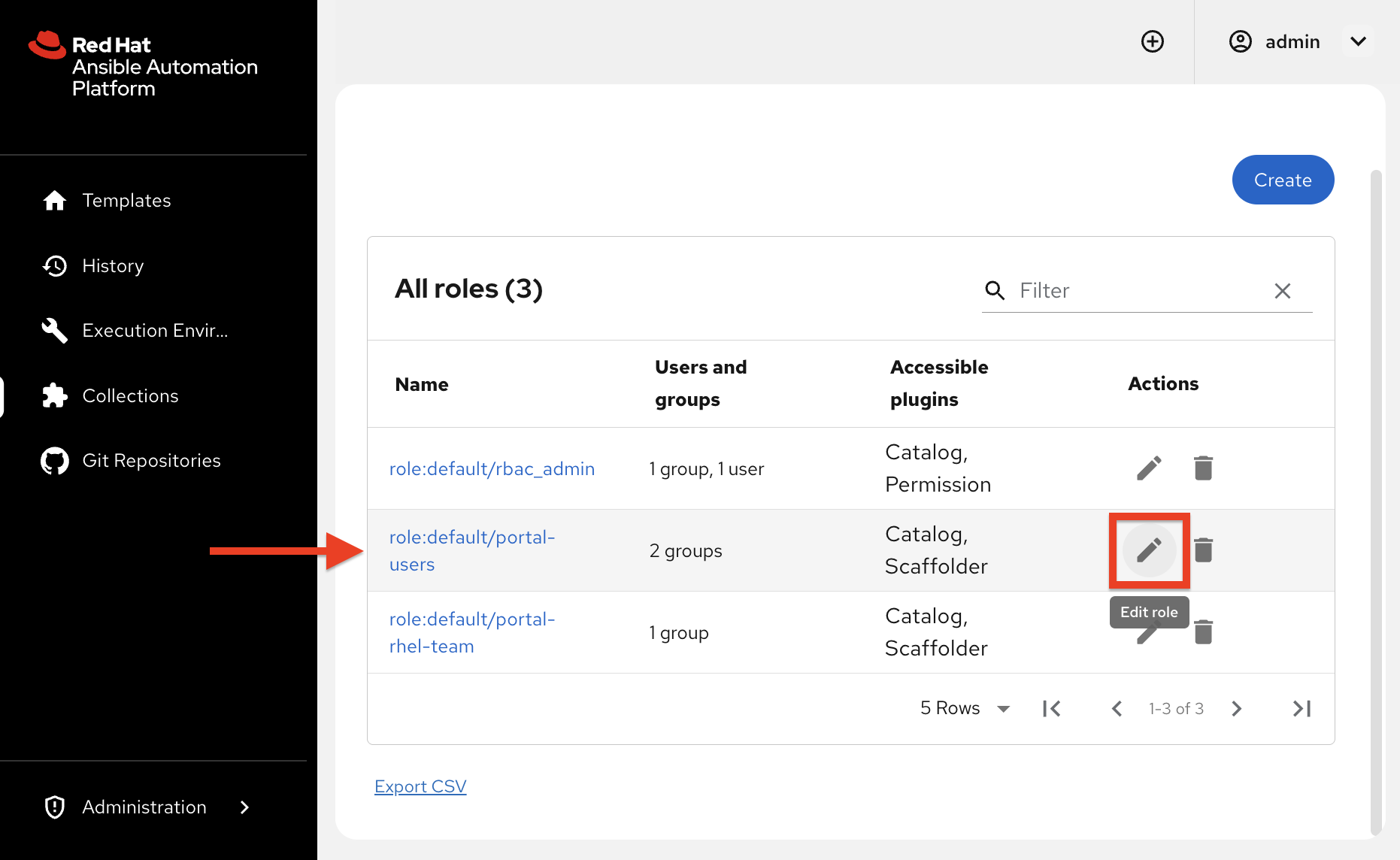
In the roles list, find
role:default/portal-usersand click the Edit (pencil) action.
-
Advance to Add permission policies (step 3 of 3).
-
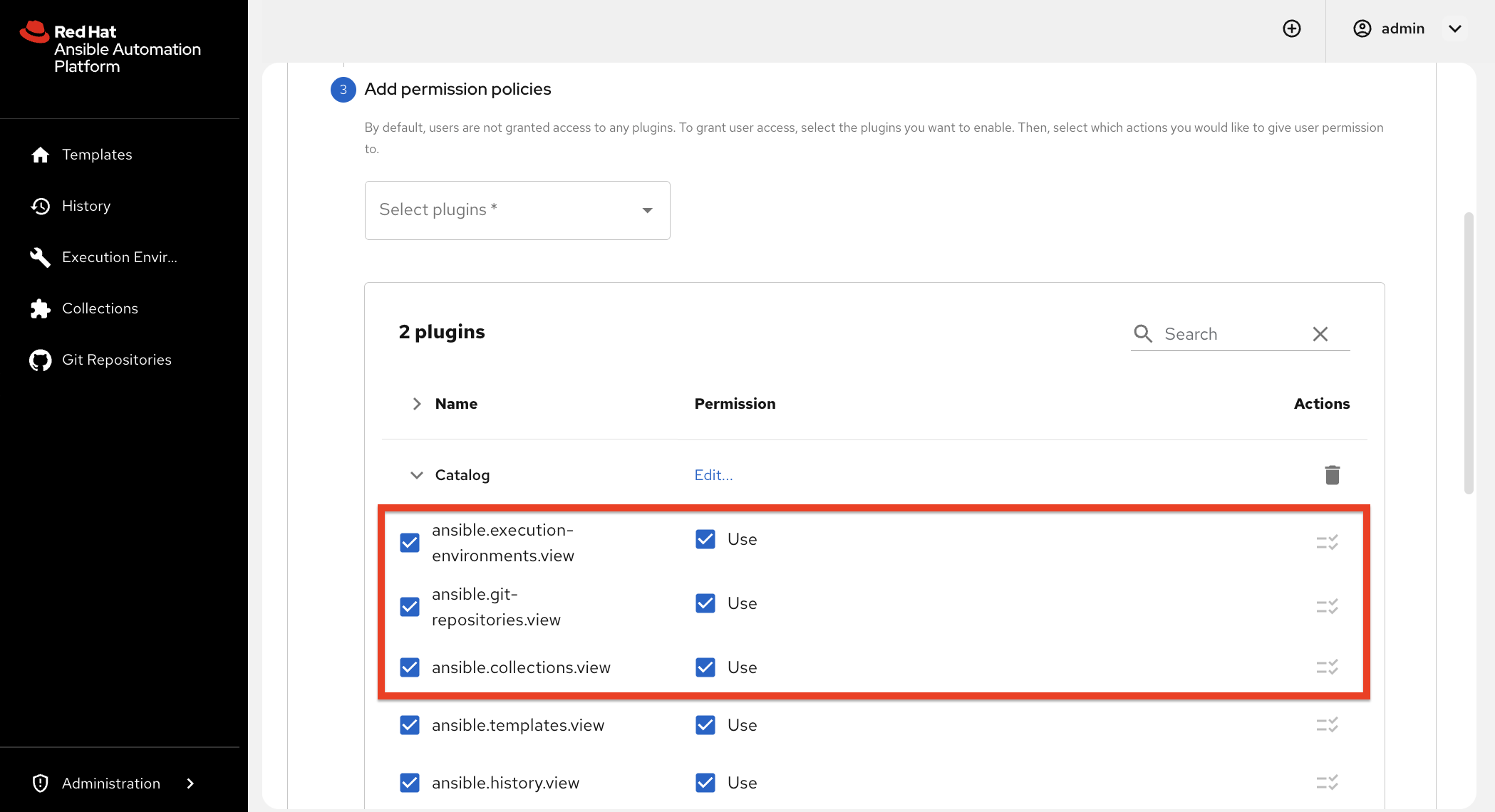
Expand the Catalog plugin and add these three Use permissions:
-
ansible.git-repositories.view -
ansible.collections.view -
ansible.execution-environments.view
-
-
Leave the other existing Catalog and Scaffolder permissions as they are.
-
Review and save the role.
Verify the sidebar as other users
When switching users, log out of Automation Portal before signing in as the next user.
-
Log in to the Automation Portal as
networkuser1with password{aap_admin_password}. Confirm the sidebar includes Git Repositories, Collections, and Execution Environments. -
Log out, then log in as
rheluser1with password{aap_admin_password}. Confirm those content discovery items are not in the sidebar. -
Log out, then log back in as
{aap_admin_username}with password{aap_admin_password}to continue the rest of this module.
✅ Expected result: networkuser1 can see the content discovery sidebar items. rheluser1 does not.
Discover Git repositories
The Git Repositories section of the portal shows Git repos that have been made discoverable for your organization. Teams can open source links, see related automation content, and understand what already exists in Git.
Browse repositories
-
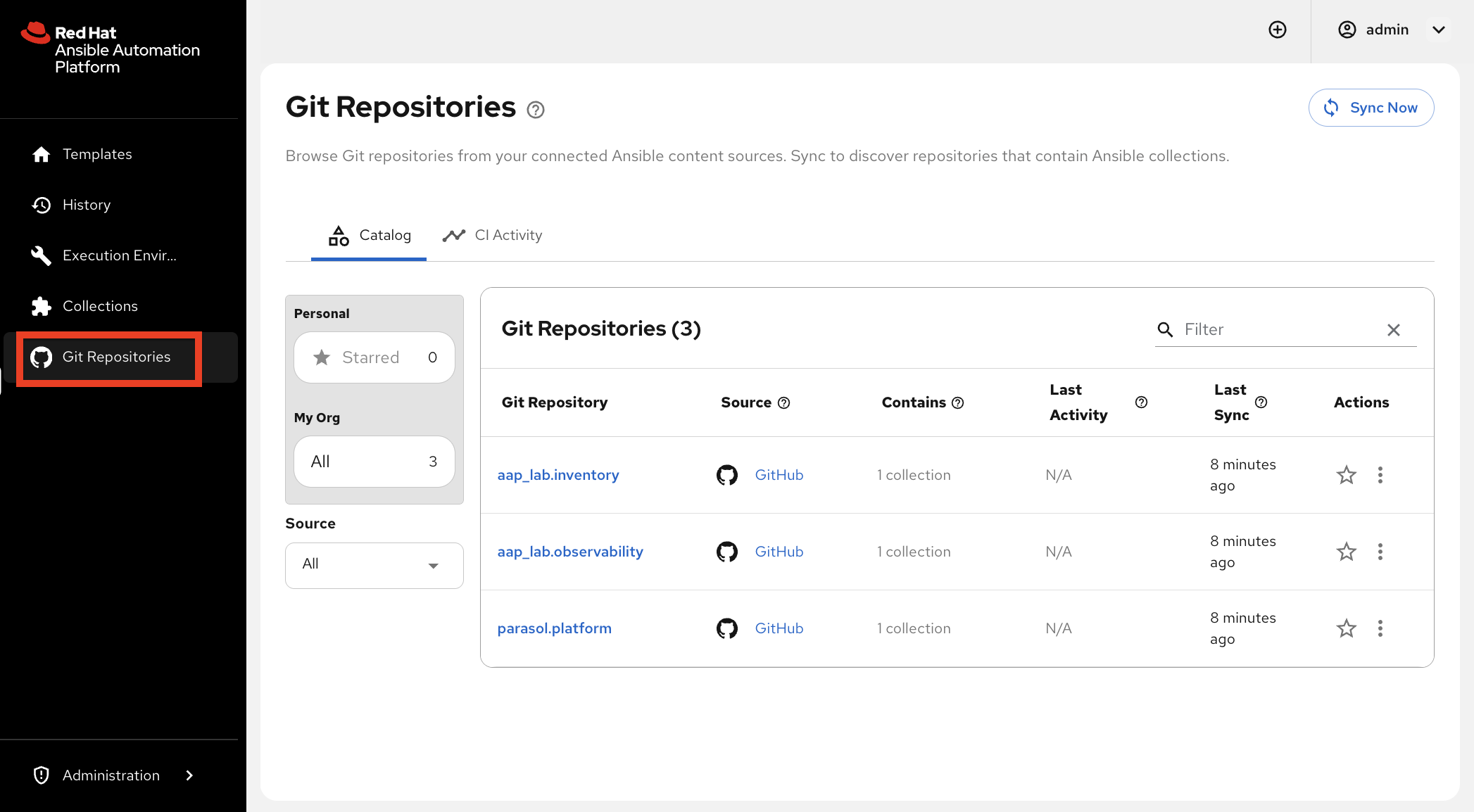
Open the portal navigation and select Git Repositories.
-
If the catalog shows No Git repositories found, click Sync Now (top right) and wait for the sync to finish, then refresh the page. Discovery only lists org repositories that look like Ansible collections (they contain a
galaxy.yml). -
Review the list of repositories available in this lab environment.
-
Open one repository and note what information the portal surfaces: name, source link, related metadata, and the repository README.
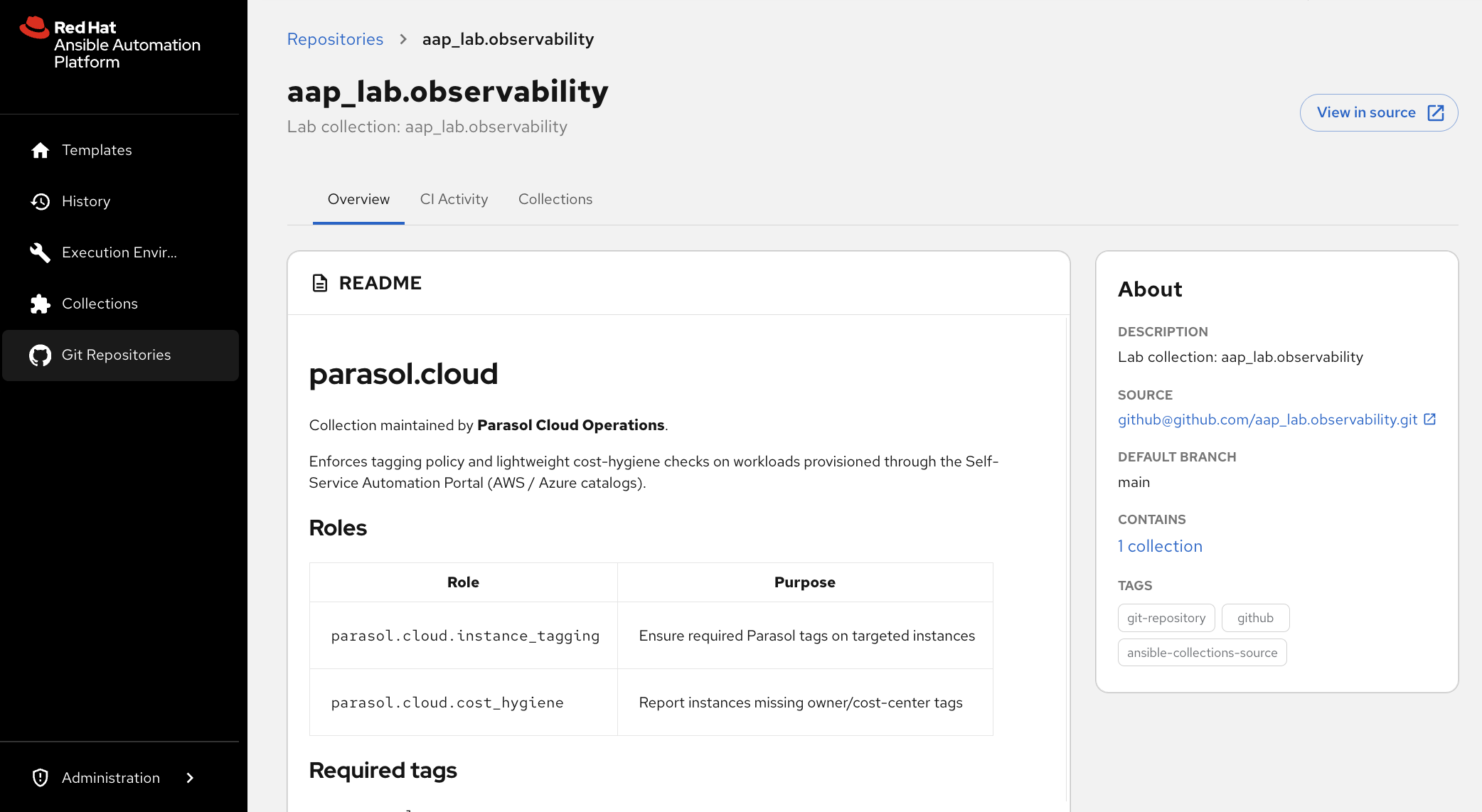
✅ Expected result: You can see one or more repositories from the lab organization, not an empty catalog.
Open a few more repositories and skim each README so you can see how the portal presents different collection content.
Discover collections
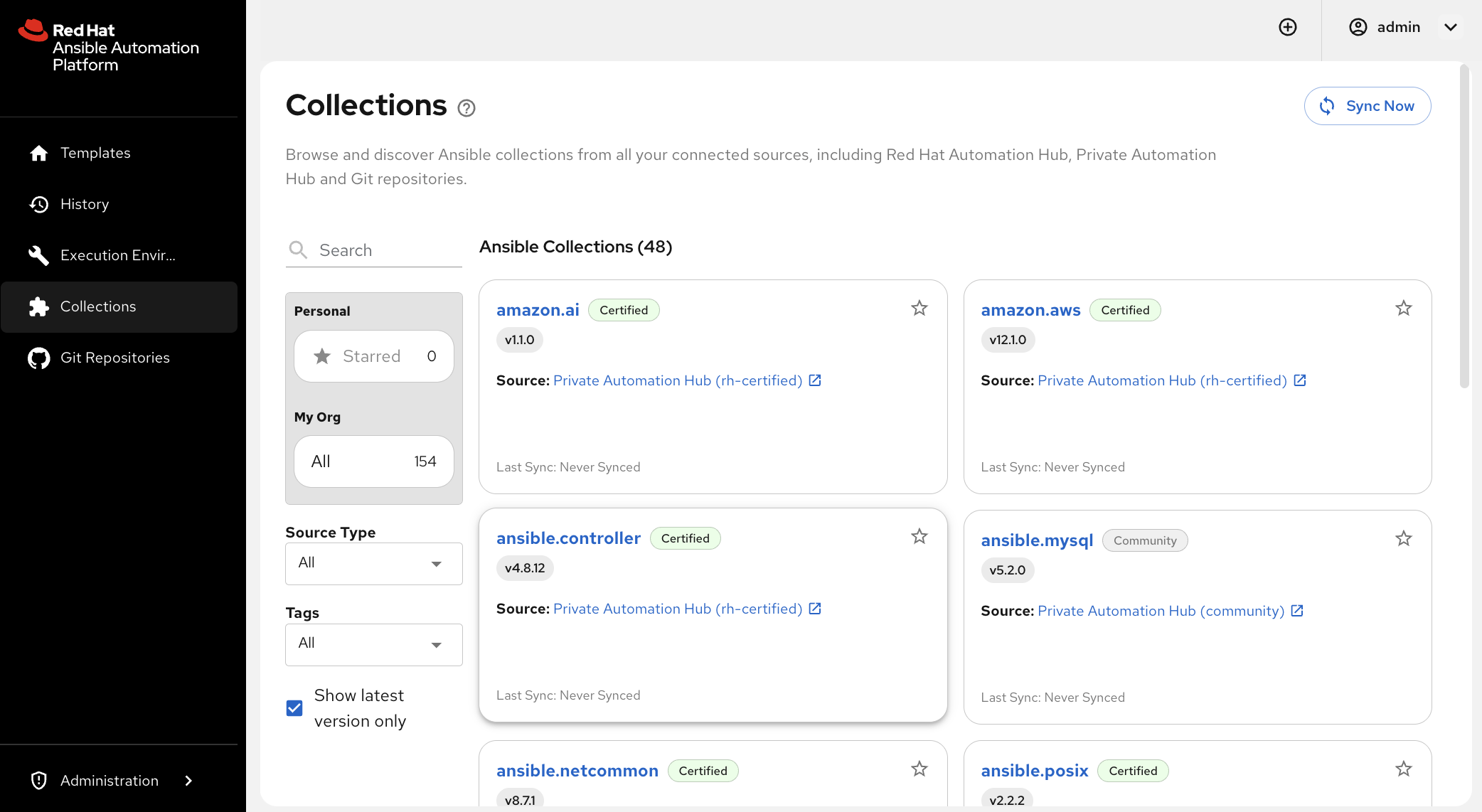
Collections package Ansible content (roles, modules, plugins) for reuse. In the portal, Collections discovery lets users browse what Hub and related sources have made available, including Red Hat content and collections your organization publishes.
Open the Collections view
-
In the portal, open Collections.
-
If the list is empty, click Sync Now so the portal pulls collections from this instance’s Private Automation Hub. The first sync can take several minutes while Hub and the portal finish indexing content. Wait for it to complete, then refresh if the list still looks empty.
-
Notice that you can browse collections without leaving the portal or logging into Hub separately.
Use filters, search, and stars
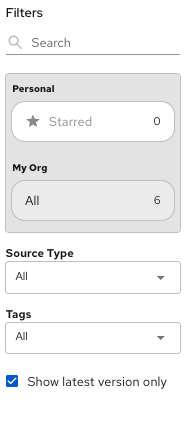
The Filters panel on the left includes search, Personal (including Starred), My Org, Source Type, Tags, and Show latest version only.
-
Try Source Type, Tags, and the search box to narrow the list. Notice that the catalog can include several kinds of content:
-
Certified collections: Built and supported by Red Hat and partners (for example
amazon.aws,cisco.ios) -
Validated collections: Expert-led roles and playbooks for common operational tasks that you can customize for your environment
-
Community collections: Built and maintained by the community (for example
community.general) -
Custom / published collections: Content your organization publishes (in this lab, the
parasolnamespace)
-
-
Open a collection you expect to reuse later, star it, then return to Collections and select Starred under Personal. Confirm the starred collection appears in that filtered list.
✅ Expected result: You can browse certified, validated, and community Hub content, find at least one parasol.* collection (for example parasol.network, parasol.platform, or parasol.cloud), and filter the catalog down to collections you have starred.
|
If |
|
Key learning: Content discovery does not replace Hub or Git. It gives SMEs and platform admins a unified place to see what automation assets exist so they can choose the right collections and repositories when they build or run automation later. |
Learning outcomes
By completing this module, you should now understand:
-
How portal RBAC controls content discovery - Sidebar items appear only for roles that include the matching view permissions
-
What content discovery is - A unified portal catalog over Hub and Git so teams can find automation available to them
-
How repositories appear in the portal - Git repos are listed for discovery and navigation, separate from EE Builder
-
How collections appear in the portal - Users can browse and filter Hub-backed content, including certified, validated, community, and custom collections
You’ve explored how Automation Portal surfaces Git repositories and collections. Next, you’ll use that idea in a real scenario: the network team needs a purpose-built execution environment, and you’ll create it with the portal’s Execution Environment Builder, review the GitHub result, and run a job with that EE.