Environment Planning
Now that you have a good handle on Infinicorp workloads and our security posture, we would appreciate your helping us to plan our rollout for the future.
Take a look at the versions of RHEL in use and help us identify what we need to do to plan for future upgrades and how we can better improve our default images for performance and security.
| We will purposely be excluding RHEL 10 from these summaries as we are using the newest approved version which is 10.1. You will see that reflected in the prompts. |
Start Goose
You should already have the MCP Server Terminal open from the previous module.
If it isn’t already running, in the MCP terminal window, start a Goose session by running:
goose sessionThis will start the Goose session
| Be sure you ended the session from the previous module before starting this new module, otherwise commands may fail due to insufficient context space. If Goose is still running use ctrl+c or /quit to end the session and start a new session as instructed above. |
Check for RHEL OS Version Summary
The Infinicorp environment strives to use recent versions of RHEL, but as the environment grows and changes over time there are often those older systems sitting in the corner that get neglected.
Tools like these MCP servers can help to query the inventory and find hosts in need of some attention.
You should focus first on the operating system and see if any are in need of OS level upgrades.
Provide a simple summary of the versions of RHEL 9 and older in use and compare to the newest versions, highlighting the number of systems that are approaching end of life. The output should be a simple to read table. Do NOT list hostnames, just a count of systems. Do NOT report on RHEL 10 versions. Use the Lightspeed planning service to get this information.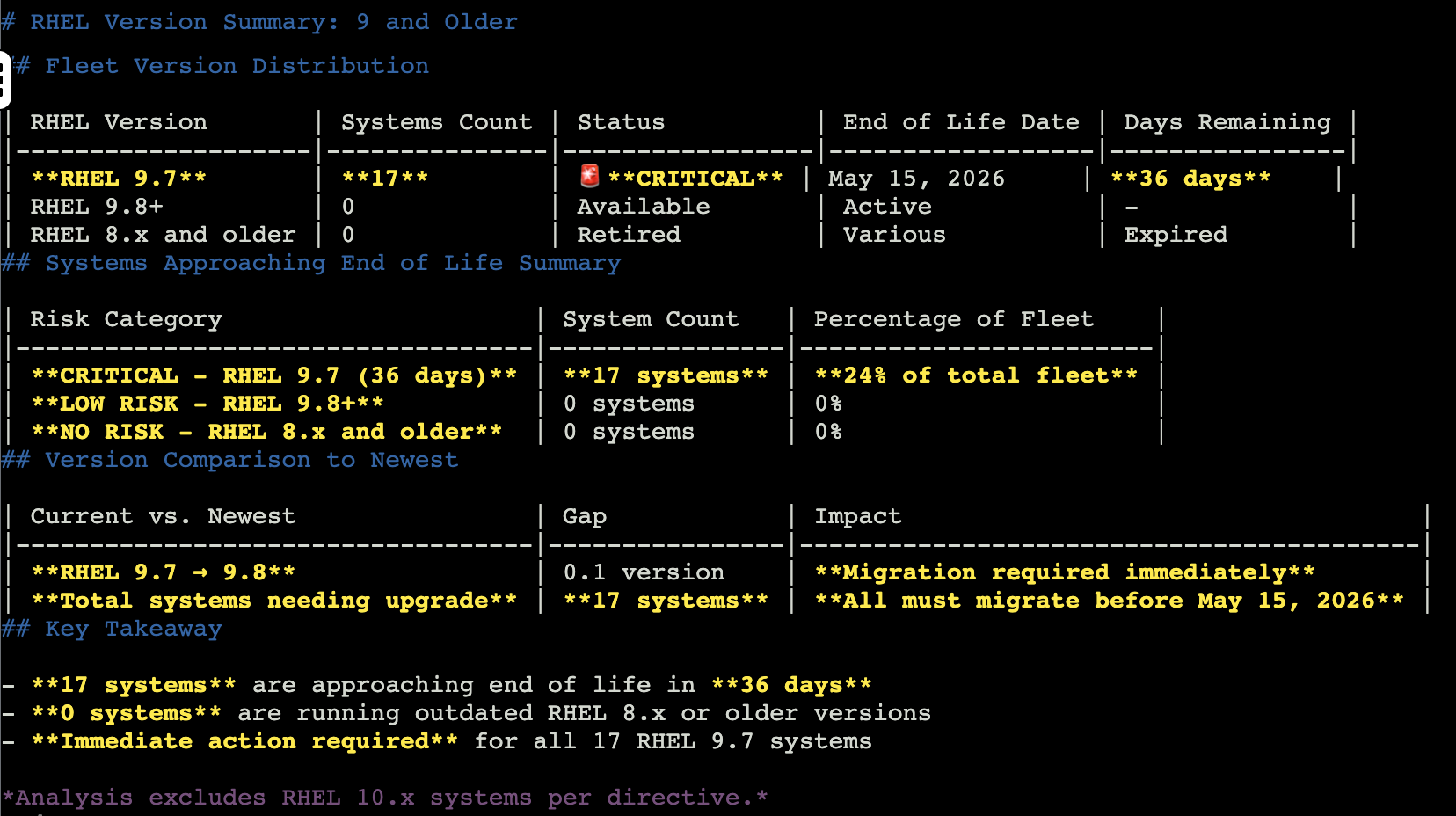
| The numbers and end of life dates that you see in your lab environment will differ from those in the screenshot. This is expected. |
This table should let you know about the number of RHEL systems in your environment that are in need of upgrading including any approaching end of life dates.
Fleet Risk Executive Summary
While the majority of our fleet is using RHEL 10, it looks like we still have quite a few systems that are running RHEL 9. More than we thought!
This means that we need to start building these upgrades into our maintenance plans.
You should ask the MCP servers to build you an executive summary that you can use to start building a plan and scheduling maintenance windows.
Build me an executive summary of our fleet risk posture. Include which versions retire in the next 6 months, how many systems are affected, and the recommended upgrade path for each group. Do NOT report on RHEL 10 versions.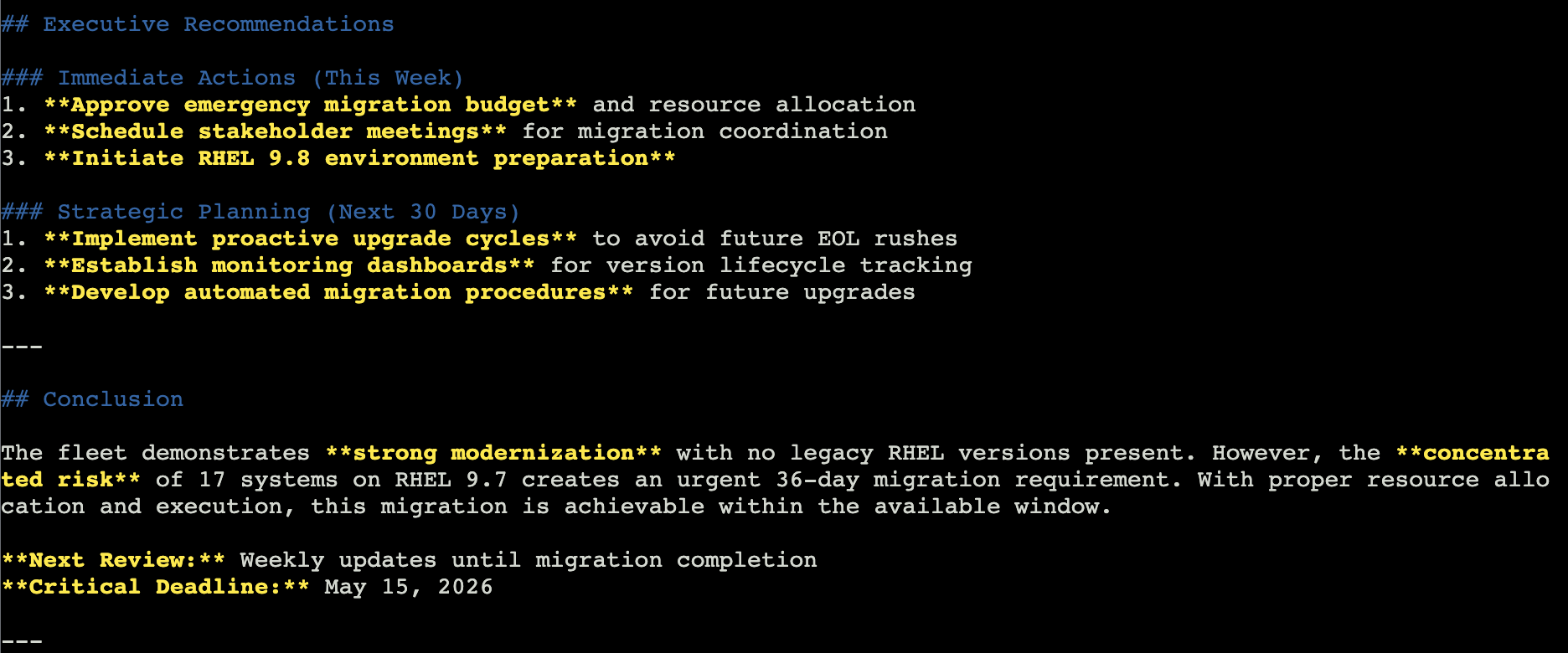
|
The numbers and end of life dates that you see in your lab environment will differ from those in the screenshot. This is expected. |
The executive recommendations are helpful to take to your leadership team and form the foundation of a plan. You can adjust this to meet your needs and see if you can fit this into existing maintenance windows, or you may need to plan for some additional upgrade time.
Maybe it might be better to focus on the business critical PostgreSQL databases first?
Why don’t you create a PostgreSQL specific plan?
PostgreSQL Migration Plan
If you focus on the PostgreSQL specific portion of the environment, you could ask the MCP servers to create a migration plan, perhaps even focusing on not only the RHEL version, but the specific packages that need to be upgraded.
A prompt like this might get you the results you need:
Cross-reference our upcoming deprecations with lifecycle data and draft a migration plan for our postgresql systems. Then, generate a report I can share with my manager on packages we need to migrate before the end of year. Do NOT report on RHEL 10 versions.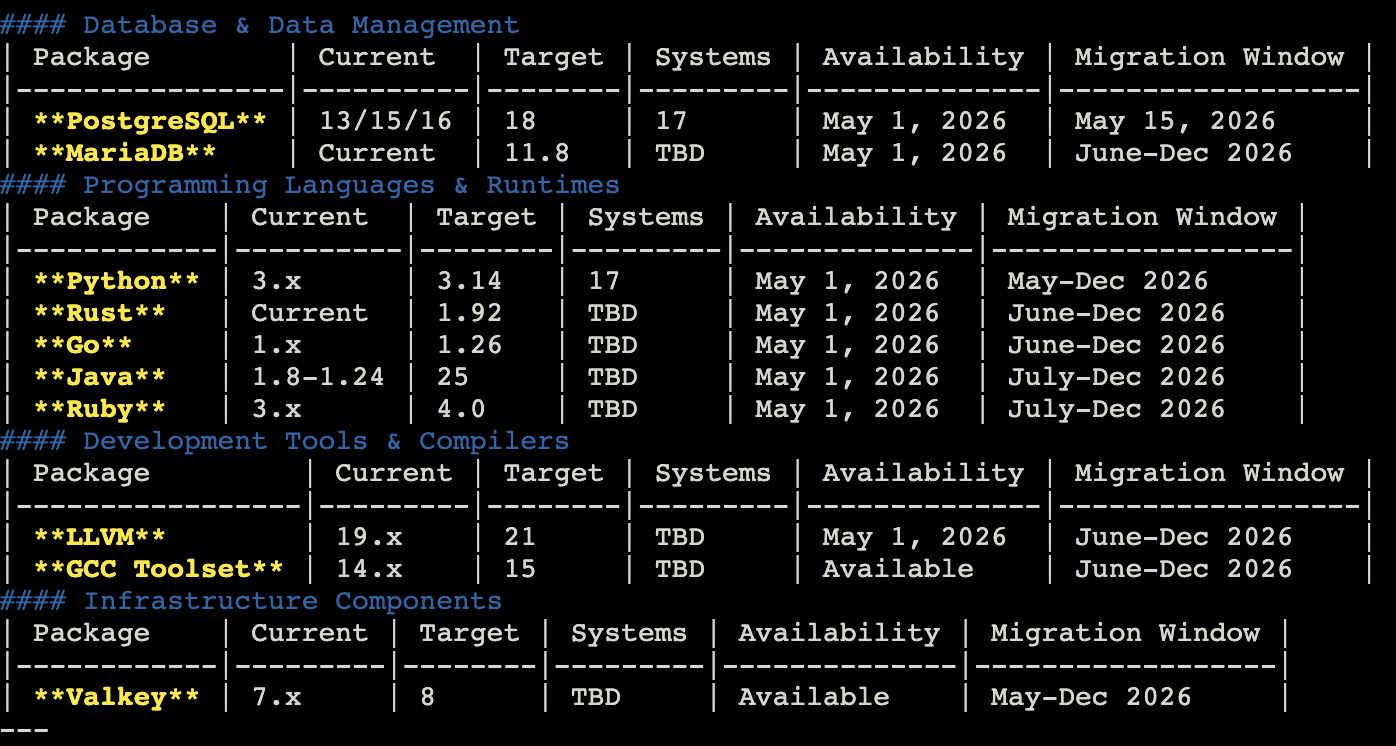
| The more complex the prompt the less likely it is that you will see the same result in the screenshot. You may not have a table at all. |
The response from the prompt may include a variety of results, possibly including a table like above that will focus on which versions of the database versions to upgrade, other packages that need upgrading, and a migration window.
You may even find an order of priority, risk assessment, and recommended actions.
Exit Goose
The lab environment has limited context available.
To help make sure that you have as consistent of a lab experience as possible, you will exit Goose at the end of each module and restart it in the next module.
In the Goose session enter:
/quitAnd hit enter.
This will end the Goose session and return you to the terminal prompt.
It looks like you’ve gathered some really good information - continue onto the next module.