Sub-Module 2.2: Custom Multi-Language Strategies
Introduction
In Sub-Module 2.1, you built a Quarkus application using the pre-installed buildah strategy and a multi-stage Containerfile. That approach works well when each repository includes its own Containerfile. But in production environments, platform teams often support multiple languages across different application teams. Requiring every team to write and maintain a Containerfile creates overhead and inconsistency.
In this sub-module, you’ll create a multi-language ClusterBuildStrategy that automatically detects the application language and generates the appropriate multi-stage Containerfile with the correct Hummingbird runtime, providing a single, consistent build interface for all development teams.
Create Multi-Language BuildStrategy
Step 1: Create ClusterBuildStrategy with Auto-Detection
This strategy uses Buildah directly with conditional logic for different languages:
cat << 'EOF' | oc apply -f -
apiVersion: shipwright.io/v1beta1
kind: ClusterBuildStrategy
metadata:
  name: hummingbird-multi-lang
spec:
  parameters:
  - name: DOCKERFILE
    description: Path to Containerfile/Dockerfile
    default: "Containerfile"
  - name: LANGUAGE
    description: Programming language (nodejs, python, java, go) - auto-detected if not specified
    default: "auto"

  securityContext:
    runAsUser: 0
    runAsGroup: 0

  steps:
  - name: detect-and-generate
    image: registry.access.redhat.com/ubi9/ubi-minimal:latest
    workingDir: $(params.shp-source-context)
    command:
    - /bin/bash
    args:
    - -c
    - |
      set -e

      # Auto-detect language from project files
      DETECTED="$(params.LANGUAGE)"
      if [ "$DETECTED" = "auto" ]; then
        echo "Detecting application language..."
        if [ -f "package.json" ]; then
          DETECTED="nodejs"
        elif [ -f "requirements.txt" ] || [ -f "setup.py" ] || [ -f "Pipfile" ]; then
          DETECTED="python"
        elif [ -f "pom.xml" ] || [ -f "build.gradle" ]; then
          DETECTED="java"
        elif [ -f "go.mod" ]; then
          DETECTED="go"
        else
          echo "ERROR: Could not detect language. Set LANGUAGE parameter explicitly."
          exit 1
        fi
      fi
      echo "Language: $DETECTED"
      echo "$DETECTED" > /shared/detected-lang

      # Select builder and Hummingbird runtime images
      case $DETECTED in
        nodejs)
          BUILDER="registry.access.redhat.com/ubi9/nodejs-20:latest"
          RUNTIME="registry.access.redhat.com/hi/nodejs:20"
          ;;
        python)
          BUILDER="registry.access.redhat.com/ubi9/python-311:latest"
          RUNTIME="registry.access.redhat.com/hi/python:3.11"
          ;;
        java)
          BUILDER="registry.access.redhat.com/hi/openjdk:21-builder"
          RUNTIME="registry.access.redhat.com/hi/openjdk:21-runtime"
          ;;
        go)
          BUILDER="registry.access.redhat.com/ubi9/go-toolset:latest"
          RUNTIME="registry.access.redhat.com/hi/core-runtime:2"
          ;;
      esac

      # Generate multi-stage Containerfile if not present
      if [ ! -f "$(params.DOCKERFILE)" ]; then
        echo "No Containerfile found -- generating one for $DETECTED..."
        case $DETECTED in
          nodejs)
            cat > Containerfile <<CEOF
      FROM $BUILDER AS builder
      WORKDIR /build
      COPY package*.json ./
      RUN npm ci --only=production
      COPY . .

      FROM $RUNTIME
      WORKDIR /app
      COPY --from=builder /build ./
      USER 65532
      EXPOSE 8080
      CMD ["node", "server.js"]
      CEOF
            ;;
          python)
            cat > Containerfile <<CEOF
      FROM $BUILDER AS builder
      WORKDIR /build
      COPY requirements.txt ./
      RUN pip install --user --no-cache-dir -r requirements.txt
      COPY . .

      FROM $RUNTIME
      WORKDIR /app
      COPY --from=builder /build ./
      COPY --from=builder /root/.local /root/.local
      ENV PATH=/root/.local/bin:\$PATH
      USER 65532
      EXPOSE 8080
      CMD ["python", "app.py"]
      CEOF
            ;;
          java)
            cat > Containerfile <<CEOF
      FROM $BUILDER AS builder
      WORKDIR /build
      COPY . .
      RUN if [ -f "mvnw" ]; then chmod +x mvnw && ./mvnw package -DskipTests; else mvn package -DskipTests; fi

      FROM $RUNTIME
      WORKDIR /app
      COPY --from=builder /build/target/quarkus-app/lib/ ./lib/
      COPY --from=builder /build/target/quarkus-app/*.jar ./
      COPY --from=builder /build/target/quarkus-app/app/ ./app/
      COPY --from=builder /build/target/quarkus-app/quarkus/ ./quarkus/
      USER 65532
      EXPOSE 8080
      ENTRYPOINT ["java", "-jar", "quarkus-run.jar"]
      CEOF
            ;;
          go)
            cat > Containerfile <<CEOF
      FROM $BUILDER AS builder
      WORKDIR /build
      COPY go.mod go.sum ./
      RUN go mod download
      COPY . .
      RUN CGO_ENABLED=0 go build -o app .

      FROM $RUNTIME
      WORKDIR /app
      COPY --from=builder /build/app ./
      USER 65532
      EXPOSE 8080
      ENTRYPOINT ["./app"]
      CEOF
            ;;
        esac
        echo "Generated Containerfile:"
        cat Containerfile
      else
        echo "Using existing $(params.DOCKERFILE)"
      fi
    volumeMounts:
    - name: shared
      mountPath: /shared

  - name: build-and-push
    image: registry.redhat.io/rhel9/buildah:latest
    imagePullPolicy: Always
    workingDir: $(params.shp-source-context)
    command:
    - /bin/bash
    args:
    - -c
    - |
      set -e

      DETECTED=$(cat /shared/detected-lang)
      echo "[INFO] Building $DETECTED application"

      buildah --storage-driver=vfs bud \
        --format=oci \
        --tls-verify=true \
        --no-cache \
        -f $(params.DOCKERFILE) \
        -t $(params.shp-output-image) \
        .

      echo "[INFO] Pushing image $(params.shp-output-image)"
      buildah --storage-driver=vfs push \
        --tls-verify=true \
        --digestfile='$(results.shp-image-digest.path)' \
        $(params.shp-output-image) \
        docker://$(params.shp-output-image)
    volumeMounts:
    - name: shared
      mountPath: /shared
    securityContext:
      capabilities:
        add:
        - SETFCAP

  volumes:
  - name: shared
    emptyDir: {}
EOFclusterbuildstrategy.shipwright.io/hummingbird-multi-lang created
-
Auto-detects application language from project files (
package.json,requirements.txt,pom.xml,go.mod) -
Selects the appropriate UBI builder (or Hummingbird builder for Java) and Hummingbird runtime images
-
Generates a language-appropriate multi-stage Containerfile if one doesn’t already exist
-
Builds and pushes the final image using buildah
| Language | Builder Image | Runtime Image |
|---|---|---|
Node.js |
|
|
Python |
|
|
Java |
|
|
Go |
|
|
|
Platform Engineering Benefit: This single ClusterBuildStrategy supports 4+ languages. Development teams can use it without worrying about language-specific configuration. The platform team maintains one strategy instead of four. |
Step 2: Test Multi-Language Strategy
Create a Build using this strategy with the same Quarkus sample application from Module 2.1. The strategy will auto-detect Java from the pom.xml and find the existing Containerfile:
cat << 'EOF' | oc apply -f -
apiVersion: shipwright.io/v1beta1
kind: Build
metadata:
  name: auto-detect-build
  namespace: {user}-hummingbird-builds
spec:
  source:
    type: Git
    git:
      url: https://github.com/tosin2013/sample-quarkus-hummingbird
      revision: main
  strategy:
    name: hummingbird-multi-lang
    kind: ClusterBuildStrategy
  output:
    image: {quay_hostname}/{quay_user}/auto-detect-app:latest
    credentials:
      name: registry-credentials
EOF|
Notice we’re using the same Git repository from Module 2.1 but with the |
Step 3: Trigger Build
cat << 'EOF' | oc apply -f -
apiVersion: shipwright.io/v1beta1
kind: BuildRun
metadata:
  name: auto-detect-build-run-1
  namespace: {user}-hummingbird-builds
spec:
  build:
    name: auto-detect-build
EOF
Monitor the build:
oc get buildrun auto-detect-build-run-1 -n {user}-hummingbird-builds -wPress Ctrl+C once the build succeeds.
Step 4: View Language Detection Logs
Check that the language was detected correctly:
BUILDRUN_POD=$(oc get buildrun auto-detect-build-run-1 -n {user}-hummingbird-builds -o jsonpath='{.status.taskRunName}')-pod

# View detect-and-generate step output
oc logs $BUILDRUN_POD -n {user}-hummingbird-builds -c step-detect-and-generateDetecting application language... Language: java Using existing Containerfile
The strategy detected Java via pom.xml and found the existing Containerfile in the repository — no auto-generation needed.
Step 5: Verify Build Logs
Confirm the full build pipeline worked by inspecting the build step output:
oc logs $BUILDRUN_POD -n {user}-hummingbird-builds -c step-build-and-push | head -20[INFO] Building java application [INFO] Building image ... [1/2] STEP 1/8: FROM registry.access.redhat.com/hi/openjdk:21-builder AS builder ... [2/2] STEP 6/11: FROM registry.access.redhat.com/hi/openjdk:21-runtime ...
This confirms the strategy correctly detected Java, used the existing multi-stage Containerfile, and built with Hummingbird builder and runtime images.
|
To test with different languages, point the Build at any repository containing:
If the repository already has a |
Registry Integration
Step 6: Configure Internal OpenShift Registry
Use OpenShift’s internal registry for development builds:
# Enable image registry default route (if not already enabled)
oc patch configs.imageregistry.operator.openshift.io/cluster \
  --type merge \
  --patch '{"spec":{"defaultRoute":true}}'

# Get internal registry route
INTERNAL_REGISTRY=$(oc get route default-route -n openshift-image-registry -o jsonpath='{.spec.host}' 2>/dev/null || echo "Not yet available")
echo "Internal registry: $INTERNAL_REGISTRY"|
If the route doesn’t exist yet, it may take 1-2 minutes for the operator to create it after patching. |
Step 7: Create Build Using Internal Registry
Create a Build targeting the internal registry:
cat << 'EOF' | oc apply -f -
apiVersion: shipwright.io/v1beta1
kind: Build
metadata:
  name: internal-registry-build
  namespace: {user}-hummingbird-builds
spec:
  source:
    type: Git
    git:
      url: https://github.com/tosin2013/sample-quarkus-hummingbird
      revision: main
  strategy:
    name: hummingbird-multi-lang
    kind: ClusterBuildStrategy
  output:
    image: image-registry.openshift-image-registry.svc:5000/{user}-hummingbird-builds/sample-app:latest
EOFbuild.shipwright.io/internal-registry-build created
|
Internal Registry Benefits:
|
Step 8: Trigger Internal Registry Build
cat << 'EOF' | oc create -f -
apiVersion: shipwright.io/v1beta1
kind: BuildRun
metadata:
  generateName: internal-registry-build-run-
  namespace: {user}-hummingbird-builds
spec:
  build:
    name: internal-registry-build
EOF|
Using |
Step 8b: Verify ImageStream in OpenShift
Confirm the image was pushed to the internal registry by checking the ImageStream:
oc get imagestream sample-app -n {user}-hummingbird-builds
oc get imagestream sample-app -n {user}-hummingbird-builds -o jsonpath='{.status.tags[0].items[0].dockerImageReference}'
echo ""NAME IMAGE REPOSITORY TAGS UPDATED
sample-app image-registry.openshift-image-registry.svc:5000/{user}-hummingbird-builds/sample-app latest ...
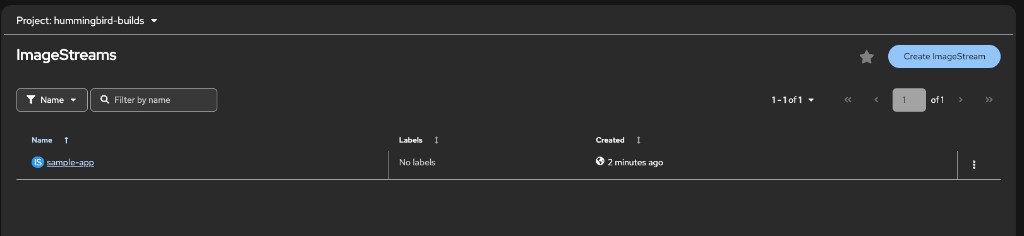
You can also verify this in the OpenShift console under Builds → ImageStreams in the {user}-hummingbird-builds project:
Air-Gapped Registry Mirrors
For air-gapped or restricted environments, configure registry mirrors to redirect pulls to internal registries.
Step 9: Configure ImageContentSourcePolicy (Optional)
|
Warning: ImageContentSourcePolicy requires cluster-admin privileges and triggers a cluster-wide MachineConfig update that will reboot all nodes. Only perform this step if:
For workshop purposes, you can skip this step and just review the configuration. |
# DO NOT APPLY - This is for reference only
apiVersion: operator.openshift.io/v1alpha1
kind: ImageContentSourcePolicy
metadata:
  name: hummingbird-mirror
spec:
  repositoryDigestMirrors:
  - mirrors:
    - registry.internal.example.com/hummingbird
    source: registry.access.redhat.com/hi
  - mirrors:
    - registry.internal.example.com/ubi9
source: registry.access.redhat.com/ubi9-
Redirects pulls from
registry.access.redhat.com/hitoregistry.internal.example.com/hummingbird -
Redirects pulls from
registry.access.redhat.com/ubi9toregistry.internal.example.com/ubi9 -
All cluster nodes (and all pods) automatically use the mirrors
-
Shipwright builds automatically use mirrored images
|
Production Air-Gap Workflow:
See the full air-gap mirror setup guide in the reference documentation. |
Summary
Congratulations! You’ve completed Sub-Module 2.2 and created advanced multi-language build strategies!
✅ Created ClusterBuildStrategy with language auto-detection
✅ Configured conditional Hummingbird runtime selection for 4+ languages
✅ Tested auto-detection with Node.js application
✅ Verified build logs confirm correct runtime selection
✅ Enabled OpenShift internal registry
✅ Created Build using internal registry (no credentials needed)
✅ Understood ImageContentSourcePolicy for air-gapped environments
✅ Learned registry mirror configuration patterns
Multi-Language Strategy Benefits: * Single interface for all development teams * Automatic detection reduces configuration burden * Consistent Hummingbird usage across all languages * Platform team maintains one strategy instead of many
Registry Integration Patterns: * On-cluster Quay: Validated TLS, Clair scanning, used throughout this workshop * OpenShift internal registry: No credentials within same cluster * External registries (quay.io, Docker Hub): Require separate credentials * Registry mirrors: Enable air-gapped deployments
Production Readiness: * Auto-detection reduces developer errors * Internal registry ideal for dev/test environments * ImageContentSourcePolicy for air-gapped production
Next Sub-Module
Ready to add security pipelines? Proceed to:
Integrate SBOM generation, vulnerability scanning, image signing, and production deployment with proper security contexts.
Additional Resources
Buildah Documentation: * Buildah Official Site * Buildah Documentation
OpenShift Registry: * OpenShift Image Registry Documentation * ImageStreams Guide
Air-Gap Deployments: * Disconnected Installation Guide
Troubleshooting
Issue: Language detection fails
# Check detect-and-generate step logs
BUILDRUN_POD=$(oc get buildrun <buildrun-name> -o jsonpath='{.status.taskRunName}')-pod
oc logs $BUILDRUN_POD -c step-detect-and-generate

# Verify source repository contents
# Ensure package.json, requirements.txt, pom.xml, or go.mod exist in the repo
Issue: Buildah build fails
# Check build-and-push step logs for errors
oc logs $BUILDRUN_POD -c step-build-and-push

# Common issues:
# - Missing build tools in UBI builder image
# - Network connectivity to registries
# - Storage driver issues (vfs vs overlay)
Issue: Internal registry not accessible
# Verify registry route exists
oc get route default-route -n openshift-image-registry

# Check registry operator status
oc get clusteroperator image-registry

# Enable default route if not already enabled
oc patch configs.imageregistry.operator.openshift.io/cluster \
  --type merge \
  --patch '{"spec":{"defaultRoute":true}}'