Module 3: Incorporating policy and tribal knowledge with Solution Server
Back at ACME Corp, you’ve successfully demonstrated AI-accelerated code modernization. Your manager is impressed but has a concern: "This looks great, but how do we ensure the AI follows our company’s coding standards? We have specific patterns we use across all applications. Furthermore, how can we ensure junior software engineers, who will carryout the bulk of the migration efforts, will be guided by AI to follow these company standards and practices."
ACME needs to scale modernization across dozens of applications while maintaining consistency with company-specific policies and best practices. You’ve heard that Developer Lightspeed Solution Server can learn organizational knowledge, but you need to see how it works. You also need to ensure that Developer Lightspeed for MTA enforces these best practices and company standards on migration efforts carried out by junior developers, or recently onboarded developers, or even contractors.
In this module, you’ll experience how Solution Server captures company policies, learns tribal knowledge, and accelerates major migration waves by teaching AI your organization’s specific patterns.
| Solution Server is an enterprise capability that will apply Migration Hints to the LLM generating code fixes. These company specific or privacy based approaches are based upon Solution Servers ability to capture company policies and tribal knowledge and have the LLM apply them across all migration efforts at ACME Corp. |
In this module you move between two different roles:
-
First you will be a senior architect or lead developer and based on an archetype grouping of applications we covered in Module 1, you will work with an initial representative application. You will add into the AI generated code some company policy code approaches, which reflect tribal knowledge based upon company libraries or practices.
-
Then you will switch roles, and as a junior developer will benefit from the AI learned best practices, which will then be injected as hints to the LLM creating code fixes.
Learning objectives
By the end of this module, you’ll be able to:
-
Understand Developer Lightspeed Solution Server architecture and capabilities
-
Configure Solution Server to learn company coding standards
-
Teach the AI system organizational best practices and policies
-
Apply learned patterns consistently across migration projects
-
Demonstrate how Solution Server accelerates large-scale migration waves
Exercise 1: Introduction to Developer Lightspeed Solution Server
You need to understand what Solution Server is and how it enables organizational knowledge capture for AI-assisted development.
You prepare to explore Solution Server’s capabilities and architecture.
Prerequisites
-
Understand at a high level the value of Developer Lightspeed for MTA
-
Able to access Workshop Application Tabs
Steps
-
Understand Solution Server’s role:
Developer Lightspeed Solution Server acts as an organizational knowledge repository that:
-
Captures company-specific coding patterns and standards
-
Learns from existing codebase examples
-
Stores best practices and policy rules
-
Provides context to AI models for consistent code generation
-
Enables knowledge sharing across development teams
-
-
Review the Solution Server architecture:
Solution Server is an MCP server that sits on top of MTA’s OpenShift installation. It listens and records "before" and "after" code changes made by a developer during the Developer Lightspeed AI driven migration process. These fixes are reconstructed as "hints," which are then centrally available through solution server for all developers connected to the MTA Hub and Solution Server. As developers invoke Analysis sessions, through the developers MTA Developer Lightspeed extension, and the static code rule enriched prompts are passed to the LLM, the LLM adds in relevant key insights based upon past fixes captured by solution server. These relevant insights are called Migration Hints and they are molded by the LLM into the returned suggested code fixes.
Developer → Developer Lightspeed Extension → Solution Server → AI Models
                                                    ↓
                                            Knowledge Base
                                            (Policies, Patterns, Examples)
This architecture ensures all AI-generated code reflects organizational standards.
-
Explore key Solution Server capabilities:
-
Policy enforcement: Define rules that AI must follow
-
Pattern recognition: Learn from existing code examples
-
Context injection: Automatically include relevant organizational knowledge in AI requests
-
Consistency: Ensure all team members get AI assistance aligned with company standards
-
Knowledge evolution: Continuously improve as more patterns are added
-
-
Consider ACME’s use cases:
ACME can use Solution Server for:
-
Standardized error handling patterns
-
Logging conventions and formats
-
Security policies and requirements
-
Configuration management approaches
-
Testing standards and patterns
-
Documentation requirements
-
Exercise 2: Ensure access and configuration
Before you start, setup the module environment
Prerequisites
-
Understand Solution Server value and basic architecture
-
Able to access Workshop Application Tabs
Steps
-
Confirm access to DevSpaces workspace
There are two different browser tabs related to DevSpaces. One is the DevSpaces tab/window that lists all the active DevSpaces workspaces. The other one is the actual opened workspace, which is the VSCode IDE hosted in a browser window/tab.
If you completed Module 2 you probably still have an active DevSpaces workspace browser tab window, or separate browser window open.
If so, navigate to it
If you don’t, then click on the following linked instructions to initially open or reset your workspace browser window.
Initially login or reestablish DevSpaces workspace -
Switch to the Module 3 Git branch
-
Create a new terminal window
-
Click on the hamburger icon on the left sidebar, Click on the Terminal menu item, click on New Terminal
-
A new terminal window will open at the bottom of the screen
-
-
Enter the following into the terminal prompt and hit Enter:
git checkout module3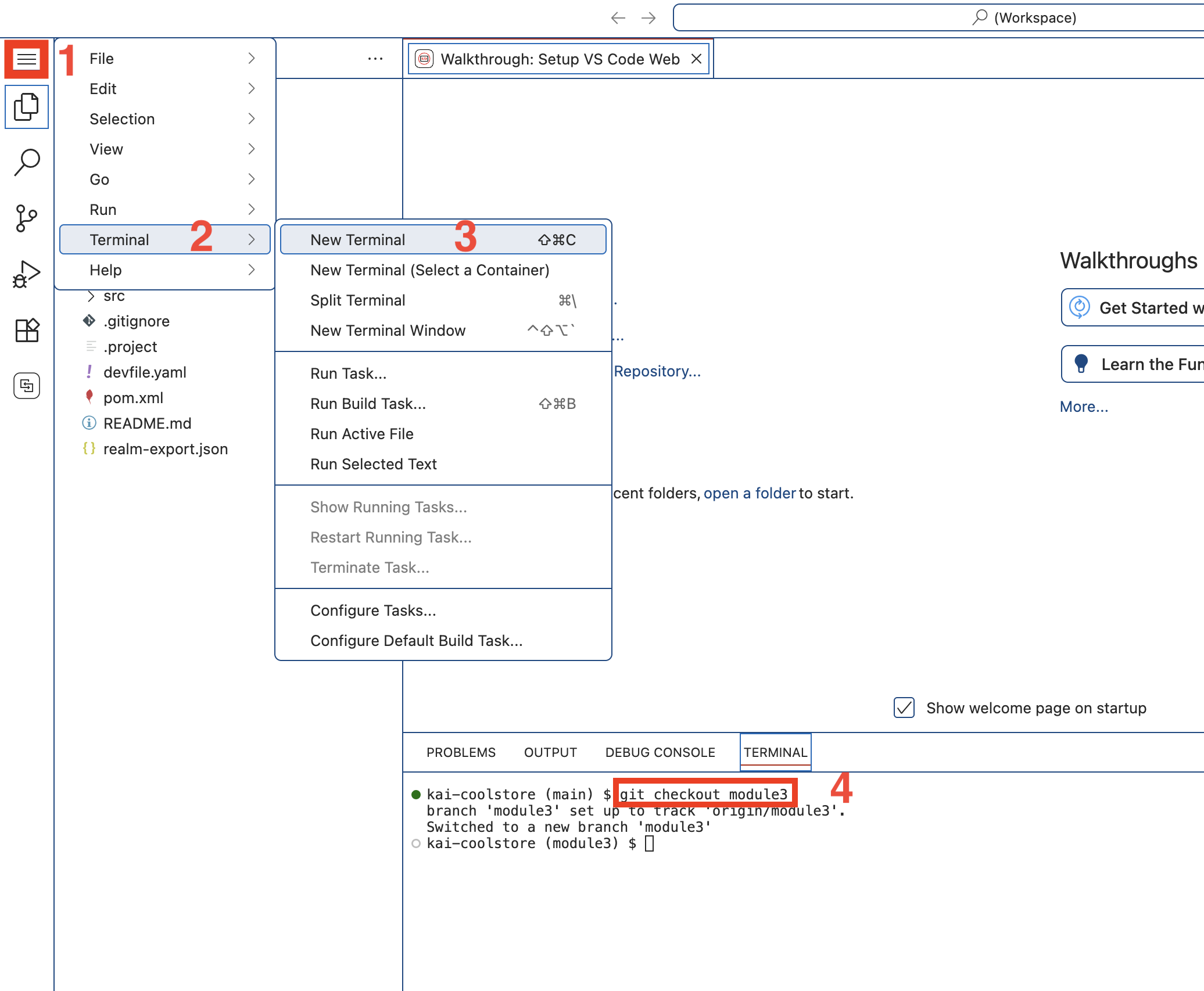 Figure 1. Checkout Module 3
If you get an error similar to
error: Your local changes to the following files would be overwritten by checkout:
Then enter the following in the terminal prompt:# Do a save of uncommitted work from the previous module git stash # Switch to branch for this module git checkout module3You can close the terminal window pane now if you want to because we won’t be using it anymore in this lab.
-
-
Confirm and open MTA VSCode extension (Developer Lightspeed for MTA)
If you completed Module 2 you probably have the extension loaded and ready to work with
If so, navigate to the Analysis View panel,
If you don’t, or can’t locate it click on the following link and follow the instructions.
Load MTA related VSCode extensions -
Connect to the MTA Hub and confirm access to the LLM
The MTA Hub connection gives access to the Solution Server tooling, which is running as an MPC server
-
Confirm you are in the MTA Analysis View
Depending upon your environment you may notice warning messages about connections. Ignore them for now. -
Click on the configuration gear icon on the upper right of the pane.
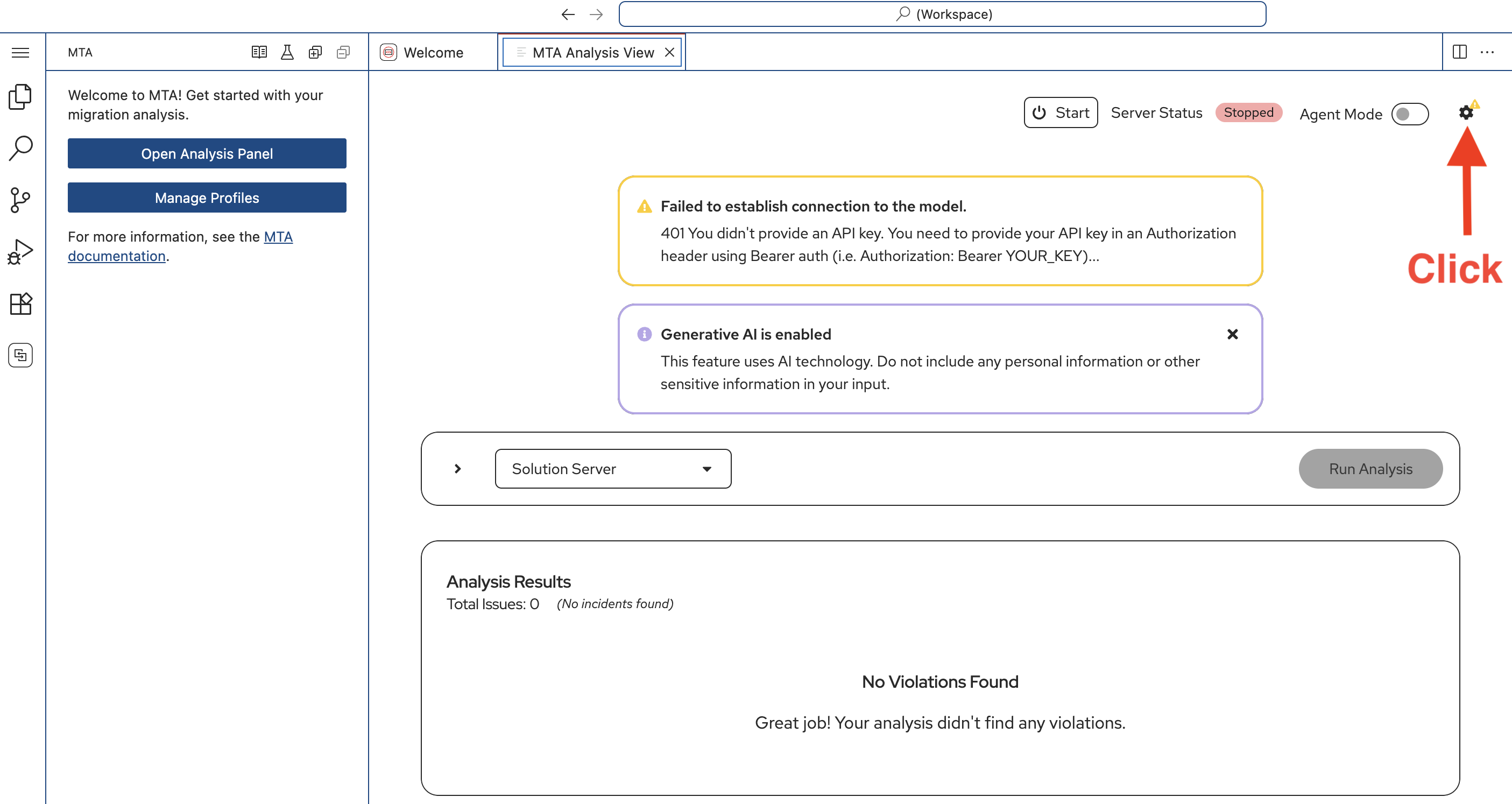 Figure 2. Open Analysis Configuration
 -
A side panel will open Get Ready to Analyze
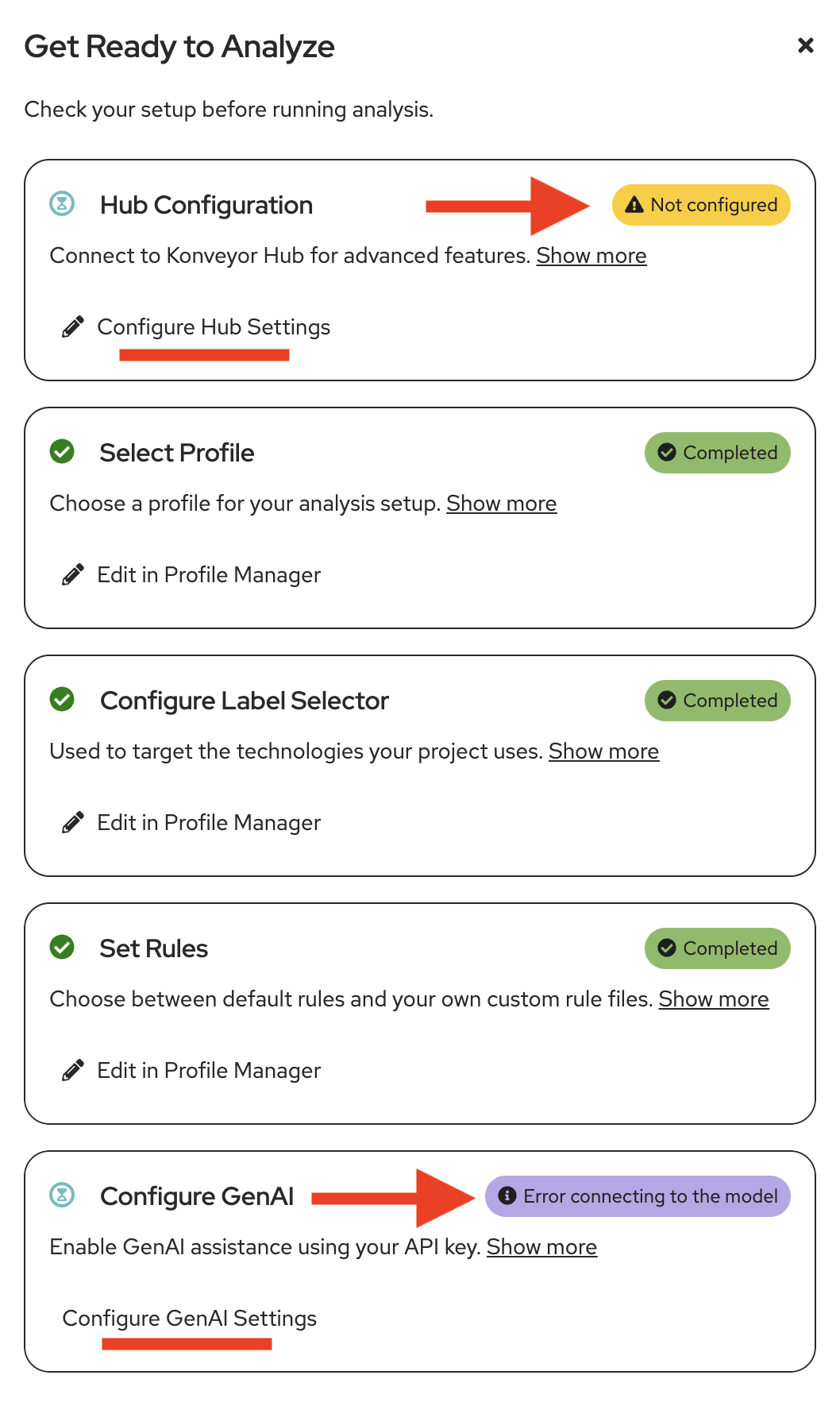 Figure 3. Analysis Configuration
 -
Notice Hub Configuration is not yet configured and Configure GenAI may not be configured yet
-
Click on Configure Hub Settings
-
The MTA Hub Configuration tab will open
-
In General Settings , click the slider to Enable connection to Konveyor Hub (MTA Hub)
-
In Hub URL enter the following URL
https://mta-mta.apps.cluster-abc123.ocpv00.rhdp.net -
Click the Slider/Turn on Skip SSL certificate verification
-
Under Features towards the bottom Enable Solution Server
-
Click Save
-
Close the MTA Hub Configuration tab
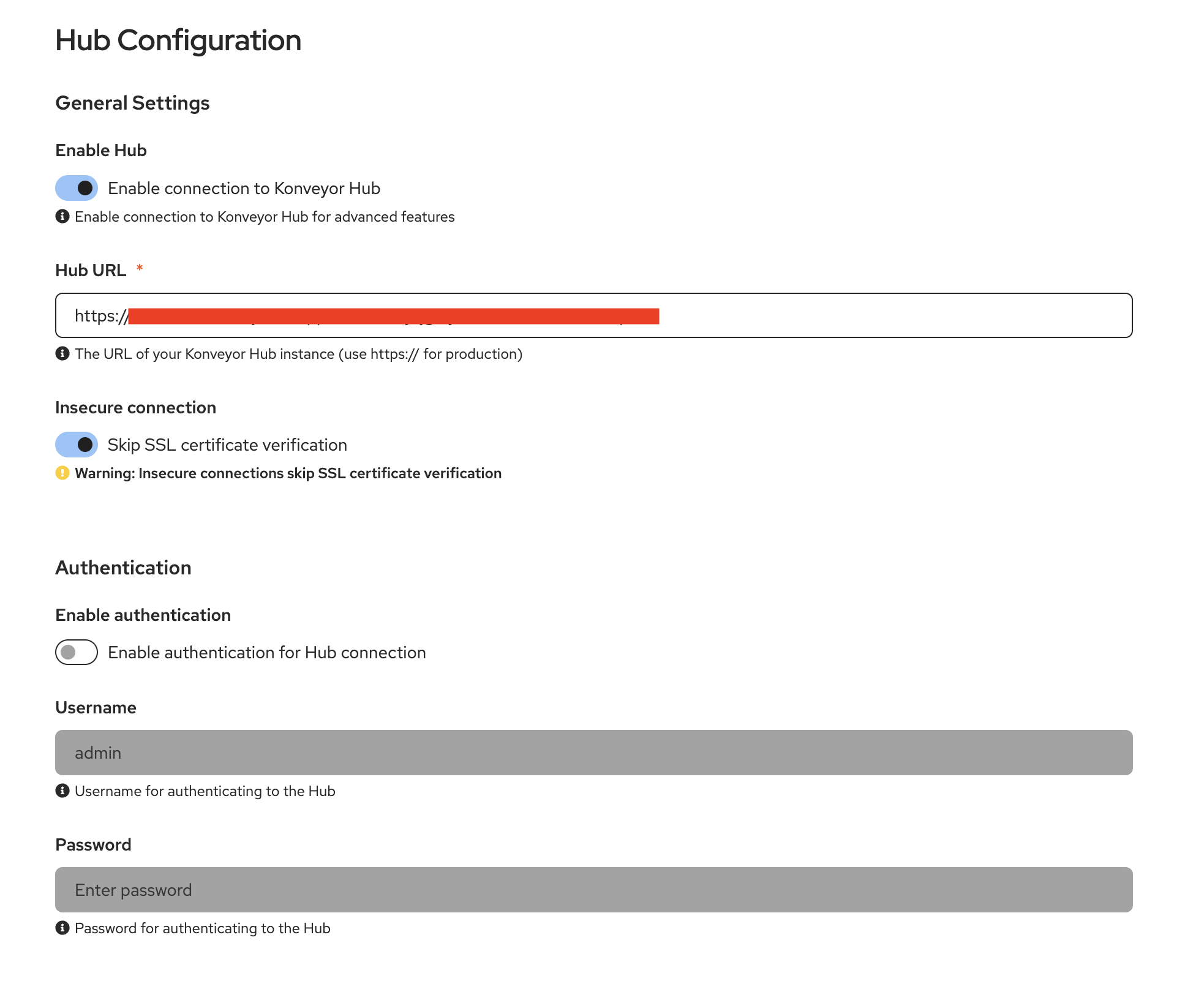 Figure 4. Hub Configuration
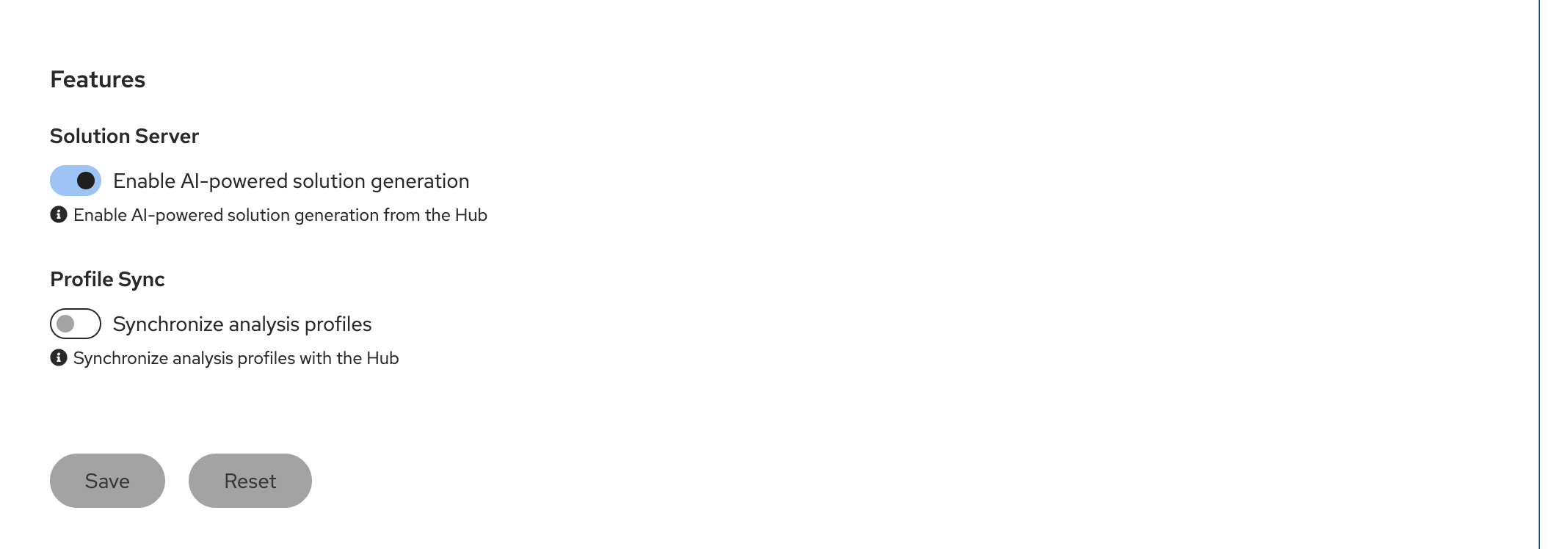 Figure 5. Hub Configuration
If the Configure GenAI setting is not configured
-
Click on Configure GenAI Settings
-
The provider-settings.yaml file will open on a separate pane
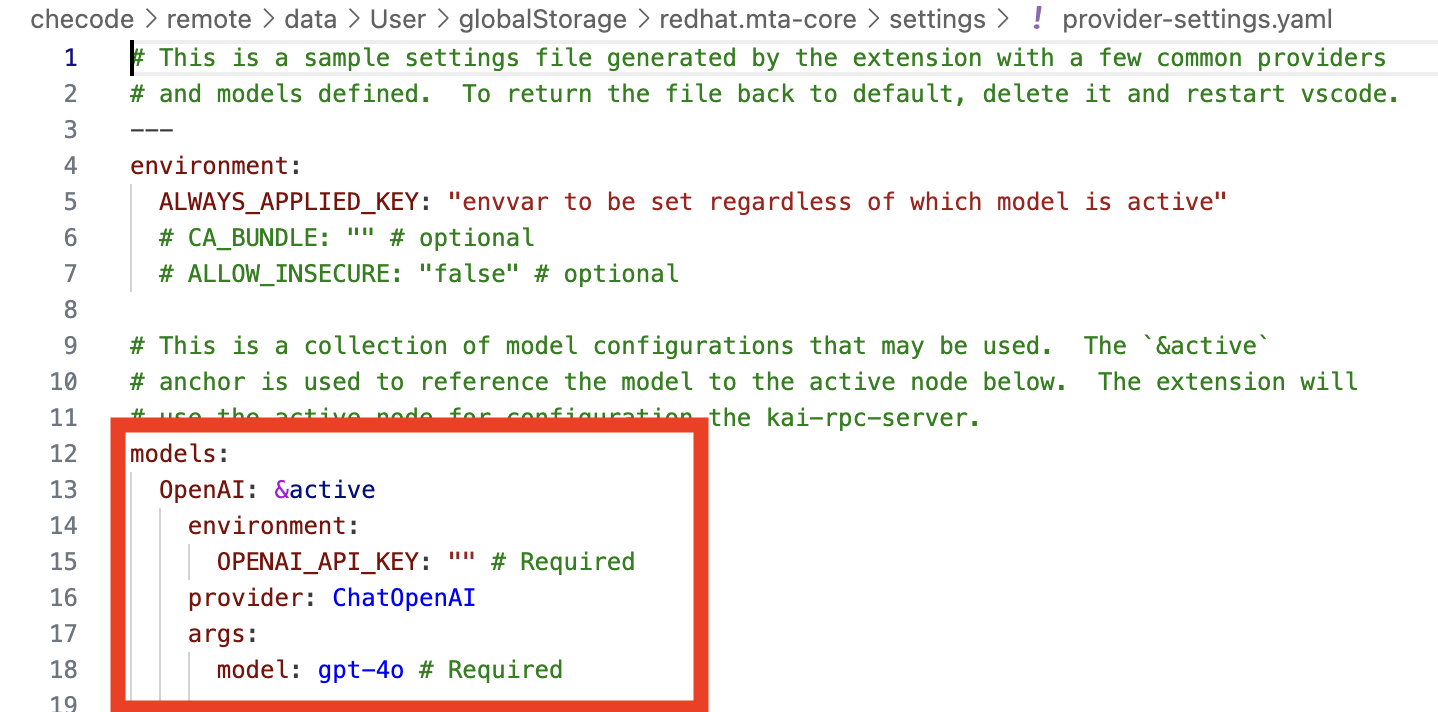 Figure 6. AI Model Settings
 -
Replace/Update from the word models: down through the first entry with the following
This is yaml syntax so ensure to keep the indentions - just copy and paste over existing source models: OpenAI: &active environment: OPENAI_API_KEY: "sk-1234" # Required provider: ChatOpenAI args: model: llama-scout-17b # Required configuration: baseURL: "https://litellm.apps.cluster-abc123.ocpv00.rhdp.net" -
Close the provider-settings.yaml file.
-
Ensure the Get Ready to Analyze panel is closed
-
Close the MTA Hub Configuration Tab/Pane
-
Navigate to the MTA Analysis View tab
-
Ensure that the Server Status shows Running
-
If it doesn’t, click on the Start button
-
-
Do NOT turn on Agent Mode
-
If Agent Mode is on (blue), click the slider to turn it off.
 Figure 7. Correct Server Status
-
-
-
Review the Profile Settings
In this module the Active Profile has been prebuilt for you. We will review it here.
Normally you would have several profiles for different Analysis Scenarios. Each profile is specific to a certain type of application migration wave scenario: defining source technologies and frameworks, target technologies and frameworks, and categories of static rules to run.In this scenario we are working with the same Module 2 monolithic legacy JavaEE application running on OpenJDK 8. The Senior Architect/Developer is now going to engage Solution Server to capture their ACME specific adjustments to AI corrections initially generated by Developer Lightspeed. -
Navigate to the MTA Analysis View tab
Ensure Agent Mode is NOT switched on to speed movement through this module.
There isn’t enough time in this workshop lab to move through a full migration with explanations.
Also ensure Server Status is Running
Figure 8. Server Status -
Click on the down arrow in the dropdown box showing the Solution Server profile
-
If you completed Lab 2 you will see 2 listed
-
Click on Manage Profiles
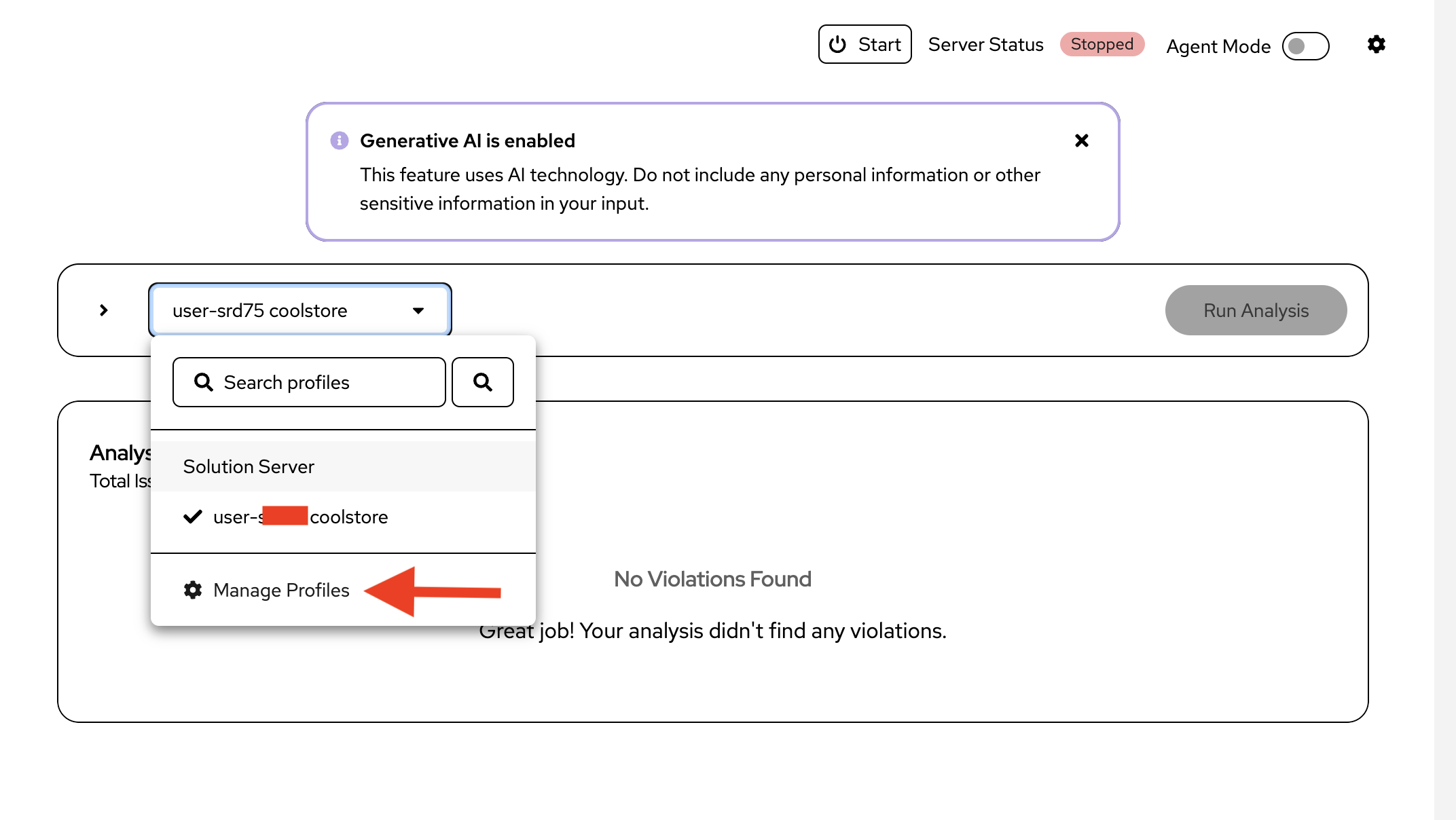 Figure 9. Open Profiles
 -
Notice a profile named Solution Server has been created for you
-
Click on it, and ensure it is the Active Profile
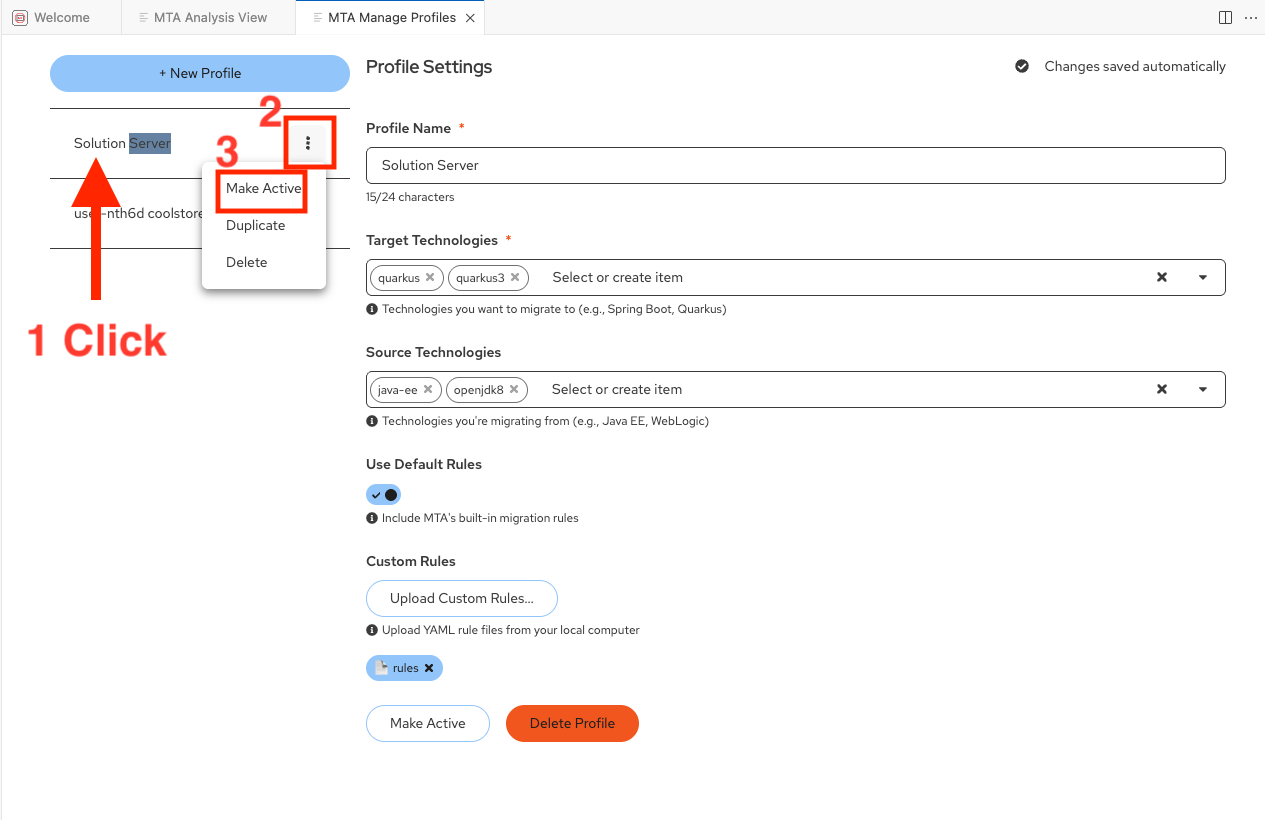 Figure 10. Active Profile
-
Like Module 2 it has the same Target and Source Technologies
-
It includes Default Rules to help narrow down areas of concern
-
It also includes the use of Custom Rules , authored in yaml by ACME architects that look for company specific logging concerns in code, among other things.
-
-
Close the MTA Manage Profiles panel
-
| Rapid authoring of Custom Rules is beyond the scope of this workshop, but if you have interest in this area please talk with the workshop leads for more information and enablement approaches. |
Exercise 3: Experience Solution Server learning company policies and best practices
Now you’ll see how Solution Server learns from ACME’s adopted solution patterns. This normally involves Architects and Developers modifying initial suggested fixes from Developer Lightspeed, so that they better embrace company specific policies and approaches. Solution Server captures the before and after fixes and leverages them for future hints to the LLM.
Steps
-
Run an Analysis with Solution Server engaged:
You will have Developer Lightspeed run an analysis, which includes running the Default and Custom (ACME best practices and policy) static rules.
Then Developer Lightspeed will create RAG style infused prompts to the LLM for generation of targeted fixes to be returned to the developer.
While this is occuring Solution Server will be listening and recording any developer/architect adjustments to generated code fixes from the LLM.-
Ensure you are in the MTA Analysis View pane
-
Click on Run Analysis (The analysis run may take up to a couple of minutes due to size of workshops and resources allocated)
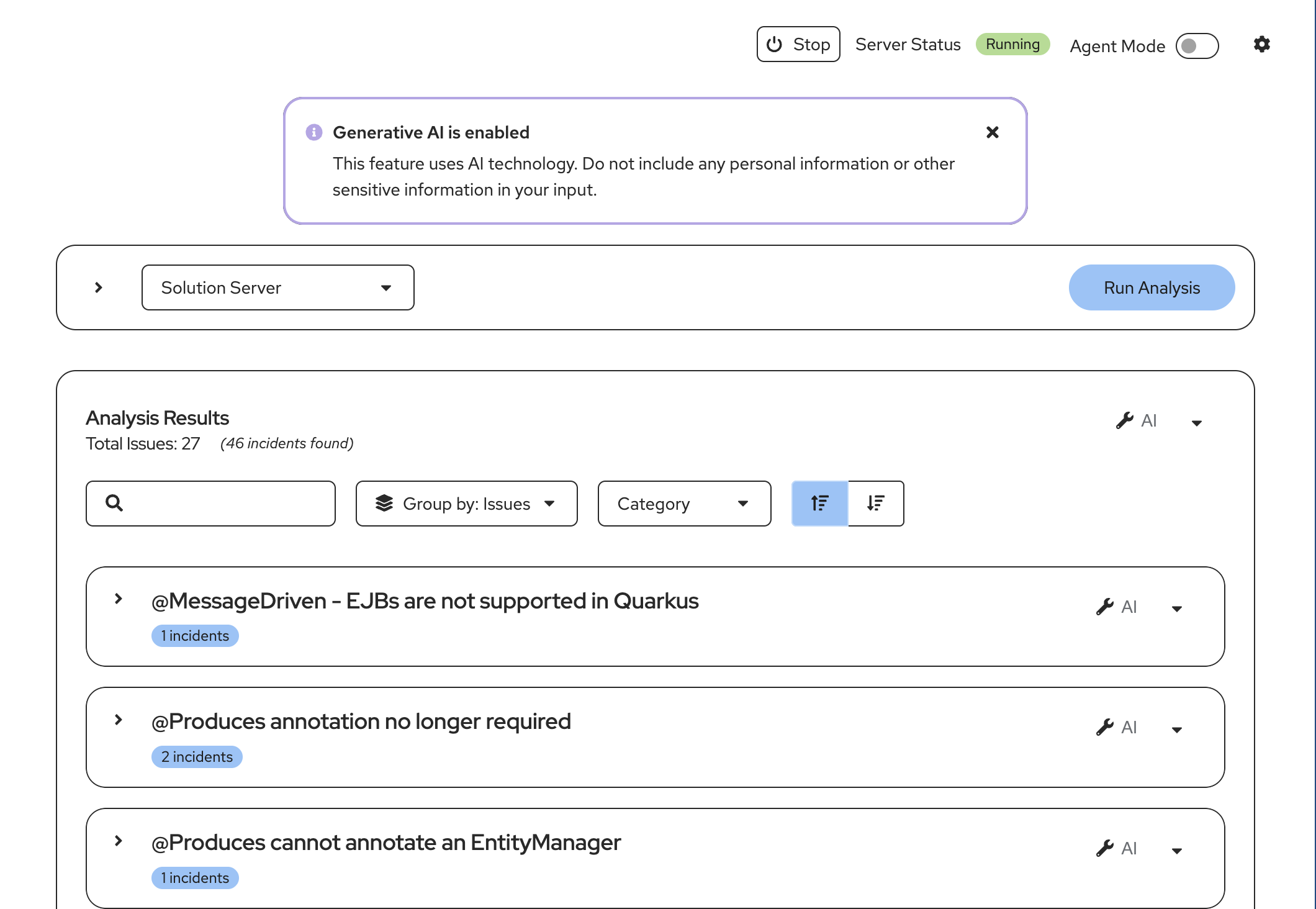 Figure 11. Initial Analysis
 -
Notice all the errors return by the Default and Custom rules
-
Narrow down our interest by focusing on issues in one Java class
-
Enter OrderService in the Search box in Analysis Results
-
Scroll down to Issue Replace
FileSystemAuditLoggerinstantiation withStreamableAuditLoggerover TCP -
Click the down arrow to view the Issue details
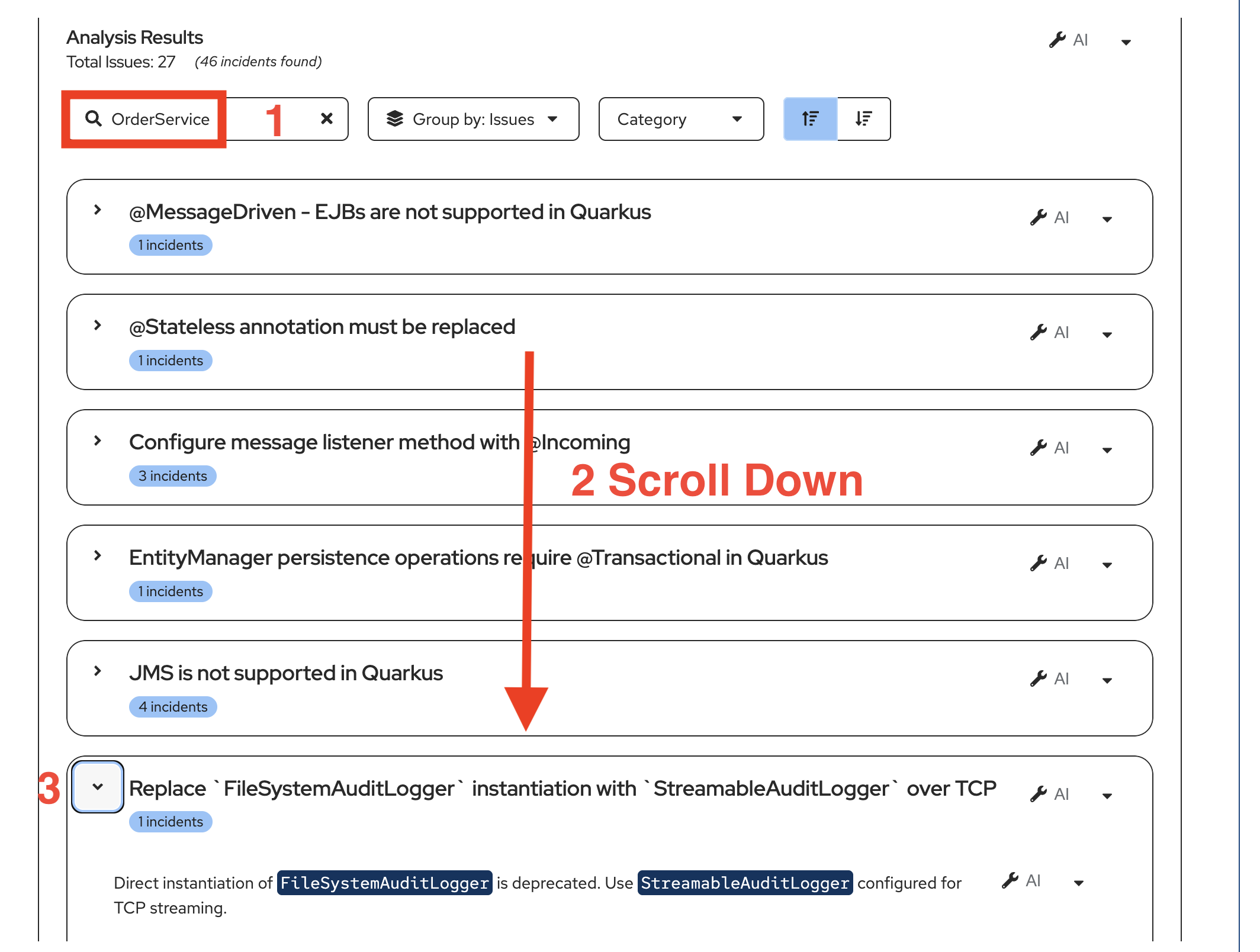 Figure 12. Order Service
 -
In this case we have an issue related to how logging is handled in the legacy application that is not acceptable in a modern cloud native Java application.
-
Click on the down arrow next to one of the wrench icons and select Get solution
-
As was seen in Module 2 this action opens a MTA Resolution Details pane and the interactive conversation between Developer Lightspeed and the LLM scrolls by with the LLM returning a suggested set of fixes for OrderService.java
-
You may want to take a minute and scroll through the AI Results screen and see all the suggested changes and reasoning behind why the LLM is suggesting the resolution.
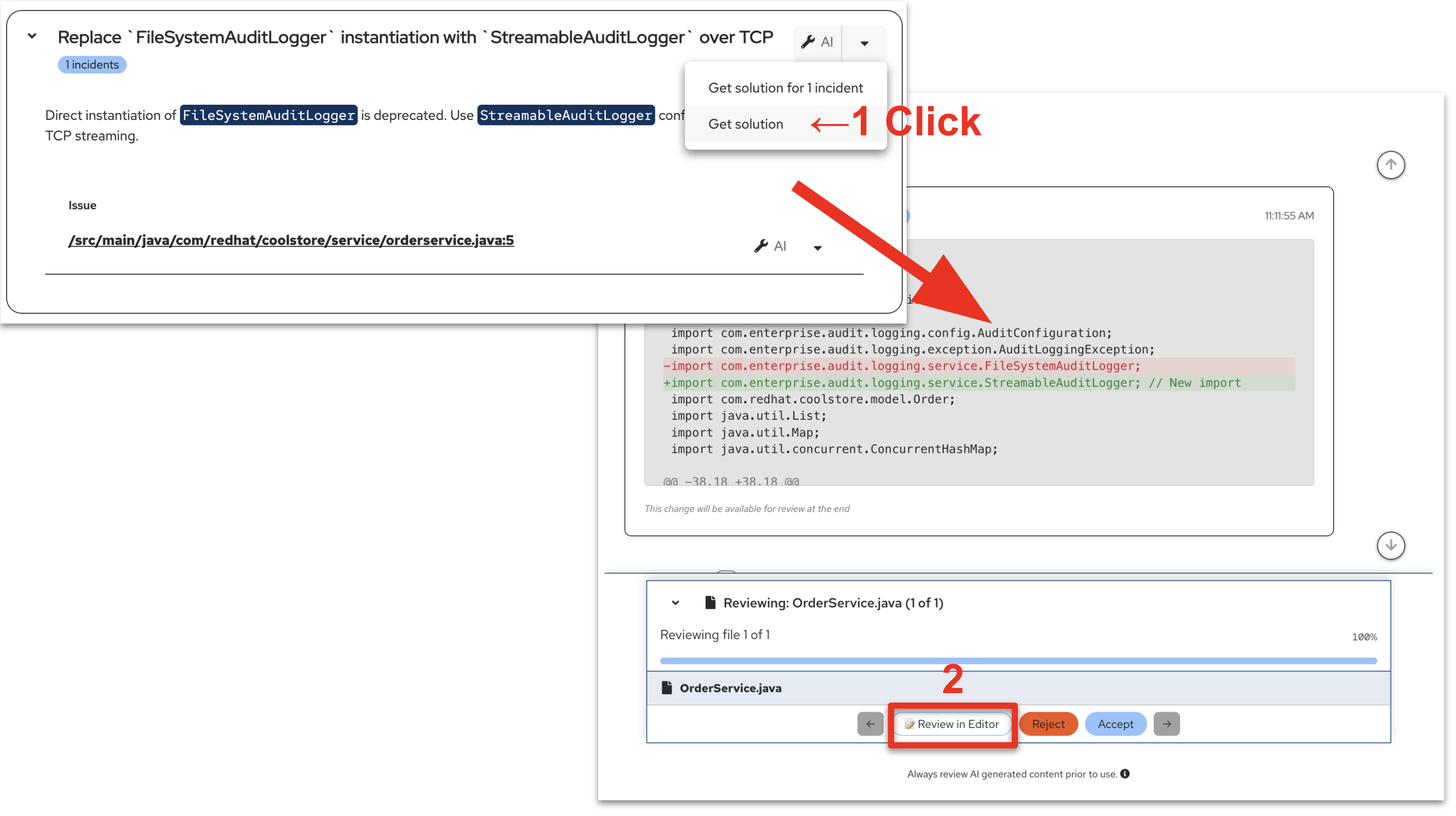 Figure 13. Logging Issue
 -
When ready, at the bottom of the screen, Click on Review in Editor
You can slide the panels a bit to expand the side by side viewing area. -
You may notice that the analysis runs again partially in the background
-
As you scroll through the OrderService.java file notice Red suggested removals and Green suggested additions generated by Developer Lightspeed through the LLM with rules prompting. Recall that the static rules run during the Analysis and are used to focus the LLM on defined categories of code issues in migration efforts.
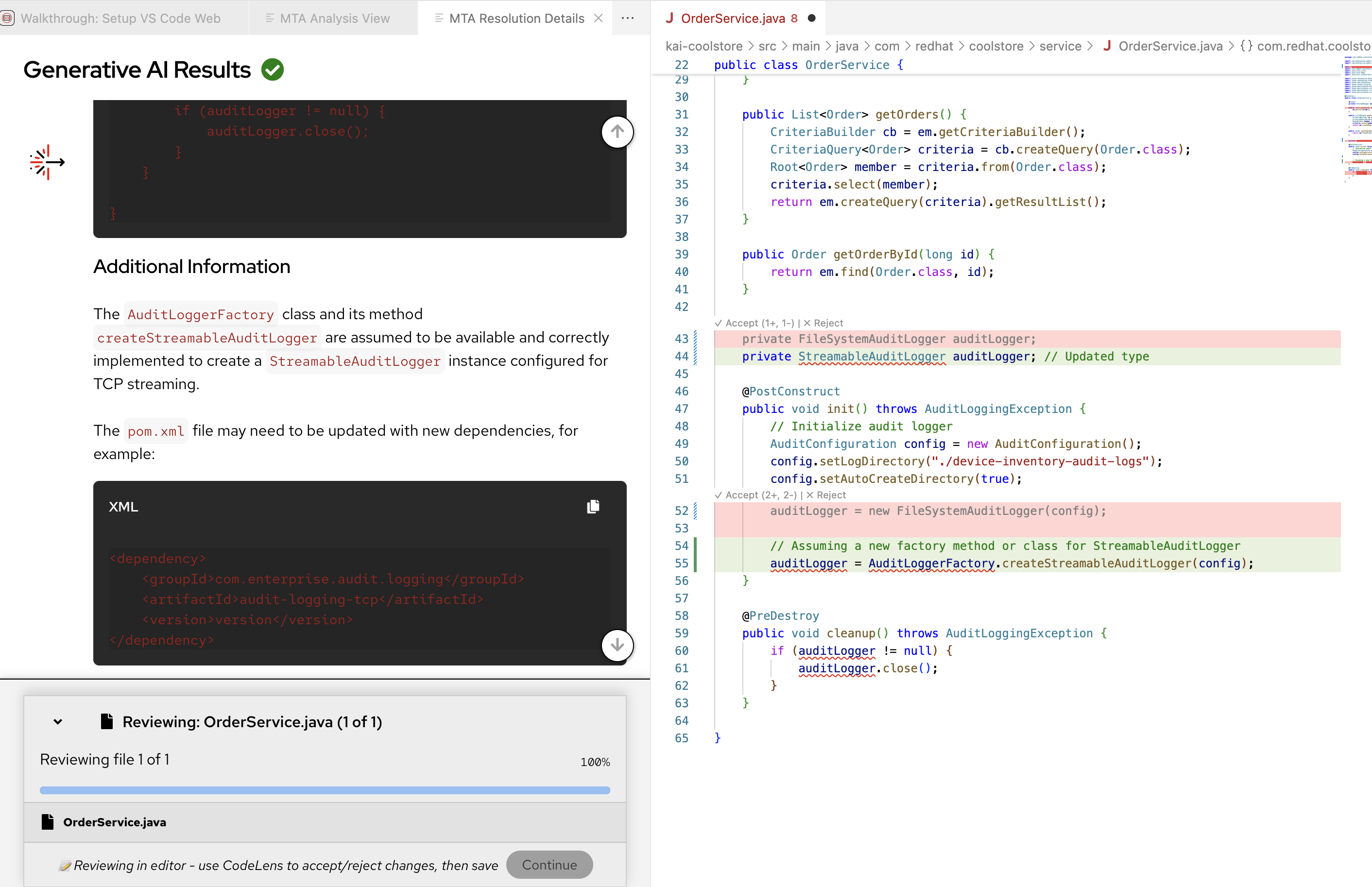 Figure 14. Suggested Fix View 1
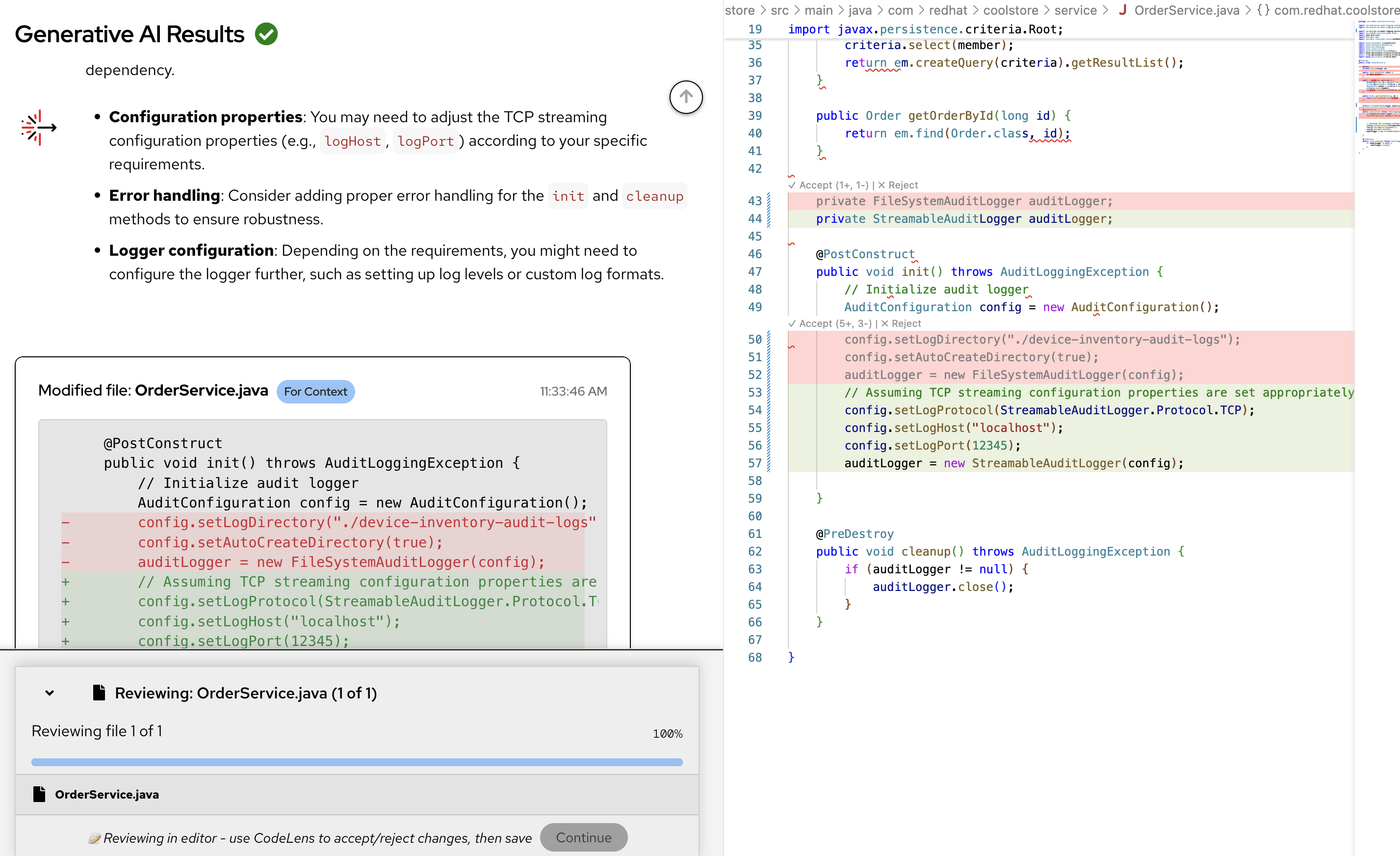 Figure 15. Suggested Fix View 2
From an ACME perspective the Architect or Lead Developer recognizes that the suggested code fix replaces file system log usage with streamable logs.
This also removes the current dependency on inhouse internal patterns and libraries that have evolved or become obsolete over the years, and also removes potential security issues.
Generic LLMs don’t understand this problem, which is why Developer Lightspeed and Solution Server are able to focus the LLM code generation on the correct context and provide solution hints.
However, this AI generated code fix still seems to allow hardcoded Host and Port values, which for an OpenShift and modern secure cloud native application should really follow ACME’s new policy of putting such information in separate environment settings in Kubernetes artifacts.
-
As the Architect/Lead Developer you recognize that new ACME cloud native coding policies and best practices need to be added into this fix.
-
You will now add in the ACME prescribed coding approach for this logging fix, and get rid of hardcoded environment variables.
-
You may need to scroll the code window down.
-
-
To visualize the suggested updates best, Add a couple open lines after the green generated code fix
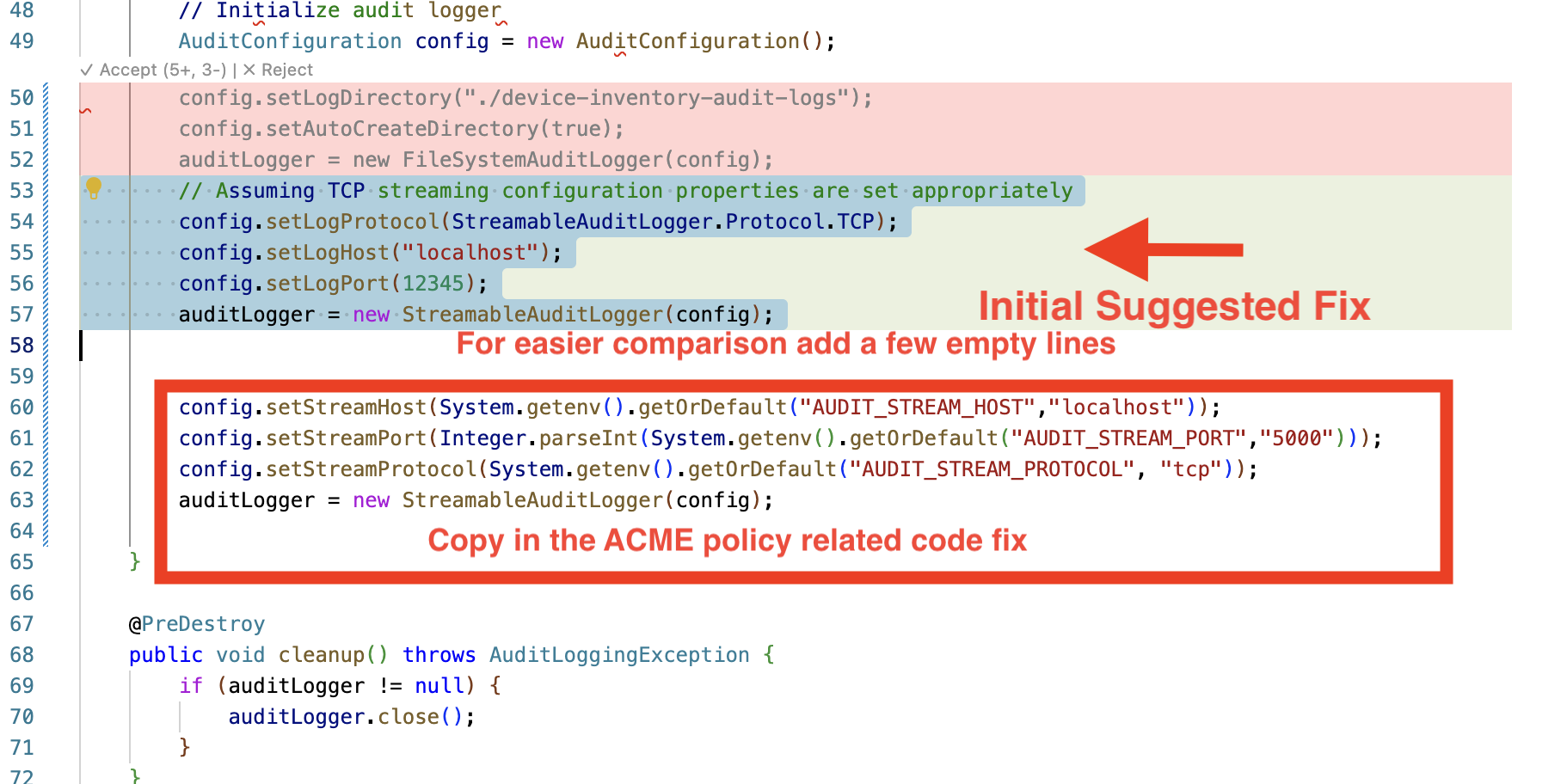 Figure 16. Insert ACME Policy Approach
 -
Copy in the following enhanced fix.
config.setStreamHost(System.getenv().getOrDefault("AUDIT_STREAM_HOST","localhost")); config.setStreamPort(Integer.parseInt(System.getenv().getOrDefault("AUDIT_STREAM_PORT","5000"))); config.setStreamProtocol(System.getenv().getOrDefault("AUDIT_STREAM_PROTOCOL", "tcp")); auditLogger = new StreamableAuditLogger(config); -
Notice the differing approach, switching to using environment variables as the primary way to set the configuration for the runtime mode of the application.
-
Delete the original green highlighted code snippet. (Don’t delete the red areas marked for deletion, as they will disappear in the next step)
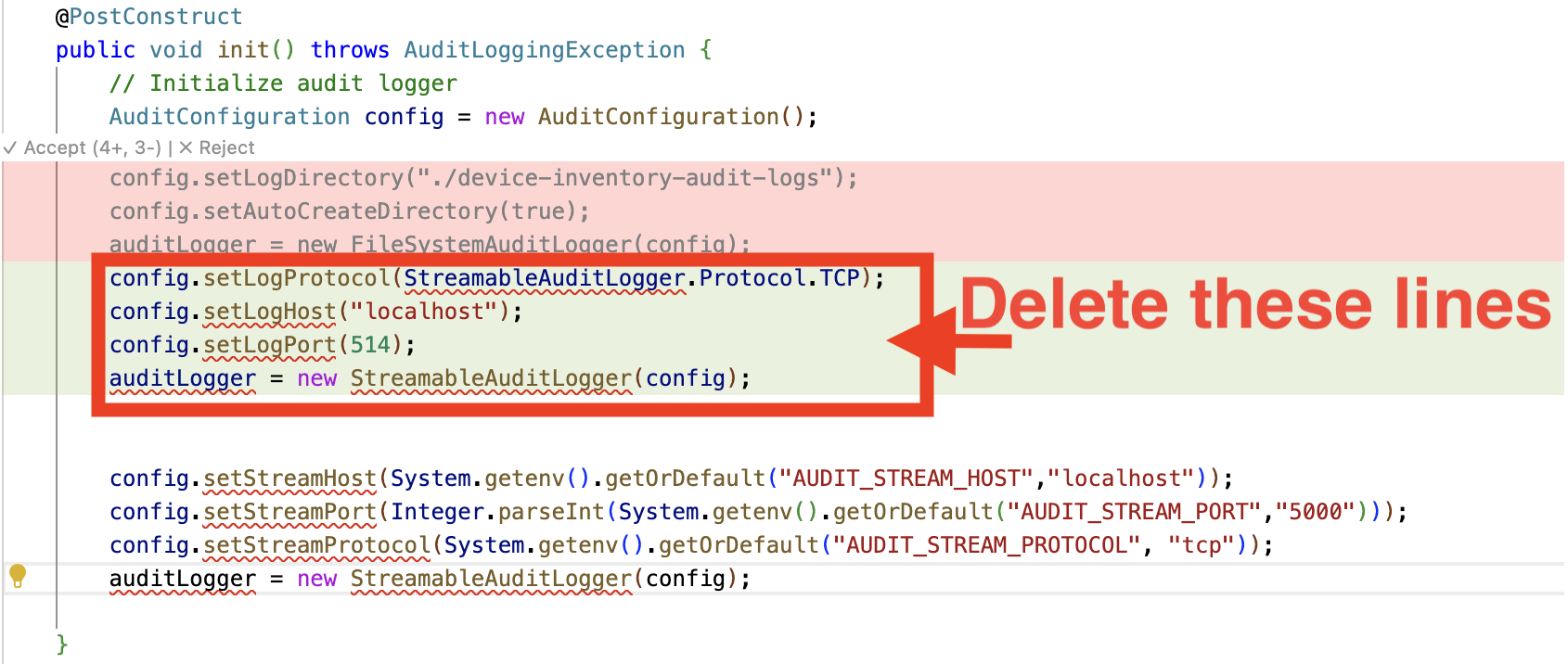 Figure 17. Remove Initial Fix
 -
It should look like the following, when you are done.
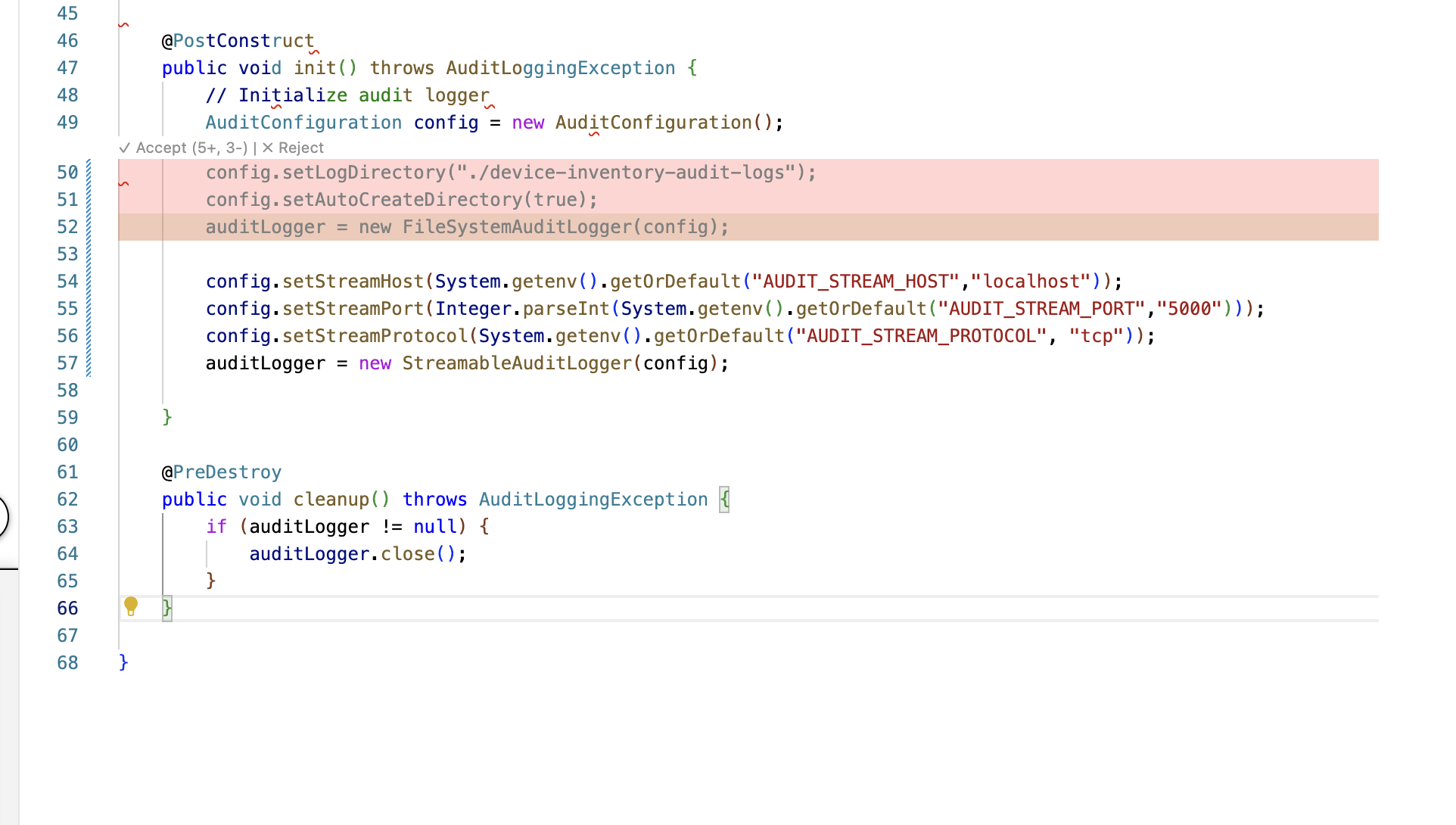 Figure 18. Final Fix View
 -
Scroll to the top of the file and click on Accept all changes
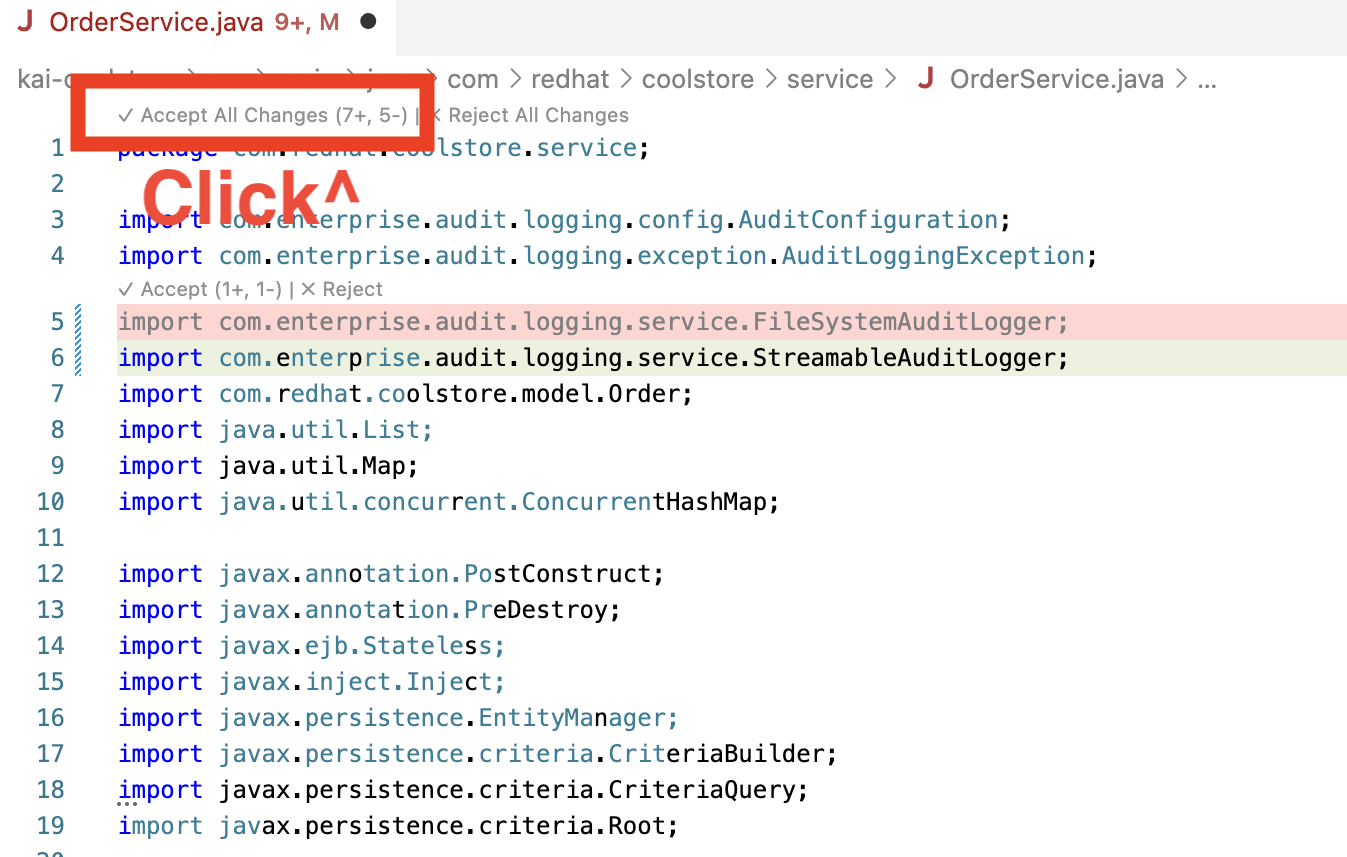 Figure 19. Accept and Save Fixes
 -
Developer Lightspeed removes the red marked deletions, keeps the green highlighted fixes, and keeps the Architect/Lead Developer authored ACME policy driven fixes. It then saves the fixed file, and automatically runs the analysis again to confirm the fixes.
-
Close the file
-
Back in the MTA Resolutions Details pane click continue and close the pane.
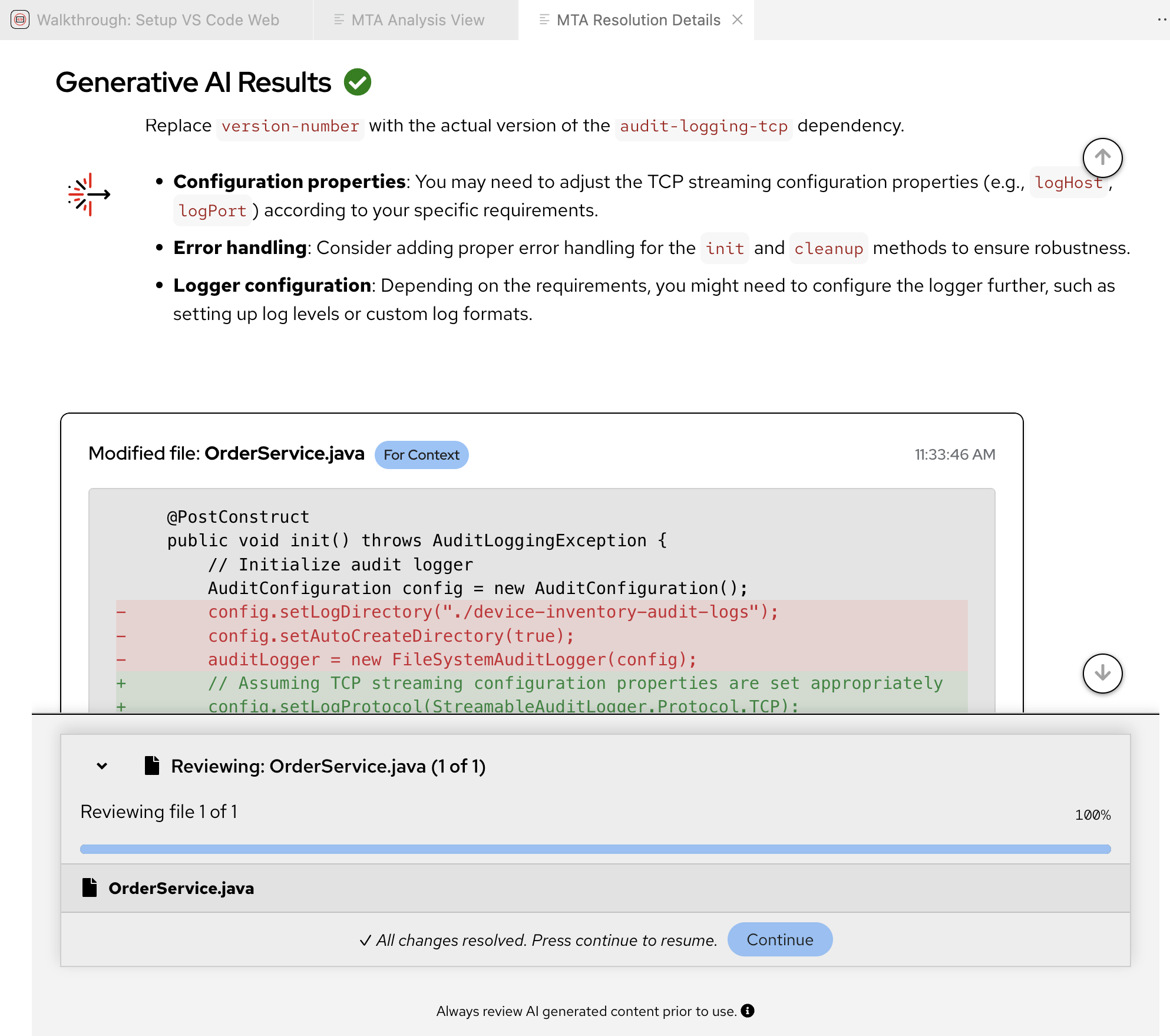 Figure 20. Continue and Return to Analysis Results
Solution Server has stored the before and after of this code fix. It has stored the ACME code policy resolution you have inserted as an Architect or Lead Developer.
Overtime ACME’s best practices, patterns, and metrics, will be available through Solution Server MCP server.
Going forward Solution Server will pass hints into the LLM for what future fixes should take into account. Thus both static rules pinpointing areas of concern and enhanced hints from Solution Server will be incorporated into AI Generated code fixes.
-
Ensure you close any code files, and the MTA Resolution Details Pane
-
Exercise 4: Apply learned patterns to code generation
With some of ACME’s policies captured and loaded, you’ll now test how Solution Server applies these organizational standards to AI-generated code.
In this Exercise you will change roles from an Architect/Lead Developer to a Junior Developer or Contractor brought in to quickly migrate a bunch of applications.
These applications were grouped into a migration wave based upon the Archetypes and Risk analysis carried out in Module 1.
As a reminder: One of those applications Cool Store a legacy JavaEE OpenJDK 8 monolithic application was already analyzed, and partially migrated.
This was done in Module 2 and here in Module 3 through the use of Developer Lightspeed for MTA interacting with a referenced LLM and the MCP server, Solution Server.
Since Solution Server just learned some ACME specific coding best practices related to security, logging, and removing hard coded environment variables, we now want to see if those can be applied as hints to the LLM for future fixes.
Can these Migration Hints via Solution Server enrich generated code fixes for junior developers and contractors who would not yet have that tribal knowledge or company policy, but are tasked with correctly migrating similar applications in the migration wave to OpenShift.
Normally the LLM would not be able to create these fixes by itself since the context and policy is specific to ACME Corp. Solution Server + Developer LIghtspeed for MTA provide this unique AI capability.
Steps
-
Fix another occurance of the learned policy issue and resolution approach:
As the Junior developer or contractor migrating a similar application, your use of Developer Lightspeed will benefit from Solution Server offering hints to the LLM and generate the appropriate context aware code fix.
Given the limited time for this workshop, we will not switch environments and setup another application codebase. We will continue to use the existing codebase and have Solution Server apply its capabilities to fix a different instance of the same logging violation. -
Locate another instance of the orignial Logging Issue:
-
In the role of the Junior Developer now, you should still be looking at the MTA Analysis View pane
-
If not navigate to that pane
-
-
In order to speed the focus on applying learned policy we will move directly to another logging issue
-
In the Search box in the Analysis Results listing, type ProductService
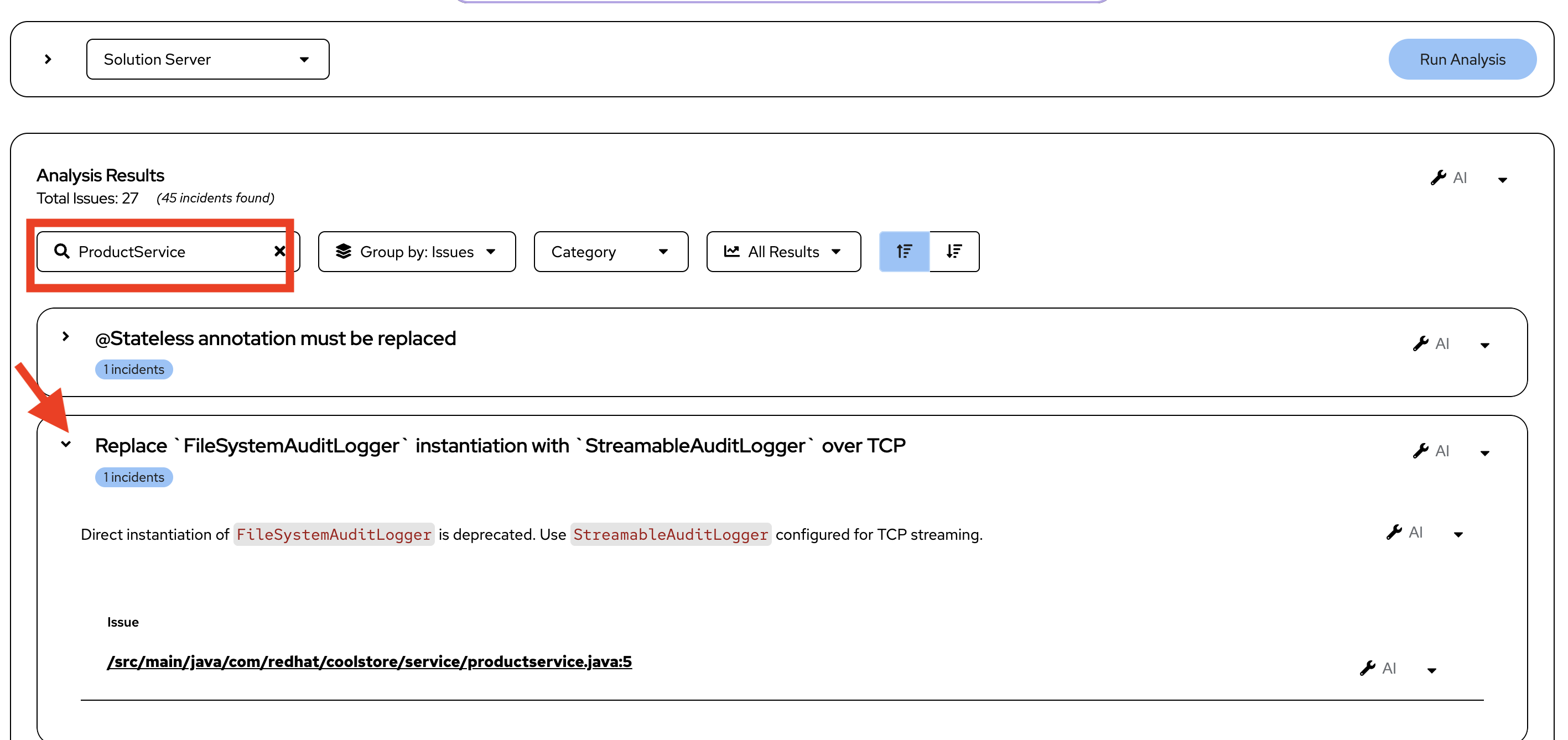 Figure 21. ProductService Issues
 -
Click on the arrow > to the left of the Issue Replace
FileSystemAuditLoggerinstantiation withStreamableAuditLoggerover TCP-
Notice that this is the same type of issue we saw previously in another part of the overall codebase.
-
-
Click on the down arrow next to one of the wrench icons and select Get solution
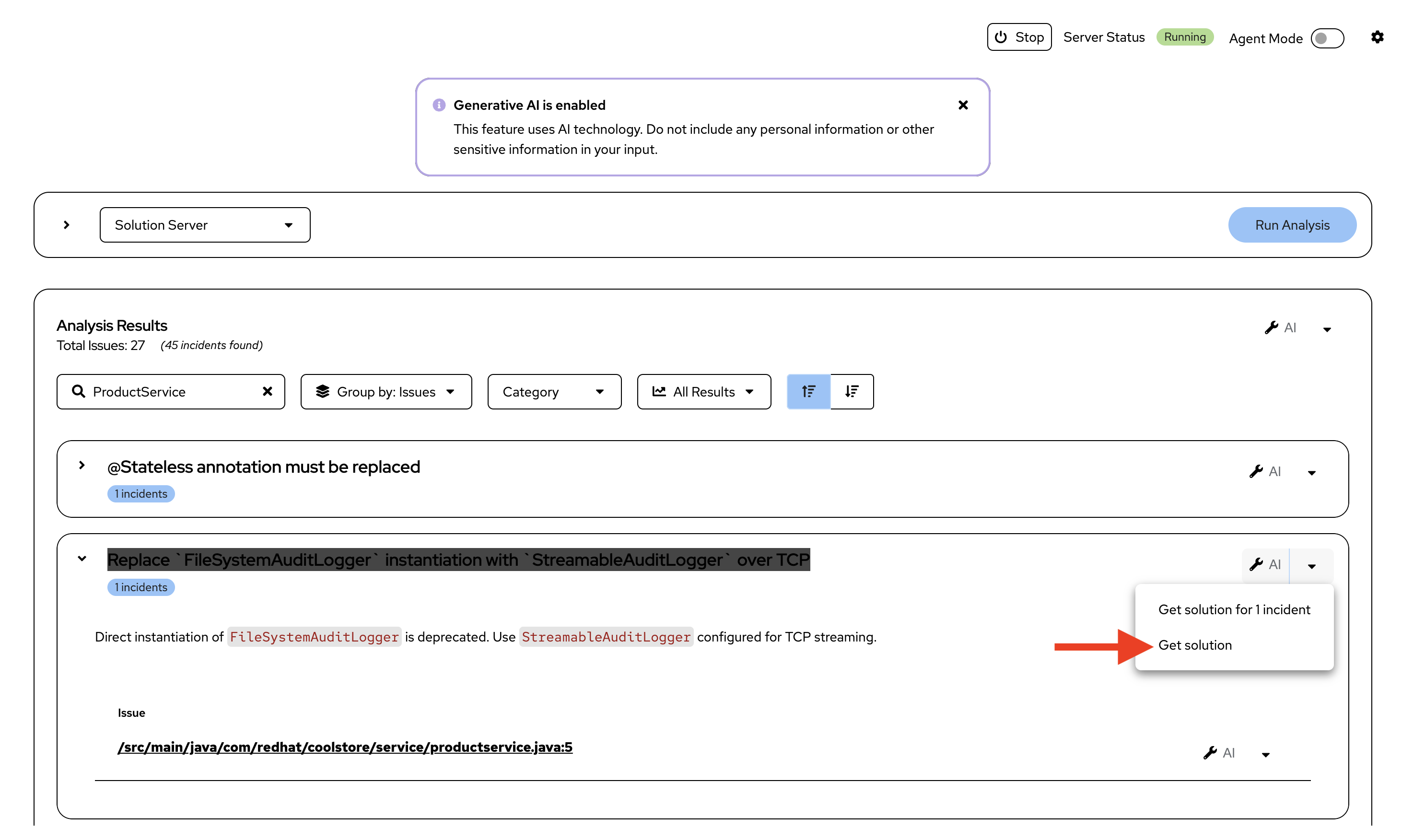 Figure 22. ProductService Analysis: Get Solution
 -
As before this opens a MTA Resolution Details pane and the interactive conversation between Developer Lightspeed and the LLM scrolls by with the LLM returning a suggested fix
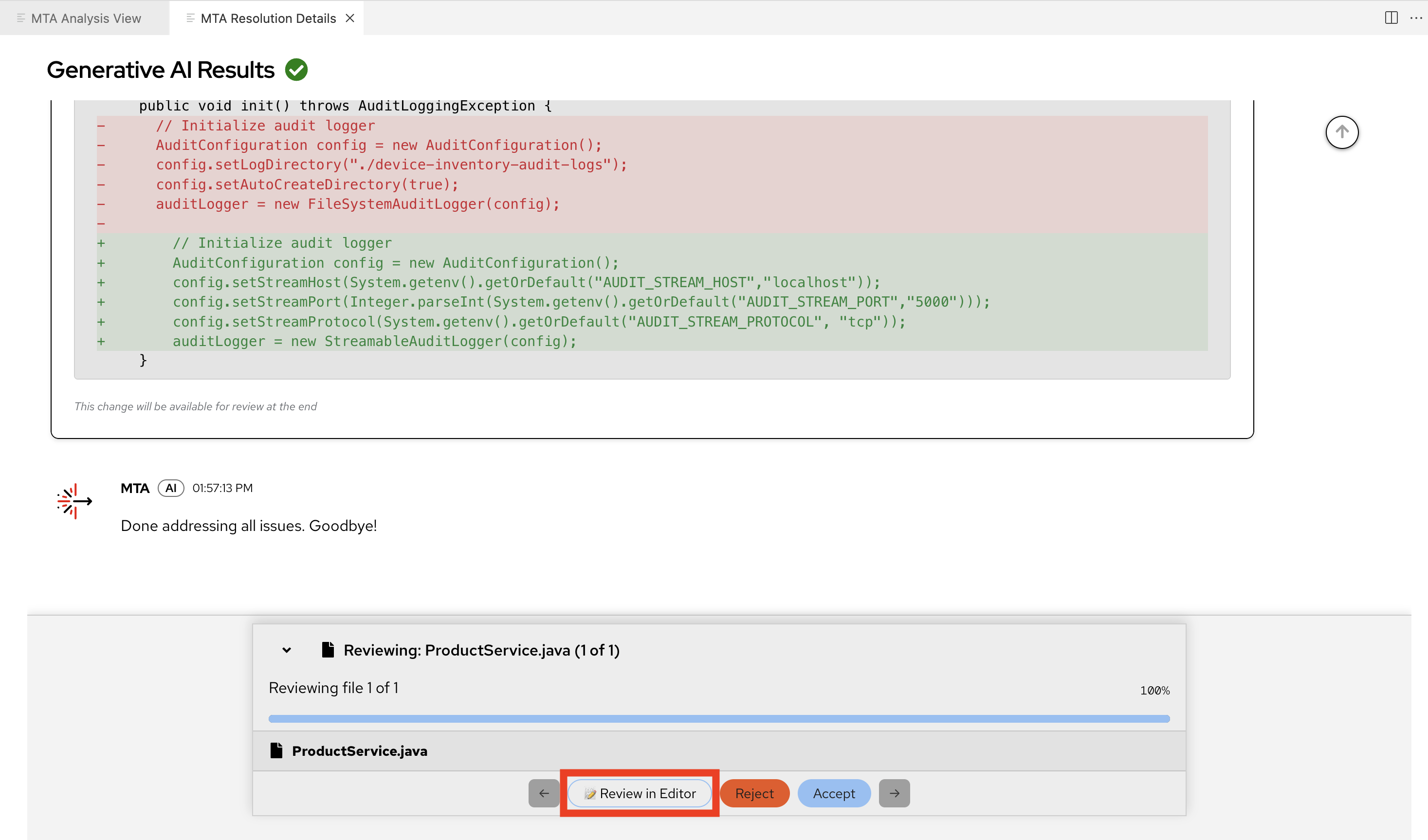 Figure 23. Generative AI Results
 -
Click Review in Editor
-
Note that the generated code fix includes the ACME coding policy approach captured in the previous Exercise in this Module.
-
-
Review the AI-generated code fix that infuses learned organizational standards:
Solution Server Migration Hints working with Developer Lightspeed for MTA have guided the LLM to generate code that fully fixes the orignial issue:
ReplaceFileSystemAuditLoggerinstantiation withStreamableAuditLoggerover TCP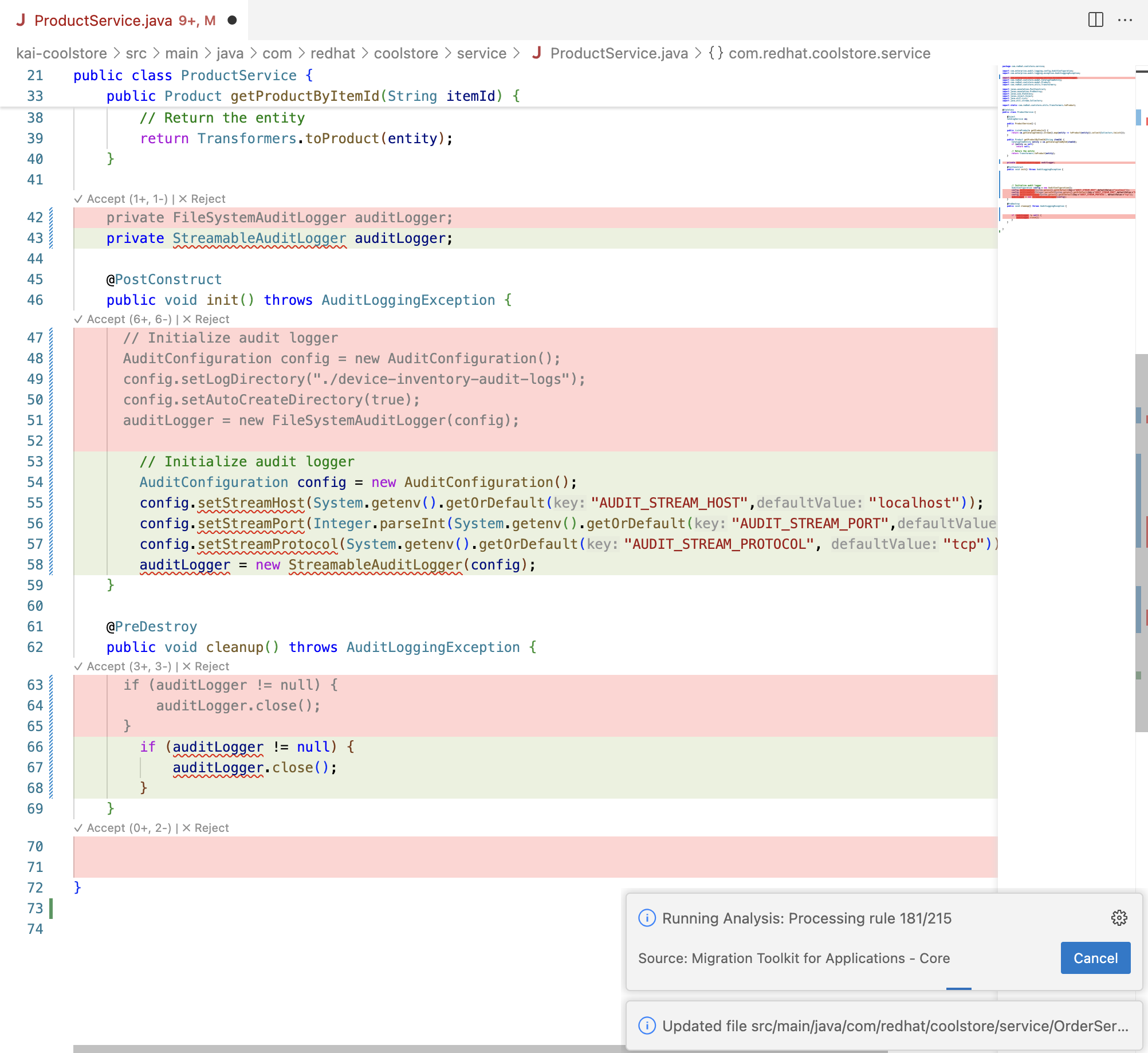 Figure 24. Full Solution
The level of completion includes:
-
Removal and replacment of import statements that now reflect streamable logging classes
-
Context aware logging code that implements streamable logging approaches
-
Removal of legacy company coding approaches
-
Removal of hard coded environment variables
-
-
You can can now scroll to the fop of the file, accept changes, and close the file and Resolution Pane.
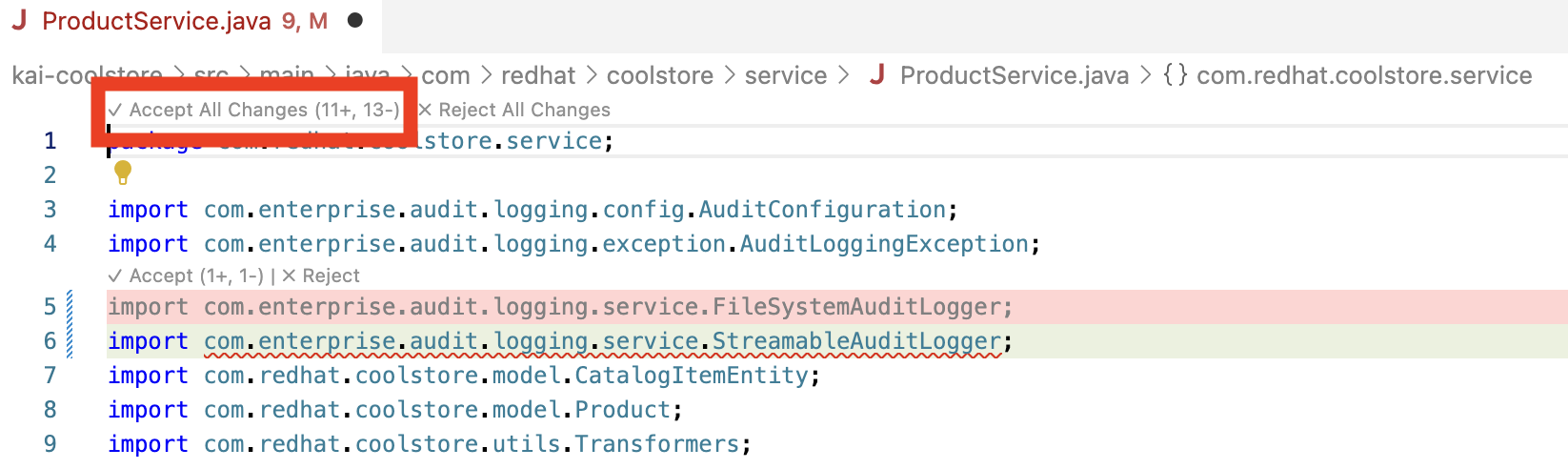 Figure 25. Accept Changes
-
Ensure you close any code files, and the MTA Resolution Details Pane
-
Exercise 5: Review how Solution Server accelerates migration waves
Now that Solution Server understands some of ACME’s standards, you’ll see how expanding use of these capabilites accelerates large-scale migration efforts across multiple applications.
Steps
-
Consider what has been learned in this migration issue example:
ACME has identified many applications in Wave 1 that all need similar modernization approaches.
The example here focused on a logging issue pervasize across Wave 1 applications, and was able to:-
Move logging away from legacy static file approaches
-
Externalize configuration
-
Update logging to company standards
-
Apply security best practices
-
-
Calculate traditional effort:
Without Solution Server:
-
Each application requires manual coding standard enforcement
-
Developers must reference policy documents repeatedly
-
Inconsistencies arise between applications
-
Code review catches policy violations late
-
-
Calculate AI-accelerated effort with Solution Server:
With Solution Server:
-
AI automatically applies ACME patterns consistently
-
Policies are enforced during code generation
-
No manual reference to policy documents needed
-
Consistency is automatic across all applications
-
-
Consider the quality benefits:
Beyond speed, Solution Server provides:
-
Consistency: All apps follow identical patterns
-
Maintainability: Standardized code is easier to support
-
Onboarding: New developers learn ACME patterns through examples
-
Compliance: Policy enforcement is automated, not manual
-
Learning outcomes checkpoint
Before moving forward, confirm you can:
-
Explain what Developer Lightspeed Solution Server is and its purpose
-
Create policy documents that capture organizational standards
-
Configure Solution Server to learn company-specific patterns
-
Verify that AI-generated code follows organizational policies
-
Demonstrate how Solution Server accelerates migration waves
-
Quantify business benefits of organizational knowledge capture
-
Understand scalability advantages for large migration portfolios
Module summary
You’ve successfully demonstrated how Solution Server captures organizational knowledge and accelerates large-scale migration efforts.
What you accomplished for ACME: * Created comprehensive policy documents for logging, configuration, and security * Configured Solution Server to learn ACME’s organizational standards * Verified that AI-generated code automatically follows company policies
Business impact realized: * Consistency: All applications follow identical patterns and standards * Velocity: Migration waves accelerate rapidly * Quality: Policy compliance is automated, not manual * Scalability: Proven approach works across entire application portfolio
Your journey progress: You now understand how to scale AI-assisted modernization across ACME’s entire organization by teaching the AI your company’s specific standards and best practices.
Next steps: Module 4 will complete the migration journey by deploying your modernized application to OpenShift, proving the end-to-end workflow from legacy code to production-ready container.