/agnosticv:catalog-builder
Create or update AgnosticV catalog files for RHDP deployments (unified skill). Version 2.2.0.
What You’ll Need Before Starting
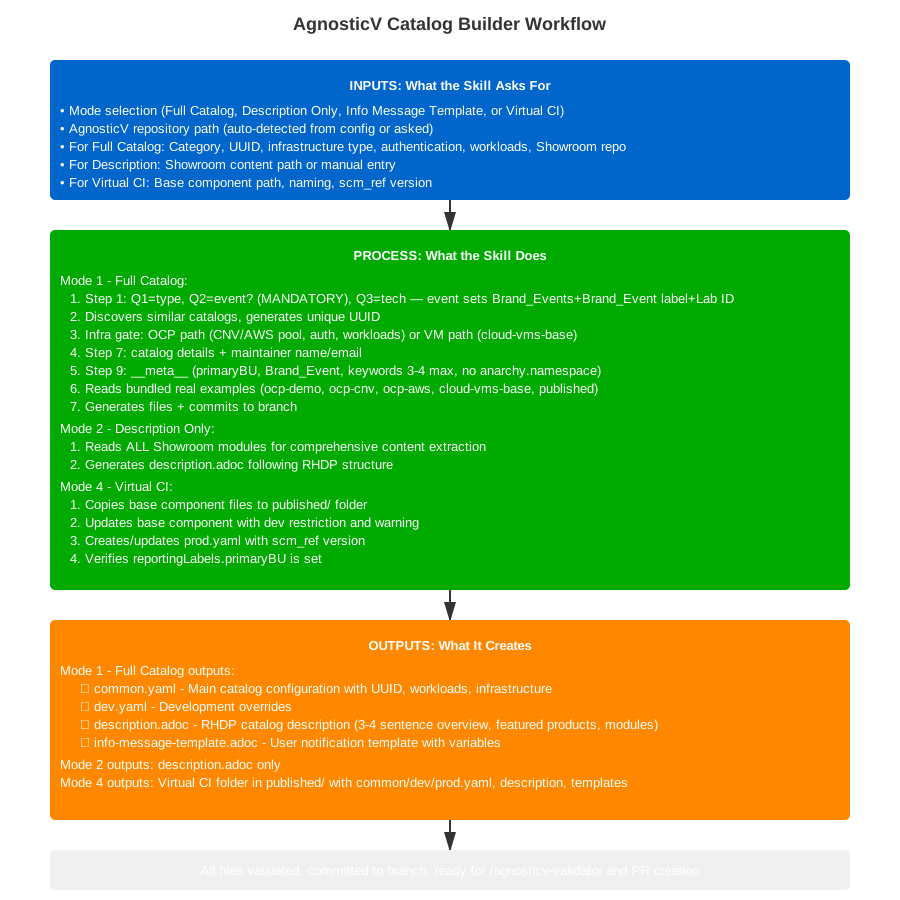
Click to view full workflow diagram
Prerequisites
Clone AgnosticV Repository
cd ~/work/code
git clone git@github.com:rhpds/agnosticv.git
cd agnosticvVerify RHDP Access
- Write access to AgnosticV repository
- Test:
gh repo view rhpds/agnosticv - Ability to create pull requests
Workshop Content Ready
- Workshop lab content (from
/showroom:create-lab) - Infrastructure requirements (CNV, AWS, etc.)
- Workload list (OpenShift AI, AAP, etc.)
What You’ll Need (By Mode)
Mode 1: Full Catalog
- Catalog name (e.g., "Agentic AI on OpenShift")
- Category (Workshops, Demos, or Sandboxes)
- Infrastructure type: OCP cluster / RHEL+AAP VMs / Sandbox API CI
- For Sandbox API CI: Cluster CI (provision shared cluster) or Tenant CI (deploy on pre-configured cluster)
- Workloads to deploy
- Multi-user requirements (yes/no)
Mode 2: Description Only
- Path to Showroom repository
- Brief overview (2-3 sentences starting with product name)
Mode 3: Info Template
- Data keys from
agnosticd_user_info.data
Mode 4: Virtual CI (published/)
- Base component path (e.g.
openshift_cnv/kafka-developer-workshop-cnv) - Handles uniqueness check, UUID, dev restriction, prod.yaml version pinning
- Supports bulk processing of multiple base components in one run
Quick Start
Navigate to Repository
Open your AgnosticV repository directory
Run Catalog Builder
/agnosticv:catalog-builderChoose Mode
Select: Full Catalog / Description Only / Info Template
Answer Questions
Follow guided prompts (or submit one batched form for MODE 1)
Review & Commit
Files auto-committed to new branch
Architecture (v2.2.0) — MODE 1 Orchestrator
Starting v2.2.0, MODE 1 (Full Catalog) uses an orchestrator pattern. Modes 2, 3, and 4 are unchanged and use the existing sequential flow.
graph TD
    User([User]) --> CB[catalog-builder\norchestrator, Sonnet]
    CB --> Form[Batched planning form\nall questions at once]
    Form --> SC[Build shared_context JSON\nUUID, includes, path validation]
    SC --> P1[agnosticv:config-writer\ngenerates common.yaml + dev.yaml]
    SC --> P2[agnosticv:description-writer\ngenerates description.adoc\n+ info-message-template.adoc]
    P1 --> |files + JSON| Merge[Orchestrator collects results]
    P2 --> |files + JSON| Merge
    Merge --> WR[agnosticv:workflow-reviewer\nconsistency check]
    WR --> Commit([Git commit\noptional])

    style CB fill:#cc0000,color:#fff
    style P1 fill:#4a90d9,color:#fff
    style P2 fill:#4a90d9,color:#fff
    style WR fill:#f5a623,color:#000
    style Commit fill:#2d862d,color:#fff
Pattern: Batched planning form → shared_context JSON → parallel agents → workflow-reviewer → commit
MODE 1 Orchestrator Flow
Step O-1: Scope Detection — user selects Mode 1 (Full Catalog).
Step O-2: Batched Planning Form — all questions presented at once in a single grouped form with three sections: Context (catalog type, event, technologies), Infrastructure (infra type, cluster size, cloud provider, OCP version, multi-user, Showroom, terminal type, E2E testing, LiteMaaS), and Catalog Details (display name, short name, description, maintainer, BU, product, keywords). User fills what they know and submits all at once.
Step O-3: Build shared_context — auto-detects AgV path, generates and collision-checks UUID, resolves category/multiuser/workshop_user_mode, builds includes list (duplicate-safe), validates catalog_path (≤50 chars, not already existing). Asks for git branch — only this one post-form question.
Step O-4: Spawn Parallel Agents — using the Task tool, spawns both simultaneously:
| Agent | Receives | Generates |
|---|---|---|
agnosticv:config-writer |
full shared_context JSON |
common.yaml + dev.yaml |
agnosticv:description-writer |
full shared_context JSON |
description.adoc + (optional) info-message-template.adoc |
Step O-5: Collect and Check Results — if either agent returns non-empty errors, display them and stop (do not commit).
Step O-6: Run workflow-reviewer — passes catalog_path and infra_type for consistency checks against validator skill paths.
Step O-7: Git Commit — offers commit and shows next steps.
What It Can Generate
Creates complete catalog with all files:
agd_v2/your-catalog-name/
├── common.yaml
├── dev.yaml
├── description.adoc
└── info-message-template.adocUpdates just the description:
agd_v2/your-catalog-name/
└── description.adocCreates user notification:
agd_v2/your-catalog-name/
└── info-message-template.adoc
Subagents (MODE 1)
| Agent | Model | Purpose |
|---|---|---|
agnosticv:config-writer |
Sonnet | Generates common.yaml and dev.yaml from shared_context. Handles all YAML generation rules: collections near top, unique password lookup paths, pinned image tags. |
agnosticv:description-writer |
Sonnet | Generates description.adoc (from Showroom clone or metadata) and optionally info-message-template.adoc. See description-writer agent docs. |
agnosticv:workflow-reviewer |
Haiku | Post-generation consistency check: builder/validator skill alignment, infra-type routing, include paths, known anti-patterns. |
Common Workflows
-
Workflow 1: Create Full Catalog from Scratch (v2.2.0 orchestrator)
/agnosticv:catalog-builder → Mode: 1 (Full Catalog) → Step O-2: Batched planning form — fill all 19 questions, submit once → Step O-3: AgV path auto-detected, UUID generated, shared_context built, branch created → Step O-4: config-writer + description-writer spawn in parallel → Step O-5: Collect results — errors stop the flow, warnings are reported → Step O-6: workflow-reviewer consistency check → Step O-7: Commit to branch -
Workflow 2: Update Description After Content Changes
/agnosticv:catalog-builder → Mode: 2 (Description Only) → Point to Showroom repo → Auto-extracts modules and technologies → Generates description.adoc → Auto-commits to branch -
Workflow 3: Add Info Template for User Data
/agnosticv:catalog-builder
→ Mode: 3 (Info Template)
→ Specify data keys from workload
→ Generates template with placeholders
→ Shows how to use agnosticd_user_info
Mode Details
Mode 1: Full Catalog - Detailed Workflow
What it creates:
- common.yaml - Main configuration (infrastructure, auth, workloads, includes)
- dev.yaml - Development environment overrides
- description.adoc - UI description following RHDP structure
- info-message-template.adoc - User notification template
Step-by-step process (sequential flow — pre-v2.2.0 path for reference):
- Step 0 — Setup: AgV path auto-detected; branch created from main (no feature/ prefix)
- Step 1 — Context: 3 questions: Q1=Workshop/Demo/Sandbox, Q2=Is this for an event? (Summit 2026 / RH One 2026 / Other), Q3=Technologies. Event selection overrides category to Brand_Events and asks for Lab ID.
-
Step 2 — Discovery: Searches all AgDv2 directories for
common.yamlfiles containing the specified technologies, then filters results by presence of aconfig:field (excludes legacy AgDv1 catalogs that lack this field). Directories searched:agd_v2/— standard OCP and VM catalogsopenshift_cnv/— CNV-pool-specific catalogsai-quickstarts/— AI/ML quickstart labsenterprise/— enterprise customer catalogssummit-2026/— Red Hat Summit 2026 event catalogssandboxes-gpte/— GPTE sandbox catalogszt_rhel/— zero-touch RHEL labsrhdp/— RHDP platform catalogs
[OCP cluster]or[RHEL/AAP VMs]labels drawn from theconfig:field. -
Step 3 — Infrastructure gate: Three options — OCP cluster, RHEL/AAP VMs, or Sandbox API CI. Routes to a separate @reference file per type:
- OCP path (
ocp-catalog-questions.md): SNO or multinode, OCP version (4.18/4.20/4.21), pool with/prodsuffix, autoscale, AWS gate; auth (unifiedocp4_workload_authentication+ provider); OCP workloads + LiteMaaS; Showroom withocp4_workload_ocp_console_embed; multi-user with worker scaling - VM path (
cloud-vms-base-catalog-questions.md): CNV or AWS, RHEL image, sizing, ports; auth skipped (OS-level only); VM workloads;vm_workload_showroomwithshowroom_git_repo/showroom_git_ref; multi-user isolation warning -
Sandbox API CI path: After choosing this option, the skill asks which half of the CI pair is being created:
- Cluster CI (
sandbox-cluster-ci-questions.md): Provisions a shared OCP cluster sized for N tenant placements. Setsconfig: openshift-workloads,cloud_provider: none,num_users: 0. Asks pool type (CNV/AWS), OCP version, lab label (tenants target the cluster using this label), and worker sizing. Auto-adds required includes (sandbox-api.yaml,access-restriction-admins-only.yaml) and the fullpropagate_provision_datablock. Deployer actionsstatusandupdateare disabled;sandbox_apiis omitted (Cluster CI does not runremove_workloads). - Tenant CI (
sandbox-tenant-ci-questions.md): Deploys per-user workloads on a pre-configured cluster via__meta__.sandboxes.cloud_selectorlabels. Setsconfig: namespace,cloud_provider: none, username patternuser-. Asks cloud (cnv/aws-dedicated-shared), lab label, namespace suffixes and quotas, optional GitOps bootstrap, and optional Showroom. Auto-setssandbox_api.actions.destroy.catch_all: falsesoremove_workloadsruns before the sandbox is released. Deployer actionsstatusandupdateare disabled.
- Cluster CI (
- OCP path (
-
Step 7a — Terminal type: After confirming the Showroom repository, the skill asks which terminal type the lab uses:
- wetty — OCP tenant (namespace) or multi-user labs. Students connect via browser WeTTY. Sets
ocp4_workload_showroom_terminal_type: wetty. - showroom — Dedicated OCP cluster with a bastion. Students SSH-tunnel through the bastion. Sets
ocp4_workload_showroom_terminal_type: showroomandocp4_workload_showroom_wetty_ssh_bastion_login: true. - none — UI-only lab with no terminal tab needed. The terminal type variable is omitted.
- wetty — OCP tenant (namespace) or multi-user labs. Students connect via browser WeTTY. Sets
-
Step 7b — E2E / Runtime Automation: The skill asks whether the lab needs Solve and Validate buttons in the Showroom guide. If yes, it enables the full runtime automation block in
common.yaml:- Adds
rhpds.ftl.ocp4_workload_runtime_automation_k8sto the workloads list - Sets
ocp4_workload_showroom_runtime_automation_enable: true - Sets
ocp4_workload_showroom_runtime_automation_image: "quay.io/rhpds/zt-runner:v2.4.2" - Ensures
rhpds-ftlcollection is present inrequirements_content - Pairs with the
/ftl:rhdp-lab-validatorskill for authoring the runtime-automation playbooks
- Adds
-
Step 9 — common.yaml generation rules:
requirements_content(collections list) must appear within the first 200 lines ofcommon.yaml, immediately after the mandatory vars section and before passwords, bastion config, and workload-specific variables. This is enforced by the platform validator (Check 22).- Passwords always use
lookup('password', output_dir ~ '/unique_filename', ...)with a unique file path per variable. Static strings and hash/GUID patterns are errors (validator Check 19). - Container image references use pinned version tags.
:latest,:main, and untagged images are rejected in prod/event catalogs (validator Check 23).
- Step 9 — __meta__: See the __meta__ Block Details section below for the full breakdown.
- Step 9.1 — Includes: Event restriction in
common.yaml(summit-devs or rh1-2026-devs); AWS extras; LiteMaaS (litemaas-master_api+litellm_metadata); workload-specific TODO - Step 10 — Path: Event catalogs → auto-generated path (e.g.
summit-2026/lb2298-short-cnv); no-event → asks subdirectory - UUID auto-generated and validated for uniqueness; files committed to branch
Naming Standards (Developer Guidelines):
- AgV config:
summit-2026/lbXXXX-short-name-cnv - Showroom repo:
short-name-showroom - OCP pool:
cnv-cluster-4.18/prod(always/prodsuffix) - Collections:
tag: ""for standard; fixed tag≥ v1.5.3for showroom
Event branding (mandatory — Question 2 never skipped):
- Event catalogs:
category: Brand_Events,Brand_Event: Red_Hat_Summit_2026label, Lab ID keyword, event access restriction include anarchy.namespace— NEVER definecatalog.reportingLabels.primaryBU— ALWAYS define
Bundled real examples (no network needed):
- ocp-demo/ — OCP with CNV pool
- ocp-aws/ — OCP with AWS pool
- ocp-cnv/ — openshift_cnv pool
- cloud-vms-base/ — RHEL VMs on AWS
- published-virtual-ci/ — Virtual CI structure
- sandbox-tenant/ — Sandbox API Tenant CI (
config: namespace) - sandbox-cluster/ — Sandbox API Cluster CI (
config: openshift-workloads,cloud_provider: none)
__meta__ Block Details
The __meta__ block is generated into common.yaml and controls how the RHDP platform manages the catalog item. The skill assembles it from answers collected throughout the workflow — no single dedicated step.
deployer actions (start / stop)
The skill asks whether any workload deploys or configures something outside the provisioned environment (external DNS, cloud resources, shared services, etc.). If yes, the relevant lifecycle actions are disabled so the platform does not attempt to start or stop those external resources independently:
__meta__:
  deployer:
    actions:
      stop:
        disable: true   # only when workload touches external resources
      start:
        disable: true   # only when workload touches external resources
If no external resources are involved, deployer.actions is omitted entirely.
sandbox_api.actions.destroy.catch_all
Controls whether remove_workloads runs before the sandbox is released on destroy.
- Standard OCP / RHEL+AAP catalogs: Omitted by default (platform catch_all defaults to true, so remove_workloads runs). Set to
falseonly if a workload deploys something that should persist after destroy. - Sandbox API Tenant CI: Always set to
false— the tenant CI must runremove_workloadsto clean up per-user namespace resources before the sandbox slot is released back to the pool. - Sandbox API Cluster CI:
sandbox_apiis omitted entirely — Cluster CI does not runremove_workloads.
  sandbox_api:
    actions:
      destroy:
        catch_all: false   # Tenant CI always; standard only when skip-cleanup needed
catalog.reportingLabels
Required for all catalog items. The skill always asks for primaryBU and optionally secondaryBU:
  catalog:
    reportingLabels:
      primaryBU: Hybrid_Platforms   # e.g. Artificial_Intelligence, Automation, RHEL, Edge
      secondaryBU: Automation       # optional
catalog.keywords
The skill enforces 3–4 specific technology keywords. Generic terms such as workshop, demo, openshift, and ansible are rejected. Event keywords are added automatically and should not be entered manually:
- Summit 2026 catalogs:
summit-2026and the lab ID (e.g.lb2298) are auto-added - RH One 2026 catalogs:
rh1-2026and the lab ID are auto-added - Non-event catalogs: only the user-supplied specific technology keywords are written
catalog.labels.Brand_Event
Auto-set from the event selected in Step 1. Omitted entirely for non-event catalogs.
| Event | Brand_Event value |
|---|---|
| Summit 2026 | Red_Hat_Summit_2026 |
| RH One 2026 | Red_Hat_One_2026 |
| No event | omitted |
catalog.workshopLabUiRedirect
Set automatically by the infra reference file, not asked separately. OCP multi-user workshops get workshopLabUiRedirect: true; demos and VM catalogs omit it.
Full __meta__ structure
__meta__:
  asset_uuid: <auto-generated, collision-checked>
  owners:
    maintainer:
    - name: <maintainer name>
      email: <maintainer email>
    instructions:
    - name: TBD
      email: tbd@redhat.com

  deployer:
    scm_url: https://github.com/agnosticd/agnosticd-v2
    scm_ref: main
    execution_environment:
      image: quay.io/agnosticd/ee-multicloud:chained-2026-02-23
      pull: missing
    # actions:           # only when workload touches external resources
    #   stop:
    #     disable: true
    #   start:
    #     disable: true

  # sandbox_api:         # Tenant CI: always; standard: only to skip cleanup
  #   actions:
  #     destroy:
  #       catch_all: false

  catalog:
    reportingLabels:
      primaryBU: <e.g. Hybrid_Platforms>
      # secondaryBU: <optional>
    namespace: babylon-catalog-
    display_name: "<display name>"
    category: <Brand_Events | Labs | Demos | Sandboxes>
    keywords:
    - <summit-2026>      # auto-added for event catalogs
    - <lb2298>           # auto-added for event catalogs
    - <specific-tech-1>
    - <specific-tech-2>
    labels:
      Product: <e.g. Red_Hat_OpenShift_Container_Platform>
      Product_Family: <e.g. Red_Hat_Cloud>
      Provider: RHDP
      # Brand_Event: Red_Hat_Summit_2026   # auto-set for event catalogs
    multiuser: <true | false>
    workshop_user_mode: <multi | single | none>
    # workshopLabUiRedirect: true           # auto-set for multi-user OCP labs
Note: anarchy.namespace must never be defined — it is set at the AgV top level.
Mode 2: Description Only - RHDP Official Structure
v1.8.0: Enhanced with full module analysis
With Showroom content:
- Reads ALL modules (not just index.adoc)
- Extracts overview from index.adoc
- Detects Red Hat products across all modules
- Extracts version numbers
- Identifies technical topics
- Shows extracted data for review before generating
Without Showroom content:
- Guided questions for RHDP structure
- Brief overview (3-4 sentences)
- Warnings (optional)
- Guide link
- Featured products (max 3-4)
- Module details (title + 2-3 bullets per module)
Generated description.adoc follows RHDP structure:
- Brief Overview (3-4 sentences max, starts with product name)
- Warnings (optional, after overview)
- Lab/Demo Guide (link to Showroom)
- Featured Technology and Products (max 3-4)
- Detailed Overview (each module + 2-3 bullets)
- Authors (from __meta__.owners)
- Support (Content + Environment)
Mode 3: Info Template - User Data Sharing
Documents how to share data with users:
# In your workload:
- name: Save user data
  agnosticd.core.agnosticd_user_info:
    data:
      api_url: ""
      api_key: ""
Template uses: {api_url} and {api_key}
Steps:
- Select Info Template mode
- Git workflow (automatic)
- Specify data keys from agnosticd_user_info.data
- Optional: add lab code (e.g., LB1234)
- Template generated with proper placeholders
Publishing House Integration
catalog-builder supports headless mode for Publishing House (phase 7b). PH passes ph_payload JSON — the skill skips all interactive prompts, generates files from the payload, and returns JSON only.
PH sends:
{
  "agv_path": "/path/to/agnosticv",
  "catalog_spec": {
    "display_name": "My Workshop",
    "short_name": "my-workshop",
    "catalog_type": "workshop_multiuser",
    "infra_type": "openshift_ocp",
    "ocp_version": "4.16",
    "num_users": 20,
    "primaryBU": "Hybrid_Platforms",
    "showroom_url": "https://github.com/rhpds/my-workshop-showroom",
    "terminal_type": "wetty"
  }
}
PH receives:
{
  "status": "success",
  "catalog_path": "/abs/path/to/agnosticv/agd_v2/my-workshop",
  "files_written": ["common.yaml", "dev.yaml", "description.adoc", "info-message-template.adoc"],
  "asset_uuid": "generated-uuid",
  "warnings": [],
  "errors": []
}
Tips & Best Practices
Start with Product Name
Description overview must start with product, not "This workshop"
Use Real Examples
Reference existing catalogs for patterns
Validate Before PR
Always run /agnosticv:validator
Test in Dev First
Use dev.yaml for testing
No feature/ Prefix
Branch names should be descriptive without feature/
Convert Lists to Strings
For info templates:
Troubleshooting
Skill not found?
- Restart Claude Code or VS Code
- Verify installation:
ls ~/.claude/skills/agnosticv-catalog-builder - Check the Troubleshooting Guide
Branch already exists?
git branch -D old-branch
# Or use different name
UUID collision?
- Skill auto-regenerates unique UUID
- Check against existing catalogs automatically
Showroom content not found?
# Verify structure
ls ~/path/to/showroom/content/modules/ROOT/pages/
# Should contain .adoc files
description-writer agent failed?
If the description-writer subagent returns an error in MODE 1:
- Check that
catalog.display_nameis non-empty in the planning form - Check that the
catalog_pathdirectory was created by Step O-3 before the agent ran - If Showroom clone failed, the agent falls back to metadata-based generation and reports a warning (not an error) — review the warning and re-run if needed
Description starts with "This workshop"?
RHDP Requirement:
Description overview must start with the product name, not "This workshop teaches..."
Example: "OpenShift Pipelines enables..." NOT "This workshop teaches OpenShift Pipelines..."
Git Workflow
Always follows this pattern:
1. Pull latest main
git checkout main
git pull origin main
2. Create descriptive branch (NO feature/ prefix)
add-ansible-ai-workshopupdate-ocp-pipelines-description
feature/add-workshop
3. Auto-commit changes
git add agd_v2/your-catalog/
git commit -m "Add your-catalog catalog"
4. Push and create PR
git push origin your-branch
# Open GitHub → create PR from your branch to main
Related Skills
/agnosticv:validator
Validate catalog before PR
agnosticv:description-writer
Subagent — generates description.adoc
/showroom:create-lab
Create Showroom workshop first
/health:deployment-validator
Create automated health checks