/showroom:create-lab
Create hands-on Red Hat Showroom workshop content. Runs a grouped planning form then generates all files in parallel using specialized agents. Supports headless mode for Publishing House.
Quick Start
/showroom:create-lab
/showroom:create-lab content/modules/ROOT/pages/ --new
/showroom:create-lab content/modules/ROOT/pages/ --continue 03-module-01.adoc
Architecture
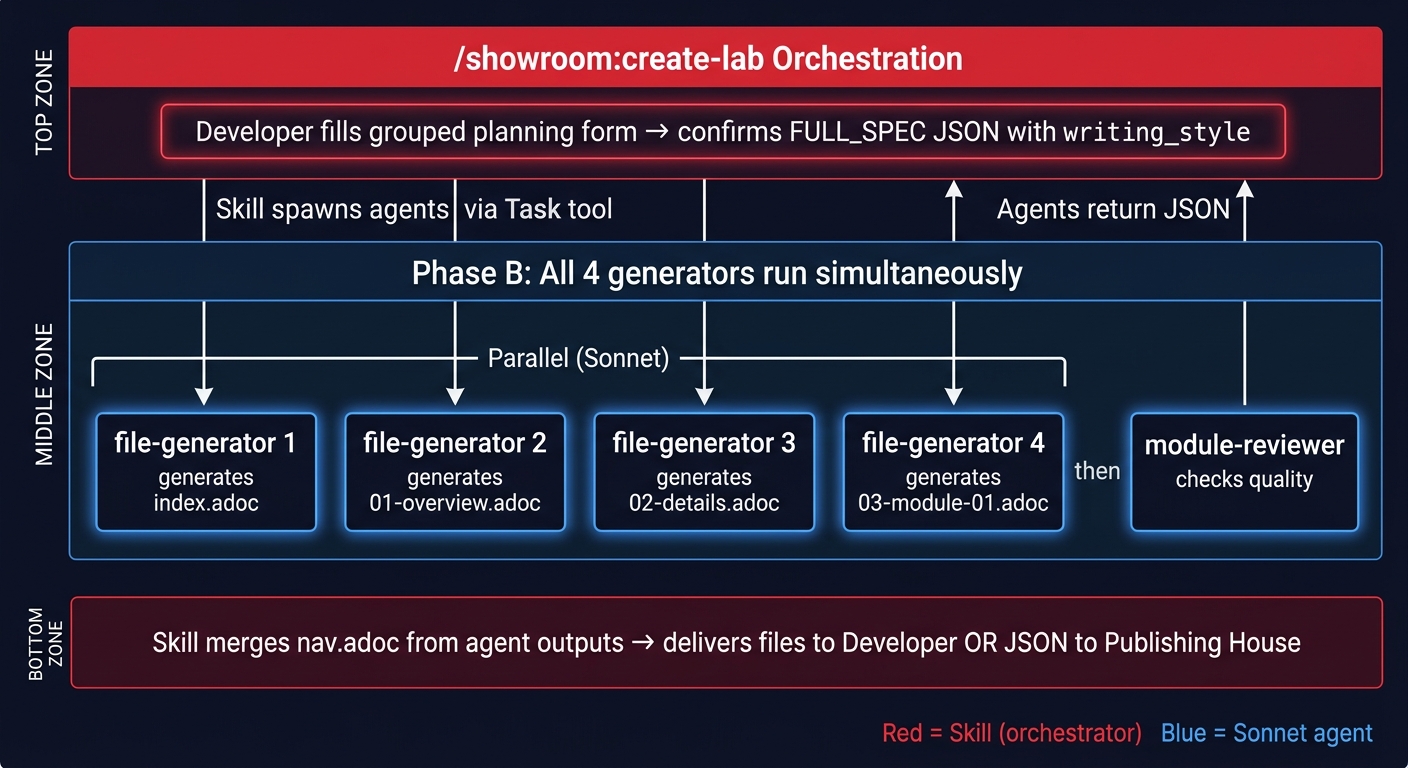
New lab: 4 file-generator agents run simultaneously — index, overview, details, module-01 all generated in parallel.
Continue mode: single file-generator seeded with previous module content (sequential by design for story continuity).
How It Works
-
Parse arguments
Reads
--newor--continueflags. If target directory is empty, prompts to clone the nookbag template first. -
Grouped planning form (Phase A)
Asks all questions at once — lab name, audience, business scenario, duration, module breakdown, environment details, reference materials, and optional writing style. No sequential blocking. User fills what they know and confirms the plan.
-
Showroom setup (new labs)
Q0–Q3: catalog type, tabs/consoles, Red Hat theme, E2E automation. Creates
site.ymlandui-config.yml. If E2E: copiesbuttons.jsfrom the nookbag e2e-template branch and createsruntime-automation/skeleton with canonical Ansible stubs. -
Parallel file generation (Phase B)
Spawns 4
showroom:file-generatoragents simultaneously. Each gets the full FULL_SPEC JSON including writing style profile. All apply the auto-humanizer pass before writing to disk. -
Quality check and delivery
Spawns
showroom:module-revieweron generated files. Merges nav.adoc from agent nav_entry outputs. Presents delivery summary with file list, word counts, and any quality warnings.
Personal Writing Style
Provide your style in the planning form:
Writing style: "conversational, short sentences, active voice, no jargon"
  OR paste 1-3 paragraphs of your writing as an example
  OR path to a module you wrote: ~/my-showroom/content/modules/ROOT/pages/03-module-01.adoc
  Saved profile: ~/.claude/context/my-writing-style.md
See Writing Style Guide for how to create a persistent profile.
Publishing House Integration
ph_payload:
  target_dir: content/modules/ROOT/pages/
  mode: new
  spec:
    lab_name: OpenShift Pipelines Workshop
    audience: intermediate
    learning_objectives: [Deploy a pipeline, Configure triggers, Monitor builds]
    business_scenario: ACME Corp needs to modernize their CI/CD pipeline...
    duration: 90min
    env:
      ocp_version: "4.18"
      attributes: {user: user1, password: openshift}
    writing_style: "conversational, short sentences"
Returns:
{
  "files_created": ["index.adoc", "01-overview.adoc", "02-details.adoc", "03-module-01-pipeline-setup.adoc"],
  "nav_updated": true,
  "quality": {"critical": 0, "high": 0, "warnings": 1}
}
See PH Integration Guide for full sequence diagrams.
Related Skills
/showroom:verify-content— quality review after content is created/showroom:create-demo— presenter-led demo content/ftl:rhdp-lab-validator— E2E automation- Agent Architecture