/health:deployment-validator
Create Ansible validation roles that verify every component of your RHDP deployment is healthy — pods running, routes accessible, operators installed, per-user resources correctly provisioned.
What You’ll Need Before Starting
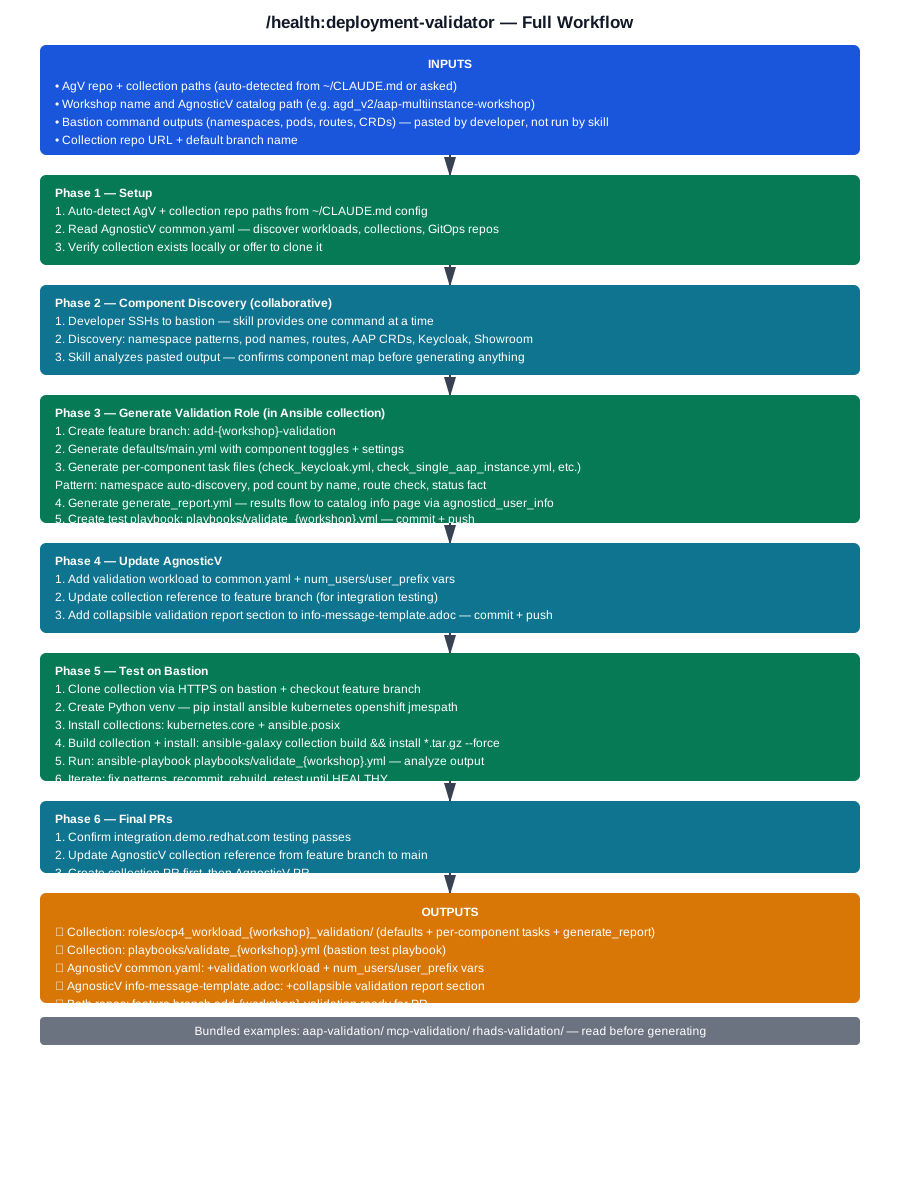
Click to view full workflow diagram
Prerequisites
Know What to Validate
- List of packages to verify
- Services that should be running
- Configuration files to check
- Expected OpenShift resources
- API endpoints to test
Have Workload Deployed
# Know your deployment details:
- OpenShift namespace
- Deployed applications
- Required resourcesAgnosticD Repository Access
cd ~/work/code/agnosticdWhat You’ll Need
Workload Name
Matches your deployment workload
Validation Checks
List of checks to perform
Expected State
Expected state for each check
Failure Conditions
Failure conditions and error messages
Quick Start
Navigate to Repository
Open your AgnosticD repository directory
Run Validator
/health:deployment-validatorAnswer Questions
Provide validation requirements
Review & Test
Review generated role and test it
What It Creates
Generated role in your Ansible collection:
{collection}/roles/ocp4_workload_{workshop}_validation/
├── defaults/main.yml              # Component toggles + settings
├── tasks/
│   ├── main.yml                   # Orchestrates all checks
│   ├── check_keycloak.yml         # Shared Keycloak namespace
│   ├── check_aap_instances.yml    # Per-user loop
│   ├── check_single_aap_instance.yml
│   ├── check_showroom_instances.yml
│   ├── check_single_showroom.yml
│   └── generate_report.yml        # Results to agnosticd_user_info
└── playbooks/
    └── validate_{workshop}.yml    # Bastion test playbook
Common Validation Types
Package Validation
Verify RPM packages are installed:
- name: Verify package is installed
  package:
    name: ""
    state: present
  check_mode: yes
Service Validation
Check systemd services are running:
- name: Verify service is running
  systemd:
    name: ""
    state: started
    enabled: yes
OpenShift Resource Validation
Verify pods, deployments, routes:
- name: Verify deployment is ready
  kubernetes.core.k8s_info:
    kind: Deployment
    name: ""
    namespace: ""
Tips & Best Practices
🎯 Start Simple
Begin with basic checks first
💬 Clear Messages
Use clear error messages
🧪 Test Thoroughly
Test on clean deployment
📝 Document Checks
Document what each check verifies
🔒 Read-Only
Validation should not modify state
⏱️ Add Retries
Resources take time to be ready
Troubleshooting
Skill not found?
- Restart Claude Code or VS Code
- Verify installation:
ls ~/.claude/skills/deployment-health-checker - Check the Troubleshooting Guide
Validation fails on working deployment?
- Check timing - resources take time to be ready
- Add retries with delays
- Verify variable values are correct
- Use debug mode to inspect actual vs expected state
Related Skills
/agnosticv:catalog-builder
Create catalog with validation enabled
/agnosticv:validator
Validate catalog configuration
/ftl:lab-validator
Generate automated graders