/showroom:verify-content
Verify workshop or demo content against Red Hat quality standards. Runs parallel agents per module — fast, thorough, dimension-scored. Works interactively or headless via Publishing House.
Quick Start
/showroom:verify-content
Run from inside your Showroom repo. Auto-detects content type and lab type.
Architecture
This skill is an orchestrator. All checks are delegated to specialized agents running in parallel — one scaffold-checker for root config files and one module-reviewer per .adoc file simultaneously.
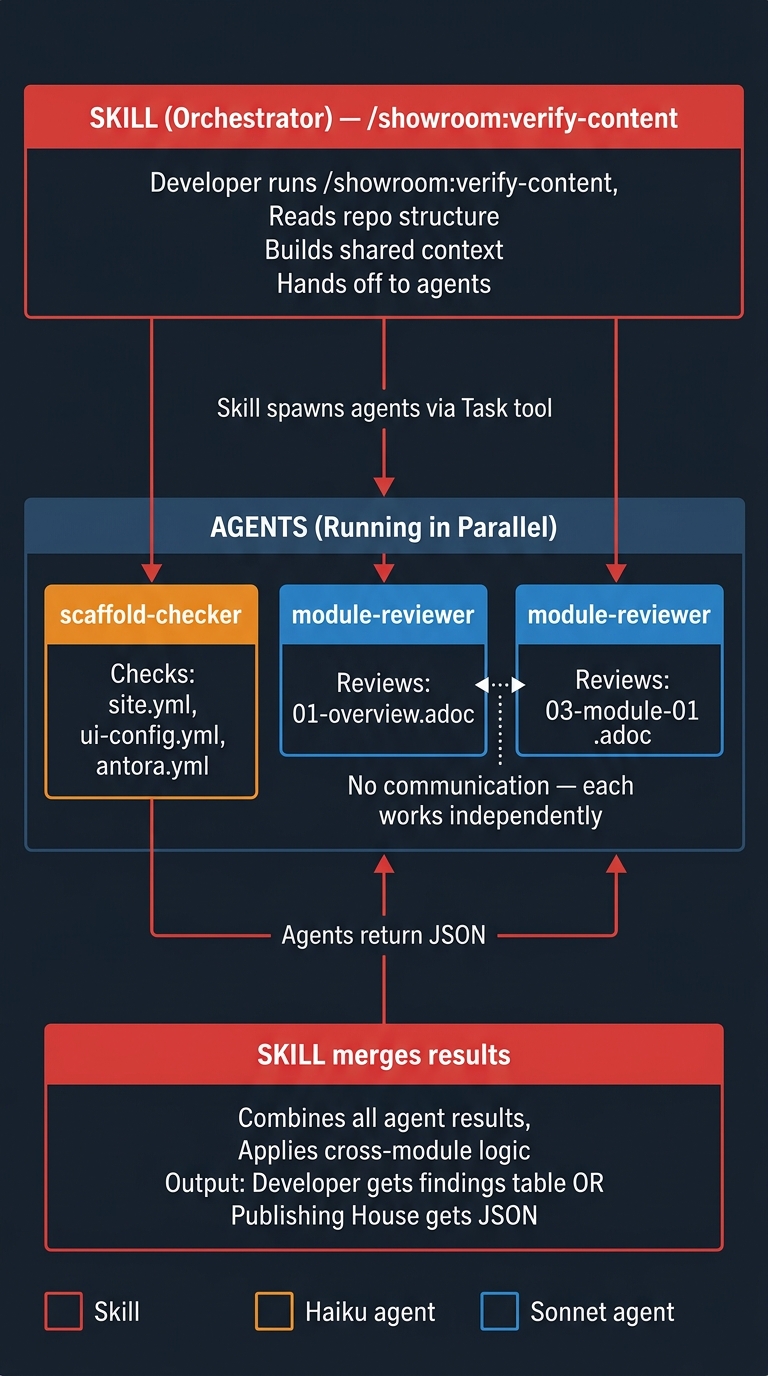
Expected speedup: ~6× faster than sequential checks (8 min → ~90 sec for a 6-module lab).
How It Works
-
Auto-detect
Detects
content/modules/ROOT/pages/in the current directory. Infers content type (workshop vs demo) from file structure, and lab type (ocp, rhel, vm, ai) fromui-config.yml. If nothing found, asks for a local path or GitHub URL. -
Pre-flight (orchestrator, inline)
Reads
nav.adocfor module order,antora.ymlfor defined attributes, and scans all .adoc files to build the first-use acronym map. Runs B.1–B.7 cross-module structure checks (index.adoc, nav completeness, module presence). ProducesSHARED_CONTEXTJSON shared with all agents. -
Parallel agent review
Spawns
showroom:scaffold-checker(Haiku) and oneshowroom:module-reviewer(Sonnet) per module — all run simultaneously. Each agent gets its own fresh context window withSHARED_CONTEXTso it doesn't need to read across files. -
Merge and cross-module logic
Flattens all agent findings. Applies cross-module suppression: D.2 acronym warnings only fire on the first occurrence across all modules; E.5 attribute warnings are suppressed for attributes defined in
antora.yml. Deduplicates, sorts by severity. -
Present and fix
Outputs one consolidated findings table. User picks issues to fix one at a time (or "all critical" / "all high"). Fix loop applies changes interactively. In PH headless mode, returns structured JSON and skips the fix loop.
Check Coverage
Scaffold Checks (S) — showroom:scaffold-checker
| Check | What it catches |
|---|---|
| S.1 | site.yml missing, stale title, missing start_page |
| S.2 | ui-config.yml missing, split view not enabled |
| S.3 | antora.yml missing, stale name or start_page |
| S.4 | gh-pages.yml missing or referencing wrong playbook |
| S.5 | supplemental-ui/ files missing |
| S.5c | buttons.js missing when button roles are used |
| S.5d | Recommendation only — solve/validate buttons are optional |
| S.5f | runtime-automation/ missing when button placeholders used |
Content Checks (B/C/D/E/F) — showroom:module-reviewer
| Pass | Checks |
|---|---|
| B — Structure | Learning objectives, exercises, Verify sections, conclusion, nav completeness |
| C — Formatting | Image syntax, code blocks, heading levels, include references, list spacing |
| D — Style | Red Hat terminology, acronym expansion, inclusive language, version attributes |
| E — Technical | oc command casing, YAML indent, role="execute" on shell blocks, attribute placeholders, hardcoded URLs |
| F — Demo | Know/Show structure, business value, presenter notes (demo content only) |
Security Checks — new in this release
The following security issues were identified from real production labs and are now automatically detected:
| Security Check | What it catches | Severity |
|---|---|---|
| Multiuser htpasswd — shared passwords | When multiuser: true and htpasswd auth is used, all users share the same password unless ocp4_workload_authentication_htpasswd_user_password_randomized: true is set |
High |
| VS Code without authentication | ocp4_workload_vscode with auth-type: none exposes an unauthenticated IDE to anyone with the Showroom URL |
High |
Both detected in: agnosticv:validator
Dimension Scoring
Each module-reviewer agent returns dimension scores (0.0–1.0) alongside findings. These enable regression detection when skill changes are evaluated against known-good content.
| Dimension | Checks covered |
|---|---|
structure |
B.8–B.15, E.7 |
pedagogy |
B.8, B.9, B.12 |
style |
C.9, D.1, D.3–D.5, D.8, D.9 |
technical_accuracy |
D.10, E.1–E.9 |
demo_structure |
F.1–F.5 (demo content only) |
formatting |
C.1, C.2, C.5, C.10 |
intro_quality |
B structure + D.1/D.2 (first module only) |
Publishing House Integration
verify-content supports headless mode for Publishing House. PH passes ph_payload JSON — the skill skips all interactive prompts and returns structured findings JSON. No PH code changes needed.
PH sends:
ph_payload:
  content_path: content/modules/ROOT/pages/
  modules: []
  lab_type: workshop
  shared_context:
    defined_attributes: {ocp_version: "4.18"}
    nav_order: [index, 01-overview, 03-module-01]
    first_use_map: {}
PH receives:
{
  "findings": [
    {"id": "E.3a", "module": "03-module-01.adoc", "line": 47, "severity": "High", "message": "..."}
  ],
  "summary": {"critical": 0, "high": 1, "medium": 0, "warnings": 3}
}
See PH Integration Guide for full details and sequence diagrams.
Template Priority
The skill checks the repo’s own templates and prompt files before falling back to marketplace bundled versions:
1. {REPO_PATH}/showroom/prompts/*.txt  →  project-specific rules (partner content, custom terminology)
2. @showroom/prompts/*.txt             →  marketplace defaults
Related Skills
/showroom:create-lab— create workshop content/showroom:create-demo— create presenter demo content/ftl:rhdp-lab-validator— write E2E automation- Agent Architecture — how orchestration works
- PH Integration — headless mode details