Technology and Supply Chain
Module Goals
Own your software supply chain.
Ingest, build, sign, attest and secure your software supply chain. Take control by working hands-on with cryptographic signing, verification, and Software Bills of Materials (SBOMs). These practices enable you to maintain sovereignty over your software artifacts and dependencies throughout their entire lifecycle.
Installation and Setup
First, we need to set up the applications for this module.
-
Switch to the Terminal tab on the right and run the following command to check if cosign is already installed and login to your Quay instance.
cosign version
podman login https://$QUAY_URL -u $QUAY_USER -p {quay_admin_password}
Sample Output[INFO] Cosign installed successfully: ______ ______ _______. __ _______ .__ __. / | / __ \ / || | / _____|| \ | | | ,----'| | | | | (----`| | | | __ | \| | | | | | | | \ \ | | | | |_ | | . ` | | `----.| `--' | .----) | | | | |__| | | |\ | \______| \______/ |_______/ |__| \______| |__| \__| cosign: A tool for Container Signing, Verification and Storage in an OCI registry. GitVersion: 5c43d256 GitCommit: 5c43d256f1391f505ada9f9c46c3e31b6e219c8e GitTreeState: clean BuildDate: 2025-11-19T10:04:54Z GoVersion: go1.24.6 (Red Hat 1.24.6-1.el9_6) X:strictfipsruntime Compiler: gc Platform: linux/amd64 [INFO] Gitsign installed successfully: gitsign version v0.0.0-20251119095025-6ae9439418bc+dirty parsed config: { "Fulcio": "https://fulcio.sigstore.dev", "FulcioRoot": "", "Rekor": "https://rekor.sigstore.dev",If cosign is not installed, please run the following command to install it in the Terminal tab on the right. cd ~/svc-lab/tssc-setup && ./setup.sh
Getting your golden image
Having your own golden image ensures you have full control and visibility over the software components included, significantly reducing security risks and supply chain vulnerabilities. By downloading and building golden images yourself, you guarantee provenance and compliance tailored to your organization’s requirements. Ownership of these images allows for faster recovery, reproducibility, and assurance that no unapproved changes or dependencies are introduced into your environments.
We’ll be building a python based application to demonstrate the signing and verification process.
-
First, let’s download and push a public image to your Quay instance. Run the following commands in the terminal:
source ~/.bashrc
podman pull registry.access.redhat.com/ubi8/python-312:1-1775513555
podman tag registry.access.redhat.com/ubi8/python-312:1-1775513555 $QUAY_URL/$QUAY_USER/python-ubi-312:3.12-golden
podman push --remove-signatures $QUAY_URL/$QUAY_USER/python-ubi-312:3.12-golden
UBI images from Red Hat carry signatures; pushing to another registry may change layer layout, so
--remove-signaturesavoids the error Would invalidate signatures. You are still pushing the same image content.
You now have a container image in the local Quay registry.
Rebuilding the Patient Portal Frontend
-
Go to the
patient-portal-frontendbuild directory (clone the repo first if you do not already have it under~/demo-applications):cd ~/demo-applications/image-builds/patient-portal-frontend -
Replace both
FROMlines so the build uses your Quay golden image instead of Docker Hub:sed -i "s|^FROM docker.io/library/python:3.12-slim|FROM $QUAY_URL/$QUAY_USER/python-ubi-312:3.12-golden|g" Dockerfile -
Build the frontend container image:
podman build -t $QUAY_URL/$QUAY_USER/patient-portal-frontend:1.0 . -
Push the image to your Quay instance:
podman push $QUAY_URL/$QUAY_USER/patient-portal-frontend:1.0
Signing Your Software
For signing and verification of container images, we’ll be using the cosign CLI binary, which has already been installed in the terminal tab on the right.
cosign can easily be used in any CI/CD toolchain as we use it here and handles all the communication with the Sigstore / Trusted Artifact Signer services that request certificates, handle the OIDC authentication, store info in the transparency log (Rekor), etc.
-
Run the following command in the terminal:
cosign version______ ______ _______. __ _______ .__ __. / | / __ \ / || | / _____|| \ | | | ,----'| | | | | (----`| | | | __ | \| | | | | | | | \ \ | | | | |_ | | . ` | | `----.| `--' | .----) | | | | |__| | | |\ | \______| \______/ |_______/ |__| \______| |__| \__| cosign: A tool for Container Signing, Verification and Storage in an OCI registry. GitVersion: 5c43d256 GitCommit: 5c43d256f1391f505ada9f9c46c3e31b6e219c8e GitTreeState: clean BuildDate: 2025-11-19T10:04:54Z GoVersion: go1.24.6 (Red Hat 1.24.6-1.el9_6) X:strictfipsruntime Compiler: gc Platform: linux/amd64 -
Run the following commands in the terminal to set the environment variables for
cosign:export TUF_URL=$(oc get tuf -o jsonpath='{.items[0].status.url}' -n trusted-artifact-signer) # Issuer must match Fulcio's configured OIDC issuer (path may be /realms/... or /auth/realms/...). export OIDC_ISSUER_URL=$(oc get fulcio -n trusted-artifact-signer -o jsonpath='{.items[0].spec.config.oidcIssuers[0].issuer}' 2>/dev/null) if [ -z "$OIDC_ISSUER_URL" ]; then export OIDC_ISSUER_URL=$(oc get fulcio -n trusted-artifact-signer -o jsonpath='{.items[0].spec.config.OIDCIssuers[0].Issuer}' 2>/dev/null) fi if [ -z "$OIDC_ISSUER_URL" ]; then export OIDC_ISSUER_URL=$(oc get securesign -n trusted-artifact-signer -o jsonpath='{.items[0].spec.fulcio.config.oidcIssuers[0].issuer}' 2>/dev/null) fi if [ -z "$OIDC_ISSUER_URL" ]; then export OIDC_ISSUER_URL=$(oc get securesign -n trusted-artifact-signer -o jsonpath='{.items[0].spec.fulcio.config.OIDCIssuers[0].Issuer}' 2>/dev/null) fi if [ -z "$OIDC_ISSUER_URL" ]; then KK_HOST=$(oc get route keycloak -n keycloak -o jsonpath='{.spec.host}' 2>/dev/null) if [ -n "$KK_HOST" ]; then export OIDC_ISSUER_URL="https://${KK_HOST}/realms/openshift"; fi fi if [ -z "$OIDC_ISSUER_URL" ]; then KK_HOST=$(oc get route keycloak -n rhsso -o jsonpath='{.spec.host}' 2>/dev/null) if [ -n "$KK_HOST" ]; then export OIDC_ISSUER_URL="https://${KK_HOST}/auth/realms/openshift"; fi fi export COSIGN_FULCIO_URL=$(oc get fulcio -o jsonpath='{.items[0].status.url}' -n trusted-artifact-signer) export COSIGN_REKOR_URL=$(oc get rekor -o jsonpath='{.items[0].status.url}' -n trusted-artifact-signer) export COSIGN_MIRROR=$TUF_URL export COSIGN_ROOT=$TUF_URL/root.json export COSIGN_OIDC_CLIENT_ID="trusted-artifact-signer" export COSIGN_OIDC_ISSUER=$OIDC_ISSUER_URL export COSIGN_CERTIFICATE_OIDC_ISSUER=$OIDC_ISSUER_URL export COSIGN_YES="true" export SIGSTORE_FULCIO_URL=$COSIGN_FULCIO_URL export SIGSTORE_OIDC_ISSUER=$COSIGN_OIDC_ISSUER export SIGSTORE_REKOR_URL=$COSIGN_REKOR_URL export REKOR_REKOR_SERVER=$COSIGN_REKOR_URL echo "$OIDC_ISSUER_URL" env | grep URL -
As the last step, initialize
cosignso it knows who to talk to. Run the following command in the terminalcosign initialize[lab-user@bastion ~]$ cosign initialize Root status: { "local": "/home/lab-user/.sigstore/root", "remote": "https://tuf-trusted-artifact-signer.apps.cluster-l2ktc.l2ktc.sandbox75.opentlc.com", "metadata": { "root.json": { "version": 1, "len": 2178, "expiration": "13 Jun 25 16:39 UTC", "error": "" }, "snapshot.json": { "version": 1, "len": 618, "expiration": "13 Jun 25 16:39 UTC", "error": "" }, "targets.json": { "version": 1, "len": 1372, "expiration": "13 Jun 25 16:39 UTC", "error": "" }, "timestamp.json": { "version": 1, "len": 619, "expiration": "13 Jun 25 16:39 UTC", "error": "" } }, "targets": [ "ctfe.pub", "fulcio_v1.crt.pem", "rekor.pub" ] }
Cryptographic signing lets you control which container images can run in your environment, making sure only trusted, verified images are used.
cosign will be interacting with the image in our private registry, therefore we need to log in to Quay.
Procedure
-
Run the following command in the terminal:
cosign login $QUAY_URL -u $QUAY_USER -p {quay_admin_password}WARNING! Your credentials are stored unencrypted in '/home/lab-user/.docker/config.json'. Configure a credential helper to remove this warning. See https://docs.docker.com/go/credential-store/ logged in via /home/lab-user/.docker/config.json -
Run the following command in the terminal:
cosign tree $QUAY_URL/$QUAY_USER/patient-portal-frontend:1.0[lab-user@bastion ~]$ cosign tree $QUAY_URL/$QUAY_USER/patient-portal-frontend:1.0 📦 Supply Chain Security Related artifacts for an image: quay.apps.cluster-m2mgb.dyn.redhatworkshops.io/quayadmin/patient-portal-frontend:1.0 No Supply Chain Security Related Artifacts artifacts found for image quay.apps.cluster-m2mgb.dyn.redhatworkshops.io/quayadmin/patient-portal-frontend:1.0 , start creating one with simply running$ cosign sign <img> -
As
cosignsuggests, signing this image is as simple as the following. Run the following command in the terminal:cosign sign $QUAY_URL/$QUAY_USER/patient-portal-frontend:1.0[lab-user@bastion ~]$ cosign sign $QUAY_URL/$QUAY_USER/patient-portal-frontend:1.0 Generating ephemeral keys... Retrieving signed certificate... Note that there may be personally identifiable information associated with this signed artifact. This may include the email address associated with the account with which you authenticate. This information will be used for signing this artifact and will be stored in public transparency logs and cannot be removed later. By typing 'y', you attest that you grant (or have permission to grant) and agree to have this information stored permanently in transparency logs. error opening browser: exec: "xdg-open": executable file not found in $PATH Go to the following link in a browser: https://sso.apps.<your-cluster>.<domain>/realms/openshift/protocol/openid-connect/auth?access_type=online&client_id=trusted-artifact-signer&code_challenge=... Enter verification code: -
Copy the URL and paste it in a new browser window or tab and log in. Use the following user credentials:
Username:
jdoe@redhat.com
Password:
secure
As mentioned above, the signing process ties an identity (an OIDC identity, to be specific) to the signature. The signing certificate is issued on demand, but only issued if an OIDC identity proof can be established. 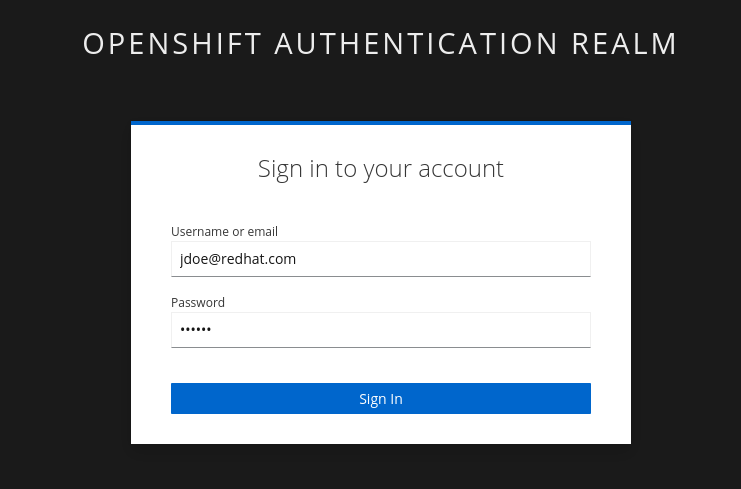
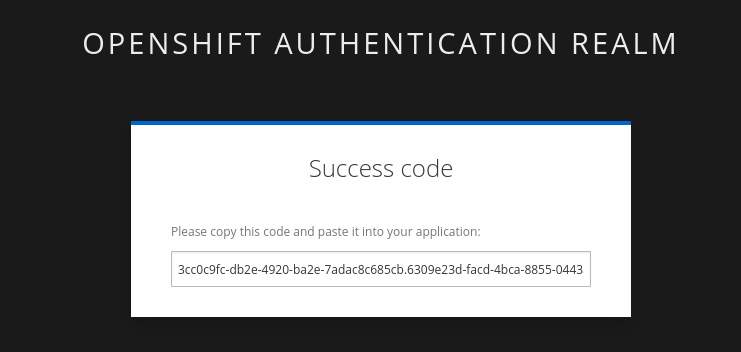
Make sure to copy the whole code, as it is longer than the text box. You may have to run rm -rf ~/.sigstoreif you get a cache error. -
Copy the verification code and paste it in the terminal:
Enter verification code: 3cc0c9fc-db2e-4920-ba2e-7adac8c685cb.6309e23d-facd-4bca-8855-0443a3c4ddf5.d8370879-39c7-41ec-99ab-669101e99f91

Successfully verified SCT...
WARNING: Image reference quay-l2ktc.apps.cluster-l2ktc.l2ktc.sandbox75.opentlc.com/quayadmin/patient-portal-frontend:1.0 uses a tag, not a digest, to identify the image to sign.
    This can lead you to sign a different image than the intended one. Please use a
    digest (example.com/ubuntu@sha256:abc123...) rather than tag
    (example.com/ubuntu:latest) for the input to cosign. The ability to refer to
    images by tag will be removed in a future release.

tlog entry created with index: 1
Pushing signature to: quay-l2ktc.apps.cluster-l2ktc.l2ktc.sandbox75.opentlc.com/quayadmin/patient-portal-frontend:1.0
SUCCESS!
With one command, you have signed the container image in the quay registry. Furthermore, the signing event and its metadata have been recorded in the Rekor transparency log:
tlog entry created with index: 1. -
To check, we can again use
cosign tree. Run the following command in the terminal:cosign tree $QUAY_URL/$QUAY_USER/patient-portal-frontend:1.0📦 Supply Chain Security Related artifacts for an image: quay.apps.cluster-m2mgb.dyn.redhatworkshops.io/quayadmin/patient-portal-frontend:1.0 └── 🔐 Signatures for an image tag: quay.apps.cluster-m2mgb.dyn.redhatworkshops.io/quayadmin/patient-portal-frontend:sha256-22f99a3899129e277d305e187c8d24180c14a050d91455bd3369911f366c4dfb.sig └── 🍒 sha256:c20e35a851fe1f348be662e94f3095edfe85955d1d7b9ee8de2afbfc3c94f7e2We can also view the signature in the Quay console. Head over to the console with username
quayadminand password{quay_admin_password}. check out the patient-portal-frontend image and you will see the signature.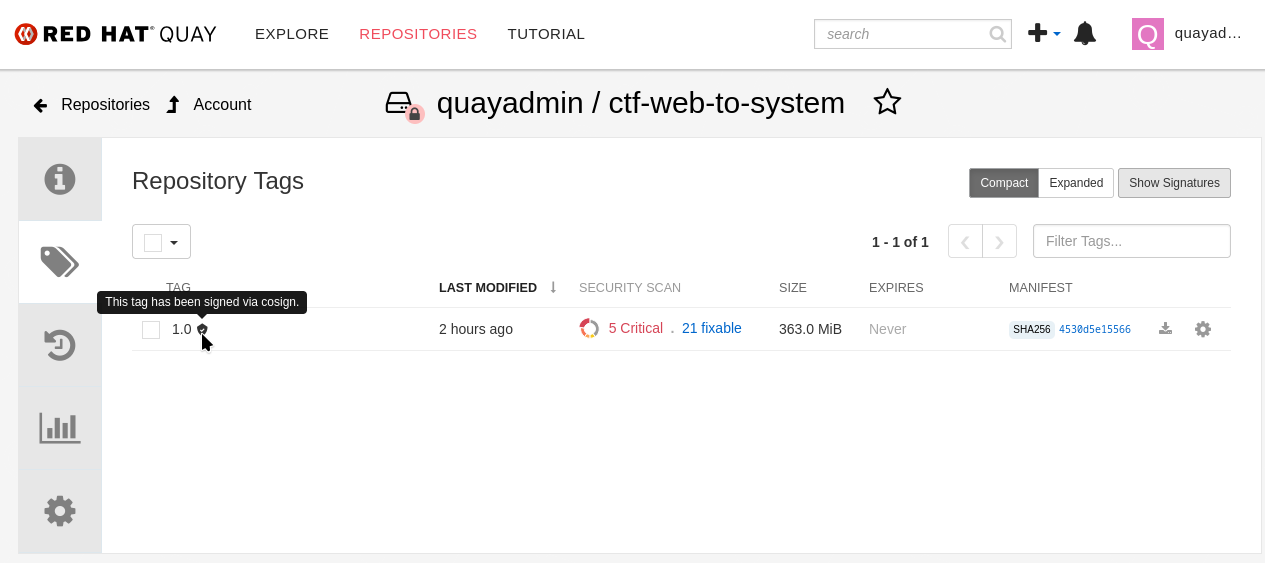
You’re crushing it!
