Module 4: Developer Hub and catalog
|
Presenter note: Section 2 picks up after time has passed. Parasol has adopted platform engineering practices and implemented an internal developer portal (IDP) with Red Hat Developer Hub, a product based on Backstage. They have also established a more secure software supply chain. The foundational platform from Section 1 is in place — now the organization is ready to adopt advanced capabilities that improve discoverability, self-service, and software supply chain security. |
Part 1 — Developer Hub and Developer Lightspeed
Know
Red Hat Developer Hub (RHDH) is the Internal Developer Platform (IDP) for Parasol — a single pane of glass where developers can discover applications, APIs, and documentation, provision environments through self-service templates, and get AI-assisted guidance. It accelerates onboarding by giving new developers everything they need in one place: a software catalog, golden path templates, integrated CI/CD visibility, and now AI-powered assistance through Developer Lightspeed.
Business challenge:
-
Developers spend excessive time discovering services, APIs, and documentation across fragmented tools
-
No single source of truth for what components exist, who owns them, and how they relate
-
New developer onboarding takes weeks of knowledge transfer and tribal knowledge sharing
-
Developers lack context about the projects they work on and need to interrupt teammates for answers
-
Onboarding a new developer to the application landscape takes weeks
Value proposition:
Developer Hub provides a centralized, searchable catalog of all applications, components, APIs, and documentation. Developer Lightspeed integrates AI directly into the IDP (not the IDE — that is the job of coding assistants and extensions such as Continue with Model Context Protocol, which we saw in Section 1). Lightspeed combines product documentation, developer documentation, and the software catalog to answer developer questions in natural language, speeding up development and reducing onboarding friction. The platform engineer configures Lightspeed to use the IT-approved model, so developers get AI assistance within governance guardrails.
Show
What I say:
"Time has passed since Section 1. Parasol has adopted platform engineering practices and implemented an Internal Developer Platform with Red Hat Developer Hub. This is the single pane of glass for developers — software catalog, self-service templates, CI/CD visibility, and now AI-assisted development. Let me show you what this looks like."
What I do:
-
Open Red Hat Developer Hub at https://backstage-developer-hub-rhdh.{openshift_cluster_ingress_domain} and log in as
dev1/{common_password} -
Give a brief tour of the RHDH interface:
-
Point out the left sidebar navigation: Catalog, Lightspeed, and other menu items
-
"This is the developer’s home base. Everything they need is here: discover components and APIs in the Catalog, get AI assistance from Lightspeed, provision environments from templates, and monitor pipelines and deployments. One tool instead of a dozen."
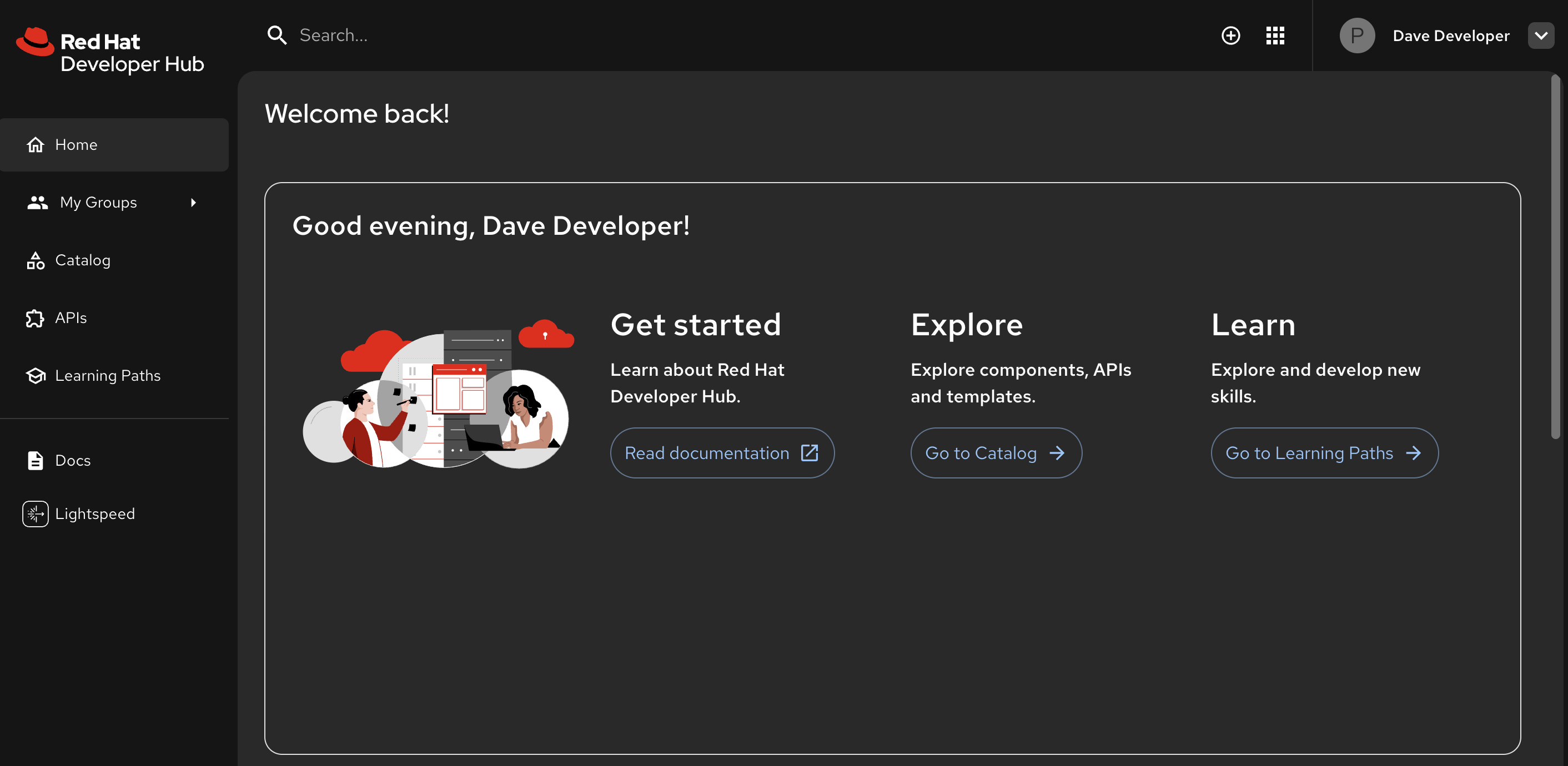 Figure 1. Developer Hub: the single pane of glass for developers
-
-
Navigate to the Lightspeed menu item in the left sidebar:
-
"This is Developer Lightspeed — AI-assisted development built right into the developer platform. Unlike Continue, which is an AI assistant in the IDE for writing code, Lightspeed operates at the platform level. It combines product documentation, developer docs, and the software catalog to answer questions about the projects developers work on."
-
-
Enter a natural language prompt in Lightspeed:
Tell me about the parasol-insurance-api API in the catalog, and write a sample snippet of Java code to access it-
Show the response as Lightspeed retrieves information from the catalog and documentation
-
"Lightspeed pulled information about the API from the software catalog, combined it with documentation, and generated a working code snippet. A new developer does not need to hunt through wikis or interrupt teammates. They ask Lightspeed and get a contextual answer in seconds."
-
|
LLMs are non-deterministic — responses vary between attempts. The demo environment uses a relatively small model (
|
-
Point out how the response combines multiple sources:
-
Catalog metadata (API description, owner, lifecycle)
-
Documentation content (from docs-as-code in the repository)
-
Generated code that references the actual API endpoints
-
"This is not a generic AI response. It is grounded in the actual catalog data and documentation for the Parasol application. The platform engineer configured Lightspeed to use the IT-approved model, so this happens within governance guardrails."
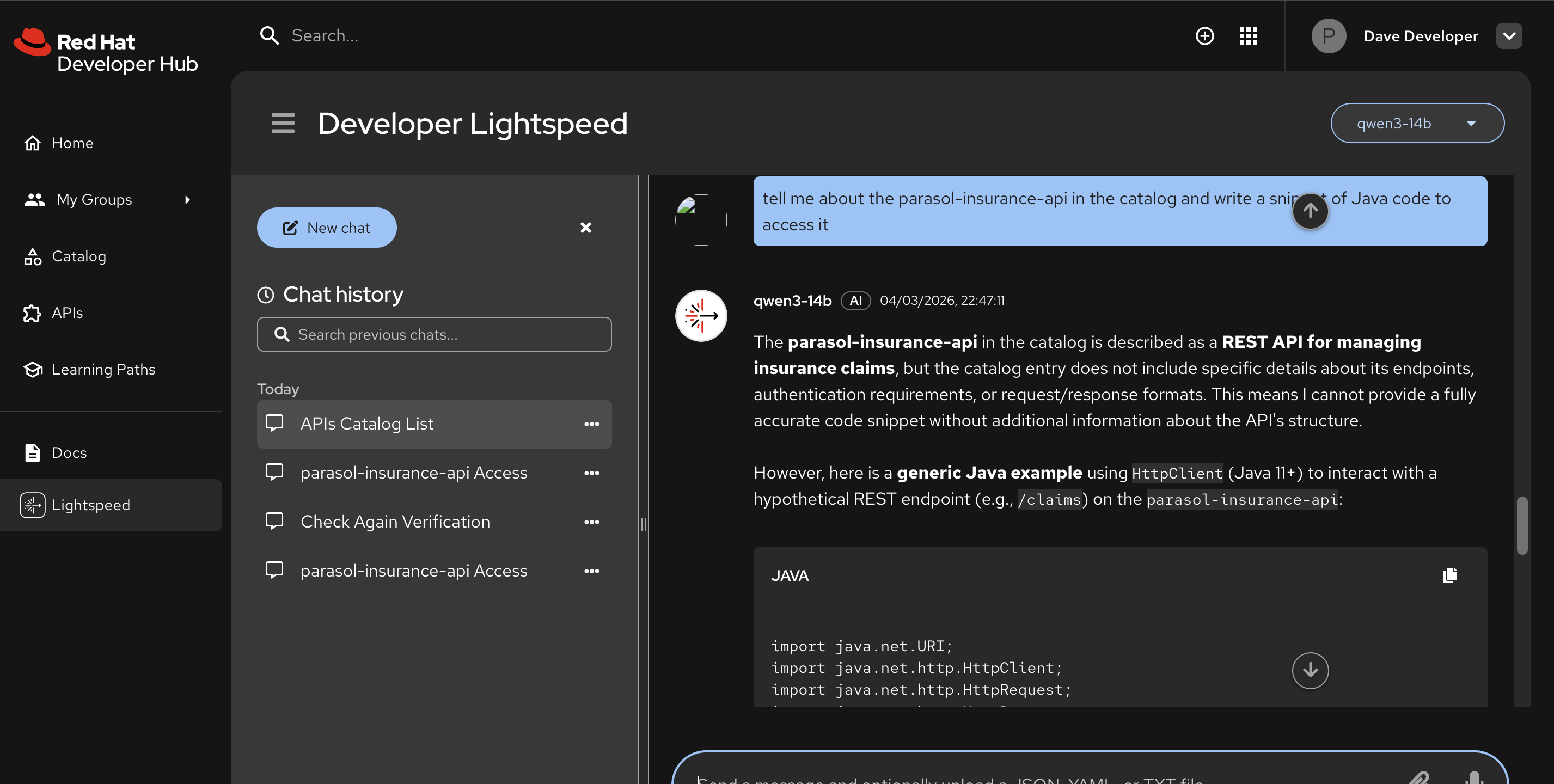 Figure 2. Developer Lightspeed: AI-powered answers grounded in the software catalog
-
What they should notice:
-
Developer Lightspeed is integrated directly into the IDP, not the IDE
-
It combines product docs, developer docs, and the software catalog for contextual answers
-
The response includes both information and working code, accelerating development
-
The platform engineer configured the AI model — developers get assistance within governance guardrails
-
This reduces onboarding friction and eliminates the need to interrupt teammates for project context
Business value callout:
"At Parasol, onboarding a new developer to the application landscape takes weeks of knowledge transfer. With Developer Lightspeed, a developer can ask natural language questions about any project in the catalog and get answers grounded in real documentation and catalog data. That weeks-long knowledge transfer becomes self-service in seconds."
If asked:
- Q: "Which LLM does Lightspeed use?"
-
A: "Developer Lightspeed supports multiple model backends. The platform engineer configures which model to use. Organizations can use Red Hat-hosted models or their own, depending on their security and data residency requirements."
- Q: "How does Lightspeed know about our applications?"
-
A: "Lightspeed uses the catalog data, registered APIs, and docs-as-code content to answer questions. It has context about the relationships between components, the API contracts, and the documentation. As the catalog grows, Lightspeed becomes more useful."
- Q: "Is this the same as the Continue extension we saw in Section 1?"
-
A: "No. Continue is an AI assistant in the IDE for writing and fixing code. Lightspeed operates at the platform level in Developer Hub, answering questions about the application landscape, APIs, and documentation. They complement each other: Lightspeed for understanding the platform, Continue for writing code."
- Q: "Can I access lightspeed context from elsewhere like my IDE?"
-
A: "Yes. Lightspeed includes MCP servers that can expose context from the catalog and tech docs to any system that supports the MCP protocol, including many IDE extensions like Continue, Roo Code, Claude Code, and many more. This allows you to get the same contextual information in your chosen interface as you do in the Developer Hub interface."
Part 2 — Exploring the RHDH Software Catalog
Know
The software catalog is the foundation of Developer Hub. It provides a centralized, searchable registry of all applications, components, APIs, and documentation. The Parasol application and all its components are registered as a system in the catalog, making it easy for any developer to understand the architecture and find what they need.
Business challenge:
-
No single source of truth for what components exist, who owns them, and how they relate
-
Tribal knowledge about application architecture is lost when team members leave
-
New developers have no structured way to learn the system landscape
-
API documentation is scattered and often outdated
Value proposition:
RHDH provides a centralized, searchable catalog of all applications, components, APIs, and documentation. The Parasol application is registered as a "system" with its components linked together. Developers can browse the catalog to understand relationships, find API documentation, and discover available services without asking anyone. Documentation lives alongside code as docs-as-code, ensuring it stays current.
Show
What I say:
"Now let me show you the software catalog that powers those Lightspeed answers. This is where the Parasol application and all its components are registered."
What I do:
-
Navigate to the Catalog in the left sidebar:
-
Use the Kind dropdown to filter for System entities.
-
Select the parasol-insurance system.
-
"Everything related to the Parasol application is organized here. A new developer can see the entire landscape in seconds."
-
-
Click on the parasol-insurance system to show the system view:
-
Show all components registered under the system
-
Point out the dependency associations associations between components
-
"The catalog captures how components relate to each other. A developer can trace these relationships without reading architecture documents or asking teammates."
-
-
Click on various entities in the graph (e.g., the API) to show their dedicated detail view:
-
Show the Overview tab with ownership, lifecycle, and system information
-
Show the API tab with provided and consumed API definitions
-
Show the provided APIs and consumed APIs for each Component
-
"Notice the documentation. It is rendered directly from the repository, written as code alongside the application. When the code changes, the docs stay current. No more stale wikis."
 Figure 3. Parasol system in the Developer Hub catalog
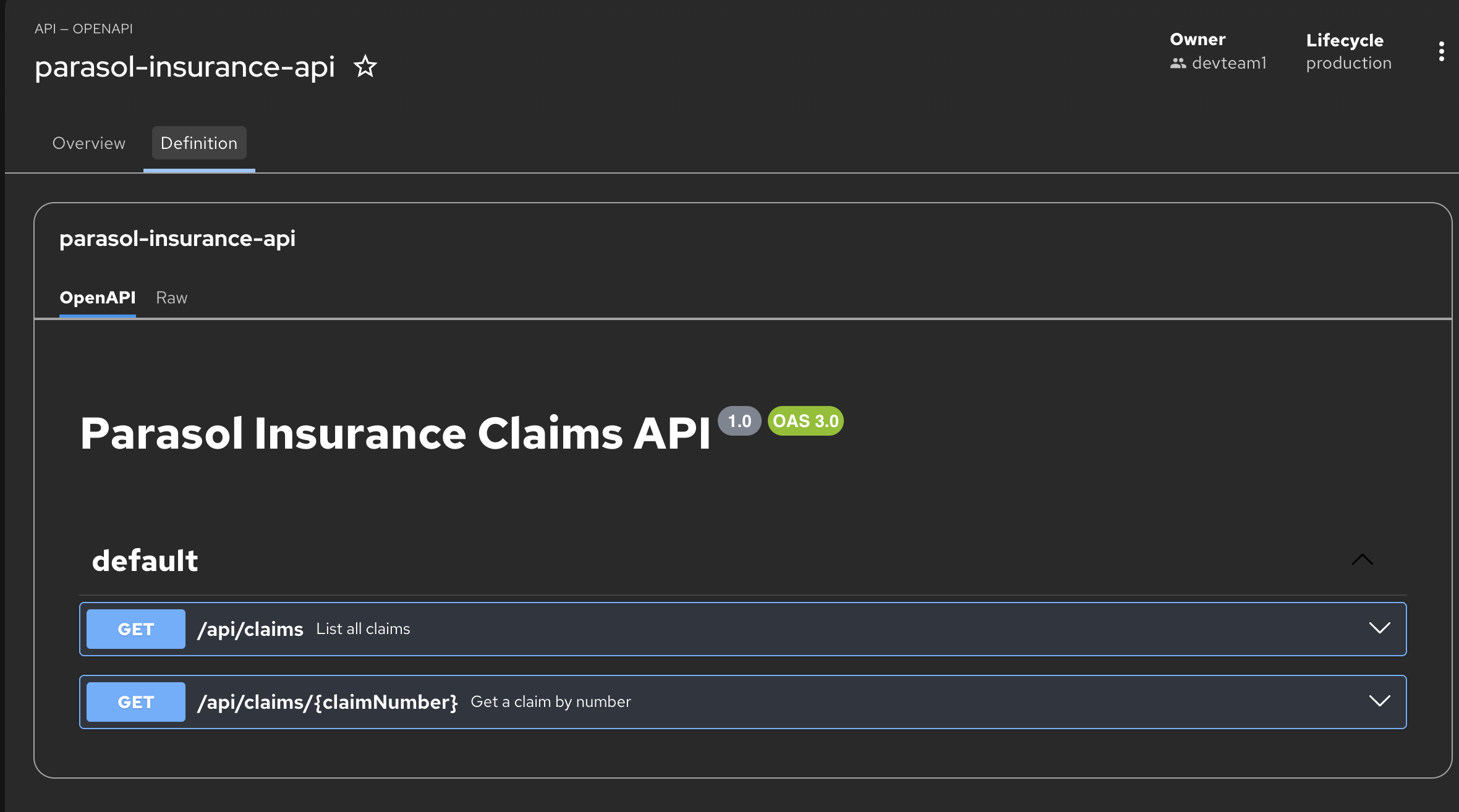 Figure 4. Parasol API in the Developer Hub catalog
-
What they should notice:
-
The catalog provides a complete, structured view of the application landscape
-
Components are linked together with explicit relationships (depends-on, provides, consumes)
-
Documentation is rendered from the repository, not a separate wiki. It stays current automatically.
-
APIs are discoverable through the catalog with their definitions
-
No tickets, no asking teammates, no searching through scattered tools
Business value callout:
"The catalog is the foundation for everything in Developer Hub. It powers the Lightspeed AI answers we just saw, it drives the self-service templates we are about to see, and it provides the single source of truth for the entire application landscape."
If asked:
- Q: "Who maintains the catalog data?"
-
A: "The catalog is populated from
catalog-info.yamlfiles in each repository. When a team registers their component, the catalog data stays in sync with the code. The platform team manages the overall catalog configuration, but individual teams own their component registrations." - Q: "Can we streamline the creation and import of the catalog-info.yaml files?"
-
A: "Our Bulk Import plugin makes it easy for developers to generate the initial YAML file. Additionally, Developer Lightspeed can generate catalog-info.yaml and relationship information using it’s context of the software catalog."
- Q: "Can we integrate internal APIs from other teams?"
-
A: "Yes. Any team can register their APIs in the catalog. This creates a self-service API marketplace where developers can discover and consume APIs across the organization without knowing which team owns them."
Part 3 — Self-service and environment provisioning
Know
Beyond discovery, RHDH provides self-service capabilities that allow developers to provision development environments, request infrastructure, and more, by using "golden path" templates. Instead of filing tickets and waiting for operations teams, developers use templates that the platform team has pre-approved. The "Parasol Insurance Secured Development" template creates a feature branch on the source repository and registers a new catalog component representing the developer’s branch — all the developer needs to provide is a branch name.
Business challenge:
-
Provisioning development infrastructure requires tickets and wait times spanning days
-
No standardized way to create feature development environments
-
Each team reinvents project structure, CI/CD configuration, and deployment manifests
-
Shadow IT emerges when developers bypass slow provisioning processes
-
Platform team is a bottleneck for all infrastructure provisioning requests
Value proposition:
RHDH templates provide golden path self-service for developers. The "Parasol Insurance Secured Development" template creates a feature branch on the source repository and provisions a complete development environment: a dedicated namespace, CI/CD pipeline wired to the branch, and a catalog component representing the developer’s work. The developer only needs to specify a branch name. The new component is automatically registered in the catalog and the developer can open it directly in DevSpaces.
Show
What I say:
"The catalog solves discovery. Now let me show you self-service. Our developer needs a production-like environment to work on and verify a new feature for the Parasol application. Traditionally, this means filing tickets and waiting days. Let me show you how that self-service with an IDP changes that."
What I do:
-
In Developer Hub, click the + (plus) button at the top of the page to access software templates
-
Show the available software templates:
-
Point out that these are pre-approved golden path templates maintained by the platform team
-
"Each template includes everything a developer needs to get started. The platform team defines these golden paths, and the developer consumes them."
-
-
Select the Parasol Insurance Secured Development template
-
Walk through the template form:
-
The developer only needs to specify a branch name such as
feat1.Keep the branch name short, as it will be used to generate a Route which has length restrictions -
"That is it. One field. The template handles everything else: creating the branch on the source repository, provisioning the development namespace, configuring the pipeline for the branch, and registering a new component in the catalog."
-
-
Click Create and show the provisioning progress:
-
Manifests fetched and templated, then pushed to GitLab
-
CI/CD pipeline configured for the feature branch
-
Component registered in the RHDH catalog
-
"In a few seconds, the developer has a fully provisioned development environment linked to their feature branch."
Presenter tip: Emphasize that the developer did not need to contact anyone. The platform team pre-approved this template with the right resource limits and security policies. The developer gets what they need instantly, within guardrails.
 Figure 5. Development environment provisioned with one click
-
-
Click Open In Catalog, then click the DevSpaces link generated by the template to open a workspace for the new branch:
-
Show that DevSpaces opens to the correct feature branch automatically (far lower left branch name)
-
"The developer clicked one link and landed in a cloud workspace on their feature branch. Same DevSpaces experience from Section 1, but now provisioned through the IDP’s self-service template."
-
What they should notice:
-
The developer clicked the + button at the top to access templates
-
Only one field to fill in: the branch name. Everything else is handled by the template.
-
The template created a branch on the existing source repo (not a new repo)
-
A new catalog component was registered representing the developer’s feature branch
-
The developer opened DevSpaces directly from the template output on the correct branch
-
No tickets, no waiting, no IT bottleneck
Business value callout:
"What used to take Parasol a week — filing tickets for a namespace, waiting for IT to provision it, setting up the pipeline, configuring the branch — just happened in seconds with one field. The developer typed a branch name and got a fully provisioned development environment. No tickets, no waiting, no bottleneck."
If asked:
- Q: "Who creates and maintains the templates?"
-
A: "The platform team creates and maintains the templates. They define what infrastructure is provisioned, what pipeline is configured, and what catalog entries are created. Templates are version-controlled and reviewed like any other code."
- Q: "Can templates enforce organizational standards?"
-
A: "Yes. Templates are the golden path. They include the organization’s approved pipeline configuration, security policies, and deployment patterns. Every environment created from a template follows the same standards."
- Q: "What happens to the environment when the feature is done?"
-
A: "The development environment can be cleaned up through the catalog. The platform team can also configure automatic cleanup policies. The branch and its associated resources are removed when no longer needed."
Module 4 summary
What we demonstrated
In this module, you saw how Red Hat Developer Hub transforms the developer experience at scale:
-
Developer Lightspeed — AI-assisted development integrated directly into the IDP, combining product docs, developer docs, and the software catalog to answer developer questions in natural language
-
Centralized catalog — A single source of truth for all applications, components, APIs, and documentation with explicit relationships and docs-as-code
-
Self-service provisioning — Golden path templates allow developers to provision feature branch environments with a single field, with the branch, namespace, pipeline, and catalog component created automatically
Setting up Module 5
Our developer has a fully provisioned development environment on their feature branch, open in DevSpaces. In Module 5, we will see how they use the Dependency Analytics plugin to identify an unnecessary dependency and push code through the secure build pipeline.
Presenter transition
|
Presenter tip: The transition to Module 5 should emphasize the shift from setup to development: "Our developer now has a fully provisioned environment on their feature branch. Let’s see what happens when they start working on the code and the platform’s security tooling catches a dependency issue." |