Module 7: AI-enhanced applications
Presenter note: This is Section 3 (Intelligent Applications). The Parasol application is running with a keyword-based email routing system that sends ambiguous emails to "Review Required" for manual triage. A new developer (dev2) is tasked with replacing this with LLM-powered classification. They log in to Developer Hub, create a new development environment using the "Parasol Insurance Secured Development" template with branch name llm-routing, pull in the LLM classification code from a prepared branch, and push it through the pipeline. The result is intelligent email routing with no more manual review. Target duration: 15 minutes across 3 parts.
|
Section 3 builds on everything from Sections 1 and 2. The foundational platform is in place, the secure supply chain is operational, and now the organization is ready to integrate AI capabilities into their applications. This section shows that the same platform patterns — DevSpaces, pipelines, and GitOps — apply seamlessly to AI-enhanced workloads. |
Part 1 — Setting the scene: the email triage problem
Know
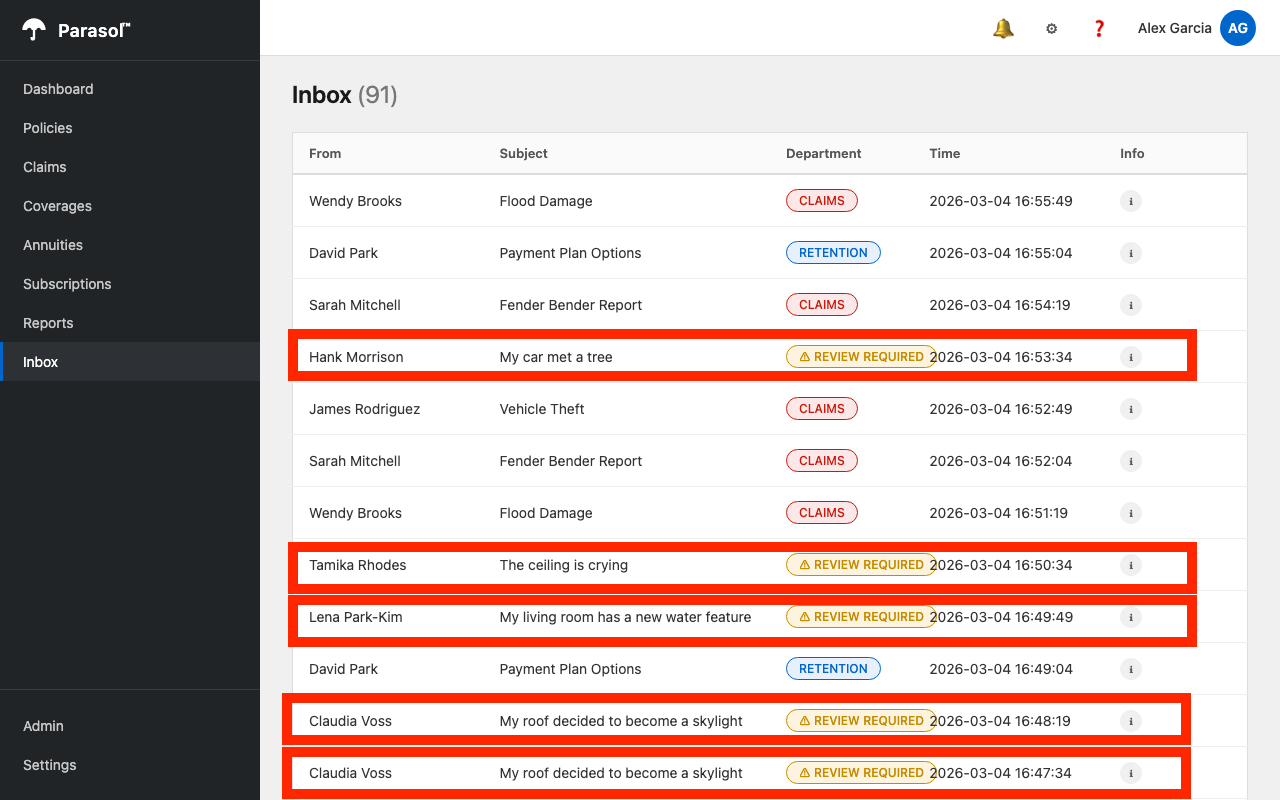
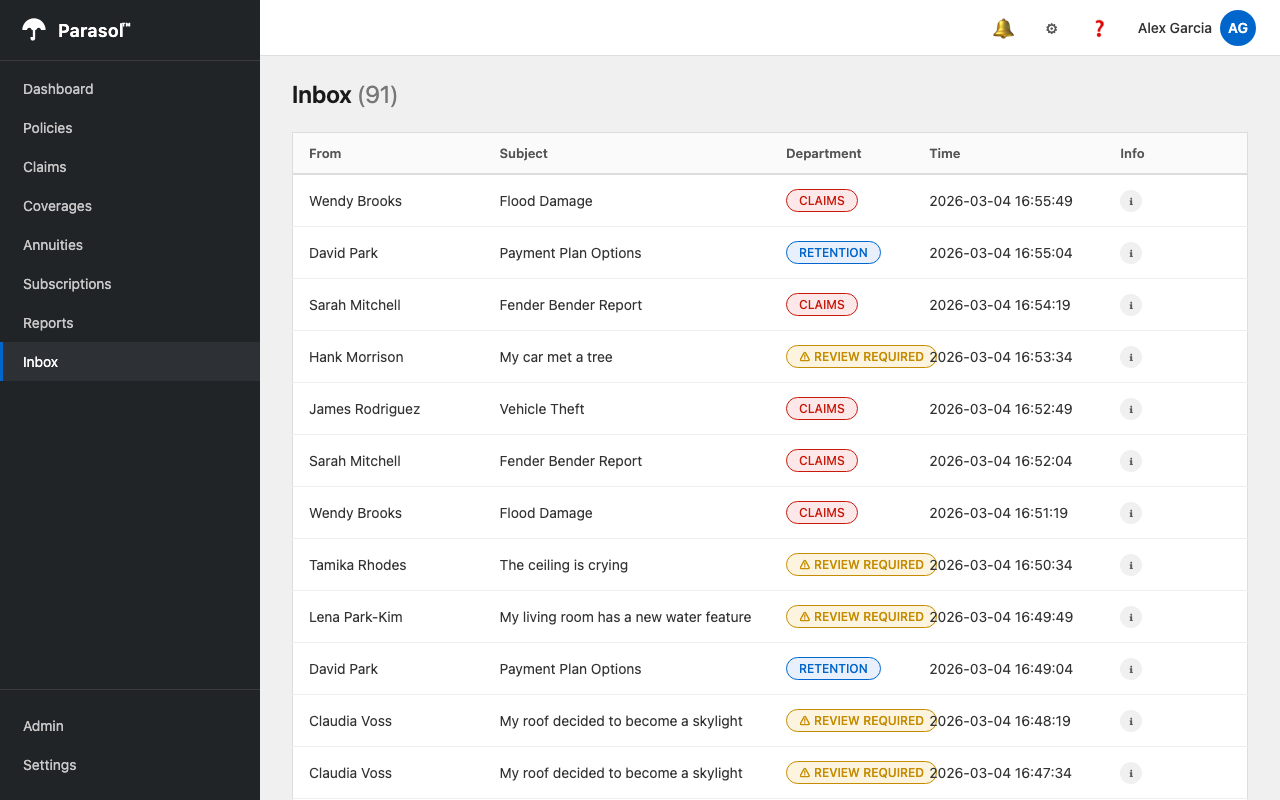
Parasol Insurance receives customer emails that are processed by the application’s inbox system. On the Inbox screen (left-hand tab in the Parasol app), incoming emails flow in as they arrive. The current system uses a keyword matching algorithm to route emails to the appropriate department: CLAIMS, RETENTION, or ACQUISITION. However, ambiguous emails that do not match any keywords are routed to "REVIEW REQUIRED," where claims administrators must manually triage them. The CIO has tasked the development team with using an LLM to replace this keyword matching, eliminating the manual review bucket entirely.
Business challenge:
-
Ambiguous customer emails pile up in "Review Required" because the keyword matcher cannot understand context
-
Claims administrators spend hours manually triaging emails that could be automatically routed
-
Business leadership wants to leverage the LLM that is already available as a platform service
-
Ad hoc AI integrations risk bypassing established security and compliance controls
Current state at Parasol:
-
An LLM is available as an API endpoint (in this demo, hosted on the Red Hat Demo Platform through OpenShift AI)
-
Customer emails flow through Kafka into the application’s inbox, but ambiguous ones accumulate in "Review Required"
-
Claims administrators manually review and route these emails to the correct department
-
The platform team wants AI integrations to follow the same golden path as any other code change
Value proposition:
The application platform makes AI integration a standard development activity, not a special case. The developer will enhance the existing email routing logic to call an LLM instead of relying on keyword matching. The LLM understands natural language context and always classifies emails into one of three departments — CLAIMS, RETENTION, or ACQUISITION — eliminating the "Review Required" bucket entirely. The same DevSpaces environment, CI/CD pipeline, and GitOps delivery from Sections 1 and 2 apply. No new tools, no special processes.
Show
|
Presenter note: This section sets context with a brief talk track and a look at the current application state. The key message is that the platform makes AI integration follow the same golden path as any other development activity. |
What I say:
"Parasol’s applications are running smoothly. The CI/CD pipeline is automated, the supply chain is trusted, and the platform handles operations. Now the CIO has a new mandate: use AI to solve a real business problem.
Right now, the Parasol application has an Inbox screen where incoming customer emails are processed. The current system uses keyword matching to route them — if the email mentions 'accident' or 'damage,' it goes to Claims. If the sender is a known customer, it goes to Retention. But many emails are ambiguous — they describe situations without using the right keywords. Those end up in a 'Review Required' bucket, and claims administrators have to manually triage every one of them.
An LLM is already available as an API endpoint, managed as a platform service. The developer does not need to deploy a model or manage infrastructure. The question is: how do they integrate it into the existing application using the same platform patterns?"
What I do:
-
Open the running Parasol application (from the existing deployment):
-
Navigate to the Inbox tab on the left side of the application
-
Show incoming emails flowing in
-
Point out the emails routed to different departments: CLAIMS, RETENTION, ACQUISITION
-
Point out the emails marked "REVIEW REQUIRED" (there will be many) — these are the ambiguous ones the keyword matcher could not handle
-
"These 'Review Required' emails are the problem. Each one requires a claims administrator to read it, understand the context, and manually route it. That is the manual triage cost we are going to eliminate with AI."
-
Business value callout:
"Manual email triage costs Parasol significant staff hours across their claims organization. An AI-powered routing service can evaluate and route emails in seconds with full context understanding, freeing claims administrators to focus on high-value work like complex claims resolution."
If asked:
- Q: "Where is the LLM running?"
-
A: "The model is available as an API endpoint. In this demo, it is hosted on the Red Hat Demo Platform, which uses OpenShift AI for model serving. In production, organizations can run models on-premises with Red Hat AI or consume models from hosted providers. The application platform does not care where the model lives — the developer just needs an endpoint URL and an API key, both managed through Vault."
- Q: "What about model governance and responsible AI?"
-
A: "Model governance is handled by the data science and platform teams. The application developer consumes a governed, approved endpoint that is pre-configured via software templates. The same trusted software supply chain from Section 2 ensures the AI-enhanced code is scanned, signed, and attested before reaching production."
Part 2 — Implementing LLM-powered email routing
Know
Another developer (dev2) is tasked with improving the email routing. They log in to Developer Hub and use the "Parasol Insurance Secured Development" template to create a new development environment with branch name llm-routing. The pre-approved Kafka broker and LLM configuration is already available as environment variables (configured by the platform engineer through external secrets, as shown in Module 5). The developer pulls in the LLM classification code from a prepared branch, reviews the changes, and pushes through the pipeline.
|
This demo focuses on the value of the platform, including runtimes like Quarkus, but is not intended to be a deep dive on coding exercises. Therefore, you as a demoer will not write the new code to implement the AI-based triage, but instead use a few git commands to pull in the pre-built AI code from a prepared branch, overlaying it onto the current feature branch (this could also be done by a more powerful LLM using a code assistant). |
Business challenge:
-
Developers waste time figuring out how to integrate with AI model endpoints
-
No standardized patterns for consuming AI services in production applications
-
Connecting to existing Kafka and LLM endpoints requires manual configuration
-
AI integrations built outside the golden path bypass security and compliance controls
Value proposition:
The platform engineer has already configured the LLM endpoint and Kafka credentials as environment variables through external secrets (visible in application.properties). The developer does not need to manage API keys or infrastructure. They simply implement the feature using the pre-configured connections, following the same development workflow from Sections 1 and 2.
Show
What I say:
"Another developer has been tasked with replacing the keyword matching with LLM-powered classification. Let me show you how they do this using the same platform patterns we have been demonstrating."
What I do:
-
Open a different browser (e.g., Firefox or Safari if you have been using Chrome) and navigate to Developer Hub at https://backstage-developer-hub-rhdh.{openshift_cluster_ingress_domain}. Log in as
dev2/{common_password}.Using a separate browser avoids session conflicts with the dev1session from earlier modules. -
Click the + (plus) button at the top of the page to access software templates, then select Parasol Insurance Secured Development.
-
Fill in the branch name as
llm-routingand click Create:-
Wait for the provisioning to complete
-
"This is the same self-service workflow from Module 4. A new developer, a new branch, a fully provisioned environment in seconds."
-
-
Click Open In Catalog, then click the DevSpaces link to open a workspace for the
llm-routingbranch:-
Show the workspace loading on the correct branch
-
-
Open a new Terminal in DevSpaces and pull in the LLM classification code from the prepared branch:
cd $PROJECT_SOURCE && \ git rm -rf . && \ git clean -df && \ git checkout origin/llm-classification -- . && \ git checkout devfile.yaml-
"The LLM classification implementation has been prepared on a separate branch. We pull the code into our feature branch with a single command. This overlays the AI-enhanced version of the application onto our working branch without changing branches."
-
-
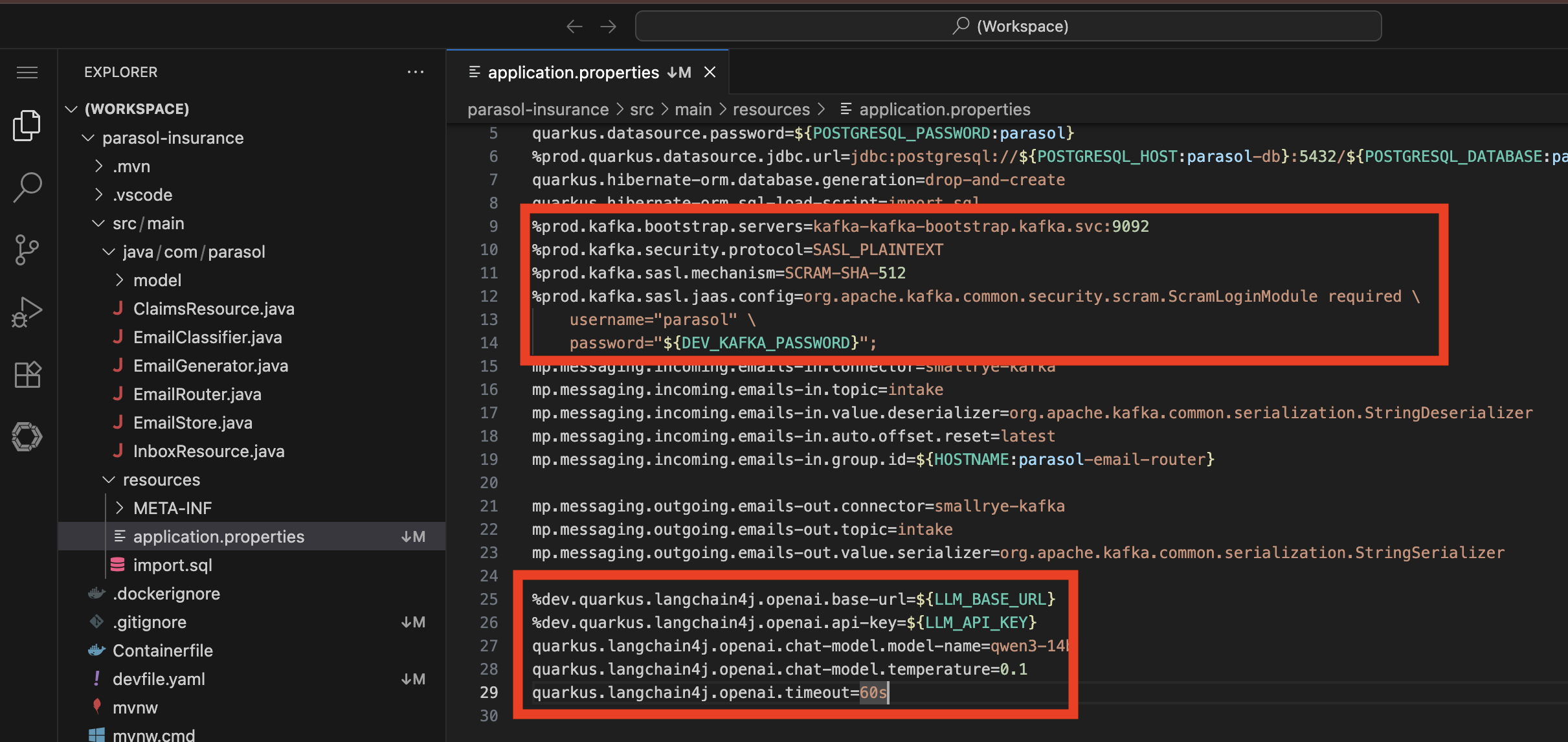
Show the pre-configured environment variables in
src/main/resources/application.properties:-
Point out the LangChain4j LLM configuration with
LLM_BASE_URLandLLM_API_KEY -
"The platform engineer has already configured the Kafka broker credentials and the LLM endpoint through external secrets, as we saw in Module 5. The developer does not need to manage API keys or model endpoints. They are pre-approved and pre-configured as part of the golden path."
-
-
Depending on the audience (whether they want a code walkthrough or not), review the changes:
-
Show the new file
src/main/java/com/parasol/EmailClassifier.java:-
A
@RegisterAiServiceinterface using Quarkus LangChain4j -
@SystemMessagedescribing the three departments (CLAIMS, RETENTION, ACQUISITION) with classification criteria -
Lists the known existing customers so the LLM can distinguish between retention and acquisition
-
Instructs the LLM to respond with JSON:
{"department":"…","reason":"…"}
-
-
Show the modified
src/main/java/com/parasol/EmailRouter.java:-
Now injects the
EmailClassifierand uses the LLM as the primary classification path -
Keyword matching is kept as a fallback in case the LLM is unavailable
-
Response parser handles the LLM’s JSON output, including edge cases
-
-
Show the updated
pom.xmlwith thequarkus-langchain4j-openaidependency -
"The implementation uses Quarkus LangChain4j to call the LLM through a clean interface. The system prompt tells the LLM about the three departments and lists known customers. The LLM understands context — it does not just match keywords. And if the LLM is unavailable, the keyword matching still works as a fallback."
-
-
Show the project structure in the DevSpaces IDE:
-
src/main/java/com/parasol/EmailClassifier.java— the new AI service interface -
src/main/java/com/parasol/EmailRouter.java— modified to use LLM with keyword fallback -
src/main/java/com/parasol/EmailGenerator.java— simulates incoming emails -
src/main/java/com/parasol/EmailStore.java— in-memory store for processed emails -
src/main/java/com/parasol/InboxResource.java— REST endpoint for the inbox UI -
src/main/java/com/parasol/ClaimsResource.java— claims API -
src/main/java/com/parasol/model/Claim.java— claim entity -
src/main/java/com/parasol/model/Email.java— email model -
src/main/resources/application.properties— Kafka, LLM, and database configuration -
src/main/resources/META-INF/resources/inbox.html— the inbox UI -
"This is the complete Parasol application. The LLM integration adds one new file and modifies one existing file. Everything else stays the same."
Presenter tip: If time permits, the demoer can start Quarkus dev mode to show the LLM classification working locally before pushing. Use CTRL+SHIFT+P (or CMD+SHIFT+P on Mac) → Tasks: Run Task → devfile → Start Development Mode. Open the app in a new tab when prompted and navigate to the Inbox to see emails being classified by the LLM in real time - it can take up to 30 seconds for a new email to appear in the list.
-
-
Push the code (same as previous sections):
-
In DevSpaces, use the Source Control view in the left sidebar
-
Click the Source Control icon (branch icon) in the activity bar
-
The new files appears under "Changes"
-
Enter a commit message:
Add claims statistics API endpoint -
Click the dropdown arrow next to the Commit button and select Commit & Push
-
Click Yes when prompted about unstaged changes. This will add all changed files to your commit.
-
"That is all the developer does. A commit and push from the IDE. The platform takes it from here."
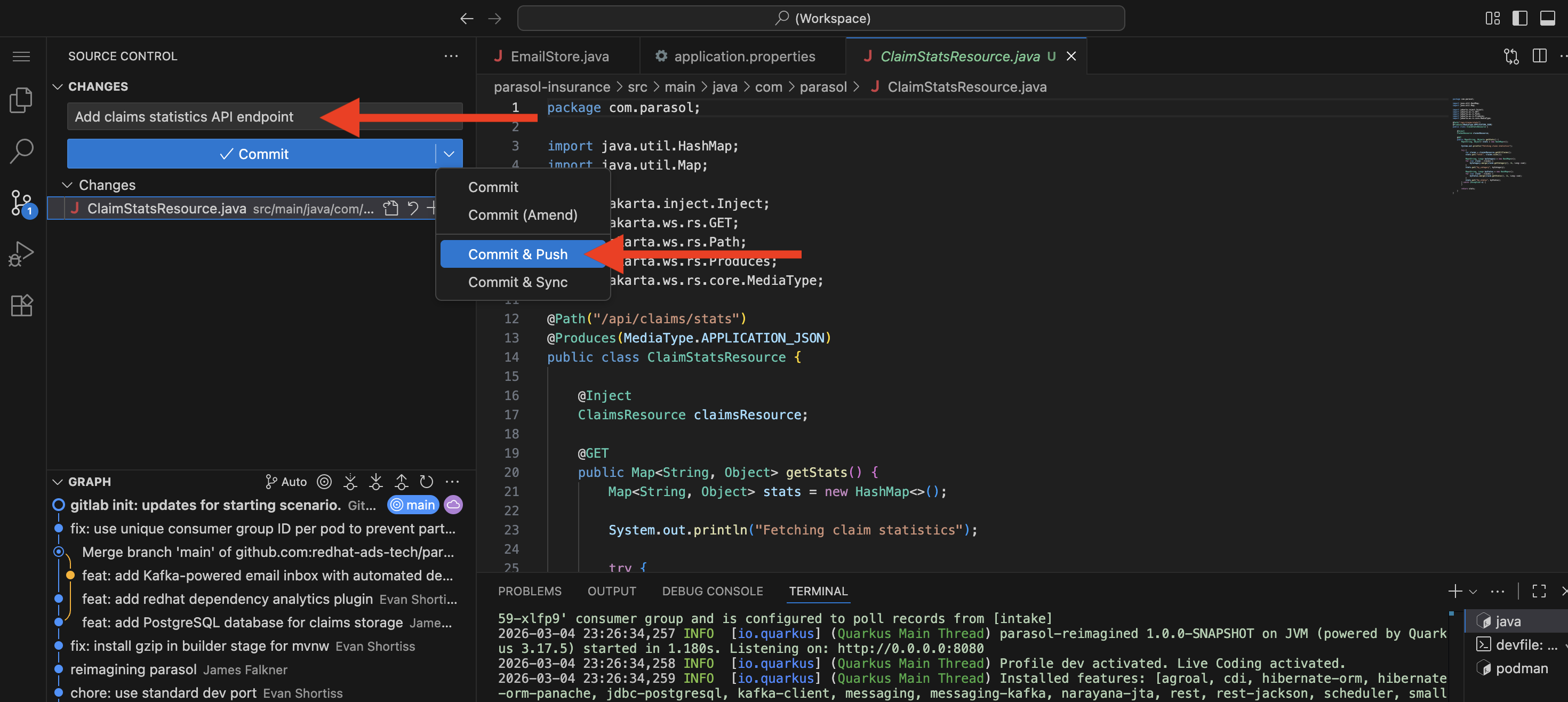 Figure 4. Developer commits and pushes code from the IDE, triggering the CI pipeline
 -
"The developer pushes the LLM integration to their feature branch. The secure pipeline starts automatically, just like in Module 5."
-
What they should notice:
-
A new developer provisioned a development environment through Developer Hub self-service in seconds
-
The LLM endpoint and Kafka credentials were pre-configured by the platform engineer as environment variables
-
The prepared LLM code was pulled in cleanly — one new file and one modified file
-
The implementation uses a clean AI service interface with a system prompt that describes the business rules
-
Keyword matching is kept as a fallback for resilience
-
The same push-and-pipeline workflow applies — AI integration is not a special case
Business value callout:
"What you just saw is AI integration following the exact same development workflow. A new developer logged in, provisioned a development environment through self-service, and was productive in minutes. They did not need to configure API keys or use any special tools. The platform engineer pre-configured the LLM endpoint through external secrets (which we saw in Module 5), and the developer implemented the feature using a standard Quarkus extension. One new file, one modified file, and a git push. That is how the platform makes AI a standard part of development."
If asked:
- Q: "Can the developer customize the LLM prompt?"
-
A: "Yes. The system prompt in
EmailClassifier.javais fully customizable. The developer defines the classification criteria, the department descriptions, and the response format. The LLM client is just a Quarkus extension. The developer has full control." - Q: "What happens if the LLM is unavailable?"
-
A: "The code includes a fallback to the original keyword matching logic. If the LLM call fails for any reason, emails are still classified using the keyword approach. The fallback is logged for visibility."
- Q: "How do you handle the LLM API key securely?"
-
A: "The API key is managed through the same external secrets pattern from Module 3. It is stored in Vault as
litellm-credentialsand injected at runtime. The developer never sees or commits the actual key."
Part 3 — Deploying and showcasing the AI-enhanced feature
Know
The secure pipeline builds, scans, signs, and deploys the AI-enhanced application. Once deployed, the Inbox screen shows a dramatic improvement: emails that previously landed in "Review Required" are now intelligently classified into CLAIMS, RETENTION, or ACQUISITION, with rich descriptions of why the LLM made each decision.
Business challenge:
-
AI features deployed without integration into existing applications provide limited business value
-
Showcasing AI value to business stakeholders requires a working, integrated feature
-
Disconnected AI prototypes do not translate to production-ready capabilities
Value proposition:
The AI-enhanced email routing is deployed through the same trusted pipeline as every other change. The result is immediately visible in the application: the "Review Required" bucket disappears, and every email gets an intelligent classification with a detailed reason. Claims administrators can see why each email was routed to a specific department, providing transparency and trust in the AI’s decisions.
Show
What I say:
"The pipeline is running on the AI-enhanced code. Let’s watch it complete and then see the results in the application."
What I do:
-
Show the pipeline completing in Developer Hub or the OpenShift console:
-
The same secure pipeline stages: Clone, Sonarqube SAST, ACS scan, Build and Push, Tekton Chains signing and attestation
-
"The AI-enhanced code goes through the exact same secure pipeline. Scanned, signed, attested. No shortcuts because it uses AI."
-
-
Once the pipeline completes and Argo CD syncs, open the Parasol application from the Topology view:
-
Navigate to the Topology view in the development namespace
-
Click the route link on the Parasol application to open it in a new tab
-
-
Navigate to the Inbox tab and demonstrate the improved email routing:
-
Show incoming emails being classified in real time
-
Point out that there are no more "REVIEW REQUIRED" emails — every email is now classified into CLAIMS, RETENTION, or ACQUISITION
-
"Look at the difference. Before, ambiguous emails like 'a tree fell on my porch and I do not know what to do' would end up in 'Review Required.' Now the LLM understands the context — it recognizes this as property damage that needs a claim, even without explicit keywords like 'accident' or 'damage.'"
-
-
Compare with the previous state:
-
"Before the LLM integration, the keyword matcher would only catch emails that used specific words. Anything ambiguous or conversational went to manual review. Now every email gets intelligent classification with a detailed reason. The 'Review Required' bucket is gone."
-
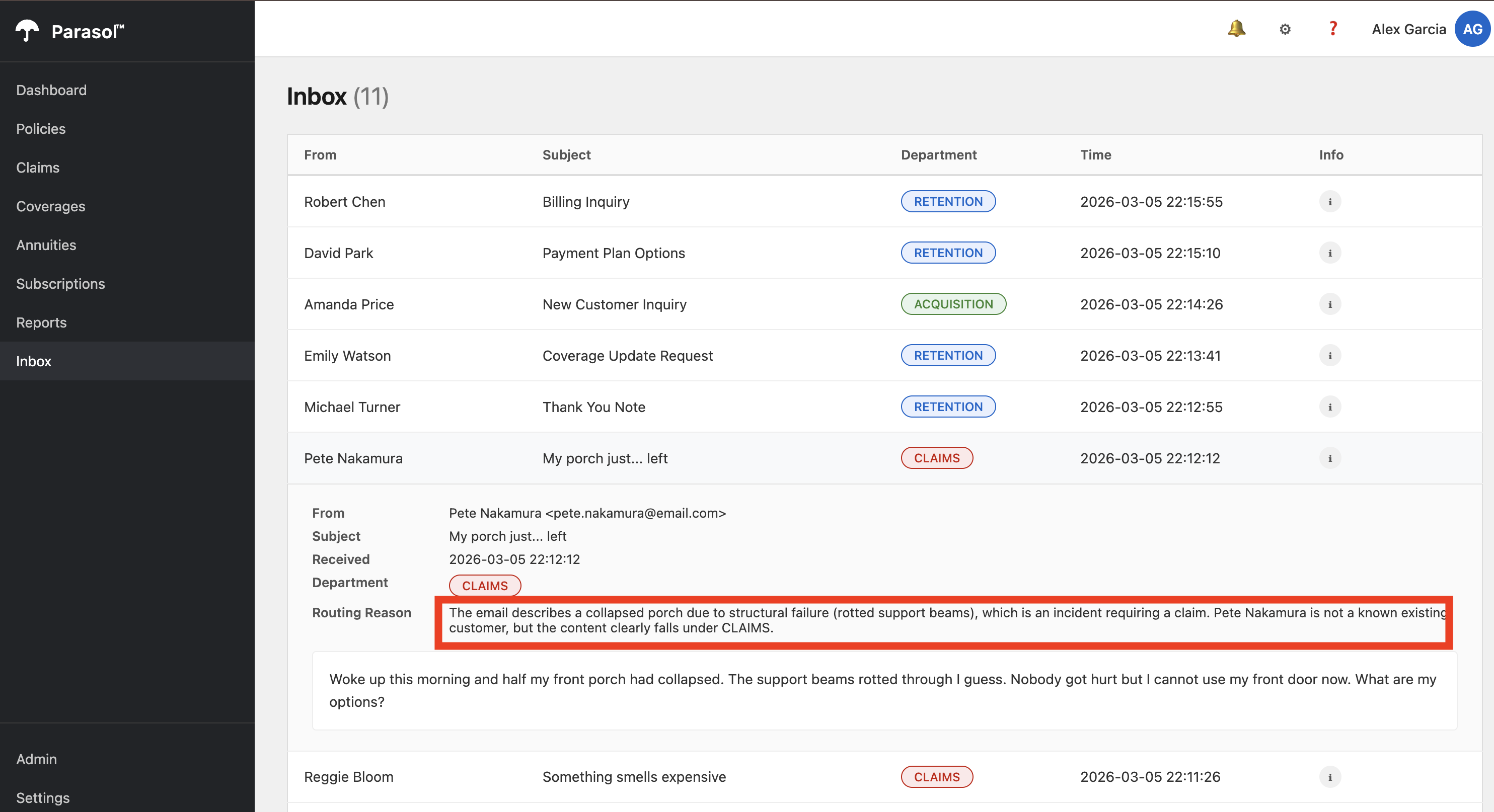
Compare this with the original, showing many emails in "Review Required" and no LLM reasoning:
(Optional, not recommended unless you have extra time) From here, you can follow the same steps to promote the code to production:
-
Developer creates a merge request on the
parasol-insurancerepo in GitLab from their feature branch to main -
Platform engineer reviews and merges the MR
-
PE creates a tag (e.g., 1.1) on the `parasol-insurance`repo in GitLab
-
The tag push triggers the parasol-insurance-secured-listener EventListener in the parasol-insurance-secured-build namespace (the main build namespace, not the developer’s sandbox)
-
That triggers the parasol-insurance-secured-tag-promote pipeline which:
-
Clones the repo at the tagged commit
-
Builds and pushes an image tagged 1.1
-
Creates a merge request on the parasol-insurance-secured-manifests GitOps repo to update app/values/values-prod.yaml with the new image tag
-
-
PE merges that GitOps MR
-
Argo CD syncs parasol-insurance-secured-prod with the new image
So there are two manual gates: the code MR approval + tag creation, and the GitOps MR approval for production. This is the same flow from Section 1 with the unsecured app, just applied to the secured variant.
The developer’s sandbox pipeline (in their namespace) is separate — it only builds and deploys to the developer’s own namespace. It doesn’t touch the prod promotion path at all. The promotion path only activates when code lands on main and gets tagged.
What they should notice:
-
The AI-enhanced code went through the same secure pipeline as every other change
-
The "Review Required" bucket is completely eliminated — every email is classified
-
The LLM provides rich, contextual reasons for each classification, not just a keyword match
-
Ambiguous emails that previously required manual triage are now handled automatically
-
The same platform patterns (Developer Hub, DevSpaces, pipelines, GitOps) applied to the AI feature
-
A new developer was productive in minutes using self-service provisioning — no special AI tooling required
Business value callout:
"Let me recap what just happened. A new developer received a task to add AI-powered email routing. They logged into Developer Hub, provisioned a development environment through self-service, pulled in the LLM integration code from a prepared branch, reviewed it, and pushed it through the secure pipeline. The platform handled everything else: the LLM credentials came from Vault, the pipeline scanned and signed the image, and Argo CD deployed it. The result? The 'Review Required' bucket is gone. Every email gets an intelligent classification with a clear explanation. Manual triage costs just dropped to near zero. And it went through the exact same security and compliance controls as every other component."
If asked:
- Q: "What about data privacy for the email content?"
-
A: "That depends on the deployment model. If the organization runs the LLM on-premises with Red Hat AI, no data leaves their infrastructure. If they use a hosted provider, they need to evaluate the provider’s data handling policies. The application platform supports both models."
- Q: "Can this pattern be applied to other AI use cases?"
-
A: "Absolutely. The LangChain4j integration is a standard Quarkus extension. Any team can add LLM capabilities to their application the same way: add the dependency, create an AI service interface, and configure the endpoint through external secrets. The golden path scales across use cases."
- Q: "What if we want to use a different model?"
-
A: "The LLM endpoint is configurable through Vault. Switching to a different model means updating the endpoint URL and API key in Vault. The application code does not change. Platform engineers can also configure the template with multiple approved models, allowing developers to choose a best fit for their use case."
- Q: "How does the claims administrator verify the AI’s decisions?"
-
A: "Every classification includes the LLM’s reasoning. The administrator can see why each email was routed to a specific department. If they disagree, they can manually reassign it. Over time, these corrections can inform prompt improvements."
Section 3 summary
What we demonstrated
In this module, you saw how the application platform extends naturally to AI-enhanced workloads:
-
AI as a standard feature — A new developer provisioned an environment through self-service, used DevSpaces, the pipeline, and GitOps delivery to add LLM-powered email classification. No special tools or processes required.
-
Pre-configured AI services — The platform engineer pre-configured the LLM endpoint and credentials through external secrets. The developer consumed them as environment variables, just like any other service dependency.
-
Immediate business value — The "Review Required" email bucket was eliminated entirely. Every email now gets intelligent classification with rich contextual reasoning.
-
Trusted delivery — The AI-enhanced code went through the same secure pipeline with scanning, signing, and attestation. AI is not a special case.
The complete story
Across all three sections, you saw a complete application platform transformation:
-
Section 1 (Foundational Application Platform) — Application modernization, standardized development environments, live reload development, automated CI/CD with quality enforcement and AI-assisted remediation, GitOps delivery, and platform operations with Service Mesh and observability
-
Section 2 (Advanced Application Platform) — Developer Hub for discovery and self-service with AI-powered Lightspeed, secure build pipeline with supply chain trust, and SBOM management for compliance
-
Section 3 (Intelligent Applications) — AI-enhanced email routing built and deployed using the same golden path patterns, demonstrating that the platform scales from traditional to AI workloads seamlessly
Key takeaway
"The platform is the product. Whether a developer is adding a simple feature, building a new component, or integrating AI capabilities, they use the same golden path: Developer Hub templates, DevSpaces environments, automated pipelines, and GitOps delivery. The platform handles security, compliance, and operations automatically. That is what an application platform delivers."
Presenter wrap-up
|
Presenter tip: End with a clear call to action relevant to your audience. For prospects, suggest a workshop or proof of concept starting with Section 1 capabilities. For existing customers, recommend advancing to Section 2 (supply chain security) or Section 3 (AI) based on what resonated during the demo. The email routing use case is relatable across industries. Ask the audience: "What manual triage process in your organization could benefit from this same pattern?" |