Workshop Exercise - Custom Modules
Optional Exercise
This is an optional exercise. It is not required to successfully complete the workshop, but it’s recommended if time allows. Review the objectives listed in the next section to decide if you want to do this exercise or if you would rather skip ahead to the next exercises:
Objectives
-
Learn what custom modules are
-
Install a Leapp custom actor to implement additional pre-upgrade checks
-
See where to go to learn more about making your own custom actors
Guide
Step 1 - What are Custom Modules?
Custom modules is a generic term that refers to any custom capabilities that may be layered on the RHEL in-place upgrades automation approach to meet any special requirements unique to your enterprise.
-
For example, maybe your organization has established a standard set of policies that must be followed before doing any system maintenance. In that case, you could implement a Leapp custom actor that will raise a pre-upgrade inhibitor if any conditions are detected that do not comply with your policies.
-
Another use case for custom modules is to deal with 3rd-party tools and agents that you include in your standard RHEL server build. For example, if you use Chef for configuration convergence, you could implement additional tasks in your upgrade playbook to take care of updating the Chef client package and making any required changes to the Chef node attributes and run list that would be required under the new OS version.
-
We use the generic term "custom modules" because there is no single blueprint for how to design and implement the logic and automation for different organization’s diverse requirements. Custom module requirements may call for a Leapp custom actor, custom Ansible automation, or even an integrated design using both.
-
Custom Leapp actors are best for implementing any additional pre-upgrade checks you may need because the results of these checks will be seamlessly included in the pre-upgrade report generated by the Leapp framework. Custom Leapp actors should also be used for any automated tasks that need to be run during the interim system (initrd) phase of the Leapp upgrade.
-
Developing Leapp custom actors is not as easy compared to just adding tasks to a playbook, so most custom automation requirements are best achieved using Ansible. Tasks can be included in your upgrade playbook before and after the task that imports the
infra.leappcollectionupgraderole from the to actually perform RHEL OS upgrade.
Step 2 - Install a Leapp Custom Actor
There is a collection of example custom actors at the GitHub repo oamg/leapp-supplements. We will use one of these to demonstrate adding a custom check to our pre-upgrade reports.
-
The example custom actor we are going to install implements checks for compliance with an imaginary organization’s "reboot hygiene" policy. The actor will block the upgrade by reporting inhibitor risk if any of the following conditions are detected:
-
The host uptime is greater than the maximum defined by the policy.
-
The running kernel version does not match the default kernel version configured in the bootloader.
-
The /boot directory has any files that have been modified since the last reboot.
-
-
For this exercise, we will leverage an already created Ansible playbook in our AAP installation. Return to your AAP Web UI browser tab and launch the playbook
EXTRA / LEAPP Custom Actors. This will install the actor on our RHEL 8 server.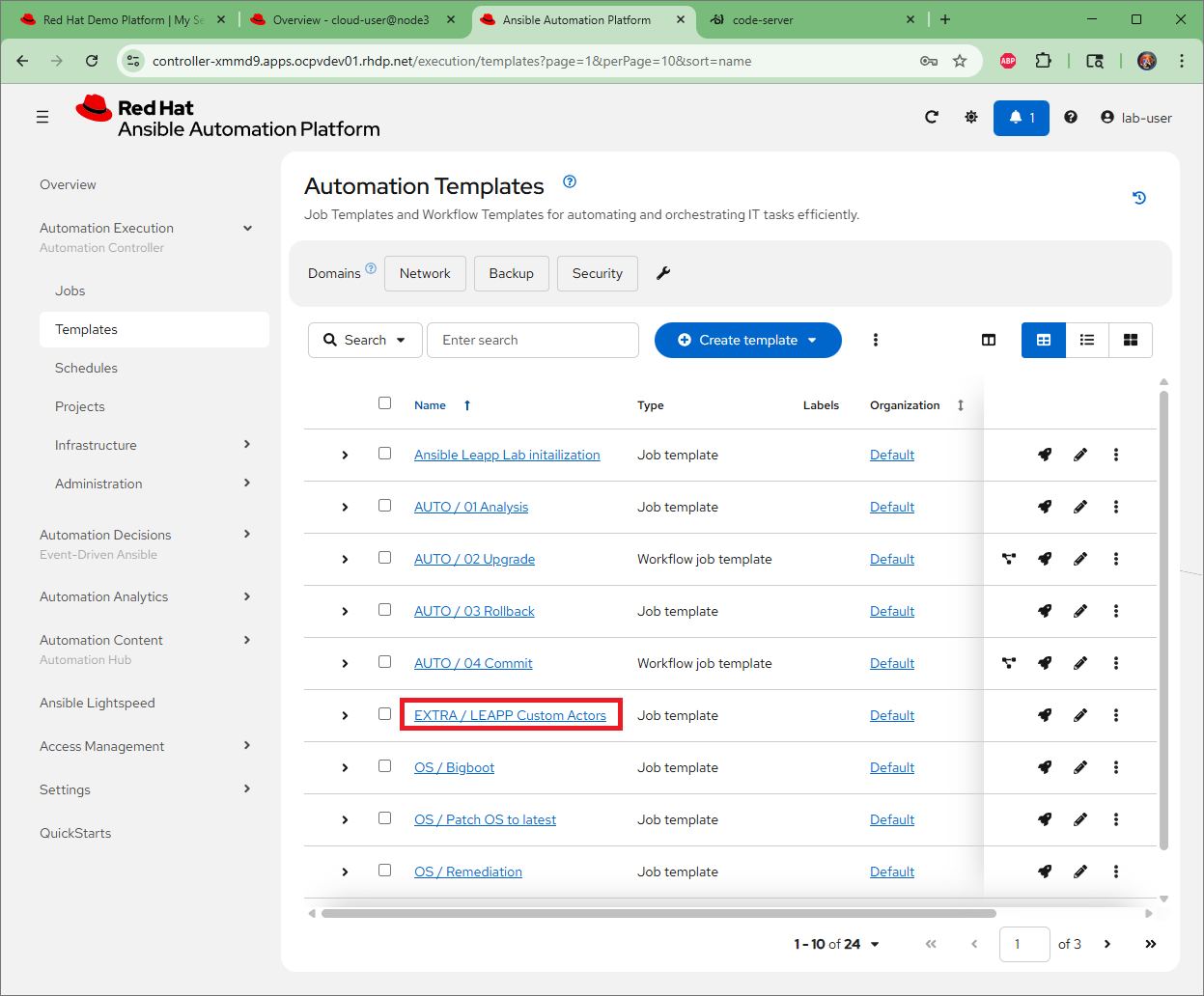
-
To demonstrate the custom actor at work, let’s create a condition that violates our policy so that an inhibitor finding will be reported. Use this command on our RHEL 8 server. You can do this however you choose, either SSH, through the VSCode terminal, or Cockpit terminal.
sudo touch /boot/policy-violationWith this command, we just created a file under /boot with a timestamp later than the last reboot. This host is now out of compliance with our reboot hygiene policy!
Step 3 - Generate a New Pre-upgrade Report
We are now ready to try running a pre-upgrade report including the checks from our custom actor.
-
Return to your AAP Web UI browser tab. Navigate to Automation Execution > Templates and open the "AUTO / 01 Analysis" job template. Launch the job choosing the "rhel8" option at the "Select inventory group" prompt.
-
When the job completes, go back to the RHEL Web Console and use the remote host menu to navigate to the pet app server where you installed the custom actor package. Refresh the pre-upgrade report. You should now see there is a new inhibitor finding. For example:
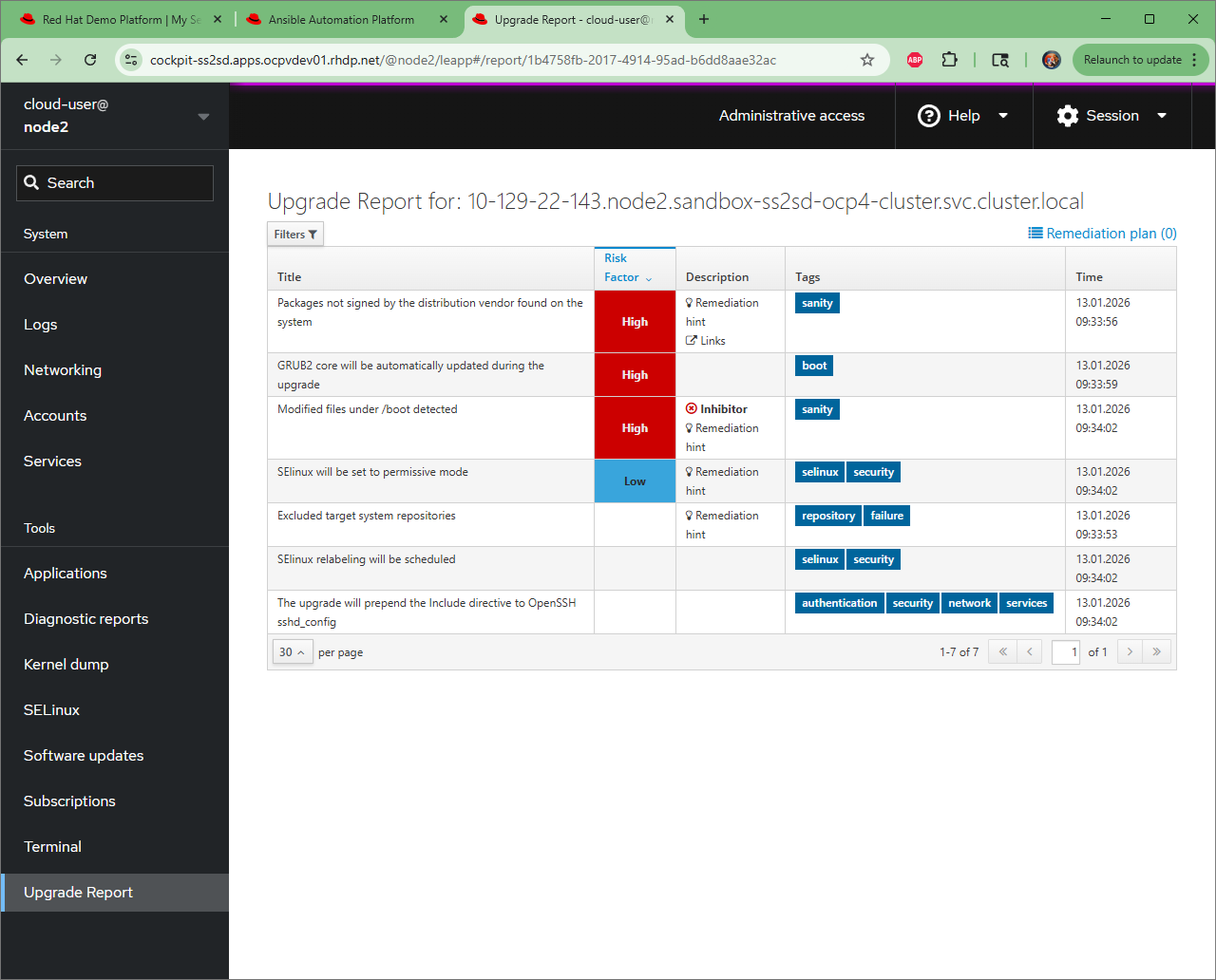
-
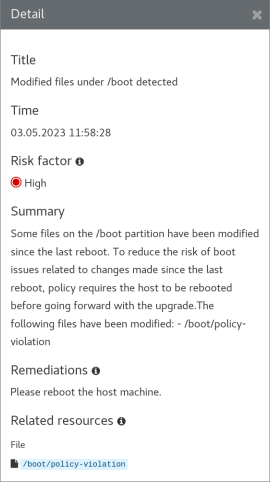
Click on the finding to open the detail view. Here we see the summary with an explanation of the finding and the remediation hint which politely says please reboot:
-
Reboot the host to resolve the inhibitor finding. For example:
sudo reboot -
Now generate another pre-upgrade report after rebooting. Verify that this inhibitor finding has disappeared with the new report.
Step 4 - Learn More About Customizing the In-place Upgrade
Read the knowledge article Customizing your Red Hat Enterprise Linux in-place upgrade to understand best practices for handling the upgrade of third-party packages using custom repositories for an in-place upgrade or custom actors.
The gritty details of developing Leapp custom actors are beyond the scope of this workshop. Here are some resources you can check out to learn more on your own:
-
Developer Documentation for Leapp: this documentation covers the internal workflow architecture of the Leapp framework and how to develop and test your own custom actors.
-
Leapp Dashboard: dig around here to make sure the custom actor functionality you are considering doesn’t already exist in the mainstream Leapp framework.
-
oamg/leapp-supplements: GitHub repo where you can find example custom actors and contribute your own. It also has the
Makefilefor custom actor RPM packaging.
Conclusion
In this exercise, we learned that custom modules can be Leapp custom actors or simply custom tasks added to your upgrade playbook. We demonstrated installing an RPM package that provides an example custom actor with additional pre-upgrade checks and generated a new pre-upgrade report to see it in action.