RHEL In-place Upgrade Automation Workshop
This workshop will introduce a comprehensive approach to automate in-place upgrades for Red Hat Enterprise Linux (RHEL). The solution uses Ansible Automation Platform (AAP) to execute upgrades at enterprise scale across a large estate of RHEL hosts. The workshop demonstrates how to use an example of this approach to perform upgrades from RHEL7 to RHEL8, RHEL8 to RHEL9, and from RHEL9 to RHEL10. You will also learn about how this solution can be customized to meet the special requirements of your enterprise environment.
There are four key features that the solution approach recommends to deliver success at scale:

As you progress through this workshop, you will learn more about the importance of these features and the different options for how you might implement them in your enterprise. For this workshop, we assume you have at least some experience using Ansible Automation Platform and working with Ansible playbooks and roles. If you’re new to Ansible, consider first completing the workshop Ansible for Red Hat Enterprise Linux.
Presentations
The exercises are self explanatory and guide the participants through all the phases of an automated RHEL in-place upgrade. All concepts are explained as they are introduced.
There is an optional presentation deck available with additional information on the benefits of the approach demonstrated in this workshop: <WIP - Deck link to be added>.
Time Planning
The time required to complete the workshop depends on the number of participants and how familiar they are with Linux and Ansible. The exercises themselves should take a minimum of 4 hours. The introduction in the optional presentation adds another hour. There are also some optional exercises which can be skipped, but are recommended if time allows. There are also supplemental exercises at the end of the workshop to allow for open-ended experimentation and exploring customizations that may apply to your specific environment and requirements. The lab environment provisioned could even be used for a multi-day deep dive workshop, but that is beyond the scope of this guide.
Lab Diagram
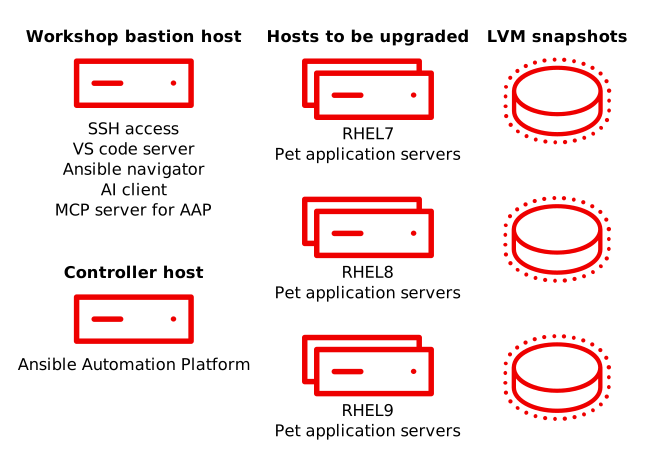
The lab environment is accessed via a bastion host that is running the services to support the workshop experience. The lab consists of an Ansible Automation Platform (AAP) controller host and three RHEL pet application hosts, one each for RHEL7, RHEL8, and RHEL9. These pet app hosts are where we will be performing the RHEL in-place upgrades. The AAP controller host executes the Ansible playbook and workflow jobs that automate the RHEL in-place upgrade process.