Release to Production
Estimated time: 15 minutes
This module closes the end-to-end supply chain. You release the policy-verified, signed artifact from your tenant namespace to a production Quay registry through Konflux’s controlled release pipeline. You inspect the ReleasePlan and ReleasePlanAdmission that govern the release, trigger a release from the Konflux UI, watch the pipeline re-evaluate Conforma policy at release time, and then verify that the signed image and its attestations are present in production. The module ends by walking the full chain — from source commit to signed, provenance-attested, policy-gated production artifact — to confirm every link is in place.
Learning Objectives
By the end of this module, you will be able to:
-
Configure and trigger a Konflux ReleasePlan to initiate the controlled release pipeline for a policy-passing Snapshot.
-
Verify that the release pipeline re-evaluates Conforma policy before promoting the artifact with the production tag.
-
Verify the signed image and its attestations are present in Quay with the production tag after a successful release.
-
Trace the artifact from the source commit through signing, policy validation, and production release to demonstrate end-to-end supply chain integrity.
1. Create the ReleasePlanAdmission and ReleasePlan
A Konflux release requires two objects: a ReleasePlanAdmission in the managed namespace (platform team controls this) and a ReleasePlan in your tenant namespace (you create this). Neither side can push an image to production without the other. This separation prevents any single team from unilaterally bypassing release policy.
|
Lab vs Production: In a production environment, the ReleasePlanAdmission is pre-created by platform administrators in the managed namespace. Application developers do NOT have permissions to create or modify it — they can only reference it from their tenant-side ReleasePlan. For this lab, you will create the ReleasePlanAdmission yourself to understand:
In real deployments, you would only create the ReleasePlan (tenant side) and reference a pre-existing ReleasePlanAdmission that the platform team set up. How the matching works: When you trigger a release:
The application name is the key link between the two resources. This creates bidirectional authorization:
Both must match for the release to proceed. |
You will create the ReleasePlanAdmission first (platform side), then create the ReleasePlan through the Konflux UI (tenant side).
-
Create the ReleasePlanAdmission in the managed namespace:
cat <<EOF | oc apply -f -
apiVersion: appstudio.redhat.com/v1alpha1
kind: ReleasePlanAdmission
metadata:
  name: production-release
  namespace: {openshift_username}-managed
spec:
  applications:
  - my-sample-app
  origin: {openshift_username}-tenant
  policy: release-policy
  pipeline:
    pipelineRef:
      resolver: git
      params:
      - name: url
        value: https://github.com/rhpds/konflux-tssc-lab.git
      - name: revision
        value: main
      - name: pathInRepo
        value: tekton/pipelines/managed-release.yaml
EOF
Expected output:
releaseplanadmission.appstudio.redhat.com/production-release createdThis object runs the
managed-release.yamlpipeline in the managed namespace — it validates the release with Enterprise Contract and pushes the image to production. -
Now create the ReleasePlan through the Konflux UI. Switch to the Konflux tab.
-
In the left navigation, click Releases.
-
Verify you are in your tenant namespace
{openshift_username}-tenant(check the namespace selector at the top of the page). -
Ensure the Release plans tab is selected.
-
Click Actions → Create release plan.
-
Fill in the form:
-
Name:
production-release -
Application:
my-sample-app(should be pre-selected) -
Target:
{openshift_username}-managedThe Application and Target fields are how the ReleasePlan connects to the ReleasePlanAdmission. Konflux looks in the {openshift_username}-managednamespace for a ReleasePlanAdmission that hasmy-sample-appin itsapplicationslist and{openshift_username}-tenantin itsoriginfield. The matching is based on the application name, not the resource names. -
Expand Git options for the release pipeline section:
-
Git URL for the release pipeline:
https://github.com/rhpds/konflux-tssc-lab.git -
Revision:
main -
Path in repository:
tekton/pipelines/tenant-release.yaml
-
-
Auto release: Off (leave toggled off for manual releases)
-
Standing attribution: Off (leave toggled off)
-
Click Create
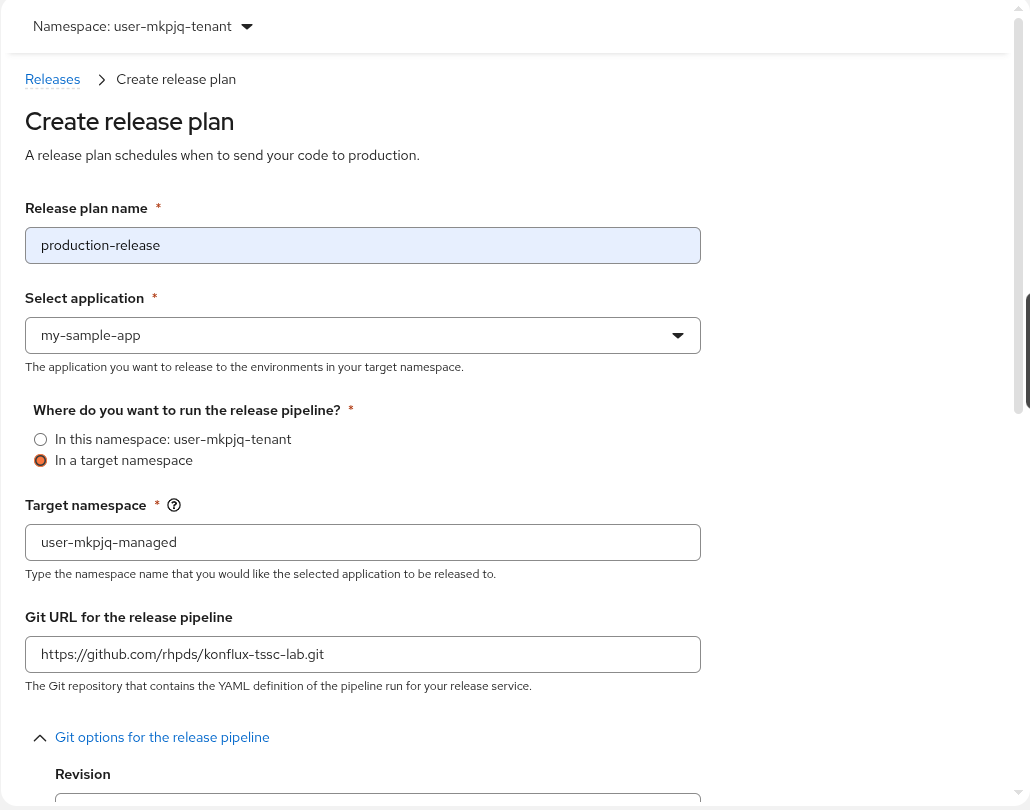 Figure 1. Completed release plan form — top section
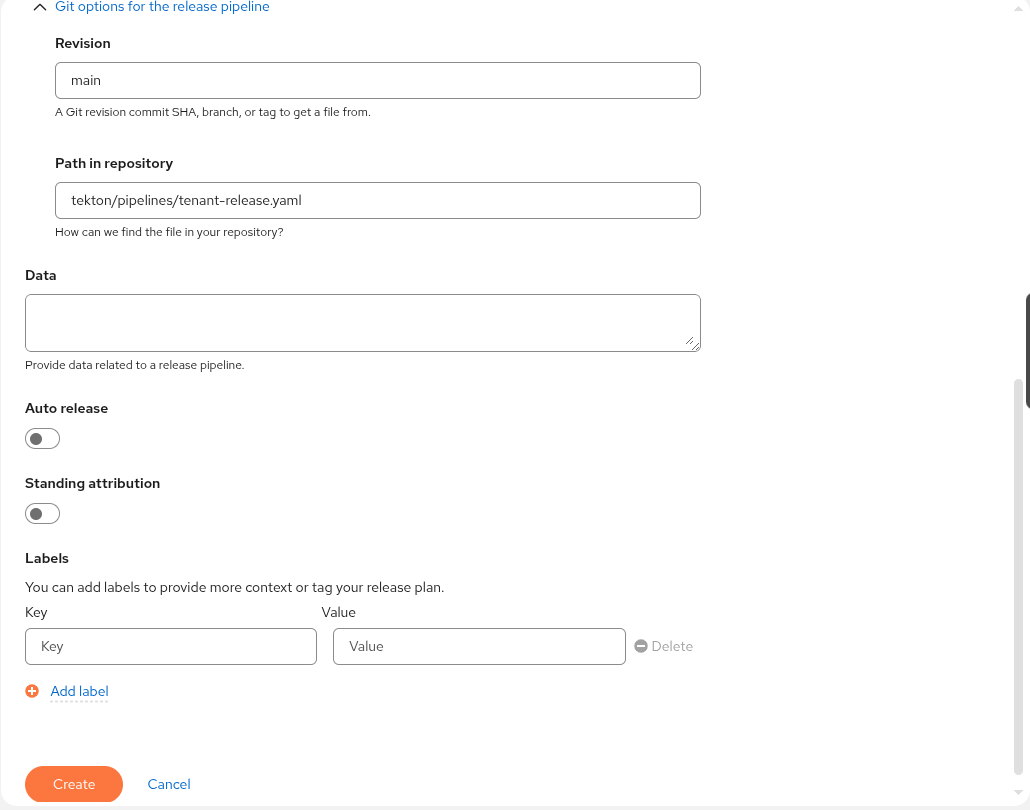 Figure 2. Completed release plan form — Git options section
-
-
Verify both resources were created. In your terminal:
oc get releaseplan -n {openshift_username}-tenant
oc get releaseplanadmission -n {openshift_username}-managed
Expected output: one ReleasePlan in your tenant namespace and one ReleasePlanAdmission in the managed namespace.
2. Trigger the Release
With both sides of the release gate confirmed, you now create a Release from the Konflux UI. A Konflux Release always references a specific Snapshot — the immutable record of the set of images produced by a build pipeline run. You select the passing Snapshot from Module 3 and pair it with the ReleasePlan you just reviewed.
-
Switch to the Konflux tab. In the left navigation, click Applications, then click my-sample-app.
-
Click the Snapshots tab.
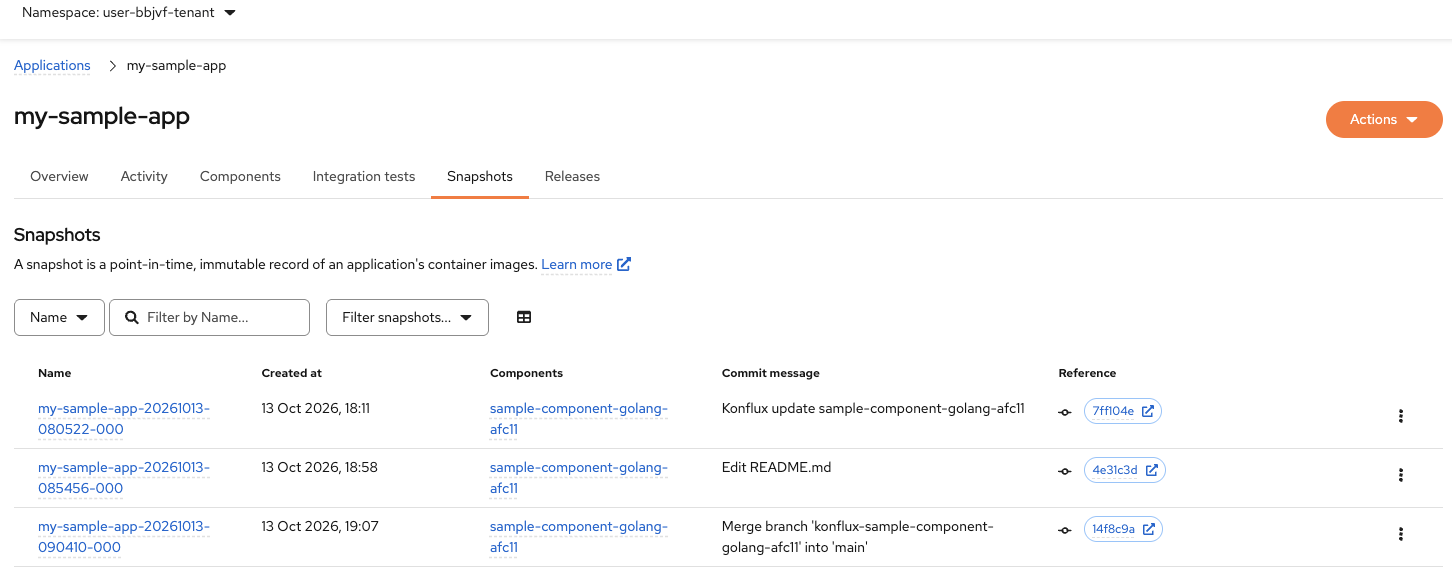 Figure 3. Konflux Snapshots tab for my-sample-app
 -
Locate the Snapshot associated with the merge commit from Module 3. Look for the commit message: Merge branch 'konflux-sample-component-golang-XXXXX' into 'main'.
This is the snapshot created by the
on-pushbuild after you merged the MR — the same build you capturedIMAGE_DIGESTfrom.If you completed Module 5, the integration tests for this snapshot have already passed. If you skipped Module 5, you can still create a release — the release pipeline will perform its own validation. -
Click the three-dot menu (⋮) at the end of the merge commit Snapshot row.
-
Select Trigger release from the dropdown menu.
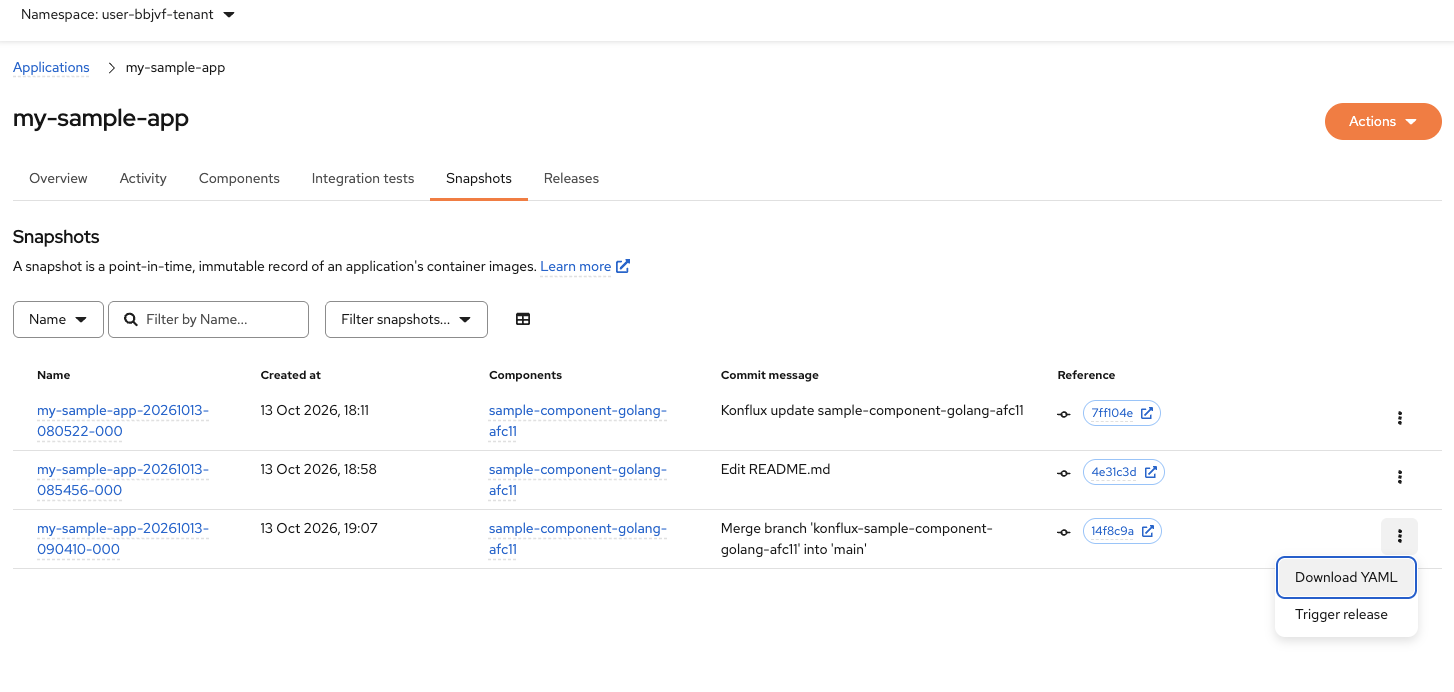 Figure 4. Konflux Trigger release menu option
 -
In the dialog that appears, select
production-releasefrom the ReleasePlan dropdown. -
Click the Trigger release button at the bottom of the dialog.
Konflux creates a Release object in your tenant namespace.
-
The release is now triggered. Navigate back to the my-sample-app Application page and click the Releases tab.
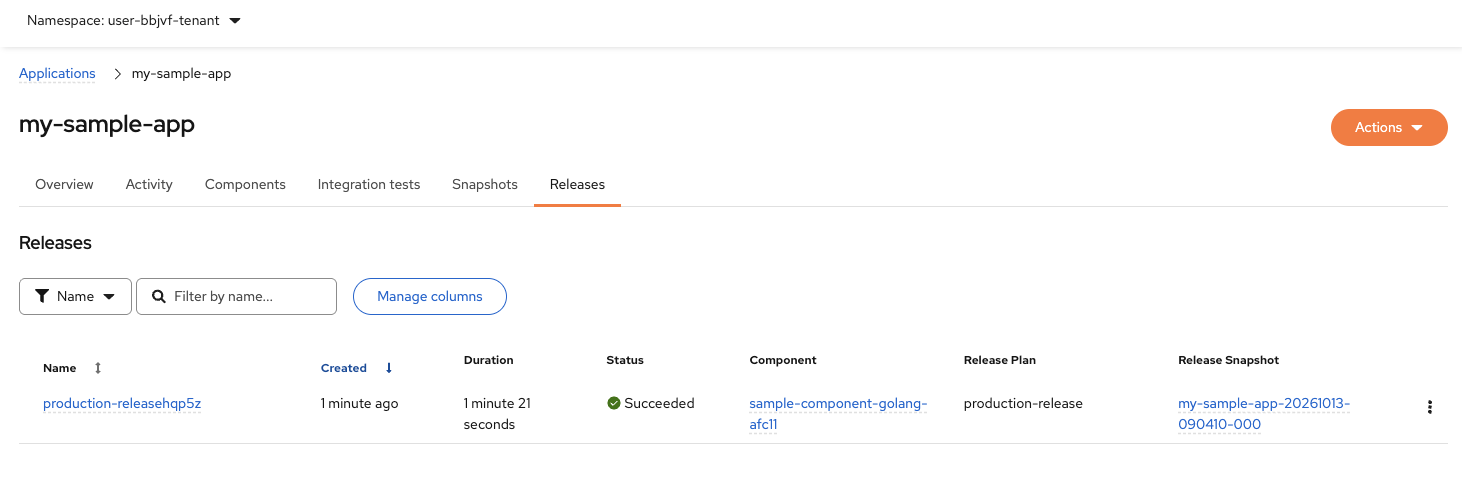 Figure 5. Konflux Releases tab showing the triggered release
 -
Click the release name (e.g.,
production-release…) to open its detail view.
3. Monitor the Release Pipeline
The Release object triggers TWO pipelines that run in sequence:
-
Tenant pipeline (
tenant-release.yaml) — runs in your tenant namespace-
Purpose: User-defined validation checks
-
Allows developers to add custom validation logic before enterprise checks
-
Fails fast if basic requirements aren’t met
-
Runs with tenant namespace permissions
-
-
Managed pipeline (
managed-release.yaml) — runs in the managed namespace-
Purpose: Enterprise compliance validation and production promotion
-
Validates against Enterprise Contract policy (security, compliance, attestation requirements)
-
Only runs if the tenant pipeline succeeds
-
Pushes the verified image to production Quay on success
-
Runs with managed namespace permissions (platform team controls)
-
This two-stage architecture separates developer concerns (tenant) from organizational compliance requirements (managed). You will observe both pipeline runs from the Release detail view.
-
On the Release detail page, click the Pipeline runs tab.
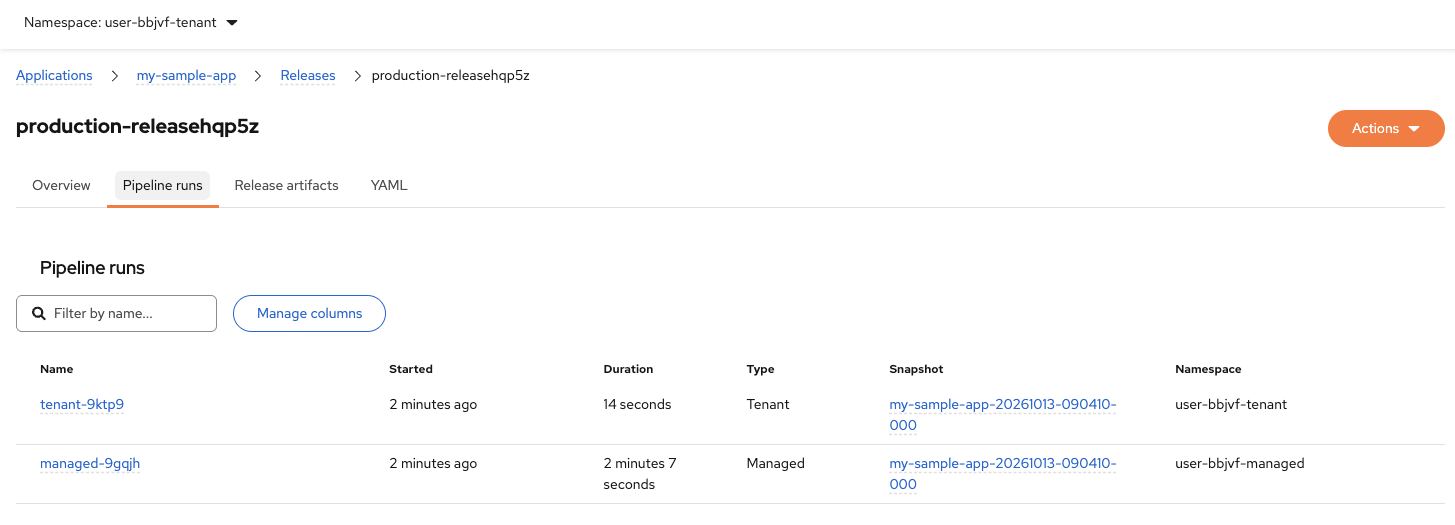 Figure 6. Konflux Pipeline runs tab showing tenant and managed pipelines
You will see two pipeline runs:
Pipeline Type Purpose Tenant (e.g.,
tenant-9ktp9)User checks
Custom validation logic defined by your team. In this lab it performs a simple snapshot validation. In production you might add functional tests, security scans, or deployment readiness checks.
Managed (e.g.,
managed-9gqjh)Enterprise compliance
Platform-enforced validation: Enterprise Contract policy evaluation, signature verification, SLSA attestation checks. Only this pipeline can push to production. Controlled by the platform team, not individual developers.
-
Wait for both pipelines to complete. The tenant pipeline runs first and typically completes quickly (under 30 seconds). The managed pipeline runs second and takes 2-3 minutes.
-
In the managed pipeline task graph, confirm the validate-release task completes successfully.
This task performs the Enterprise Contract policy evaluation. If it fails, the pipeline stops and the image is not pushed to production.
A validation failure at release time means either the policy changed between the Module 5 check and now, or the artifact was altered after the integration check passed. That is precisely the protection this architecture provides. -
Wait for the push-images task to complete. In its logs, confirm the task pushed the image with tag
production. -
In the terminal, retrieve the base image path from your component:
export IMAGE_BASE=$(oc get component -n {openshift_username}-tenant \ -o jsonpath='{.items[0].spec.containerImage}' | cut -d: -f1) echo "Base image path: ${IMAGE_BASE}" -
Retrieve the digest of the production image that was just pushed:
export PROD_DIGEST=$(skopeo inspect docker://${IMAGE_BASE}:production \
  --tls-verify=false 2>/dev/null | jq -r '.Digest')
export PROD_IMAGE="${IMAGE_BASE}@${PROD_DIGEST}"
echo "Production image: ${PROD_IMAGE}"
This queries the production tag in Quay and extracts its digest.
-
Monitor the release pipeline until it reaches Succeeded.
-
In the terminal, confirm the Release reached a successful state:
oc get release -n {openshift_username}-tenant -o yaml | grep -A 15 'conditions:'Expected output: a conditions list that includes an entry with
type: Releasedandstatus: "True".
Verify
-
The validate-release task in the managed pipeline completed successfully.
-
The push-images task completed and pushed the
productiontag. -
$IMAGE_BASEis set in your terminal with the base image path. -
skopeo inspectsuccessfully extracted$PROD_DIGESTfrom the production tag. -
$PROD_IMAGEis set in your terminal and contains the full digest reference. -
The release pipeline status in Konflux shows Succeeded.
-
oc get releaseconditions includetype: Releasedwithstatus: "True".
4. Verify the Production Artifact and Supply Chain Integrity
The image is in production. You now confirm three things: the digest in the production registry matches the merged MR build digest (no rebuild occurred), the cryptographic signature is valid on the production reference, and the SLSA provenance attestation traveled alongside the image. Then you walk the full supply chain to confirm every link is traceable from source commit to production.
-
Switch to the Quay tab and navigate to the
tsforganization.The production image is in the same
tsforganization as your development images, in the same repository ({openshift_username}-tenant/sample-component-golang-XXXXX), but with theproductiontag instead ofon-push-<commit>. -
Locate your component repository (
{openshift_username}-tenant/sample-component-golang-XXXXX) and find the newly releasedproductiontag. Confirm the push timestamp matches the time the release pipeline ran. -
Click the
productiontag and note the digest shown in Quay. -
In the terminal, retrieve the merged MR build digest from the Snapshot for comparison:
export IMAGE_DIGEST=$(oc get snapshot -n {openshift_username}-tenant \ --sort-by=.metadata.creationTimestamp \ -o jsonpath='{.items[-1].spec.components[0].containerImage}' | cut -d@ -f2) echo "Merged MR build digest: ${IMAGE_DIGEST}" -
Verify that the production digest matches the merged MR build digest (confirming no rebuild occurred):
if [ "$PROD_DIGEST" = "$IMAGE_DIGEST" ]; then
  echo "✓ Verified: Production digest matches merged MR build"
  echo "  Digest: $PROD_DIGEST"
else
  echo "✗ Warning: Digests differ"
  echo "  Merged MR: $IMAGE_DIGEST"
  echo "  Production: $PROD_DIGEST"
fi
Expected output:
✓ Verified: Production digest matches merged MR buildThis confirms the release pipeline promoted the existing artifact rather than rebuilding it.
-
In the terminal, verify the cryptographic signature on the production image:
cosign verify \
  --certificate-identity-regexp 'https://kubernetes.io/namespaces/.*/serviceaccounts/build-pipeline-.*' \
  --certificate-oidc-issuer https://kubernetes.default.svc \
  ${PROD_IMAGE}
Expected output: a
Verification for <image> --header followed by three validation checks and a JSON array — the same format seen in Module 4.The certificate identity regexp and OIDC issuer are the same values used in Module 4 — the image was signed by the same Konflux builder. The same image digest is now tagged
productioninstead ofon-push-<commit>— the bytes are identical, only the tag changed.If cosign verifyreturns a certificate error, confirm that$PROD_IMAGEcontains the full digest reference (@sha256:…) and that thehttps://kubernetes.default.svcvalue matches the OIDC issuer shown in your lab instructions. -
Confirm the SLSA provenance attestation is present on the production image reference:
cosign download attestation ${PROD_IMAGE} | jq -s 'length'Expected output: a number greater than zero, confirming that at least one attestation traveled with the image to the production registry.
-
Retrieve the build metadata from the SLSA provenance attestation to verify traceability. First, check which SLSA predicate version your cluster uses:
cosign download attestation ${PROD_IMAGE} | jq -rs '.[0].payload | @base64d | fromjson | .predicateType'Then extract the source commit and builder using the matching path below.
SLSA v0.2 —https://slsa.dev/provenance/v0.2(run if step above returnedv0.2)cosign download attestation ${PROD_IMAGE} | jq -s ' map(select(.payload | @base64d | fromjson | .predicateType == "https://slsa.dev/provenance/v0.2")) | .[0].payload | @base64d | fromjson | { repo: .predicate.invocation.environment.annotations["pipelinesascode.tekton.dev/repo-url"], commit: .predicate.invocation.environment.annotations["build.appstudio.redhat.com/commit_sha"], pipeline: .predicate.builder.id }'SLSA v1 —https://slsa.dev/provenance/v1(run only if step above returnedv1)cosign download attestation ${PROD_IMAGE} | jq -s ' map(select(.payload | @base64d | fromjson | .predicateType == "https://slsa.dev/provenance/v1")) | if length == 0 then "No SLSA v1 attestations — your cluster uses v0.2 (run the command above)" else .[0].payload | @base64d | fromjson | { repo: .predicate.buildDefinition.resolvedDependencies[0].uri, commit: .predicate.buildDefinition.resolvedDependencies[0].digest.gitCommit, pipeline: .predicate.runDetails.builder.id } end'Expected output: a JSON object showing the source repository URL, the merge commit SHA, and the Konflux builder identifier.
This confirms that starting from the production image digest alone, any authorized party can recover the source commit, the signing event in the Rekor transparency log, and the Conforma policy evaluation that approved the release.
-
Review the end-to-end chain you built across this lab:
Module Stage What you produced 2
Onboarding
GitLab repository wired to Konflux via Pipelines-as-Code; code pushes now trigger build pipelines automatically
3
Source commit and Build
Code push to GitLab triggered the PipelineRun that produced the container image, CycloneDX SBOM, and SLSA attestation this chain is built on
4
Sign and attest
Cryptographic signature and SLSA Level 3 provenance attestation recorded in the Rekor transparency log
5
Policy check
Snapshot marked Passing by Conforma; integration pipeline blocked non-compliant variants
6
Release
Signed, attested image tagged
productionin the tsf Quay organization with all supply chain metadata intact
Verify
-
The digest comparison in the terminal shows
✓ Verified: Production digest matches merged MR build. -
The production image digest in Quay matches
$PROD_DIGEST— no rebuild occurred. -
cosign verifyreturns Verified OK for the production image reference. -
cosign download attestationreturns at least one attestation on the production reference. -
The provenance attestation output includes the source repository URL and commit SHA.
-
The end-to-end chain table maps each hands-on module to its supply chain stage.
Learning Outcomes Checkpoint
Before moving on, check that you can answer the following:
Why does the release pipeline re-evaluate Conforma policy instead of trusting the Module 5 result?
Policy bundles change over time. A new vulnerability rule or compliance requirement might be published after your integration test passed. Re-evaluating at release time ensures the artifact meets the policy that is current right now — not the policy that was current when the build ran. If the artifact was tampered with after Module 5, the signature check embedded in Conforma also catches that.
Why is the production image digest identical to the build digest?
Konflux promotes the existing, signed artifact rather than rebuilding it. Rebuilding from the same source would produce a different image — timestamps, layer ordering, and other non-deterministic factors vary between builds, and a new build would invalidate the existing signature. Promotion copies the immutable artifact: same bytes, same digest, same signature, same provenance.
How does the ReleasePlan / ReleasePlanAdmission model enforce separation of duties?
Your team controls the ReleasePlan in your tenant namespace. You choose when to request a release and for which Application. The platform or security team controls the ReleasePlanAdmission in the managed namespace. They define the policy bundle, the pipeline, and the list of Applications permitted to release there. Neither side can complete a release without the other, and neither can weaken the other’s controls. An attacker who compromises your tenant namespace cannot change the release policy because that lives in a namespace they cannot write to.
Starting from a production image digest, what supply chain evidence can you retrieve?
Everything. The SLSA provenance attestation links the digest to the source commit and the build PipelineRun. The cosign signature links the digest to the signing event in the Rekor transparency log. The Release object in your tenant namespace links the digest to the Conforma policy evaluation that approved the release. No gap exists between the production artifact and its complete build history.
Key Takeaways
-
The ReleasePlan / ReleasePlanAdmission model separates release requests (application team, tenant namespace) from release governance (platform team, managed namespace). No single team controls both sides of the gate.
-
The release pipeline re-evaluates Conforma policy at release time. Policy changes between build and release are caught, not bypassed.
-
Image promotion copies the immutable digest built and signed by the merged MR pipeline. No rebuild occurs and no new artifact is introduced.
-
Attestations — SBOM and SLSA provenance — travel with the image because Quay stores them in the same repository keyed to the same digest.
-
End-to-end traceability is the core value: starting from a production image digest, any authorized party can reconstruct the full supply chain history — source commit, build, signing event, policy evaluation, and release approval.
-
This pipeline aligns with SLSA Level 3 requirements: isolated build environment, signed provenance, policy-gated promotion, and a tamper-evident transparency log.