Workshop Overview — Zero Trust Architecture with Ansible Automation Platform
What is Zero Trust Architecture?
Think about how most networks are built today: there’s a firewall at the edge, and once you’re inside, you’re more or less trusted. That worked when everyone sat in the same office and servers lived in one data centre. It doesn’t work when attackers can phish their way past the perimeter, when insiders go rogue, or when your workloads are spread across clouds, containers, and partner networks where "inside" no longer means anything.
Zero Trust flips that model on its head. Instead of trusting anyone based on where they are, every single request — from a person, an app, or an automation job — has to prove it should be allowed. Every time. No exceptions.
NIST Special Publication 800-207 put a name to this idea:
Zero trust assumes there is no implicit trust granted to assets or user accounts based solely on their physical or network location or based on asset ownership.
In practice, that means replacing the old perimeter with three things: strong identity, explicit policy, and continuous verification — enforced as close to the resource as possible, no matter what network you’re on.
That’s exactly what you’ll build in this workshop.
Core principles
Zero Trust isn’t a product you can buy — it’s a set of design principles. Over the next seven sections, you’ll see each one in action.
Click to expand the full principles table
| Principle | In plain terms | You’ll see this when… |
|---|---|---|
Never trust, always verify |
Don’t assume someone is who they say they are just because they got in before. Check every request, every time. |
Every AAP job launch queries OPA for a fresh allow/deny decision — even if the same user ran the same job five minutes ago. |
Least privilege |
Give people (and systems) only what they need, only for as long as they need it. No more, no less. |
Vault issues database credentials scoped to a single database with a five-minute TTL. They expire on their own — nobody has to remember to revoke them. |
Assume breach |
Accept that someone will get in eventually. Design your systems so that when it happens, the damage is contained and the response is fast. |
Splunk spots a brute-force SSH attack and fires a webhook to Event-Driven Ansible, which revokes the app’s database credentials in under 30 seconds — no human in the loop. |
Deny by default |
Start from "no" and only say "yes" when there’s an explicit policy match. If it’s not specifically allowed, it’s blocked. |
OPA policies return |
Identity-driven access |
Base decisions on who (or what) is asking — not what network they’re on. Prove identity with certificates, tokens, or SVIDs, and enrich it with group memberships and roles. |
IdM provides the user directory. LDAP group memberships flow into AAP teams. OPA checks those teams to decide who can launch which templates. |
Micro-segmentation |
Don’t let everything talk to everything. Carve the network into small zones and only allow the traffic that needs to flow. |
Arista cEOS switches enforce ACLs between the app tier and data tier. Having valid database credentials isn’t enough — you also need a permitted network path from the right source IP. |
Continuous monitoring |
Trust isn’t a one-time decision. Keep watching, detect anomalies, and respond automatically when something looks wrong. |
Splunk and Wazuh aggregate security events around the clock. When a brute-force pattern appears, a webhook triggers EDA, which launches a remediation job — no manual intervention needed. |
Workload identity |
It’s not just people who need to prove their identity — services, containers, and automation jobs do too. A process should have cryptographic proof that it is what it claims to be. |
SPIFFE/SPIRE issues identity documents (SVIDs) to the automation platform. OPA checks the SVID before allowing any network changes — making sure the request comes from AAP, not something pretending to be AAP. |
The NIST model, mapped to this lab
NIST 800-207 breaks Zero Trust into three logical components. Here’s how they map to the tools you’ll use:
| Component | What it does | In this lab |
|---|---|---|
Policy Decision Point (PDP) |
Looks at a request, checks it against policy, and answers: allow or deny. |
Open Policy Agent (OPA) — evaluates Rego policies using identity from IdM, infrastructure state from NetBox, and context from the request itself. |
Policy Enforcement Point (PEP) |
Sits in the path of every request and enforces whatever the PDP decided. If the answer was "deny", the action never happens. |
Ansible Automation Platform (AAP) — the controller asks OPA before launching any job (Policy as Code), and playbooks can ask OPA again mid-run for finer-grained checks. |
Policy Information Point (PIP) |
Feeds the PDP with the context it needs to make good decisions — who is this user, what state is the infrastructure in, are there any active threats? |
IdM (identity, groups), NetBox (infrastructure state, maintenance windows), Vault (credential status), Splunk/Wazuh (threat signals). |
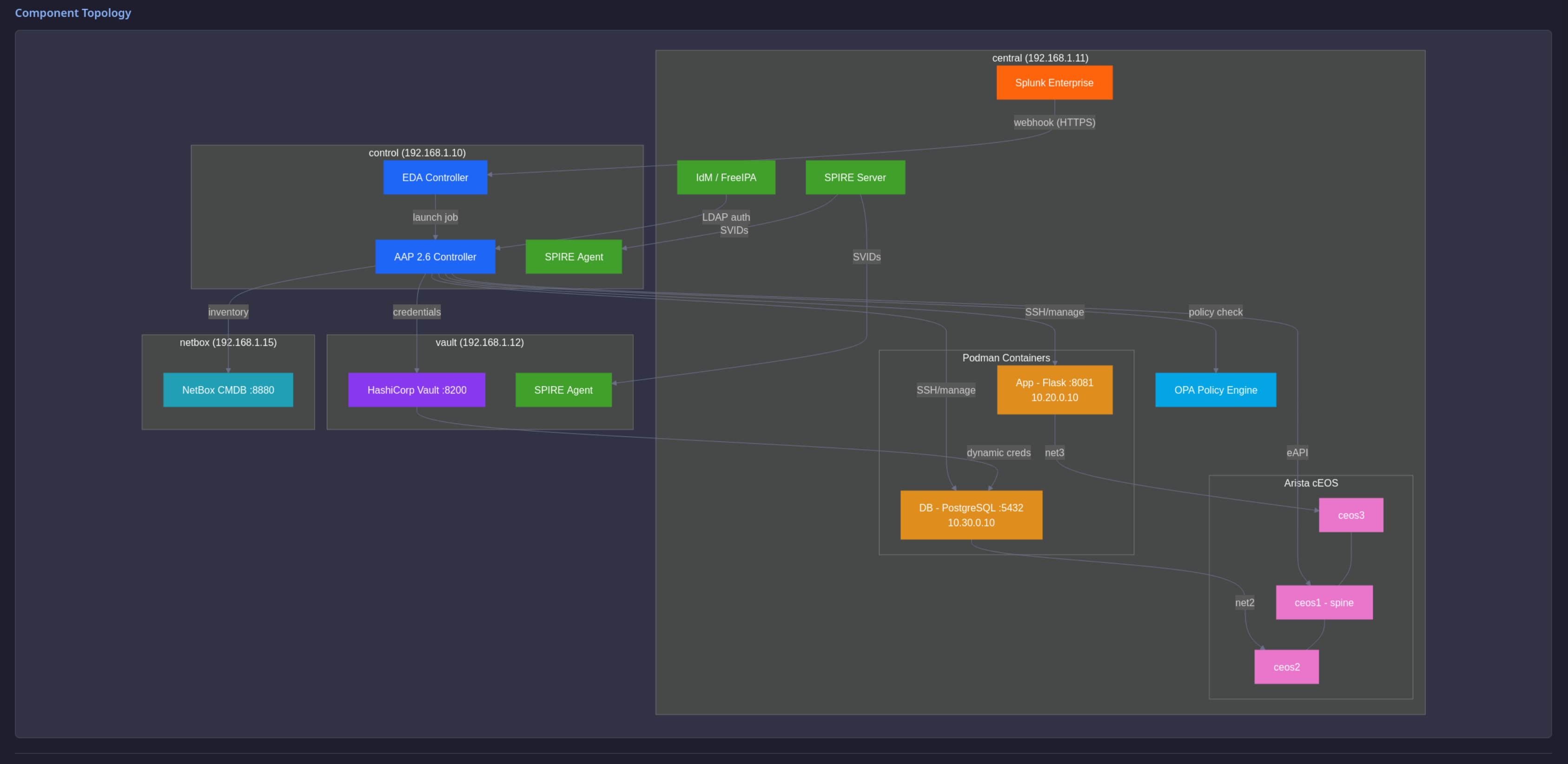
Here’s how all of that fits together:
Why Ansible Automation Platform?
Every operational change in a Zero Trust environment — patching a server, rotating a credential, updating a firewall rule — needs to pass through the same identity checks, policy gates, and audit trail. If you tried to wire each of those actions individually to your identity provider, policy engine, secrets manager, and SIEM, you’d end up with a tangled mess of one-off integrations.
AAP sits in the middle and ties it all together. It acts as the Policy Enforcement Point — the single place where policy decisions get enforced for every kind of infrastructure change.
Here’s what that gives you:
One platform for everything
AAP manages RHEL hosts, Arista switches, PostgreSQL databases, and containerised apps from the same interface. A Zero Trust approach that only covers your servers but ignores the network or the application layer has blind spots. AAP eliminates those by bringing every layer under the same policy-governed workflow.
Policy checks before anything runs
AAP 2.6 talks directly to OPA through Policy as Code. Before a job template starts, the controller sends the full context — template name, who’s launching it, which teams they belong to, what inventory it targets — to OPA for a decision. If OPA says no, the job never starts. Not "it fails partway through" — it never even begins.
This gives you two enforcement layers:
-
Outer ring (platform): AAP checks with OPA at launch time. Wrong user or wrong team? The job is blocked before a single task runs.
-
Inner ring (playbook): Individual tasks can query OPA mid-run for more specific checks — like validating a SPIFFE identity or confirming a VLAN ID is in the allowed range.
No passwords sitting on disk
AAP pulls machine and network credentials from Vault at job time through credential lookups. The AAP database never holds the actual passwords. If the controller were compromised, an attacker would find Vault paths — not usable credentials.
For SSH, Vault acts as a certificate authority. Instead of distributing static keys that sit on disk and go stale, Vault signs short-lived certificates on demand. Hosts trust the Vault CA — no more maintaining a growing, unaudited list of authorised public keys.
People get only what they should
AAP authenticates users through IdM LDAP. Their group memberships get mapped to AAP teams, and those teams determine which job templates they can see and launch. The same playbook can sit in the catalog for everyone, but only the right team can run it — enforced by AAP RBAC and OPA policy together.
Automated responses in seconds
Event-Driven Ansible (EDA) watches for webhooks from Splunk or Wazuh. When a security event fires — say, a brute-force attack — EDA matches it against a rulebook and kicks off a remediation job on the controller. Credentials get revoked, hosts get isolated, or alerts get escalated — in seconds, not the minutes or hours of a manual incident response.
A complete audit trail
Every job run records who launched it, which policy allowed it, what credentials were issued, and what changed. Playbooks live in version control in Gitea. That gives your security team a full chain of evidence from intent (the code commit) through authorisation (the OPA decision) to execution (the job output). That’s the kind of audit trail Zero Trust demands.
|
One thing to keep in mind
As you work through these labs, notice that every integration — LDAP, Vault, OPA, NetBox, Arista, Splunk — is defined as an Ansible playbook, not a manual procedure. That’s the discipline Zero Trust demands: configurations that are repeatable, auditable, and version-controlled. They can be rebuilt from scratch, checked for drift, and reviewed before deployment. In this workshop, the playbooks are the security posture. |