Section 2 — Deploy application with short-lived credentials
|
In NIST SP 800-207 terms, this section moves from verifying the ZTA stack (Section 1) to using it under load. AAP acts as the Policy Enforcement Point (PEP) that gates every deployment step. OPA (the Policy Decision Point) evaluates group membership before secrets are issued. Vault generates short-lived, per-run database credentials instead of long-lived passwords. Arista enforces micro-segmentation so that even valid credentials are only usable from the correct network segment. Why this matters: An attacker who compromises one layer—network, identity, or secrets—still faces enforcement at every other layer. The deployment pipeline isn’t a single trust decision; it’s a chain of independent verifications that must all pass. |
Overview
Deploy the Global Telemetry Platform using Vault dynamic database credentials. Experience OPA deny for the wrong user, then allow for app-deployers. Observe micro-segmentation (Arista) and credential TTL.
|
Why this section exists
Deploying an app is where identity (who), policy (may they), secrets (with what credential), and network (on which path) meet. In Zero Trust you don’t hand every engineer a long-lived DB password or open the database to the whole VLAN. This pipeline shows policy before secrets and least-privilege network paths aligned with short-lived credentials—so compromise of one layer doesn’t instantly mean full data access. |
Exercise 2.1
|
Separation of concerns in templates
Each step has a single job: decide (OPA), issue (Vault), enforce path (Arista), configure app. That mirrors ZTA’s idea that no single giant playbook should skip gates—each stage can fail closed, be audited, and be replaced without collapsing the whole story. |
As ztauser, log in to the automation platform and navigate to Automation Execution → Templates. Click Create template to create a Workflow Template.
Create the workflow with the following details:
Name |
Deploy Application Pipeline |
Organization |
Default |
Inventory |
ZTA Lab Inventory |
Click 'Create workflow job template'. This takes you to the Workflow Visualizer. You’ll now create a workflow to isolate each single job.
Click the 'Add step' button to begin. On the new menu on the right, select 'Job Template' for Node type, then use the dropdown list to select the 'Check DB policy' template. Click Next, then Finish.
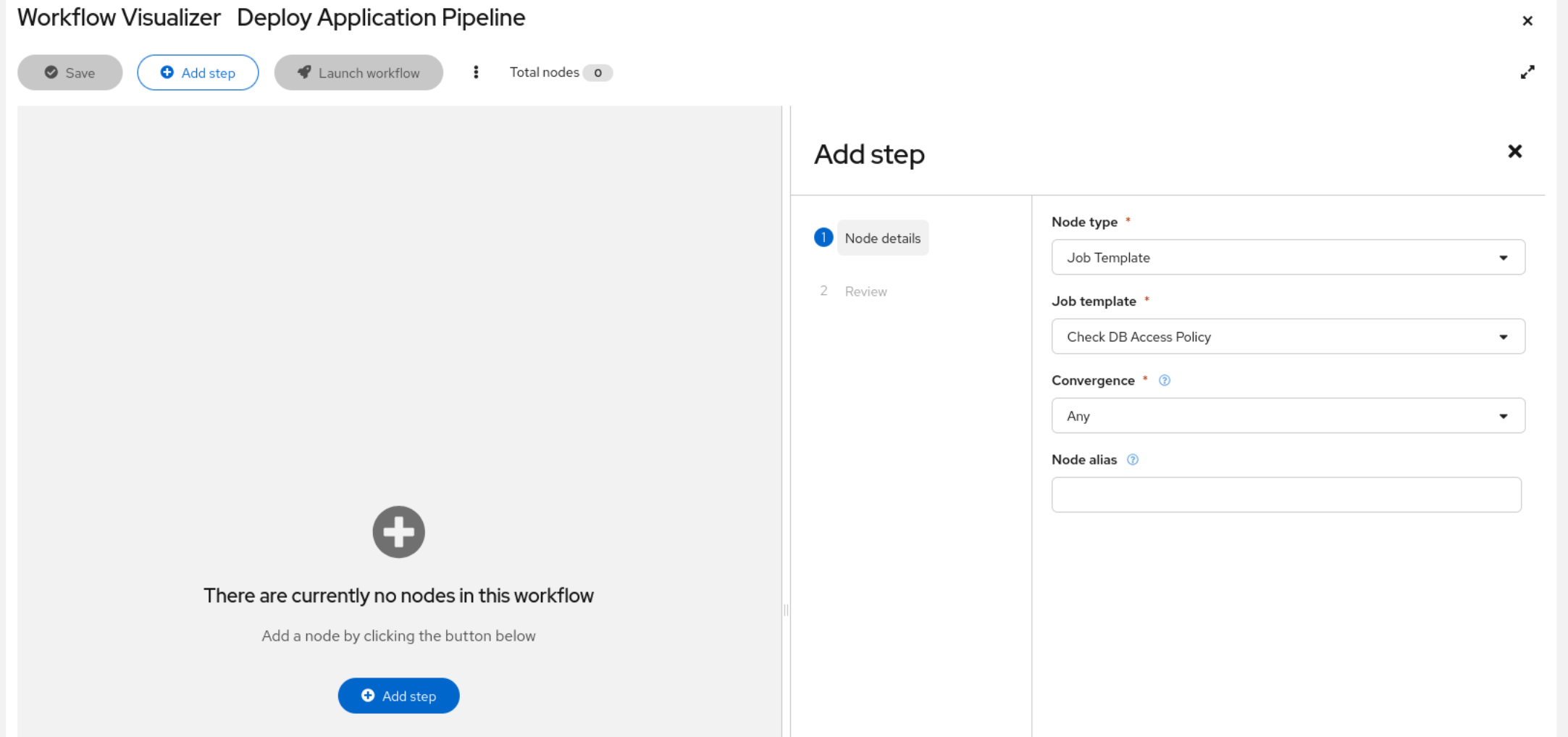
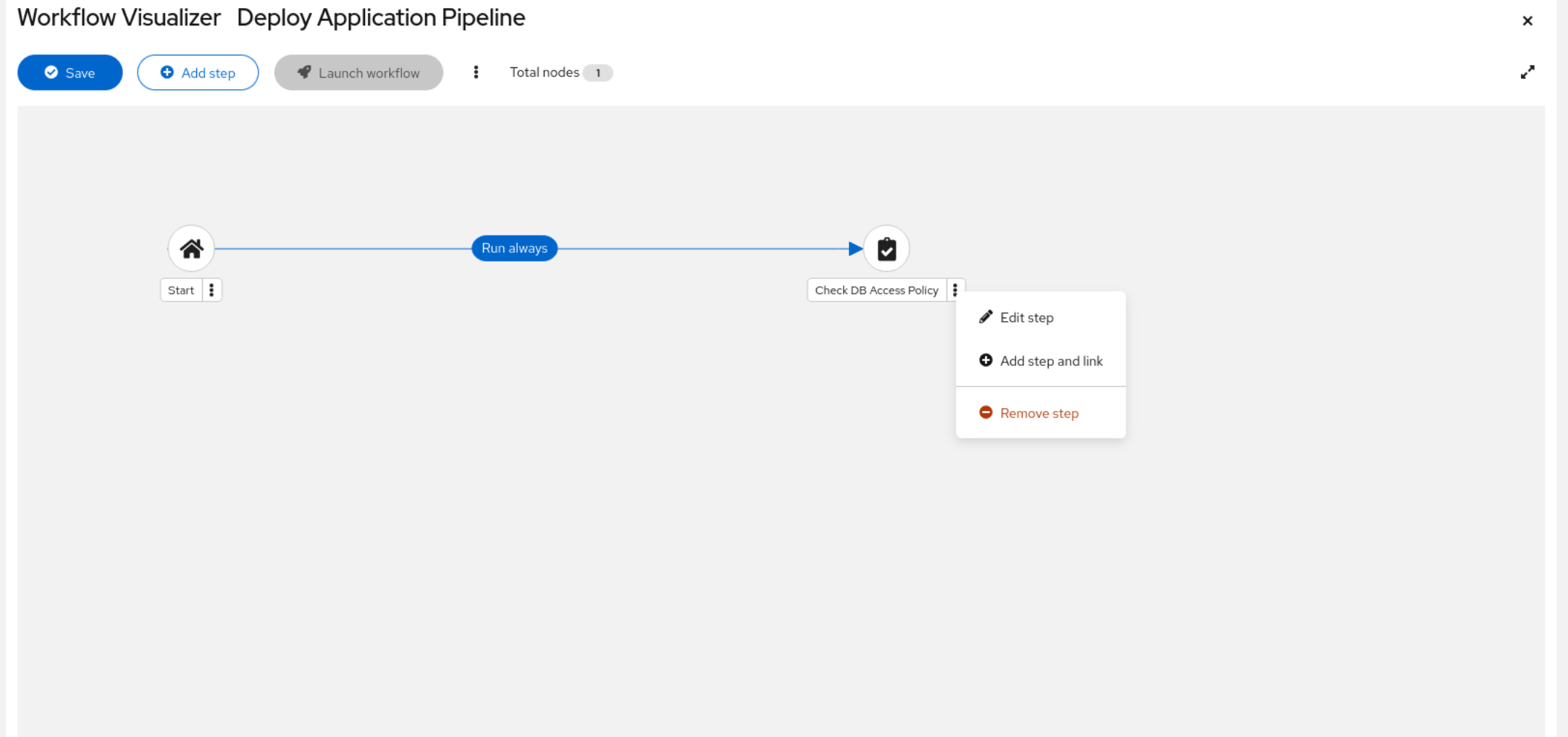
This template executes first and checks with OPA to ensure the job runs in policy. Next, add to the workflow. Right click on the kebab menu on the template you just added. <> PICTURE
Select 'add Step and link', choose the 'Create DB Credential' template this time, and under Status select 'Run on success'. This ensures the job only runs if the previous step was successful. Click Next and Finish.
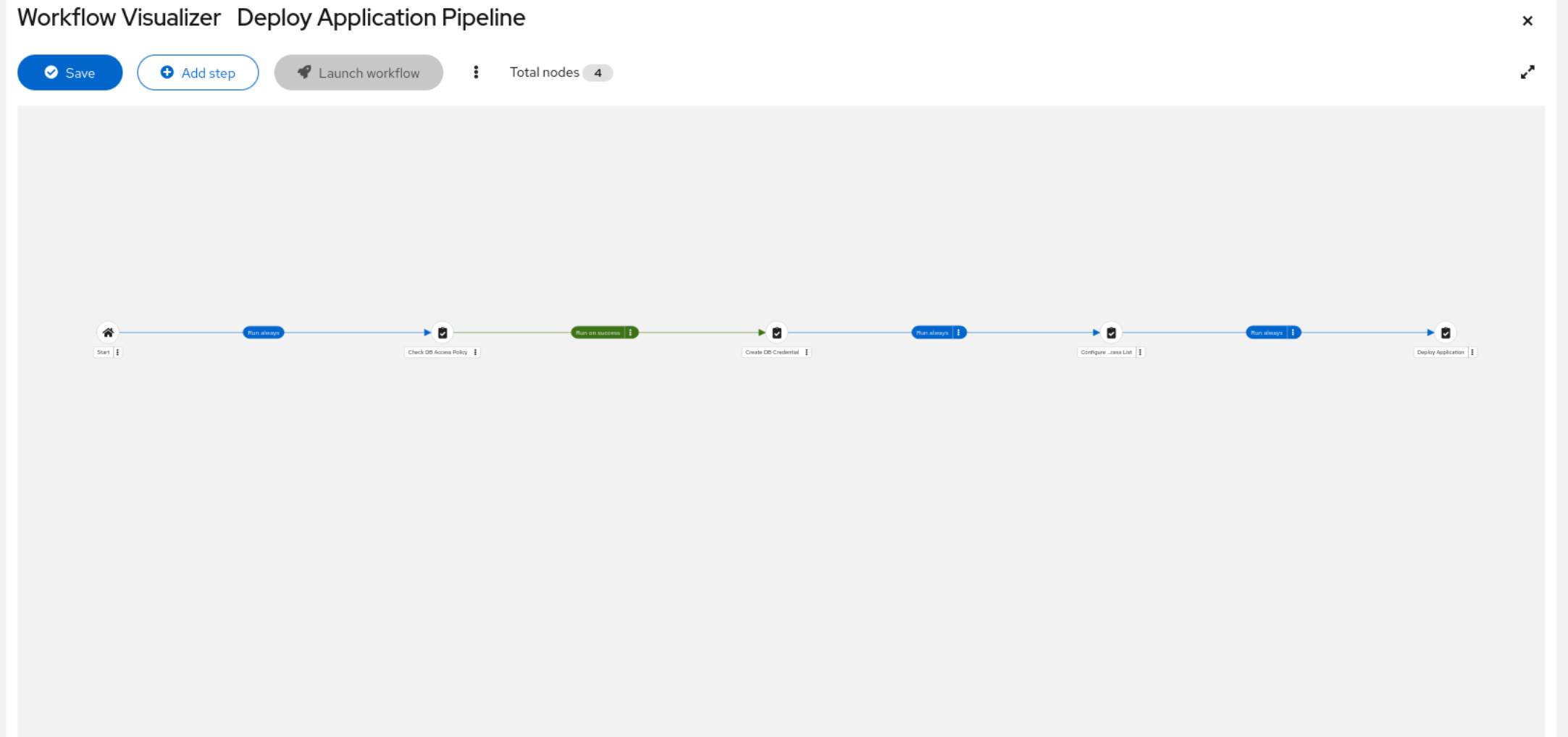
Add the next two templates the same way: 'Configure DB Access list' and 'Deploy Application'.
Your workflow should look like this:
Click 'Save' and then on the 'X' on the top right of the pane, this takes you to the template details and on the template details select 'Team Access'. Click 'Assign Teams', select all the teams except the 'Readonly' team and click next. Allocate roles for the teams by selecting 'WorkflowJobTemplate Approve' and 'WorkflowJobTemplate Execute', then click next followed by review and finish.
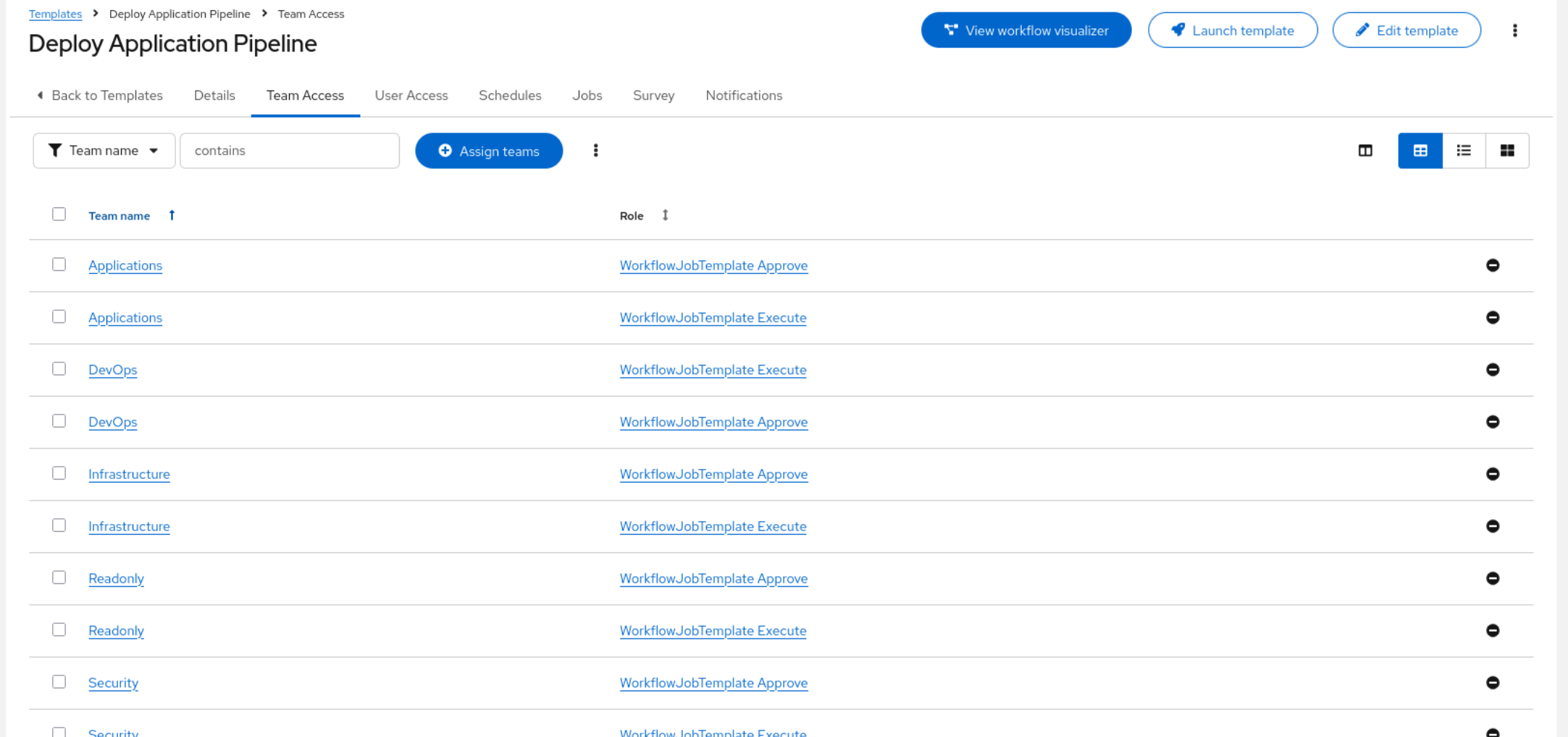
The roles are now allocated. You can log out of the platform.
|
AAP workflows as auditable trust chains
Ansible Automation Platform’s workflow visualizer makes the trust chain visible: each node is a discrete policy gate or operational step. If any node fails, the chain stops—there’s no "skip to deploy." This isn’t just convenience; it’s auditability by design. Every run records which gates passed, which failed, who launched it, and when. In a post-incident review, that trail is the difference between "we think it was authorized" and "here’s proof." |
|
Order of operations = trust boundaries
Check DB Access Policy runs first on purpose: if the human (via AAP) isn’t entitled to database credentials, the workflow never touches Vault. That’s defense in depth—the secret manager isn’t a substitute for authorization. In breach terms, an attacker who tricks someone into clicking "deploy" still hits a PDP (OPA) before any secret issuance. |
Exercise 2.2
-
Log in to AAP as
neteng. Notice you have no permissions. You’re just a member of the Organization. -
Navigate to the IDM tab and log in with the admin details.
-
Search for neteng in active users. Select the account and click on User Groups. They’re part of the 'ipausers' group so they have access but not much else.
-
Click 'Add' to add them to the Infrastructure group. Search for Infrastructure and click the '>' to allocate the group to the account, then click 'Add'.
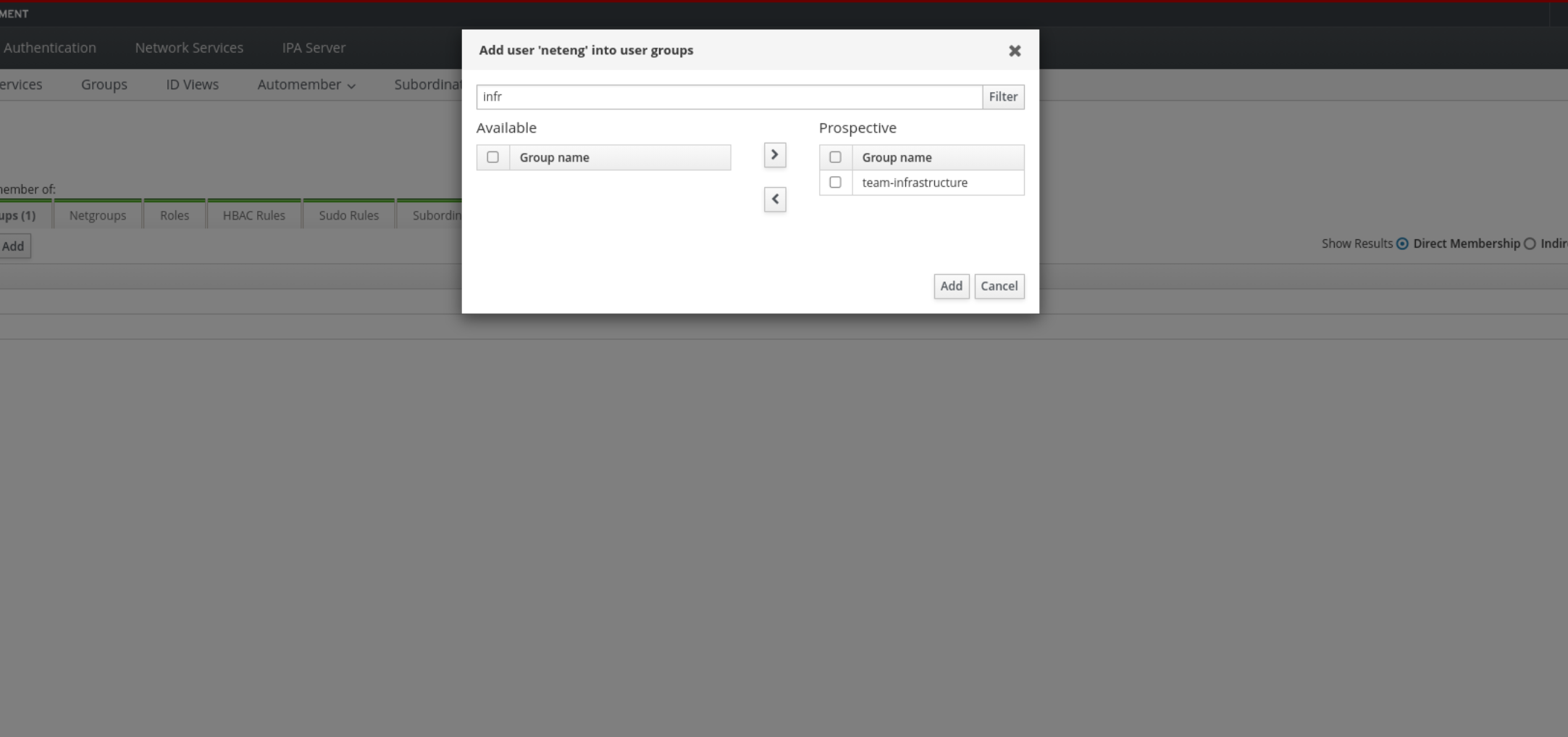
Navigate back to the controller. Log out and log back in as the neteng user.
|
AAP + IdM: real-time RBAC without local accounts
When you changed `neteng’s group membership in IdM, AAP picked up that change on next login—no local account editing, no CSV import, no manual team assignment. This is centralized identity lifecycle in action: the identity provider (IdM) is the single source of truth, and AAP’s LDAP integration ensures that access follows identity changes in near real-time. In Zero Trust, stale permissions are almost as dangerous as no permissions—this integration closes that gap. |
Navigate to Templates and execute the 'Deploy Application Pipeline' workflow by clicking the rocket.
The job failed. Click the first template to review.
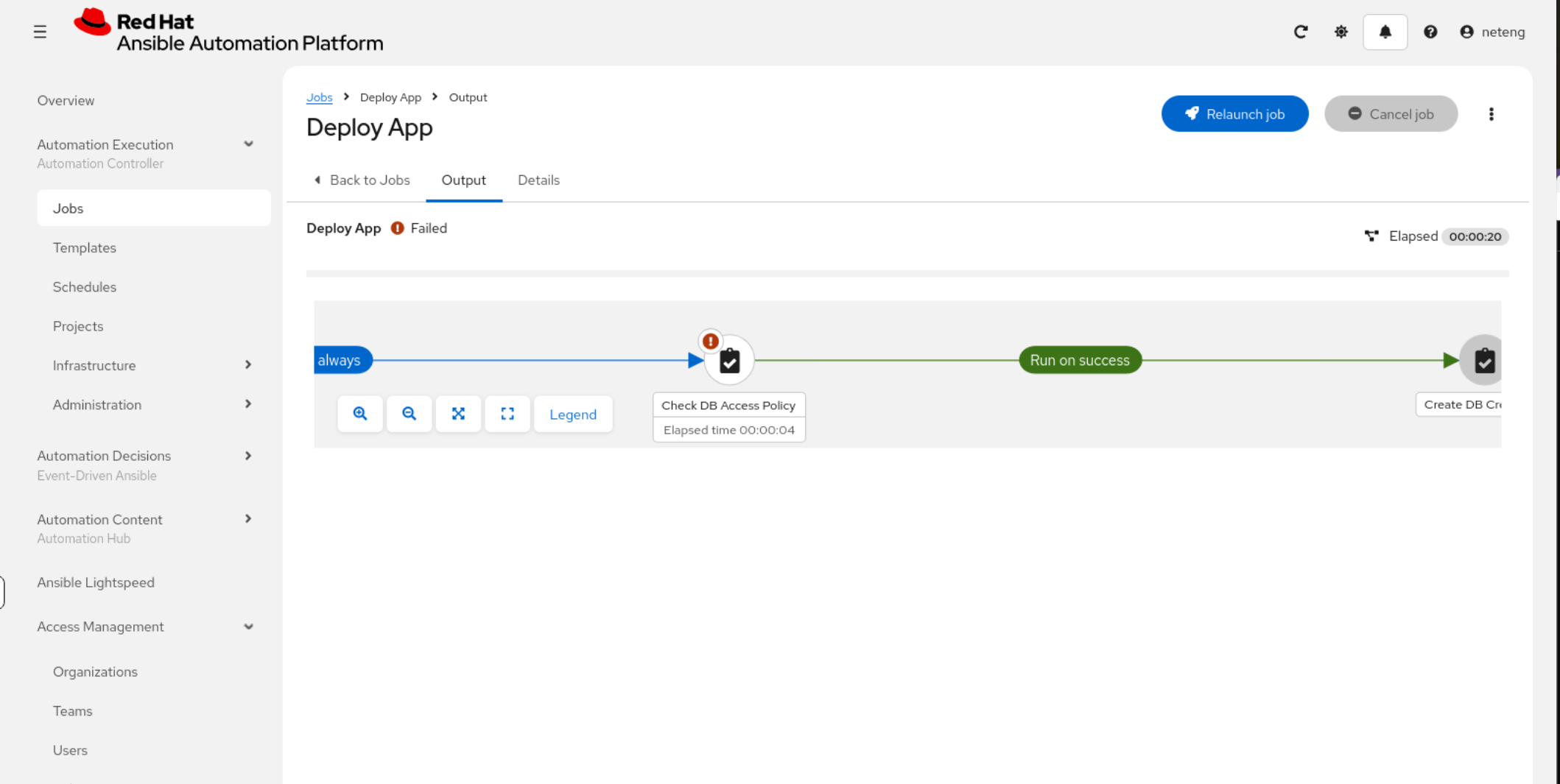
OPA stepped in and DENIED the job. The workflow stops and no further actions can take place.
_ansible_verbose_always: true
evaluated_to: false
assertion: opa_result.allow | default(false)
msg: |
  ACCESS DENIED by OPA policy.
  User 'neteng' is not authorised to request database credentials.
  Reason: unknown
  Conditions: {}
_ansible_no_log: false
changed: false
Now log out and log in with the 'appdev' user. Navigate to the same template and trigger it. This user has been approved to trigger this automation. Click on Check DB policy to see the details.
TASK [Display OPA decision] ****************************************************
ok: [central] => {
    "msg": "OPA Database Access Decision:\n User: appdev\n Groups (IdM): team-applications, app-deployers, ipausers\n Database: ztaapp\n Decision: ALLOWED\n Reason: all conditions met — credential issuance approved\n \n"
}
Monday 13 April 2026 19:58:52 +0000 (0:00:00.042) 0:00:02.446 **********

TASK [Enforce OPA decision] ****************************************************
ok: [central] => {
    "changed": false,
    "msg": "OPA policy check passed — proceeding with credential issuance"
}|
Identity-driven access
IdM groups are attributes the PDP understands. Changing group membership is how the organization grants or revokes deployment authority without editing playbooks. That’s policy + identity lifecycle working together—important when people change roles or leave. |
Go back to the workflow. It should have completed successfully. Navigate to the 'Terminal' tab and from central check the application:
curl -s http://app.zta.lab:8081/health | python3 -m json.toolWe should have a reply similar to:
{
    "database": true,
    "status": "healthy",
    "ts": 1776246070
}
The application is healthy with its new time-limited credentials.
Navigate to the 'Global Telemetry' tab and confirm the application is working. The time-limited credential should last for 5 minutes. Run the curl again to see the change.
In the workflow, click on the "Create DB Access List" template to see the following:
TASK [Display ACL configuration] ***********************************************
ok: [ceos2] => {
"msg": "Network micro-segmentation applied on ceos2:\n ACL: ZTA-APP-TO-DB\n PERMIT: 10.20.0.10 → 10.30.0.10:5432\n DENY: any → 10.30.0.10:5432\n\nOnly the app container (10.20.0.10) can reach the\ndatabase via the Arista cEOS switch fabric.\n"
}
You can verify this on the switch. Open the 'Terminal' tab and ssh into the switch. We will see the network policy that has been applied.
ssh -p 2002 admin@central.zta.lab| Switch credentials: admin/admin |
ceos2#show ip access-lists ZTA-APP-TO-DB
IP Access List ZTA-APP-TO-DB
        10 permit tcp host 10.20.0.10 host 10.30.0.10 eq 5432
        20 permit tcp host 10.30.0.10 eq 5432 host 10.20.0.10
        100 deny ip any host 10.30.0.10
Exit the switch, and ssh into the DB.
ssh -p 2022 rhel@192.168.1.11| Authentication details admin/ansible123! |
View the dynamic usernames that have been created:
[rhel@db ~]$ sudo -u postgres psql -c "\du" | grep v-userpass
 v-userpass-ztaapp-s-DWnNLePRQqnufQmAhJ47-1776246021 | Password valid until 2026-04-15 09:45:26+00
| {}|
Micro-segmentation after authorization
Even with valid DB credentials, network policy still limits where connections may originate. The Arista step models segmentation that’s common in ZTA: secrets prove who the app is, ACLs constrain which paths are valid. An attacker with stolen creds from a random laptop should still fail if the fabric only permits the app tier IP. |
After 5 minutes have passed, check the status of the application. Navigate back to 'Terminal' and run the same curl.
curl -s http://app.zta.lab:8081/health | python3 -m json.tool

{
    "database": false,
    "status": "degraded",
    "ts": 1776246423
}
The application is no longer healthy. The time-limited credentials have expired. Refresh the 'Global Telemetry Platform' web page and you’ll see a database connection error.
|
The 503 is Zero Trust working as intended
A healthy app that stops working when credentials expire is proof that time-bound access is enforced end-to-end. In a traditional environment, database passwords live in config files for years. Here, the credential self-destructs—and the app’s health check honestly reflects that. This is the operational cost of Zero Trust, and the benefit: blast radius is bounded by time, not by someone remembering to rotate a password. |
|
What this is about
The unauthorized user never sees a database password. Zero Trust isn’t only about encryption—it’s about shrinking who can cause sensitive actions. Deny-by-default policy turns "I have network reachability" into "I still can’t obtain credentials." |
|
Ephemeral credentials change operations
TTL expiry is a feature, not a bug: it forces rotation, re-authorization, or deliberate renewal instead of silent, multi-year database passwords. In ZTA, standing access to data is the exception and must be justified; here the app must be re-fed credentials on a schedule or on demand—exactly what |
Hands-on: Write the OPA policy check
ZTA concept: Policy Decision Point integration — querying OPA from a playbook turns an external policy engine into a mandatory trust gate that Ansible enforces inline.
This exercise gives you a skeleton playbook with the IdM group lookup already done. Your job is to write the three missing tasks that query OPA, display the result, and enforce the decision.
| Login as ztauser on the Ansible Automation Platform and login to Gitea with details: 'gitea/ansible123' |
|
What to do
|
| Task | What you write |
|---|---|
1. Query OPA |
|
2. Display decision |
|
3. Enforce |
|
Hands-on: Fix the broken deployment
ZTA concept: Security misconfiguration is an attack surface — a single wrong mode, a missing no_log, or a hardcoded credential can undermine an otherwise sound ZTA pipeline.
This exercise gives you a deliberately broken deployment playbook with four security and reliability bugs.
|
What to do
|
|
Defensive coding in ZTA
These are real-world misconfigurations that break Zero Trust guarantees. Bug 1 ( |
You can now proceed to the next section.
Corrected Policy Hint - Write the OPA policy check:
Placeholder |
Value |
url: "FILL_IN" |
"{{ opa_url }}/v1/data/zta/db_access/decision" |
method: "FILL_IN" |
POST |
user: "FILL_IN" |
"{{ requesting_user }}" |
user_groups: "FILL_IN" |
"{{ requesting_groups }}" |
target_database: "FILL_IN" |
"{{ db_name }}" |
requested_permissions: "FILL_IN" |
["SELECT", "INSERT", "UPDATE"] |
assert that: "FILL_IN" |
opa_decision.json.result.allow |
Corrected Playbook Hint - Broken Deployment:
Bug |
Fix |
Bug 1 |
add no_log: true to the copy task (Task: Write application environment file) |
Bug 2 |
change mode: '0644' to mode: '0600' (Task: Write application environment file) |
Bug 3 |
remove the entire "Set database password in systemd unit" task |
Bug 4 |
fix the health check port from 80 to {{ app_port }} |