Section 3 — AAP Policy as Code: platform-gated patching
|
In Sections 1–2, OPA checks ran inside workflows—a playbook task queried OPA and failed if denied. That model depends on every playbook author remembering to add the check. Section 3 moves enforcement up to the platform: AAP’s Policy as Code gateway queries OPA before the job is even enqueued. The playbook never executes, no partial changes land, and no rollback is needed. AAP is still the Policy Enforcement Point (PEP), but now enforcement is built into the platform, not bolted onto individual playbooks. OPA (the Policy Decision Point) evaluates the launcher’s AAP team memberships (populated via LDAP from IdM) against template metadata—a "Patch" template requires the Infrastructure or Security team. IdM remains the single source of truth for identity: changing a group membership in the directory changes what automation a user can launch, with no AAP reconfiguration. Why this matters: An insider or compromised account that bypasses a playbook-level check (by editing the playbook, calling the API directly) is still blocked at the platform gate. Policy as Code makes the automation platform itself a trust boundary—not just a convenient scheduler. |
Overview
|
Platform enforcement vs playbook checks
AAP itself asks OPA before starting the job. That’s Policy as Code on the automation platform: even a playbook with no internal AAP 2.6 sends the full job context to OPA, including |
Template pattern |
Required AAP team |
Patch |
Infrastructure or Security |
VLAN / Network |
Infrastructure |
Deploy, Credential, Application |
Applications or DevOps |
Everything else |
Any authenticated user |
|
Why template names matter
The gateway policy uses resource metadata (here, template name substrings) as a coarse risk classifier. Production policies often add inventory tags, execution environments, survey variables, or SAML claims—the idea is the same: encode risk in attributes the PDP can evaluate consistently, not in tribal knowledge about “who is allowed to click what.” |
Exercise 3.1
To configure AAP, navigate to 'Settings' → 'Automation Execution' → 'Policy'. Configure OPA on the platform. Select 'Edit' and provide the following details:
Name |
Deploy OPA Policy |
OPA Hostname |
192.168.1.11 |
Port |
8181 |
OPA Authentication Type |
None |
OPA custom athentication headers |
<blank> |
OPA request timeout |
5 |
OPA request retry count |
2 |
| We are using an IP Address here due to a dns bug with the containers. |
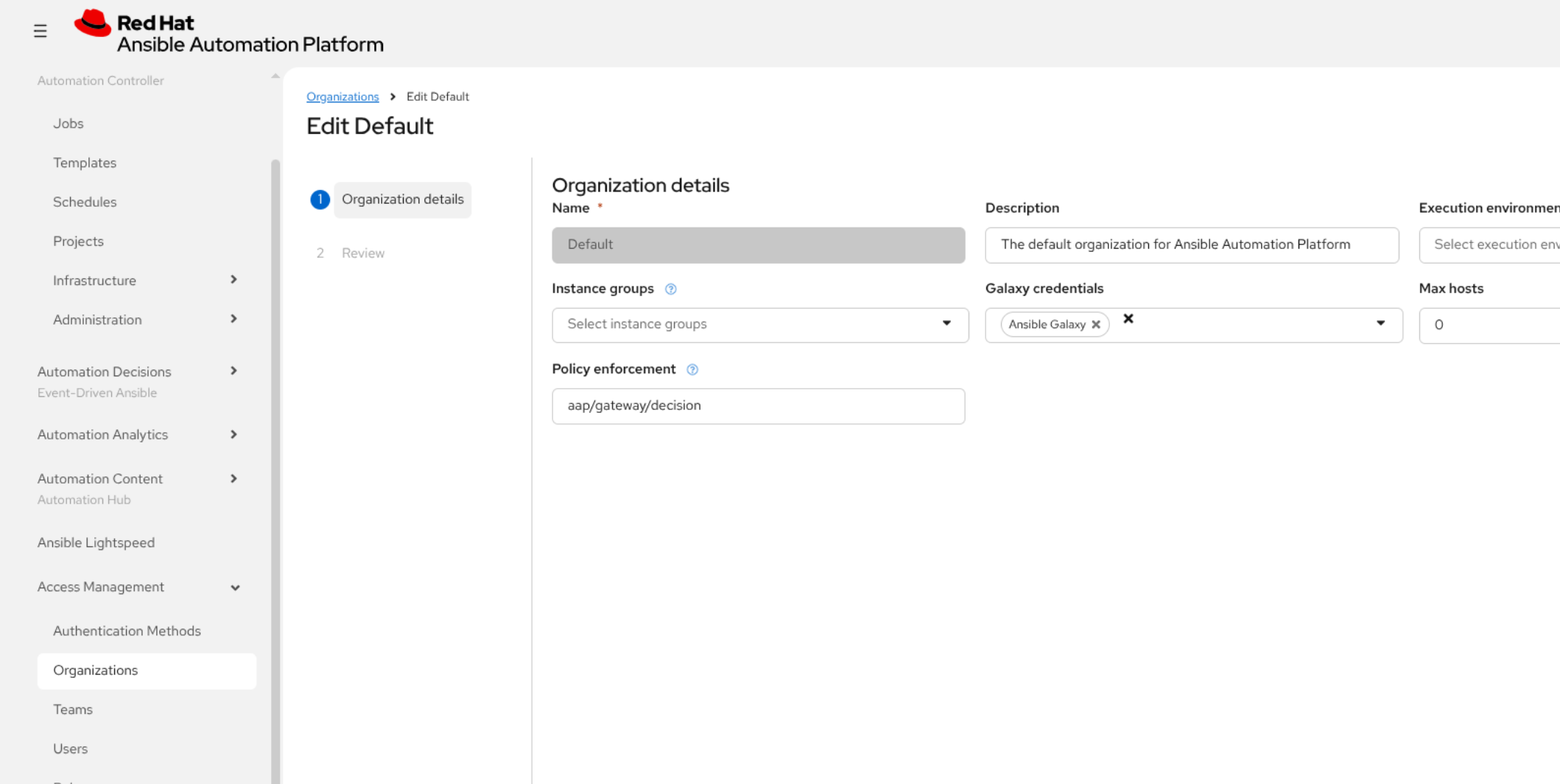
Next, configure the Organization to use policy enforcement. Navigate to 'Access Management' → 'Organizations'. Click on 'Default' then click 'Edit organization'. Under Policy enforcement enter: aap/gateway/decision. Click Next and Finish.
Log in as appdev and navigate to Templates.
Execute the 'Apply Security Patch' template. The survey will refer to which server and you can keep it set to 'app'. The Policy as Code operates and the job fails.
This job cannot be executed due to a policy violation or error. See the following details:
{'Violations': {'Organization': ["user 'appdev' is not in an authorised team "
'for patching templates (requires: '
'{"Infrastructure", "Security"}, has: '
'{"Applications"})']}}
|
Stronger than hiding buttons
Traditional RBAC might hide templates or rely on operator discipline. Policy as Code makes denial explicit and uniform—the PDP answer can be the same for UI, API, and integrated CI—reducing policy drift between teams and making exceptions visible in Git-tracked Rego rather than tribal knowledge. |
Exercise 3.2
Log in to the platform as a user (netadmin) that’s in the Infrastructure team or add appdev to the infrastructure team.
Trigger the 'Apply Security Patch' template. It should succeed.
Review the template to see the OPA interaction:
TASK [Post-patch | Display patch summary] **************************************
ok: [app] => {
"msg": [
"Security patch applied",
"Host: app.zta.lab",
"Patch ID: ZTA-SEC-2026-001",
"OS: Linux ",
"Changes: login banner (/etc/issue, /etc/motd); SSH hardening; password policy; audit rules",
"Authorised via AAP Policy as Code (Infrastructure/Security teams only)."
]
}|
Identity lifecycle, not ticket forever
Granting |
|
Hardening as code
Once launch is authorized, the playbook still applies defensive configuration (banner, |
Navigate to the 'Terminal' to verify the defensive configuration has been deployed.
ssh -p 2023 rhel@central.zta.lab
sudo sshd -T | grep -E 'permitrootlogin|maxauthtries|permitemptypasswords'|
Verify outcomes, not intentions
Spot-checking |
You can now proceed to the next section.