Section 4 — SPIFFE-verified network VLAN management
|
Sections 1–3 answered "is the right person asking?" but not "is the right platform executing?". A stolen AAP credential replayed from an attacker’s laptop would pass every check so far—OPA sees valid groups, Vault issues credentials, switches accept changes. Section 4 closes that gap with SPIFFE/SPIRE: the playbook must present a cryptographic proof of workload identity from a locally attested SPIRE agent before any network change proceeds. AAP remains the Policy Enforcement Point (PEP), but now enforcement runs through two independent rings. The outer ring (AAP Policy as Code) gates who can launch the job—the same platform-level OPA check from Section 3. The inner ring (in-playbook OPA call) adds what workload is executing (SPIFFE ID), what is being requested (VLAN ID in range), and which IdM groups the launcher holds. OPA evaluates both rings independently; SPIRE provides the workload identity that makes the inner ring meaningful. Why this matters: An attacker now needs to compromise both a valid user session and a trusted execution environment to change the network fabric. Neither identity alone is sufficient—this is defense in depth with independent verification at each layer, not a single trust decision repeated twice. |
Architecture summary
ZTA concept: Defense in depth—two independent policy rings evaluate both the human (outer) and the workload (inner) before any network change proceeds. An attacker needs to compromise both layers.
-
Outer ring: user must be in the Infrastructure AAP team to launch VLAN/Network templates (
aap.gatewaypolicy, evaluated by the controller before launch). -
Inner ring: trusted SPIFFE ID, IdM
network-adminsgroup, VLAN 100-999, allowed action (zta.networkpolicy, evaluated inside the playbook).
|
Why two rings? Ansible makes defense in depth practical
Humans can be phished; scripts can be stolen. The outer ring (AAP Policy as Code) ensures only the right people can press "go" on high-risk network automation. The inner ring (in-playbook OPA call) adds workload identity: the job proves it runs on the attested automation platform (SPIRE SVID), not someone’s laptop running a copy of the playbook. Ansible makes this practical—the outer ring is built into AAP (zero playbook changes needed), and the inner ring is a simple |
What is SPIFFE / SPIRE and why does it matter?
Details
Sections 1-3 established user identity (IdM) and policy enforcement (OPA) as trust gates. But every playbook so far ran with an implicit assumption: the automation platform itself is trustworthy. Section 4 makes that assumption explicit and cryptographically verifiable using SPIFFE and SPIRE.
Traditional infrastructure automation trusts the machine running the playbook because it sits on a trusted network or holds an SSH key. In a Zero Trust model, network location isn’t trust and static keys are a liability. An attacker who copies your playbooks and SSH key to a rogue VM has everything needed to make changes—nothing proves the workload is running on a legitimate, attested platform.
SPIFFE solves this by giving every workload a cryptographic identity—an X.509 certificate—that is:
-
Short-lived—automatically rotated (typically every hour), so a stolen certificate expires quickly.
-
Attested—issued only after the SPIRE agent proves the workload’s environment (kernel, process, node token) to the SPIRE server. A rogue VM that can’t pass attestation gets no identity.
-
Platform-agnostic—works the same way on bare metal, VMs, containers, and Kubernetes. The identity follows the workload, not the infrastructure.
| Concept | What it means |
|---|---|
SPIFFE ID |
A URI like |
SVID (SPIFFE Verifiable Identity Document) |
The proof. An X.509 certificate containing the SPIFFE ID as the Subject Alternative Name (SAN). Any party can verify it against the trust domain’s root CA without contacting the SPIRE server at runtime. |
SPIRE Server |
The certificate authority (CA) for the trust domain. Runs on |
SPIRE Agent |
Runs on every node that hosts workloads ( |
Workload registration |
An admin (or automation) registers which SPIFFE IDs are valid for which workloads. In this lab, the network-automation workload is registered to the AAP execution node. |
Trust domain |
The scope of identity authority— |
In NIST SP 800-207 terms, SPIFFE/SPIRE provides workload identity—one of the three pillars alongside user identity and device posture:
| ZTA pillar | What answers it | This lab |
|---|---|---|
User identity |
"Which human initiated this action?" |
IdM (FreeIPA)— |
Workload identity |
"Is the software making the change running on a legitimate, attested platform?" |
SPIFFE/SPIRE—the playbook fetches an SVID proving it runs on the registered AAP node |
Device posture / context |
"Is the request reasonable given the parameters?" |
OPA—VLAN in range, action allowed, both identities verified |
Without SPIFFE, Sections 1-3 answered "is the right person asking?" but not "is the right platform executing?". A stolen AAP credential replayed from an attacker’s laptop would pass every check—OPA sees valid groups, Vault issues credentials, switches accept changes. SPIFFE closes that gap: the playbook must present a valid SVID from the SPIRE agent, which only runs on the attested AAP node.
The playbook’s first play runs on the automation host (the AAP controller node) and calls the local SPIRE agent:
- name: Fetch X.509 SVID from SPIRE Agent
  command: >
    /opt/spire/bin/spire-agent api fetch x509
    -socketPath /run/spire/agent/api.sock
  register: svid_result

- name: Parse SPIFFE ID from SVID
  set_fact:
    workload_spiffe_id: "{{ svid_result.stdout | regex_search('SPIFFE ID:\\s+(spiffe://\\S+)', '\\1') | first }}"
The key insight for Ansible practitioners: SPIFFE integration is a few tasks, not a framework change. Any existing playbook can add workload identity verification by prepending a play that fetches and validates the SVID. The playbook fails closed if the SVID is missing or untrusted—no partial changes reach the switches.
Consider the attack scenario: an insider copies the configure-vlan.yml playbook, the Arista credentials, and a valid AAP user token to their laptop. Without SPIFFE:
-
Outer ring (AAP gateway): bypassed entirely—the attacker runs
ansible-playbookdirectly, not through AAP. -
Inner ring (OPA user check): passes—the attacker supplies
netadminandnetwork-adminsin the OPA input (there’s no server-side verification of user claims in a direct playbook run). -
Result: the attacker creates arbitrary VLANs on the production fabric.
With SPIFFE:
-
The playbook’s first task calls
spire-agent api fetch x509on the local node. -
The attacker’s laptop has no SPIRE agent (or has one that isn’t attested by the lab’s SPIRE server).
-
The task fails—no SVID, no OPA query, no switch changes.
This is the difference between "the right person asked" (user identity alone) and "the right person asked from the right place" (user identity + workload identity). SPIFFE provides the second half.
SPIFFE isn’t just about blocking rogue laptops. In production, workload identity can be extended to verify the execution environment (container image hash), the Git commit that produced the playbook, and the CI/CD pipeline that built the EE. SPIRE’s pluggable attestation model supports all of these. The pattern this lab teaches—fetch SVID, pass to PDP, fail closed—is the foundation for a full automation supply chain verification strategy.
Exercise 4.1
ZTA concept: Layered deny-by-default—an unauthorized user is blocked at the first available gate. If the outer ring is bypassed, the inner ring still catches them.
-
Log in to AAP as
appdevand launch the Configure VLAN template with VLAN 200 / DMZ. -
Look at the output:
This job cannot be executed due to a policy violation or error. See the following details:
{'Violations': {'Organization': ["user 'appdev' is not in an authorised team "
'for network templates (requires: '
'{"Infrastructure"}, has: {"Applications"})']}}
Path A—Outer ring blocks (expected with correct LDAP maps): appdev has no correct AAP team membership, so the aap.gateway policy denies the launch at the platform level. The playbook never starts and no SPIFFE check occurs. This is the same pattern as the previous Section 3.
Now, login as user 'neteng' and run the template.
TASK [Enforce OPA decision] ****************************************************
fatal: [central]: FAILED! => {
"assertion": "opa_decision.json.result.allow == true",
"changed": false,
"evaluated_to": false,
"msg": "VLAN CONFIGURATION DENIED by OPA policy.\nReason: DENIED: user 'neteng' is not a member of network-admins group\n\n→ User 'neteng' must be added to the 'network-admins' group in IdM.\n"
}
Path B—Inner ring blocks (if LDAP maps place all users in Infrastructure): The outer ring passes, the playbook starts, SPIFFE verification succeeds (the platform is legitimate), but OPA’s inner ring denies because neteng isn’t in the IdM network-admins group. trust the platform and authorize the person are separate questions.
Either path demonstrates deny-by-default. Discuss which ring caught the request and why.
Exercise 4.2
ZTA concept: Verified identity + verified workload = authorized change—both the human and the automation platform must prove their identity before the network is touched.
-
Log in as netadmin and re-run the Configure VLAN template to create VLAN 200.
-
Navigate to the Netbox tab and log in with the credentials admin/netbox.
-
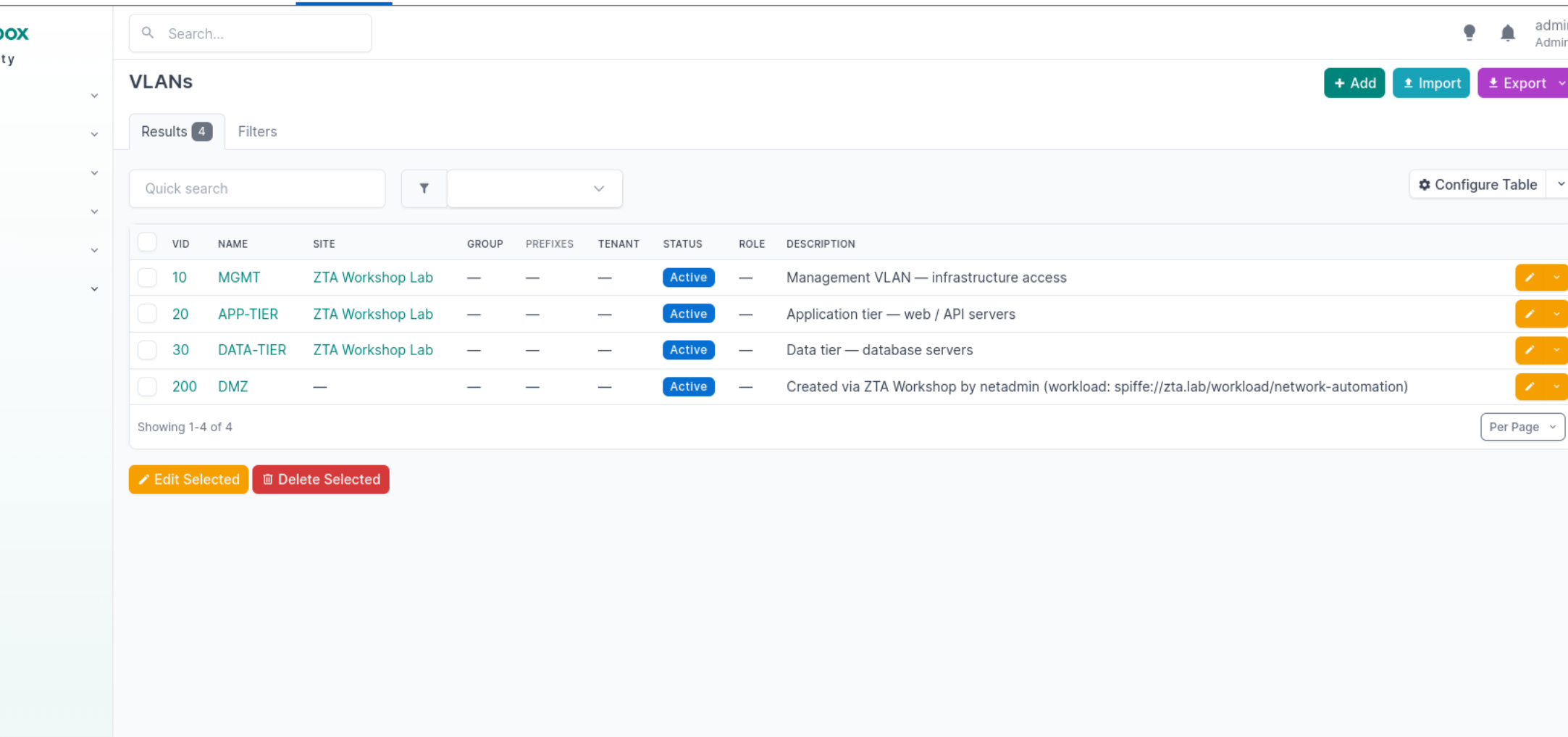
Click on IPAM, select VLANs, and you should see VLAN 200 has been created.
-
As netadmin, add VLAN 2000 now to our switches and observe the outcome.
TASK [Enforce OPA decision] ****************************************************
fatal: [central]: FAILED! => {
"assertion": "opa_decision.json.result.allow == true",
"changed": false,
"evaluated_to": false,
"msg": "VLAN CONFIGURATION DENIED by OPA policy.\nReason: DENIED: VLAN ID 2000 is outside the permitted range (100-999)\n\n→ VLAN ID 2000 is outside the permitted range (100-999).\n"
}
Policy has stepped in now to deny this action.
|
Ansible: end-to-end network change in one job
A single AAP job verifies the workload identity (SPIFFE), checks policy (OPA), configures the switches (Arista |
Exercise 4.3
ZTA concept: Ephemeral credentials and authentication ≠ authorisation — a valid certificate from the right CA does not grant access. The SPIFFE ID inside the certificate must also be in OPA’s trusted set. Short-lived SVIDs limit the blast radius of compromise.
This exercise uses the Verify SPIFFE Trust job template. It runs three parts automatically — your job is to read the output and understand what each part proves.
SVID certificate inspection
The playbook fetches the current SVID from the SPIRE agent and runs openssl to display the certificate properties.
-
Login to AAP as
netadmin, navigate to 'Templates' and launch Verify SPIFFE Trust. -
In the job output, find the SVID Certificate Analysis banner. Note:
-
The SPIFFE ID in the Subject Alternative Name (SAN) — this is the workload’s identity.
-
The Not Before / Not After timestamps — the certificate’s total lifetime.
-
The Remaining minutes — how long until this SVID expires and SPIRE auto-rotates it.
-
-
Compare with a traditional SSH key: SSH keys have no expiry. If an attacker steals one, it works forever (or until someone manually revokes it). An SVID expires in minutes to hours — a stolen SVID is a rapidly depreciating asset.
Bring in the Rogue workload identity
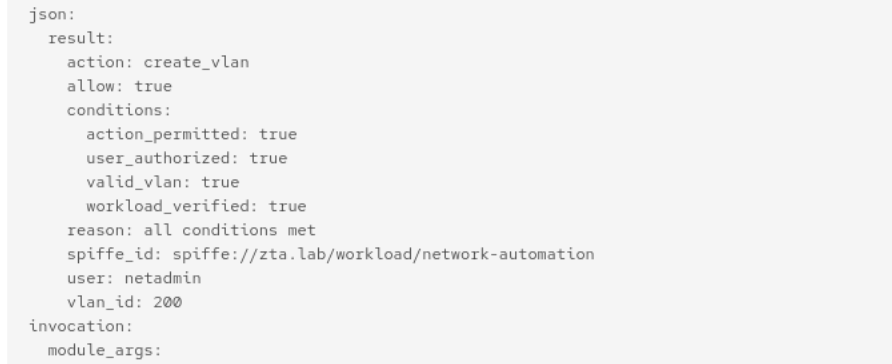
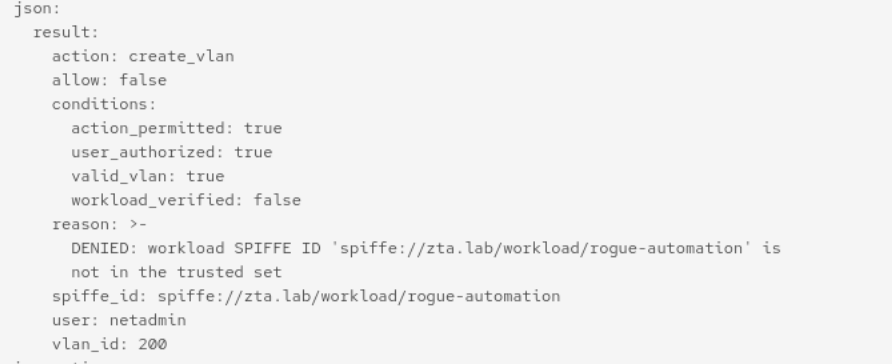
The same job output shows a side-by-side comparison of two OPA queries under the task [Part 2: Legitimate vs Rogue Workload Identity]. Find the Workload Identity: Legitimate vs Rogue banner in the job output.
-
The legitimate SPIFFE ID (
spiffe://zta.lab/workload/network-automation)
-
One with a rogue ID (
spiffe://zta.lab/workload/rogue-automation).
-
Both requests use the same user (
netadmin), same group (network-admins), same VLAN (200). Only the SPIFFE ID differs. -
The legitimate workload is ALLOWED. The rogue workload is DENIED.
This proves that stolen user credentials are not enough. Even netadmin with full group membership is denied when the request comes from an untrusted workload. OPA checks the SPIFFE ID against an explicit allowlist in the zta.network policy.
Hands-on: Write the NetBox CMDB update
ZTA concept: CMDB as source of truth—any infrastructure change not recorded in the CMDB is invisible to compliance, monitoring, and policy engines. An unregistered VLAN is indistinguishable from a rogue one.
The full configure-vlan.yml playbook updates NetBox automatically. This exercise isolates the CMDB step so you write it yourself using the NetBox REST API.
-
Navigate to Gitea and open
section4/playbooks/update-netbox-vlan-student.ymlin the text editor. -
The playbook has three commented-out tasks marked
YOUR CODE STARTS HERE. Each has hints andFILL_INplaceholders. -
Uncomment each task and replace the placeholders:
-
In AAP, create a job template called Update NetBox VLAN (Student) pointing to your skeleton playbook. Use the same inventory, credentials, and EE. Add team access to read and execute for the Infrastructure team.
-
Run Configure VLAN as
netadminto create the VLAN on the switches first, then run your template to update NetBox. -
Verify in the NetBox UI (
http://netbox.zta.lab:8880, navigate to IPAM → VLANs) that the VLAN appears. -
Run your template again—it should report "Already exists" instead of creating a duplicate.
|
Why automate the CMDB update?
If the switch change and the CMDB update are separate manual steps, they will drift. Someone will create a VLAN and forget to update NetBox, or update NetBox but fat-finger the VLAN ID. Ansible keeps both in the same job, so either both succeed or neither does. In a ZTA architecture, the CMDB feeds downstream policy decisions—an unregistered VLAN might trigger alerts, block traffic, or cause compliance violations. Automation is the glue between infrastructure state and the trust decisions that depend on it. |
Correct NetBox Update details:
| Task | Key detail |
|---|---|
Task 1 |
GET filter: |
Task 2 |
POST to |
Task 3 |
Summary status: |
- name: Update Netbox CMDB with New VLAN
  hosts: zta_services
  become: false
  gather_facts: false

  vars:
    new_vlan_id: "{{ new_vlan_id | int }}"
    new_vlan_name: "{{ new_vlan_name | default('NEW-VLAN') }}"
    network_user: "{{ awx_user_name | default('unknown') }}"

  tasks:
    - name: Check if VLAN already exists in Netbox
      uri:
        url: "{{ netbox_url }}/api/ipam/vlans/?vid={{ new_vlan_id }}"
        method: GET
        headers:
          Authorization: "Token {{ netbox_token }}"
      register: netbox_vlan_check

    - name: Create VLAN in Netbox
      uri:
        url: "{{ netbox_url }}/api/ipam/vlans/"
        method: POST
        headers:
          Authorization: "Token {{ netbox_token }}"
          Content-Type: application/json
        body_format: json
        body:
          vid: "{{ new_vlan_id | int }}"
          name: "{{ new_vlan_name }}"
          status: active
          description: "Created via ZTA Workshop by {{ network_user }}"
        status_code: [201, 400]
      register: netbox_create
      when: netbox_vlan_check.json.count == 0

    - name: CMDB update summary
      debug:
        msg: |
          NetBox CMDB Update:
            VLAN ID:   {{ new_vlan_id }}
            VLAN Name: {{ new_vlan_name }}
            Status:    {{ 'Created' if netbox_vlan_check.json.count == 0 else 'Already exists' }}
            User:      {{ network_user }}

          The CMDB is now the authoritative source of truth for this VLAN.
          Any VLAN on the network without a matching CMDB record is considered rogue.