Workshop details
How to approach this workshop
This workshop builds incrementally. Each module depends on concepts from previous ones:
Foundation (Modules 1-2): Understand the multi-agent application and core observability concepts. These modules set the stage for everything that follows.
Core Practice (Modules 3-4): Work directly with metrics, logs, and tracing. You’ll explore Grafana dashboards and configure MLflow tracing for the multi-agent system.
Optional Advanced Topics (Modules 5-6): For those with more advanced knowledge or who finish more quickly, implement LLM evaluations and automated quality monitoring. These modules require additional time but provide deeper expertise in quality assurance.
Feel free to revisit earlier modules as needed. The concepts build on each other, so if something isn’t clear later, go back and review.
Understanding and navigating the workshop UI
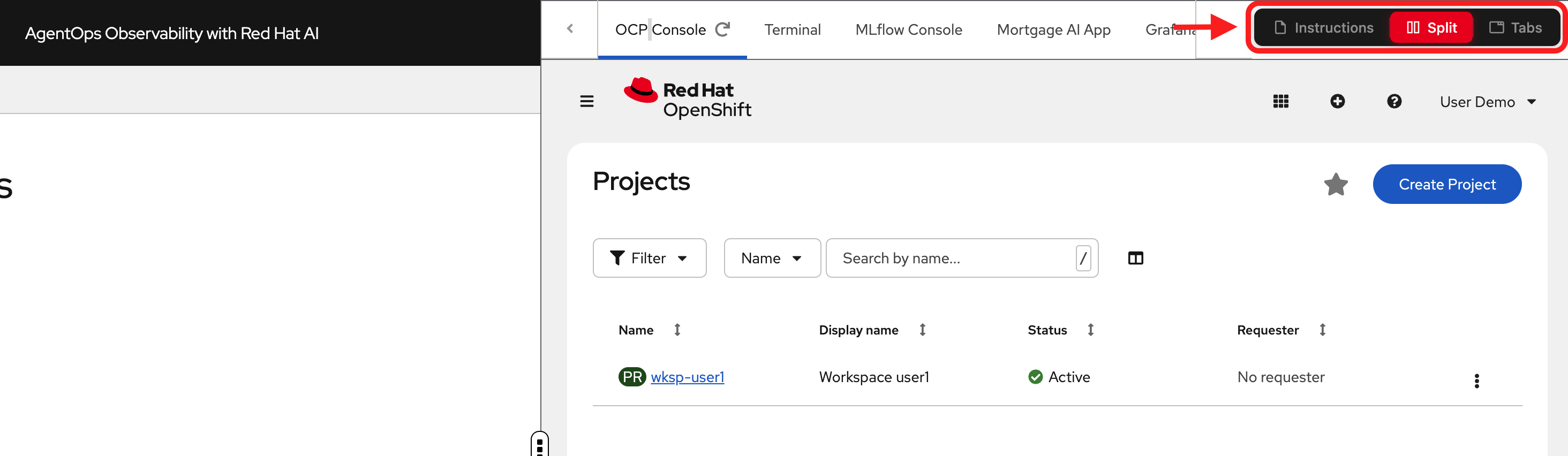
The workshop interface is designed to let you read instructions while working in your environment.
Left panel: Workshop instructions and content
Right panel: Environment tabs for hands-on exercises
-
OCP Console: OpenShift web console for managing your cluster
-
Terminal: Command-line access to run CLI commands
-
MLflow Console: MLflow UI for viewing traces and experiments
-
Mortgage AI App: The multi-agent application you’ll observe
-
Grafana: Dashboards for metrics and logs
-
RHOAI Console: Dashboard for Red Hat OpenShift AI
View modes (top navigation):
-
Instructions: Full-page instructions (hide environment tabs)
-
Split: Side-by-side view (current default) - see both instructions and environment
-
Tabs: Full-page environment (hide instructions)
Adjusting the layout: In Split mode, drag the middle divider left or right to resize the panels.
| Most exercises work best in Split mode so you can reference instructions while working in the environment tabs. |
Need help?
If you get stuck during the workshop:
-
Check the glossary below: Key terms and concepts are defined in the collapsible glossary section
-
Review previous modules: Concepts build on each other, so revisiting earlier content often clarifies later material
-
Consult the documentation links: Each module includes links to official documentation for deeper exploration
-
Try the exercises again: Hands-on practice often reveals details you might have missed the first time
-
Refer to the conclusion: The "Recommended resources" section has additional learning materials organized by topic
Glossary
Key terms used in this workshop (click to expand)
| Term | Definition |
|---|---|
AgentOps |
Agent Operations, the discipline of monitoring, tracing, evaluating, and maintaining AI agent systems in production |
AI Agent |
A system that uses an LLM to reason about tasks, decide which tools to call, and take autonomous actions |
LLM |
Large Language Model, an AI model trained on large text datasets that can generate and understand natural language |
MCP |
Model Context Protocol, a standard for connecting AI agents to external tools and data sources |
LangGraph |
A framework for building stateful, multi-agent AI workflows, built on top of LangChain |
RAG |
Retrieval-Augmented Generation, a pattern that enhances LLM responses by retrieving relevant documents before generating answers |
Trace |
A complete record of a request’s journey through a distributed system, composed of spans |
Span |
A single operation within a trace (e.g., 1 LLM call, 1 tool invocation) |
Scorer |
A function that evaluates the quality of an agent’s response (deterministic or LLM-powered) |
Inner Loop |
Manual, developer-driven evaluation workflow (e.g., running evaluations from a Jupyter notebook) |
Outer Loop |
Automated, platform-driven evaluation workflow (e.g., scheduled AI Pipelines) |
RBAC |
Role-Based Access Control, restricting system access based on user roles |
pgvector |
A PostgreSQL extension that enables vector similarity search for embeddings |
PromQL |
Prometheus Query Language, used to query metrics in Grafana dashboards |
LogQL |
Log Query Language, used to query logs in LokiStack/Grafana Loki |