Technical details
This section provides the technical specifications, architecture, and access information for the AI Lifecycle at the Edge lab environment.
Edge computing essentials
Our solution is designed to run at the edge, directly on the transportation robots operating within the plant during real operational conditions. This means it operates far from centralized data centers. Therefore, the corresponding infrastructure must be as lightweight as possible due to space limitations. For this reason, compact architectures such as Single Node OpenShift (SNO) and Red Hat Device Edge have been used.
When moving the entire AI/ML lifecycle to the edge, models are trained, deployed, and managed closer to where the data is generated, which introduces several distinct advantages:
-
Data sovereignty - Processing data at its point of origin ensures that it remains within the local environment, eliminating the need to transport it to outside infrastructure
-
Limited-to-no connectivity - Because data processing doesn’t rely on network connectivity, critical operations can continue functioning uninterrupted even during network outages or in disconnected environments
-
Faster decision-making - With no need to transmit data over the network, latency is reduced, allowing for quicker response times and near-real-time decision-making
-
Cost efficiency - Less data transfer to cloud systems
However, the edge environment presents challenges as well:
-
Constrained resources - AI/ML processes often demand significant power and hardware resources, which can be difficult to provide in an environment with limited space and resources
-
Limited IT support - Edge locations often lack extensive dedicated IT support, requiring architectures that are resilient and simple, with operations that are automated and need minimal human intervention
-
Network connectivity limitations - Connectivity can be intermittent or unavailable
Solution architecture
Now that we understand the goal of the lab, the solution we want to implement, and the existing limitations, let’s focus on the infrastructure we’ll be working with. This infrastructure consists of 2 key components: the transportation robot and the re-training machine.
Transportation robot (Red Hat Device Edge)
Our transportation robot runs on a Red Hat Enterprise Linux (RHEL) operating system where we have deployed MicroShift. This MicroShift instance also comes with the AI model serving component and GitOps service enabled. The model serving platform will be used to load and serve the AI models for inference.
Components that will be manually deployed on each robot:
-
MinIO Storage - Stores 2 AI models in the
inferencebucket used for battery stress and fault detection. By default, 2 baseline models are preloaded at startup. These will later be replaced by the retrained models coming from our Single Node OpenShift instance -
Model Serving - KServe/ModelMesh for loading and serving models via API
-
Battery Monitoring System (BMS) app - Dashboard showing real-time telemetry and AI predictions, making use of:
-
Simulated data coming from sensors
-
InfluxDB to store the collected data
-
Inference Services to interact with 2 AI models
-
Re-training node (Single Node OpenShift)
This is a single-node deployment of OpenShift that will serve as the primary platform for re-training and validating our AI models in an automated manner thanks to Red Hat OpenShift AI (RHOAI). This single node is located in the plant. The sensor data will be collected from the robots and used to re-train the models.
Components on the SNO server:
-
Red Hat OpenShift AI - Complete AI/ML platform
-
Data science projects and workbenches (JupyterLab)
-
Model training with TensorFlow
-
Automated pipelines for retraining workflow
-
Model serving for validation
-
-
MinIO Storage - Another MinIO storage instance is already deployed in our SNO and will be used to store pipeline artifacts in the
pipelinesbucket
Solution workflow
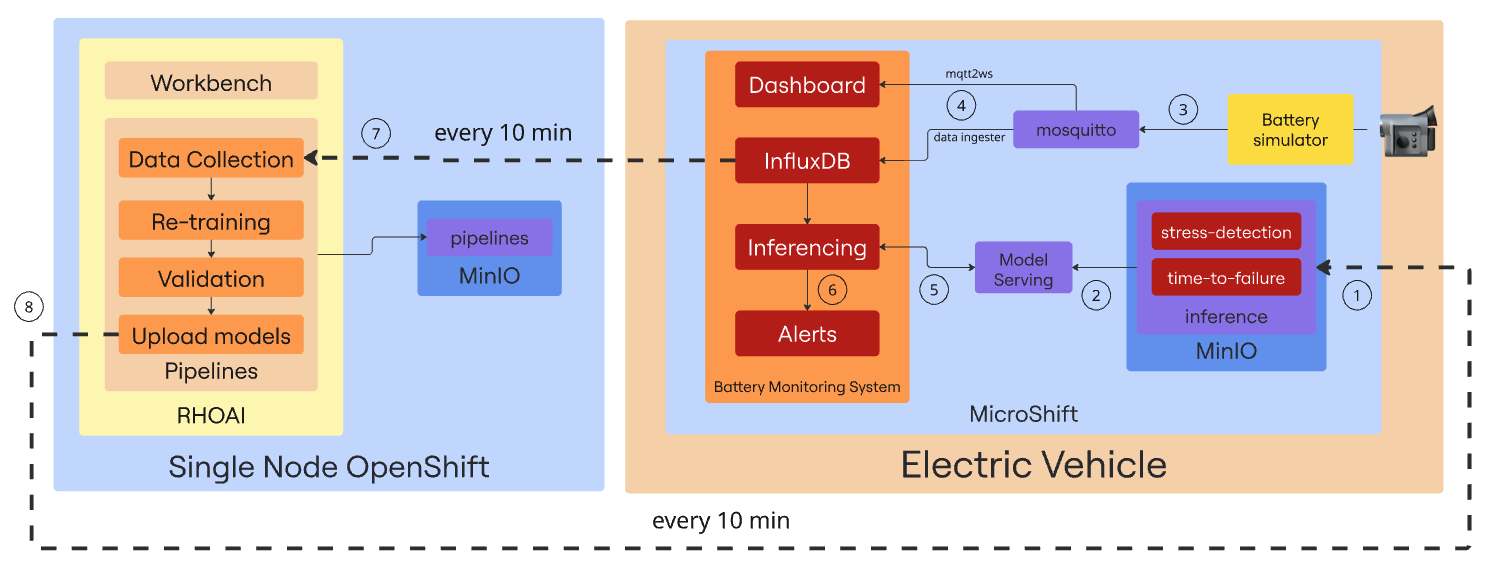
Sometimes, a picture is worth a thousand words. Below, you will find a diagram illustrating the main components involved in our solution:
-
Our environment comes with 2 base AI models stored in the inference MinIO bucket. The first one called Stress Detection will be able to identify early signs of battery stress - conditions that may lead to degradation or failure. The second one - Time to Failure - uses sensor data to provide an estimate of the remaining time until a potential battery failure.
-
Both models are loaded into the InferenceServer instance to make them available for inference via API endpoints.
-
The Battery simulator item is a Quarkus component that simulates the battery consumption of an operating transportation robot and sends telemetry data to the Mosquitto MQTT broker that acts as the central messaging hub, receiving the data coming from the emulated sensors.
-
2 different Camel Quarkus components are in charge of reading the data from Mosquitto and sending it to the Battery Monitoring System (BMS) app. The mqtt2ws exposes the data as WebSocket for the BMS Dashboard and the data ingester stores it in InfluxDB.
-
The Battery Monitoring System application includes a component that retrieves real-time data from InfluxDB and sends it as queries to the 2 inference endpoints and receives the predictions from the AI models currently being served.
-
The response returned by the models is analyzed, and forwarded to an alerting system that triggers notifications in case of detected battery stress conditions or signs of an imminent failure.
-
Every 10 minutes, a pipeline is triggered to collect the data, retrain the model, and compare its performance against the existing one. All in a fully automated manner.
-
If the comparison results show that the new models perform better, they are sent back to the inference MinIO bucket in the transportation robot, so the cycle can start again with the updated models.
Dashboard control center
Below are the dashboards and consoles you’ll use during this lab. Some will become available as you progress through the modules.
| This section is provided for your convenience, allowing quick access to any dashboard or machine you may need. However, all the necessary steps will be provided throughout the demo. |
Factory robot dashboards
Access the robot infrastructure via bastion host:
ssh {bastion_ssh_user_name}@{bastion_public_hostname} -p {bastion_ssh_port}| Credential | Value |
|---|---|
ssh user name |
|
ssh password |
|
Then connect to robot VM:
virtctl ssh cloud-user@vmi/microshift -n microshift-001 --identity-file=/home/lab-user/.ssh/microshift-001Available Dashboards:
| Dashboard | URL | Credentials |
|---|---|---|
Robot MinIO Storage |
Username: |
|
BMS Dashboard |
https://bms-dashboard-microshift-001.apps.cluster.example.com |
No authentication required |
InfluxDB |
Username: |
Re-training server dashboards
Available Dashboards:
| Dashboard | URL | Credentials |
|---|---|---|
OpenShift Web Console |
Username: |
|
OpenShift AI Dashboard |
https://rhods-dashboard-redhat-ods-applications.apps.cluster.example.com |
Username: |
SNO MinIO Storage |
Username: |
Next steps
Now that you understand the technical architecture and have access to all dashboards, you’re ready to begin the hands-on modules.
Begin the hands-on exercises: Module 1: Transportation robot