Module 5: Validate the End-to-End Workflow
Overview
The model is deployed, evaluated, exposed as a service, and connected to an application. This module brings those pieces together by validating the end-to-end request flow. You trace one inference request through the canonical serving chain — application → MaaS gateway → model server → model — verify every component along the way, troubleshoot a simulated failure, and confirm reliability against the baseline response captured at the start.
Structured, layer-by-layer log inspection is the core skill of this module: a shared AI service fails between layers, and the layer that stops logging is where the break is.
|
Every failure introduced in this module is reversible — revert steps are explicit, and the environment must be left healthy for Module 6, which monitors the same serving chain under load. |
Modules 1–4 complete — the model is deployed and serving (your project), exposed as Model-as-a-Service with a reachable API endpoint, and the sample application is deployed and connected to the model service.
20 minutes (5 min trace / 5 min verify components / 5 min troubleshoot / 5 min confirm reliability)
Learning objectives
By the end of this module you will be able to:
-
Verify end-to-end request flow from application request to model response
-
Troubleshoot common issues in the serving chain between the application and the model
Exercise 1: Trace a request through the serving chain
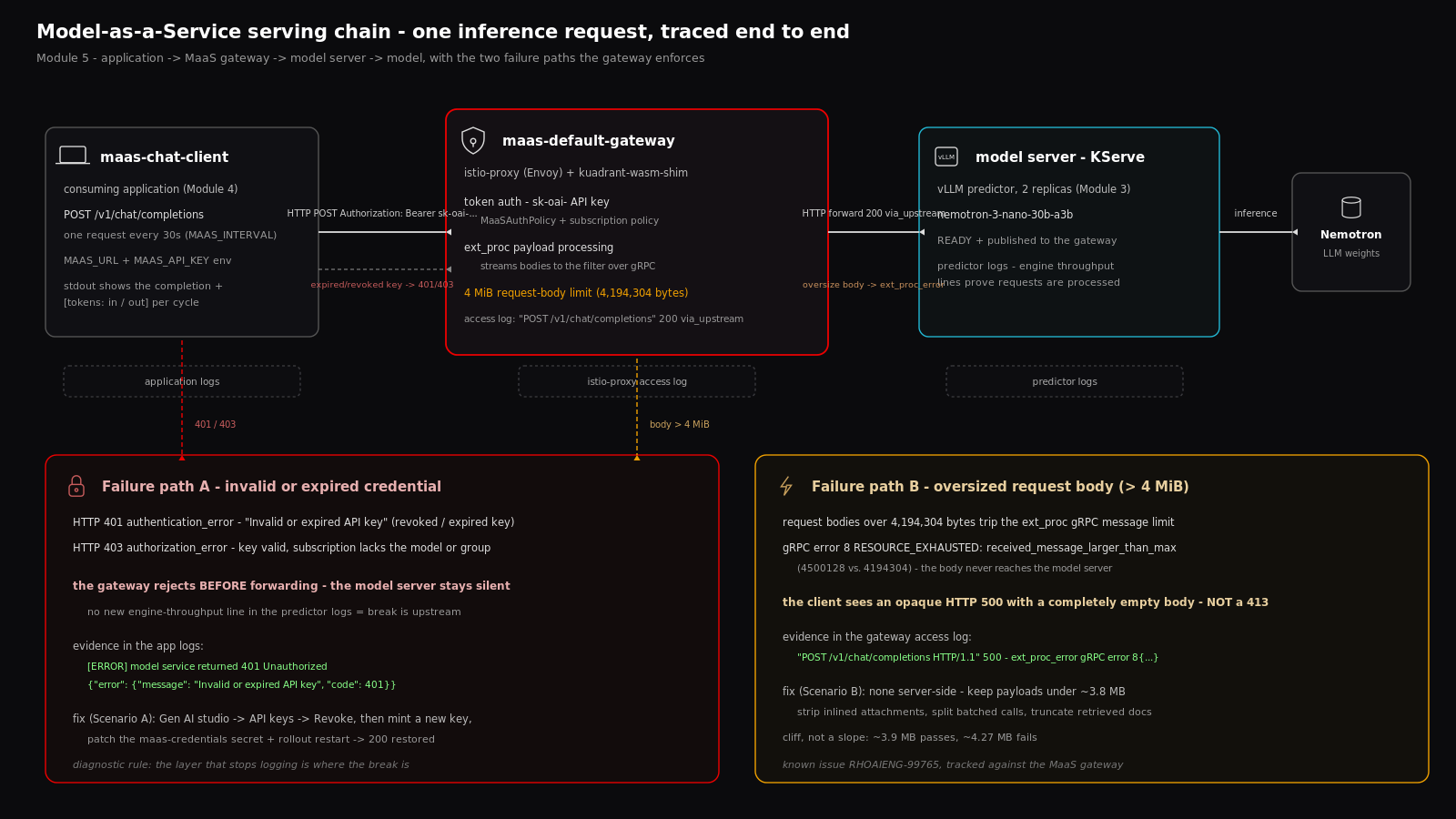
The path every successful inference follows:
[application]              [MaaS gateway]               [model server]
maas-chat-client --HTTP POST-->  maas-default-gateway  --HTTP-->  vLLM predictor  -->  [model]
      |                          |                          |
 application logs          istio-proxy log             predictor logs
The model behind the gateway is nemotron-3-nano-30b-a3b, serving in your project (Module 1) and published to the maas-default-gateway gateway (Module 3). The consuming application is the one deployed in Module 4.
Send one request and follow it through every layer:
-
Open the application interface and send a request that triggers an inference call. Note the response — this is your baseline. Copy it now: Exercise 4 compares against it to prove the chain is still healthy after the failure simulations.
-
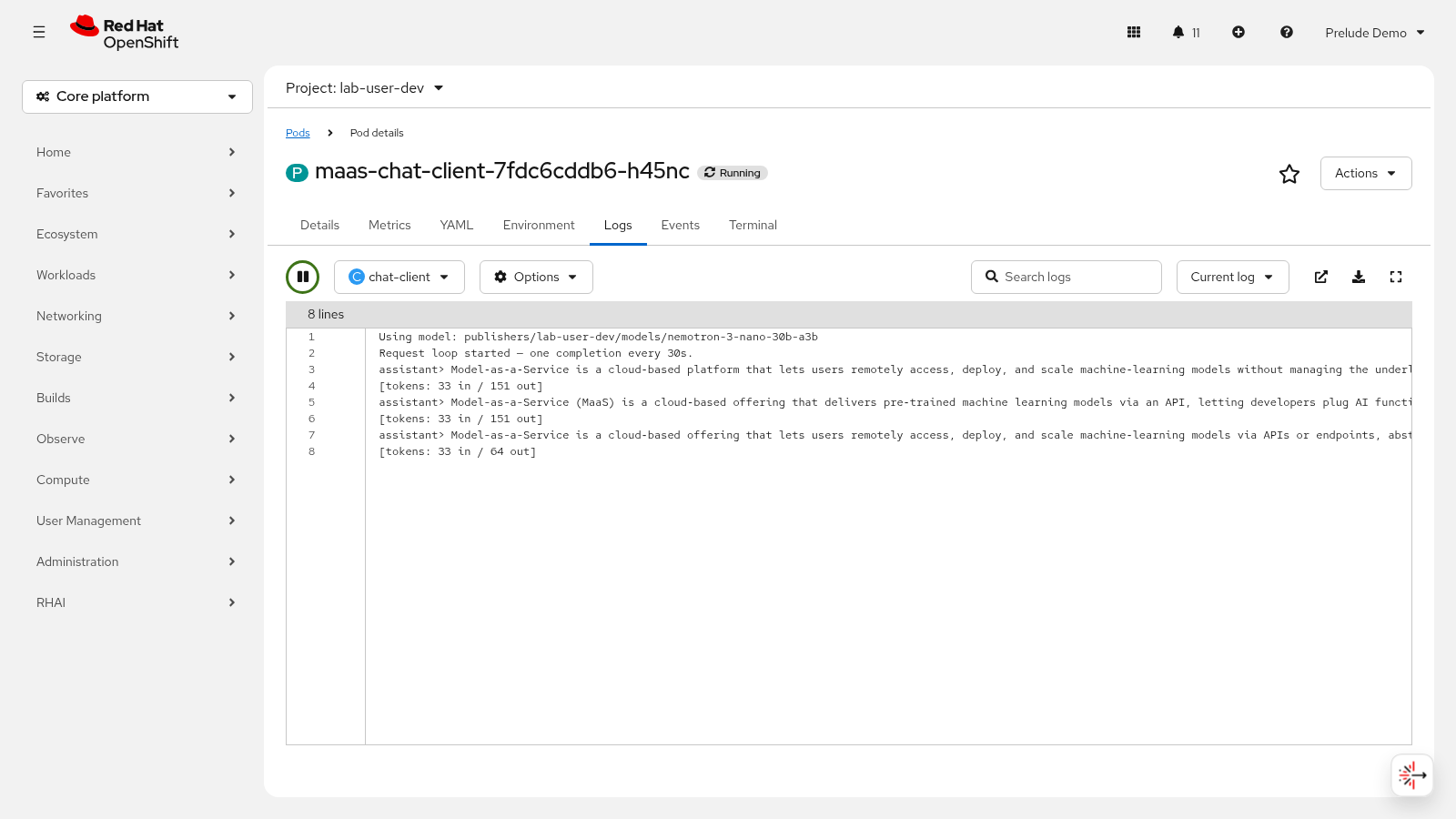
Inspect the application logs to confirm the outbound request was sent:
oc logs deployment/maas-chat-client --tail=20Expected output (representative — exact wording depends on the application):
[INFO] inference request sent: POST https://maas.apps.<cluster-domain>/v1/chat/completions
[INFO] model service returned 200 OK (response saved)
Look for the POST to the MaaS gateway URL with a 200 status. The gateway URL was recorded in Module 3 and configured in Module 4.
-
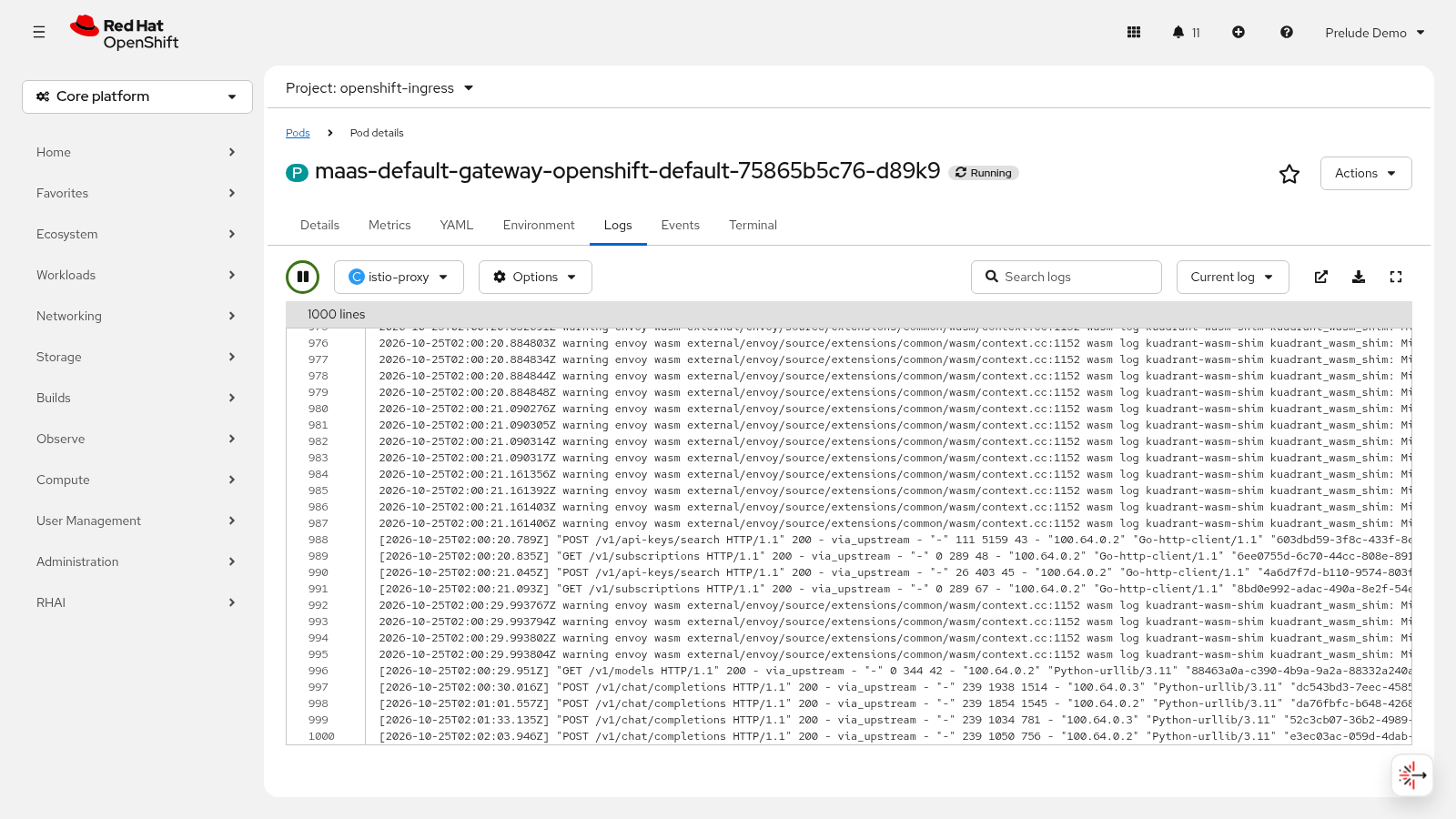
Inspect the MaaS gateway access log. The gateway runs as
maas-default-gatewaypods with anistio-proxycontainer in theopenshift-ingressnamespace:
oc logs -n openshift-ingress deployment/maas-default-gateway-istio -c istio-proxy --tail=20Expected output (abridged — one access-log line per request):
[2026-10-24T09:14:58.123Z] "POST /v1/chat/completions HTTP/1.1" 200 - via_upstream ...
The 200 with via_upstream confirms the gateway authenticated the request, applied the subscription policy, and forwarded it to the model server.
-
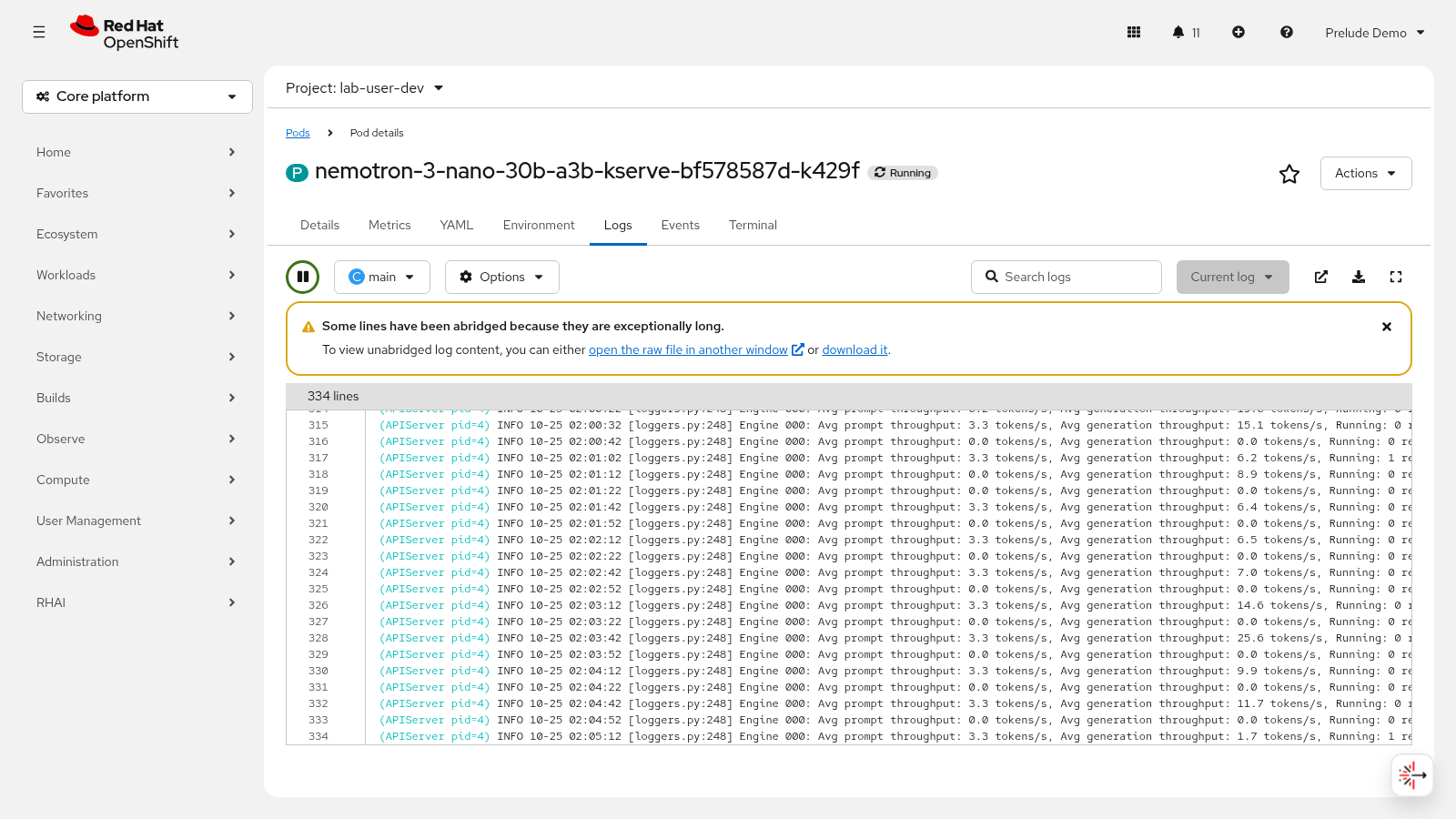
Inspect the model server logs to confirm the inference request was received and processed:
MODEL_POD=$(oc get pods -n {project-namespace} -o name | grep '^pod/nemotron-3-nano-30b-a3b-predictor' | head -1)
oc logs -n {project-namespace} ${MODEL_POD} --tail=20
Expected output (representative — exact wording varies by vLLM version):
INFO 10-24 09:14:57 [async_llm.py:258] Added request chatcmpl-<id>.
INFO 10-24 09:14:58 [logger.py:39] Finished request chatcmpl-<id>.
INFO:     10.129.4.27:41234 - "POST /v1/chat/completions HTTP/1.1" 200 OK
The Added request and Finished request lines confirm the model server received the request and the model processed it.
|
Set the values recorded in Module 3 as environment variables — later steps use them. Run these in the same terminal session so they remain available: |
Exercise 2: Verify each component
Now that you have traced one request through every layer, you will verify each component’s health.
Work through the checklist layer by layer — each step gives the command and what healthy looks like.
-
Application pod Running and responding. The pod deployed in Module 4 must be up:
oc get pods -l app=maas-chat-clientExpected output:
NAME                            READY   STATUS    RESTARTS   AGE
maas-chat-client-7d9f8b6c5-xr2kp  1/1     Running   0          25m
Confirm the application interface still returns responses (send one as in Exercise 1).
-
MaaS subscription and API keys valid. The subscription and authorization policy provisioned in Module 3 must both exist:
oc get maassubscription,maasauthpolicy -n models-as-a-serviceExpected output — both resources for each subscription tier (maas-free-subscription and maas-premium-subscription, each with a matching -policy). Then confirm your key authenticates — /v1/models lists the models your subscription grants:
curl -s "${MAAS_URL}/v1/models" -H "Authorization: Bearer ${MAAS_API_KEY}" | jq -r '.data[] | [.id, .ready] | @tsv'Expected output:
publishers/{project-namespace}/models/nemotron-3-nano-30b-a3b true
-
Gateway routing. The gateway pods must be
Running:
oc get pods -n openshift-ingress | grep maas-default-gatewayExpected output:
NAME                                          READY   STATUS    RESTARTS   AGE
maas-default-gateway-istio-6f9b7d8c4-xq2lp    1/1     Running   0          2d
-
Model server Ready and serving. The
LLMInferenceServicedeployed in Module 1 (scaled to two replicas in Module 3) must reportREADY:
oc get llminferenceservice nemotron-3-nano-30b-a3b -n {project-namespace}Expected output:
NAME                          URL   READY   AGE
nemotron-3-nano-30b-a3b             True    45m
-
Metrics endpoints. The model server exposes Prometheus metrics on port
8080at/metrics. Forward the port and scrape it:
# Terminal 1 — forward the model server metrics port
oc port-forward -n {project-namespace} ${MODEL_POD} 8480:8080

# Terminal 2 — scrape the endpoint
curl -s localhost:8480/metrics | head -5
Expected output (vLLM metric series):
# HELP vllm:num_requests_running Number of requests currently running on GPU.
# TYPE vllm:num_requests_running gauge
vllm:num_requests_running{model_name="publishers/{project-namespace}/models/nemotron-3-nano-30b-a3b"} 0.0
|
The MaaS gateway also exposes Envoy telemetry metrics — the surface Module 6 consumes when monitoring serving behavior under load. If metrics are missing here, Module 6 will have nothing to display; fix metrics access before moving on. |
-
Document the healthy trace. Summarize what healthy looks like at each step — this is the reference you troubleshoot against in Exercise 3:
| Layer | Evidence of health | Where you saw it |
|---|---|---|
Application |
|
|
MaaS gateway |
Access-log line |
|
Model server |
|
|
Model |
Completion returned with |
Application response body |
Exercise 3: Troubleshoot a simulated failure
Now that you know what healthy looks like at every layer, you will introduce — and fix — simulated failures.
Both scenarios follow the same discipline: introduce a reversible failure, observe the error behavior in the logs, diagnose which layer broke, then fix and revert. The key diagnostic: a failure at one layer leaves the layers below it silent — if the model server logs show no request, the break is upstream at the gateway or the application.
| Symptom | Broken layer | Covered in |
|---|---|---|
HTTP 401 / 403 on every request |
Access control — API key or subscription |
Scenario A |
HTTP 500 with an empty body on large requests |
MaaS gateway — request body limit |
Scenario B |
HTTP 404 or connection refused |
Wrong endpoint URL — check |
— |
HTTP 429 Too Many Requests |
Subscription token rate limit — wait for the window to reset and retry |
— |
Scenario A — Invalid or expired API credential
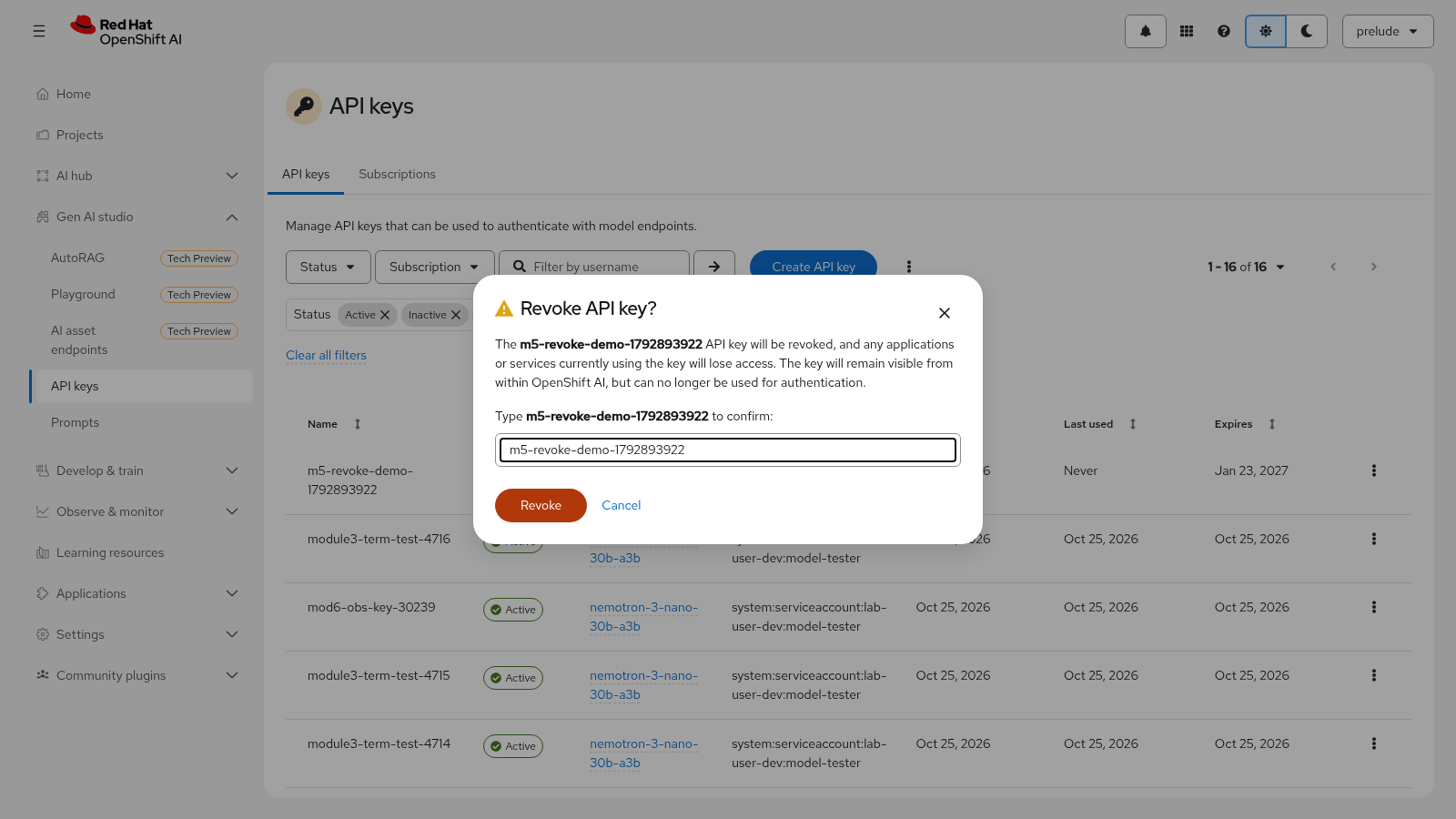
Revoke the API key your application uses: in the OpenShift AI dashboard, navigate to Gen AI studio → API keys, and in the row for your key click the action menu (⋮) and select Revoke. Confirm by entering the key name. The key stops working — the application secret still holds the now-revoked key.
Send a request from the application interface — it fails. Inspect the logs at each layer:
oc logs deployment/maas-chat-client --tail=10Expected output (representative):
[ERROR] model service returned 401 Unauthorized
[ERROR] {"error": {"message": "Invalid or expired API key", "type": "authentication_error", "code": 401}}
Check the model server — it is silent, because the gateway rejected the request before forwarding it:
oc logs -n {project-namespace} ${MODEL_POD} --tail=10No new Added request line appears: the model never saw the request.
The layer that stopped logging is where the break is. A 401 Unauthorized with authentication_error means the credential itself is invalid. The possible causes:
-
API key revoked — exactly what you just did; create a new one
-
API key expired — keys carry an expiration (30–90 days by default); create a new one from the API keys page
-
Incorrect key format — the
Authorization: Bearer <key>header must carry the full key including thesk-oai-prefix -
Wrong authentication method — OpenShift login tokens are not valid for MaaS authentication; a MaaS API key from the dashboard is required
|
Distinguish the two authorization errors: 401 ( |
Mint a new key using the Module 3 flow: in the dashboard, navigate to Gen AI studio → API keys, click Create API key, name it, select your subscription, choose an expiration, and click Create. Copy the plaintext key (with the sk-oai- prefix) — it is displayed only once.
Update the application to use the new key with the same mechanism you used in
Module 4 — patch the maas-credentials Secret created in Module 4, Exercise 2 (it lives
in your project), then restart the rollout:
oc patch secret maas-credentials --type merge \
  -p '{"stringData":{"MAAS_API_KEY":"{maas_api_key}"}}'
oc rollout restart deployment/maas-chat-client
Wait for the rollout to complete, then send a request from the application interface again. It succeeds with 200 — the environment is restored. Re-export the new key for the rest of this module:
export MAAS_API_KEY="{maas_api_key}"|
Revert verified: the revoked key is gone, the new key is active, and the application pod is |
Scenario B — Oversized request body
Send a request larger than 4 MiB through the gateway. The Python snippet pads a prompt until the JSON body passes the 4,194,304-byte limit, then POSTs it:
import json
import os

import requests

url = os.environ["MAAS_URL"].rstrip("/") + "/v1/chat/completions"
headers = {
    "Authorization": "Bearer " + os.environ["MAAS_API_KEY"],
    "Content-Type": "application/json",
}

# Pad the prompt until the request body is well past the 4 MiB gateway limit
padding = "x" * 4_300_000
payload = {
    "model": os.environ["MODEL_ID"],
    "messages": [{"role": "user", "content": "Summarize this text: " + padding}],
    "max_tokens": 32,
}
body = json.dumps(payload).encode()

print(f"Request body size: {len(body):,} bytes (gateway limit: 4,194,304)")

response = requests.post(url, headers=headers, data=body, timeout=120)
print(f"HTTP {response.status_code} - response body: {len(response.content)} bytes")
Save the snippet as oversized-request.py and run it:
python3 oversized-request.pyExpected output:
Request body size: 4,300,144 bytes (gateway limit: 4,194,304)
HTTP 500 - response body: 0 bytes
The response is an opaque HTTP 500 with a completely empty body — not a 413 Payload Too Large, and not the JSON error envelope you saw in Scenario A. The application cannot tell what went wrong from the response alone.
Read the gateway access log for the failing request:
oc logs -n openshift-ingress deployment/maas-default-gateway-istio -c istio-proxy --tail=50 | grep -i ext_proc_errorExpected output (abridged — <size> is your actual body size):
... ext_proc_error gRPC error 8{grpc: received_message_larger_than_max (4300144 vs. 4194304)}
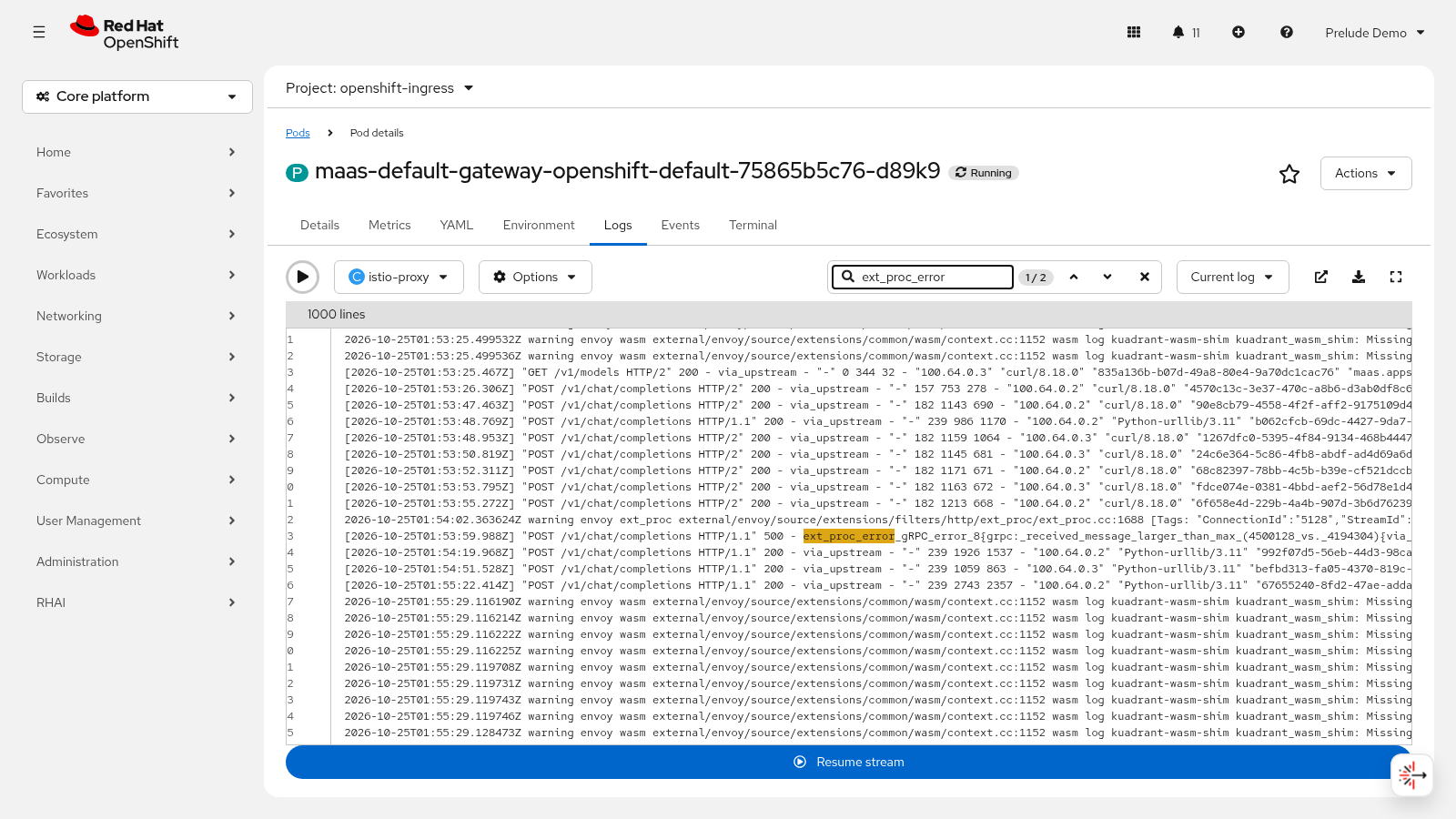
The gateway’s external processing (ext_proc) layer receives request bodies over gRPC with a 4,194,304-byte (4 MiB) message limit. Error 8 is gRPC RESOURCE_EXHAUSTED: received message larger than max. The body never reaches the model server — the vLLM logs stay silent and the gateway emits the empty 500.
The threshold is a cliff, not a slope: requests up to roughly 3.9 MB pass normally, while requests of roughly 4.27 MB and above fail. This is not an Envoy or Kuadrant configuration problem on your side — it is a known issue, RHOAIENG-99765, tracked against the MaaS gateway.
There is nothing to undo in the environment — the gateway rejected the request without changing state. The fix is client-side: keep request payloads under roughly 3.8 MB through the MaaS gateway. The usual sources of oversized bodies:
-
Base64-encoded attachments or images inlined in the prompt JSON — strip them, or move the content to object storage and reference it by URL
-
Batched requests that concatenate many documents into one call — split them into smaller requests
-
Retrieved documents pasted wholesale into the prompt — truncate or summarize before sending
Confirm the chain is healthy again with a normal-sized request:
curl -s "${MAAS_URL}/v1/chat/completions" \
  -H "Authorization: Bearer ${MAAS_API_KEY}" \
  -H "Content-Type: application/json" \
  -d "{\"model\":\"${MODEL_ID}\",\"messages\":[{\"role\":\"user\",\"content\":\"What is Model-as-a-Service in one sentence?\"}],\"max_tokens\":100}" \
  | jq -r '.choices[0].finish_reason'
Expected output:
stop
Exercise 4: Confirm end-to-end reliability
After restoring from both failures, prove the serving chain is back to its baseline.
-
Re-run the happy path through the application. Send a request from the application interface and compare the response to the baseline captured in Exercise 1: same structure,
finish_reason: stop, and a completion consistent with the original — the chain recovers end-to-end after the failure cycle. -
Re-run the direct API check. The same curl from Scenario B still returns
stopwith HTTP 200 — a completion in the same OpenAI-compatible format as the baseline, includingusagetoken counts. -
Verify metrics are still flowing. Scrape the model server metrics endpoint again and confirm the counters advanced past the values seen in Exercise 2 — through the failed attempts and the recovery, the serving chain kept emitting telemetry:
curl -s localhost:8480/metrics | grep -E 'vllm:num_requests_(running|waiting)|success_total' | head -5Expected output: live metric series with updated counter values.
|
Metrics still flowing is the handoff to Module 6, where you watch these same series on the observability dashboard while the application generates load. If the counters did not move, revisit Exercise 2 before continuing. |
-
Summarize the serving chain health. At this point you have verified:
-
Application pod
Running, sending requests, logging outcomes -
Subscription and authorization policy present; API key valid with
sk-oai-prefix -
Gateway pods
Running, routing requests, enforcing the 4 MiB body limit -
Model server
READY, receiving requests, serving completions -
Metrics flowing from the model server for Module 6
-
Module summary
What you accomplished:
-
Traced a request through the serving chain and verified each component.
-
Troubleshot simulated failures — an invalid API credential and an oversized request body.
-
Confirmed end-to-end reliability against the baseline.
Key takeaways:
-
End-to-end validation confirms that deployment, serving, access control, and application integration are all working together.
-
Tracing a request through the serving chain reveals where failures occur when something breaks.
-
Structured troubleshooting — checking logs at each layer — is essential for maintaining production AI services.
-
Keep request payloads under roughly 3.8 MB through the MaaS gateway: oversized bodies fail with an opaque HTTP 500 and an empty body (RHOAIENG-99765), not a 413.
Next steps:
The serving chain is validated end-to-end: continue to Module 6 to monitor it under load.