Hands-On AIOps: Building Self-Healing, Observability-Driven Automation with Ansible
1. Background
AIOps stands for artificial intelligence for IT operations. It refers both to a modern approach to managing IT operations and to the software systems that implement it. AIOps uses data science, big data, and machine learning to augment, or even automate, many of the processes traditionally handled manually by IT teams. Its goal is to improve issue detection, root cause analysis, and system resolution by making IT operations more intelligent and efficient. To read more about AIops there is a great article on redhat.com.
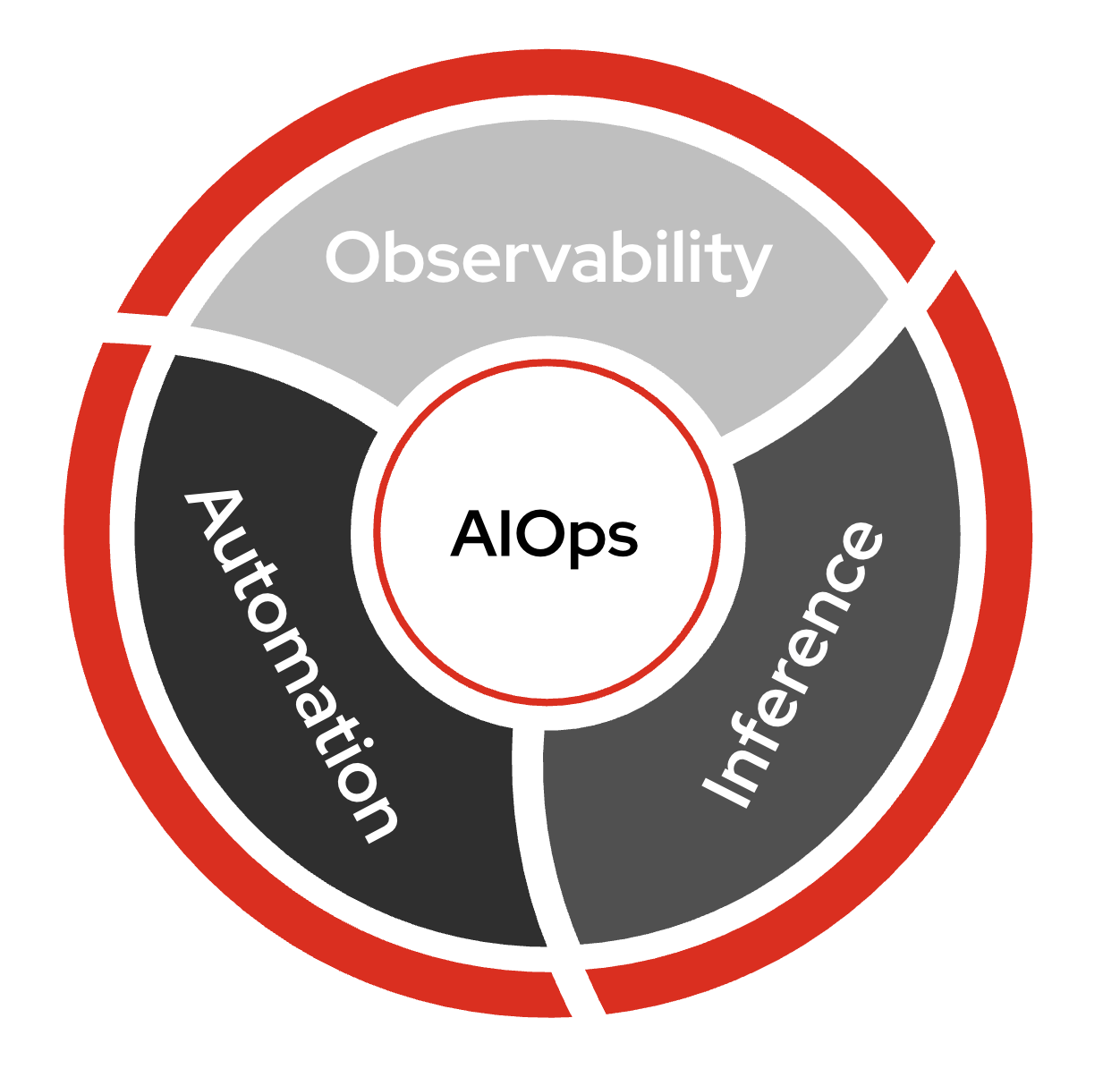
In AIOps there are three major parts:
-
Observability
-
Inference
-
Automation
-
Observability is the ability to understand the internal state of a system by collecting, analyzing, and visualizing data from logs, metrics, and traces. This can be another AI tool such as IBM Instana Observability. For this lab we are simply relaying logs using Filebeat, a Lightweight shipper for logs. Ansible Automation Platform can integrate with observability tools using Event-Driven Ansible (EDA).
-
Inference - Inference in AI refers to the process of using a trained model to make predictions or decisions based on new, unseen data. For this AIOps workflow we are using Red Hat AI for understanding service issues like an application outage, and Automation coding assistant to create an Ansible Playbook.
-
Automation is the ability to automatically detect, respond to, and resolve IT issues without human intervention. We are using Ansible Automation Platform to tie observability and inference together directly to create workflows for self-healing infrastructure.
It is important to note that AIOps can be adopted incrementally and it is not all or nothing. You do not need to have fully self-healing infrastructure on day one to start realizing value. At Red Hat we like to say: "Start small, think big!"
2. Lab Environment
-
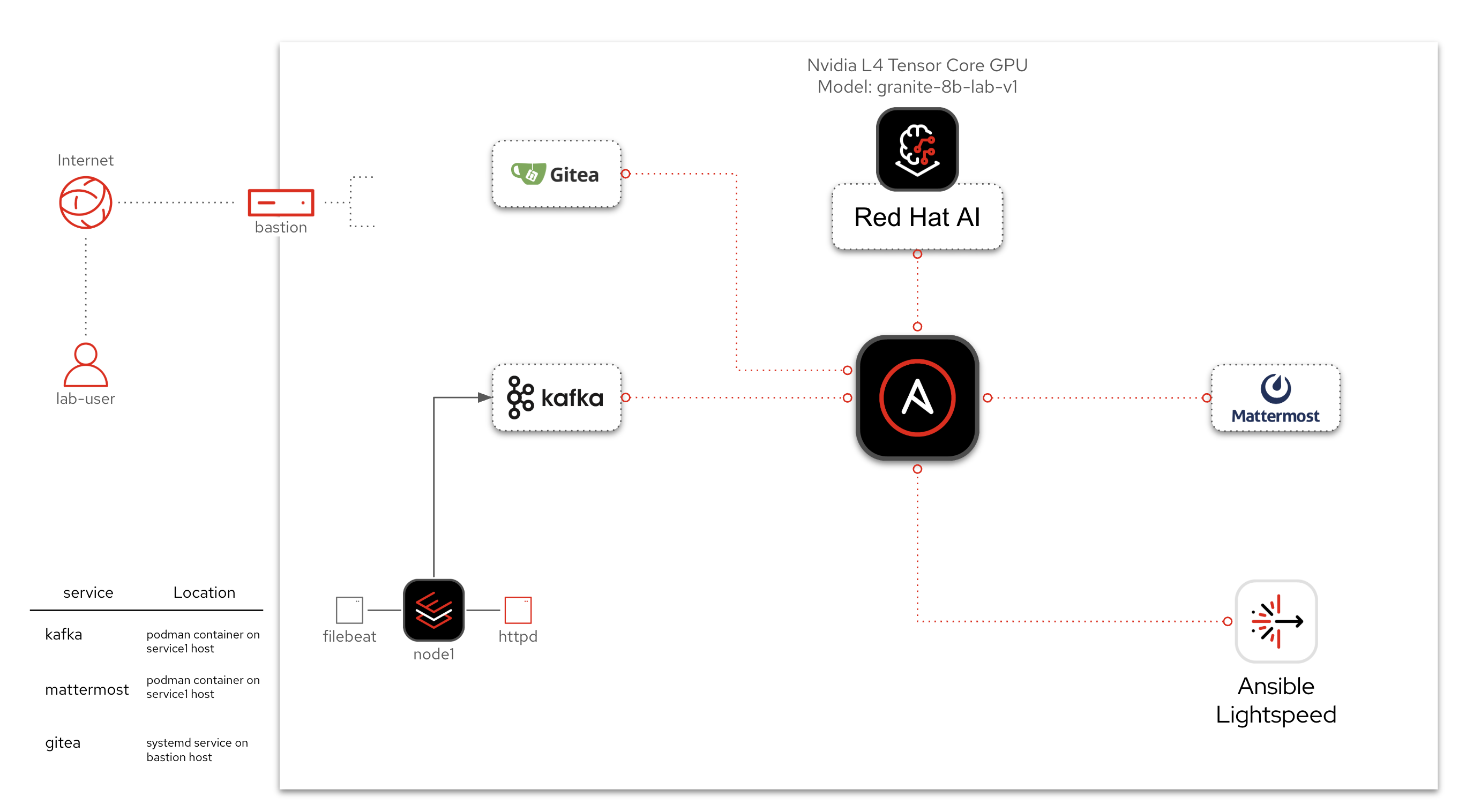
Three RHEL (Red Hat Enterprise Linux) nodes: one with Apache (
httpd), and two additional nodes for CVE remediation and system role configuration -
Filebeat monitoring Apache logs
-
Kafka acting as the event transport
-
Event-Driven Ansible is listening to Kafka and launching workflows based on defined rules
-
Red Hat AI to infer incident context from logs
-
Automation coding assistant to generate a remediation playbook
-
Gitea for source control management of Ansible Playbooks
-
Ansible Automation Platform to run job templates and workflows
-
Mattermost for message notifications
-
A Windows Server with Active Directory for Windows event-driven automation
-
Winlogbeat on Windows forwarding events to Kafka
-
Red Hat Lightspeed (formerly Insights) for CVE and Advisor remediation playbook generation
-
code-server (VS Code in the browser) with Claude Code as the AI agent, connected to AAP via the Ansible MCP server
-
Automation coding assistant (formerly Ansible Lightspeed) for AI-powered playbook generation in the IDE
-
Splunk Universal Forwarder on RHEL for system-level misconfiguration detection
-
CrewAI agent framework for autonomous AI-driven incident response
EDA (Event-Driven Ansible) is part of Ansible Automation Platform. It is referred to separately sometimes depending on the workflow. EDA uses rulebooks to monitor events, then executes specified job templates or workflows based on the event. Think of it simply as inputs and outputs. EDA is an automatic way for inputs into Ansible Automation Platform, where Automation controller / Automation execution is the output (running a job template or workflow).
3. Access & Credentials
All lab content is preconfigured and ready to run.
3.1. Systems Overview
This lab environment includes a variety of tools working together to demonstrate AI-driven remediation. You’ll interact with the following systems:
-
Ansible Automation Platform (AAP) - Executes workflows and job templates. Already opened in your lab interface.
-
Gitea - Git service used to host the AI-generated playbook.
-
Mattermost - Used for automated notifications during log enrichment.
-
RHEL node - The webserver (
httpd) that will experience and recover from failure. -
Red Hat AI & Automation coding assistant - AI services that analyze logs and generate remediation content.
3.2. Access Table
| System | URL | Credentials |
|---|---|---|
Ansible Automation Platform |
AAP is preloaded in the lab interface. Click link if you want to open it in full tab: AAP Web UI |
Username: |
Gitea |
Username: |
|
Mattermost |
Username: |
|
Splunk |
Username: |
|
Red Hat Lightspeed (console.redhat.com) |
console.redhat.com Used in Section 4 for CVE and Advisor remediation |
Username: |
4. EDA Rulebook Activation Management
|
Read this before starting any section. This lab uses multiple Event-Driven Ansible (EDA) rulebook activations, and some of them listen on the same ports or respond to overlapping events. Only the activations relevant to your current section should be enabled. Each section that requires an EDA change will include specific instructions, but here is the overall map for reference:
Sections 1, 2, 3 can run concurrently since their activations do not conflict. Sections 5 and 6 require toggling activations as noted. Section 4 (Red Hat Lightspeed and Agentic IDE Workflow) does not use EDA at all. |
5. Workshop Sections
This workshop consists of six independent sections that can be completed in any order. Together they cover the full AIOps maturity spectrum, from event-driven remediation with human review to fully autonomous self-healing with AI agents.
| Section | Title | Description |
|---|---|---|
A basic introduction to AIOps: build a self-healing workflow for Apache service failures using Red Hat AI and Automation coding assistant. (30-40 min) |
||
Apply the same AIOps patterns to network infrastructure. Troubleshoot OSPF routing issues on Cisco routers using Splunk, Event-Driven Ansible, and AI-generated playbooks. (30-40 min) |
||
Extend the AIOps pattern to Windows Server. Detect Active Directory and Windows Firewall events with Winlogbeat and Kafka, then use Event-Driven Ansible to create AI-enriched tickets automatically. (15-20 min) |
||
Use Red Hat Lightspeed to generate CVE and Advisor remediation playbooks, use Automation coding assistant to generate an HTTPD fix in code-server, then use Claude Code to interactively discover and remediate issues via the Ansible MCP server. (50-70 min) |
||
Experience autonomous self-healing: Splunk detects a RHEL misconfiguration, EDA triggers an AI routing agent that selects and applies the correct fix automatically. (20-30 min) |
||
Use AI agents that interact with Ansible Automation Platform through the Model Context Protocol (MCP). Progress from human-in-the-loop with Claude Code, to autonomous CrewAI agents, to fully operationalized AI-driven incident response with EDA. (30-40 min) |
Total Workshop Time: ~3-4 hours (all sections) or pick individual sections as needed.
5.1. The AIOps Maturity Spectrum
This workshop takes you through the full maturity spectrum:
-
Sections 1-3: Event-driven with AI content generation and human review checkpoints
-
Section 4: Human-in-the-loop with an AI agent that asks permission before every action
-
Section 5: Autonomous, pre-approved automation handles detection and remediation end-to-end
-
Section 6: AI agents that discover and orchestrate existing automation through MCP, from interactive to fully autonomous
5.2. Workshop Agenda
For Sections 1-3, each section follows a consistent 4-part structure:
-
Event-Driven Ansible (EDA) Response - Event Driven Ansible will respond to a systemd application outage
-
Log Enrichment and Prompt Generation Workflow - Ansible Automation Platform (AAP) will retrieve systemd logs, coordinate with Red Hat AI to analyze the incident, notify Mattermost then automatically create a Job Template for us to use in the subsequent workflow.
-
Remediation Workflow - This workflow will focus on automatically creating an Ansible Playbook to resolve the issue by using Automation coding assistant. This workflow will take the prompt created by the previous workflow, request a playbook from Automation coding assistant, sync this playbook to Git and then automatically create a Job Template for us to remediate the issue.
-
Execute a remediation
-
For Section 1: Execute HTTPD Remediation - This is the final Job Template that will actually fix the application outage on the RHEL webserver.
-
For Section 2: AI Driven Ansible for Network Automation - This section synthesizes the AI skills from the preceding sections of the Hands-On AIOps: Building Self-Healing, Observability-Driven Automation with Ansible into a practical network automation scenario.
-
Could this all be one workflow? Yes. This is purposely broken up at natural breakpoints where a human user can review what the AIOps workflow is doing and course correct if required. This also allows organizations to incrementally adopt AIOps workflows. Organizations can benefit greatly from any of these individual sections!
Here is a diagram of the entire workflow:
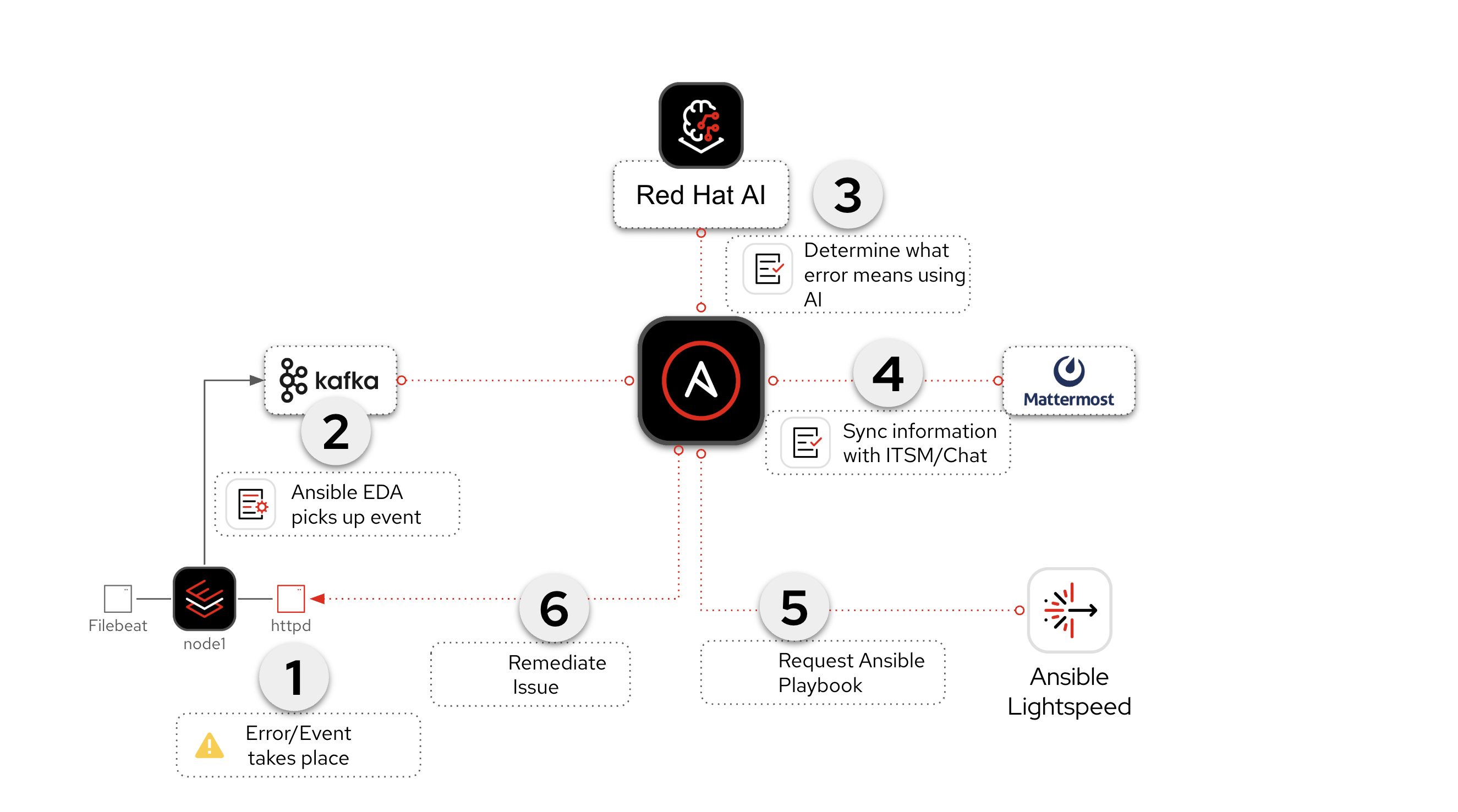
We will break this up into sections though! As you go through each section we will break down each individual workflow and go step-by-step! Red Hat and Ansible Automation Platform will make AIOps simple for organizations to adopt and scale.
Why Mattermost? Mattermost is an open-source, self-hostable online chat service with file sharing, search, and third party application integrations. It is designed as an internal chat for organisations and companies, and mostly markets itself as an open-source alternative to Slack and Microsoft Teams. It is used in this workshop as an example and can be replaced with any Chat or ITSM (e.g. ServiceNow) of your choice. It is really easy to setup an individual Mattermost container per student in the workshop!
Why Gitea? Gitea is a self-hosted, open-source software development service that provides Git hosting, code review, team collaboration, package registry, and CI/CD, similar to platforms like GitHub, Bitbucket, and GitLab. It could be replaced by Github, Gitlab or any Git service of your choosing. It is a very lightweight solution that works great for workshops.
Why Kafka? Apache Kafka is a distributed streaming platform used for building real-time data pipelines and streaming applications, enabling applications to publish, consume, and process high volumes of data streams. It is all open-source and self hosted and works great for workshops. This could be replaced by any event bus of your choosing. Event-Driven Ansible has numerous plugins including integrations with AWS SQS, AWS CloudTrail, Azure Service Bus, Prometheus, dynatrace, IBM Instana, BigPanda, Zabbix, CyberArk and more.