Section 6 - AI-Driven Incident Response with MCP
Objective
Estimated time: 30-40 minutes
In earlier parts of this lab, you used AI to generate automation. Red Hat AI analyzed logs, Automation coding assistant wrote playbooks, and you reviewed the output before running it. The AI was powerful, but it operated in a fixed pipeline: detect, analyze, generate, execute.
In this section, you will explore a fundamentally different approach. Instead of pre-built workflows and prompts, you will use AI agents that can directly interact with Ansible Automation Platform through the Model Context Protocol (MCP), an open standard that lets AI models discover and use tools in real time. The AI no longer generates playbooks. It discovers existing automation and decides which playbooks to run, when, and in what order.
You will work through three challenges that progressively increase the level of AI autonomy:
-
Challenge 1: You drive the AI. Use Claude Code to interactively query and control Ansible Automation Platform.
-
Challenge 2: AI drives Ansible Automation Platform. Autonomous AI agents triage, fix, and report on incidents.
-
Challenge 3: Event-driven AI. Event-Driven Ansible detects failures and triggers AI agents automatically.
Why Ansible Automation Platform for AI-driven operations?
AI models and agent frameworks are powerful, but they are inherently non-deterministic. The same prompt can produce different results depending on the model, temperature settings, context window, and even the time of day. In a development environment, that variability is acceptable. In production infrastructure, it is not.
Consider what happens when AI agents interact directly with production systems without governance:
-
A misconfigured AI agent at a financial institution autonomously rolls back a database migration, corrupting transaction records for thousands of customers.
-
An AI-driven remediation in a healthcare system restarts a service that handles patient data, violating HIPAA compliance because no audit trail captured the decision.
-
An autonomous agent in a retail environment scales down infrastructure during what it interprets as low traffic, but it is actually Black Friday pre-staging.
-
An AI agent with direct SSH access to production servers executes an untested fix, taking down a payment processing pipeline during peak hours.
These are not hypothetical edge cases. In 2024, an AI-powered coding assistant at a major tech company autonomously merged code that bypassed security reviews, causing a production outage. AI systems operating without governance guardrails create real risk.
Ansible Automation Platform solves this by separating what AI is good at from what it is not. AI handles the non-deterministic work: reasoning about incidents, triaging alerts, deciding which action to take. Ansible handles the deterministic work: executing tested playbooks, enforcing access controls, recording audit trails. The AI decides what to do. Ansible governs how it gets done.
When AI agents need to touch production systems (restart services, apply patches, modify configurations), those actions go through Ansible Automation Platform. That means:
-
Deterministic execution: tested, repeatable playbooks replace ad-hoc AI-generated commands
-
User-scoped identity: AI agents act under the identity and permissions of the authorizing user, not a shadow service account with elevated access
-
RBAC controls: the same role-based access that governs human operators governs AI agents
-
Audit trails: every action, every decision, every outcome is captured
-
Approval gates: humans can review AI recommendations before execution
-
Credential management: secrets stay in Ansible, never exposed to AI agent code
In this module, you will see this pattern in action: AI agents connect to Ansible Automation Platform via MCP, but every infrastructure operation goes through Ansible. The AI agent never SSHs into a server, never runs ad-hoc commands, never touches infrastructure directly. It discovers available automation, selects the right playbook, and asks Ansible Automation Platform to execute it, under the authorizing user’s identity, with full RBAC, audit, and governance.
What is MCP?
The Model Context Protocol (MCP) is an open standard that allows AI models to discover and use external tools. Think of it as a USB-C port for AI: a universal connector that lets any AI system plug into any tool server.
In this lab, Ansible Automation Platform hosts an MCP server that exposes its capabilities as tools:
-
Job Management: list, launch, and monitor job templates
-
Inventory Management: query hosts, groups, and inventories
-
Security: manage credentials and audit activity
Any MCP-compatible AI client can discover these tools automatically and use them to interact with Ansible Automation Platform. No custom API integration code required.
A note on models and frameworks
In this module, we use Claude (by Anthropic) as the AI model and CrewAI as the agent framework. These are choices, not requirements.
Models: MCP is model-agnostic. Any large language model that supports tool use (Claude, GPT, Gemini, Llama, Granite, Mistral) can connect to the Ansible Automation Platform MCP server and interact with the same tools. In earlier parts of this lab, you used Automation coding assistant to generate playbooks (AI as a code generator). Here, you use Claude to interact with Ansible Automation Platform at runtime (AI as a decision-maker). Both patterns are valid, and your organization’s AI strategy determines which models you use. The integration pattern remains the same.
Learning objectives
After completing this section, you will be able to:
-
Use an AI coding assistant (Claude Code) to interact with Ansible Automation Platform through MCP
-
Run autonomous AI agents that triage and remediate incidents using Ansible Automation Platform
-
Combine Event-Driven Ansible with AI agents for automated incident response
-
Articulate why AI agents should interact with infrastructure through Ansible Automation Platform, not directly
-
Understand how the automation orchestrator, an exciting new feature coming to Ansible Automation Platform, will unify these approaches
Challenge 1: Human-in-the-loop with Claude Code
In this challenge, you will use Claude Code, an AI coding assistant, to interact with Ansible Automation Platform through natural language. Claude Code connects to the MCP server and discovers available tools automatically. You stay in control: you ask questions, review results, and decide what actions to take.
Step 1.1: Open VS Code
-
Click the @Codeserver tab in your lab interface
-
Enter your password if prompted:
{{ common_password }}
Step 1.2: Open Claude Code
-
Open a terminal in VS Code: click Terminal in the top menu bar, then click New Terminal
-
Claude Code is pre-installed. Start it by typing the following command and pressing Enter:
claude -
Wait for Claude Code to initialize. You should see the Claude Code interface with a prompt ready for input.
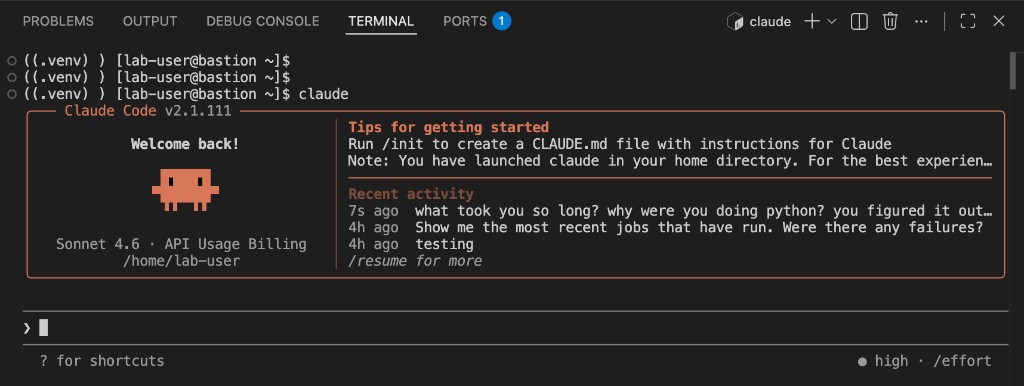
+ When Claude Code starts for the first time, it will display a safety prompt asking if you trust the current folder. Select 1. Yes, I trust this folder and press Enter to continue.
|
Claude Code is already configured to connect to the Ansible Automation Platform MCP server. No additional setup is required. When you ask Claude about Ansible Automation Platform, it will automatically discover and use the MCP tools. |
|
Model availability. This lab environment provides access to Claude Sonnet 4.6 (
|
Step 1.3: Discover available automation
Claude Code is connected to the MCP server. Type the following prompt and press Enter:
Search for job templates related to "Apache" in AAP. List their names, IDs, and descriptions.Before Claude executes any MCP tool, it will ask for your permission:
Do you want to proceed?
 ❯ 1. Yes
   2. Yes, and don't ask again for aap-job-mgmt - job_templates_list commands in /home/lab-user
   3. No
This is an important safety guardrail. Claude Code requires explicit human approval before calling external tools. It will not take action on its own without your consent. Select 1. Yes to approve the tool call and continue. You will see this prompt each time Claude wants to use a new MCP tool.
|
If you want to speed up your workflow, select option 2 to allow Claude to use that specific tool without asking again for the remainder of the session. This is useful once you are comfortable with the tools Claude is calling. |
What to observe:
-
Claude calls the
job_templates_listMCP tool with a search filter. You will see the tool call in the output. -
Claude presents the results in a readable, formatted table
-
You should see templates including Break Apache, Restore Apache, and Apache Service Status Check
Step 1.4: Check infrastructure status
Type the following prompt:
What hosts are registered in AAP? Which inventories do they belong to?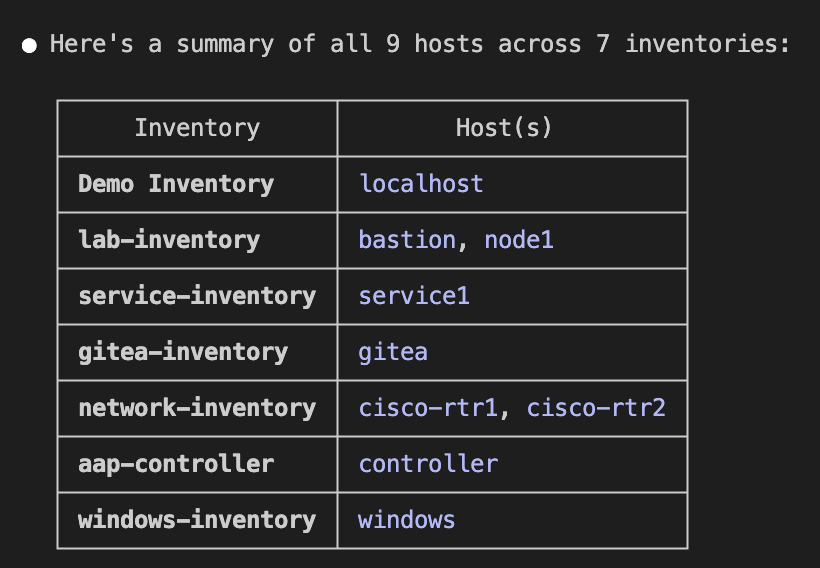
What to observe:
-
Claude queries both the
hosts_listandinventories_listMCP tools -
It cross-references the data to show which hosts belong to which inventories
-
You should see
node1in thelab-inventoryandbastionin thelab-inventory
Step 1.5: Investigate recent activity
Type the following prompt:
Show me the most recent jobs that have run. Were there any failures?What to observe:
-
Claude uses the
jobs_listtool to retrieve recent job history -
It highlights any failures and shows job status (successful, failed, running)
-
You should see the jobs that were launched during the lab provisioning process
Step 1.6: Take action and diagnose a problem
Now ask Claude to take an action. Type the following prompt:
Launch the "Apache Service Status Check" job template and show me the results when it completes.What to observe:
-
Claude calls the
job_templates_launch_createMCP tool to start the job -
It polls the
jobs_retrievetool to check job status until completion -
It retrieves the output using
jobs_stdout_retrieveand presents the results -
Apache should currently be running on node1
|
Notice what is happening here: Claude does not SSH into node1 to check Apache. It asks Ansible Automation Platform to run a job template (a pre-approved, tested playbook) and reads the results. The AI never touches infrastructure directly. Also notice who is executing: Claude uses your lab user’s gateway token, which means it operates under your RBAC permissions. You can verify this in the Ansible Automation Platform UI: navigate to Access Management → OAuth2 Tokens and you will see the token that the MCP server uses. If your user lacked access to the Apache templates, Claude would be denied, just like a human operator would be. There are no hidden service accounts or elevated AI privileges. |
Step 1.7: Try your own prompts
Now experiment on your own. Here are some ideas:
-
What credentials are configured in AAP? -
Launch the Restore Apache template and wait for it to finish -
Check the status of job ID 5 and show me its output -
Which templates target node1?
What you learned
-
MCP lets any AI model discover and use Ansible Automation Platform. No custom API code, no hardcoded integrations, model-agnostic by design.
-
All infrastructure operations go through Ansible. The AI never accesses hosts directly. Every action is governed by RBAC and recorded in the audit trail.
-
You stay in control. The AI suggests, you decide and approve. This is the human-in-the-loop model for AI-driven operations.
Challenge 2: Autonomous agents with CrewAI
What is an AI agent?
In Challenge 1, you typed prompts and decided what to do next. In the earlier parts of this lab, you built workflows that followed a fixed sequence: check status, call AI, generate playbook, commit to Git, execute. An AI agent is different. It receives a goal and autonomously figures out how to achieve it. It can call external tools, break a problem into steps, make decisions based on what it observes, and adjust its approach when something does not work.
In this lab, each agent is a small Python program that connects to an LLM, receives a goal (for example, "Apache is down on node1"), and autonomously decides which MCP tools to call, in what order, and what to do with the results. You do not build the workflow in advance. The agent builds it at runtime.
Why CrewAI?
CrewAI is one of many open-source agent frameworks available today (LangGraph, AutoGen, Semantic Kernel, and others). We chose it because it is simple to understand and demonstrates multi-agent collaboration clearly. The key concept is not the framework. It is the integration pattern: AI agents connected to Ansible Automation Platform through MCP, with Ansible providing the governed execution layer for all infrastructure operations.
In this challenge, you move from human-in-the-loop to autonomous agents. You will run an incident response crew, a team of specialized AI agents that collaborate to handle an incident without human intervention.
The incident agent has three specialists:
-
Triage Agent discovers available automation, confirms the target host, and creates an action plan
-
Executor Agent launches the recommended job templates, monitors their progress, and collects results
-
Reporter Agent summarizes the entire incident response into a concise report
Each agent connects to Ansible Automation Platform through the same MCP server as Claude Code. The agents discover available automation, select the right job templates, and ask Ansible Automation Platform to execute them. The AI agents never SSH into servers or run ad-hoc commands. Every infrastructure operation goes through Ansible.
Step 2.1: Disable EDA activations
Before running agents from the CLI, disable all EDA rulebook activations so they do not trigger duplicate responses to the jobs the agent launches.
-
Open the Ansible Automation Platform tab
-
Navigate to Automation Decisions → Rulebook Activations
-
Disable the Web App activation:
-
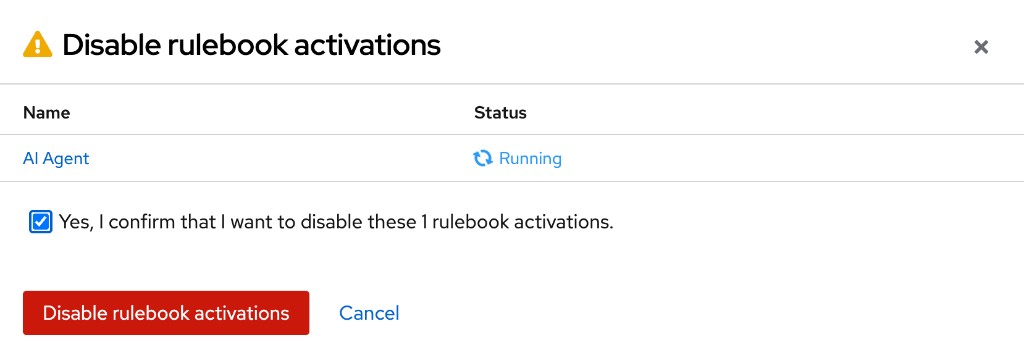
Select the checkbox next to Web App
-
Click the Disable rulebook activations button
-
Check the confirmation checkbox and click Disable rulebook activations
-
Click Close when complete
-
-
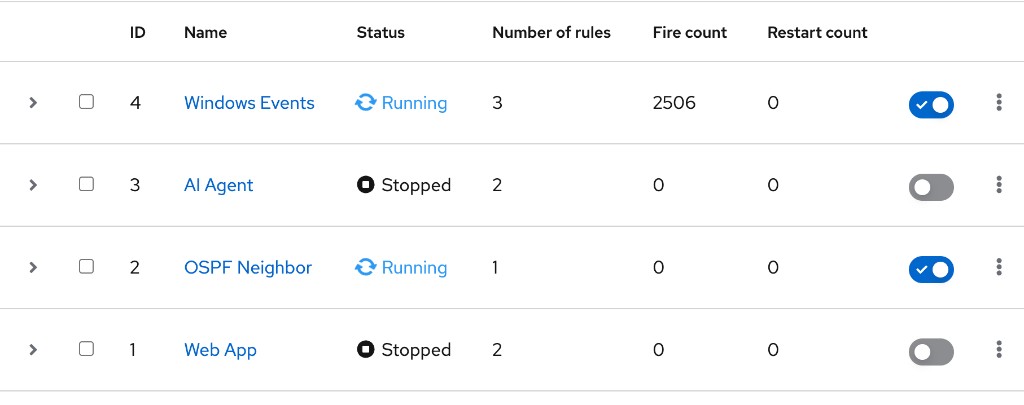
Verify that both the Web App and AI Agent activations show Disabled
Step 2.2: Open the terminal
-
Click the >_Terminal-01 tab in your lab interface, or use the VS Code terminal from Challenge 1
-
Navigate to the agent directory and activate the Python virtual environment:
cd ~/agentic-aiops source ~/.venv/bin/activate -
Verify that you are in the correct directory:
pwdExpected output:
/home/lab-user/agentic-aiops
Step 2.3: Run the triage agent
The triage agent is the first responder. Its job is to discover what automation is available, confirm the target host exists, and create an action plan for resolving the issue. It does not take any action itself. It only investigates and recommends.
In this step, you are not breaking anything yet. Apache is still running normally on node1. You are passing a simulated alert message to the triage agent to see how it reasons about a reported problem. The agent will query AAP for available job templates, confirm the target host exists in inventory, review recent job history, and build a remediation plan. Note that the triage agent only investigates and recommends. It does not execute any jobs or verify the actual state of Apache. It builds its understanding from the information available through MCP (templates, hosts, job history) and proposes a plan for the executor agent to carry out in the next step.
Run only the triage agent first to see how it analyzes the situation:
python3 incident_agent.py triage "Apache web server is down on node1"Wait for the agent to complete (approximately 15-30 seconds). Review the output carefully.
What to verify in the triage output:
-
PROBLEM: the agent restates the reported issue
-
TEMPLATES: the agent lists relevant templates it discovered via MCP:
Apache Service Status Check,Restore Apache -
HOST: the agent confirms that
node1exists inlab-inventory -
RECENT ACTIVITY: the agent may note recent job history (e.g., previous status checks or restores that ran successfully)
-
PLAN: the agent proposes a numbered sequence: check status, restore, verify
Since Apache is actually running fine right now, the agent’s plan still proposes remediation steps based on the reported alert. The triage agent takes the reported problem at face value and plans accordingly. It does not verify whether the problem is real. That verification happens when the executor agent runs the plan in the next step.
|
The agent runs silently by default, showing only the final result. To see the full agent reasoning and every MCP tool call, add the This is useful for understanding how the agent makes decisions. |
Step 2.4: Run the executor agent
The executor agent acts on the triage plan, but it does not touch infrastructure directly. It runs the triage step internally first to understand the situation, then asks Ansible Automation Platform to launch the recommended job templates. It monitors each job until completion and collects the results. The agent decides what to run; Ansible Automation Platform governs how it runs.
Now run the executor agent to see how it acts on a triage plan:
python3 incident_agent.py execute "Apache web server is down on node1"Wait for the agent to complete (approximately 60-90 seconds, as it launches and monitors AAP jobs).
What to verify in the execution output:
-
The agent runs the triage step internally first (to build a plan)
-
It launches job templates through Ansible Automation Platform, not by running commands directly
-
Each job is monitored until completion
-
The output reports success or failure for each job
-
Since Apache is currently running fine, the status check job will report that httpd is active. The agent may still run "Restore Apache" as a precaution, or it may skip it after seeing the service is healthy. Either behavior is valid; the agent adapts based on what it observes.
|
Notice that the executor agent makes autonomous decisions about which templates to run. It does not ask for your approval. This is the key difference from Challenge 1: the AI decides what to do, then asks Ansible Automation Platform to execute it. You review after. But critically, increasing autonomy does not reduce governance. The agent’s reasoning is non-deterministic. The same alert could produce a slightly different triage plan each time. But the execution is deterministic: tested, repeatable Ansible playbooks running through Ansible Automation Platform under the same user-scoped identity, the same RBAC permissions, and the same audit trail as Challenge 1. The agent cannot bypass access controls, skip audit logging, or run unvetted commands. The autonomy is in decision-making, not in execution, and the governance controls scale with the level of autonomy. |
Step 2.5: Run the reporter agent
The reporter agent runs the entire pipeline (triage and execution), then summarizes everything into a concise incident report. Its job is to produce a clear record of what happened, what was done, and whether the issue was resolved.
Run the reporter agent to generate an incident summary:
python3 incident_agent.py report "Apache web server is down on node1"Wait for the agent to complete (approximately 90-120 seconds, as it runs all three stages).
What to verify in the report output:
-
PROBLEM: what happened
-
TRIAGE: what was found
-
ACTIONS: what was done and the results
-
OUTCOME: resolved or not
-
RECOMMENDATION: one actionable suggestion
Step 2.6: Run the full pipeline with a simulated incident
Now run all three agents in sequence (triage, execute, and report) with a simulated incident:
python3 incident_agent.py all "Apache web server is down on node1" --break-first|
The |
Watch the output as each agent completes its work:
-
TRIAGE: the action plan appears first
-
EXECUTION: jobs are launched and monitored
-
REPORT: a final incident summary is produced
This is the full autonomous incident response pipeline: detect, triage, remediate, verify, report.
Step 2.7: Verify in Ansible Automation Platform
-
Switch to the Ansible Automation Platform tab
-
Navigate to Automation Execution → Jobs
-
You should see jobs launched by the AI agents. Look for:
-
✅ Break Apache (the simulated incident, launched by
--break-first) -
✅ Apache Service Status Check (the diagnostic check, launched by the agent)
-
✅ Restore Apache (the remediation, launched by the agent)
-
✅ Apache Service Status Check (the verification, launched by the agent)
-
-
Click on any job to review its output and verify it completed successfully
|
Every job launched by the AI agent appears in the Ansible Automation Platform job history with full audit details: who launched it, when, which credentials were used, and the complete output. This is the governance value. Even when AI makes the decisions, Ansible provides the audit trail. |
Step 2.8: Test the agent’s judgment
Run the triage agent with a problem that has no matching automation:
python3 incident_agent.py triage "PostgreSQL database is not responding on node1"What to verify:
-
The agent should honestly report that no relevant templates were found
-
It should not run unrelated automation (like Restore Apache) just because templates exist
-
The agent demonstrates responsible behavior: when it cannot help, it says so
This is a critical test. In production, you do not want an AI agent guessing and running random playbooks when it encounters an unfamiliar problem.
What you learned
-
AI reasons, Ansible executes. Agents handle the non-deterministic work (triaging, deciding) while Ansible Automation Platform handles the deterministic work (executing tested playbooks, enforcing access controls, recording audit trails).
-
Agents exercise responsible judgment. They do not run irrelevant automation, and when they cannot help, they say so.
-
Governance scales with autonomy. User-scoped identity, RBAC, and full audit trails apply whether a human drives the AI or the AI drives itself.
Challenge 3: Operationalizing AI agents with Ansible Automation Platform
In Challenges 1 and 2, you ran AI agents interactively from the command line. That is great for development and testing, but how do you put AI agents into production? In this challenge, you will operationalize the AI agent using the tools Ansible Automation Platform already provides: Event-Driven Ansible for detection, job templates for execution, and Mattermost for notification.
This is the highest level of autonomy in this module: fully automated from detection to resolution. But the governance model does not change. The AI agent still operates under the same user-scoped identity, the same RBAC controls, and the same audit trail. Every action is logged, every job is traceable, and every credential is managed by Ansible Automation Platform. The automation becomes faster, not less governed.
This works, and it works well. Along the way, you will also see where the current approach requires creative engineering, and where the upcoming automation orchestrator will make things simpler.
How it works
-
A service fails on node1 (Apache)
-
Filebeat captures the log event and sends it to Kafka
-
Event-Driven Ansible consumes the Kafka topic and triggers a job template
-
The job template runs the AI agent on bastion
-
The agent triages, remediates (if possible), and posts results to Mattermost.
Notice that this uses the same EDA pipeline you saw in earlier modules. The only difference is what gets triggered. Instead of a deterministic playbook, EDA launches an AI agent. Your existing event-driven infrastructure works unchanged. You are just swapping what happens when an event arrives.
Step 3.1: Enable the AI Agent EDA activation
In Challenge 2, you disabled all EDA activations to prevent interference while running agents from the CLI. Now you will enable the AI Agent activation so that Event-Driven Ansible triggers the AI agent automatically when failures are detected.
-
Open the Ansible Automation Platform tab
-
Navigate to Automation Decisions → Rulebook Activations
-
Verify that the Web App activation is still Disabled (you disabled it in Challenge 2)
-
Enable the AI Agent activation:
-
Click on AI Agent to open it
-
Toggle the activation to Enabled
-
Wait for the status to show Running

-
|
The Web App activation must remain disabled. Both activations listen for Apache events on the same Kafka topic. Running both simultaneously would cause duplicate responses to the same event. |
Step 3.2: Break Apache and watch the AI respond
Simulate an Apache failure and let the event-driven pipeline handle it end-to-end:
-
Navigate to Automation Execution → Templates
-
Find the Break Apache job template and click the launch icon (rocket)
-
Wait for the job to complete successfully
This breaks the Apache configuration on node1. Here is what happens next, automatically:
-
Filebeat on node1 detects the error in
/var/log/httpd/error_log -
Filebeat sends the event to Kafka on the
httpd-error-logstopic -
Event-Driven Ansible consumes the Kafka event and matches the rule
-
EDA triggers the AI Agent: Incident Response job template
-
The AI agent reasons autonomously on bastion (triaging, deciding, and reporting) while all infrastructure actions execute through Ansible Automation Platform
Step 3.3: Watch the AI agent in action
-
Navigate to Automation Execution → Jobs
-
Watch for the AI Agent: Incident Response job to appear. This was triggered automatically by EDA (it may take 30-60 seconds after the Break Apache job completes).
-
Click on the job to view the output
You should see three stages in the job output:
-
Stage 1: Triage. The agent identifies available Apache-related templates and creates a plan.
-
Stage 2: Execute. The agent launches Restore Apache and monitors the job.
-
Stage 3: Report. The agent produces a summary and posts it to Mattermost.
Step 3.4: Check Mattermost
-
Open the Mattermost tab in your lab interface
-
Navigate to the Town Square channel
-
Look for the AI Agent’s incident report
What to verify in the Mattermost report:
-
PROBLEM: describes the Apache shutdown
-
TRIAGE: what the agent found
-
ACTIONS: which job templates were launched and their results
-
OUTCOME: whether the issue was resolved
-
RECOMMENDATION: one actionable suggestion
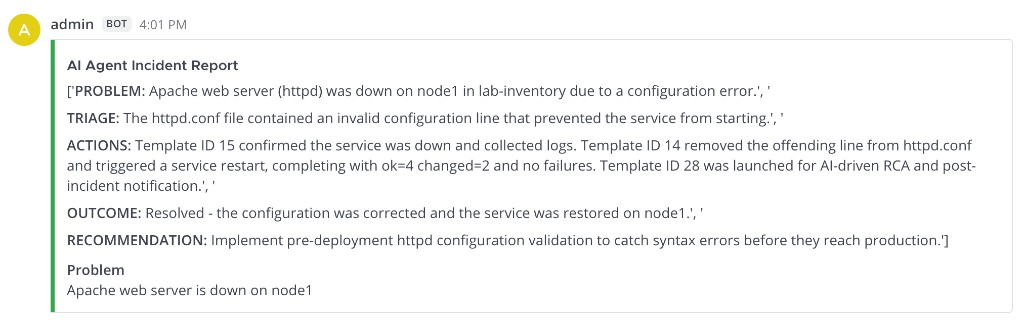
The report should show a green bar on the left if the issue was resolved, or a red bar if it was not.
Step 3.5: Restore the original configuration
After completing this challenge, re-enable the Web App activation:
-
Navigate to Automation Decisions → Rulebook Activations
-
Click on AI Agent and toggle it to Disabled
-
Click on Web App and toggle it to Enabled
-
Verify that the Web App activation shows Running
What you learned
-
Your existing EDA infrastructure works unchanged. You swap the action from a deterministic playbook to an AI agent without modifying the event pipeline.
-
End-to-end automation from detection to resolution. The agent handles triage, remediation, verification, and notification autonomously through Ansible Automation Platform.
-
Full governance in fully autonomous mode. Every infrastructure operation still goes through Ansible with RBAC, user-scoped identity, and complete audit trails.
What required creative engineering
This approach works, and it demonstrates real value. But as you went through the challenge, you may have noticed areas where the integration required some creative engineering:
-
The agent runs as a Python script wrapped in a job template. This works, but the agent is essentially a black box to Ansible Automation Platform. The platform launches it, waits for it to finish, and captures stdout. It cannot see inside the agent’s decision-making process.
-
No approval gate between triage and execution. In Challenge 2, you saw the triage agent produce an action plan. In a production scenario, you might want a human to review that plan before the executor agent acts on it. Today, you could build this with a workflow that has an approval node between two job templates, but translating the agent’s triage output into a meaningful approval prompt requires custom glue code.
-
Two audit trails. Ansible Automation Platform tracks the job template execution (who launched it, when, success/failure). But the agent’s internal reasoning (which templates it considered, why it chose a specific action, what MCP tools it called) lives in stdout. There is no unified view.
-
Context does not flow natively. The agent discovers the state of Ansible Automation Platform by querying MCP tools at runtime. It works, but data does not flow between the EDA event, the job template, and the agent as a connected pipeline.
None of these are blockers. You just built a working end-to-end system. But they represent areas where the platform can evolve to make AI agent integration simpler, more governed, and more transparent.
What comes next: automation orchestrator
What you built today works. The question is: how do you scale this across an enterprise with hundreds of agents, thousands of events, and strict governance requirements?
The automation orchestrator is an exciting new capability coming to Ansible Automation Platform that enables AI agents to natively invoke governed automation through visual workflow design and unified audit trails. Ansible Automation Platform is not becoming an agent runtime or agent hosting platform. It remains the trusted execution layer that agents call. The automation orchestrator makes that integration seamless.
How the automation orchestrator changes the game
| Capability | Today (what you built) | With automation orchestrator |
|---|---|---|
AI agents invoking automation |
Wrapped in job templates as Python scripts |
Native workflow nodes that invoke governed automation alongside playbooks |
Human-in-the-loop |
Approval nodes between job templates, requires custom glue |
Native approval gates between any nodes, including AI-driven steps |
Context flow |
Agent queries Ansible Automation Platform state via MCP at runtime |
Data flows natively between Ansible nodes, AI nodes, and approval gates |
Audit and governance |
Job logs + agent stdout in separate places |
Unified audit trail across all automation types |
Workflow design |
YAML, code, and creative engineering |
Visual drag-and-drop designer with AI and Ansible nodes side by side |
Model integration |
External: you configure the AI model connection and proxy |
Built-in: bring your own model through standardized APIs |
The vision
The automation orchestrator enables a new class of automation workflows where AI agents invoke governed automation through Ansible Automation Platform:
-
AI decision nodes that analyze data and choose the next workflow path, with every decision audited
-
Human-in-the-loop gates where an operator reviews the AI’s recommendation before execution, with full context, not just stdout
-
Mixed workflows that combine Ansible playbooks, AI-driven decisions, external tools, and approval steps in a single visual workflow across Linux, network, and Windows infrastructure
-
Unified governance with user-scoped identity, RBAC, audit trails, and compliance across all automation types, deterministic and non-deterministic alike
What you built today is the foundation: AI agents interacting with Ansible Automation Platform via MCP, triggered by Event-Driven Ansible, operationalized through job templates. Every pattern you used in this module carries forward. The automation orchestrator makes that integration native, governed, and enterprise-ready.
Summary
Congratulations! You have completed the AI-Driven Incident Response module.
You experienced three levels of AI-driven automation, each building on the last. As autonomy increased, governance remained constant:
| Model | AI autonomy | Speed | Governance |
|---|---|---|---|
Human-in-the-loop (Claude Code) |
AI suggests, you decide |
Interactive |
User-scoped identity, RBAC, full audit trail |
Autonomous agents (CrewAI) |
AI decides, AAP executes |
Minutes |
User-scoped identity, RBAC, full audit trail |
Operationalized (EDA + AI agents) |
Platform detects and AI responds |
Seconds to minutes |
User-scoped identity, RBAC, full audit trail |
The governance column is intentionally identical across all three rows. That is the point: Ansible Automation Platform enforces the same deterministic execution, access controls, and audit trail regardless of how much autonomy you grant the AI. You choose the level of autonomy your organization is ready for. The governance is non-negotiable.
The core principle
Across all three challenges, two principles remained constant:
-
AI agents never touched infrastructure directly. Every operation (checking Apache status, restoring configurations, querying inventory) went through Ansible Automation Platform. The AI decided what to do. Ansible governed how it was done.
-
Governance never decreased as autonomy increased. Whether you drove the AI interactively, let agents act autonomously, or fully automated the pipeline with EDA, the same user-scoped identity, RBAC controls, and audit trails applied. More autonomy did not mean less oversight.
This is the pattern for enterprise AI-driven operations: AI handles the non-deterministic work: reasoning, triaging, deciding. Ansible handles the deterministic work: executing tested playbooks, enforcing access controls, recording audit trails. Together, they deliver autonomous operations with enterprise-grade trust.
The automation orchestrator will make this integration native: visual workflow design, unified audit trails, and seamless human-in-the-loop gates, turning the creative engineering you saw today into governed, enterprise-ready simplicity.
Complete
Three takeaways from this module:
-
Ansible Automation Platform is the trusted execution layer for AI agents interacting with IT infrastructure. Agents reason and decide, but every action (restarting services, applying configurations, querying inventory) goes through Ansible with deterministic, auditable, and repeatable execution. No shadow access, no ad-hoc commands, no ungoverned AI.
-
AI-driven automation reduces mean time to repair without sacrificing compliance. From the moment an event fires to the moment a remediation completes, the entire pipeline is automated, audited, and governed under user-scoped identity and RBAC. Organizations get faster incident response while maintaining the compliance posture their security and audit teams require.
-
You can adopt agentic automation incrementally with the tools you already have. You do not need to wait for a new platform or rip out existing workflows. Event-Driven Ansible, job templates, and MCP work together today. Start with human-in-the-loop AI assistance, progress to autonomous agents when your organization is ready, and look ahead to the automation orchestrator for native integration, all on the same Ansible Automation Platform foundation.
Click the link below to proceed to the Summary and Call to Actions.