Module 3 Lab 2: Events - Automated Reactive Remediation with Filebeat and Kafka
This lab demonstrates a reactive monitoring solution using Filebeat to send IIS events to Kafka. Event-Driven Ansible will monitor this Kafka queue to maintain the availability of a Windows IIS web server.
Introduction
In this lab, you will implement a production-grade automation pipeline. You will use an Ansible Playbook to configure Filebeat (installed via Chocolatey) to monitor IIS. These events will be published to a Kafka broker, where Event-Driven Ansible (EDA) will consume them to trigger a self-healing playbook.
Prerequisites
-
Chocolatey and Filebeat installed on Windows
-
IIS installed and running on Windows reachable via the internal URI:
http://windows.aap.svc.cluster.local -
Access to Ansible Automation Platform (AAP) and EDA Controller
-
An existing Job Template to setup and configure IIS
1: Create the Configuration Playbook
In a previous module, we built and ran automation that installed Chocolatey and Filebeat to the Windows host. In this lab, we will add additional configuration for Filebeat.
-
In your
lab_playbooksrepository, create thesetup_monitoring.ymlplaybook:/projects/lab_playbooks/setup_monitoring.yml- name: Configure Filebeat on Windows hosts: windows tasks: - name: Update Filebeat configuration ansible.windows.win_copy: dest: 'C:\ProgramData\chocolatey\lib\filebeat\tools\filebeat.yml' content: | filebeat.inputs: - type: winlog name: System event_id: 7036 processors: - add_host_metadata: when.not.contains.tags: forwarded - add_cloud_metadata: ~ - add_docker_metadata: ~ - add_kubernetes_metadata: ~ filebeat.modules: - module: iis access: enabled: true error: enabled: true output.kafka: hosts: ["cluster-kafka-bootstrap-kafka.{openshift_cluster_ingress_domain}:443"] topic: "eda-windows-iis-events" ssl.enabled: true ssl.verification_mode: none codec.json: pretty: false(1) filebeat.registry.path: /var/lib/filebeat notify: Restart Filebeat handlers: - name: Restart Filebeat ansible.windows.win_service: name: filebeat state: restarted ...1 For debugging, this property can be set to trueto provide greater readability in the logs. -
Run the playbook from OpenShift Dev Spaces:
ansible-playbook \ --inventory inventory/hosts.yml \ --extra-vars @/projects/env/secrets.yml \ setup_monitoring.yml -
Add, commit and push the files to the
lab_playbooksgit repositorygit add setup_monitoring.yml git commit --message "Add filebeat configuration playbook" git push origin main
2: Create the EDA Rulebook
The EDA Rulebook must match the structure of the Kafka event to properly trigger the remediation playbook. We are going to check for log messages that indicate the IIS service has stopped in the condition property of the rule:
-
In your
lab_playbooksrepository, create thecheck_kafka.ymlrulebook in therulebooksdirectory:/projects/lab_playbooks/rulebooks/check_kafka.yml--- - name: Listen for Kafka Events hosts: windows sources: - ansible.eda.kafka: host: cluster-kafka-bootstrap-kafka.{openshift_cluster_ingress_domain} port: 443 topic: eda-windows-iis-events security_protocol: SSL rules: - name: Trigger Fix if IIS Service Stops condition: > event.body.winlog.event_data.param1 == "World Wide Web Publishing Service" and event.body.winlog.event_data.param2 == "stopped" action: run_job_template: name: "Start IIS"(1) organization: "Default" ...1 Be sure this job template name matches the one created in the previous lab. -
Add, commit and push this rulebook to the
lab_playbooksgit repositorygit add rulebooks/check_kafka.yml git commit --message "Add kafka rulebook" git push origin main
3: Synchronize the Project
Synchronize the Lab Playbooks EDA project to retrieve the new rulebook.
-
Navigate to Automation Decisions → Projects
-
Click the Sync button next to the
Lab Playbooksproject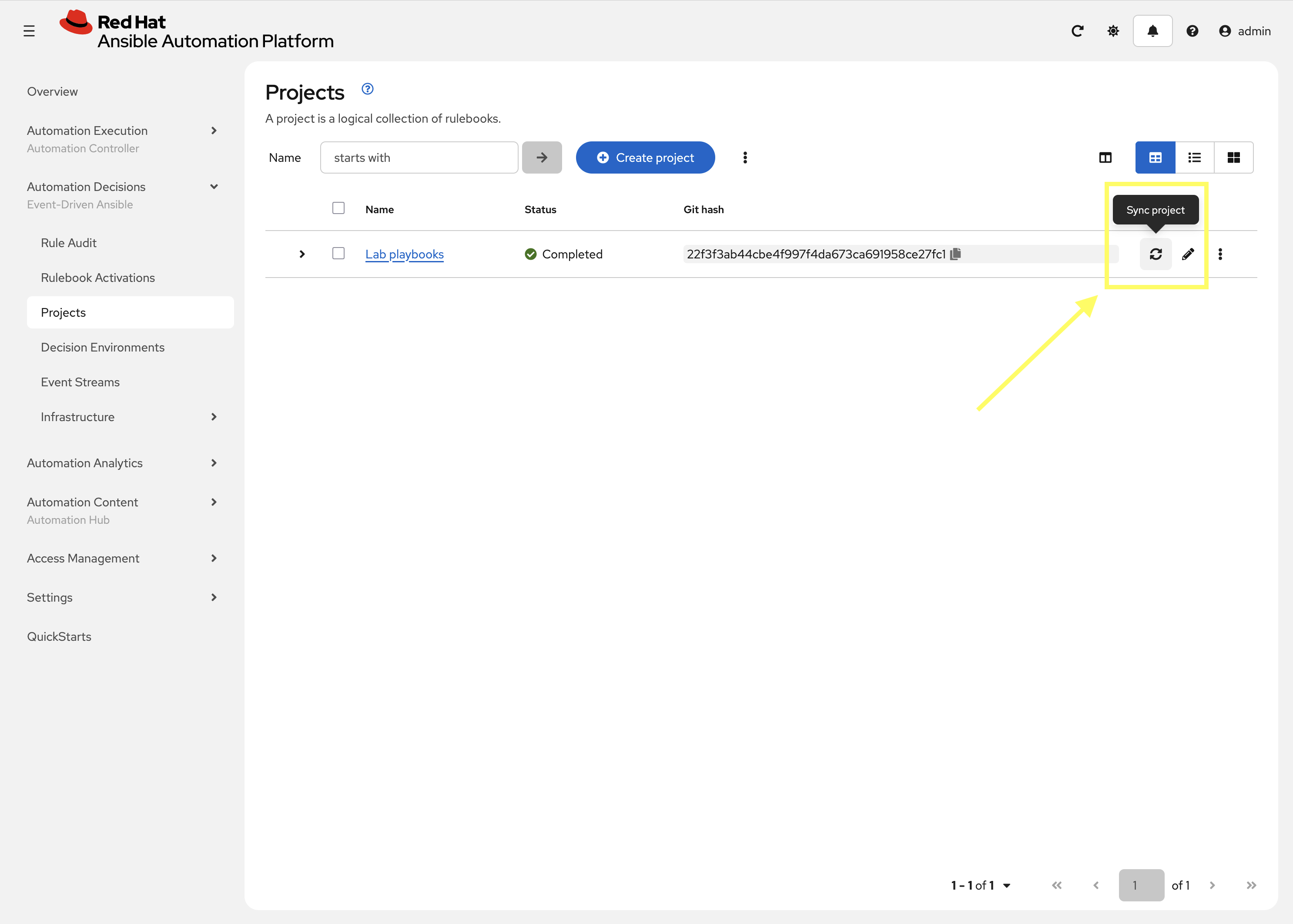
4: Create the Rulebook Activation
Create a new Rulebook Activation for the check_kafka.yml rulebook.
-
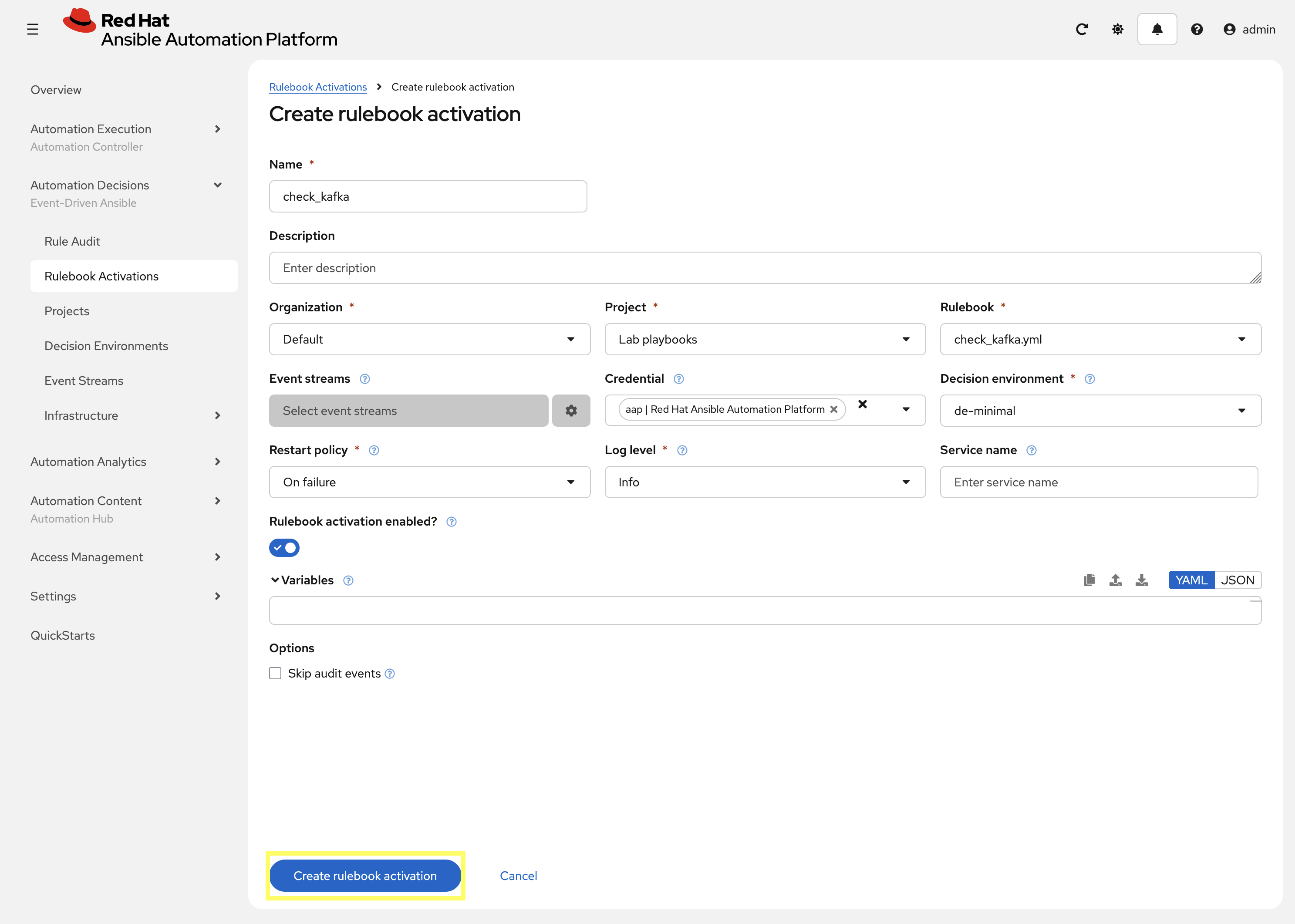
Navigate to Automation Decisions → Rulebook Activations → Create rulebook activation
-
Create a new Rulebook Activation with the following details:
-
Name:
check_kafka -
Organization:
Default -
Project:
Lab playbooks -
Rulebook: In the drop-down select
check_kafka.yml -
Credential:
aap | Red Hat Ansible Automation Platform -
Decision Environment:
de-minimal -
Log level:
Info
-
-
Click Create rulebook activation and the Rulebook will begin to activate
5: Simulate Failure
Return to OpenShift Dev Spaces and intentionally stop the service to verify the end-to-end flow.
-
Stop the IIS service:
ansible --module-name ansible.windows.win_service windows \
  --args "name=W3SVC state=stopped" \
  --extra-vars @/projects/env/secrets.yml
ansible [core 2.19.3] config file = /projects/lab_playbooks/ansible.cfg configured module search path = ['/home/user/.ansible/plugins/modules', '/usr/share/ansible/plugins/modules'] ansible python module location = /usr/local/lib/python3.11/site-packages/ansible ansible collection location = /home/user/.ansible/collections:/usr/share/ansible/collections executable location = /usr/local/bin/ansible python version = 3.11.13 (main, Aug 21 2025, 00:00:00) [GCC 11.5.0 20240719 (Red Hat 11.5.0-11)] (/usr/bin/python3.11) jinja version = 3.1.6 pyyaml version = 6.0.3 (with libyaml v0.2.5) Using /projects/lab_playbooks/ansible.cfg as config file [WARNING]: Found both group and host with same name: windows Skipping callback 'default', as we already have a stdout callback. Skipping callback 'oneline', as we already have a stdout callback. windows | CHANGED => { "can_pause_and_continue": false, "changed": true, "depended_by": [], "dependencies": [ "WAS", "HTTP" ], "description": "Provides Web connectivity and administration through the Internet Information Services Manager", "desktop_interact": false, "display_name": "World Wide Web Publishing Service", "exists": true, "name": "W3SVC", "path": "C:\\Windows\\system32\\svchost.exe -k iissvcs", "start_mode": "auto", "state": "stopped", "username": "LocalSystem" } -
Attempt to access the IIS web server to confirm it is not responding:
curl http://windows.aap.svc.cluster.localcurl: (7) Failed to connect to windows.aap.svc.cluster.local port 80: Connection refused
6: Verify Remediation
With the Service stopped, EDA should consume the event from Kafka that was generated by Filebeat to trigger the remediation playbook within Automation Controller to restart the IIS service.
-
Navigate to Automation Decisions → Rulebook Activations
-
Find and click on the
check_kafkaRulebook Activation -
Select the History tab for the
check_kafkaRulebook Activation -
Check the EDA Controller Rulebook Activation logs for the Kafka event.
-
Confirm the
Start IISwas triggered in Automation Controller.ansible_rulebook.engine - INFO - load source ansible.eda.kafka ansible_rulebook.engine - INFO - loading source filter eda.builtin.insert_meta_info aiokafka.consumer.subscription_state - INFO - Updating subscribed topics to: frozenset({'eda-windows-iis-events'}) aiokafka.consumer.consumer - INFO - Subscribed to topic(s): {'eda-windows-iis-events'} ansible_rulebook.websocket - INFO - websocket ws://aap-eda-daphne:8001/api/eda/ws/ansible-rulebook ansible_rulebook.websocket - INFO - attempt websocket connection ansible_rulebook.engine - INFO - Waiting for all ruleset tasks to end [drools-async-evaluator-thread] INFO org.drools.ansible.rulebook.integration.api.io.RuleExecutorChannel - Async channel connected ansible_rulebook.rule_set_runner - INFO - Waiting for actions on events from Listen for Kafka Events ansible_rulebook.rule_set_runner - INFO - Waiting for events, ruleset: Listen for Kafka Events ansible_rulebook.websocket - INFO - feedback websocket connected aiokafka.consumer.group_coordinator - INFO - Metadata for topic has changed from {} to {'eda-windows-iis-events': 1}. ansible_rulebook.action.run_job_template - INFO - running job template: Start IIS, organization: Default ansible_rulebook.action.run_job_template - INFO - job results url: https://aap-aap.apps.cluster-866kv.dyn.redhatworkshops.io/#/jobs/75/details ansible_rulebook.action.run_job_template - INFO - controller job id: 75 -
If you enable
debuglogging you will see the event as well:Ruleset: Listen for Kafka Events Event: {'body': {'@metadata': {'beat': 'filebeat', 'type': '_doc', 'version': '7.15.1'}, '@timestamp': '2026-01-21T18:41:46.151Z', 'agent': {'ephemeral_id': '4d8b5562-a452-49a2-a9ae-361335d13ab9', 'hostname': 'windows', 'id': '8bd7436b-2fff-47f4-a2ef-07dcb2998d50', 'name': 'windows', 'type': 'filebeat', 'version': '7.15.1'}, 'ecs': {'version': '1.11.0'}, 'event': {'code': '7036', 'created': '2026-01-21T18:41:48.221Z', 'kind': 'event', 'provider': 'Service Control Manager'}, 'host': {'architecture': 'x86_64', 'hostname': 'windows', 'id': 'd6705081-8c1d-4aa2-9817-7c4eab135d7b', 'ip': ['fe80::e4d7:1546:2ce4:93fc', '10.0.2.2'], 'mac': ['0a:58:0a:82:2b:cb'], 'name': 'windows', 'os': {'build': '17763.3650', 'family': 'windows', 'kernel': '10.0.17763.3650 (WinBuild.160101.0800)', 'name': 'Windows Server 2019 Datacenter Evaluation', 'platform': 'windows', 'type': 'windows', 'version': '10.0'}}, 'input': {'type': 'winlog'}, 'log': {'level': 'information'}, 'message': 'The World Wide Web Publishing Service service entered ' 'the stopped state.', 'winlog': {'api': 'wineventlog', 'channel': 'System', 'computer_name': 'windows', 'event_data': {'Binary': '570033005300560043002F0031000000', 'param1': 'World Wide Web Publishing ' 'Service', 'param2': 'stopped'}, 'event_id': '7036', 'keywords': ['Classic'], 'process': {'pid': 640, 'thread': {'id': 4984}}, 'provider_guid': '{555908d1-a6d7-4695-8e1e-26931d2012f4}', 'provider_name': 'Service Control Manager', 'record_id': 14099}}, 'meta': {'headers': {}, 'received_at': '2026-01-21T18:42:31.078451Z', 'source': {'name': 'ansible.eda.kafka', 'type': 'ansible.eda.kafka'}, 'uuid': 'a61ce8f1-fbde-4166-8aba-ce044052c6fc'}} ******************************************************************************** ansible_rulebook.rule_set_runner - DEBUG - Posting data to ruleset Listen for Kafka Events => {'meta': {'headers': {}, 'source': {'name': 'ansible.eda.kafka', 'type': 'ansible.eda.kafka'}, 'received_at': '2026-01-21T18:42:31.078451Z', 'uuid': 'a61ce8f1-fbde-4166-8aba-ce044052c6fc'}, 'body': {'@timestamp': '2026-01-21T18:41:46.151Z', '@metadata': {'beat': 'filebeat', 'type': '_doc', 'version': '7.15.1'}, 'ecs': {'version': '1.11.0'}, 'winlog': {'record_id': 14099, 'channel': 'System', 'computer_name': 'windows', 'event_data': {'Binary': '570033005300560043002F0031000000', 'param1': 'World Wide Web Publishing Service', 'param2': 'stopped'}, 'provider_guid': '{555908d1-a6d7-4695-8e1e-26931d2012f4}', 'api': 'wineventlog', 'process': {'pid': 640, 'thread': {'id': 4984}}, 'provider_name': 'Service Control Manager', 'keywords': ['Classic'], 'event_id': '7036'}, 'event': {'created': '2026-01-21T18:41:48.221Z', 'code': '7036', 'kind': 'event', 'provider': 'Service Control Manager'}, 'log': {'level': 'information'}, 'message': 'The World Wide Web Publishing Service service entered the stopped state.', 'host': {'mac': ['0a:58:0a:82:2b:cb'], 'hostname': 'windows', 'architecture': 'x86_64', 'os': {'name': 'Windows Server 2019 Datacenter Evaluation', 'kernel': '10.0.17763.3650 (WinBuild.160101.0800)', 'build': '17763.3650', 'type': 'windows', 'platform': 'windows', 'version': '10.0', 'family': 'windows'}, 'id': 'd6705081-8c1d-4aa2-9817-7c4eab135d7b', 'name': 'windows', 'ip': ['fe80::e4d7:1546:2ce4:93fc', '10.0.2.2']}, 'input': {'type': 'winlog'}, 'agent': {'type': 'filebeat', 'version': '7.15.1', 'hostname': 'windows', 'ephemeral_id': '4d8b5562-a452-49a2-a9ae-361335d13ab9', 'id': '8bd7436b-2fff-47f4-a2ef-07dcb2998d50', 'name': 'windows'}}} [main] DEBUG org.drools.ansible.rulebook.integration.api.rulesengine.RegisterOnlyAgendaFilter - Activation of effective rule "Trigger Fix if IIS Service Stops" with facts: {m={meta={headers={}, source={name=ansible.eda.kafka, type=ansible.eda.kafka}, received_at=2026-01-21T18:42:31.078451Z, uuid=a61ce8f1-fbde-4166-8aba-ce044052c6fc}, body={@timestamp=2026-01-21T18:41:46.151Z, @metadata={beat=filebeat, type=_doc, version=7.15.1}, ecs={version=1.11.0}, winlog={record_id=14099, channel=System, computer_name=windows, event_data={Binary=570033005300560043002F0031000000, param1=World Wide Web Publishing Service, param2=stopped}, provider_guid={555908d1-a6d7-4695-8e1e-26931d2012f4}, api=wineventlog, process={pid=640, thread={id=4984}}, provider_name=Service Control Manager, keywords=[Classic], event_id=7036}, event={created=2026-01-21T18:41:48.221Z, code=7036, kind=event, provider=Service Control Manager}, log={level=information}, message=The World Wide Web Publishing Service service entered the stopped state., host={mac=[0a:58:0a:82:2b:cb], hostname=windows, architecture=x86_64, os={name=Windows Server 2019 Datacenter Evaluation, kernel=10.0.17763.3650 (WinBuild.160101.0800), build=17763.3650, type=windows, platform=windows, version=10.0, family=windows}, id=d6705081-8c1d-4aa2-9817-7c4eab135d7b, name=windows, ip=[fe80::e4d7:1546:2ce4:93fc, 10.0.2.2]}, input={type=winlog}, agent={type=filebeat, version=7.15.1, hostname=windows, ephemeral_id=4d8b5562-a452-49a2-a9ae-361335d13ab9, id=8bd7436b-2fff-47f4-a2ef-07dcb2998d50, name=windows}}}} drools.ruleset - DEBUG - Calling rule : Trigger Fix if IIS Service Stops in session: 1 ansible_rulebook.rule_generator - DEBUG - callback calling Trigger Fix if IIS Service Stops ansible_rulebook.rule_set_runner - DEBUG - None ansible_rulebook.rule_set_runner - DEBUG - Creating action task action::run_job_template::Listen for Kafka Events::Trigger Fix if IIS Service Stops ansible_rulebook.websocket - DEBUG - Event received, {'type': 'SessionStats', 'activation_id': '619', 'activation_instance_id': '619', 'stats': {'start': '2026-01-21T18:41:01.998915284Z', 'lastClockTime': '2026-01-21T18:42:31.023Z', 'clockAdvanceCount': 890, 'numberOfRules': 2, 'numberOfDisabledRules': 0, 'rulesTriggered': 1, 'eventsProcessed': 1, 'eventsMatched': 1, 'eventsSuppressed': 0, 'permanentStorageCount': 0, 'permanentStorageSize': 0, 'asyncResponses': 0, 'bytesSentOnAsync': 0, 'sessionId': 1, 'ruleSetName': 'Listen for Kafka Events', 'lastRuleFired': 'Trigger Fix if IIS Service Stops', 'lastRuleFiredAt': '2026-01-21T18:42:31.023Z', 'lastEventReceivedAt': '2026-01-21T18:42:31.023Z', 'baseLevelMemory': 5210392, 'peakMemory': 9408056, 'usedMemory': 9408056, 'maxAvailableMemory': 536870912}, 'reported_at': '2026-01-21T18:42:31.120155Z'} ansible_rulebook.websocket - DEBUG - Event received, {'type': 'Job', 'action': 'run_job_template', 'action_uuid': '47c24dab-052a-48da-a923-2747218f7cca', 'ruleset': 'Listen for Kafka Events', 'ruleset_uuid': '4384618c-d250-41de-a992-d39e6e67e45b', 'rule': 'Trigger Fix if IIS Service Stops', 'rule_uuid': 'c5cb00ef-c603-4512-8aae-f4b042ef54eb', 'rule_run_at': '2026-01-21T18:42:31.119344Z', 'activation_id': '619', 'activation_instance_id': '619', 'run_at': '2026-01-21T18:42:31.121197Z', 'matching_events': {'m': {'meta': {'headers': {}, 'source': {'name': 'ansible.eda.kafka', 'type': 'ansible.eda.kafka'}, 'received_at': '2026-01-21T18:42:31.078451Z', 'uuid': 'a61ce8f1-fbde-4166-8aba-ce044052c6fc'}, 'body': {'@timestamp': '2026-01-21T18:41:46.151Z', '@metadata': {'beat': 'filebeat', 'type': '_doc', 'version': '7.15.1'}, 'ecs': {'version': '1.11.0'}, 'winlog': {'record_id': 14099, 'channel': 'System', 'computer_name': 'windows', 'event_data': {'Binary': '570033005300560043002F0031000000', 'param1': 'World Wide Web Publishing Service', 'param2': 'stopped'}, 'provider_guid': '{555908d1-a6d7-4695-8e1e-26931d2012f4}', 'api': 'wineventlog', 'process': {'pid': 640, 'thread': {'id': 4984}}, 'provider_name': 'Service Control Manager', 'keywords': ['Classic'], 'event_id': '7036'}, 'event': {'created': '2026-01-21T18:41:48.221Z', 'code': '7036', 'kind': 'event', 'provider': 'Service Control Manager'}, 'log': {'level': 'information'}, 'message': 'The World Wide Web Publishing Service service entered the stopped state.', 'host': {'mac': ['0a:58:0a:82:2b:cb'], 'hostname': 'windows', 'architecture': 'x86_64', 'os': {'name': 'Windows Server 2019 Datacenter Evaluation', 'kernel': '10.0.17763.3650 (WinBuild.160101.0800)', 'build': '17763.3650', 'type': 'windows', 'platform': 'windows', 'version': '10.0', 'family': 'windows'}, 'id': 'd6705081-8c1d-4aa2-9817-7c4eab135d7b', 'name': 'windows', 'ip': ['fe80::e4d7:1546:2ce4:93fc', '10.0.2.2']}, 'input': {'type': 'winlog'}, 'agent': {'type': 'filebeat', 'version': '7.15.1', 'hostname': 'windows', 'ephemeral_id': '4d8b5562-a452-49a2-a9ae-361335d13ab9', 'id': '8bd7436b-2fff-47f4-a2ef-07dcb2998d50', 'name': 'windows'}}}}, 'hosts': 'windows', 'name': 'Fix IIS Service', 'job_id': 'ed9e8999-886b-466c-a0e7-38a2fa9bb977', 'ansible_rulebook_id': '619'} ansible_rulebook.action.run_job_template - INFO - job results url: https://aap-aap.apps.cluster-866kv.dyn.redhatworkshops.io/#/jobs/77/details ansible_rulebook.action.run_job_template - INFO - controller job id: 77 ansible_rulebook.websocket - DEBUG - Event received, {'type': 'Action', 'action': 'run_job_template', 'action_uuid': '47c24dab-052a-48da-a923-2747218f7cca', 'ruleset': 'Listen for Kafka Events', 'ruleset_uuid': '4384618c-d250-41de-a992-d39e6e67e45b', 'rule': 'Trigger Fix if IIS Service Stops', 'rule_uuid': 'c5cb00ef-c603-4512-8aae-f4b042ef54eb', 'rule_run_at': '2026-01-21T18:42:31.119344Z', 'activation_id': '619', 'activation_instance_id': '619', 'job_template_name': 'Fix IIS Service', 'organization': 'Default', 'job_id': 'ed9e8999-886b-466c-a0e7-38a2fa9bb977', 'status': 'successful', 'run_at': '2026-01-21T18:42:31.627882Z', 'url': 'https://aap-aap.apps.cluster-866kv.dyn.redhatworkshops.io/#/jobs/77/details', 'matching_events': {'m': {'meta': {'headers': {}, 'source': {'name': 'ansible.eda.kafka', 'type': 'ansible.eda.kafka'}, 'received_at': '2026-01-21T18:42:31.078451Z', 'uuid': 'a61ce8f1-fbde-4166-8aba-ce044052c6fc'}, 'body': {'@timestamp': '2026-01-21T18:41:46.151Z', '@metadata': {'beat': 'filebeat', 'type': '_doc', 'version': '7.15.1'}, 'ecs': {'version': '1.11.0'}, 'winlog': {'record_id': 14099, 'channel': 'System', 'computer_name': 'windows', 'event_data': {'Binary': '570033005300560043002F0031000000', 'param1': 'World Wide Web Publishing Service', 'param2': 'stopped'}, 'provider_guid': '{555908d1-a6d7-4695-8e1e-26931d2012f4}', 'api': 'wineventlog', 'process': {'pid': 640, 'thread': {'id': 4984}}, 'provider_name': 'Service Control Manager', 'keywords': ['Classic'], 'event_id': '7036'}, 'event': {'created': '2026-01-21T18:41:48.221Z', 'code': '7036', 'kind': 'event', 'provider': 'Service Control Manager'}, 'log': {'level': 'information'}, 'message': 'The World Wide Web Publishing Service service entered the stopped state.', 'host': {'mac': ['0a:58:0a:82:2b:cb'], 'hostname': 'windows', 'architecture': 'x86_64', 'os': {'name': 'Windows Server 2019 Datacenter Evaluation', 'kernel': '10.0.17763.3650 (WinBuild.160101.0800)', 'build': '17763.3650', 'type': 'windows', 'platform': 'windows', 'version': '10.0', 'family': 'windows'}, 'id': 'd6705081-8c1d-4aa2-9817-7c4eab135d7b', 'name': 'windows', 'ip': ['fe80::e4d7:1546:2ce4:93fc', '10.0.2.2']}, 'input': {'type': 'winlog'}, 'agent': {'type': 'filebeat', 'version': '7.15.1', 'hostname': 'windows', 'ephemeral_id': '4d8b5562-a452-49a2-a9ae-361335d13ab9', 'id': '8bd7436b-2fff-47f4-a2ef-07dcb2998d50', 'name': 'windows'}}}}, 'controller_job_id': 77} ansible_rulebook.rule_set_runner - DEBUG - Task action::run_job_template::Listen for Kafka Events::Trigger Fix if IIS Service Stops finished, active actions 0 -
Run a final ad-hoc check to ensure the service is
started.curl http://windows.aap.svc.cluster.localWelcome to Super Lab IIS Server Machine ID S-1-5-21-2979851890-3482578088-4054385452 Hostname windows.lab.sandbox-866kv-ocp4-cluster.svc.cluster.local Deployed on 2026-01-19 at 18:38:43
7: Disable check_kafka Rulebook Activation
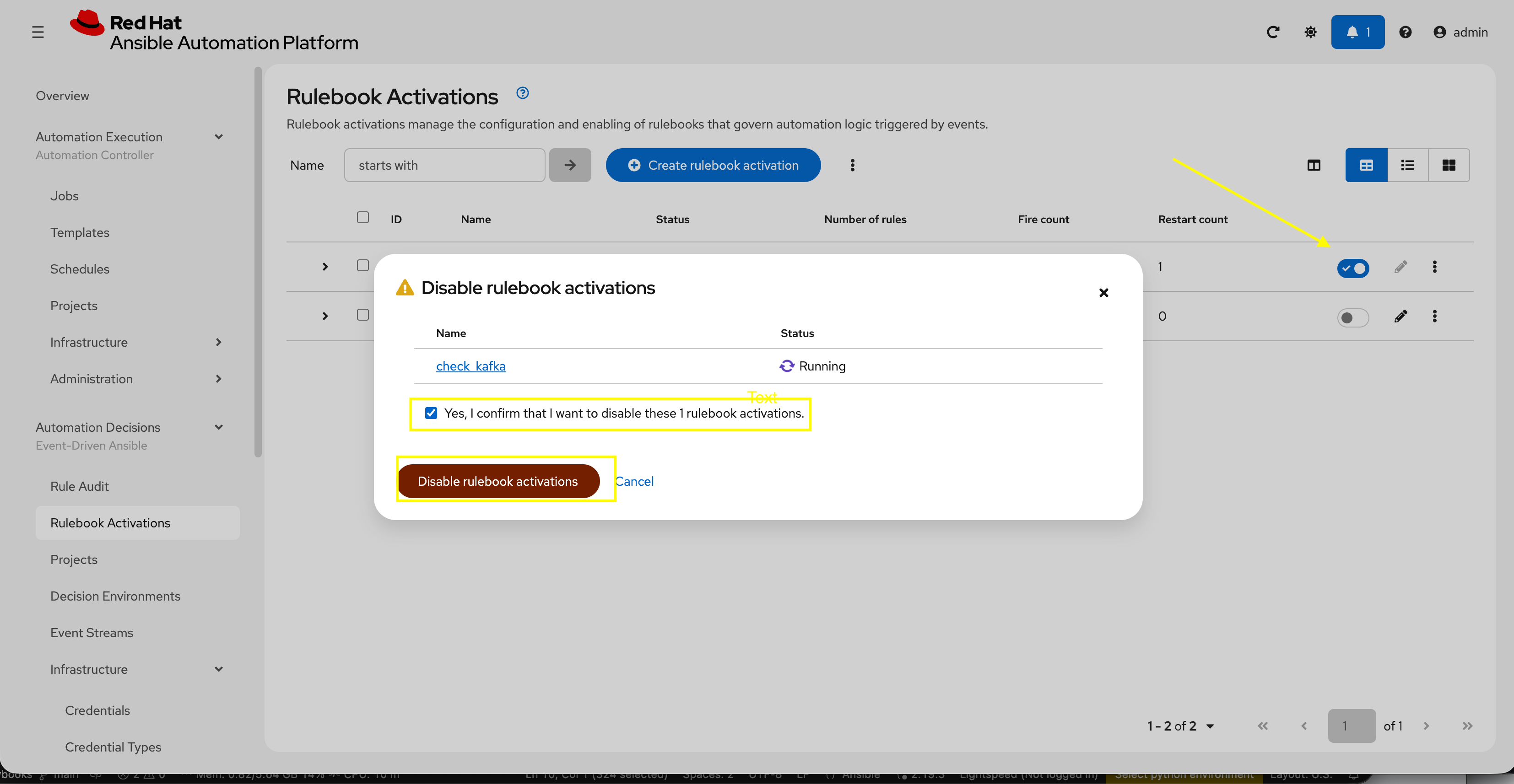
Before exiting this lab, disable the check_kafka Rulebook Activation created in this lab so that it does not interfere with additional labs.
-
Navigate to Automation Controller web interface go to Automation Decisions → Rulebook Activations:
-
Deselect the toggle for the
check_websiteRulebook Activation to disable it -
Select the checkbox to confirm disabling and click Disable rulebook activations
Summary
You have learned how to configure Filebeat to send Windows IIS event logs to Kafka and configure EDA to monitor the Kafka topic for service outages and fire off the playbook to start IIS when it is detected down.
Appendix
Troubleshooting
If needed, you can check the contents of the Kafka queue directly:
-
Go to the OpenShift console
-
Make sure the namespace is set to Kafka
-
Go to Workloads → Pods
-
Select one of the broker pods
-
Select Terminal
-
Run the following with the matching topic:
bin/kafka-console-consumer.sh --bootstrap-server cluster-kafka-bootstrap-kafka.{openshift_cluster_ingress_domain}:443 --consumer-property security.protocol=SSL --topic eda-windows-iis-events --from-beginning