Introduction
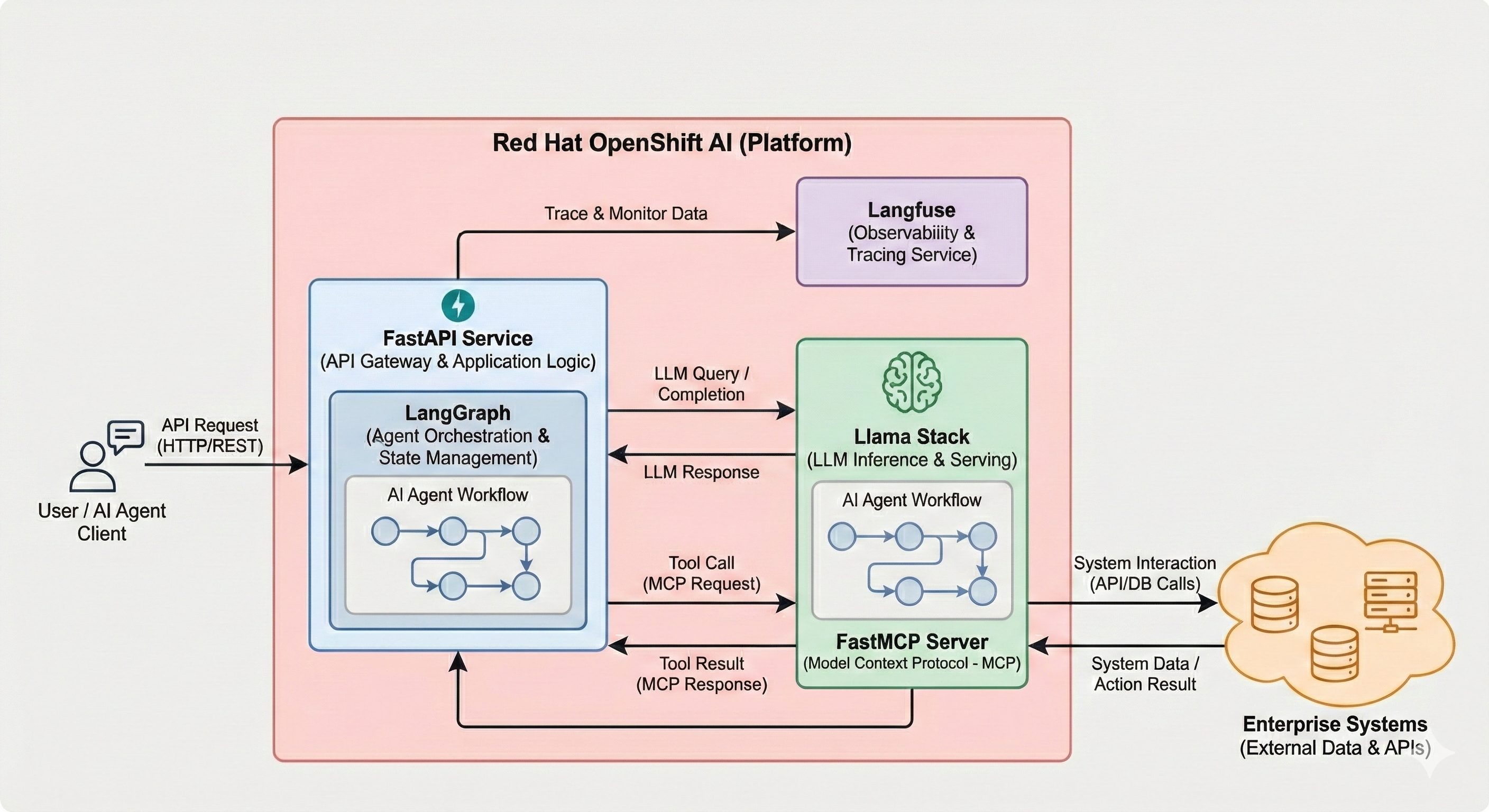
Welcome to this hands-on workshop on building agentic AI applications using Llama Stack, LangGraph, Langfuse, Langflow, FastAPI and FastMCP on Red Hat OpenShift AI. This lab series takes you from deploying your first Llama Stack instance to building AI agents that interact with enterprise systems through the Model Context Protocol (MCP).
What you'll learn
- Deploy and explore Llama Stack
-
You'll deploy a Llama Stack distribution on OpenShift, discover its comprehensive API landscape, and interact with language models through multiple inference interfaces including the native Response API.
- Implement RAG capabilities
-
Build Retrieval-Augmented Generation (RAG) systems using Llama Stack's built-in vector stores, embedding models, and file search tools to ground AI responses in your own documents.
- Apply safety guardrails
-
Learn how to implement content moderation and safety shields to ensure your AI applications meet enterprise security and compliance requirements.
- Web Search Tool
-
Leverage Tavily to augment context and address your model’s knowledge cutoff and limited training data.
- Integrate business systems via MCP
-
Deploy and register Model Context Protocol servers that bridge Llama Stack and LangGraph agents with backend microservices, enabling AI to access customer data, financial transactions, and other enterprise capabilities.
- Build autonomous agents
-
Create intelligent agents using both the native Llama Stack Client and popular frameworks like LangGraph that can reason about tool usage, execute multi-step workflows, and provide natural language interfaces to complex business functions.
- Deploy production applications
-
Complete the journey by deploying a full-stack AI agent application with a web-based chat interface that brings together inference, tools, MCP, traces, evals and feedback.
Prerequisites
This workshop assumes basic familiarity with:
-
Linux command line (terminal usage) and bash scripting
-
Python programming fundamentals
-
REST APIs and JSON
-
Kubernetes/OpenShift concepts (pods, services, routes, configmaps)
Command line tools included in your environment:
This workshop comes with a provided terminal (Showroom Terminal) that contains already all the tools you need such as:
-
python
-
pip
-
git
-
curl, source, echo, export, sed, awk, grep
-
jq
-
oc
-
helm
-
openssl
-
watch
You have two terminals on the right side of this page, Terminal 1 and Terminal 2. While you can use just Terminal 1 for most of the lab, sometimes it’s comfortable to use both while deploying is in progress or when you have two processes to start.
Lab architecture
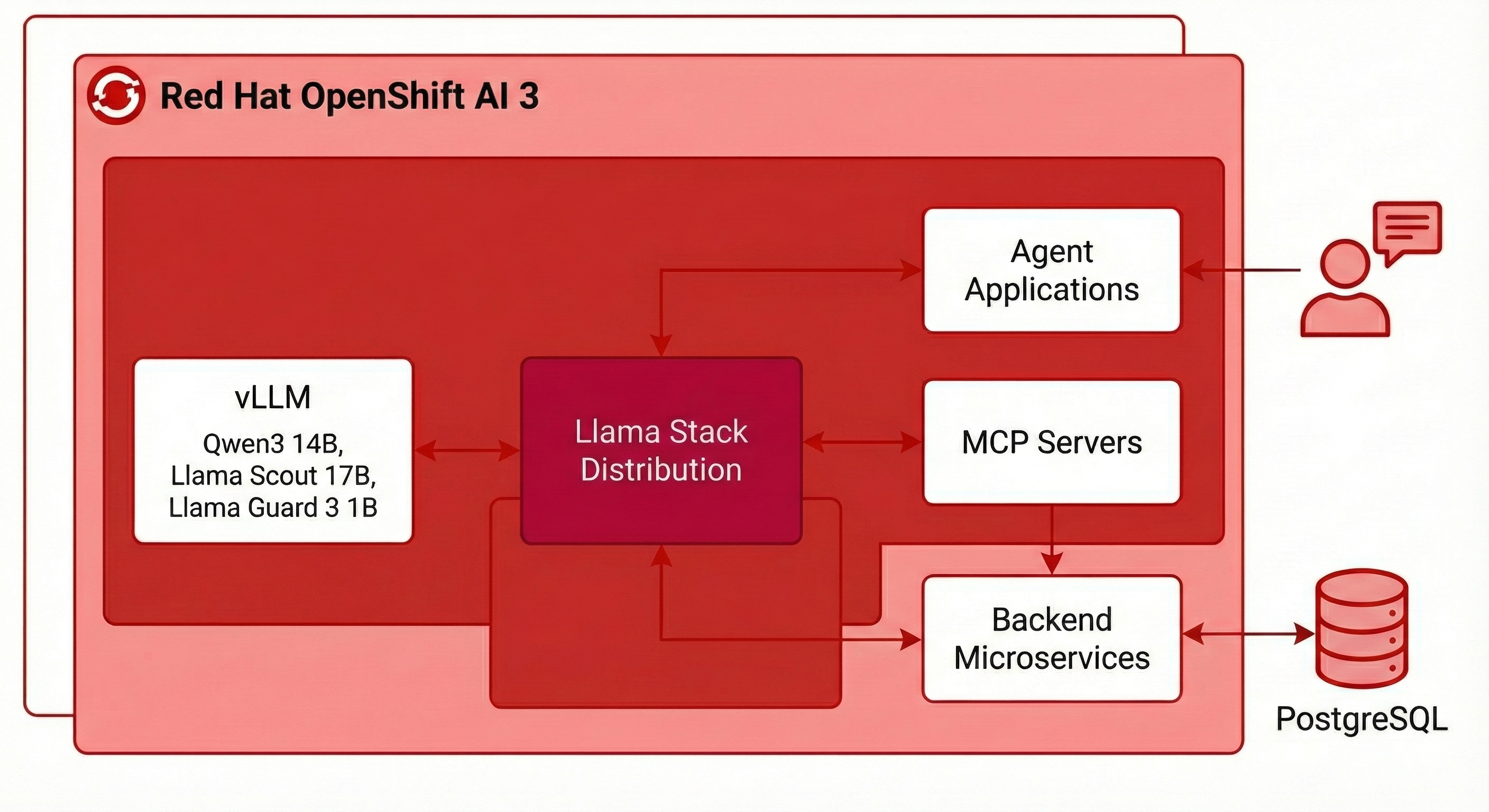
Throughout this workshop, you'll work with an enterprise AI architecture running on OpenShift:
-
Llama Stack Distribution: The core AI platform providing unified APIs for inference, agents, RAG, and tools
-
vLLM: High-performance model serving using the Qwen3 14B model, Llama Scout 17B, Llama Guard 3 1B, etc.
-
MCP Servers: Protocol translation layer connecting agents to backend systems
-
Backend Microservices: PostgreSQL-backed REST APIs providing customer and finance capabilities
-
Agent Applications: Python applications demonstrating various agent architectures and frameworks
All components run on Red Hat OpenShift AI 3, leveraging enterprise-grade infrastructure for production AI workloads.
Workshop Modules
-
Introduction (this module) - Workshop overview and objectives
-
Deploying Llama Stack - Install and configure your AI platform
-
Exploring Llama Stack - Discover APIs and test inference capabilities
-
RAG - Implement document retrieval and knowledge grounding Optional
-
Evals - Evaluate the responses from models Optional
-
Shields - Apply safety and content moderation Optional
-
Web Search - Using Tavily to augment context with web results Optional
-
Backend Setup - Deploy microservices and MCP servers
-
MCP - Build agents with Python that use business function tools via MCP
-
Agent - Explore the Llama Stack Agent API
-
Agent - Deploy a complete LangGraph-based agent application
-
Traces - Using Langfuse for traces, evals and feedback
-
Workbench - RHOAI has an in-cluster, in-browser VS Code Optional
By the end of this workshop, you'll have hands-on experience building, deploying, and operating agentic AI systems on OpenShift using Llama Stack, FastMCP, LangGraph, FastAPI, Langfuse, and enterprise infrastructure.
Let's begin!