Web Search with Llama Stack
One of the more powerful out of the box tools in Llama Stack is web search and an integration with Tavily.
This means your agent/application can have the latest and greatest information available from Internet sources and not wholly rely on its training data.
|
What is Tavily? Tavily is an AI-optimized search engine designed specifically for LLM applications. Unlike general web search APIs that return raw HTML, Tavily returns clean, structured content that models can directly reason about. The free tier provides enough API calls for development and testing. |
You will need a Tavily API key to activate. Sign up at www.tavily.com and create an API key.
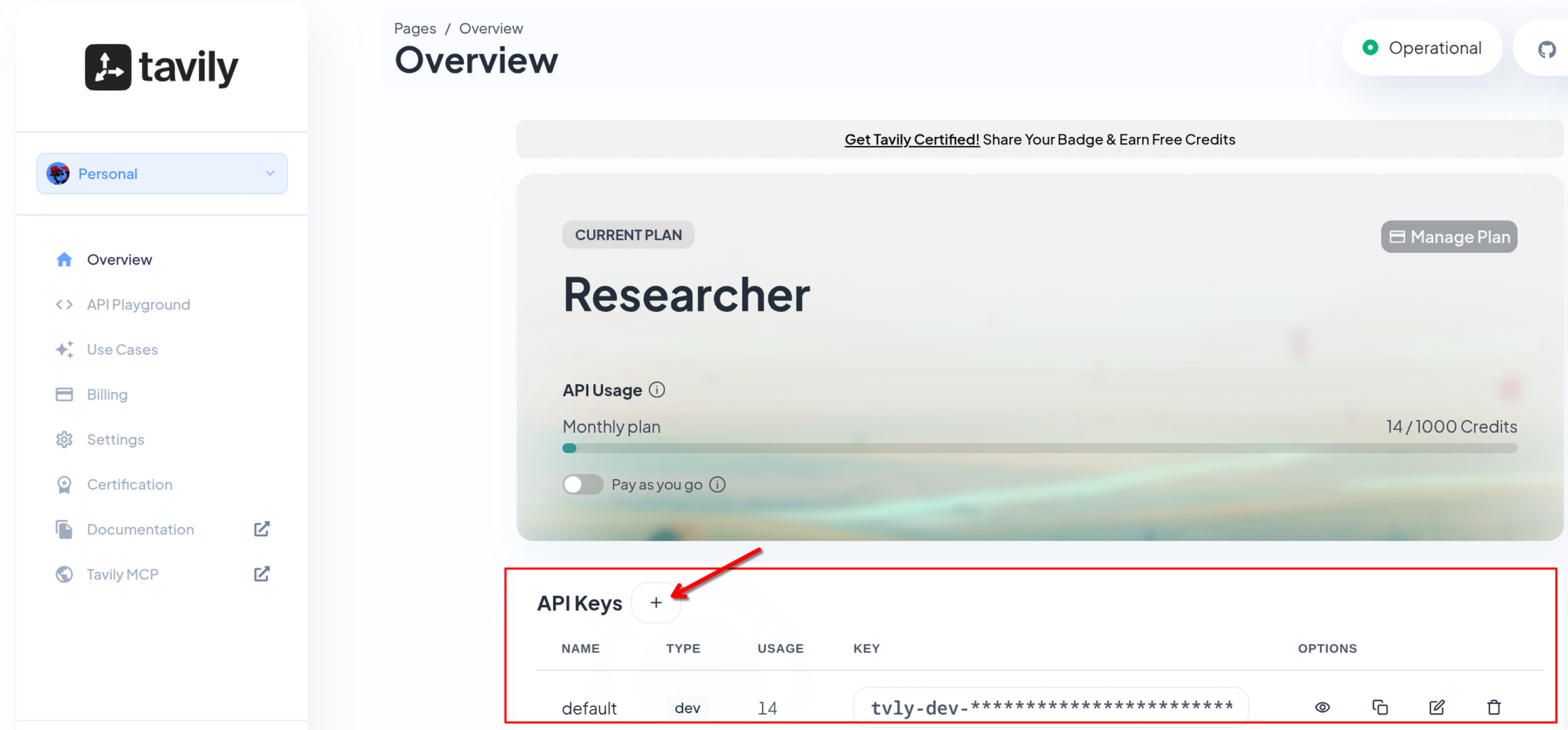
| This module requires you to have a TAVILY_SEARCH_API_KEY. Once you signed up to Tavily and get one, continue with the following instructions. |
Make sure you are in the correct base directory
cd $HOME/fantaco-redhat-one-2026/
pwd/home/lab-user/fantaco-redhat-one-2026If needed, create a Python virtual environment (venv)
python -m venv .venvHow do you know if you need to create one? You can look for an existing .venv folder
ls .venvThe following response indicates you need to create your Python venv
ls: cannot access '.venv': No such file or directorySet environment
source .venv/bin/activateTavily was configured as part of the LlamaStack ConfigMap, it will use your own Tavily key as an environment variable.
grep -A 3 "tavily" $HOME/fantaco-redhat-one-2026/llama-stack-scripts/llamastack-configmap.yaml - provider_id: tavily-search
provider_type: remote::tavily-search
config:
api_key: ${env.TAVILY_SEARCH_API_KEY:=}
max_results: 3Change to the web-search sub-directory
cd web-search
pwd
Install the dependencies
pip install -r requirements.txtCopy and paste your API key from Tavily and add it to the following environment variable in the terminal:
export TAVILY_SEARCH_API_KEY=| It will be something like: export TAVILY_SEARCH_API_KEY=tvly-dev-abcde… |
Make sure your INFERENCE_MODEL env variable is set correctly
echo $INFERENCE_MODELvllm/qwen3-14bpython 1_list_tools.py==================================================
Registered Toolgroups
==================================================
Toolgroup ID: builtin::rag
Provider ID: rag-runtime
--------------------------------------------------
Toolgroup ID: builtin::websearch
Provider ID: tavily-search
--------------------------------------------------
Total toolgroups: 2
==================================================Who won the last Super Bowl?
Review the code snippet to use Response API to ask who won last Super Bowl.
# Initialize client
client = LlamaStackClient(base_url=LLAMA_STACK_BASE_URL)

# Create response without web search (non-streaming)
response = client.responses.create(
    model=INFERENCE_MODEL,
    input="Who won the last Super Bowl?",
    stream=False,
)
Run the script with NO web search and only the model’s training data:
python 2_no_web_search.pyThe last Super Bowl, **Super Bowl LVIII**, was played on **February 11, 2024**, at Allegiant Stadium in Las Vegas. The **Kansas City Chiefs** defeated the **San Francisco 49ers** with a final score of **25-22**.
**Patrick Mahomes** of the Chiefs was named **Super Bowl MVP**, leading his team to victory with a strong performance. This marked the Chiefs' second Super Bowl win in three years (following their 2020 victory).The response you receive will be different than the one above as you are dealing with a non-deterministic LLM. Typically the response includes the winner from 2023 or 2024.
|
Why is the answer outdated? The model’s training data has a cutoff date (typically mid-2024 for Qwen3). It can only answer based on what it learned during training. Events after that cutoff — like Super Bowl LIX in February 2025 — are invisible to the model without external tools. |
Now we can use the builtin tool to use Tavily websearch to POTENTIALLY receive a more up to date answer.
See the snippet below:
# Initialize client with Tavily API key
client = LlamaStackClient(
    base_url=LLAMA_STACK_BASE_URL,
    provider_data={"tavily_search_api_key": TAVILY_SEARCH_API_KEY} if TAVILY_SEARCH_API_KEY else None,
)

# Create response with web search (non-streaming)
response = client.responses.create(
    model=INFERENCE_MODEL,
    input=QUESTION,
    tools=[{"type": "web_search"}],
    stream=False,
)
Run the script:
QUESTION="Who won the last Super Bowl?" python 3_web_search.pyNote: If you are running this query after February 8 2026 then you will likely have a different response.
|
How does it work? When |
Tavily Key: Set
Question:   Who won the last Super Bowl?

The Philadelphia Eagles won the most recent Super Bowl (Super Bowl LIX in 2025), defeating the Kansas City Chiefs with a score of **40-22** in New Orleans. This marked the Eagles' second Super Bowl championship and their first since 2018.
Who is the current US President?
python 2_no_web_search_president.pyAs of the latest information available (up to July 2024), **Joe Biden** is the 46th President of the United States. His term began on **January 20, 2021**, following the 2020 presidential election. The next U.S. presidential election is scheduled for **November 5, 2024**, with the new president to be inaugurated on **January 20, 2025**.
If you're asking this question after July 2024, the answer may change depending on the election results. Let me know if you'd like updates on the 2024 race!And now with a web search:
python 3_web_search_president.pyNote: Non-deterministic behavior means even with the web search tool this can report that Joe Biden is president. We attempt to help the LLM+Tavily by providing Today as seen later in this module.
The current President of the United States is **Donald John Trump**.
He was sworn into office on **January 20, 2025**, and his term is set
to end on **January 20, 2029**. This information is consistent across
multiple sources, including official government websites and encyclopedic
references.
Make sure to know your model’s knowledge cutoff date
Knowledge Cutoff Date
python 4_what_is_my_knowledge_cutoff.pyMy knowledge cutoff is **Q3 2024**, meaning my training data includes
information up to that time. However, I do **not** have real-time internet
access, so I cannot provide updates or information beyond this cutoff.
For the most current data, I recommend checking reliable sources directly.
Let me know if you'd like help with anything within my training scope!|
Why check the cutoff? Knowing your model’s knowledge cutoff tells you which questions need web search augmentation and which can rely on training data alone. For factual questions about events after the cutoff, web search is essential. For stable knowledge (math, science, history), the model’s training data is typically sufficient. |
Today
A key tip to make your search results better is to simply add Today to every prompt.
today = date.today()
prompt=f"Today is {today}. Who is the current US President?"
Simply knowing about today’s date helps the model reason about things that are temporal in nature such as "current", "Q2" or "last year".
|
A simple but powerful pattern: Prepending |
python 5_web_search_president_today.pyAs of January 8, 2026, the current U.S. President is **Donald Trump**.
He secured a second term in the 2024 election, as indicated by multiple
sources, including news articles and the official White House website.Responses
You can also use the web search tool via the Responses API
QUESTION="Who won the last Super Bowl?"

cat << EOF | curl -sS "$LLAMA_STACK_BASE_URL/v1/responses" \
    -H "Content-Type: application/json" \
    -H "Authorization: Bearer $API_KEY" \
    -H "X-LlamaStack-Provider-Data: {\"tavily_search_api_key\": \"$TAVILY_SEARCH_API_KEY\"}" \
    -d @- | jq -r '.output[] | select(.type == "message") | .content[0].text'
{
  "model": "$INFERENCE_MODEL",
  "input": "Today is $(date +%Y-%m-%d). $QUESTION",
  "tools": [{"type": "web_search"}],
  "stream": false
}
EOF
Summary
In this module you:
-
Compared model responses with and without web search, seeing how training data cutoffs create stale answers
-
Used Tavily via Llama Stack’s built-in
web_searchtool to get current information -
Learned the importance of knowing your model’s knowledge cutoff date
-
Applied the "Today is…" prompt pattern to improve temporal reasoning and search relevance
-
Accessed web search through both the Python SDK and direct REST API calls
Web search is one of the simplest tools to add to your agents, and it immediately addresses one of the most common complaints about LLMs — outdated information.