Backend and MCP Architecture
In previous modules, you explored Llama Stack’s APIs in isolation. Now you’ll see how Llama Stack agents interact with real business functions through the Model Context Protocol (MCP). This module demonstrates how agents can access enterprise capabilities - customer data, financial transactions, order management - through standardized tool interfaces.
From APIs to agent tools
Traditional enterprise applications expose business functions through REST APIs. While powerful, these APIs require developers to write custom integration code, manage authentication, handle errors, and understand domain-specific schemas. Every new application means more integration work.
Llama Stack agents change this paradigm. Instead of hardcoding API integrations, agents can:
-
Discover tools dynamically at runtime through MCP servers
-
Reason about which tools to use based on user intent
-
Invoke business functions naturally using tool calling
-
Compose multi-step workflows across different systems
The bridge between agents and existing business systems is the Model Context Protocol (MCP).
What is MCP and why does it matter?
The Model Context Protocol is an open standard that allows AI agents to interact with external tools and data sources through a consistent interface. Think of MCP as "API for AI" - while REST APIs are designed for developers, MCP is designed for agents.
MCP solves the agent integration challenge
Without MCP, integrating agents with business systems requires:
-
Writing custom tool wrappers for every API endpoint
-
Hardcoding business logic into agent prompts
-
Managing credentials and authentication separately
-
Rebuilding tools when APIs change
-
No standardization across different systems
With MCP, you get:
-
Standardized tool discovery: Agents ask MCP servers "what can you do?" and receive structured tool descriptions
-
Unified invocation protocol: All tools are called the same way, regardless of underlying implementation
-
Security boundary: MCP servers control access, validate requests, and enforce policies
-
Backend abstraction: Business systems can evolve without breaking agents
-
Ecosystem compatibility: Any MCP-compliant agent can use any MCP-compliant server
How Llama Stack uses MCP
Llama Stack provides first-class MCP support through its tool runtime:
-
MCP server registration: Register MCP endpoints as tool groups with Llama Stack
-
Tool discovery: Llama Stack queries MCP servers for available tools
-
Agent reasoning: When an agent needs capabilities, Llama Stack makes tools available for invocation
-
Tool execution: Llama Stack invokes MCP tools and returns results to the agent
-
Response synthesis: The agent uses tool results to formulate natural language responses
This module demonstrates this pattern with business functions for customer management and financial operations.
Agent-to-business-function architecture
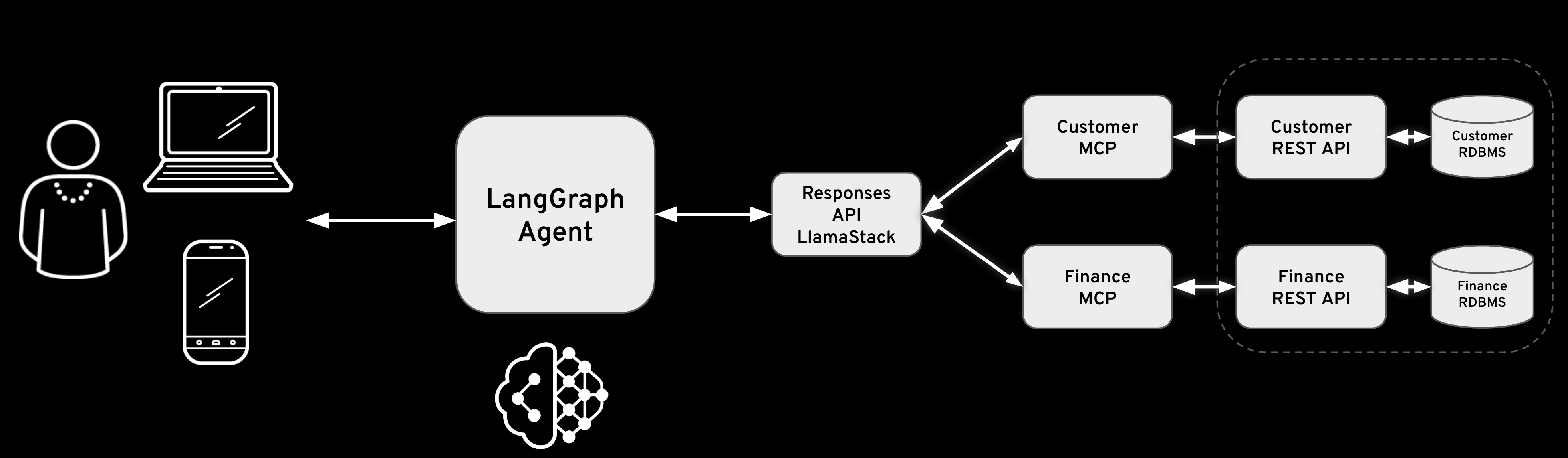
This lab demonstrates how Llama Stack agents access business capabilities through MCP servers. The example uses Fantaco, a fictional company with customer and finance business functions:
Chat Interface] end subgraph AI["AI Platform - OpenShift"] subgraph LLS["Llama Stack Distribution"] AGENT[AI Agent
Multi-turn reasoning] API[Llama Stack APIs
Responses, Tools, Agents] VLLM[vLLM Inference
Qwen3-14B] end end subgraph MCP["MCP Layer - Tool Abstraction"] MCP_CUST[Customer MCP Server
Port: 8001] MCP_FIN[Finance MCP Server
Port: 8002] end subgraph Backend["Backend Microservices"] subgraph CustSvc["Customer Domain"] CUST_API[Customer REST API
FastAPI] CUST_DB[(PostgreSQL
Customer Data)] end subgraph FinSvc["Finance Domain"] FIN_API[Finance REST API
FastAPI] FIN_DB[(PostgreSQL
Orders, Invoices)] end end SUPPORT --> AGENT AGENT --> API API --> VLLM API --> MCP_CUST API --> MCP_FIN MCP_CUST --> CUST_API MCP_FIN --> FIN_API CUST_API --> CUST_DB FIN_API --> FIN_DB style Users fill:#e1f5ff style AI fill:#fff4e1 style LLS fill:#ffe4e1 style MCP fill:#e8f5e9 style Backend fill:#f3e5f5 style CustSvc fill:#e8eaf6 style FinSvc fill:#e8eaf6
How agents access business functions
- Step 1: User makes a request
-
A user asks a natural language question: "Find the customer with email thomashardy@example.com and show their order history"
- Step 2: The LLM reasons about the request
-
The agent sends the request to the LLM, which analyzes it and determines that 2 capabilities are needed:
-
Search for a customer by email
-
Retrieve order history for that customer
-
- Step 3: Tool discovery
-
Llama Stack queries the registered MCP servers to find available tools:
-
Customer MCP:
search_customers,get_customer -
Finance MCP:
fetch_order_history,fetch_invoice_history, etc.
-
- Step 4: Agent invokes tools
-
The agent makes tool calls through Llama Stack’s tool runtime:
-
Call
search_customers(email="thomashardy@example.com")via Customer MCP -
Extract customer ID from result
-
Call
fetch_order_history(customer_id="AROUT")via Finance MCP
-
- Step 5: MCP servers execute business logic
-
Each MCP server:
-
Validates the request
-
Calls the appropriate backend API
-
Formats the response as MCP tool result
-
Returns data to Llama Stack
-
- Step 6: Agent synthesizes response
-
The agent receives tool results and generates a natural language response combining customer information with order history
The agent-MCP-business function flow
MCP creates a clean separation between agent reasoning and business logic execution. Agents don’t need to know about REST APIs, database schemas, or authentication mechanisms - they simply invoke tools and receive structured results.
thomashardy@example.com" LLS->>LLS: Analyze request
Determine tool needed LLS->>MCP: GET /v1/tools
Discover available tools MCP-->>LLS: [search_customers,
get_customer] LLS->>LLS: Generate tool call
search_customers() LLS->>MCP: POST /v1/tool-runtime/invoke
search_customers(email=...) MCP->>MCP: Validate request
Check permissions MCP->>API: GET /api/customers?
contactEmail=... API->>DB: SELECT * FROM customers
WHERE contact_email LIKE... DB-->>API: Customer record(s) API-->>MCP: JSON response MCP->>MCP: Format as MCP result MCP-->>LLS: ToolInvocationResult LLS->>Agent: Synthesize natural
language response Agent-->>LLS: "Found customer:
Thomas Hardy at
Around the Horn..." Note over Agent,DB: MCP servers translate between agent tool calls
and backend business functions
Business functions exposed as agent tools
In this lab, 2 MCP servers expose business capabilities to Llama Stack agents:
- Customer tools (via Customer MCP Server)
-
-
search_customers: Find customers by various criteria with partial matching -
get_customer: Retrieve complete customer details by ID
-
- Finance tools (via Finance MCP Server)
-
-
fetch_order_history: Get order history with date filtering and pagination -
fetch_invoice_history: Get invoice history with date filtering and pagination
-
Agents invoke these tools naturally through Llama Stack’s tool runtime without knowing about the underlying APIs, databases, or implementation details. The MCP servers handle all the complexity of translating tool calls into business operations.
FantaCo Backend
Deploy Microservices and Database Backend
The backend system consists of two REST APIs, one for Customer and one for Finance. Each has its own Postgres database and the two services are fully independent of each other.
Make sure you are in the correct directory
cd $HOME/fantaco-redhat-one-2026/
pwd/home/lab-user/fantaco-redhat-one-2026Install the enterprise backend databases and REST APIs
|
What is Helm? Helm is the package manager for Kubernetes. A Helm chart bundles all the YAML manifests (Deployments, Services, ConfigMaps, etc.) needed to deploy an application. Running |
helm install fantaco-app ./helm/fantaco-appNAME: fantaco-app
LAST DEPLOYED: Fri Dec 12 23:01:21 2025
NAMESPACE: agentic-user1
STATUS: deployed
REVISION: 1
TEST SUITE: Noneoc get podsNAME READY STATUS RESTARTS AGE
fantaco-customer-main-7fd4ddb666-5cngz 1/1 Running 0 3m14s
fantaco-finance-main-75ffddb44b-knj6x 1/1 Running 0 3m14s
llamastack-distribution-vllm-77897d9f8f-xl6gp 1/1 Running 0 51m
postgresql-customer-ff78dffdf-tpj9c 1/1 Running 0 12m
postgresql-finance-689d97894f-2fq89 1/1 Running 0 12mAnd wait for the 1/1 Running before continuing
|
What’s running now? You have 5 pods: the Llama Stack server from the earlier module, two PostgreSQL databases (one for customer data, one for financial data), and two FastAPI microservices that expose REST APIs over those databases. This mirrors a real enterprise setup where business data lives in separate domain-specific services. |
Test backend
Verify that you have connectivity to the backend REST endpoints and their databases with some simple curl commands.
CUST_URL=https://$(oc get routes -l app=fantaco-customer-main -o jsonpath="{range .items[*]}{.status.ingress[0].host}{end}")
echo $CUST_URLhttp://fantaco-customer-service-default.apps.cluster-frcqw.dynamic.redhatworkshops.iocurl -sS -L "$CUST_URL/api/customers?contactEmail=thomashardy%40example.com" | jq[
{
"customerId": "AROUT",
"companyName": "Around the Horn",
"contactName": "Thomas Hardy",
"contactTitle": "Sales Representative",
"address": "120 Hanover Sq.",
"city": "London",
"region": null,
"postalCode": "WA1 1DP",
"country": "UK",
"phone": "(171) 555-7788",
"fax": "(171) 555-6750",
"contactEmail": "thomashardy@example.com",
"createdAt": "2025-12-13T22:19:49.433401",
"updatedAt": "2025-12-13T22:19:49.433401"
}
]|
Why test with curl first? Verifying the REST APIs directly confirms the backend is healthy before adding the MCP layer. If something fails later, you’ll know the issue is in the MCP translation — not the underlying data. |
FIN_URL=https://$(oc get routes -l app=fantaco-finance-main -o jsonpath="{range .items[*]}{.status.ingress[0].host}{end}")
echo $FIN_URLhttp://fantaco-finance-service-default.apps.cluster-frcqw.dynamic.redhatworkshops.iocurl -sS -X POST $FIN_URL/api/finance/orders/history \
-H "Content-Type: application/json" \
-d '{
"customerId": "AROUT",
"limit": 10
}' | jq{
"data": [
{
"id": 8,
"orderNumber": "ORD-008",
"customerId": "AROUT",
"totalAmount": 59.99,
"status": "PENDING",
"orderDate": "2024-01-30T15:20:00",
"createdAt": "2024-01-30T15:20:00",
"updatedAt": null
},
{
"id": 3,
"orderNumber": "ORD-003",
"customerId": "AROUT",
"totalAmount": 89.99,
"status": "PENDING",
"orderDate": "2024-01-25T09:45:00",
"createdAt": "2024-01-25T09:45:00",
"updatedAt": null
},
{
"id": 4,
"orderNumber": "ORD-004",
"customerId": "AROUT",
"totalAmount": 199.99,
"status": "DELIVERED",
"orderDate": "2024-01-10T16:20:00",
"createdAt": "2024-01-10T16:20:00",
"updatedAt": null
}
],
"success": true,
"count": 3,
"message": "Order history retrieved successfully"
}You’ve now verified that the Fantaco backend microservices are operational and can respond to direct REST API calls. The Customer API provides anagraphic data, while the Finance API delivers transactional information. Both services are backed by PostgreSQL databases containing realistic sample data.
Next, you’ll deploy the MCP servers that will bridge these backend APIs to Llama Stack agents.
Deploy MCP Servers
MCP servers act as the translation layer between Llama Stack’s tool invocation protocol and the backend REST APIs. Each MCP server:
-
Implements the MCP specification: Provides standardized endpoints for tool discovery and invocation
-
Wraps backend APIs: Translates MCP tool calls into appropriate REST API requests
-
Handles authentication and validation: Ensures only authorized operations are performed
-
Formats responses: Converts API responses into MCP-compatible tool results
The Fantaco deployment includes 2 MCP servers, one for each domain:
|
The MCP servers don’t contain business logic. They are thin adapters that translate MCP tool invocations into REST API calls. The actual business rules, data validation, and database queries stay in the backend services. This separation means you can add AI capabilities to existing systems without modifying them. |
helm install fantaco-mcp ./helm/fantaco-mcpNAME: fantaco-mcp
LAST DEPLOYED: Fri Dec 12 23:01:44 2025
NAMESPACE: agentic-user1
STATUS: deployed
REVISION: 1
TEST SUITE: Noneoc get podsNAME READY STATUS RESTARTS AGE
fantaco-customer-main-7fd4ddb666-5cngz 1/1 Running 0 25m
fantaco-finance-main-75ffddb44b-knj6x 1/1 Running 0 25m
llamastack-distribution-vllm-77897d9f8f-xl6gp 1/1 Running 0 73m
mcp-customer-6bd8bcfc7b-f85dl 1/1 Running 0 118s
mcp-finance-75bd497cfd-wtnpt 1/1 Running 0 118s
postgresql-customer-ff78dffdf-tpj9c 1/1 Running 0 34m
postgresql-finance-689d97894f-2fq89 1/1 Running 0 34mSummary
In this module, you deployed the infrastructure that enables agents to access business functions:
- Deployed backend services
-
2 microservices (Customer and Finance) with PostgreSQL databases provide realistic business capabilities
- Deployed MCP servers
-
2 MCP servers act as bridges between Llama Stack and the backend services, translating agent tool calls into API requests
- Verified the integration
-
Using curl commands, you confirmed that:
-
Backend APIs respond to direct REST calls
-
MCP servers are deployed
-
- Key concepts demonstrated
-
-
Agent-to-business-function flow: How agents access enterprise capabilities without knowing implementation details
-
MCP as abstraction layer: Standardized protocol for tool discovery and invocation
-
Dynamic tool discovery: Agents learn available capabilities at runtime, not deployment time
-
Clean separation: Business logic stays in backend services, MCP handles translation, agents handle reasoning
-
The infrastructure is now ready for agents to invoke these tools. In the next module, you’ll use Python clients (Llama Stack Client and LangGraph) to interact with these MCP servers that intelligently combine these business functions to answer complex user queries.