Closing
Congratulations on completing this hands-on workshop on building agentic AI applications using Llama Stack, LangGraph, Langfuse, FastAPI and FastMCP on Red Hat OpenShift AI. You’ve journeyed from deploying your first Llama Stack instance to building AI agents that interact with enterprise systems through the Model Context Protocol (MCP).
What you’ve learned
- Deployed and explored Llama Stack
-
You deployed a Llama Stack distribution on OpenShift, discovered its comprehensive API landscape, and interacted with language models through multiple inference interfaces including the native Response API.
- Implemented RAG capabilities
-
You built Retrieval-Augmented Generation (RAG) systems using Llama Stack’s built-in vector stores, embedding models, and file search tools to ground AI responses in your own documents.
- Applied safety guardrails
-
You learned how to implement content moderation and safety shields to ensure your AI applications meet enterprise security and compliance requirements.
- Leveraged Web Search Tools
-
You used Tavily to augment context and address your model’s knowledge cutoff and limited training data.
- Integrated business systems via MCP
-
You deployed and registered Model Context Protocol servers that bridge Llama Stack and LangGraph agents with backend microservices, enabling AI to access customer data, financial transactions, and other enterprise capabilities.
- Built autonomous agents
-
You created intelligent agents using both the native Llama Stack Client and popular frameworks like LangGraph that can reason about tool usage, execute multi-step workflows, and provide natural language interfaces to complex business functions.
- Deployed production applications
-
You completed the journey by deploying a full-stack AI agent application with a web-based chat interface that brings together inference, tools, MCP, traces, evals and feedback.
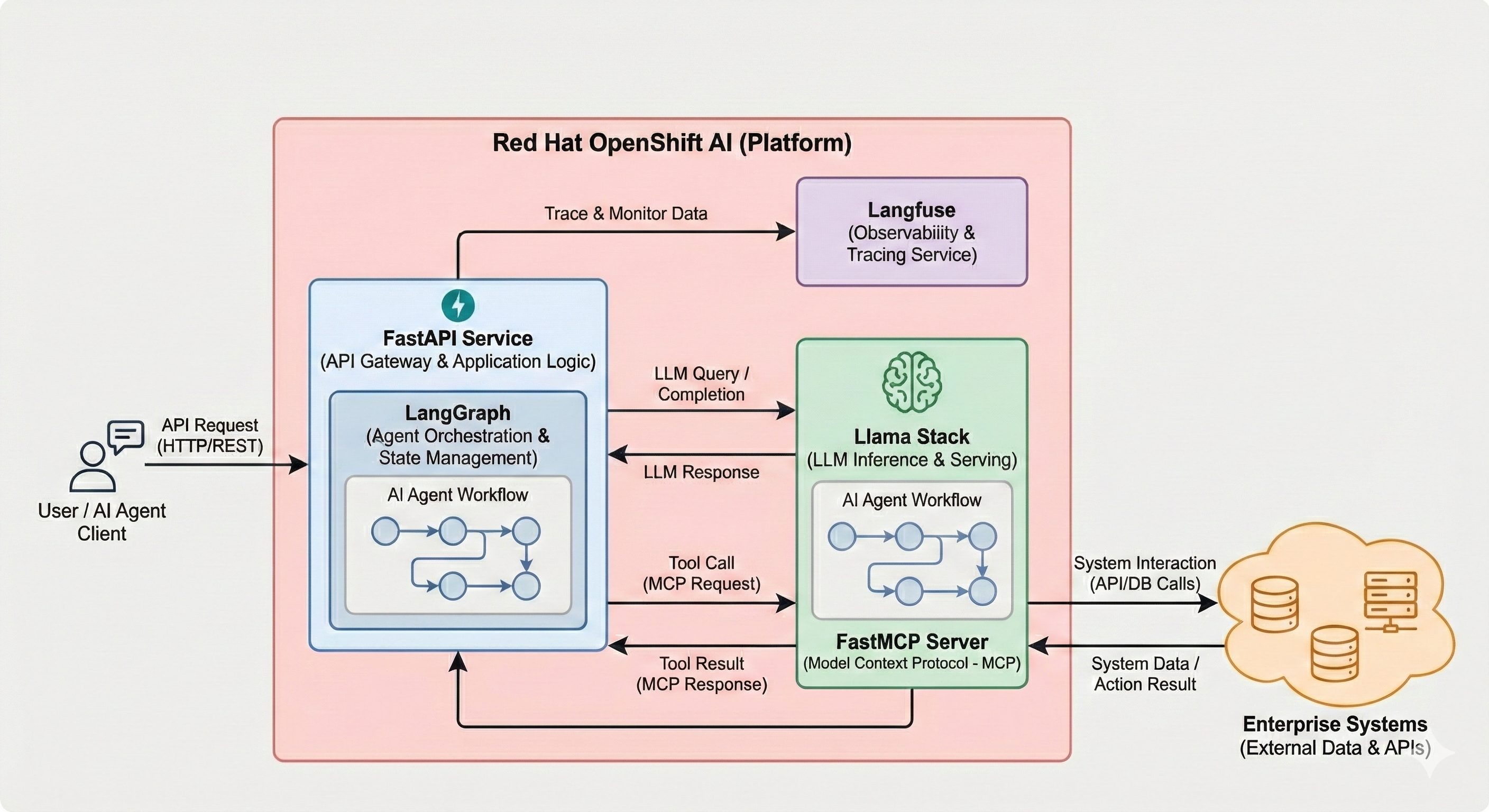
Throughout this workshop, you worked with an enterprise AI architecture running on OpenShift:
-
Llama Stack Distribution: The core AI platform providing unified APIs for inference, agents, RAG, and tools
-
vLLM: High-performance model serving using the Qwen3 14B model, Llama Scout 17B, Llama Guard 3 1B, etc.
-
MCP Servers: Protocol translation layer connecting agents to backend systems
-
Backend Microservices: PostgreSQL-backed REST APIs providing customer and finance capabilities
-
Agent Applications: Python applications demonstrating various agent architectures and frameworks
All components ran on Red Hat OpenShift AI 3, leveraging enterprise-grade infrastructure for production AI workloads.
Workshop modules completed
-
Introduction - Workshop overview and objectives
-
Deploying Llama Stack - Installed and configured your AI platform
-
Exploring Llama Stack - Discovered APIs and tested inference capabilities
-
RAG - Implemented document retrieval and knowledge grounding
-
Evals - Evaluated the responses from models
-
Shields - Applied safety and content moderation
-
Web Search - Used Tavily to augment context with web results
-
Backend Setup - Deployed microservices and MCP servers
-
MCP - Built agents with Python that use business function tools via MCP
-
Agent - Explored the Llama Stack Agent API
-
Agent - Deployed a complete LangGraph-based agent application
-
Traces - Used Langfuse for traces, evals and feedback
-
Langflow - Built graphical agent workflows
-
Workbench - Explored OpenShift AI’s in-cluster, in-browser VS Code
You now have hands-on experience building, deploying, and operating agentic AI systems on OpenShift using Llama Stack,FastMCP, LangGraph, FastAPI, Langfuse, Langflow and enterprise infrastructure.
Next steps
|
Taking this to your own environment: The patterns you practiced — Llama Stack distribution, MCP servers, agent frameworks, observability with Langfuse — are all portable. You can reproduce this architecture on any OpenShift cluster with GPU access by following the same Helm charts and CRDs used in this lab. The key components (Llama Stack, vLLM, FastMCP, LangGraph, Langfuse, Langflow) are all open source. |
Ready to continue your AI journey? Explore more innovative AI use cases and quickstart guides:
Red Hat AI Quickstarts: https://docs.redhat.com/en/learn/ai-quickstarts
The AI quickstarts provide simple, focused examples designed for fast and easy deployment on the Red Hat AI platform, including:
-
Enterprise RAG Chatbot - Centralize company knowledge with retrieval-augmented generation
-
AI-powered Virtual Agent - Build conversational AI to automate customer interactions
-
Privacy-focused AI Assistant - Deploy healthcare AI with PII detection and content moderation
-
Self-Service IT Agents - Automate IT processes like laptop refresh workflows
-
HR Assistant - Replace hours of policy document searches with AI-powered assistance
-
Compliance Audit Systems - Deploy financial audit systems with real-time insights
-
Observability Analysis - Summarize and analyze AI model performance and cluster metrics
-
AI Product Recommendations - Transform e-commerce with AI-driven discovery
Each quickstart has been created by Red Hat experts and is designed to help you adopt and scale AI in your organization.
Thank you!
Thank you for participating in this workshop. We hope you found it valuable and that you’re excited to bring these agentic AI capabilities to your own projects and organization.
For questions, feedback, or support, please reach out to your Red Hat team or visit the Red Hat Customer Portal.
Happy building!