Fast Install
The steps, tips and tricks to get up and running as fast as possible.
|
When to use this page: This module is a condensed reference for experienced users who want to set up the entire lab environment quickly without the explanatory content of the individual modules. If this is your first time through the workshop, follow the full modules instead — they provide important context about what each step does and why. |
Install Fast
Login
{login_command}git clone https://github.com/burrsutter/fantaco-redhat-one-2026
cd fantaco-redhat-one-2026/There are a few key variables that have been pre-populated for you as part of this lab environment:
Persist the most important env variables to my_env_vars.sh therefore if they become lost, you can just simply source $HOME\fantaco-redhat-one-2026\my_env_var.sh
cat << 'EOF' > my_env_vars.sh
export VLLM_API_URL='{litellm_api_base_url}'
export VLLM_API_TOKEN='{litellm_virtual_key}'
export LLAMA_STACK_BASE_URL=http://llamastack-distribution-vllm-service.agentic-{user}.svc:8321
export INFERENCE_MODEL=vllm/qwen3-14b
export API_KEY="not-applicable"
export EMBEDDING_MODEL=sentence-transformers/nomic-ai/nomic-embed-text-v1.5
export EMBEDDING_DIMENSION=768
export CUSTOMER_MCP_SERVER_URL=https://$(oc get routes -l app=mcp-customer -o jsonpath="{range .items[*]}{.status.ingress[0].host}{end}")/mcp
export FINANCE_MCP_SERVER_URL=https://$(oc get routes -l app=mcp-finance -o jsonpath="{range .items[*]}{.status.ingress[0].host}{end}")/mcp
export CHAT_URL=http://$(oc get routes -l app=simple-agent-chat-ui -o jsonpath="{range .items[*]}{.status.ingress[0].host}{end}")
export LANGFUSE_HOST=https://$(oc get route langfuse -o jsonpath='{.spec.host}')
EOF
source $HOME/fantaco-redhat-one-2026/my_env_vars.shecho "VLLM_API_URL="$VLLM_API_URL
echo "VLLM_API_TOKEN="$VLLM_API_TOKEN
echo ""
echo "LLAMA_STACK_BASE_URL="$LLAMA_STACK_BASE_URL
echo "INFERENCE_MODEL="$INFERENCE_MODEL
echo "API_KEY="$API_KEY
echo ""
echo "EMBEDDING_MODEL"=$EMBEDDING_MODEL
echo "EMBEDDING_DIMENSION="$EMBEDDING_DIMENSION
echo ""
echo "CUSTOMER_MCP_SERVER_URL="$CUSTOMER_MCP_SERVER_URL
echo "FINANCE_MCP_SERVER_URL="$FINANCE_MCP_SERVER_URL
echo ""
echo "CHAT_URL"=$CHAT_URL
echo ""
echo "LANGFUSE_HOST"=$LANGFUSE_HOSTNote: Some of these are filled in as you work through the steps
https://llm-prod.apps.maas.redhatworkshops.io/v1
sk-331A-A8c_DxQiHnUPX1Ulg
oc apply -f llama-stack-scripts/llamastack-configmap.yamloc apply -f - <<'EOF'
apiVersion: llamastack.io/v1alpha1
kind: LlamaStackDistribution
metadata:
annotations:
openshift.io/display-name: llamastack-distribution-vllm
name: llamastack-distribution-vllm
labels:
opendatahub.io/dashboard: 'true'
spec:
replicas: 1
server:
containerSpec:
command:
- /bin/sh
- '-c'
- llama stack run /etc/llama-stack/run.yaml
env:
- name: VLLM_TLS_VERIFY
value: 'false'
- name: MILVUS_DB_PATH
value: ~/.llama/milvus.db
- name: FMS_ORCHESTRATOR_URL
value: 'http://localhost'
- name: VLLM_MAX_TOKENS
value: '4096'
- name: VLLM_API_URL
value: '{litellm_api_base_url}'
- name: VLLM_API_TOKEN
value: '{litellm_virtual_key}'
- name: LLAMA_STACK_CONFIG_DIR
value: /opt/app-root/src/.llama/distributions/rh/
name: llama-stack
port: 8321
resources:
limits:
cpu: '2'
memory: 12Gi
requests:
cpu: 250m
memory: 500Mi
distribution:
name: rh-dev
userConfig:
configMapName: llama-stack-config
EOFecho "LLAMA_STACK_BASE_URL="$LLAMA_STACK_BASE_URL
echo "INFERENCE_MODEL="$INFERENCE_MODEL
echo "API_KEY="$API_KEYoc get pods -wNAME READY STATUS RESTARTS AGE
llamastack-distribution-vllm-9b647c5b5-xhfxs 0/1 Init:0/1 0 43s./install-lls-fantaco.shoc get pods -wNAME READY STATUS RESTARTS AGE
fantaco-customer-main-7fd4ddb666-4q8dh 1/1 Running 0 55s
fantaco-finance-main-75ffddb44b-t8rrg 1/1 Running 0 55s
langgraph-fastapi-569d6d554-cjnxl 1/1 Running 0 52s
llamastack-distribution-vllm-85866c49c6-k769c 1/1 Running 0 3m4s
mcp-customer-6bd8bcfc7b-kcjg5 1/1 Running 0 53s
mcp-finance-8cc684b8d-d254r 1/1 Running 0 53s
postgresql-customer-ff78dffdf-jrlhp 1/1 Running 0 55s
postgresql-finance-689d97894f-hks84 1/1 Running 0 55s
simple-agent-chat-ui-6d7794dc6b-5j6fs 1/1 Running 0 52ssource my_env_vars.sh
echo $CUSTOMER_MCP_SERVER_URL
echo $FINANCE_MCP_SERVER_URLecho $CHAT_URLLangfuse Setup
Keep the .venv folder inside of $HOME/fantaco-redhat-one-2026/
cd $HOME/fantaco-redhat-one-2026/python -m venv .venvsource .venv/bin/activatecd $HOME/fantaco-redhat-one-2026/langfuse-setupsource ./create-langfuse-url.shsource ./create-secrets.shhelm repo add langfuse https://langfuse.github.io/langfuse-k8s
helm repo updatehelm install langfuse langfuse/langfuse \
-f values-openshift-single-user.yaml \
--set langfuse.nextauth.url=$LANGFUSE_HOSToc get pods -wNAME READY STATUS RESTARTS AGE
fantaco-customer-main-7fd4ddb666-c26fv 1/1 Running 0 55m
fantaco-finance-main-75ffddb44b-frlxb 1/1 Running 0 55m
langfuse-clickhouse-shard0-0 1/1 Running 0 23m
langfuse-postgresql-0 1/1 Running 0 23m
langfuse-redis-primary-0 1/1 Running 0 23m
langfuse-s3-5fb6c8f845-s9shp 1/1 Running 0 23m
langfuse-web-67f4c9849-rmkxt 1/1 Running 2 (23m ago) 23m
langfuse-worker-69d997664c-bdr8f 1/1 Running 0 23m
langfuse-zookeeper-0 1/1 Running 0 23m
langgraph-fastapi-569d6d554-65j95 1/1 Running 0 55m
llamastack-distribution-vllm-78ccd8fcbf-tp2ch 1/1 Running 0 59m
mcp-customer-6bd8bcfc7b-fmmt2 1/1 Running 0 55m
mcp-finance-8cc684b8d-bln8l 1/1 Running 0 55m
postgresql-customer-ff78dffdf-69p5n 1/1 Running 0 55m
postgresql-finance-689d97894f-jlmm8 1/1 Running 0 55m
simple-agent-chat-ui-6d7794dc6b-4cndl 1/1 Running 0 55mlangfuse-web likes to CrashLoop see trouble shooting section
echo $LANGFUSE_HOSThttps://langfuse-agentic-user1.apps.cluster-m7dw5.dynamic.redhatworkshops.ioCreate API Keys via the Langfuse GUI
Place the values in keys.txt. This is helpful if the env vars become lost due to browser refresh, timeout, cluster stop/sleep, etc.
vi keys.txtsource $HOME/fantaco-redhat-one-2026/langfuse-setup/convert-keys-txt-env-vars.shVerify you have the needed Langfuse env vars
echo $LANGFUSE_SECRET_KEY
echo $LANGFUSE_PUBLIC_KEY
echo $LANGFUSE_HOST
cd ~/fantaco-redhat-one-2026/langfuse-setup/langgraph-agent/backendpip install -r requirements.txtpython 6-langgraph-langfuse-fastapi-chatbot.pyThis can fail for a number of reasons, check the startup logging to see if all the env vars are correctly set.
Terminal 2
source $HOME/fantaco-redhat-one-2026/langfuse-setup/convert-keys-txt-env-vars.sh
echo $LANGFUSE_SECRET_KEY
echo $LANGFUSE_PUBLIC_KEY
echo $LANGFUSE_HOST
curl -sS -X POST http://localhost:8002/chat \
-H "Content-Type: application/json" \
-d '{
"message": "what are Fran Wilson'\''s orders?",
"user_id": "test-user",
"session_id": "test-session-123"
}' | jq -r '.reply'Evals
curl -sS -X POST http://localhost:8002/evaluate \
  -H "Content-Type: application/json" \
  -d '{
    "run_name": "after-prompt-update",
    "sync_dataset": true,
    "record_to_langfuse": true
  }' | jq .
Feedback
The Route was pre-created during cluster creation within the showroom namespace. This script just calculates it based on a pattern. You will need access to the chatbot GUI to leave feedback
For Showroom users:
$HOME/fantaco-redhat-one-2026/langfuse-setup/get-agent-route-as-student.shOR
For Workbench users:
oc apply -f workbench-service-route.yamlecho "https://$(oc get route chatbot-8002 -o jsonpath='{.spec.host}')"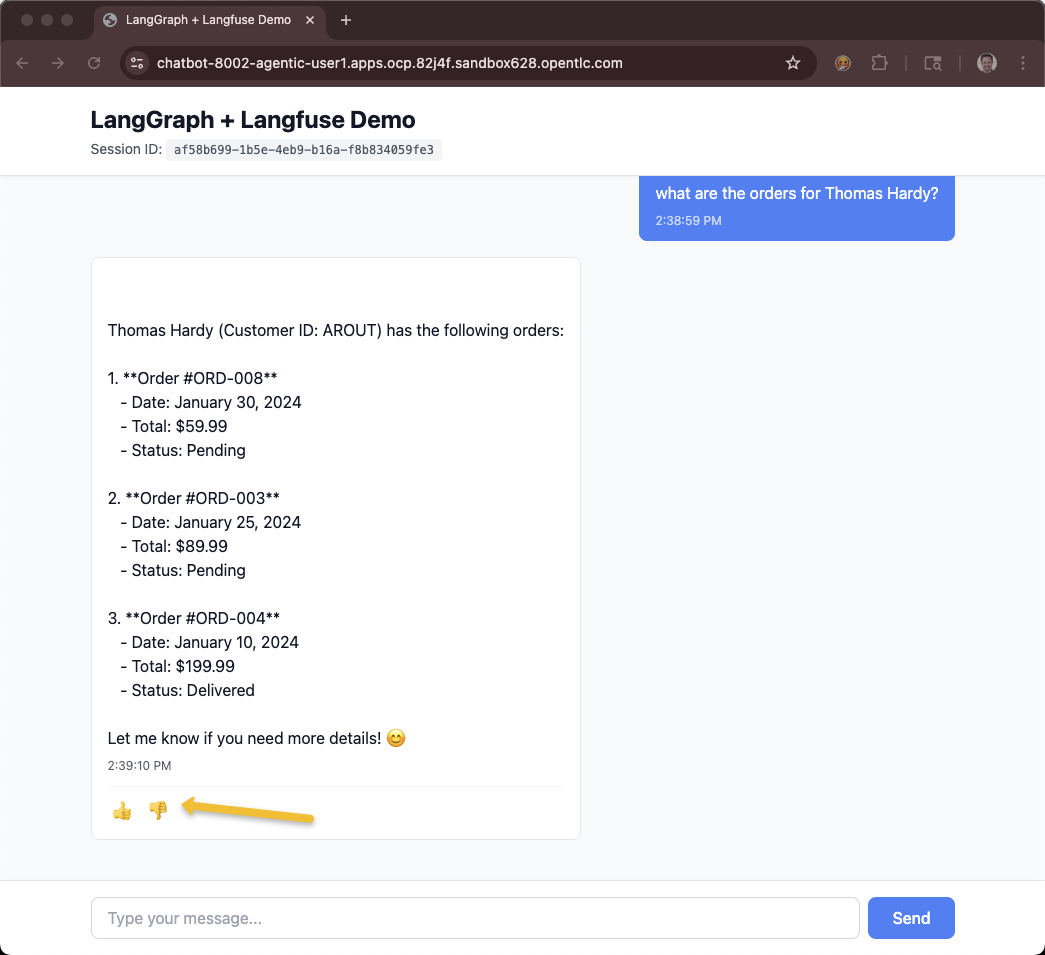
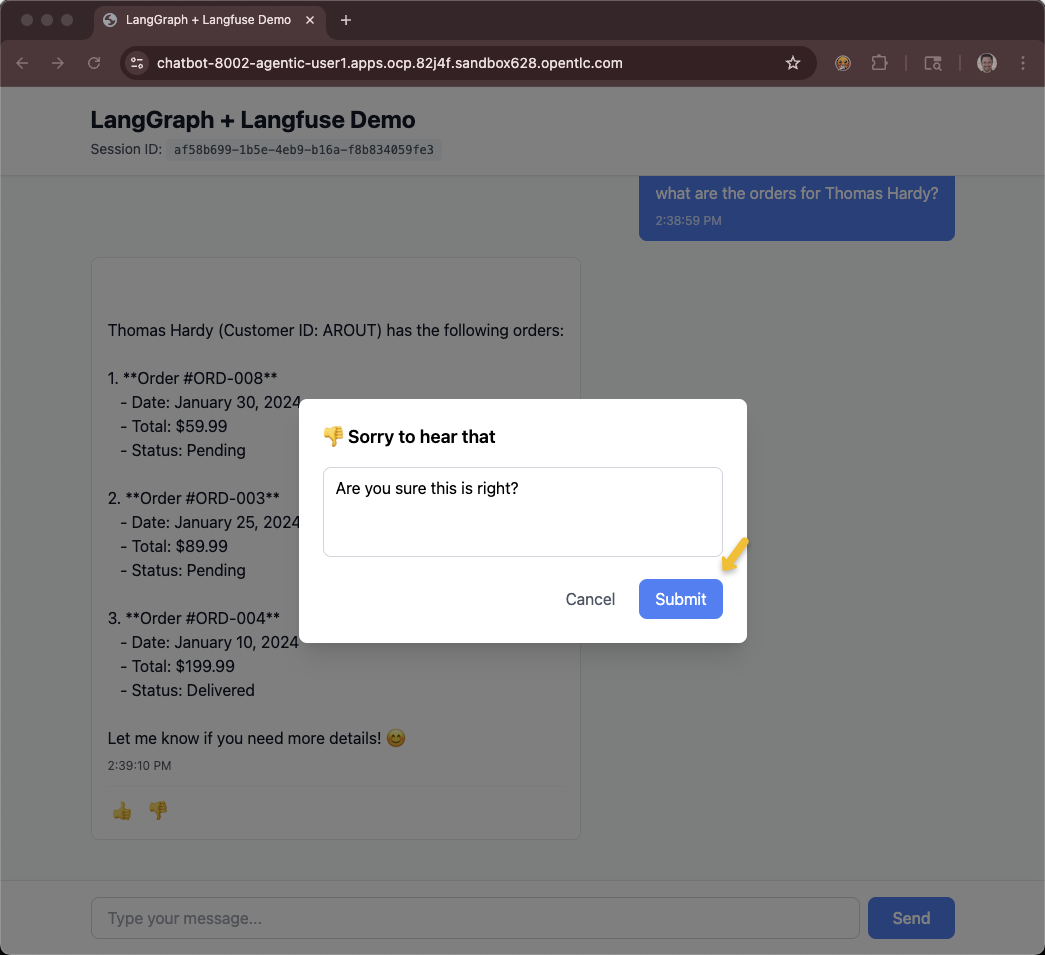
Make sure you have the correct env vars
source $HOME/fantaco-redhat-one-2026/langfuse-setup/convert-keys-txt-env-vars.shList traces
source $HOME/fantaco-redhat-one-2026/langfuse-setup/list-traces.shWhat is the feedback of the last trace?
$HOME/fantaco-redhat-one-2026/langfuse-setup/get-trace-feedback.sh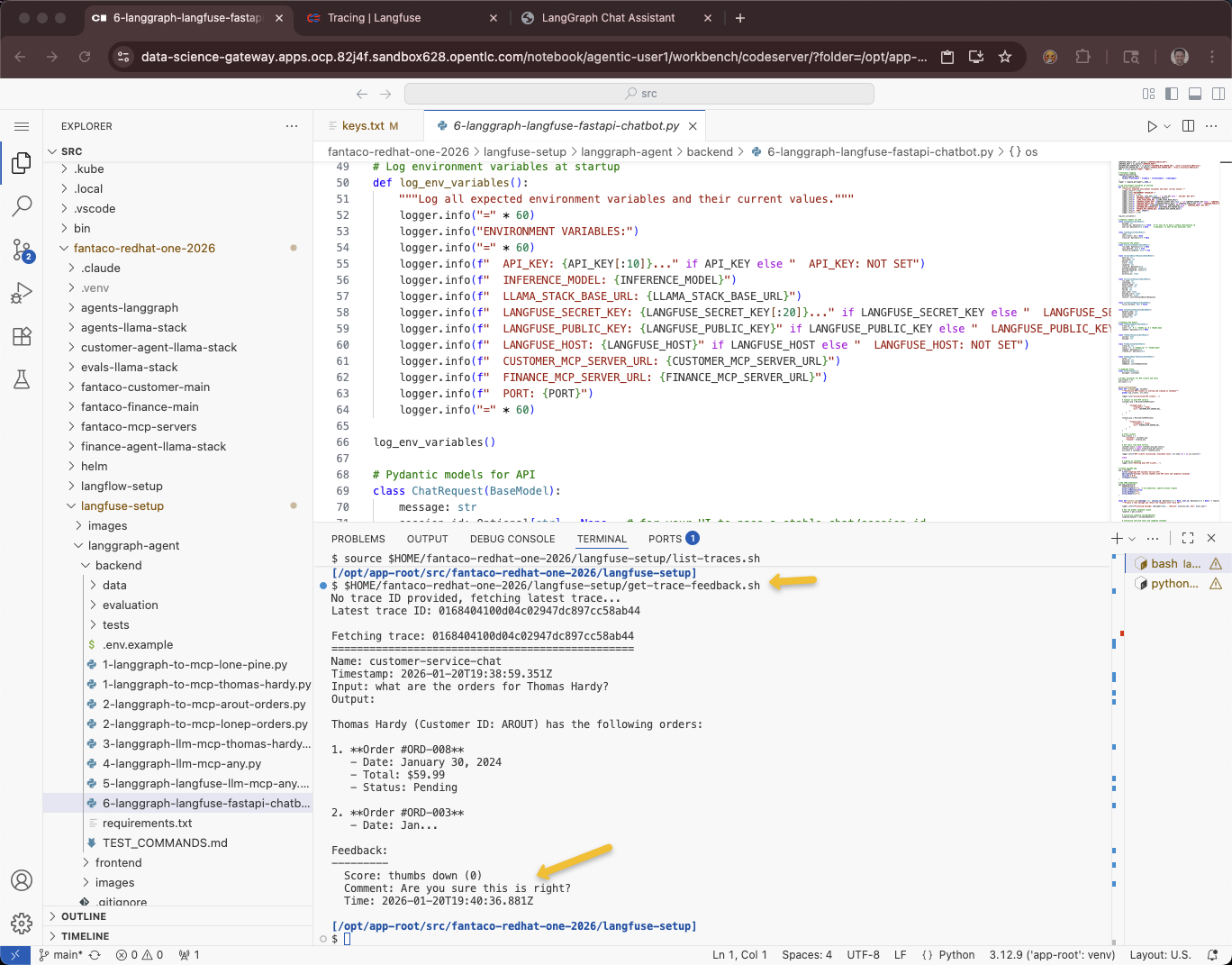
Troubleshooting
OpenShift AI, aka RHODS
LlamaStack is still in developer preview and is often not backward compatible.
As Cluster Admin
oc get csv -A -o custom-columns=NAME:.metadata.name,VERSION:.spec.version | grep rhods | head -1rhods-operator.3.2.0 3.2.0oc get llamastackdistribution -A -o custom-columns=NAME:.metadata.name,OPERATOR_VERSION:.status.version.operatorVersion,LLAMASTACK_VERSION:.status.version.llamaStackServerVersionNAME OPERATOR_VERSION LLAMASTACK_VERSION
llamastack-distribution-vllm "0.4.0" 0.3.5.1+rhai0Monitor that LLS pod
oc adm top pod -l app=llama-stackNAME CPU(cores) MEMORY(bytes)
llamastack-distribution-vllm-6954d965d8-m29kr 2m 461Mi