Langfuse: Traces, Evals and Feedback
Agents are applications and need the appropriate infrastructure to run them at with scale. Many of the vital capabilities such as load-balancing and fail-over across replicas, capturing logs and metrics and automatic restart are part of OpenShift.
However, Agents do have some unique aspects that require additional infrastructure services such as:
-
Traces
-
Evals
-
Feedback
The open source solution for these capabilities is in Langfuse.
|
Why do agents need specialized observability? Traditional application monitoring tracks request latency and error rates. Agent observability must also capture the reasoning chain: which tools were called, what data was returned, how the model synthesized its answer, and whether the user found it helpful. Langfuse provides this AI-specific observability layer on top of the platform-level monitoring that OpenShift already provides. |
Traces are mission critical for debugging, production support and for the intial capture of end-user intent and subsequent creation of evals. Feedback is vital to incrementally improving the quality of your agent over time.
cd $HOME/fantaco-redhat-one-2026/
pwd/home/lab-user/fantaco-redhat-one-2026Check that you have set key env variables
export LLAMA_STACK_BASE_URL=http://llamastack-distribution-vllm-service.agentic-{user}.svc:8321
export INFERENCE_MODEL=vllm/qwen3-14b
echo "LLAMA_STACK_BASE_URL="$LLAMA_STACK_BASE_URL
echo "INFERENCE_MODEL="$INFERENCE_MODEL
LLAMA_STACK_BASE_URL=http://llamastack-distribution-vllm-service:8321
INFERENCE_MODEL=vllm/qwen3-14bLangGraph clients (and most clients) like having an API_KEY set, even if it is not applicable since we are using privately hosted models via Llama Stack.
export API_KEY=not-applicableAnd double check on your MCP server URLs
export CUSTOMER_MCP_SERVER_URL=https://$(oc get routes -l app=mcp-customer -o jsonpath="{range .items[*]}{.status.ingress[0].host}{end}")/mcp
export FINANCE_MCP_SERVER_URL=https://$(oc get routes -l app=mcp-finance -o jsonpath="{range .items[*]}{.status.ingress[0].host}{end}")/mcp
echo $CUSTOMER_MCP_SERVER_URL
echo $FINANCE_MCP_SERVER_URL
If needed, create a Python virtual environment (venv)
python -m venv .venvor you can look for an existing .venv folder
ls .venvThe following response indicates you need to create your Python venv
ls: cannot access '.venv': No such file or directoryand
echo $VIRTUAL_ENV/home/lab-user/fantaco-redhat-one-2026/.venvIf needed, set environment to point to the venv
source .venv/bin/activateNow change to the agent backend directory. We have another LangGraph-based agent that has been instrumented for Langfuse traces.
cd $HOME/fantaco-redhat-one-2026/langfuse-setupLangfuse Setup
source ./create-langfuse-url.shsource ./create-secrets.shhelm repo add langfuse https://langfuse.github.io/langfuse-k8s
helm repo updatehelm install langfuse langfuse/langfuse \
-f values-openshift-single-user.yaml \
--set langfuse.nextauth.url=$LANGFUSE_HOSToc get podsNAME READY STATUS RESTARTS AGE
fantaco-customer-main-7fd4ddb666-c26fv 1/1 Running 0 55m
fantaco-finance-main-75ffddb44b-frlxb 1/1 Running 0 55m
langfuse-clickhouse-shard0-0 1/1 Running 0 23m
langfuse-postgresql-0 1/1 Running 0 23m
langfuse-redis-primary-0 1/1 Running 0 23m
langfuse-s3-5fb6c8f845-s9shp 1/1 Running 0 23m
langfuse-web-67f4c9849-rmkxt 1/1 Running 2 (23m ago) 23m
langfuse-worker-69d997664c-bdr8f 1/1 Running 0 23m
langfuse-zookeeper-0 1/1 Running 0 23m
langgraph-fastapi-569d6d554-65j95 1/1 Running 0 55m
llamastack-distribution-vllm-78ccd8fcbf-tp2ch 1/1 Running 0 59m
mcp-customer-6bd8bcfc7b-fmmt2 1/1 Running 0 55m
mcp-finance-8cc684b8d-bln8l 1/1 Running 0 55m
postgresql-customer-ff78dffdf-69p5n 1/1 Running 0 55m
postgresql-finance-689d97894f-jlmm8 1/1 Running 0 55m
simple-agent-chat-ui-6d7794dc6b-4cndl 1/1 Running 0 55mYou can view logs of the worker or web pods. There can be a few restarts while Kubernetes eventual consistency works its magic.
oc logs -l app=web --tail=100echo $LANGFUSE_URL
echo "Open in a new browser tab"Use the GUI of Langfuse to then create the following:
-
Account
-
Organization
-
Project
-
API Keys
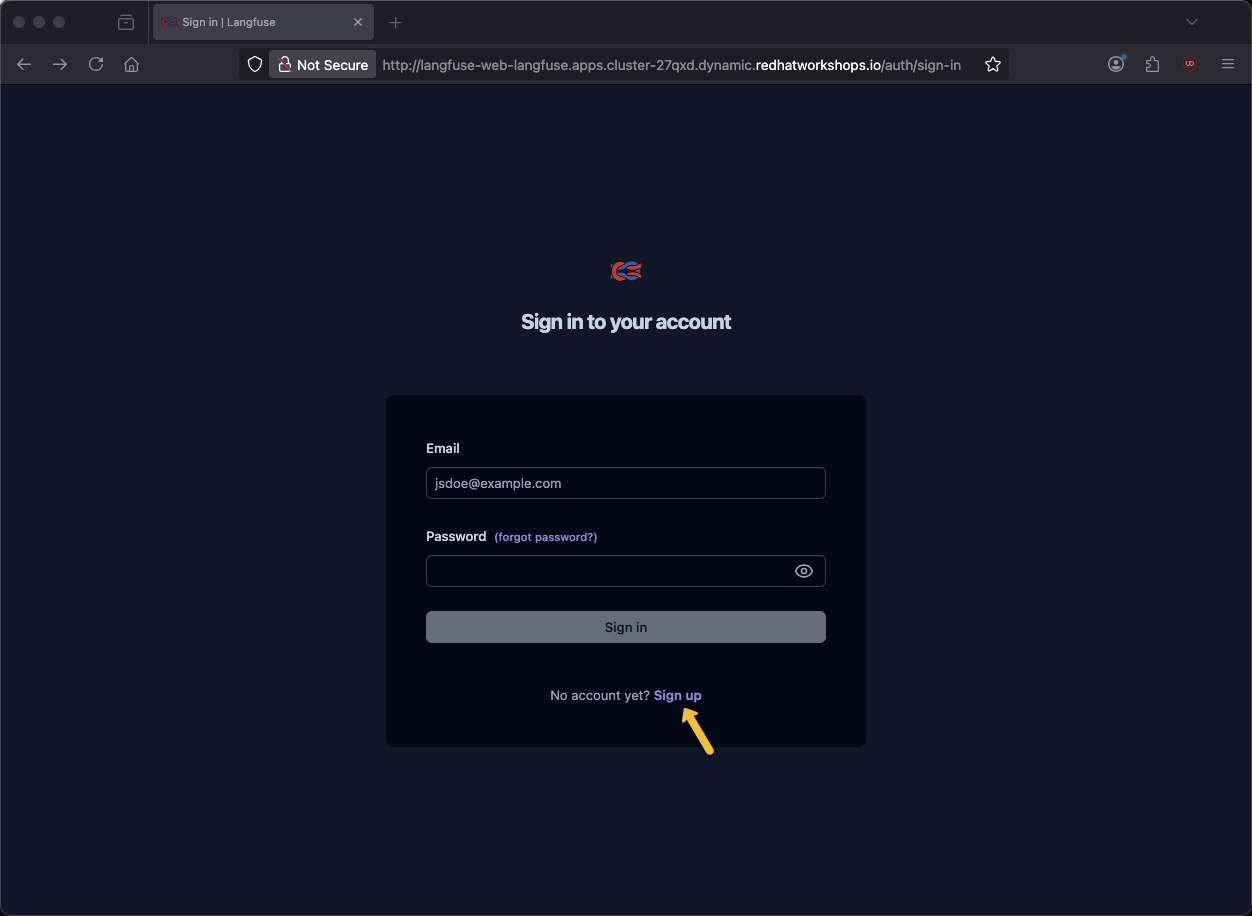
Click Sign up
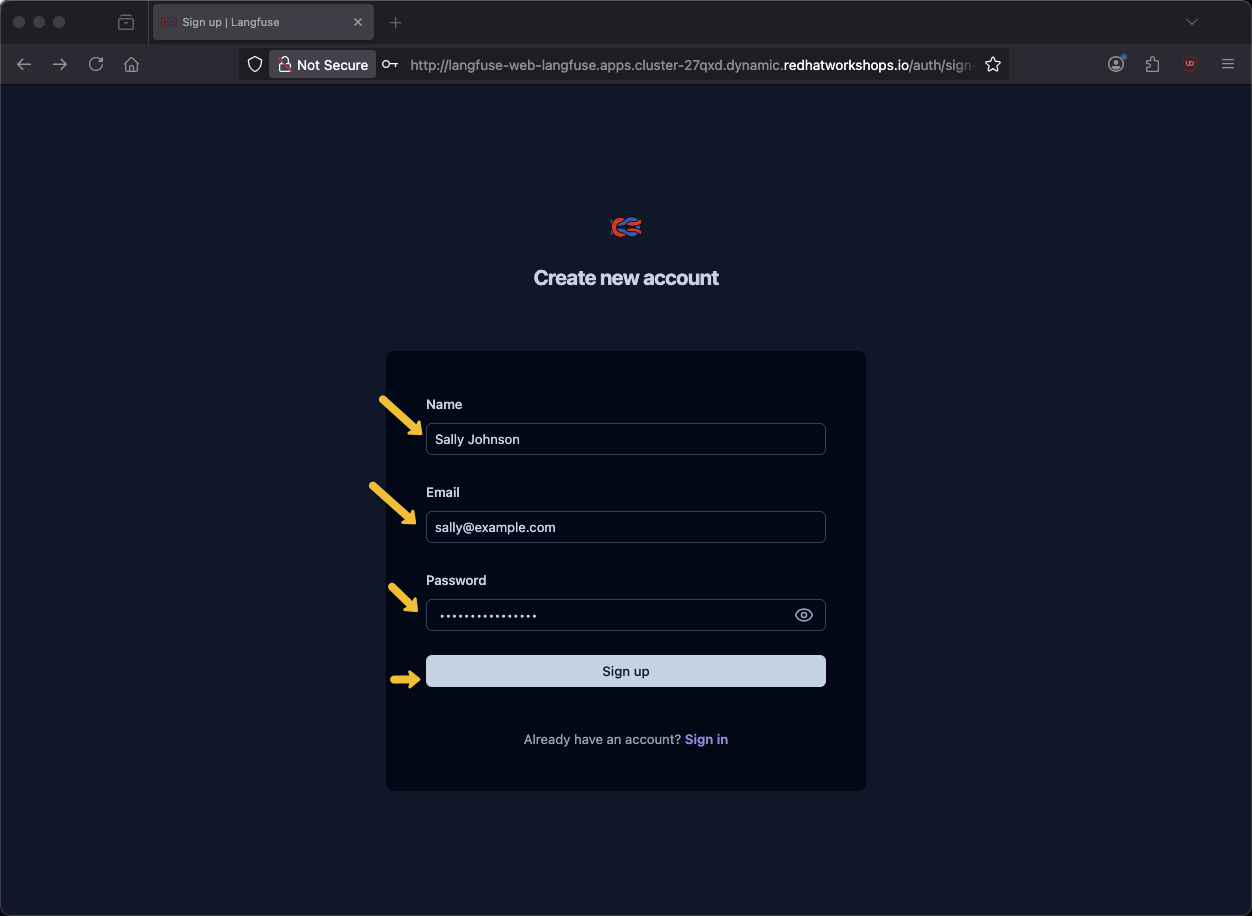
Provide name, email address and password and click Sign up
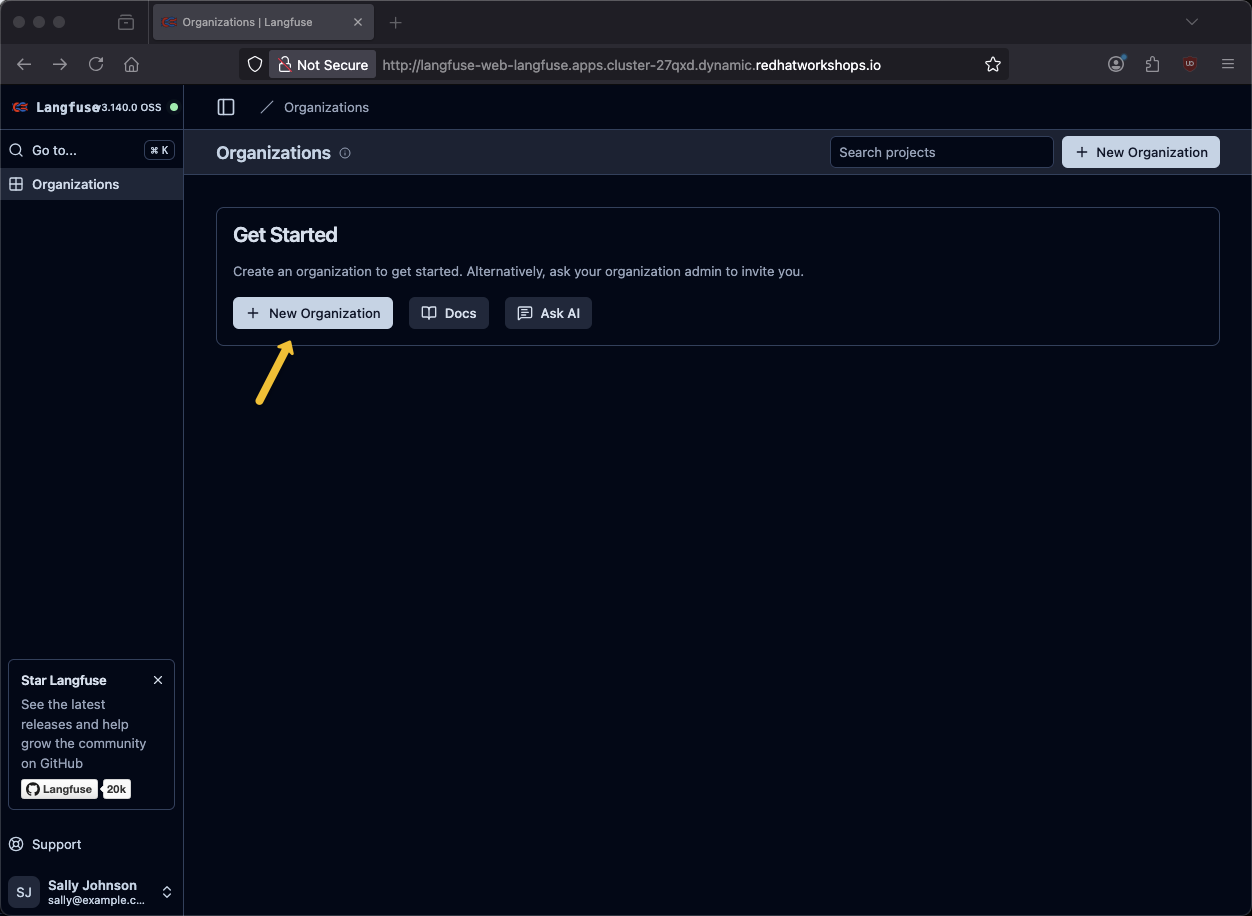
Click New Organization
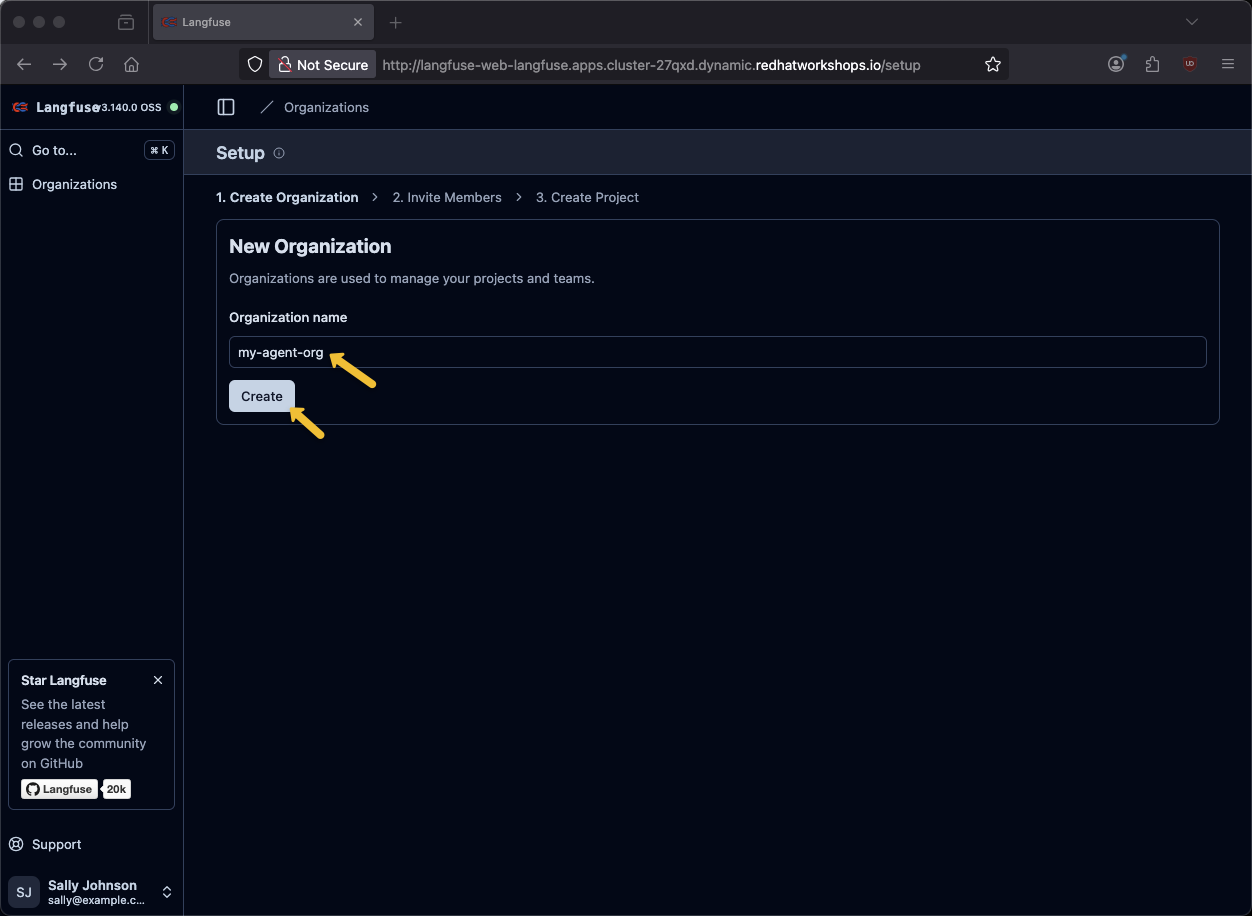
Provide an organization name of my-agent-org and click Create
Click Next
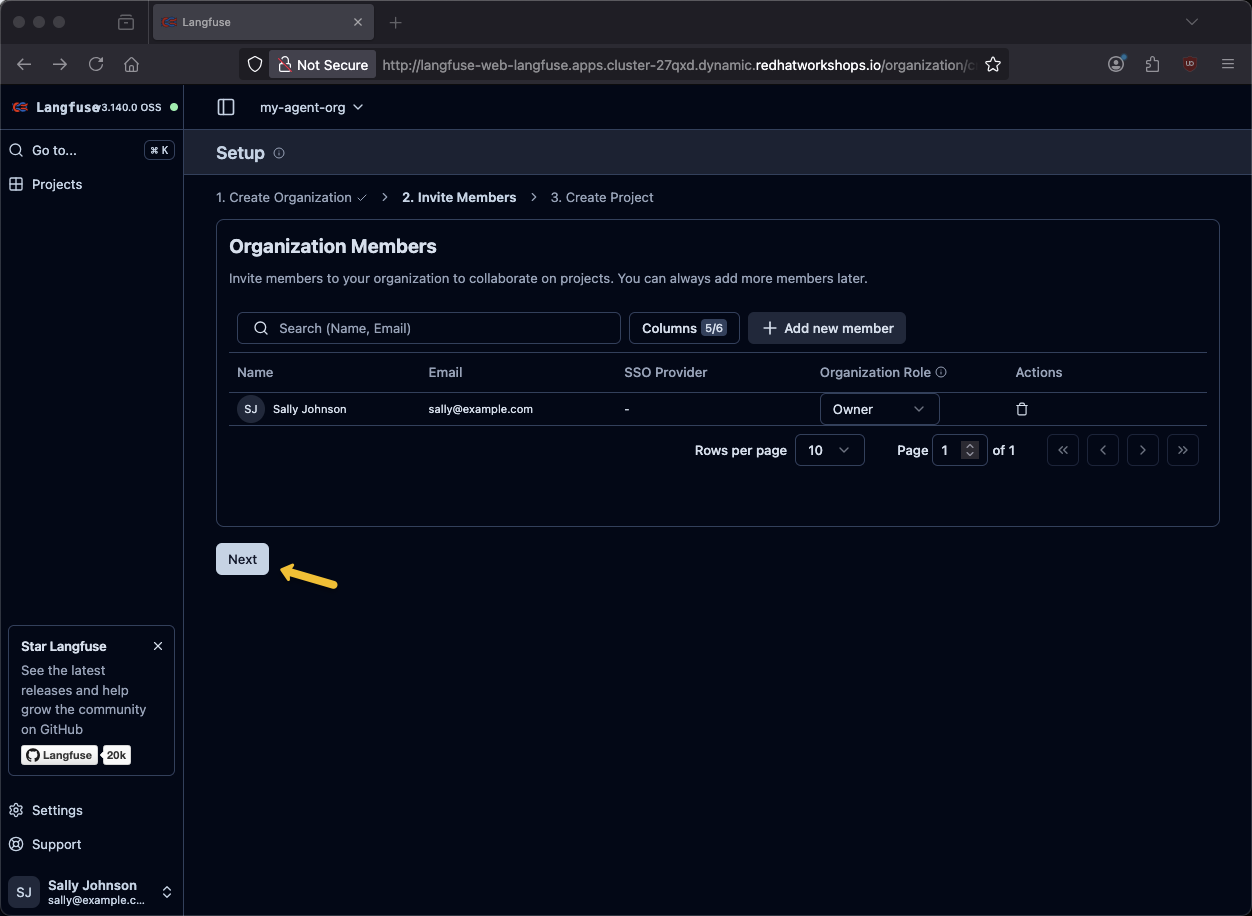
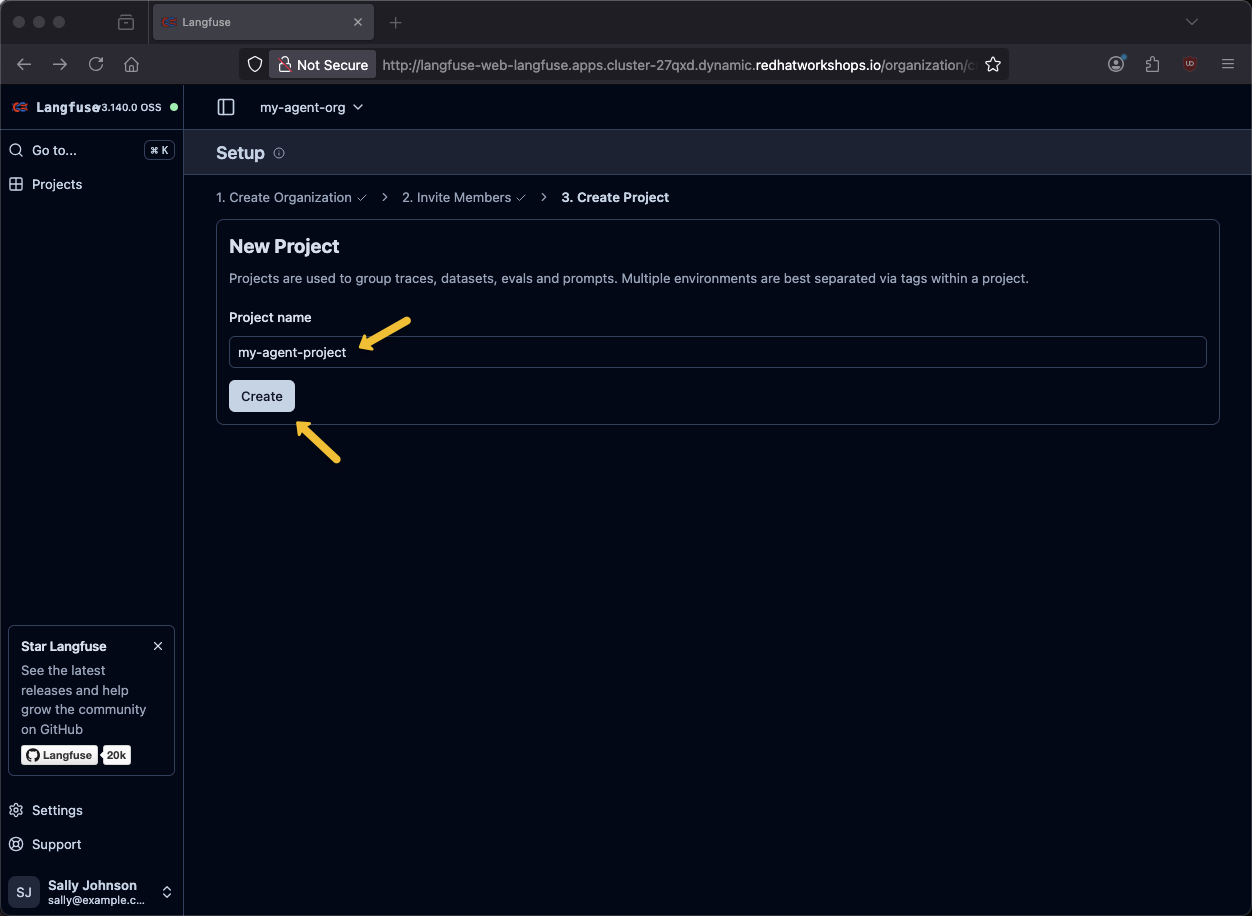
Provide a project name of my-agent-project and click Create
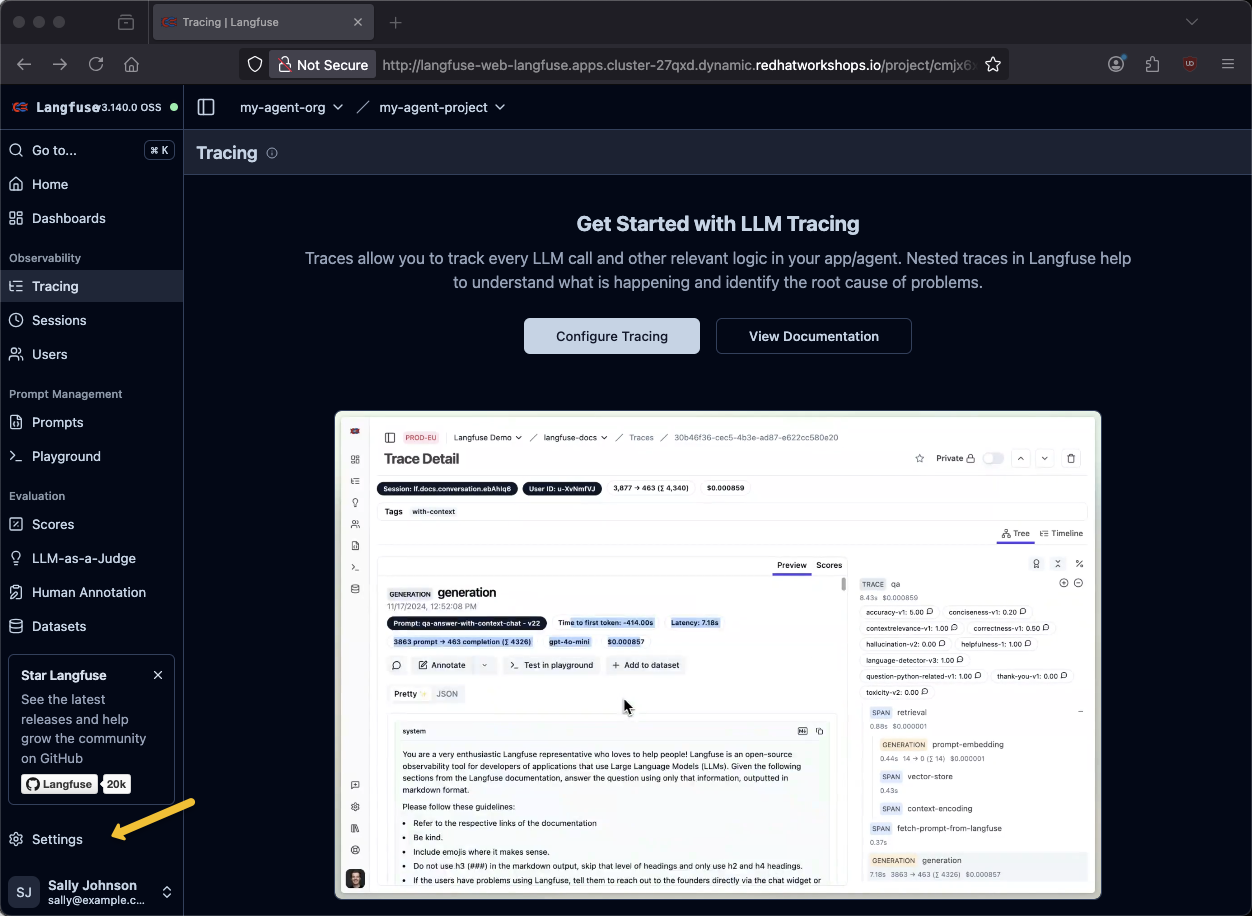
Click on Settings
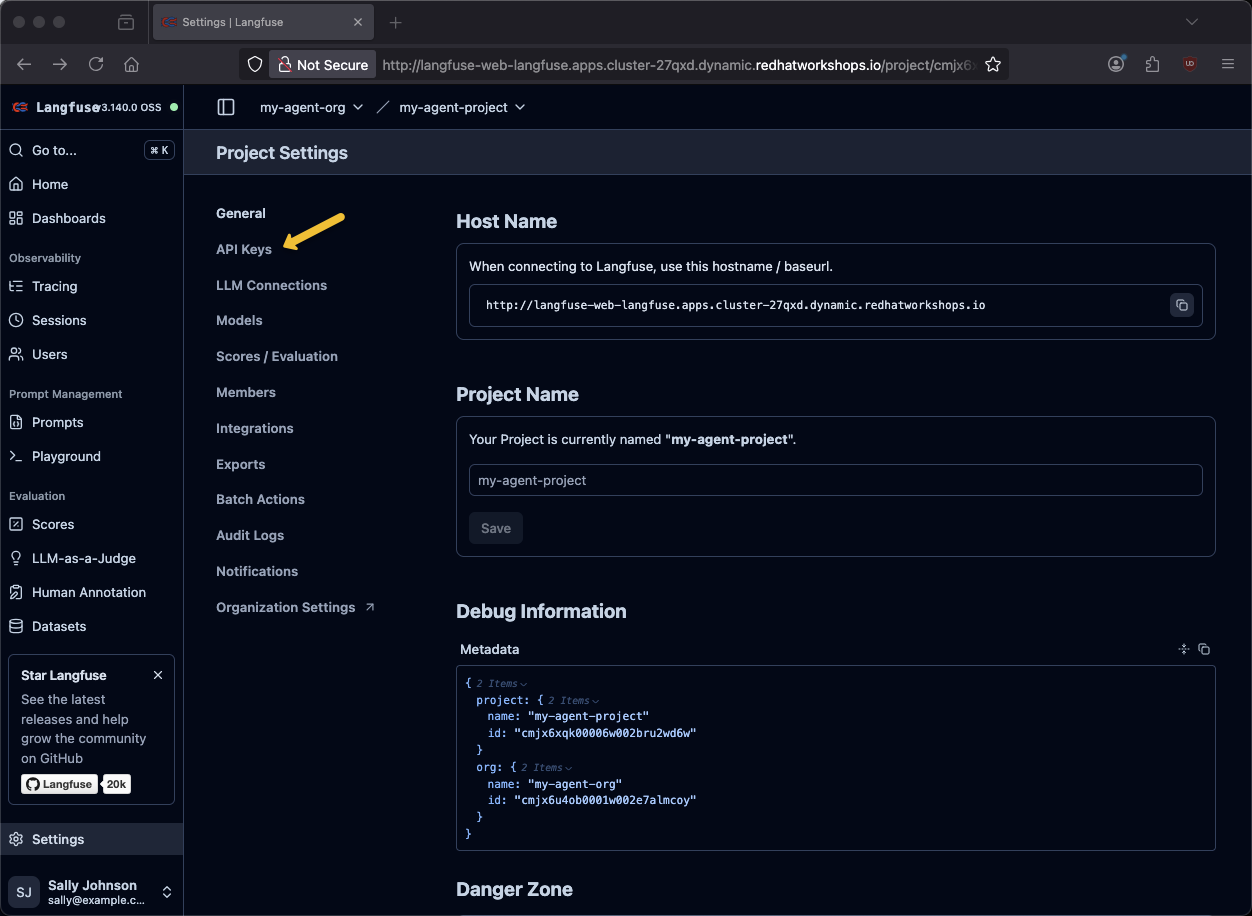
Click on API Keys
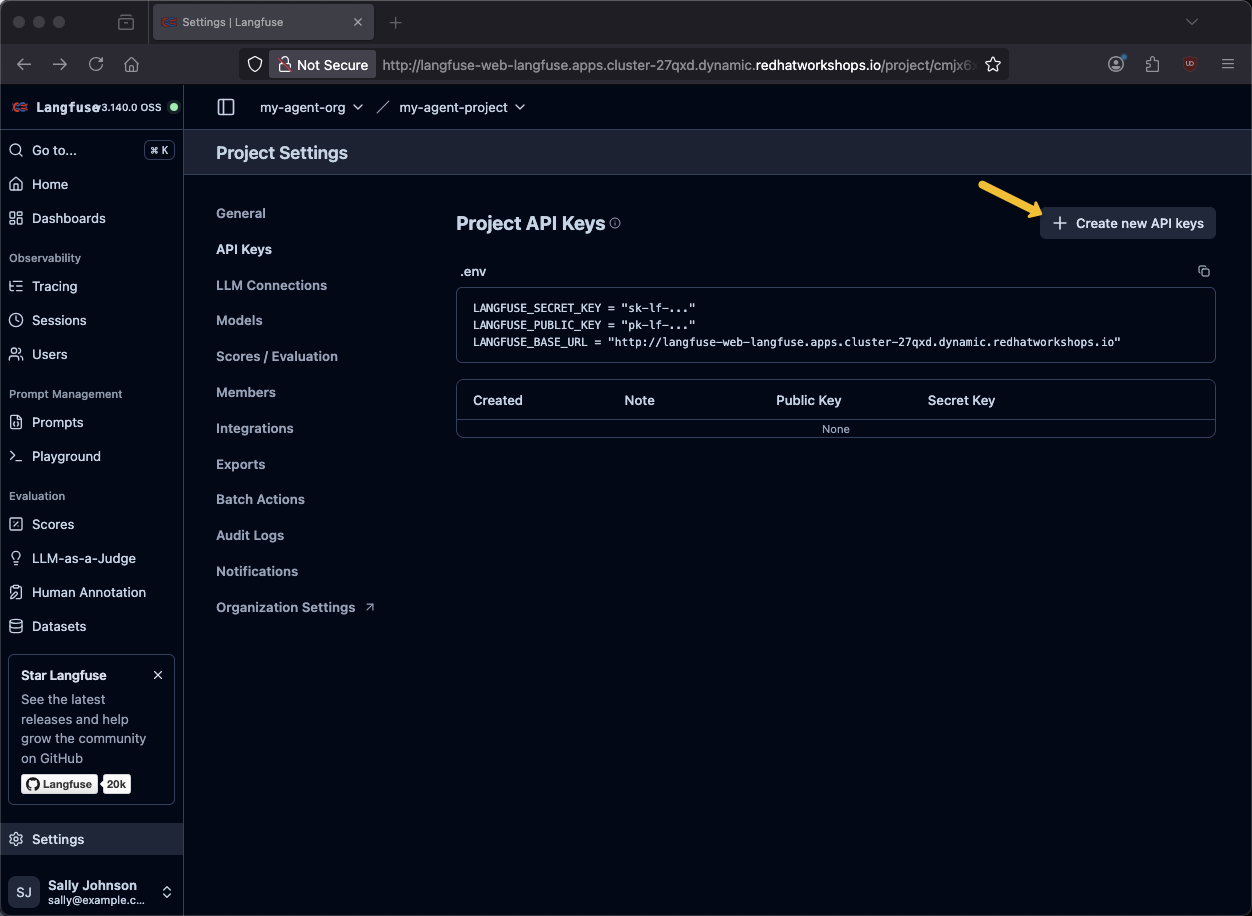
Click on + Create new API Keys
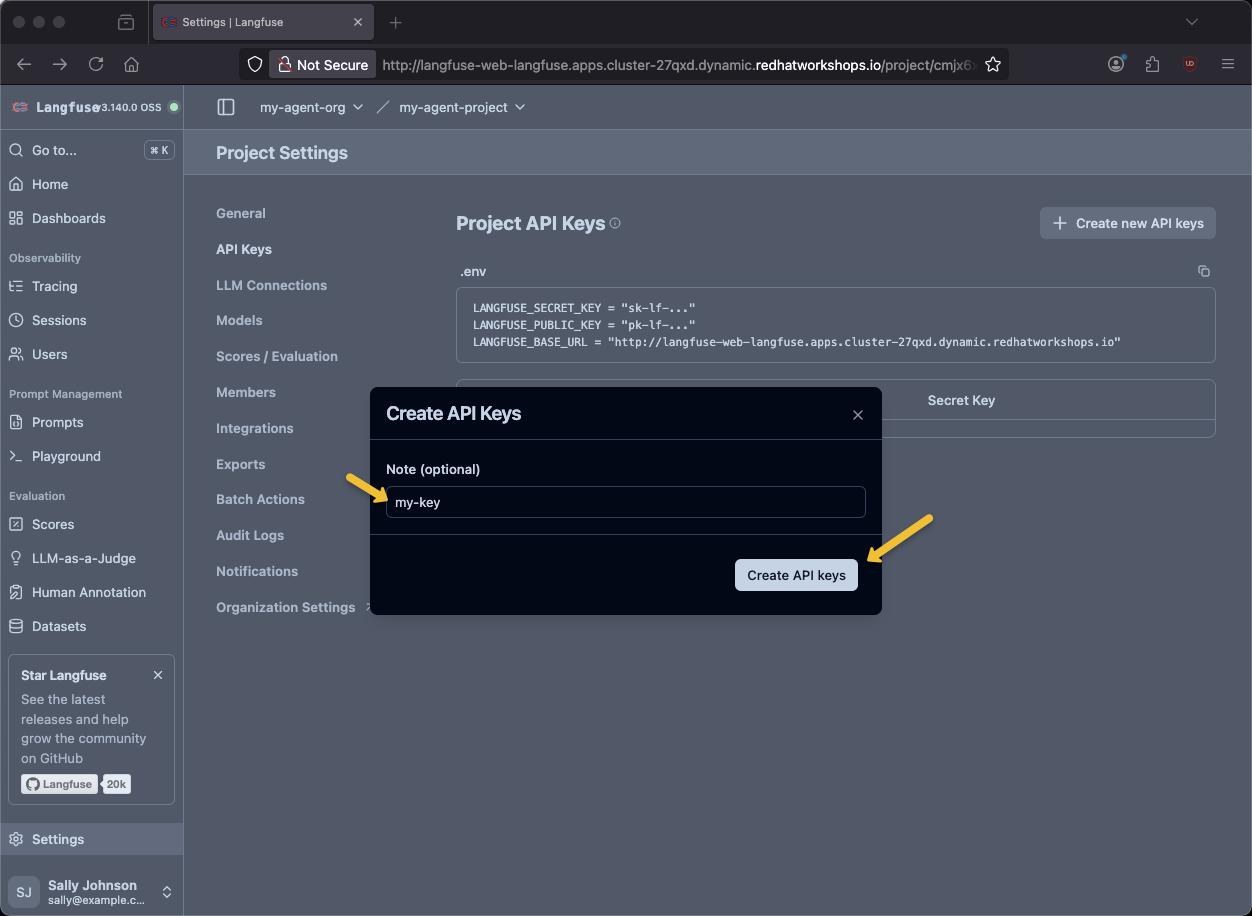
Provide a key name of my-key and click Create API keys
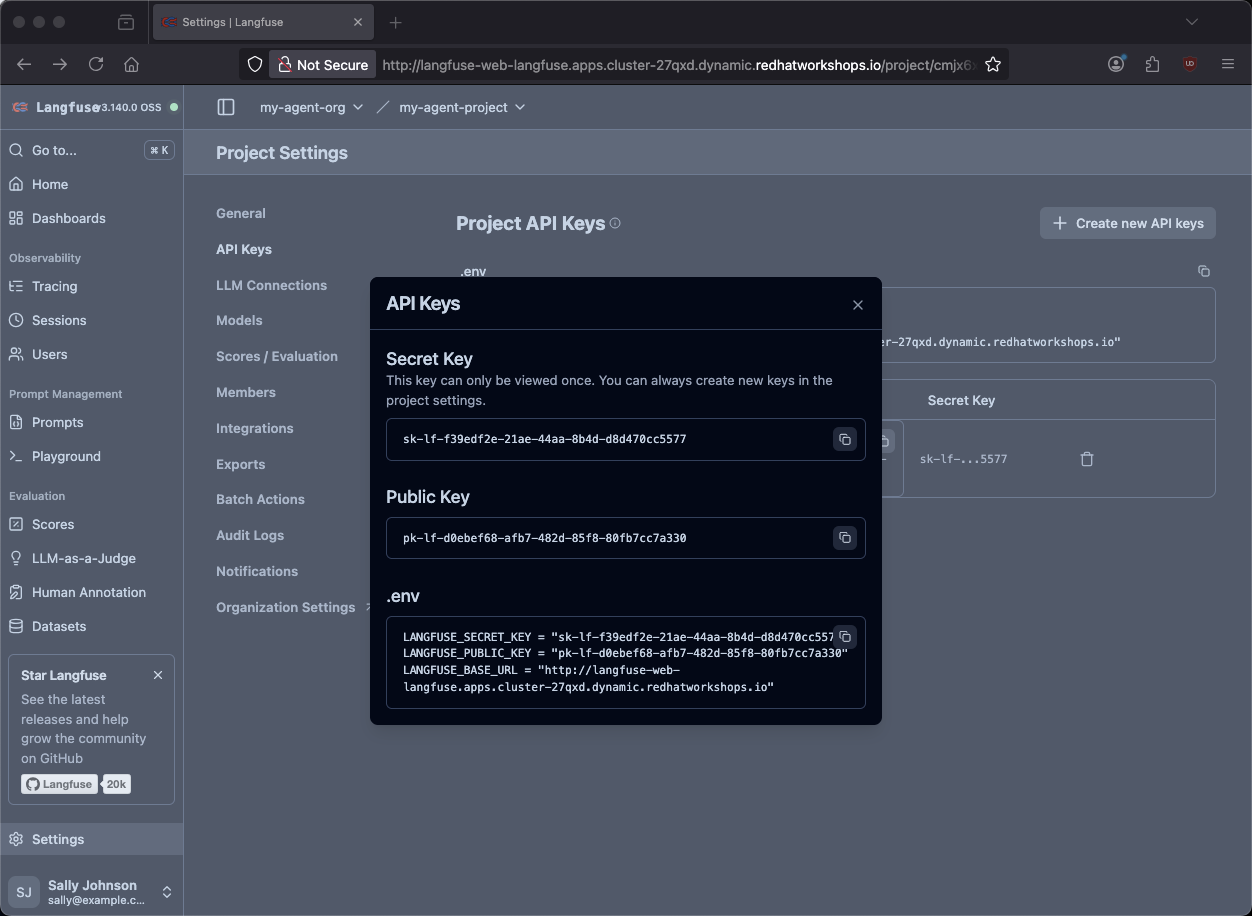
You will need the .env variables.
Go back to the terminal
Place the values in keys.txt. This is helpful if the env vars become lost due to browser refresh, timeout, cluster stop/sleep, etc.
vi keys.txtsource $HOME/fantaco-redhat-one-2026/langfuse-setup/convert-keys-txt-env-vars.shecho $LANGFUSE_SECRET_KEY
echo $LANGFUSE_PUBLIC_KEY
echo $LANGFUSE_HOSTsk-lf-66fa2f08-9797-4405-8a47-bbd295f8035c
pk-lf-827fb4cf-4d9b-41d3-a6fe-0bcd13aa5e6b
https://langfuse-agentic-user2.apps.cluster-l5k54.dynamic.redhatworkshops.ioTest the agent
Terminal 1
Make sure you are in the backend directory
cd $HOME/fantaco-redhat-one-2026/langfuse-setup/langgraph-agent/backendpip install -r requirements.txtpython 6-langgraph-langfuse-fastapi-chatbot.py2026-01-01 17:47:18,114 - __main__ - INFO - Starting FastAPI server on port 8002...
INFO: Started server process [190]
INFO: Waiting for application startup.
2026-01-01 17:47:18,167 - __main__ - INFO - Initializing MCP clients...
2026-01-01 17:47:18,374 - mcp.client.streamable_http - INFO - Received session ID: f551c9b09df343f1ad85ebd3b67dee48
2026-01-01 17:47:18,376 - mcp.client.streamable_http - INFO - Negotiated protocol version: 2025-06-18
2026-01-01 17:47:18,522 - mcp.client.streamable_http - INFO - Received session ID: 6d9eee0561334c05833355a3f9ac75e7
2026-01-01 17:47:18,524 - mcp.client.streamable_http - INFO - Negotiated protocol version: 2025-06-18
2026-01-01 17:47:18,599 - __main__ - INFO - MCP clients initialized. Available tools: ['search_customers', 'get_customer', 'fetch_order_history', 'fetch_invoice_history']
INFO: Application startup complete.
INFO: Uvicorn running on http://0.0.0.0:8002 (Press CTRL+C to quit)Terminal 2
curl -sS -X POST http://localhost:8002/chat \
  -H "Content-Type: application/json" \
  -d '{
    "message": "who does Thomas Hardy work for?",
    "user_id": "test-user",
    "session_id": "test-session-123"
}' | jq -r '.reply'
Thomas Hardy works for **Around the Horn** as a **Sales Representative**.
Let me know if you need additional details about this customer!curl -sS -X POST http://localhost:8002/chat \
-H "Content-Type: application/json" \
-d '{
"message": "what are Fran Wilson'\''s orders?",
"user_id": "test-user",
"session_id": "test-session-123"
}' | jq -r '.reply'Fran Wilson (LONEP) has 3 orders:
1. **ORD-006** (Jan 5, 2024) - DELIVERED $399.99
2. **ORD-001** (Jan 15, 2024) - DELIVERED $299.99
3. **ORD-002** (Jan 20, 2024) - SHIPPED $149.50
Would you like details about any specific order or invoice history?Traces
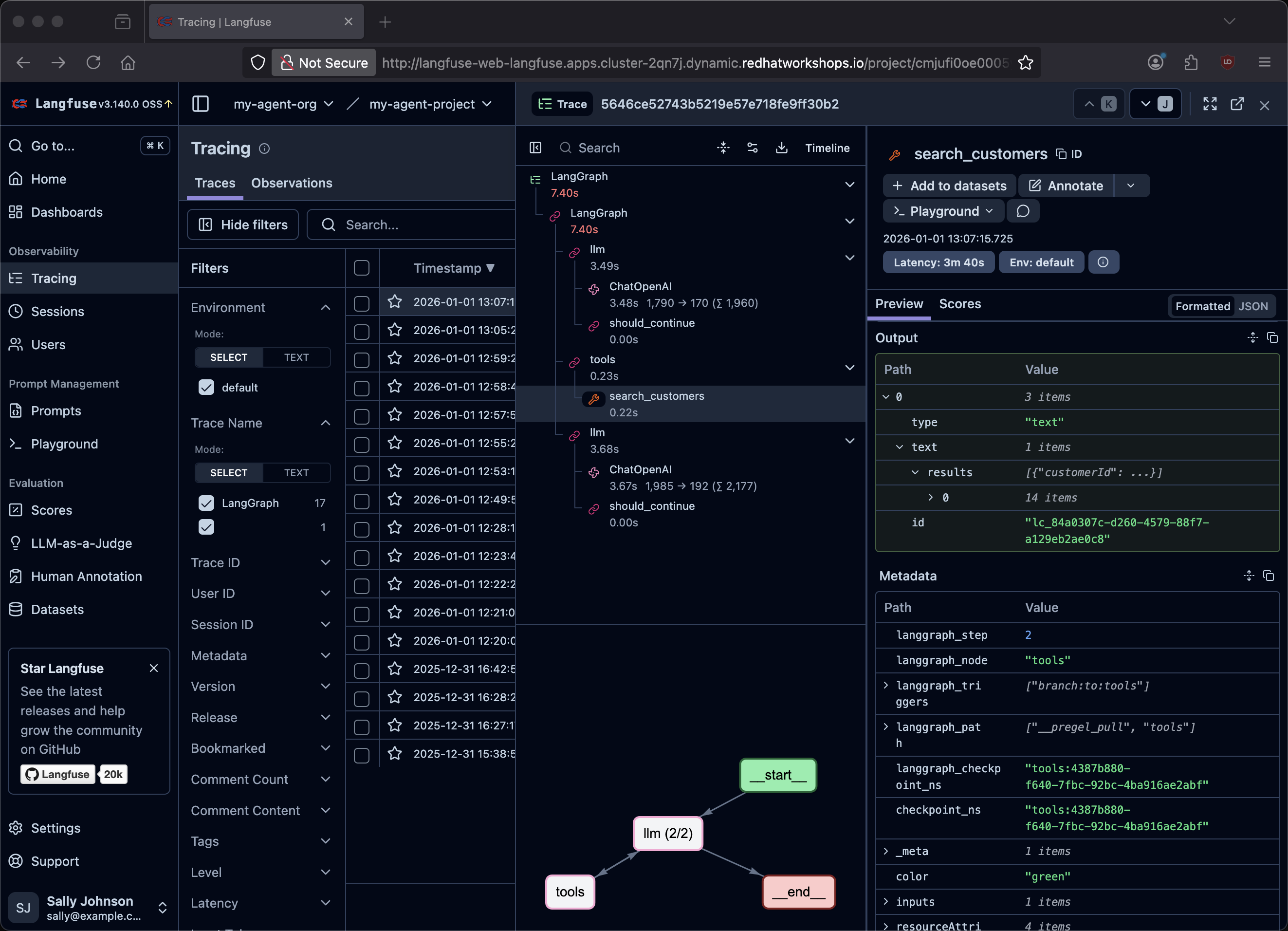
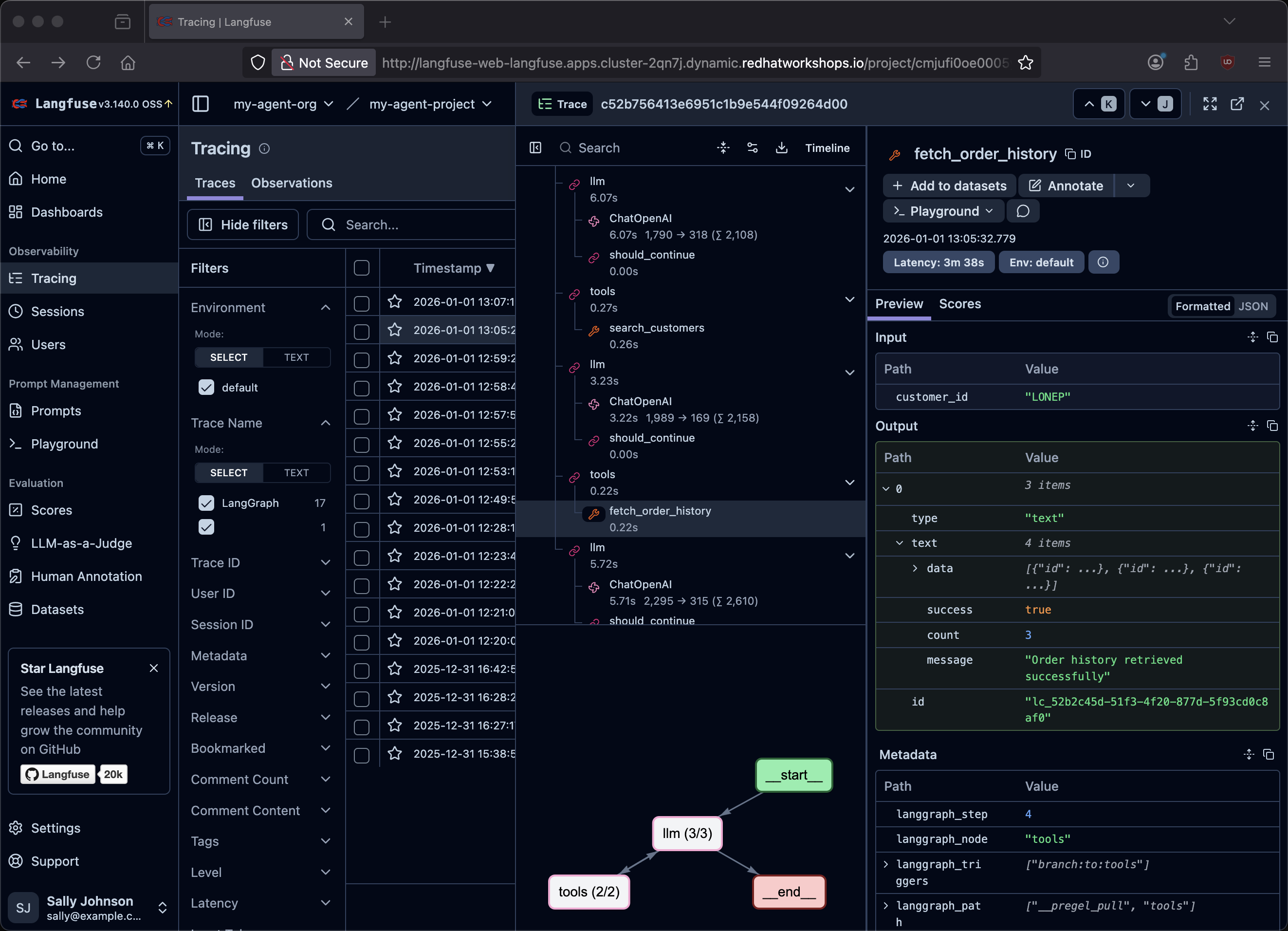
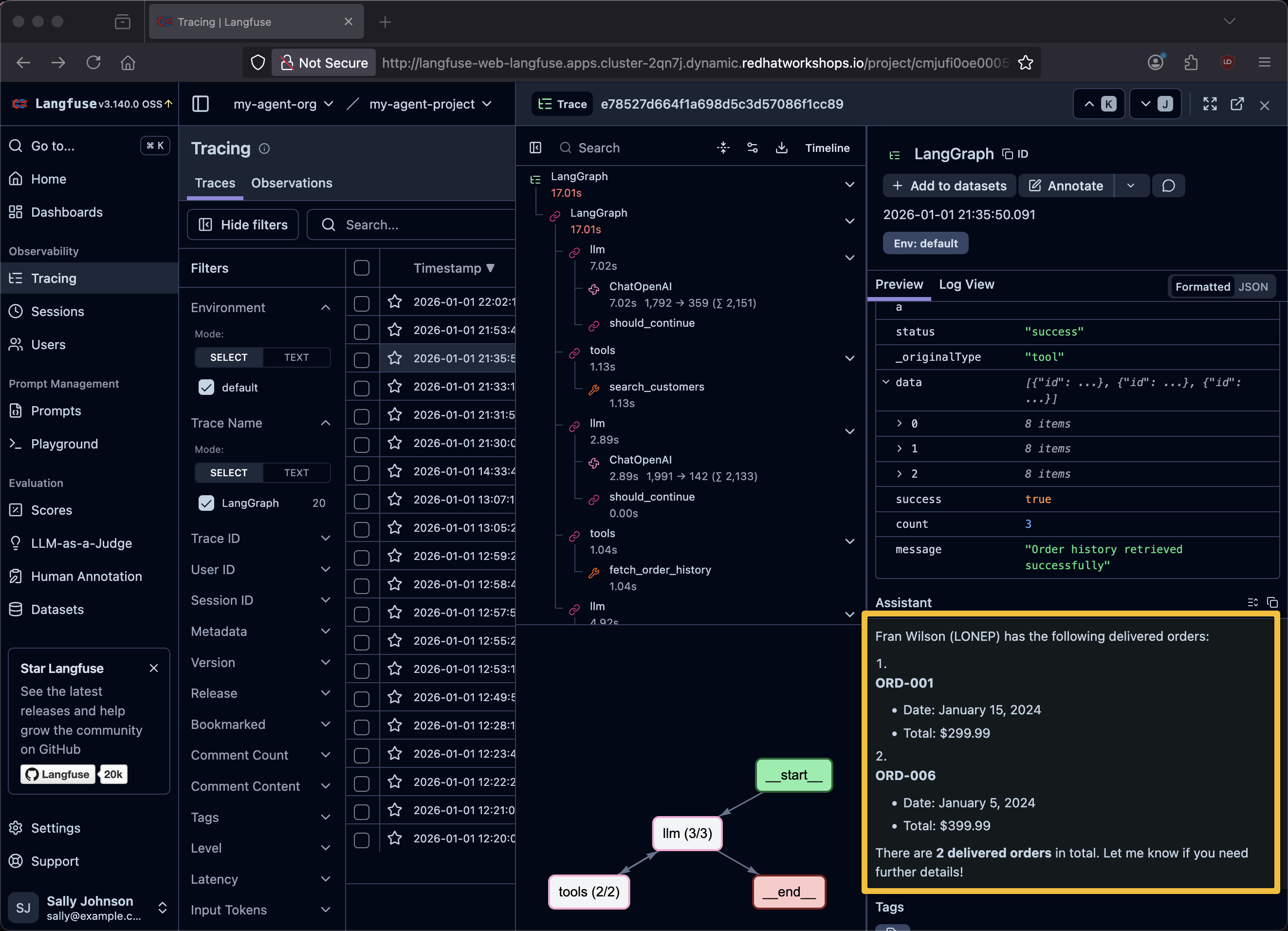
Find the traces inside of Langfuse
|
What do traces show you? Each trace captures the complete lifecycle of a request: the user’s input, every LLM inference call, every tool invocation (including MCP calls to customer and finance services), the tool responses, and the final generated answer. This is invaluable for debugging why an agent gave a wrong answer — you can see exactly which tool returned unexpected data or where the model’s reasoning went wrong. |
Evals
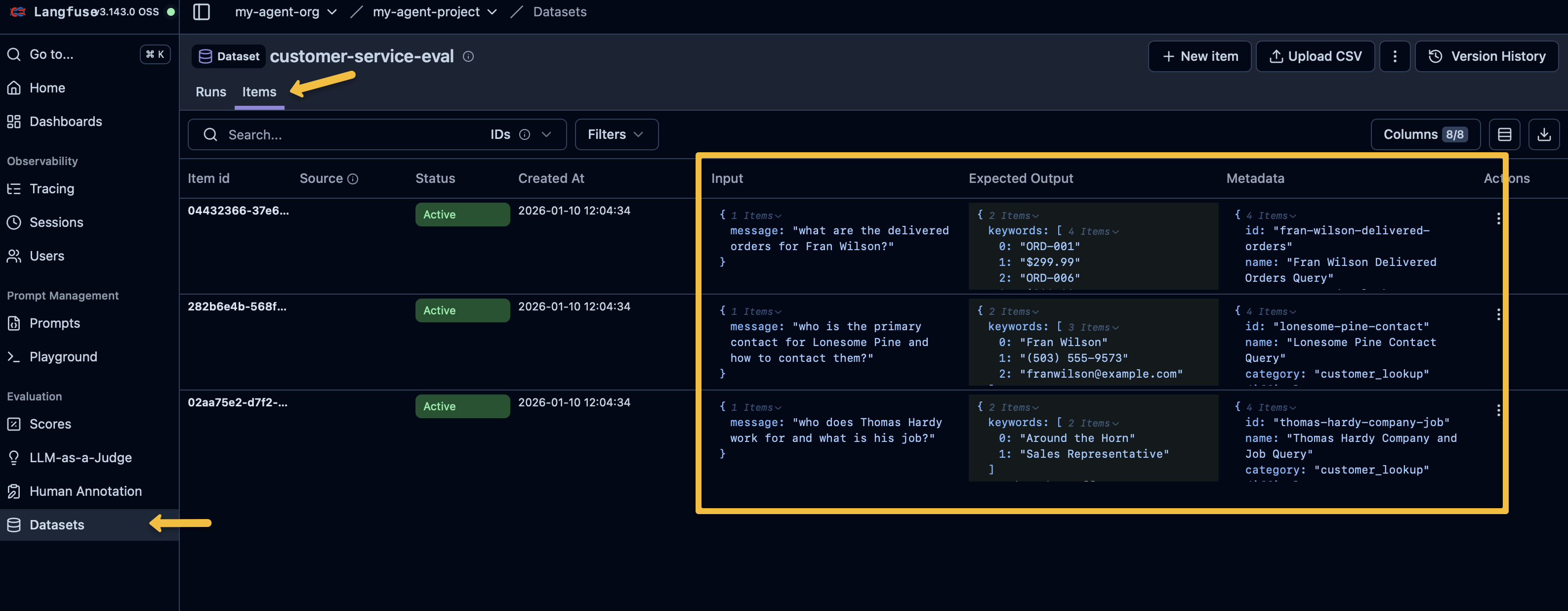
The backend also provides a call to execute Langfuse Evals. If you open up 6-langgraph-langfuse-fastapi-chatbot.py you will find an endpoint defined via @app.post("/evaluate", response_model=EvaluationResponse)
And it in turn interacts with the Langfuse API to excute the evals.
  logger.info(f"Starting evaluation run: {request.run_name or 'auto-generated'}")
  result = await run_evaluation(
      test_cases_path=str(test_cases_path),
      process_chat_fn=process_chat,
      run_name=request.run_name,
      record_to_langfuse=request.record_to_langfuse
  )
Trigger the eval execution with a simple curl command
curl -sS -X POST http://localhost:8002/evaluate \
  -H "Content-Type: application/json" \
  -d '{
    "run_name": "after-prompt-update",
    "sync_dataset": true,
    "record_to_langfuse": true
  }' | jq .
{
"run_name": "after-prompt-update",
"timestamp": "2026-01-03T22:52:48.068633",
"dataset_name": "customer-service-eval",
"total_tests": 3,
"passed": 3,
"failed": 0,
"pass_rate": 1.0,
"average_score": 1.0,
"duration_ms": 42144.819498062134,
"results": [
{
"test_id": "thomas-hardy-company-job",
"test_name": "Thomas Hardy Company and Job Query",
"passed": true,
"score": 1.0,
"response": "\n\nThomas Hardy works for **Around the Horn** and his job title is **Sales Representative**. \n\nLet me know if you need additional details!",
"trace_id": "ccbdd39f31ad0046995c2df51872d7ea",
"matched_keywords": [
"Around the Horn",
"Sales Representative"
],
"missing_keywords": [],
"details": "Matched 2/2 keywords",
"duration_ms": 8468.608140945435
},
{
"test_id": "lonesome-pine-contact",
"test_name": "Lonesome Pine Contact Query",
"passed": true,
"score": 1.0,
"response": "\n\nThe primary contact for **Lonesome Pine Restaurant** is **Fran Wilson**, the Sales Manager. Here’s how to reach them:\n\n- **Phone:** (503) 555-9573 \n- **Email:** franwilson@example.com \n\nLet me know if you need additional details!",
"trace_id": "ccbdd39f31ad0046995c2df51872d7ea",
"matched_keywords": [
"Fran Wilson",
"(503) 555-9573",
"franwilson@example.com"
],
"missing_keywords": [],
"details": "Matched 3/3 keywords",
"duration_ms": 10165.385484695435
},
{
"test_id": "fran-wilson-delivered-orders",
"test_name": "Fran Wilson Delivered Orders Query",
"passed": true,
"score": 1.0,
"response": "\n\nHere are the delivered orders for Fran Wilson (LONEP):\n\n1. **Order #ORD-001** \n - Date: January 15, 2024 \n - Total: $299.99 \n\n2. **Order #ORD-006** \n - Date: January 5, 2024 \n - Total: $399.99 \n\n**Total delivered orders:** 2 \n*(Note: One additional order, ORD-002, is marked as \"SHIPPED\" but not yet delivered.)* \n\nLet me know if you need further details!",
"trace_id": "ccbdd39f31ad0046995c2df51872d7ea",
"matched_keywords": [
"ORD-001",
"$299.99",
"ORD-006",
"$399.99"
],
"missing_keywords": [],
"details": "Matched 4/4 keywords",
"duration_ms": 23384.660720825195
}
]
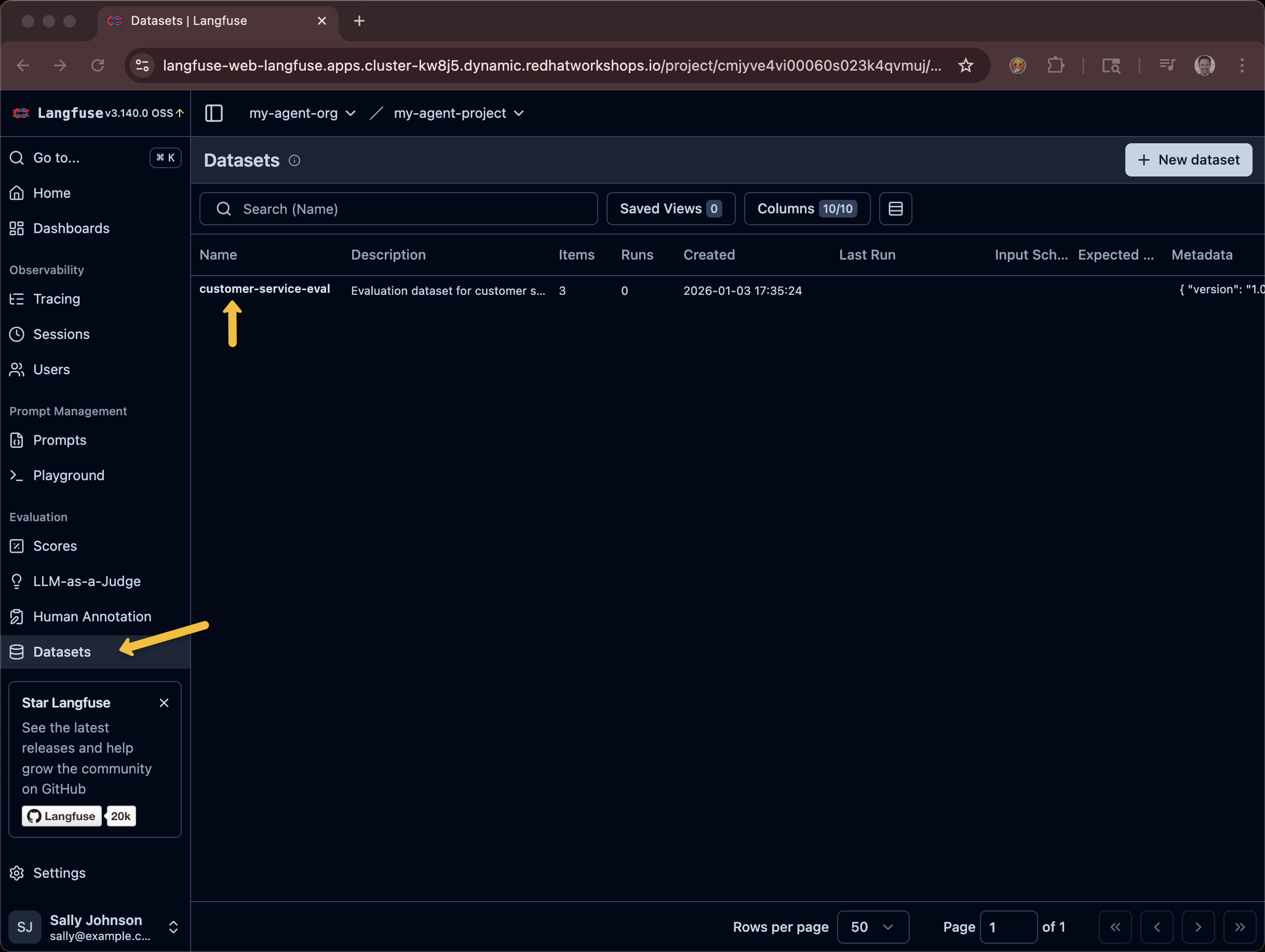
}
|
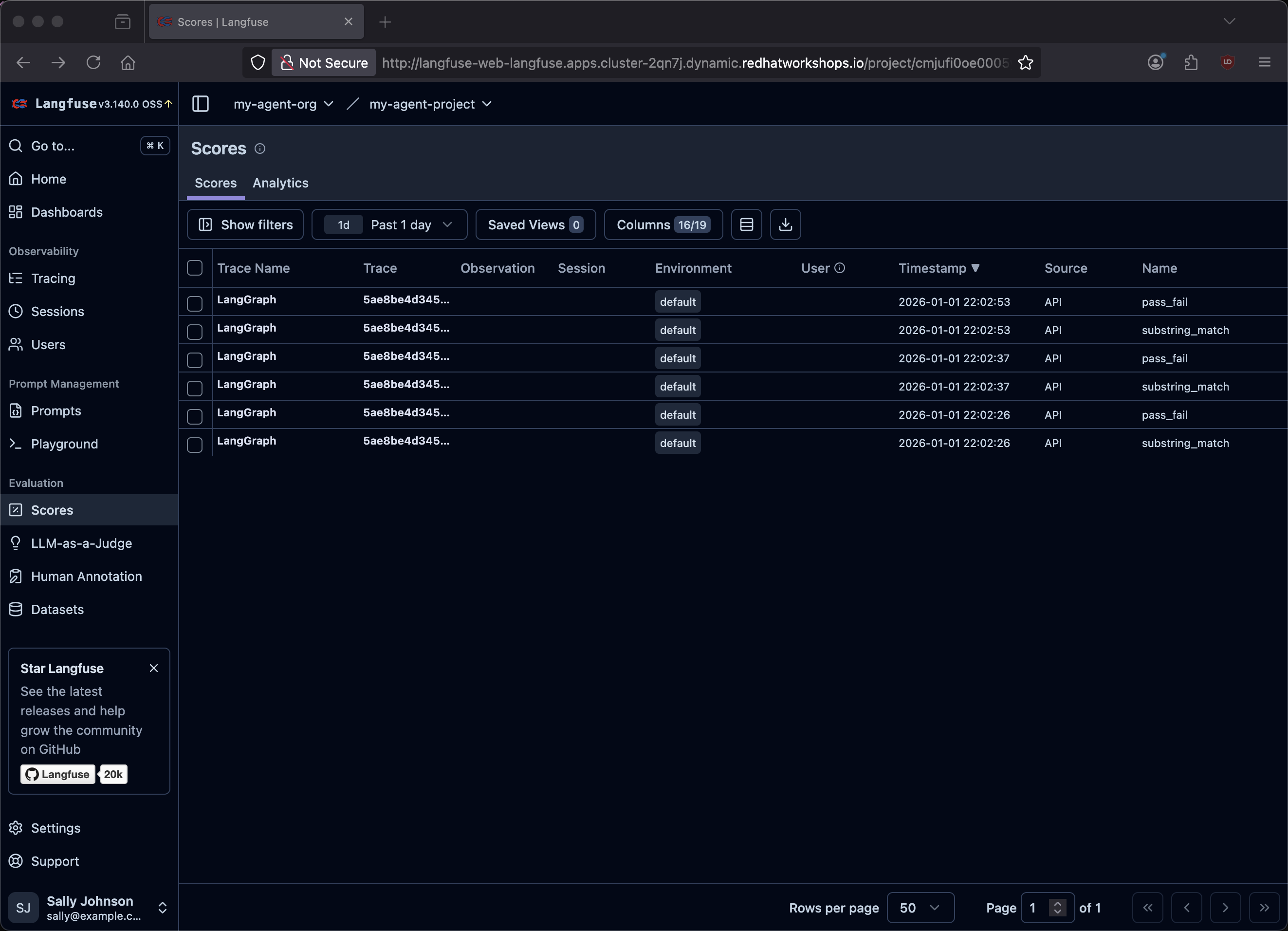
Keyword-based evals: These evals use a simple but effective approach — they check if specific expected keywords appear in the agent’s response. For example, the "Thomas Hardy" test expects "Around the Horn" and "Sales Representative". A score of 1.0 means all keywords matched. This is lighter-weight than LLM-as-judge (which you saw in the Llama Stack Evals module) but well-suited for verifying that agents return correct factual data from their tools. |
Feedback
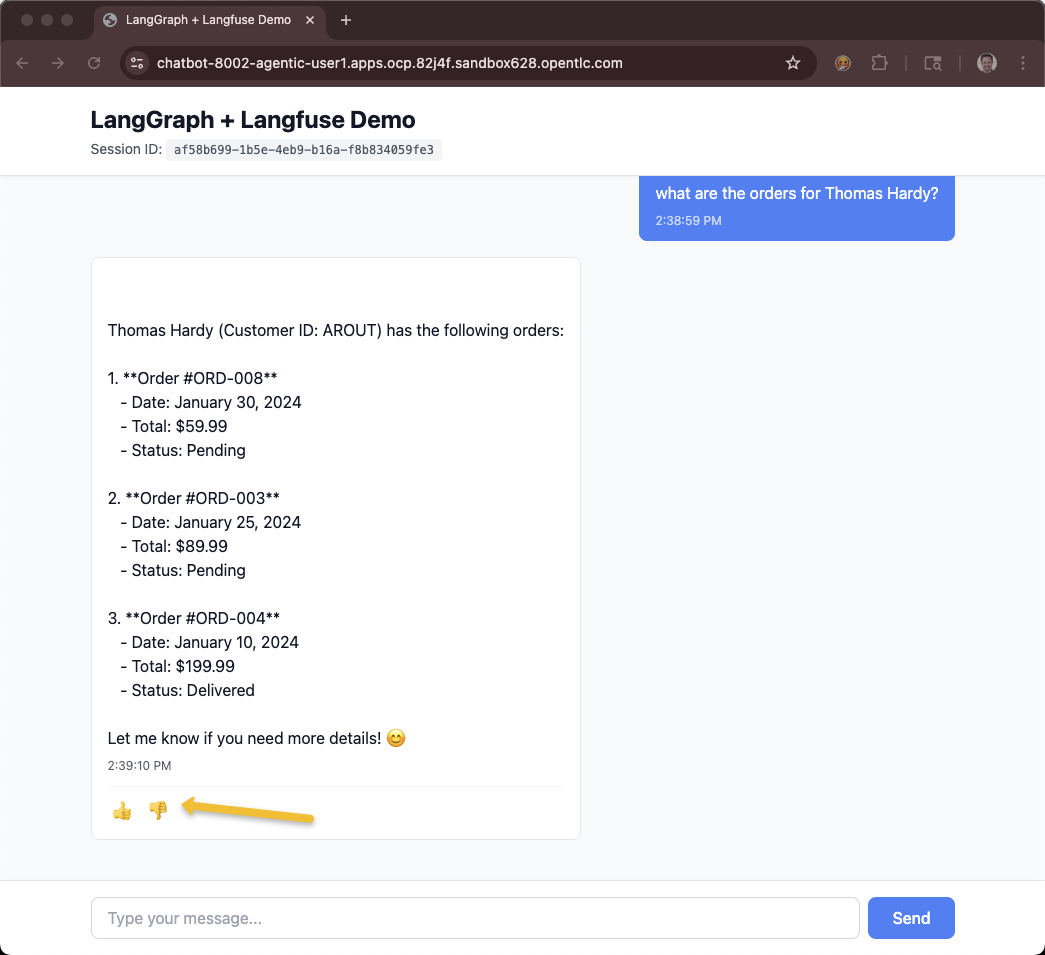
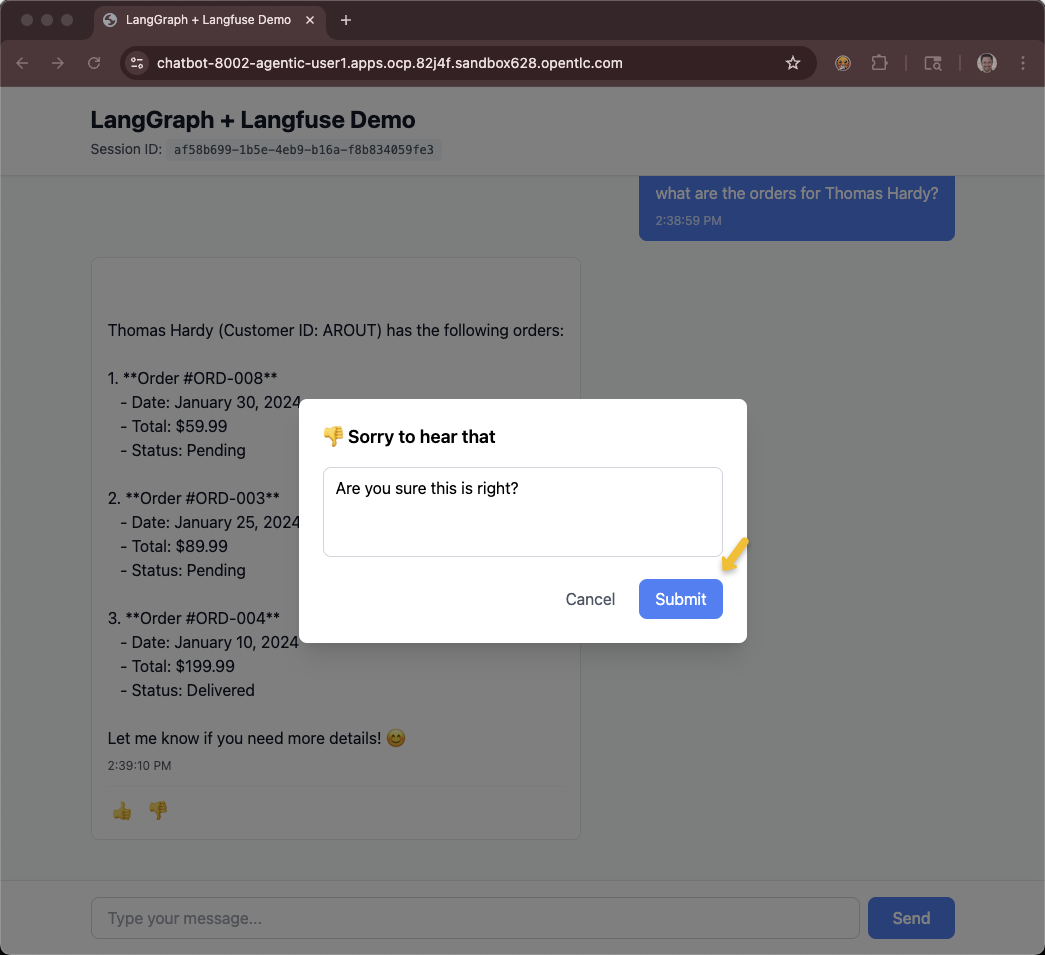
The feeback system is a thumbs-up/down feature tied to the GUI that adds the information as a score into Langfuse.
You will need access to the chatbot UI in order to interact with the feedback system.
If you are using the showroom terminal, you can run the following script to see the pre-created Route.
$HOME/fantaco-redhat-one-2026/langfuse-setup/get-agent-route-as-student.shCHAT_TRACE_URL=https://chatbot-8002-showroom-qk9xm-1-user1.apps.ocp.qk9xm.sandbox2661.opentlc.com/OR
ONLY If you are using the Workbench Code Server IDE terminal, you can add a Service and Route via the following command:
oc apply -f $HOME/fantaco-redhat-one-2026/langfuse-setup/workbench-service-route.yaml
echo "CHAT_TRACE_URL=https://$(oc get route chatbot-8002 -o jsonpath='{.spec.host}')"CHAT_TRACE_URL=https://chatbot-8002-agentic-user1.apps.ocp.82j4f.sandbox628.opentlc.comThe chatbot will let you ask questions and use a Thumb Up/Down and comment to provide feedback.
You can get a listing of all the traces.
$HOME/fantaco-redhat-one-2026/langfuse-setup/list-traces.shFetching last 10 traces...
TRACE ID QUERY
=====================================================================================
bc0008ba64304e09fcc3fbaf9f1f9888 what is today?
20a4d01e6cf0eb28e15872a5317274a2 who is Burr Sutter?
1e81a8782d937c8e1adafb994e96681c what are the delivered orders for Fran Wilson?
dd4e1cb37e83e51e3d25bd05cc237f16 who is the primary contact for Lonesome Pine ...
631fc657a05762b86e44551393fb16f1 who does Thomas Hardy work for and what is hi...
4e4ed7ee062f0d38f0abb6fc03defc3d what are the orders for Liu Wong?
017c454bb7fbc01cc5a7a8fe6f0b073b who does Thomas Hardy work for?
8fa62c42a85d8f14ba9a42d38359ce53 what are Fran Wilson's orders?
5ee044f92e94fd50c133f5ac7dc82d96 who does Thomas Hardy work for?Use the trace id to get the specific score and comment. If you do not provide a trace id it just defaults the last trace.
$HOME/fantaco-redhat-one-2026/langfuse-setup/get-trace-feedback.shNo trace ID provided, fetching latest trace...
Fetching trace: bc0008ba64304e09fcc3fbaf9f1f9888
================================================
Name: customer-service-chat
Timestamp: 2026-01-08T17:57:16.111Z
Input: what is today?
Output:
I don't have access to real-time information or calendar functions. You'll need to check your device's clock or a calendar application for today's date. Let me know if you need help with any custome...
Feedback:
---------
Score: thumbs down (0)
Comment: you should have access to a clock~!
Time: 2026-01-08T17:57:35.580ZYou can provide the get-trace-feedback.sh with a specific trace id.
Summary
In this module you:
-
Deployed Langfuse as an observability platform for your AI agents
-
Captured traces that show the complete reasoning chain for each agent interaction — from user input through tool calls to final response
-
Ran keyword-based evals against your agent to verify it returns correct customer and order data
-
Used the feedback system (thumbs up/down with comments) to capture end-user satisfaction tied to specific traces
These three capabilities — traces, evals, and feedback — form a continuous improvement loop: traces help you debug, evals help you prevent regressions, and feedback helps you discover what to improve next.