Network Security
Duration: 30 minutes
Format: Hands-on network security configuration
The Scenario
Your apps are receiving traffic - but by default, every pod can talk to every other pod, and any pod can reach the internet. That’s not production-ready.
In this module you’ll lock things down: implement NetworkPolicy to isolate pods, configure EgressFirewall to control outbound traffic, and set up EgressIP for predictable source IPs that external firewalls can whitelist.
OpenShift Networking
OpenShift uses OVN-Kubernetes as its network plugin (the only supported option in 4.20). It handles pod networking, network isolation via NetworkPolicy, egress traffic control, and optional IPsec encryption.
View Cluster Network Configuration
oc get network.config cluster -o yaml| You can also view this in the console at Administration > Cluster Settings > Configuration > Network for a formatted view of cluster and service network CIDRs. |
Key fields:
-
networkType: OVNKubernetes- Confirms OVN-Kubernetes is active -
clusterNetwork- IP range for pod networking (varies by cluster) -
serviceNetwork- IP range for Services (varies by cluster)
Verify Network Operator Health
oc get clusteroperator networkThe network operator should show AVAILABLE: True and DEGRADED: False.
oc get pods -n openshift-ovn-kubernetesYou’ll see OVN pods running on the cluster: ovnkube-node (a DaemonSet running on every node) and ovnkube-control-plane (a Deployment managing the OVN control plane).
NetworkPolicy: Pod-to-Pod Security
By default, all pods can communicate with all other pods. NetworkPolicy restricts this.
Create Test Projects
# Create two projects for testing network isolation
oc new-project netpol-frontend
oc new-project netpol-backend

# Deploy apps in each
oc new-app --name=frontend --image=registry.access.redhat.com/ubi9/httpd-24 -n netpol-frontend
oc new-app --name=backend --image=registry.access.redhat.com/ubi9/httpd-24 -n netpol-backend
Wait for pods in both namespaces:
oc get pods -n netpol-frontendoc get pods -n netpol-backendBoth pods should show Running before continuing.
Test Default Connectivity (Should Work)
Test connectivity from frontend to backend:
BACKEND_IP=$(oc get pod -n netpol-backend -l deployment=backend -o jsonpath='{.items[0].status.podIP}')
oc exec -n netpol-frontend deployment/frontend -- curl -s --connect-timeout 5 http://${BACKEND_IP}:8080
Expected: HTML output from the app - connectivity works by default.
Apply Deny-All NetworkPolicy
cat <<EOF | oc apply -n netpol-backend -f -
apiVersion: networking.k8s.io/v1
kind: NetworkPolicy
metadata:
  name: deny-all
spec:
  podSelector: {}       # empty = applies to ALL pods in this namespace
  policyTypes:
  - Ingress             # we're controlling inbound traffic
  ingress: []           # empty list = no traffic allowed in
EOF
Three lines do all the work: podSelector: {} targets every pod, policyTypes: Ingress says we’re controlling inbound traffic, and the empty ingress: [] list means nothing is allowed through. This is the standard "default deny" pattern - start locked down, then punch specific holes.
Test Connectivity Again (Should Fail)
BACKEND_IP=$(oc get pod -n netpol-backend -l deployment=backend -o jsonpath='{.items[0].status.podIP}')
oc exec -n netpol-frontend deployment/frontend -- curl -s --connect-timeout 5 http://${BACKEND_IP}:8080
Expected: Connection times out (no output after 5 seconds). The NetworkPolicy blocked it.
Allow Traffic from Specific Namespace
Now punch a hole - allow only the frontend namespace to reach the backend, and only on port 8080:
# First, label the frontend namespace so we can reference it
oc label namespace netpol-frontend app-tier=frontend

# Create NetworkPolicy allowing traffic from frontend namespace
cat <<EOF | oc apply -n netpol-backend -f -
apiVersion: networking.k8s.io/v1
kind: NetworkPolicy
metadata:
  name: allow-from-frontend
spec:
  podSelector:
    matchLabels:
      deployment: backend       # only applies to pods with this label
  policyTypes:
  - Ingress
  ingress:
  - from:
    - namespaceSelector:
        matchLabels:
          app-tier: frontend    # only from namespaces with this label
    ports:
    - protocol: TCP
      port: 8080                # only on this port
EOF
This is precise: only pods labelled deployment: backend, only from namespaces labelled app-tier: frontend, only on TCP 8080. Everything else is still denied by the deny-all policy.
Test Connectivity (Should Work Again)
BACKEND_IP=$(oc get pod -n netpol-backend -l deployment=backend -o jsonpath='{.items[0].status.podIP}')
oc exec -n netpol-frontend deployment/frontend -- curl -s --connect-timeout 5 http://${BACKEND_IP}:8080
Expected: HTML output from the app - the allow policy takes effect.
View NetworkPolicies
oc get networkpolicy -n netpol-backendYou should see both deny-all and allow-from-frontend policies.
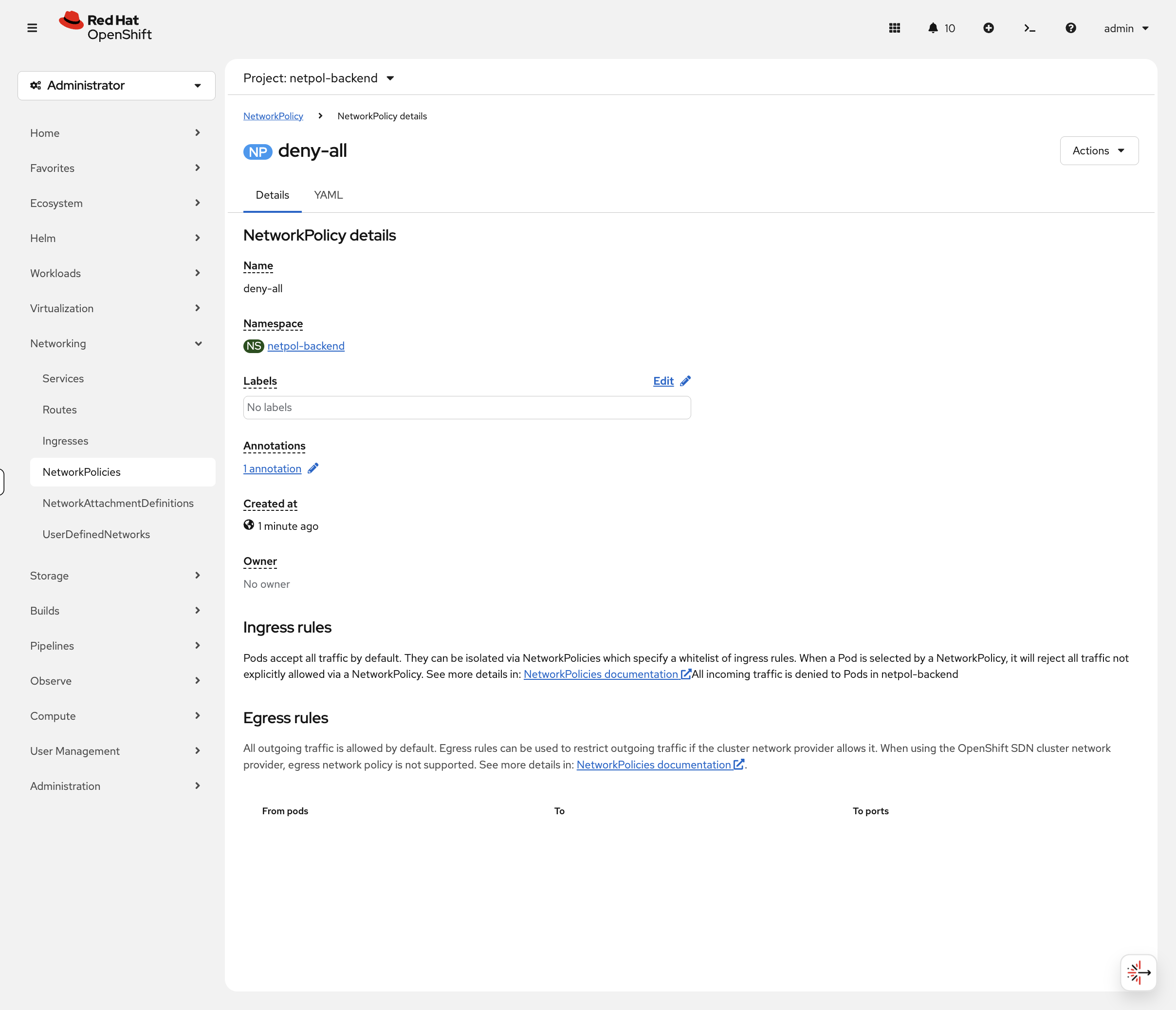
Now switch to the OCP Console tab and navigate to Networking → NetworkPolicies (project: netpol-backend). Click on deny-all - the console clearly states "All incoming traffic is denied":
Click back and open allow-from-frontend - the console renders the ingress rule as a readable table showing the pod selector, namespace selector, and allowed port:
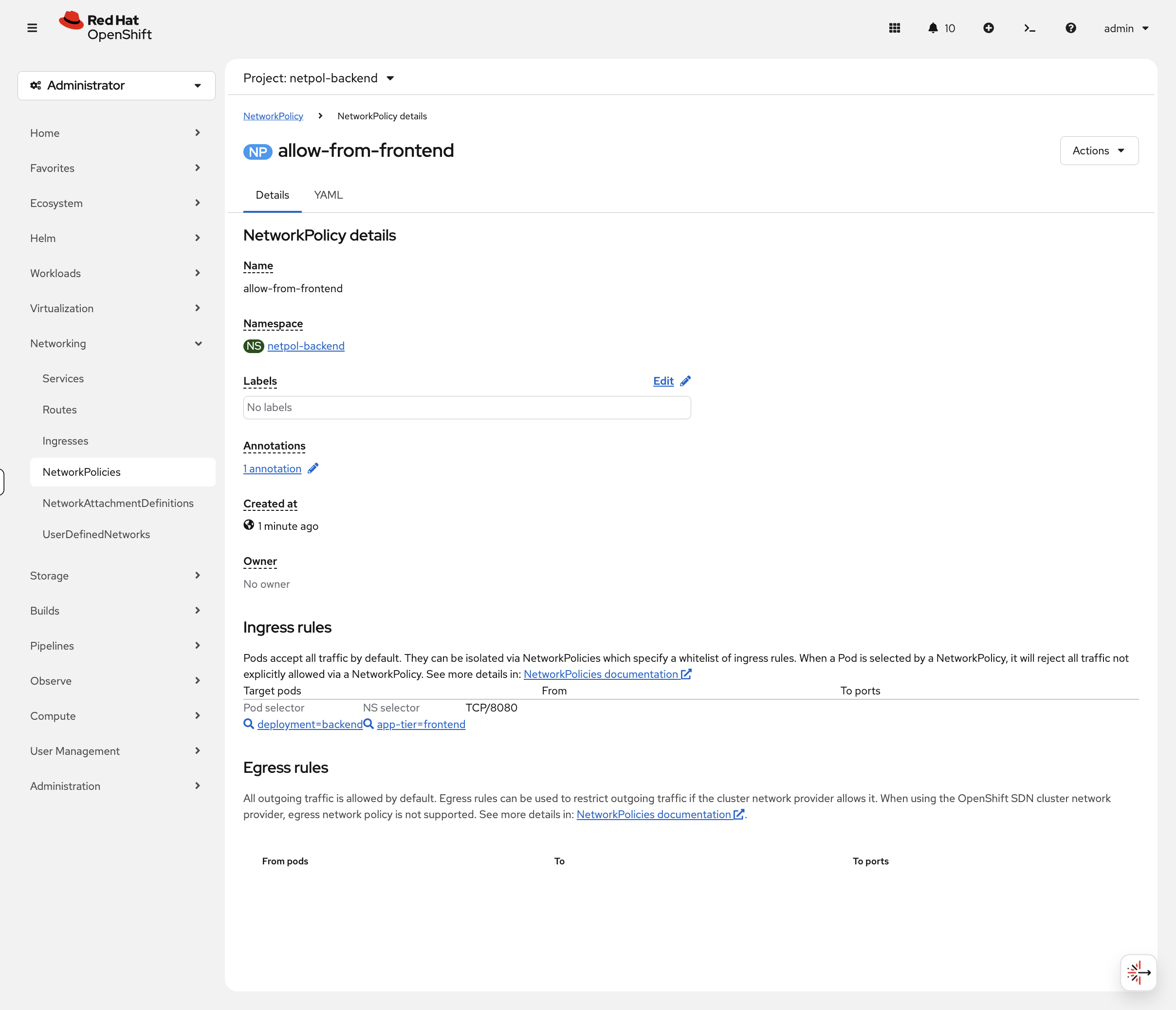
Compare this to the YAML you just wrote. In production, when you’re auditing policies across 50 namespaces, this view is dramatically faster than reading raw YAML.
NetworkPolicy Best Practices
| Practice | Description |
|---|---|
Default deny |
Start with a deny-all policy, then explicitly allow required traffic |
Namespace labels |
Use namespace labels for cross-namespace policies |
Least privilege |
Only allow the specific ports and protocols needed |
Document policies |
Use annotations to document policy purpose |
AdminNetworkPolicy: Cluster-Scoped Policies
Standard NetworkPolicies are namespace-scoped - each team manages their own. AdminNetworkPolicy (ANP) is a cluster-scoped resource that lets platform administrators enforce network policies across all namespaces, with priority over namespace-scoped policies.
View the available ANP API:
oc api-resources | grep policy.networkingCreate a cluster-wide policy that blocks external DNS to a specific provider:
cat <<EOF | oc apply -f -
apiVersion: policy.networking.k8s.io/v1alpha1
kind: AdminNetworkPolicy
metadata:
  name: cluster-deny-external-dns
spec:
  priority: 50
  subject:
    namespaces:
      matchLabels:
        kubernetes.io/metadata.name: netpol-backend
  egress:
  - name: deny-external-dns
    action: Deny
    to:
    - networks:
      - 8.8.8.8/32
    ports:
    - portNumber:
        port: 53
        protocol: UDP
EOF
Verify it was created:
oc get adminnetworkpolicyThe PRIORITY field determines evaluation order - lower numbers are evaluated first. This allows platform teams to enforce security baselines that namespace owners cannot override.
Now prove it works. Try resolving DNS via the blocked external server:
bash <(curl -sL https://raw.githubusercontent.com/rhpds/openshift-days-ops-showroom/main/support/04-network-security/test-dns.sh)Expected: DNS to 8.8.8.8: BLOCKED (timed out). The ANP blocked outbound traffic to 8.8.8.8.
Clean up and verify DNS recovers:
oc delete adminnetworkpolicy cluster-deny-external-dnsbash <(curl -sL https://raw.githubusercontent.com/rhpds/openshift-days-ops-showroom/main/support/04-network-security/test-dns.sh)Expected: DNS to 8.8.8.8: ALLOWED. The ANP is gone, traffic flows again.
AdminNetworkPolicy uses policy.networking.k8s.io/v1alpha1. There is also BaselineAdminNetworkPolicy which acts as a fallback - it applies only when no other ANP or NetworkPolicy matches. Together, ANP and BANP give platform teams guardrails while still allowing namespace-level customization.
|
Egress Controls
EgressFirewall: Controlling Outbound Traffic
EgressFirewall controls which external IPs/domains pods can reach. This is an OVN-Kubernetes feature.
Understanding EgressFirewall
EgressFirewall applies per-namespace and evaluates rules in order. Traffic not matching any rule is allowed by default.
View the API:
oc explain egressfirewall.specCreate an EgressFirewall
Block traffic to a specific CIDR (example: block 1.1.1.0/24):
cat <<EOF | oc apply -n netpol-frontend -f -
apiVersion: k8s.ovn.org/v1
kind: EgressFirewall
metadata:
  name: default
spec:
  egress:
  - type: Deny
    to:
      cidrSelector: 1.1.1.0/24
  - type: Allow
    to:
      cidrSelector: 0.0.0.0/0
EOF
This blocks egress to 1.1.1.0/24 but allows all other traffic.
Test EgressFirewall
# This should fail (blocked)
oc exec -n netpol-frontend deployment/frontend -- curl -s --connect-timeout 3 http://1.1.1.1 || echo "Blocked!"

# This should work (allowed)
oc exec -n netpol-frontend deployment/frontend -- curl -s --connect-timeout 3 -I http://google.com | head -1DNS-Based EgressFirewall
You can also use DNS names instead of IP addresses (OVN resolves them):
cat <<EOF | oc apply -n netpol-backend -f -
apiVersion: k8s.ovn.org/v1
kind: EgressFirewall
metadata:
  name: default
spec:
  egress:
  - type: Allow
    to:
      dnsName: "www.redhat.com"
  - type: Allow
    to:
      dnsName: "quay.io"
  - type: Deny
    to:
      cidrSelector: 0.0.0.0/0
EOF
This allows only traffic to www.redhat.com and quay.io, blocking everything else.
Wildcard DNS names (e.g., *.redhat.com) are a Technology Preview feature in OpenShift 4.20 and may not be enabled on all clusters. Use specific hostnames for production configurations.
|
EgressFirewall Use Cases
| Use Case | Configuration |
|---|---|
Block known bad IPs |
Deny specific CIDRs, allow all else |
Allowlist mode |
Allow specific destinations, deny 0.0.0.0/0 |
Compliance |
Restrict egress to approved external services |
Data exfiltration prevention |
Block unknown external endpoints |
|
EgressFirewall limitations to be aware of in production:
|
EgressIP: Predictable Source IPs
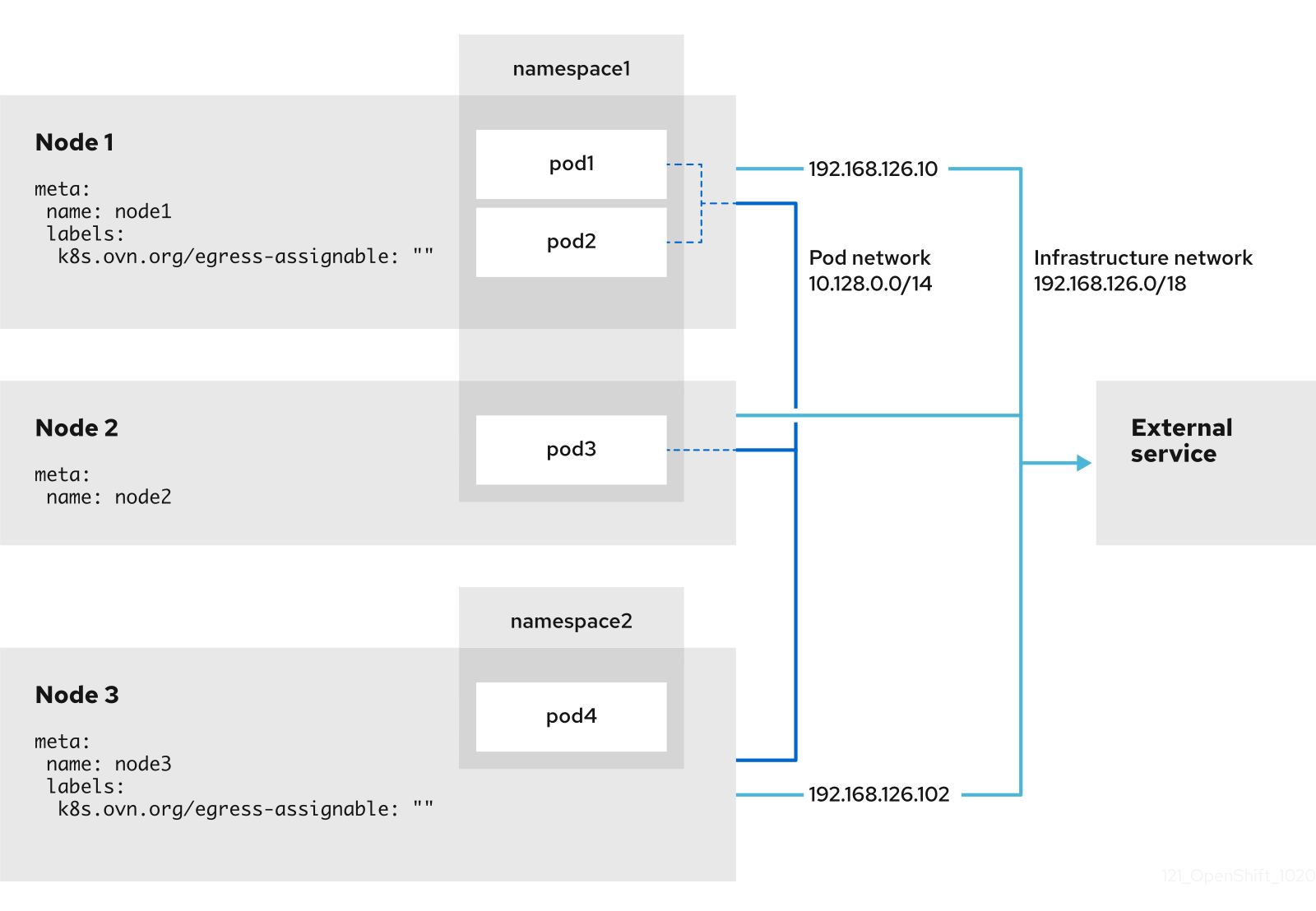
EgressIP assigns a fixed source IP for egress traffic from specific pods. Useful when external firewalls need to allowlist your cluster.
Understanding EgressIP
oc explain egressipEgressIP requires:
-
Nodes labeled for hosting egress IPs
-
Available IPs on the node’s network
-
EgressIP CR referencing namespace/pod selectors
View EgressIP Capability
oc get nodes -o jsonpath='{range .items[*]}{.metadata.name}{"\t"}{.metadata.annotations.k8s\.ovn\.org/node-egress-label}{"\n"}{end}'Nodes must have the label k8s.ovn.org/egress-assignable="" to be eligible to host EgressIPs.
EgressIP Configuration Example
apiVersion: k8s.ovn.org/v1
kind: EgressIP
metadata:
  name: production-egress
spec:
  egressIPs:
  - 192.168.1.100
  - 192.168.1.101
  namespaceSelector:
    matchLabels:
      environment: production
  podSelector:
    matchLabels:
      egress-required: "true"
Note: EgressIP configuration requires network planning and is typically done during cluster setup. The IPs must be routable on the node network.
DNS and Service Discovery
OpenShift provides automatic DNS for services.
Test DNS Resolution
Test DNS resolution from any pod:
oc exec -n netpol-frontend deployment/frontend -- getent hosts backend.netpol-backend.svc.cluster.localYou should see the backend service’s cluster IP followed by the hostname - this confirms that pods can resolve other services by name via the cluster DNS.
View Cluster DNS Configuration
oc get dns cluster -o yamlShows the cluster’s DNS configuration. The key field is:
-
baseDomain- Cluster’s base DNS domain (e.g.,cluster-xxxxx.dynamic.redhatworkshops.io)
On cloud platforms (AWS, Azure, GCP), you’ll also see publicZone and privateZone fields for the cloud DNS zones. On other platforms these may not be present.
|
Cleanup & Summary
# Delete network policy test namespaces in the background
oc delete namespace netpol-frontend netpol-backend --ignore-not-found --wait=false
echo "Cleanup running in background - you can continue to the next module"
What you learned:
-
OpenShift uses OVN-Kubernetes as the default SDN
-
NetworkPolicy controls pod-to-pod communication (default allow, explicit deny)
-
EgressFirewall controls outbound traffic to external destinations
-
EgressIP provides predictable source IPs for egress
-
DNS provides automatic service discovery via
<service>.<namespace>.svc.cluster.local
Key operational commands:
# View network configuration
oc get network.config cluster -o yaml

# View network policies
oc get networkpolicy -A

# View egress firewalls
oc get egressfirewall -A

# View egress IPs
oc get egressip -A

# Check DNS configuration
oc get dns cluster -o yaml
Additional Resources
-
OVN-Kubernetes: OVN-Kubernetes network plugin
-
NetworkPolicy: About network policy
-
EgressFirewall: Configuring an egress firewall for a project
-
EgressIP: Configuring an egress IP address