Appendix: instructor delivery guide
Use this guide to prepare and facilitate the workshop. Students follow the seven tracks in navigation; this appendix explains the suggested two-day grouping, the evidence to review at each handoff, and how to handle incomplete work.
Production namespace ownership and safe upgrades
In the standard bootstrap, the NetworkPolicy Application owns lw-poc-prod; admission renders policy resources into that namespace without declaring it again. If NetworkPolicy is disabled, bootstrap enables admission’s standalone namespace creation. Do not deploy both child charts independently with both namespace declarations enabled. Readiness checks reject Argo CD SharedResourceWarning conditions even when the Applications report Healthy.
An existing claim with both owners needs a controlled migration before syncing this change. Pause automatic reconciliation for the bootstrap parent and both affected child Applications using your platform’s Argo CD maintenance procedure. Record the namespace UID and the learner resources. While the old Applications are paused, protect the live namespace:
oc annotate namespace lw-poc-prod argocd.argoproj.io/sync-options='Prune=false,Delete=false' --overwrite
oc get namespace lw-poc-prod -o jsonpath='{.metadata.uid}{"\n"}'
Inspect the annotation before proceeding. Update the bootstrap revision, render its child values, and confirm admission.createProdNamespace: false when NetworkPolicy is enabled. Sync NetworkPolicy first without pruning, then admission without pruning. Hard-refresh both Applications and inspect their resource inventories and conditions. If admission still tracks the namespace, stop and investigate Argo CD tracking metadata; do not delete the namespace to clear the warning. Restore automation only after both Applications are stably Synced with no SharedResourceWarning, the namespace UID is unchanged, and learner resources remain present. Run qa-automation/healthcheck.yml again and record the result. The new templates retain namespace deletion/pruning protection; namespace retirement is a separate operator action.
Plan the two-day sequence
Start with Tracks 1–3 on Day 1 and Tracks 4–7 on Day 2. This grouping separates input selection and source ownership from build, signing, promotion, and compliance. It is a planning starting point, not a measured duration. Record actual timings during dry runs and move whole track boundaries if necessary.
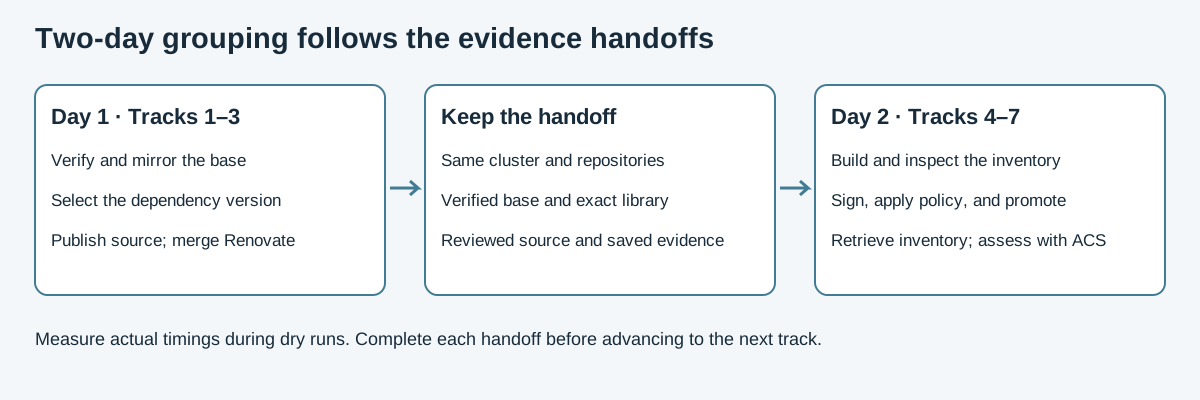
There are six learner module pages in Tracks 1–3 and eleven in Tracks 4–7, plus the workshop introduction. The count does not imply equal effort per module. Retain the sequence and its evidence handoffs when adjusting the schedule.
Prepare the environment
Before learners begin, confirm that Showroom can reach the claim and that the bastion connection needed for Track 1 is available. Inspect the provisioned service URLs and access information without placing credentials in shared notes.
Check that the Maven starter repository, Developer Hub template and publish:gitea action, Renovate integration, pipeline Tasks, and security services are ready. Use the repository’s existing instructor health-check procedures. Repair missing provisioning before asking learners to repeat an exercise; preserve their repositories and evidence on retries.
Day 1: inputs and source
| Track | Review before continuing |
|---|---|
The Ansible workflow verifies the source, mirrors it, and verifies the destination. Students can explain the negative attempt and show the published verified destination. The independent validation Job remains optional instructor QA. |
|
Maven settings route downloads through Nexus. Students compare the baseline and exact remediated version using the sample OSV in 2.2. |
|
Developer Hub publishes the app and catalog entry; the Dockerfile and POM record the earlier choices; the student reviews and merges the bot PR in 3.3. |
Keep the same cluster overnight. Day 2 depends on the verified destination, dependency choice, and published source. If the PR remains unmerged, complete that step before starting Track 4. Investigate a missing bot or PR through its configuration and logs rather than replacing it with a hand edit.
Day 2: build through compliance
| Track | Review before continuing |
|---|---|
Source restrictions, prefetch, and egress policy are configured. A selected run produces an image and matching inventory. The known-bad attempt has its own logs, and the normal BuildConfig input is restored. |
|
The student verifies the keyless signature, compares Conforma signature reports, and verifies the admission-key signature for the same digest. Explain the attestation exception; mirrored TUF is not a requirement of module 5.3. |
|
Stage admission rejects the unsigned test for a signature reason. Production follows its own Git repository and commit, deploys the verified digest, and has Ready pods. Preserve destination signature evidence. |
|
The retrieved TPA inventory describes the promoted image. The report interprets the sample OSV/OpenVEX and includes a completed ACS assessment, with any policy rejection stated explicitly. |
When a later build changes the image digest, refresh its inventory and verification evidence before promotion. Avoid treating an older successful TaskRun as evidence for the replacement image.
Guide troubleshooting with direct evidence
Classic Showroom allows learners to open later pages. Explain that the exercise dependencies still apply even though navigation is unrestricted.
Tracks 1–4, 6, and 7 review command output, repository history, and saved evidence directly. Track 5 retains module-specific report fields and validation Jobs in lw-poc-validate; its pages explain retries. There is no automated Solve procedure or attempt quota.
For a failed step, identify the exact resource, namespace, run, and image before troubleshooting. Separate configuration mistakes from authentication, connectivity, and service readiness problems. A timeout or ImagePullBackOff alone does not prove that the intended security control rejected an artifact.
In Track 7, LW-DEMO-0002 is a seeded sample. A failed ACS command may be a policy rejection or an execution error; inspect the logs before accepting the assessment as complete.
Preserve deliberate sample versions
The affected and remediated fixtures support the comparison in Track 2. Review dependency-update proposals against the teaching purpose before changing those versions. A routine upgrade of the affected fixture can remove the intended demonstration. The learner’s Renovate PR in Track 3 is a separate, deliberate part of the exercise.
After the event
Record timings, prerequisite failures, and recurring points of confusion. Use that evidence to adjust future delivery. Optional references can be read afterward; do not remove a required handoff simply to fit the schedule.
Use Delivery readiness review for the follow-up discussion. Ask learners to show evidence and explain its limits, then map the workshop to customer requirements with Consultant delivery map.
Verify session continuity before delivery
On a disposable test claim, follow module 3.2 until the application clone exists, leave an uncommitted marker file in it, and save the Track 5 key and Track 6 verification evidence in their documented home directories. Record file checksums and git status --short without recording credentials or the private key contents. Replace only the Showroom pod, leaving its home PVC intact. In the new terminal, confirm the marker, Git status, key checksums, and evidence checksums are unchanged. Resume the next module after rediscovering its variables and refreshing Git and registry authentication. Record this result as part of delivery readiness; a successful remote clone alone does not test preservation of uncommitted work.