4.3 Build NetworkPolicy
On this page you prove that pods in the build namespace can reach only the in-cluster services the hermetic build needs.
Track 4 is the hermetic build. This is the third page. 4.1 Source forbid-list and 4.2 Prefetch (Hermeto mapping) removed the public fetches from source and filled a local Maven cache. NetworkPolicy build-egress on lw-poc-build is still seeded to allow every egress. You replace that with a deny-by-default policy that allows DNS, the internal registry, Nexus, in-cluster Gitea, and the Kubernetes API. 4.4 Build and SBOM clones and runs oc start-build, so those last two allows have to be present. A policy that also allows a public registry host, or the worked-example address 8.8.8.8, fails the Check.
The same policy does not belong on lw-poc-staging or lw-poc-prod. NetworkPolicy app-operate on those namespaces stays the operate policy. Track 6 grades that separately.
Why this control exists
Source grep is the first gate. The network is the one that still holds after someone skips a file. Once you tighten build-egress, Maven Central, public registries, and the Nexus Route fail from lw-poc-build. Lightwell Network GAVs use the in-cluster Nexus Service. The git clone uses the in-cluster Gitea URL.
OpenShift’s OVN matcher sees the pod port after DNAT, not the Service port you might read from oc get svc. A rule for Service port 443 does not allow a pod that listens on 8443. A missing allow for Gitea, Nexus, or Red Hat Trusted Artifact Signer breaks 4.4 and 5.1. An extra public CIDR undoes the control.
Lightwell Clearinghouse Premier does not need packages.redhat.com on this allow-list. The member artifacts are already in the proxy you allow.
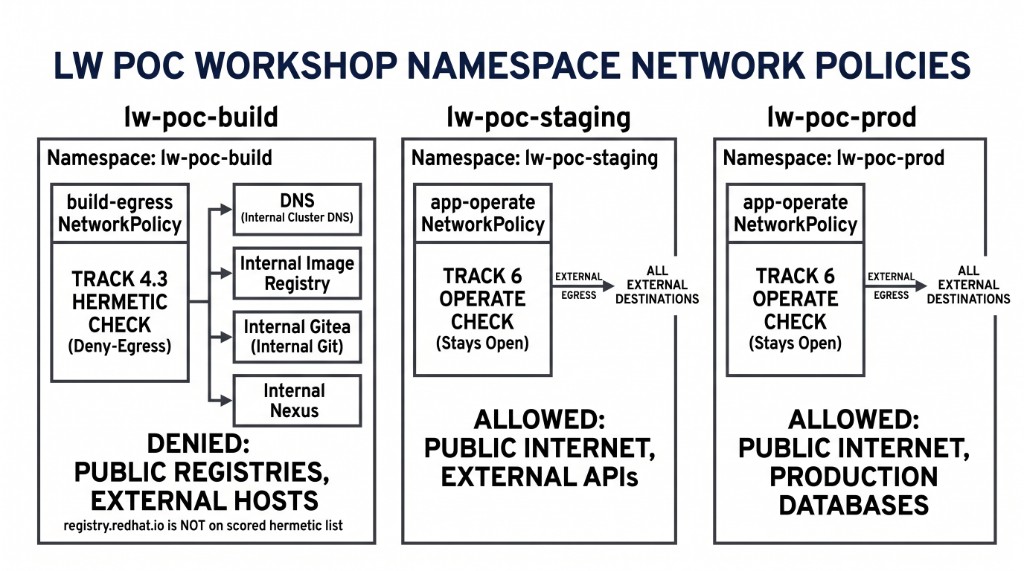
The figure is two policies. The left column is the policy split: build-egress on lw-poc-build, which this page tightens. The middle and right columns are app-operate on stage and prod, which stay open for Track 6. Copying build-egress onto those namespaces fails the Check. The pod ports for the left column are the allow-list figure in the next section.
|
The allow-list below is longer than the four boxes in the left column. DNS, the registry, Gitea, and Nexus are the hermetic core. The Kubernetes API, Advanced Cluster Security, Trusted Artifact Signer, and Trusted Profile Analyzer are on the list so later pipeline tasks can run. |
In a customer engagement, CI namespaces are isolated from the namespaces where the application runs. You keep those two policies separate.
Learning objectives
By the end of this module, you will be able to:
-
Replace allow-all egress on
build-egresswith the in-cluster allow-list -
Name each allowed namespace and the pod port OVN will match
-
Confirm the tightened policy is live on
lw-poc-buildonly -
Explain that Network and Premier remediations keep resolving through Nexus port
8081
The seed and the allow-list
Success of the reads is a NetworkPolicy whose egress is still allow-all, a userinfo ConfigMap of hints, and an example policy you will not apply.
oc -n lw-poc-build get networkpolicy build-egress -o yaml
oc -n lw-poc-build get configmap demo-userinfo-networkpolicy -o yaml
oc -n lw-poc-build get configmap networkpolicy-docs \
  -o jsonpath='{.data.example-hermetic-egress\.yaml}'
The block below is a policy with the wrong name, the wrong namespace, and a public DNS address. A paste of that object fails the Check.
# Worked example ONLY — wrong name, wrong namespace, public DNS.
apiVersion: networking.k8s.io/v1
kind: NetworkPolicy
metadata:
  name: example-hermetic-egress
  namespace: example-build-ns
spec:
  podSelector: {}
  policyTypes: [Egress]
  egress:
    - to:
        - ipBlock:
            cidr: 8.8.8.8/32
The allow-list comes from the userinfo keys. The only addresses you discover yourself are the Kubernetes API ClusterIP and its endpoint IPs. Everything else is a namespaceSelector plus the pod port.
-
Namespace
openshift-dns, UDP and TCP port5353. -
Namespace
openshift-image-registry, TCP port5000. -
Namespace
lightwell-repo, Nexus HTTP port8081and the Docker dest port5000. -
Namespace
gitea, TCP port3000. That is the in-cluster clone, not the Gitea Route. -
The Kubernetes API: Service
default/kubernetesClusterIP, TCP443, plus the endpoint IPs, TCP6443. Those endpoints are hostNetwork control-plane nodes. AnamespaceSelectorofdefaultdoes not match them, so they areipBlockentries of/32. -
Namespace
stackrox, TCP8443. Central’s Service port is443and the pod port is8443. A rule for port443does not allow it. -
Namespace
trusted-artifact-signer: TCP8080for TUF,5555for Fulcio HTTP,5554for Fulcio gRPC, and3000for Rekor. -
Namespace
trusted-profile-analyzer, TCP8080. The TPA Service port is443and the pod port is8080.
Each arrow starts at NetworkPolicy build-egress and ends on one of those destinations.
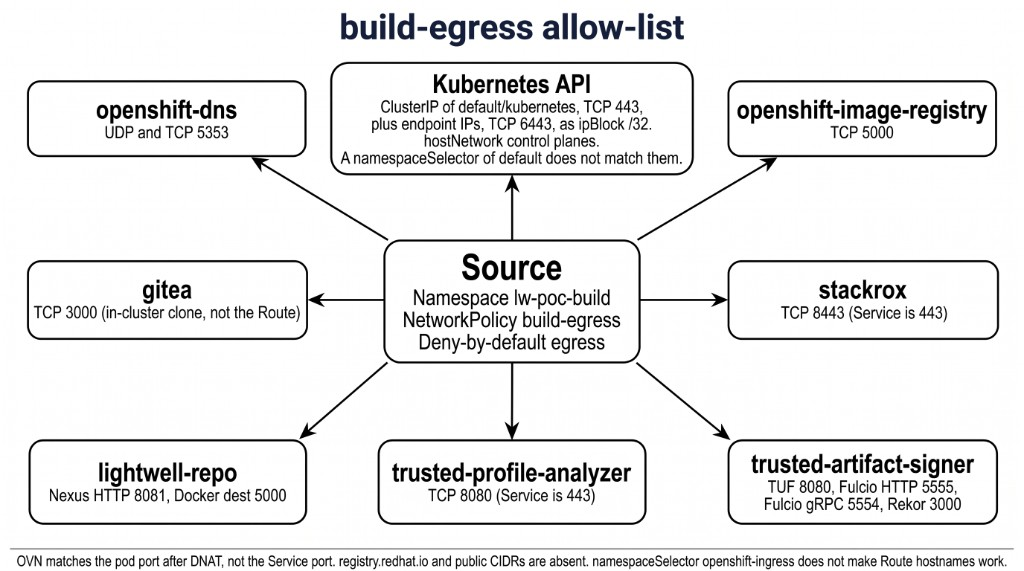
The API addresses differ per cluster. Success is one ClusterIP line and one endpoints line.
oc -n default get svc kubernetes -o jsonpath='clusterIP={.spec.clusterIP} port={.spec.ports[0].port}{"\n"}'
oc -n default get endpoints kubernetes -o jsonpath='{.subsets[*].addresses[*].ip}{" "}{.subsets[*].ports[*].port}{"\n"}'
Your change
Replace the seed egress: [ {} ] with deny-by-default plus the destinations above. Use a namespaceSelector for those namespaces, and match the pod ports from userinfo. Add an ipBlock of /32 for the kube API ClusterIP and for each endpoint IP. Leave registry.redhat.io and any public CIDR off the policy. A namespaceSelector of openshift-ingress does not make Route hostnames work: those names resolve to the ingress VIP, and that selector does not match the VIP. After this page, 4.4 uses in-cluster Gitea (student_repo_internal_url) and Nexus (nexus_internal_url). Pipeline tasks that talk to ACS, keyless signing, or TPA need the stackrox, Trusted Artifact Signer, and TPA pod ports. Service port 80 or 443 is not enough.
Success is a live build-egress that is no longer allow-all, and an app-operate policy that is still the operate seed.
oc -n lw-poc-build get networkpolicy build-egress -o yaml
# edit in place or oc apply a file you authored — not example-hermetic-egress.yaml
oc -n lw-poc-staging get networkpolicy app-operate
Check
The pass is the live object. build-egress exists in lw-poc-build, is not allow-all egress, and includes DNS, the registry, and Nexus. The extra allows for Gitea, the kube API, stackrox port 8443, and the Trusted Artifact Signer pod ports are expected, so 4.4 and 5.1 can run. The policy is not copied to lw-poc-staging. app-operate on staging and prod is still the operate seed.
After this tighten, a PipelineRun that still clones the Gitea HTTPS Route, or that resolves Maven from Central, hangs or fails. That is the control. It is not a reason to reopen egress.
build-egress applies to pods in lw-poc-build. Image pulls the kubelet makes on the node, including Task step images and some BuildConfig strategy pulls, are outside that NetworkPolicy. The prefetch Task image (registry.access.redhat.com/ubi9/openjdk-21) can still land after this page. The ImageStream import from 4.1 is what keeps the Dockerfile FROM internal. A Task step that pulled from registry.access.redhat.com is not a reason to add registry.redhat.io to the allow-list.
The Job also grades ConfigMap report-10-build-networkpolicy key np_scope. Set it to build-ns. Empty or REPLACE_ME fails even if cluster state is correct. Do not copy validate-docs.
oc -n lw-poc-validate edit configmap report-10-build-networkpolicyThe scored Check is Job validate-10-build-networkpolicy in lw-poc-validate. Direct nav URLs still work (honor system). Unlimited retries. There is no Solve.
oc -n lw-poc-validate delete job validate-10-build-networkpolicy --ignore-not-found
TPL='job-10.yaml'
oc -n lw-poc-validate get configmap validate-job-templates \
  -o go-template="{{ index .data \"${TPL}\" }}" | oc create -f -
oc -n lw-poc-validate logs -f job/validate-10-build-networkpolicy
Expect CHECK PASSED: before you continue. CHECK FAILED: names the object to fix. Delete the Job and create it again as often as you need.
The Validate Job grades the live NetworkPolicy. A YAML screenshot is not the grade. The next page still opens if you skip this one.
Official documentation
-
Lightwell Network Java repository (why Nexus port
8081stays on the allow-list)
Key takeaways
-
Build egress and application egress are different policies, on different namespaces.
-
After this tighten, clone and Maven use in-cluster Service URLs. That includes Lightwell Network GAVs and Premier GAVs.
-
Fulcio, Rekor, and TUF use the
*_internal_urlvalues fromdemo-userinfo-rhtas. The runtimeFROMis already the internal ImageStream from 4.1. -
build-egressis pod egress. A kubelet pull of a Task image can still reachregistry.access.redhat.com.