5.1 Sign (keyless)
On this page you prove that the application image you built carries a keyless signature from Red Hat Trusted Artifact Signer, and that cosign verify accepts it.
Track 5 is sign and attest. This is the first of its three pages. You sign the application digest from 4.4 Build and SBOM. The Hummingbird base already has Red Hat’s key, from Track 1. Lightwell already signed the libraries. This signature is the application’s. The seeded pipeline includes Task cosign-sign-keyless. The PipelineRun still has placeholders until you fill the in-cluster Fulcio, Rekor, and TUF URLs. 5.3 Disconnected verify adds a second, key-based signature on the same digest. Keyless alone is not the end of Track 5.
Why this control exists
Integrity of the application image is a signature on the digest you built. The pipeline service account presents an OIDC token. Fulcio issues a short-lived certificate. Rekor records the signature. TUF distributes the trust root. cosign verify accepts that identity: the pipeline service account in the build namespace, issued by https://kubernetes.default.svc.
The URLs inside the build namespace are the in-cluster Services, fulcio_internal_url and its siblings on ConfigMap demo-userinfo-rhtas. After 4.3 the build namespace cannot reach the HTTPS Routes. The Route hints (fulcio_url_hint and its siblings) are for the Showroom cosign verify only. A verify that uses the Hummingbird key, or a fake issuer, fails the Check. Admission in Track 6 still needs the public key from 5.3, because native ImagePolicy cannot store this service-account URI. Keep both signatures.
Lightwell Network and Lightwell Clearinghouse Premier sign dependencies. They do not sign this application digest. Premier does not replace Trusted Artifact Signer.
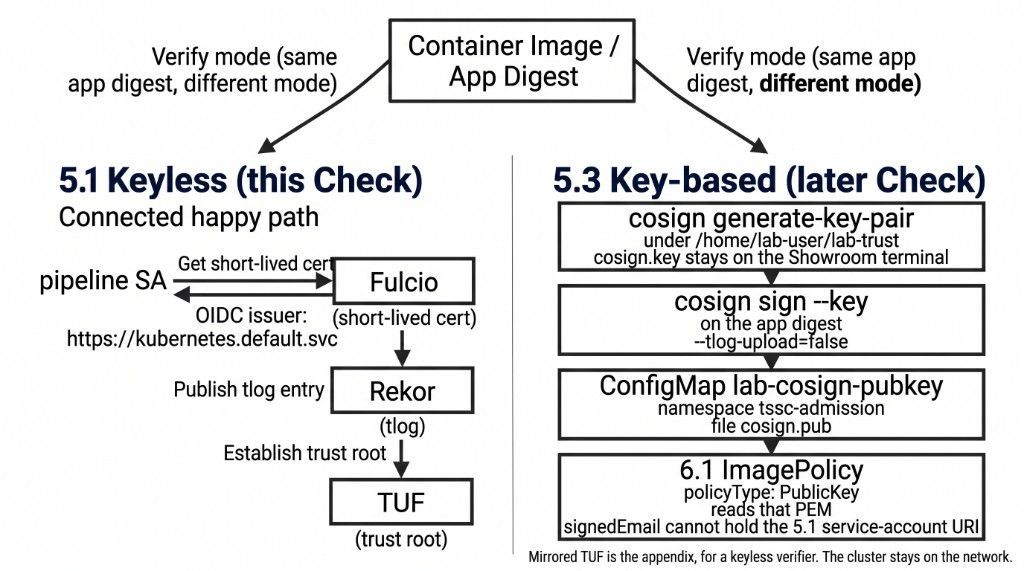
The figure is the two signatures on one digest. This page is the left column: the pipeline service account, Fulcio, Rekor, and TUF. The key-based path, on 5.3, is a key pair under ~/lab-trust, cosign sign --key, and ConfigMap lab-cosign-pubkey. Mirrored TUF belongs to the appendix exercise for a keyless verifier. The cluster stays on the network for both signatures.
|
|
In a customer engagement, CI produces a signed image through Sigstore or Trusted Artifact Signer. You prove that your BuildConfig digest verifies against this cluster’s Trusted Artifact Signer. Admission is Track 6.
Learning objectives
By the end of this module, you will be able to:
-
Fill the PipelineRun with the in-cluster Fulcio, Rekor, and TUF URLs and get
cosign-sign-keylessto Succeeded -
Run
cosign verifyon the application digest with the pipeline service-account identity -
Record that digest for Track 6
-
Leave the key-based
cosign sign --keyfor 5.3
The signer URLs
Success is cosign on PATH, then the signing model and both URL families: internal Services for the pipeline, and Route hints for the Showroom verify. Confirm the hints against the live Routes. A PipelineRun that still contains apps.<domain> fails the sign task.
command -v cosign
oc -n trusted-artifact-signer get configmap demo-userinfo-rhtas \
  -o jsonpath='{.data.signing_model}{"\n"}{.data.fulcio_internal_url}{"\n"}{.data.rekor_internal_url}{"\n"}{.data.tuf_internal_url}{"\n"}{.data.fulcio_url_hint}{"\n"}{.data.rekor_url_hint}{"\n"}{.data.tuf_url_hint}{"\n"}'
oc -n trusted-artifact-signer get routes
The block below is cosign verify against a different issuer and a different image. Using it as the scored verify fails the Check.
# Worked example ONLY — fake issuer/subject. Do not use as the scored verify.
cosign verify \
  --certificate-identity-regexp='https://example.invalid/not-the-pipeline-sa' \
  --certificate-oidc-issuer='https://example.invalid/oidc' \
  image-registry.openshift-image-registry.svc:5000/example/not-your-app:latest
Your change
If 4.4 already ran cosign-sign-keyless to Succeeded, you still confirm that Gitea has the filled PipelineRun. Check 12 reads .tekton/pipelinerun.yaml from Gitea, not the live object. STUDENT_REPO_URL_PLACEHOLDER or <lab-namespace> still on main fails the Check even when the sign task succeeded. Success of the grep is the line Gitea pipelinerun is filled. If you see STILL HAS PLACEHOLDERS, commit the filled file from 4.4 and push it.
cd /tmp/spring-boot-lw-poc
git fetch
git show origin/main:.tekton/pipelinerun.yaml | grep -E 'STUDENT_REPO_URL_PLACEHOLDER|<lab-namespace>' \
  && echo 'STILL HAS PLACEHOLDERS — commit the filled file from 4.4' \
  || echo 'Gitea pipelinerun is filled'
If the sign task has not succeeded yet, edit .tekton/pipelinerun.yaml on lw-student/spring-boot-lw-poc. Replace Fulcio, Rekor, and TUF with fulcio_internal_url, rekor_internal_url, and tuf_internal_url. Replace STUDENT_REPO_URL_PLACEHOLDER with student_repo_internal_url. Replace <lab-namespace> with lw-poc-build. Commit and push that file, the same way 4.4 did, then create a new run. Success is cosign-sign-keyless Succeeded. ACS may still fail. This Check is the signature.
BUILD_NS="$(oc -n gitea get configmap demo-userinfo-gitea -o jsonpath='{.data.student_build_namespace}')"
cd /tmp/spring-boot-lw-poc
oc -n "${BUILD_NS}" apply -f .tekton/pipeline.yaml
oc -n "${BUILD_NS}" create -f .tekton/pipelinerun.yaml
oc -n "${BUILD_NS}" get pipelinerun -w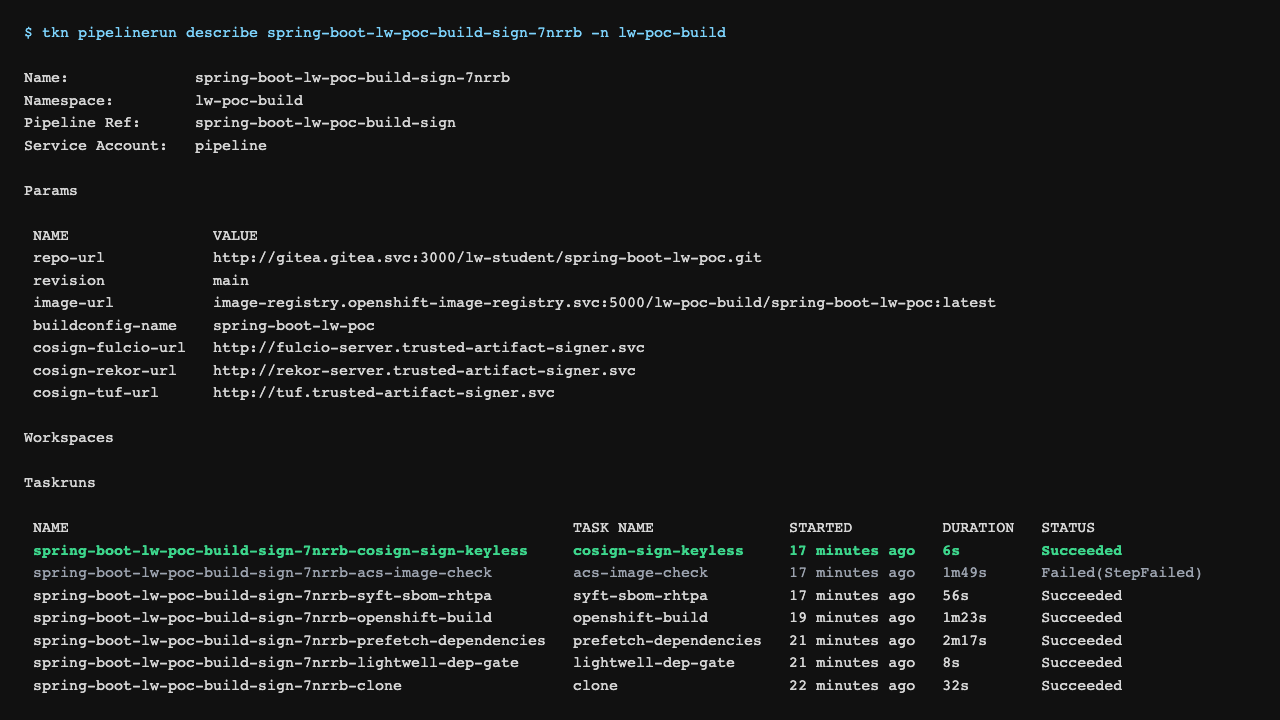
The capture is the pipeline graph once cosign-sign-keyless has succeeded. Tagging the image into staging is Track 6. Generating a key pair, or running cosign sign --key, is 5.3.
Check
Verify the application tag spring-boot-lw-poc:latest in the build namespace. The identity is the pipeline service account in that namespace. The issuer is the Kubernetes API. Showroom uses the Route hints for TUF and Rekor, because this shell is outside the build NetworkPolicy. HOME is /tmp/lab-home so cosign login does not write a Docker config into the real home directory.
If verify fails, read the SAN from the Rekor entry or from the cosign verify error. The identity regexp below is the one this cluster’s pipeline service account presents.
Success is exit code 0, and a verification block for your application digest.
BUILD_NS="$(oc -n gitea get configmap demo-userinfo-gitea -o jsonpath='{.data.student_build_namespace}')"
TUF="$(oc -n trusted-artifact-signer get configmap demo-userinfo-rhtas -o jsonpath='{.data.tuf_url_hint}')"
REKOR="$(oc -n trusted-artifact-signer get configmap demo-userinfo-rhtas -o jsonpath='{.data.rekor_url_hint}')"
IMAGE="image-registry.openshift-image-registry.svc:5000/${BUILD_NS}/spring-boot-lw-poc:latest"
mkdir -p /tmp/lab-home
export HOME=/tmp/lab-home
cosign initialize --mirror="${TUF}" --root="${TUF}/root.json"
cosign login -u unused -p "$(cat /var/run/secrets/kubernetes.io/serviceaccount/token)" \
  image-registry.openshift-image-registry.svc:5000
cosign verify \
  --rekor-url="${REKOR}" \
  --certificate-identity-regexp="^https://kubernetes.io/namespaces/${BUILD_NS}/serviceaccounts/pipeline$" \
  --certificate-oidc-issuer="https://kubernetes.default.svc" \
  --allow-http-registry --allow-insecure-registry \
  "${IMAGE}"
Record the digest. Track 6 promotes it.
BUILD_NS="$(oc -n gitea get configmap demo-userinfo-gitea -o jsonpath='{.data.student_build_namespace}')"
oc -n "${BUILD_NS}" get istag spring-boot-lw-poc:latest -o jsonpath='{.image.dockerImageReference}{"\n"}'The Job also grades ConfigMap report-12-sign-keyless key what_you_signed. Set it to app-digest. Empty or REPLACE_ME fails even if cluster state is correct. Do not copy validate-docs.
oc -n lw-poc-validate edit configmap report-12-sign-keylessThe scored Check is Job validate-12-sign-keyless in lw-poc-validate. Direct nav URLs still work (honor system). Unlimited retries. There is no Solve.
oc -n lw-poc-validate delete job validate-12-sign-keyless --ignore-not-found
TPL='job-12.yaml'
oc -n lw-poc-validate get configmap validate-job-templates \
  -o go-template="{{ index .data \"${TPL}\" }}" | oc create -f -
oc -n lw-poc-validate logs -f job/validate-12-sign-keyless
Expect CHECK PASSED: before you continue. CHECK FAILED: names the object to fix. Delete the Job and create it again as often as you need.
The Validate Job grades the keyless signature on the application digest. The next page still opens if you skip this one. Lightwell signed the library. This page signed the image.
Official documentation
-
Trusted Artifact Signer deployment guide (Fulcio, Rekor, TUF,
cosign, and Conforma)