3.3 Live Renovate
On this page you prove that a bot, not you, updated the Lightwell and Hummingbird pins in git.
Track 3 is application source. This is the third page. 3.2 Bind base and deps committed the runtime FROM and the default Maven property, and left lightwell-pins.properties stale. A Renovate CronJob opens one pull request that moves both stale lines. You review that pull request and merge it. A hand-edited commit on the pins file fails the Check.
MintMaker is the name customers use for this bot. This cluster does not install hosted Konflux MintMaker. The term map is Appendix: Konflux mapping.
Why this control exists
A trusted software supply chain cannot depend on a person noticing a new Lightwell version. The control is a bot pull request against enterprise git. You merge it the way a developer merges any other pull request. A commit authored by student on the pins file is a different control, and the Check rejects it.
The seed is stale on purpose. The bot opens one grouped pull request that moves both lines:
-
commons-lang3=3.14.0.rhlw-00000becomes the remediated3.14.0.rhlw-00001that Nexus already has. -
hummingbird-digestmoves off the all-zero digest to the dest digest from 1.2.
Merging only the Maven line used to leave a second digest pull request that could not merge, because both lines live in the same file. Leave the file for the bot. The CronJob retries about every 20 minutes.
Lightwell Network catalog bumps are what this bot is seeded to see. A Clearinghouse Premier member version would appear the same way once Nexus, or Artifactory, has metadata the bot can read. During a Premier embargo, you merge the pin. The CVE text and the advisory text stay out of a public pull-request description.
|
Renovate on a Python application watches |
In a customer engagement the bot runs against GitHub or GitLab. Here the git is Gitea. Red Hat operates the workshop CronJob on this cluster. You merge the pull request.
Learning objectives
By the end of this module, you will be able to:
-
Find a pull request authored by
renovate-botwhose files includelightwell-pins.properties -
Merge that pull request so both the Maven pin and the Hummingbird digest move in one commit
-
Map the name MintMaker, in a customer engagement, to this in-cluster bot
-
Say that a Clearinghouse Premier remediation would arrive on the same pull-request path
The bot on this cluster
The chart is off unless components.renovate is enabled on this cluster. If the CronJob is missing, tell an instructor. A pull request you author yourself fails the Check.
Success is a CronJob in namespace renovate, a userinfo ConfigMap, and a short markdown example of the pull request shape.
oc -n renovate get cronjob
oc -n renovate get configmap demo-userinfo-renovate -o yaml
oc -n renovate get configmap renovate-docs \
  -o jsonpath='{.data.example-renovate-pr\.md}'
The block below is a commit by the wrong author, on the wrong file. If that is what landed on main, the Check fails.
# Worked example ONLY — wrong author, wrong file. Do not commit this as the Check.
git commit --author='student <student@example.invalid>' \
  -m 'Bump jackson-databind' pom.xml
Your change
In Gitea, open lw-student/spring-boot-lw-poc and then Pull Requests. The scored pull request is authored by renovate-bot. The files include lightwell-pins.properties. Both seed values, rhlw-00000 and the all-zero digest, move in that one pull request. Review it, then merge it in the Gitea UI.
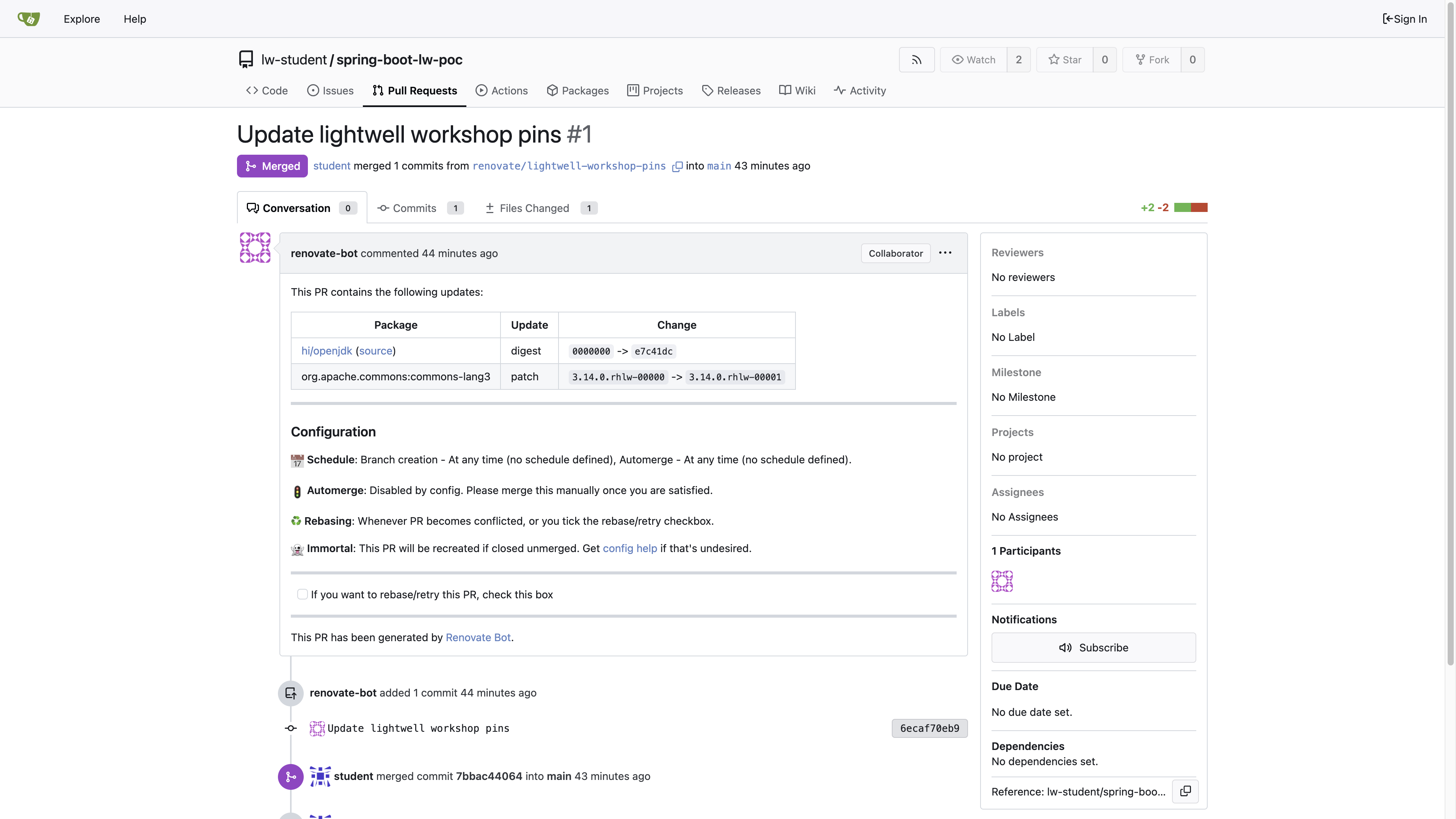
The capture is that pull request after the merge. The comment is from renovate-bot. The table shows both the Hummingbird digest and commons-lang3. The merge on the page is yours. The pin commit is the bot’s.
If the pull request is not there yet, wait for the next CronJob and read the Job logs in namespace renovate. The Maven bump appears once the Nexus remotes are up. The dest Docker bump needs the 1.2 mirror. A student commit that edits the pins file fails the Check.
After the merge, refresh the clone from 3.2. git log -1 is your merge commit. Success is a pins file that has moved off rhlw-00000 and the all-zero digest, and a renovate-bot commit on that file. The second git log lists commits for lightwell-pins.properties. The newest of those is renovate-bot.
cd /tmp/spring-boot-lw-poc
git fetch origin
git checkout main
git pull --ff-only origin main
git log -1 --format='%an %ae %s'
git log --format='%h %an %ae %s' -- lightwell-pins.properties
cat lightwell-pins.properties
Check
The pass is the merged history. git log -1 is your merge commit. A renovate-bot commit is on lightwell-pins.properties. That file has moved off rhlw-00000 and the all-zero digest. A hand commit that recreates that diff fails the Check.
The Job also grades ConfigMap report-07-live-renovate key who_changed_pins. Set it to renovate-bot. Empty or REPLACE_ME fails even if cluster state is correct. Do not copy validate-docs.
oc -n lw-poc-validate edit configmap report-07-live-renovateThe scored Check is Job validate-07-live-renovate in lw-poc-validate. Direct nav URLs still work (honor system). Unlimited retries. There is no Solve.
oc -n lw-poc-validate delete job validate-07-live-renovate --ignore-not-found
TPL='job-07.yaml'
oc -n lw-poc-validate get configmap validate-job-templates \
  -o go-template="{{ index .data \"${TPL}\" }}" | oc create -f -
oc -n lw-poc-validate logs -f job/validate-07-live-renovate
Expect CHECK PASSED: before you continue. CHECK FAILED: names the object to fix. Delete the Job and create it again as often as you need.
The Validate Job rejects a seeded pin bump and a student-authored pin bump. Track 4 still opens if you skip this page. The binding of FROM and the pom default was 3.2. This Check is who changed the pins file.
Official documentation
-
Lightwell Network Java repository (the metadata Renovate reads through Nexus)
-
Konflux mapping (MintMaker maps to this CronJob)
Key takeaways
-
Pin refresh is a bot pull request on enterprise git. On this cluster, that git is Gitea.
-
The Lightwell Network catalog bump is this Check. A Clearinghouse Premier member version would use the same bot against the same proxy.
-
During an embargo, merge the pin and leave the advisory text out of the pull-request body.
-
The next track starts from these pins and removes every public fetch the build could still make.