1.1 Verify Hummingbird
On this page you prove that the Java runtime base is a published Hummingbird image, and that its signature matches Red Hat’s key, while that image still lives in the public catalog.
Track 1 is the base. This is the first of its two pages. You read the pin from cluster userinfo, finish an incomplete cosign verify snippet, and run it against that published digest. 1.2 Mirror into the trust boundary copies the same pin into the cluster.
The image is a Project Hummingbird runtime in Red Hat Hardened Images. The scored pin is hi/openjdk. Red Hat signs the catalog image. This cluster consumes that signature.
Why this control exists
A trusted software supply chain starts with a trusted runtime input. That input is a specific name your organization already uses: the published pull spec, digest included. Later signatures, SBOMs, and admission decisions refer back to that name. You check it here, in the catalog Red Hat published.
Red Hat Hardened Images is that runtime: a minimal signed image under registry.access.redhat.com/hi/…, with no package manager in the image. A Universal Base Image is a general-purpose base. This page uses the Hardened Images pull spec the cluster stores in userinfo.
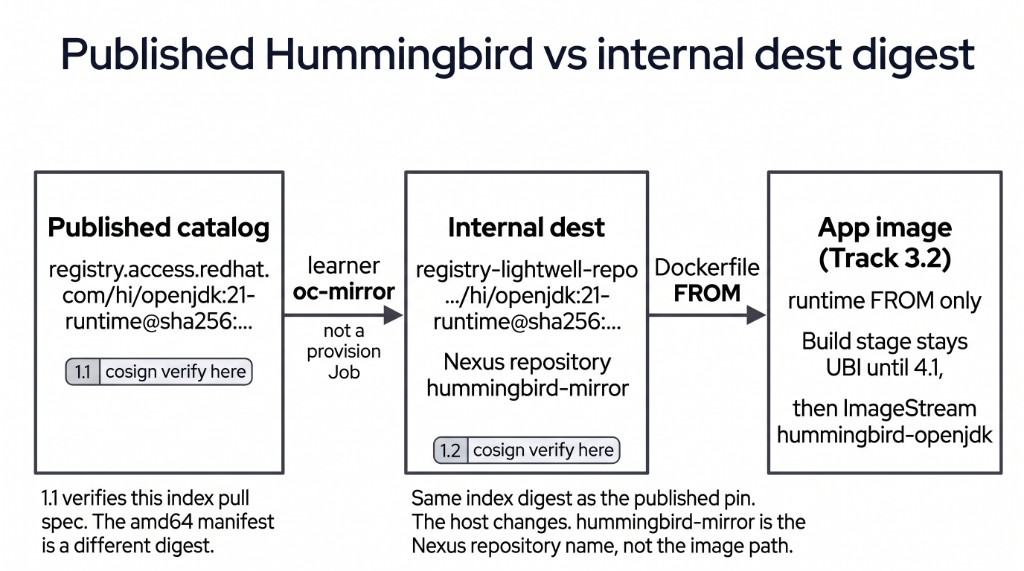
The figure has three coordinates. This page is the left box: cosign verify on the published catalog. The string drawn there is the image index pull spec. The amd64 platform digest is a different sha256, which the next section separates. The middle box is the internal dest you fill on the next page. The right box is the application FROM you set in Track 3, once that dest digest exists.
Lightwell Network and Lightwell Clearinghouse Premier remediate application libraries. Those libraries run on this base. A Premier member package still needs this verified Hummingbird pin underneath it.
|
A Hummingbird Python runtime ( |
In a customer engagement, the customer subscribes to Hardened Images and pins the digest in their catalog. Red Hat runs the factory and holds the signing key. Here you do the consumer half: read the pin, verify it, and carry that same pin into the mirror.
Learning objectives
By the end of this module, you will be able to:
-
Verify a published Hardened Images digest with
cosignand Red Hat’s key -
Read the scored pull spec from cluster userinfo and put that string in the verify snippet
-
Explain the image index and the amd64 manifest inside it, and treat an arm64 entry in that index as a callout
The published pin
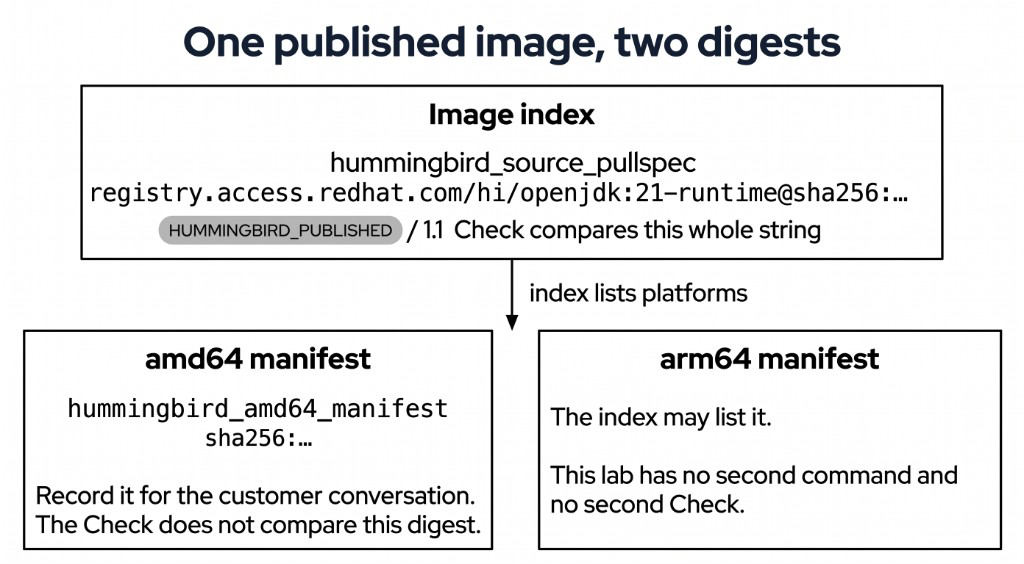
Two digests describe this catalog image. The Check compares one of them.
The pull spec is the reference you verify. ConfigMap demo-userinfo-lightwell-repo in namespace lightwell-repo stores it as hummingbird_source_pullspec. The value looks like registry.access.redhat.com/hi/openjdk:21-runtime@sha256:…. The digest after @ is the image index: one manifest that can list more than one architecture. You copy that entire line into the snippet. The Validate Job requires the ConfigMap to contain this userinfo value.
The amd64 manifest is the platform image the index lists for this cluster. ConfigMap demo-userinfo-showroom in namespace showroom stores it as hummingbird_amd64_manifest, beside hummingbird_source_registry. That sha256 differs from the index digest. You record it so you can name the architecture in a customer conversation. The Check compares the pull spec. The same index may also list arm64. You can name that architecture in the same conversation. The command on this page stays on the published pull spec.
Red Hat signs every Hardened Images catalog image at build time. This Showroom shell already has cosign on PATH. The key for this terminal is the URL below. Red Hat’s Enterprise Linux recipe mounts /etc/pki/sigstore into a cosign container, and that recipe belongs on a different host.
The key URL is https://security.access.redhat.com/data/63405576.txt. The seed already includes --insecure-ignore-tlog, which skips the transparency log and checks the signature against that key. This Showroom cosign warns that skipping the log is insecure. Success is the two checks under that warning: the cosign claims were validated, and the signatures were verified against the specified public key. See Verify the integrity of Red Hat Hardened Images.
Track 5 signs your application image with in-cluster Red Hat Trusted Artifact Signer. That signature uses a short-lived Fulcio certificate. This page uses Red Hat’s published Hardened Images key. If the key URL fails to load on this cluster, stop and tell an instructor.
The block below is the same command shape on a different image. --key points at https://example.invalid/not-redhat-hardened-images.pub, and the image is registry.access.redhat.com/ubi9/ubi-minimal:latest. A scored ConfigMap that still contains ubi-minimal or example.invalid fails the Check.
# Worked example ONLY — ubi-minimal, and a key outside Red Hat Hardened Images.
cosign verify \
  --key https://example.invalid/not-redhat-hardened-images.pub \
  --insecure-ignore-tlog \
  registry.access.redhat.com/ubi9/ubi-minimal:latest
Your change
cosign and oc-mirror are already installed in the Showroom terminal. You use cosign on this page. You use oc-mirror on the next page. Success here is a filesystem path for each binary, then a line that lists those tools and the value true.
command -v cosign
command -v oc-mirror
oc -n showroom get configmap demo-userinfo-showroom \
  -o jsonpath='{.data.lab_clis}{"\n"}{.data.do_not_curl_github}{"\n"}'
Read the pull spec from the cluster. Success is one line: registry.access.redhat.com, hi/openjdk, and @sha256:. That line is what you will store in HUMMINGBIRD_PUBLISHED.
oc -n lightwell-repo get configmap demo-userinfo-lightwell-repo \
  -o jsonpath='{.data.hummingbird_source_pullspec}{"\n"}'
Read the platform digest next. Success is a sha256: line, then registry.access.redhat.com. The sha256 differs from the digest in the pull spec. Keep both. The snippet and the Check use the pull spec.
oc -n showroom get configmap demo-userinfo-showroom \
  -o jsonpath='{.data.hummingbird_amd64_manifest}{"\n"}{.data.hummingbird_source_registry}{"\n"}'
The scored object is ConfigMap stub-01-hummingbird-verify in namespace lightwell-repo, key published-verify.sh. Extract it, replace both placeholders, and write the ConfigMap back. A copy that exists only as a file in your home directory leaves the Check on the seed.
oc -n lightwell-repo get configmap stub-01-hummingbird-verify \
  -o jsonpath='{.data.published-verify\.sh}' > ~/track-1-1-published-verify.sh
The file still has both placeholders:
#!/usr/bin/env bash
set -euo pipefail
# V2-53 incomplete seed (1.1). Fill the pull spec and key URL placeholders;
# do not copy validate-docs or the worked example from the page. Check grades
# this ConfigMap, not only ~/ .
export HUMMINGBIRD_PUBLISHED='REPLACE_ME_HUMMINGBIRD_PULLSPEC'
cosign verify \
  --key REPLACE_ME_COSIGN_KEY \
  --insecure-ignore-tlog \
  "${HUMMINGBIRD_PUBLISHED}"
Set HUMMINGBIRD_PUBLISHED to the pull spec you just read, including the @sha256: index digest. Set --key to https://security.access.redhat.com/data/63405576.txt. Leave --insecure-ignore-tlog as it is.
Writing the ConfigMap back succeeds when the last line prints placeholders gone.
chmod +x ~/track-1-1-published-verify.sh
oc -n lightwell-repo create configmap stub-01-hummingbird-verify \
  --from-file=published-verify.sh=$HOME/track-1-1-published-verify.sh \
  --dry-run=client -o yaml | oc apply -f -
grep -E 'REPLACE_ME' ~/track-1-1-published-verify.sh && echo 'STILL HAS PLACEHOLDERS' || echo 'placeholders gone'
Check
Run the snippet. Success is a verification block for the published hi/openjdk pin. The warning says tlog verification was skipped. The two checks under it are that the cosign claims were validated and that the signatures were verified against the specified public key.
~/track-1-1-published-verify.shThat output is how you see the signature. The Validate Job grades ConfigMap stub-01-hummingbird-verify in lightwell-repo and the report key below. It requires the userinfo pull spec in the snippet, and it rejects any remaining REPLACE_ME.
The Job also grades ConfigMap report-01-hummingbird-verify key consume_published. Set it to consume-published. Empty or REPLACE_ME fails even if cluster state is correct. Do not copy validate-docs.
oc -n lw-poc-validate edit configmap report-01-hummingbird-verifyThe scored Check is Job validate-01-hummingbird-verify in lw-poc-validate. Direct nav URLs still work (honor system). Unlimited retries. There is no Solve.
oc -n lw-poc-validate delete job validate-01-hummingbird-verify --ignore-not-found
TPL='job-01.yaml'
oc -n lw-poc-validate get configmap validate-job-templates \
  -o go-template="{{ index .data \"${TPL}\" }}" | oc create -f -
oc -n lw-poc-validate logs -f job/validate-01-hummingbird-verify
Expect CHECK PASSED: before you continue. CHECK FAILED: names the object to fix. Delete the Job and create it again as often as you need.
The next page starts Job oc-mirror-learner and verifies the internal digest. Track 3 points the application Dockerfile FROM at that dest digest. Track 5 signs your application image with in-cluster Red Hat Trusted Artifact Signer.
Official documentation
-
Lightwell (Network and Clearinghouse Premier remediate libraries; Hummingbird stays the runtime base)
Key takeaways
-
The supply chain starts from a signed published runtime. You consume Hummingbird. Red Hat runs the factory.
-
This page verifies the published pull spec. The next page verifies the internal digest after you mirror.
-
Lightwell remediates libraries. The runtime base under those libraries is the Hummingbird pin.
-
cosignwas already onPATH.