3.1 Golden-path source
On this page you prove that the Java application lives on a git remote you own, on the Gitea inside this cluster.
Track 3 is application source. This is the first of its three pages. Operator templates stay in organization workshop-templates. The scored remote is lw-student/spring-boot-lw-poc. You create that organization, create three empty repositories, and run the seed script. The script also adds renovate-bot, which 3.3 Live Renovate needs. 3.2 Bind base and deps is where the Dockerfile FROM changes.
Why this control exists
Pins, FROM lines, pipeline YAML, and GitOps remotes count only when a later Check can see them on a remote the learner owns. The golden path copies a prepared tree into organization lw-student. From that commit on, you own the history.
Lightwell Network and Lightwell Clearinghouse Premier do not host application source. They supply the GAVs you commit on the next page and that Renovate bumps on the page after that. A Premier member remediation still needs this remote.
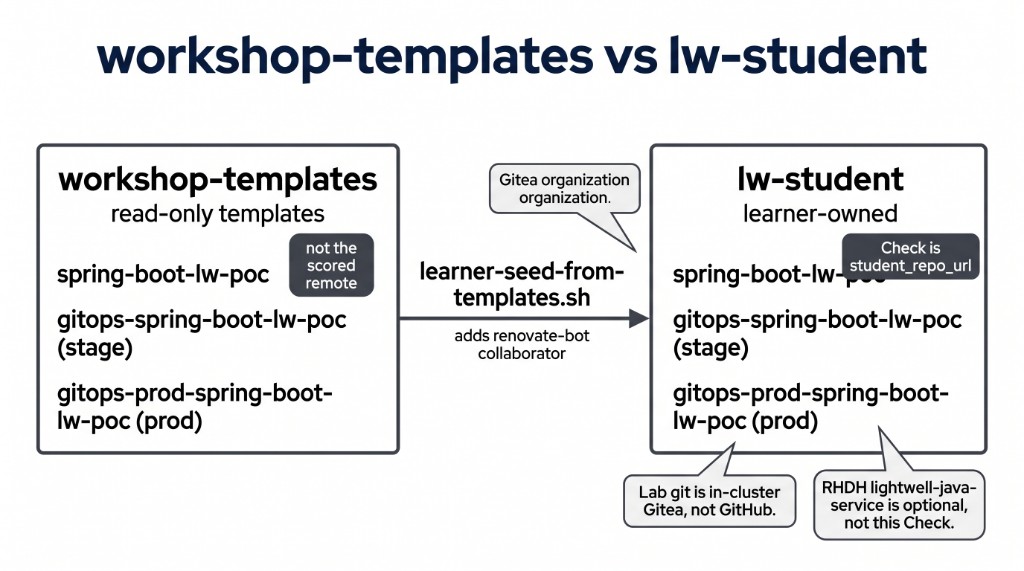
The figure has two homes. The left side is workshop-templates, which you read and do not score. The right side is lw-student, which the Check grades. A student_repo_url that still points at the template organization fails the Check.
|
Red Hat Developer Hub Software Template |
In a customer engagement the git host is GitHub, GitLab, or Bitbucket, and the copy is often a Developer Hub software template. This lab uses in-cluster Gitea so the exercise has no github.com remote. MintMaker, in that same customer conversation, maps to the Renovate bot you meet on 3.3.
Learning objectives
By the end of this module, you will be able to:
-
Create organization
lw-studentand the empty application and GitOps repositories on in-cluster Gitea -
Seed those repositories from the workshop templates, including the
renovate-botcollaborator -
Confirm
student_repo_urlservespom.xmlat the repository root -
Map a Developer Hub software template in a customer engagement to this seed
The Gitea coordinates
ConfigMap demo-userinfo-gitea in namespace gitea holds the URLs. gitea_url is the console. student_username is student. student_gitea_org is lw-student. student_repo_url is the scored application remote. template_app_repo_url is the operator tree you copy from. The password is the value of key student_password. Leave that value out of Git and out of screenshots.
Success is those fields, with user student and org lw-student.
oc -n gitea get configmap demo-userinfo-gitea \
  -o jsonpath='gitea_url={.data.gitea_url}{"\n"}user={.data.student_username}{"\n"}org={.data.student_gitea_org}{"\n"}app={.data.student_repo_url}{"\n"}templates={.data.template_app_repo_url}{"\n"}password={.data.student_password}{"\n"}'
The seed Job may already have created the student account. The ensure script is a no-op when the account exists. Success is a script that exits 0.
export STUDENT_USER=student
: "${STUDENT_PASS:=$(oc -n gitea get configmap demo-userinfo-gitea -o jsonpath='{.data.student_password}')}"
: "${GITEA_URL:=$(oc -n gitea get configmap demo-userinfo-gitea -o jsonpath='{.data.gitea_url}')}"

oc -n gitea get configmap gitea-student-repo-seed \
  -o jsonpath='{.data.learner-ensure-gitea-user\.sh}' > /tmp/learner-ensure-gitea-user.sh
chmod +x /tmp/learner-ensure-gitea-user.sh
/tmp/learner-ensure-gitea-user.sh
Open gitea_url and sign in as student with that password value.
The block below is a clone of the wrong remote. A student_repo_url that still points at GitHub, or at workshop-templates, fails the Check.
# Worked example ONLY — not the scored remote.
git clone https://github.com/example/spring-boot-lw-poc.git
# or: git clone <template_app_repo_url>   # workshop-templates, not lw-student
Your change
In Gitea, open + and choose New Organization. The name is exactly lw-student. Visibility is Public. Create the organization.
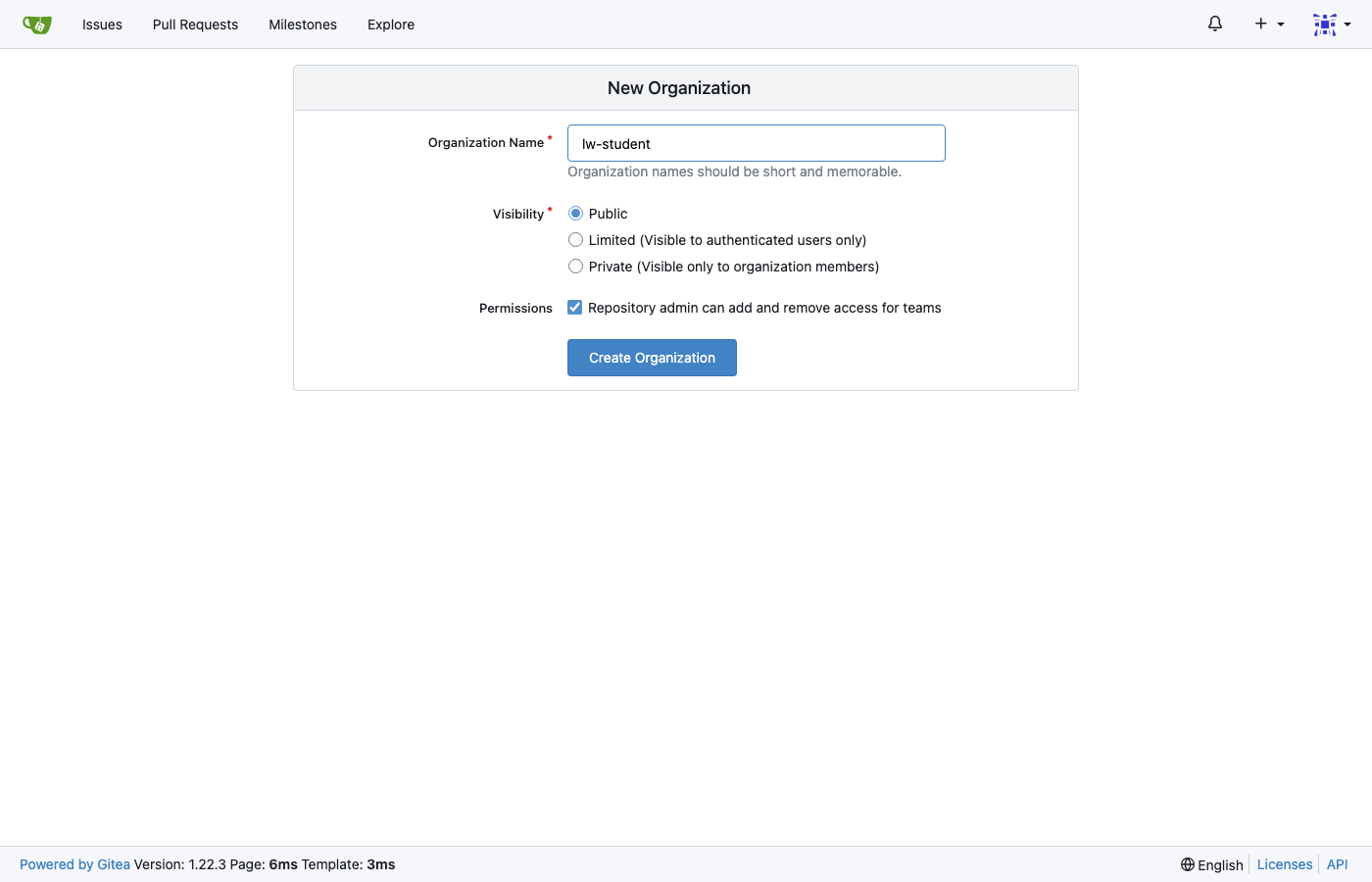
The capture is that form after the name is filled. The organization name is the string the later Checks look up.
Under lw-student, create three empty repositories. Leave the README checkbox clear. Initializing a repository puts a commit on it before the seed, and the seed expects an empty remote.
-
spring-boot-lw-pocis the application. -
gitops-spring-boot-lw-pocis the stage GitOps remote. -
gitops-prod-spring-boot-lw-pocis the production GitOps remote.
The seed script copies the template tree and adds renovate-bot as a write collaborator on the application repository. Success is a script that exits 0.
export STUDENT_USER=student
: "${STUDENT_PASS:=$(oc -n gitea get configmap demo-userinfo-gitea -o jsonpath='{.data.student_password}')}"
: "${GITEA_URL:=$(oc -n gitea get configmap demo-userinfo-gitea -o jsonpath='{.data.gitea_url}')}"

oc -n gitea get configmap gitea-student-repo-seed \
  -o jsonpath='{.data.learner-seed-from-templates\.sh}' > /tmp/learner-seed.sh
chmod +x /tmp/learner-seed.sh
/tmp/learner-seed.sh
Check
Success is HTTP 200 on student_repo_url, and a repository root that contains pom.xml. The default <commons.lang3.version> is still the affected upstream 3.14.0. The remediated pin is the next page. 3.18.0 would already be the wrong fix. lightwell-pins.properties is still the stale seed that 3.3’s bot updates.
oc -n gitea get configmap demo-userinfo-gitea \
  -o jsonpath='{.data.student_repo_url}{"\n"}{.data.template_app_repo_url}{"\n"}'
curl -sk -o /dev/null -w "%{http_code}\n" \
  "$(oc -n gitea get configmap demo-userinfo-gitea -o jsonpath='{.data.student_repo_url}')"
Open lw-student/spring-boot-lw-poc and confirm pom.xml is at the repository root.
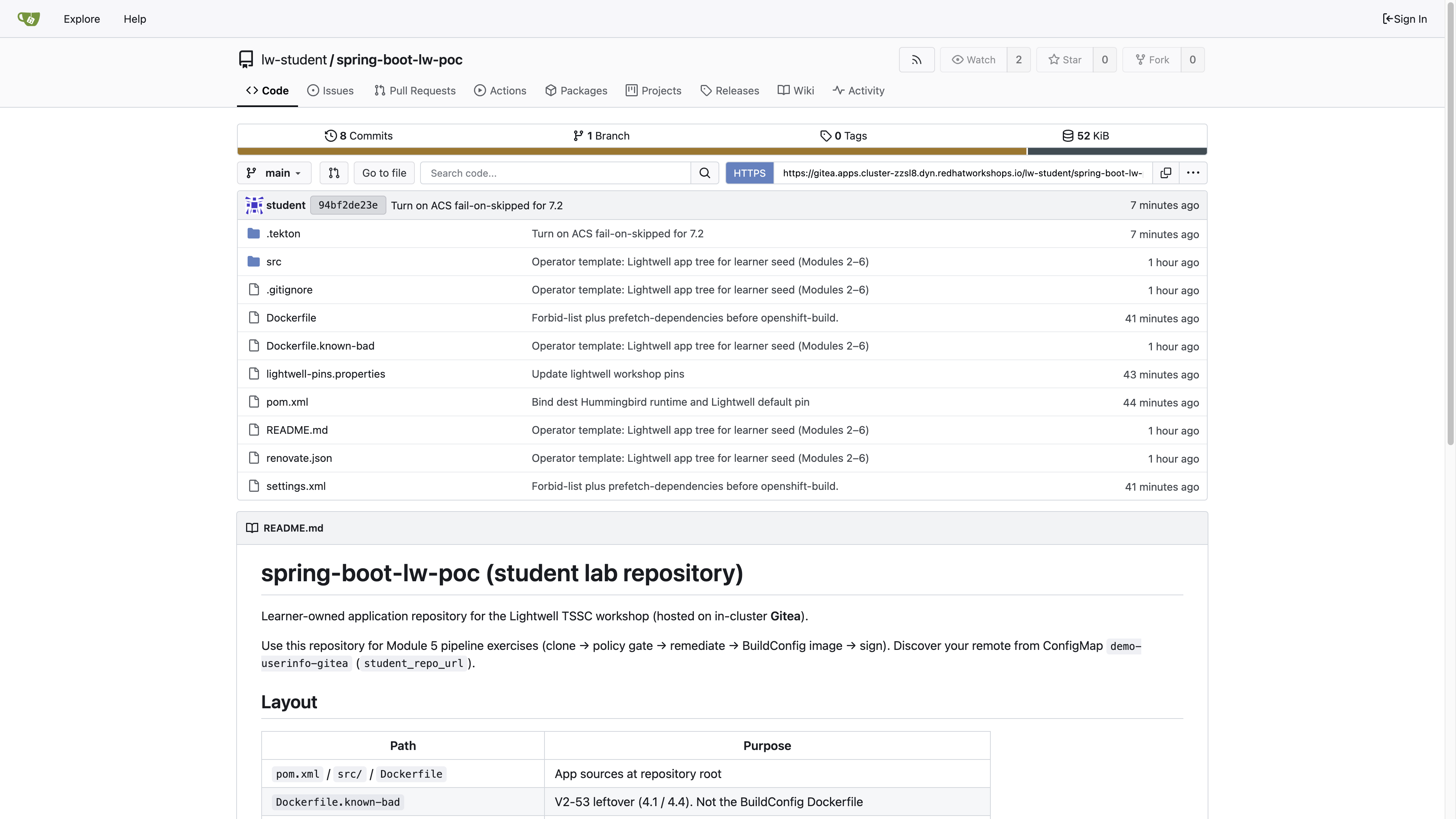
The capture is that root after the seed. pom.xml is in the file list. workshop-templates is a different organization.
The Validate Job grades the Gitea remotes. A screenshot is not the grade. The next page still opens if you skip this one, and its clone will fail until this remote exists.
The Job also grades ConfigMap report-05-golden-path-source key git_home. Set it to gitea-not-github. Empty or REPLACE_ME fails even if cluster state is correct. Do not copy validate-docs.
oc -n lw-poc-validate edit configmap report-05-golden-path-sourceThe scored Check is Job validate-05-golden-path-source in lw-poc-validate. Direct nav URLs still work (honor system). Unlimited retries. There is no Solve.
oc -n lw-poc-validate delete job validate-05-golden-path-source --ignore-not-found
TPL='job-05.yaml'
oc -n lw-poc-validate get configmap validate-job-templates \
  -o go-template="{{ index .data \"${TPL}\" }}" | oc create -f -
oc -n lw-poc-validate logs -f job/validate-05-golden-path-source
Expect CHECK PASSED: before you continue. CHECK FAILED: names the object to fix. Delete the Job and create it again as often as you need.
Official documentation
-
Getting started with Red Hat Developer Hub (the software-template form of this seed in a customer engagement)