6.1 Deploy the signed image with stage GitOps
- Why this control exists
- Learning objectives
- How GitOps and runtime policy work together
- The two remotes
- Exercise
- Confirm the digest and admission key
- Copy the verified image and its signatures
- Prepare the stage GitOps clone
- Commit the stage digest with the application stopped
- Complete and publish the admission policy
- Wait for node enforcement before starting stage
- Test an unsigned digest in the protected repository
- Review
- Carry the result into module 6.2
- Official documentation
- Key takeaways
In this module you prove that stage runs the signed digest, and that an unsigned tag on the same ImageStream fails at pull.
This is the first of the two modules in Track 6, which runs the signed Java application image as the production container and refuses an unsigned digest. You tag the signed image into lw-poc-staging, copy the signature onto that repository, commit the digest to the stage GitOps remote, and fill admission/trust-policy.yaml. A CronJob renders a namespaced ImagePolicy on lw-poc-staging and on lw-poc-prod. 6.2 Promote to prod is a second Gitea remote. You will update the production GitOps repository in the next module. Keep the staging app-operate NetworkPolicy unchanged so the application retains its runtime network access. This policy is separate from the build-pod egress policy you configured in 4.3 Restrict build-pod network access.
Why this control exists
Track 5 established which application image you signed and verified. Deployment needs to preserve that choice. Red Hat OpenShift GitOps uses a Git repository to record the desired application state, and Argo CD reconciles that state with the cluster. You commit the verified image digest to values.yaml in lw-student/gitops-spring-boot-lw-poc; Application lw-poc-staging uses that commit to configure the Deployment in namespace lw-poc-staging. A digest identifies fixed image content, while a tag such as latest can move to a different image. Recording the digest in Git gives you a deployment decision you can review and trace to a commit.
Runtime signature enforcement adds a separate check when a node pulls the image. A Git commit records what you intend to run, but it does not itself verify the image’s signature. In this lab, you complete admission/trust-policy.yaml in the stage repository, and the cluster renders an ImagePolicy for staging and production. The node uses that policy and the public key you published in module 5.3 to check signatures for the protected image repositories. This connects your earlier signing work to the runtime: the application must carry a signature that the configured policy trusts before the node can run it. Signature verification establishes trust in the signed image; it does not inspect its Maven dependencies or establish that the application is free of vulnerabilities.
You demonstrate the control with two outcomes. First, you keep the stage Deployment at zero replicas until the nodes have applied the policy, then start the signed image and confirm that its pod becomes Ready. Next, you create a temporary Deployment using an unsigned digest in the same protected repository. With this lab’s native ImagePolicy, creating the Deployment can succeed because enforcement happens when the node pulls the image. The pod then fails to start, and its events must identify a signature rejection. ImagePullBackOff alone is insufficient evidence because registry authentication and network failures can produce the same status. Together, the Ready signed pod and the rejected unsigned pull show that staging can run the selected image while enforcing the signature requirement. You carry that verified digest into the separate production GitOps repository in module 6.2.
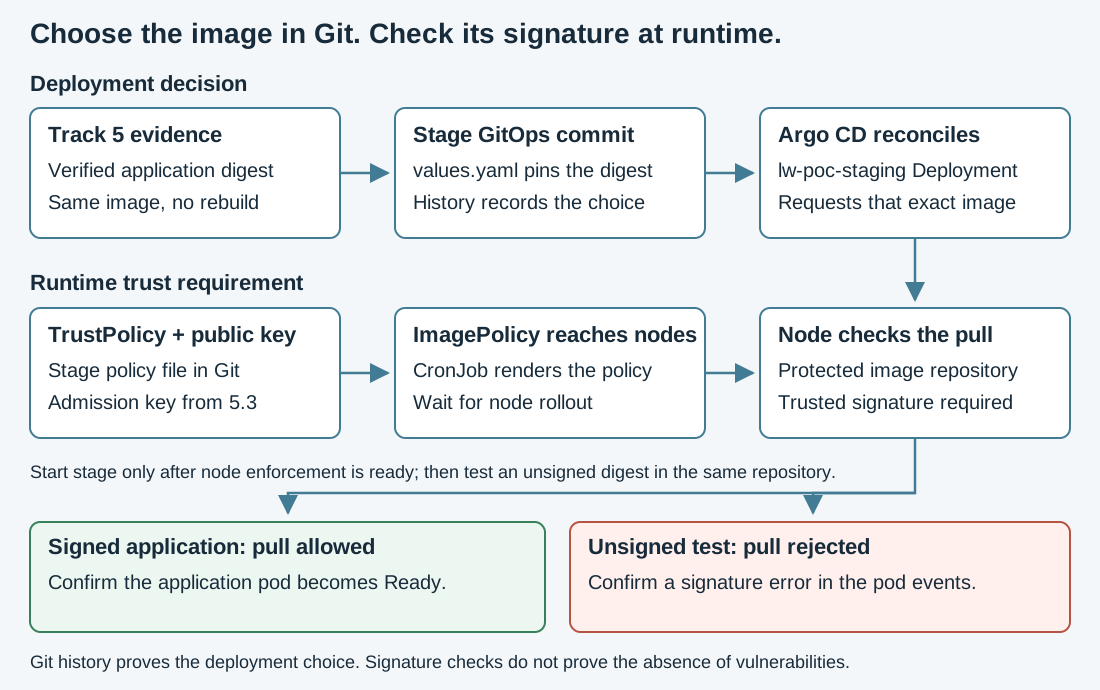
Read the two paths together: the upper path selects the image, and the lower path establishes the trust requirement. They meet when the node pulls the image. Check both outcomes at the bottom before promoting to production; a successful GitOps sync alone does not demonstrate signature enforcement.
Learning objectives
By the end of this module, you will be able to:
-
Tag the signed image into
lw-poc-stagingand copy its signature onto that repository -
Commit the digest to the stage GitOps remote and leave
replicasat 0 until the nodes are enforcing ImagePolicy -
Explain and configure the TrustPolicy fields that render a public-key ImagePolicy in stage and production
-
Set
replicas: 1only after both MachineConfigPools have finished applying that policy -
Distinguish a signature-related unsigned rejection from other pull errors while the signed stage pod remains Ready
How GitOps and runtime policy work together
TrustPolicy is a workshop-specific input format, not a portable product API. The admission file you edit on the stage remote is admission/trust-policy.yaml, kind: TrustPolicy. You set enforce: true, the live digest, and the pipeline service-account subject from 5.1. CronJob trust-policy-apply in namespace tssc-admission polls about every two minutes and renders ImagePolicy into both stage and prod. A ClusterImagePolicy does not satisfy this workshop’s required ImagePolicy evidence.
Native ImagePolicy signedEmail has to be an email. The 5.1 identity is a Kubernetes service-account URI, so the CronJob renders policyType: PublicKey from ConfigMap lab-cosign-pubkey, the cosign.pub you published on 5.3. The TrustPolicy file records the 5.1 service-account URI and issuer, but this PublicKey path does not require a matching Fulcio signature. Track 5 verifies that identity separately. oc tag copies the image and leaves the .sig tags behind. You cosign copy those tags, then cosign sign --key the destination repository, after the tag.
For the workshop’s service-account URI and native PublicKey path, read each field according to its actual control:
| Input | Treatment | Effect |
|---|---|---|
|
Readiness check |
Must be |
|
Enforced scope |
Protects the named repositories. The renderer also adds digest-qualified scopes, but retains the repository-wide entries. |
|
Recorded and syntax-checked |
Must match |
|
Recorded and readiness-checked |
Both must be nonempty. The service-account URI selects PublicKey rendering; these values are not enforced as Fulcio identity constraints on that path. An email subject selects a different renderer branch, outside this exercise. |
|
Not read from this input |
The renderer supplies |
|
Enforced trust material |
The renderer reads the admission ConfigMap and embeds its public key in the live ImagePolicy. The node requires a matching trusted-key signature and signed repository identity. |
A different digest in a protected repository can satisfy the same policy if its signature meets the key and repository requirements. That result does not prove the recorded Fulcio subject signed it or that promotion reviewers approved it. Keep the Track 5 identity-verification output and the GitOps promotion decision as separate evidence.
For a customer handoff, assign signing-key custody and rotation to the signing-service owner, runtime policy and trusted-key updates to platform/security owners, and digest promotion approvals to release owners. Separate their permissions and retain audit evidence. You hold all these roles in this exercise.
The application image already contains the Lightwell dependency versions selected during the build. The runtime policy checks the image signature; it does not evaluate Maven dependency coordinates or whether a dependency comes from Lightwell Network or Lightwell Clearinghouse. An image containing those dependencies must still carry a trusted signature to pass the runtime check.
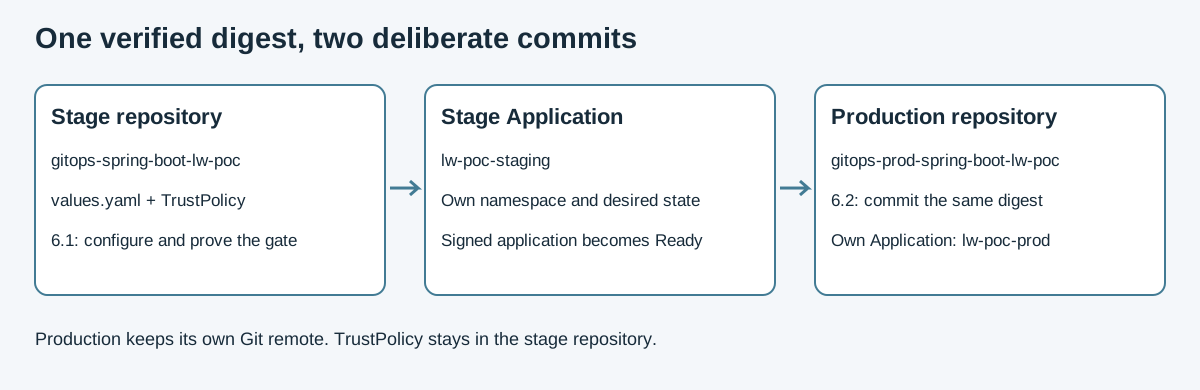
As the figure shows, in this module you work the stage remote: lw-student/gitops-spring-boot-lw-poc, Application lw-poc-staging, namespace lw-poc-staging. Module 6.2 works the prod remote. Keep Application lw-poc-prod connected to the production repository so production changes require their own commit.
In a customer engagement, GitOps selects the approved application digest and runtime policy checks the trusted signature. A suitable VM container runtime can run that application digest. A bootc host requires a separate bootable OS image, with its own digest and verification; Satellite provides management and content distribution rather than executing the application. See RHEL image mode. This cluster has no VM exercise.
The two remotes
ConfigMap lab-gitea in namespace gitea holds the URLs. student_gitops_repo_url is stage. student_prod_gitops_repo_url is prod. student_promote_namespace is lw-poc-staging. student_build_namespace is where the signed image lives. student_argocd_app is the stage Application. The password is the value of key student_password. Leave that value out of Git and out of screenshots.
ConfigMap lab-admission in namespace tssc-admission names the scored kind and the live kind. Success is the stage and prod URLs, the two namespaces, the Argo CD application name, and scored=TrustPolicy with live=ImagePolicy.
oc -n gitea get configmap lab-gitea \
  -o jsonpath='stage={.data.student_gitops_repo_url}{"\n"}prod={.data.student_prod_gitops_repo_url}{"\n"}promote_ns={.data.student_promote_namespace}{"\n"}build_ns={.data.student_build_namespace}{"\n"}argo={.data.student_argocd_app}{"\n"}'
oc -n tssc-admission get configmap lab-admission \
  -o jsonpath='scored={.data.scored_kind}{"\n"}live={.data.live_kind}{"\n"}hint={.data.unsigned_deny_hint}{"\n"}'
The seeded admission/trust-policy.yaml is deliberately incomplete. You will edit that file in your stage clone. The separate admission-docs example is reference material; it does not contain your repository scopes, verified digest, or signer identity.
Exercise
Confirm the digest and admission key
Run these commands in the Showroom terminal. You need the final image.txt and verification outputs from Track 5, the existing private key, and the public key published in tssc-admission/lab-cosign-pubkey. Success means the saved digest still matches the build tag and the published public key matches your local key. If the tag moved, return to Track 5 and refresh the signing, policy, and SBOM evidence before continuing. Do not generate a replacement key here.
BUILD_NS="$(oc -n gitea get configmap lab-gitea -o jsonpath='{.data.student_build_namespace}')"
IMAGE="$(cat /home/lab-user/lightwell-signing-evidence/image.txt)"
CURRENT_IMAGE="$(oc -n "$BUILD_NS" get istag spring-boot-lw-poc:latest -o jsonpath='{.image.dockerImageReference}')"
[[ "$IMAGE" == *@sha256:* && "$IMAGE" == "$CURRENT_IMAGE" ]] || { echo "Return to Track 5: verified digest differs from build tag"; exit 1; }
DIGEST="${IMAGE##*@}"
test -f /home/lab-user/lab-trust/cosign.key || { echo "Recover your Track 5 signing key"; exit 1; }
oc -n tssc-admission get configmap lab-cosign-pubkey \
  -o jsonpath='{.data.cosign\.pub}' > /tmp/track6-admission.pub
python3 -c 'import pathlib, sys; sys.exit(pathlib.Path(sys.argv[1]).read_bytes() != pathlib.Path(sys.argv[2]).read_bytes())' /home/lab-user/lab-trust/cosign.pub /tmp/track6-admission.pub \
  || { echo "Admission public key differs from your Track 5 key"; exit 1; }
printf 'Verified digest: %s\n' "$DIGEST"
Copy the verified image and its signatures
Tag the signed image into staging. The digest you print has to match the 5.1 digest, including the sha256: prefix. oc tag copies the image. cosign copy copies the signature tags from the build repository to the stage repository. cosign sign --key then signs that destination tag with the 5.3 key, which is what ImagePolicy will check. Each cosign command uses /tmp/lab-home for its registry configuration. The key path stays /home/lab-user/lab-trust/cosign.key.
BUILD_NS="$(oc -n gitea get configmap lab-gitea -o jsonpath='{.data.student_build_namespace}')"
PROMOTE_NS="$(oc -n gitea get configmap lab-gitea -o jsonpath='{.data.student_promote_namespace}')"
oc tag "${BUILD_NS}/spring-boot-lw-poc@${DIGEST}" "${PROMOTE_NS}/spring-boot-lw-poc:latest"
oc -n "${PROMOTE_NS}" get istag spring-boot-lw-poc:latest \
  -o jsonpath='{.image.metadata.name}{"\n"}'
TARGET_DIGEST="$(oc -n "${PROMOTE_NS}" get istag spring-boot-lw-poc:latest \
  -o jsonpath='{.image.metadata.name}')"
test "$TARGET_DIGEST" = "$DIGEST" || { echo "Copied digest differs from verified digest"; exit 1; }
SRC="image-registry.openshift-image-registry.svc:5000/${BUILD_NS}/spring-boot-lw-poc@${DIGEST}"
DST="image-registry.openshift-image-registry.svc:5000/${PROMOTE_NS}/spring-boot-lw-poc@${DIGEST}"
# oc tag copies the image, not .sig tags. Copy, then sign the dest repo with the 5.3 key.
mkdir -p /tmp/lab-home /home/lab-user/lightwell-signing-evidence
HOME=/tmp/lab-home cosign login -u unused -p "$(cat /var/run/secrets/kubernetes.io/serviceaccount/token)" \
  image-registry.openshift-image-registry.svc:5000
HOME=/tmp/lab-home cosign copy --allow-http-registry --allow-insecure-registry "${SRC}" "${DST}"
HOME=/tmp/lab-home COSIGN_PASSWORD="" cosign sign --key /home/lab-user/lab-trust/cosign.key \
  --tlog-upload=false --allow-http-registry --allow-insecure-registry \
  "${DST}"
HOME=/tmp/lab-home cosign verify --key /tmp/track6-admission.pub \
  --insecure-ignore-tlog --allow-http-registry --allow-insecure-registry \
  "${DST}" > /home/lab-user/lightwell-signing-evidence/track6-stage-verification.json
VERIFY_STATUS=$?
cat /home/lab-user/lightwell-signing-evidence/track6-stage-verification.json
test "$VERIFY_STATUS" -eq 0 || { echo "Destination signature verification failed"; exit 1; }
Prepare the stage GitOps clone
Clone the stage GitOps remote, student_gitops_repo_url. A fresh clone does not inherit git config from the application repository. Set the author locally, the same identity as 3.2. Git uses the same Showroom credential helper as module 3.2; the remote URL contains no password. Success is a clone at /home/lab-user/lightwell-workspace/gitops-stage.
STAGE_GITOPS="$(oc -n gitea get configmap lab-gitea -o jsonpath='{.data.student_gitops_repo_url}')"
: "${STUDENT_USER:=$(oc -n gitea get configmap lab-gitea -o jsonpath='{.data.student_username}')}"
bash /usr/local/libexec/lab-git-setup.sh
test ! -e /home/lab-user/lightwell-workspace/gitops-stage || { echo "Clone already exists: inspect and reuse it before continuing"; exit 1; }
mkdir -p /home/lab-user/lightwell-workspace
git clone "$STAGE_GITOPS" /home/lab-user/lightwell-workspace/gitops-stage
cd /home/lab-user/lightwell-workspace/gitops-stage
git config user.name student
git config user.email student@workshop.local
Commit the stage digest with the application stopped
Open /home/lab-user/lightwell-workspace/gitops-stage/values.yaml in your editor. Set image.digest to the printed $DIGEST, including sha256:, and keep replicas: 0. Preserve the other chart settings. Review the diff before publishing: it should pin the image without starting a pod.
git diff --check
git diff -- values.yaml
git add values.yaml
git commit -m "Pin verified stage digest with replicas zero"
git push origin HEAD
Automated sync often stays on the previous commit, and replicas: 0 can still look Healthy. After the push, hard-refresh the Application. Success of that refresh is sync status, health, and a Deployment whose replicas is 0. Leave the pod stopped. A pull that happens before the node is enforcing ImagePolicy stores the image with no signature. After the policy is on that node, a restart reports already present on machine and no signature exists, and those retries do not start the container.
ARGO="$(oc -n gitea get configmap lab-gitea -o jsonpath='{.data.student_argocd_app}')"
PROMOTE_NS="$(oc -n gitea get configmap lab-gitea -o jsonpath='{.data.student_promote_namespace}')"
oc -n openshift-gitops annotate applications.argoproj.io "${ARGO}" \
  argocd.argoproj.io/refresh=hard --overwrite
oc -n openshift-gitops get applications.argoproj.io "${ARGO}" \
  -o jsonpath='sync={.status.sync.status} health={.status.health.status} rev={.status.sync.revision}{"\n"}'
oc -n "${PROMOTE_NS}" get deploy spring-boot-lw-poc \
  -o jsonpath='replicas={.spec.replicas} ready={.status.readyReplicas}{"\n"}'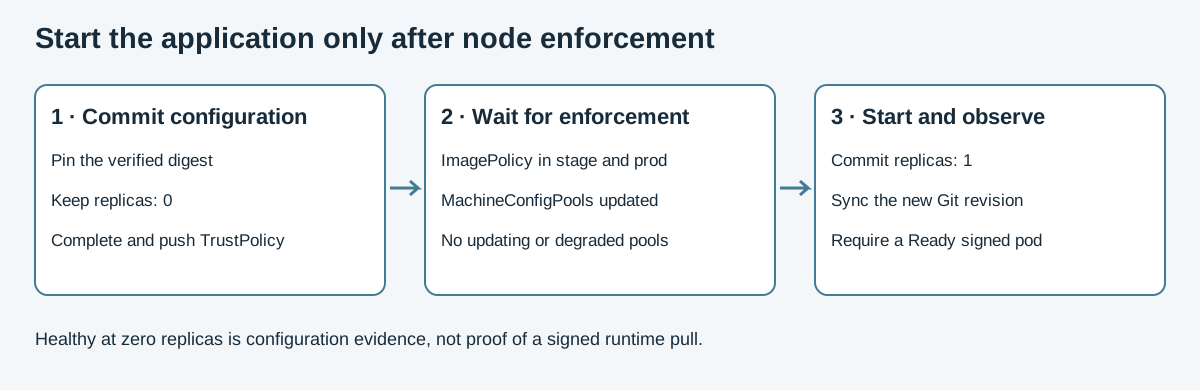
The sequence separates configuration from execution. A Synced, Healthy Application with zero replicas has no running application; you still need policy enforcement and a Ready pod.
Complete and publish the admission policy
Edit /home/lab-user/lightwell-workspace/gitops-stage/admission/trust-policy.yaml on the same stage remote. Leave apiVersion and kind as they are. Set enforce: true. Replace every REPLACE_ME_*. The issuer is https://kubernetes.default.svc, or the hint oidc_issuer_hint in ConfigMap lab-admission. The subject is the pipeline service-account URI from 5.1. The digest is the signed sha256:…. The scopes are the internal ImageStream repositories that staging and prod actually pull. Discover those names with oc get is. Confirm ConfigMap tssc-admission/lab-cosign-pubkey still holds the 5.3 PEM. The renderer obtains trust material from cluster configuration; keep PEM material out of the TrustPolicy file. The CronJob sets signedIdentity.matchPolicy: ExactRepository to the build ImageStream, so a pull in stage or prod accepts a signature whose identity is lw-poc-build.
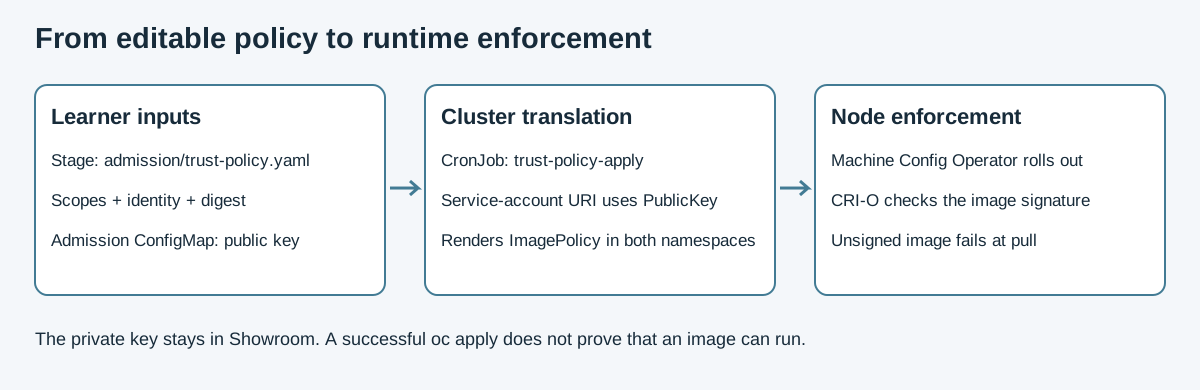
As the figure shows, you edit the TrustPolicy file in Gitea. CronJob trust-policy-apply renders it. The live ImagePolicy then appears in lw-poc-staging and lw-poc-prod. ClusterImagePolicy and the Advanced Cluster Security signer list sit outside that gate.
Print the two repository scopes and the identity you verified in 5.1. Use these values to replace the seed fields; keep metadata.name and the existing signedIdentity block for the seed structure, while recognizing that the renderer supplies the effective signed repository identity from its configuration. Scopes are repository names without a tag or digest. The subject is the full service-account URI, not an email address.
PROD_NS="$(oc -n gitea get configmap lab-gitea -o jsonpath='{.data.student_prod_namespace}')"
printf 'stage scope: image-registry.openshift-image-registry.svc:5000/%s/spring-boot-lw-poc\n' "$PROMOTE_NS"
printf 'prod scope: image-registry.openshift-image-registry.svc:5000/%s/spring-boot-lw-poc\n' "$PROD_NS"
printf 'subject: https://kubernetes.io/namespaces/%s/serviceaccounts/pipeline\n' "$BUILD_NS"
printf 'issuer: https://kubernetes.default.svc\ndigest: %s\n' "$DIGEST"
grep -n 'REPLACE_ME' admission/trust-policy.yaml
After editing, grep should print nothing (exit status 1 means no matches). Inspect the file to confirm enforce: true, both scopes, and the exact digest and identity, then publish it. The CronJob reads the remote commit, so a local edit alone does not enable the gate.
git diff --check
git diff -- admission/trust-policy.yaml
git add admission/trust-policy.yaml
git commit -m "Enforce signed images in stage and production"
git push origin HEAD
Wait for node enforcement before starting stage
An ImagePolicy should appear in both namespaces. The object name comes from ConfigMap lab-admission key policy_name. The CronJob interval is about two minutes.
ImagePolicy reaches the node as a CRI-O policy file, written by the Machine Config Operator. oc get imagepolicy can succeed while the pools are still updating. Wait until both pools list the same updated count as the machine count, and UPDATING is False. Then set replicas: 1, push, and hard-refresh. That first pull is the one the node checks. A later restart of that same pod finds the image already on the machine and starts the container. In the Review, compare the Ready pod’s creation time with the ImagePolicy timestamp and confirm that the pools have finished updating.
PROMOTE_NS="$(oc -n gitea get configmap lab-gitea -o jsonpath='{.data.student_promote_namespace}')"
PROD_NS="$(oc -n tssc-admission get configmap lab-admission -o jsonpath='{.data.prod_namespace}')"
POLICY="$(oc -n tssc-admission get configmap lab-admission -o jsonpath='{.data.policy_name}')"
ARGO="$(oc -n gitea get configmap lab-gitea -o jsonpath='{.data.student_argocd_app}')"
oc -n "${PROMOTE_NS}" get imagepolicy "${POLICY}"
oc -n "${PROD_NS}" get imagepolicy "${POLICY}"
oc get mcp
Do not continue until both pools show UPDATED=True, UPDATING=False, DEGRADED=False, and their updated and ready machine counts equal the machine count. Recheck oc get mcp while the change rolls out. Then edit only replicas to 1 in /home/lab-user/lightwell-workspace/gitops-stage/values.yaml and publish the change.
git diff --check
git diff -- values.yaml
git add values.yaml
git commit -m "Start stage after admission policy rollout"
git push origin HEAD
A hard refresh requests reconciliation; it does not prove that sync has finished. Repeat the Application inspection until its revision matches git rev-parse HEAD and it reports Synced and Healthy. The Deployment must have one Ready replica.
oc -n openshift-gitops annotate applications.argoproj.io "${ARGO}" \
  argocd.argoproj.io/refresh=hard --overwrite
oc -n "${PROMOTE_NS}" rollout status deploy/spring-boot-lw-poc --timeout=180s
oc -n "${PROMOTE_NS}" get pods -l app=spring-boot-lw-poc \
  -o 'custom-columns=NAME:.metadata.name,CREATED:.metadata.creationTimestamp,PHASE:.status.phase,READY:.status.containerStatuses[0].ready'
Test an unsigned digest in the protected repository
Native ImagePolicy is CRI-O policy.json. oc apply of an unsigned Deployment can succeed. The pod fails when the node pulls the image. If this cluster is using the Kyverno fallback, the deny happens at admission instead. Either way, read the pod and the events.
The gate covers spec.scopes. Tag an unsigned digest onto the same ImageStream and deploy that tag. Leave GitOps image.digest on the signed digest. Pointing GitOps at the unsigned tag would disrupt the signed application you are using for comparison.
The throwaway pod should report ImagePullBackOff or a signature error. Confirm that the stage Application remains Healthy, the signed Deployment has replicas=1, and an ImagePolicy exists in both lw-poc-staging and lw-poc-prod. Both MachineConfigPools are done updating. The stage pod’s creation time is later than that ImagePolicy. TrustPolicy has no REPLACE_ME, and enforce is true.
BUILD_NS="$(oc -n gitea get configmap lab-gitea -o jsonpath='{.data.student_build_namespace}')"
PROMOTE_NS="$(oc -n gitea get configmap lab-gitea -o jsonpath='{.data.student_promote_namespace}')"
ARGO="$(oc -n gitea get configmap lab-gitea -o jsonpath='{.data.student_argocd_app}')"
# Unsigned digest, in-scope name:
oc tag "${BUILD_NS}/openjdk-21-builder:latest" "${PROMOTE_NS}/spring-boot-lw-poc:unsigned"
oc -n "${PROMOTE_NS}" create deployment unsigned-deny-test \
  --image="image-registry.openshift-image-registry.svc:5000/${PROMOTE_NS}/spring-boot-lw-poc:unsigned"
oc -n "${PROMOTE_NS}" rollout status deploy/unsigned-deny-test --timeout=30s || true
oc -n "${PROMOTE_NS}" get pods -l app=unsigned-deny-test
oc -n "${PROMOTE_NS}" get events --field-selector reason=Failed --sort-by=.lastTimestamp \
  | tee /home/lab-user/lightwell-signing-evidence/track6-unsigned-events.txt
Inspect /home/lab-user/lightwell-signing-evidence/track6-unsigned-events.txt for the unsigned test pod’s signature rejection. If only scheduling or pull progress appears, repeat the pod and event commands. Save the evidence, then remove the test and inspect the signed application.
oc -n "${PROMOTE_NS}" delete deployment unsigned-deny-test
oc -n openshift-gitops get applications.argoproj.io "${ARGO}" \
  -o custom-columns=NAME:.metadata.name,SYNC:.status.sync.status,HEALTH:.status.health.status
oc -n "${PROMOTE_NS}" get deploy spring-boot-lw-poc \
  -o jsonpath='replicas={.spec.replicas} ready={.status.readyReplicas}{"\n"}'
oc -n "${PROMOTE_NS}" get imagepolicy
oc -n lw-poc-prod get imagepolicy
POLICY="$(oc -n tssc-admission get configmap lab-admission -o jsonpath='{.data.policy_name}')"
echo -n "policy created "
oc -n "${PROMOTE_NS}" get imagepolicy "${POLICY}" -o jsonpath='{.metadata.creationTimestamp}{"\n"}'
oc -n "${PROMOTE_NS}" get pods -l app=spring-boot-lw-poc \
  -o 'custom-columns=NAME:.metadata.name,CREATED:.metadata.creationTimestamp,PHASE:.status.phase,READY:.status.containerStatuses[0].ready'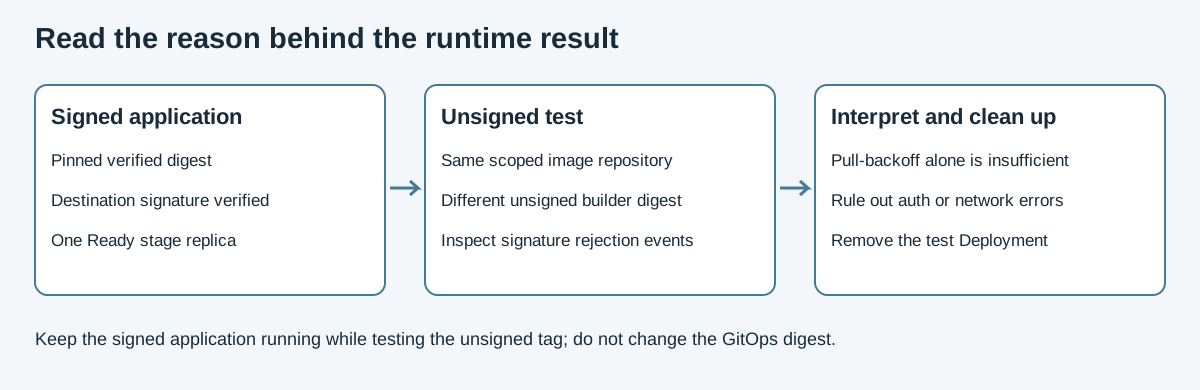
Use this evidence comparison to interpret your own output. ImagePullBackOff alone is not proof of signature enforcement: the events must identify a signature rejection, rather than a missing image, registry authentication error, or network failure. The signed application must remain Ready. The cleanup removes only the throwaway Deployment.
Review
Explain the evidence in order: your stage commit pins the verified digest; the TrustPolicy renders a live ImagePolicy in both namespaces; the nodes finish applying it; the signed pod starts afterward and becomes Ready; the unsigned test fails with a signature-related event. Keep the negative-test event output with your Track 5 evidence before deleting the test Deployment.
Inspect the committed stage configuration
Run this review in your /home/lab-user/lightwell-workspace/gitops-stage clone. Fetch the remote branch you pushed during the exercise so you inspect published files, not only local edits. Stop if the fetch fails. FETCH_HEAD identifies the fetched remote commit; compare it with local HEAD and with the Argo CD revision in the next step. If you used an older guide, first follow the origin repair procedure with this repository’s URL from lab-gitea; then git remote -v is safe to inspect.
cd /home/lab-user/lightwell-workspace/gitops-stage
BRANCH="$(git branch --show-current)"
git fetch origin "$BRANCH"
git status --short
git log -1 --format='%H %s' HEAD
git log -1 --format='%H %s' FETCH_HEAD
git show FETCH_HEAD:values.yaml
git show FETCH_HEAD:admission/trust-policy.yaml
Success means the working tree is clean, local and remote commit IDs match, and the published values.yaml selects the saved Track 5 digest with replicas: 1. Compare the actual digest, not just the presence of sha256:. The published TrustPolicy must have enforce: true, both repository scopes, your actual issuer and service-account subject, and the same digest. No REPLACE_ME or example.invalid values should remain. Explain the distinction in your own words: TrustPolicy is the file you edit; ImagePolicy is the live API object that configures runtime enforcement.
Compare Git intent with live cluster evidence
Read the following output alongside the remote commit and the saved image reference. These are terminal observations; there is no validation Job to run or report token to submit.
IMAGE="$(cat /home/lab-user/lightwell-signing-evidence/image.txt)"
printf 'Expected verified image: %s\n' "$IMAGE"
APP="$(oc -n gitea get configmap lab-gitea -o jsonpath='{.data.student_argocd_app}')"
TARGET_NS="$(oc -n gitea get configmap lab-gitea -o jsonpath='{.data.student_promote_namespace}')"
oc -n gitea get configmap lab-gitea \
  -o jsonpath='expected_repo={.data.student_gitops_repo_url}{"\n"}'
POLICY="$(oc -n tssc-admission get configmap lab-admission -o jsonpath='{.data.policy_name}')"
oc -n openshift-gitops get applications.argoproj.io "$APP" \
  -o jsonpath='repo={.spec.source.repoURL}{"\n"}revision={.status.sync.revision}{"\n"}sync={.status.sync.status}{"\n"}health={.status.health.status}{"\n"}'
oc -n "$TARGET_NS" get deploy spring-boot-lw-poc \
  -o jsonpath='image={.spec.template.spec.containers[0].image}{"\n"}replicas={.spec.replicas} ready={.status.readyReplicas}{"\n"}'
oc -n "$TARGET_NS" get pods -l app=spring-boot-lw-poc \
  --sort-by=.metadata.creationTimestamp \
  -o 'custom-columns=NAME:.metadata.name,CREATED:.metadata.creationTimestamp,PHASE:.status.phase,READY:.status.containerStatuses[0].ready,IMAGE:.status.containerStatuses[0].imageID'
oc -n "$TARGET_NS" get imagepolicy "$POLICY" -o yaml
PROD_NS="$(oc -n gitea get configmap lab-gitea -o jsonpath='{.data.student_prod_namespace}')"
oc -n "$PROD_NS" get imagepolicy "$POLICY" -o yaml
oc get mcp
Compare each result before continuing:
-
The Application’s repository matches the expected repository, its revision matches the fetched remote commit, and its status is
SyncedandHealthy. -
The Deployment image uses the saved digest in the destination repository, and both desired and Ready replica counts are
1. -
The application pod is
RunningwithREADY=true. Inspect its image ID alongside the Deployment reference. -
ImagePolicy exists in both stage and production. Inspect its scopes and
PublicKeypolicy against your published TrustPolicy and admission key configuration. -
Both MachineConfigPools show
UPDATED=True,UPDATING=False,DEGRADED=False, with ready and updated counts equal to the machine count. -
The newest stage pod’s
CREATEDtimestamp is later than the stage ImagePolicy’smetadata.creationTimestamp. This comparison complements your earlier wait for node rollout; the timestamp alone does not prove node enforcement. -
Your saved
/home/lab-user/lightwell-signing-evidence/track6-stage-verification.jsonrecords successful destination signature verification. The unsigned-test events saved in/home/lab-user/lightwell-signing-evidence/track6-unsigned-events.txtidentify a signature rejection, while the signed application remains Ready.
If a value differs, return to the corresponding exercise step. For a pending sync, repeat the Application inspection after reconciliation. For a signature error, inspect the destination signature and admission public key. Continue to production only after you can account for all of these observations.
|
A VM container runtime could run the same signed application digest. Its bootc OS image would be a separately built and verified artifact with a different digest; Satellite manages and distributes content rather than serving as that runtime. Canary and blue-green are other rollout strategies for that digest. This lab uses the default rolling Deployment. This cluster has no virtual machine to boot. |
Carry the result into module 6.2
Keep the stage commit ID, signed digest, destination verification output, and unsigned rejection event. Stage must remain Ready while you promote the same digest through the separate production repository. Leave app-operate in place; it is the application runtime network policy, separate from Track 4 build egress.
Official documentation
-
Trusted Artifact Signer (the signatures admission consumes)
Key takeaways
-
Admission is a namespaced
ImagePolicyrendered from one TrustPolicy file. -
Start the stage Deployment after MachineConfigPools have applied that policy. A pull made before the node enforces it does not become Ready on a later restart.
-
A service-account subject renders as
PublicKeyfrom the 5.3 ConfigMaplab-cosign-pubkey. -
oc tagneeds a followingcosign copy, and acosign sign --keyon the destination. -
Lightwell GAVs inside the image do not admit an unsigned tag.
-
Production is a commit to a second remote, in the next module.