4.4 Build the image and inspect its SBOM
You have configured internal source inputs, dependency prefetch, and build-pod egress. Now run that path and inspect its outputs: an application image in the build namespace and a CycloneDX SBOM persisted for Track 7. Continue in /home/lab-user/lightwell-workspace/spring-boot-lw-poc in Showroom.
Why this control exists
A committed configuration describes intent. Task logs, the image digest, and the SBOM show what happened during a build. An SBOM is an inventory of discovered components; its existence does not prove a signature or that a vulnerability is fixed. You will verify signing in Track 5 and use the inventory in Track 7.
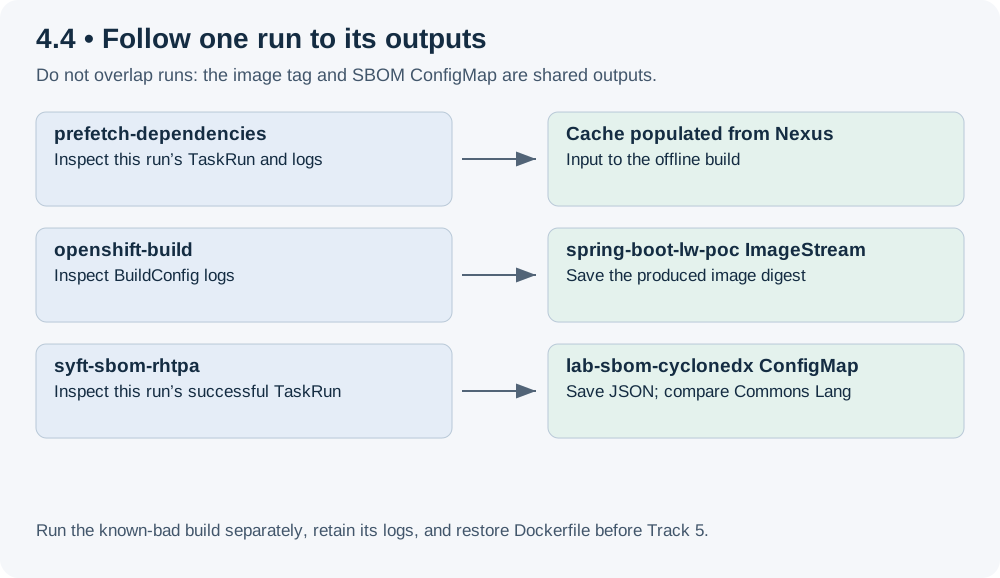
The workshop uses a binary OpenShift BuildConfig: the pipeline sends its source workspace with oc start-build --from-dir. Task syft-sbom-rhtpa scans the resulting image and persists sbom.cyclonedx.json in ConfigMap lab-sbom-cyclonedx. You do not need a local Syft installation.
Learning objectives
By the end of this module, you will be able to:
-
Commit a PipelineRun that uses the claim’s internal service URLs.
-
Follow one run through prefetch, BuildConfig, and SBOM generation.
-
Record the produced image digest and inspect the selected dependency in CycloneDX.
-
Run a separate known-bad build, interpret its failure, and restore the normal build input.
Read the run’s inputs
The following reads should show your build namespace, internal Gitea URL, and internal Fulcio, Rekor, and TUF URLs. Stop if a value is empty. The Pipeline also includes signing and ACS tasks, so their internal service configuration is needed even though this module reviews the image and inventory.
cd /home/lab-user/lightwell-workspace/spring-boot-lw-poc
git status --short
BUILD_NS="$(oc -n gitea get configmap lab-gitea -o jsonpath='{.data.student_build_namespace}')"
oc -n gitea get configmap lab-gitea \
  -o jsonpath='build namespace={.data.student_build_namespace}{"\n"}repo={.data.student_repo_internal_url}{"\n"}'
oc -n trusted-artifact-signer get configmap lab-rhtas \
-o jsonpath='fulcio={.data.fulcio_internal_url}{"\n"}rekor={.data.rekor_internal_url}{"\n"}tuf={.data.tuf_internal_url}{"\n"}'|
In a seeded claim, |
Exercise
Fill and commit the PipelineRun
Open .tekton/pipelinerun.yaml and complete these parameters. Keep the existing workspaces and service account.
| Parameter | Value to use |
|---|---|
|
|
|
|
|
Keep the internal registry path; replace |
|
|
|
|
|
|
|
|
In .tekton/pipeline.yaml, leave the Syft task’s rhtpa-url empty. This produces and persists the inventory without uploading it; Track 7 performs that upload. Use service URLs for the build pods rather than the HTTPS Routes used from Showroom.
Review the diff, then commit and push the filled run definition. Track 5 also reads this file from Gitea, so creating a live run without publishing the file is insufficient.
git diff -- .tekton/pipelinerun.yaml
git add .tekton/pipelinerun.yaml
git diff --cached
git commit -m "Configure PipelineRun with internal service URLs"
git push origin HEAD
git fetch origin
git rev-parse HEAD origin/main
oc -n "$BUILD_NS" apply -f .tekton/rbac.yaml
oc -n "$BUILD_NS" apply -f .tekton/pipeline.yaml
Start and follow one run
Create a fresh evidence directory and save the exact PipelineRun name. Avoid overlapping runs: the image tag and SBOM ConfigMap are shared outputs and a later run can replace them. Success for this exercise requires successful prefetch, openshift-build, and syft-sbom-rhtpa TaskRuns from this run.
mkdir -p ~/lightwell-build-evidence
BUILD_EVIDENCE="$(mktemp -d "$HOME/lightwell-build-evidence/build.XXXXXX")"
RUN="$(oc -n "$BUILD_NS" create -f .tekton/pipelinerun.yaml -o jsonpath='{.metadata.name}')"
printf '%s\n' "$RUN" | tee "$BUILD_EVIDENCE/pipelinerun-name.txt"
git rev-parse HEAD > "$BUILD_EVIDENCE/source-commit.txt"
oc -n "$BUILD_NS" get pipelinerun "$RUN" -w
Press Ctrl-C to stop watching once the run settles; this does not cancel it. Inspect only TaskRuns belonging to that run. Use each TaskRun’s pod name to read its logs, and save relevant output in your evidence directory.
oc -n "$BUILD_NS" get taskrun -l "tekton.dev/pipelineRun=$RUN" \
  -o custom-columns='NAME:.metadata.name,TASK:.metadata.labels.tekton\.dev/pipelineTask,STATUS:.status.conditions[0].status,REASON:.status.conditions[0].reason,POD:.status.podName'
oc -n "$BUILD_NS" get pipelinerun "$RUN" -o yaml > "$BUILD_EVIDENCE/pipelinerun.yaml"
For a selected pod, run oc -n "$BUILD_NS" logs POD_NAME --all-containers=true, replacing POD_NAME with the printed name. Prefetch should report cached jars from Nexus. The BuildConfig output should show the offline Maven command completing. If a required task is failed or skipped, read its reason and logs; do not treat an older successful run as evidence for this attempt. ACS or signing results need their own review in later tracks, and a failed overall run must not be described as a fully successful pipeline.
Inspect and save the outputs
After this run’s build and Syft tasks succeed, save the image digest and SBOM before another run replaces the shared outputs. The digest must be populated, and the JSON must identify CycloneDX with a nonempty component inventory.
oc -n "$BUILD_NS" get istag spring-boot-lw-poc:latest \
  -o jsonpath='{.image.dockerImageReference}{"\n"}' | tee "$BUILD_EVIDENCE/image.txt"
oc -n "$BUILD_NS" get configmap lab-sbom-cyclonedx \
  -o jsonpath='{.data.sbom\.cyclonedx\.json}' > "$BUILD_EVIDENCE/sbom.cyclonedx.json"
python3 - "$BUILD_EVIDENCE/sbom.cyclonedx.json" <<'PYTHON'
import json, sys
with open(sys.argv[1]) as stream:
    bom = json.load(stream)
assert bom.get("bomFormat") == "CycloneDX", "Expected CycloneDX"
components = bom.get("components", [])
assert components, "No components found"
print("CycloneDX components:", len(components))
matches = [c for c in components if c.get("name") == "commons-lang3"]
assert matches, "Commons Lang missing: inspect the build and inventory"
for c in matches:
    print(c.get("name"), c.get("version"), c.get("purl", ""))
PYTHON
Compare the reported Commons Lang version with the default property in your committed POM. The workshop selection is 3.14.0.rhlw-00001. If the inventory shows 3.14.0, check for a leftover Dockerfile override or an older image. Do not claim remediation from an SBOM’s existence alone. The saved run definition records a main revision; the local commit file records your intended source, not a cryptographic provenance attestation.
Test the known-bad input and restore the BuildConfig
Wait until no normal build is active. The separate Dockerfile.known-bad contains a public image reference and installer download. Temporarily select it, then capture the new Build name so cleanup affects only this negative attempt.
cd /home/lab-user/lightwell-workspace/spring-boot-lw-poc
oc -n "$BUILD_NS" get builds
oc -n "$BUILD_NS" patch bc spring-boot-lw-poc --type=merge \
  -p '{"spec":{"strategy":{"dockerStrategy":{"dockerfilePath":"Dockerfile.known-bad"}}}}'
BAD_BUILD="$(oc -n "$BUILD_NS" start-build spring-boot-lw-poc --from-dir=. -o name)"
printf '%s\n' "$BAD_BUILD" | tee "$BUILD_EVIDENCE/known-bad-build.txt"
If start-build fails without returning a Build name, restore the Dockerfile with the cleanup block below immediately. Otherwise follow this Build’s logs. Expect a failure involving the public pull or installer fetch. After the first relevant error or timeout, press Ctrl-C to stop following and proceed to cleanup; do not wait through repeated pull retries.
oc -n "$BUILD_NS" logs -f "$BAD_BUILD"Record the failing operation. A registry timeout alone does not identify its cause, and node image pulls are outside pod NetworkPolicy. If the bad build succeeds, the negative test has failed: preserve its logs and ask the instructor to investigate the environment. Do not describe that outcome as proof of hermetic enforcement.
Always run cleanup, including after interrupting log follow. Cancelling this specific Build prevents it from delaying later pipeline builds. Restore the normal Dockerfile even if there was no Build to cancel.
if [ -n "$BAD_BUILD" ]; then
  oc -n "$BUILD_NS" logs "$BAD_BUILD" > "$BUILD_EVIDENCE/known-bad.log" 2>&1
  oc -n "$BUILD_NS" cancel-build "$BAD_BUILD"
  oc -n "$BUILD_NS" get "$BAD_BUILD" -o yaml > "$BUILD_EVIDENCE/known-bad.yaml"
fi
oc -n "$BUILD_NS" patch bc spring-boot-lw-poc --type=merge \
  -p '{"spec":{"strategy":{"dockerStrategy":{"dockerfilePath":"Dockerfile"}}}}'
oc -n "$BUILD_NS" get bc spring-boot-lw-poc \
  -o jsonpath='{.spec.strategy.dockerStrategy.dockerfilePath}{"\n"}'
oc -n "$BUILD_NS" get builds
Review
Review the terminal output and saved evidence from the exercise above; you do not need to rerun successful commands. Confirm that the TaskRun list shows successful prefetch, build, and Syft tasks for your selected run, image.txt contains the produced image digest, and the CycloneDX inspection prints the selected dependency version. Keep the negative attempt’s logs and outcome separately. Confirm that its Build is no longer running or pending and the BuildConfig again selects Dockerfile.
If the negative build unexpectedly succeeded, it may have replaced the application tag. After investigating and restoring the normal input, rerun the normal pipeline and capture fresh output before Track 5.
Carry the result into Track 5
Keep the image reference, run name, source commit, SBOM, and negative-test logs in your evidence directory. Track 5 verifies signing and policy evidence for the application image. Leave promotion to Track 6 and SBOM ingestion to Track 7.
Official documentation
-
Trusted Profile Analyzer overview (why the CycloneDX file exists; ingest is Track 7)