7.1 SBOM system of record
On this page you prove that Red Hat Trusted Profile Analyzer holds a CycloneDX SBOM for the digest you promoted.
Track 7 is continuous compliance. This is the first of its two pages. The digest is the one 6.2 Promote to prod repo put into production. This is not the Track 2 OSV read, and it is not the GAV VEX Check on 7.2 VEX blast radius + ACS. Showroom may not have syft on PATH (syft_baked=false). You copy the CycloneDX file Task syft-sbom-rhtpa already wrote on 4.4 Build and SBOM. Leave github.com out of the lab. Leave the live Red Hat CSAF importer off. That importer is not this gate.
Why this control exists
Compliance starts from the artifact you promoted, not from a file that only exists on a laptop. Trusted Profile Analyzer stores the CycloneDX SBOM for that digest. You should be able to find the Lightwell-pinned component in the document.
You authenticate with the workshop OIDC token and POST the file to /api/v3/sbom. Customers keep this system of record in Trusted Profile Analyzer or in a product such as Dependency-Track. Red Hat Dependency Analytics is the laptop IDE client of the same vulnerability intelligence. This Check is the analyzer. Showroom has no IDE. The longer note is RHDA shift-left.
A Clearinghouse Premier member SBOM ingests on the same API. The live CSAF importer stays off. OS-layer Hummingbird CSAF is a callout on the next page.
|
Wheels typically ingest as SPDX. This Check looks for the CycloneDX document from the Maven and syft path. Either format is the system-of-record idea. |
In a customer engagement the system of record holds the promoted artifact. You ingest this digest. A Hummingbird CSAF feed is a different document.
Learning objectives
By the end of this module, you will be able to:
-
Read the Trusted Profile Analyzer URL and the OIDC issuer from cluster userinfo
-
Copy CycloneDX from ConfigMap
lab-sbom-cyclonedxand POST it to/api/v3/sbom -
Find that document in the analyzer UI for the digest you promoted
-
Explain that GAV-bound VEX is the next page, not this ingest
The analyzer
ConfigMap rhtpa-ingestion-info in namespace trusted-profile-analyzer holds server_url and live_csaf_gate. ConfigMap demo-userinfo-rhtpa holds rhtpa_url and sbom_format. ConfigMap demo-userinfo-keycloak in namespace sso holds the issuer, the workshop username, and the workshop password. The password is the value of key workshop_password. The CLI client secret is Secret tpa-realm-cli-clients. Leave both out of Git. Sign in from the analyzer UI Route, realm tpa. The Keycloak admin console is a different URL.
Success is the UI URL, live_csaf_gate still false, the SBOM format, and an issuer you can request a token from.
oc -n trusted-profile-analyzer get configmap rhtpa-ingestion-info \
  -o jsonpath='tpa_ui={.data.server_url}{"\n"}csaf_gate={.data.live_csaf_gate}{"\n"}'
oc -n trusted-profile-analyzer get configmap demo-userinfo-rhtpa \
  -o jsonpath='url={.data.rhtpa_url}{"\n"}format={.data.sbom_format}{"\n"}'
oc -n sso get configmap demo-userinfo-keycloak \
  -o jsonpath='issuer={.data.oidc_issuer}{"\n"}user={.data.workshop_username}{"\n"}password={.data.workshop_password}{"\n"}'
The block below posts a different file to a host this cluster does not use. Uploading that file as the Check fails it.
# Worked example ONLY — different purl / filename. Do not upload this as the Check.
curl -sk -X POST -H 'Content-Type: application/octet-stream' \
  --data-binary @/tmp/example-not-your-app.cdx.json \
  https://example.invalid/api/v3/sbom
Your change
Task syft-sbom-rhtpa writes ConfigMap lab-sbom-cyclonedx in the build namespace. The Task’s sbom workspace is an emptyDir, and it is gone when the pod completes. oc cp or oc exec into that completed pod fails. Extract the ConfigMap. Re-running the 4.4 pipeline only to copy a file is unnecessary.
Success of the extract is ~/sbom.cyclonedx.json whose bomFormat is CycloneDX and whose component count is greater than zero.
BUILD_NS="$(oc -n gitea get configmap demo-userinfo-gitea -o jsonpath='{.data.student_build_namespace}')"
oc -n "${BUILD_NS}" get tr -l tekton.dev/pipelineTask=syft-sbom-rhtpa
oc -n "${BUILD_NS}" extract configmap/lab-sbom-cyclonedx --to="${HOME}" --confirm
test -f ~/sbom.cyclonedx.json && jq '{bomFormat, specVersion, components:(.components|length)}' ~/sbom.cyclonedx.json || echo 'EXTRACT ConfigMap lab-sbom-cyclonedx FIRST'
Ingest this file, the one bound to the 6.2 digest, even if the pipeline already uploaded a copy. You have to be able to find the document. The UI file picker and the REST call below are the same ingest. The token request uses client cli and the secret from tpa-realm-cli-clients. Success is HTTP 201, or another success code, from POST /api/v3/sbom.
export OIDC_ISSUER="$(oc -n sso get configmap demo-userinfo-keycloak -o jsonpath='{.data.oidc_issuer}')"
export RHTPA_URL="$(oc -n trusted-profile-analyzer get configmap rhtpa-ingestion-info -o jsonpath='{.data.server_url}')"
export TPA_USER="$(oc -n sso get configmap demo-userinfo-keycloak -o jsonpath='{.data.workshop_username}')"
: "${TPA_PASS:=$(oc -n sso get configmap demo-userinfo-keycloak -o jsonpath='{.data.workshop_password}')}"
export CLI_SECRET="$(oc -n trusted-profile-analyzer get secret tpa-realm-cli-clients -o jsonpath='{.data.cli}' | base64 -d)"
TOKEN="$(curl -sk -X POST "${OIDC_ISSUER}/protocol/openid-connect/token" \
  -d grant_type=password -d client_id=cli -d client_secret="${CLI_SECRET}" \
  -d username="${TPA_USER}" -d password="${TPA_PASS}" -d scope=openid \
  | jq -r .access_token)"
curl -sk -X POST \
  -H "Authorization: Bearer ${TOKEN}" \
  -H "Content-Type: application/octet-stream" \
  --data-binary @"${HOME}/sbom.cyclonedx.json" \
  -w '\nHTTP %{http_code}\n' \
  "${RHTPA_URL%/}/api/v3/sbom"
Open server_url, sign in, and find the promoted digest.
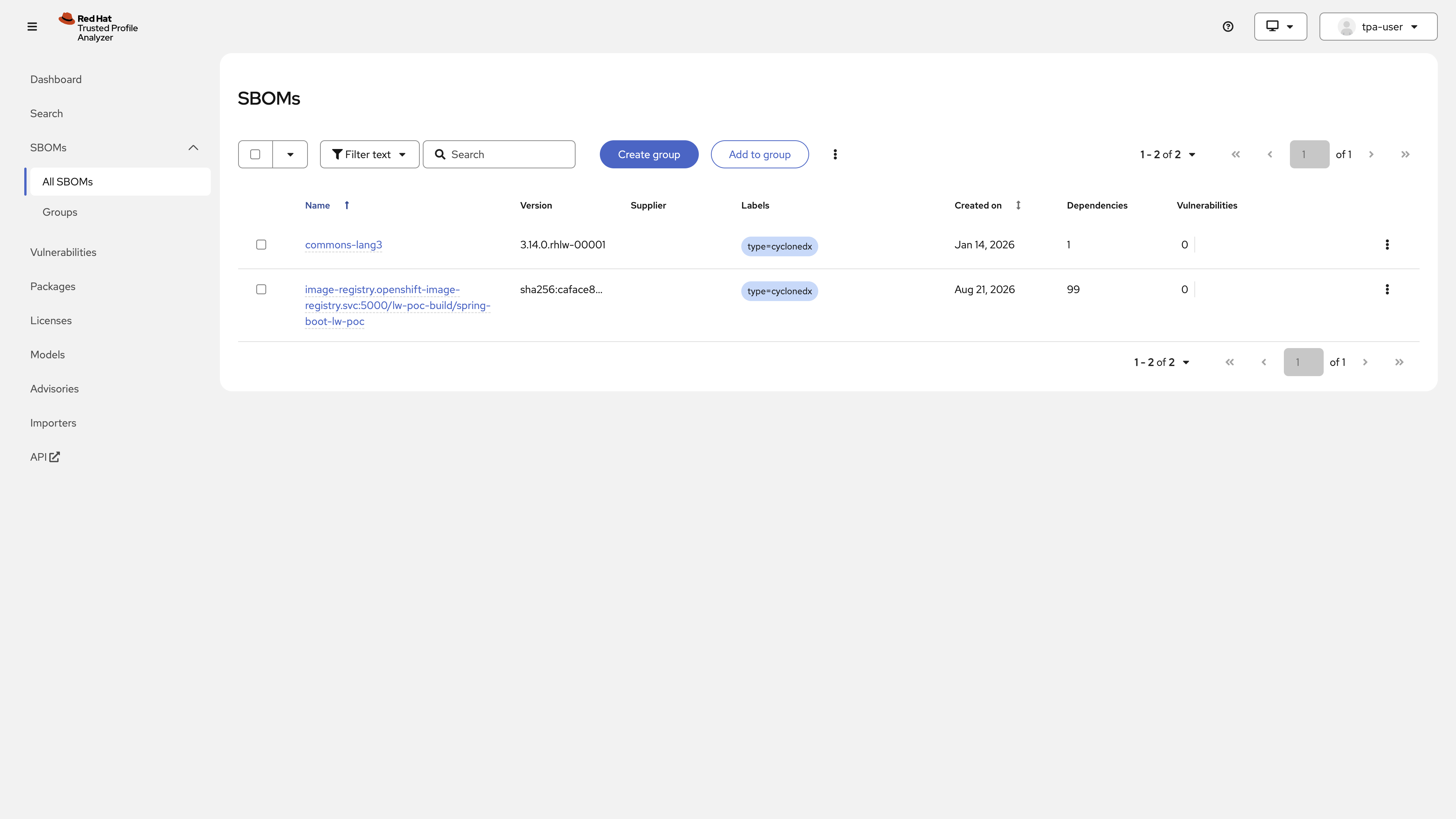
The capture is the analyzer after that ingest. The document you find is the promoted application SBOM, not the Track 2 OSV record and not a Hummingbird CSAF advisory.
Check
The pass is a CycloneDX document in Trusted Profile Analyzer for the digest you promoted in 6.2. You can see it in the UI or in an API list. live_csaf_gate stays false.
The Job also grades ConfigMap report-17-sbom-sor key sor_object. Set it to promoted-digest. Empty or REPLACE_ME fails even if cluster state is correct. Do not copy validate-docs.
oc -n lw-poc-validate edit configmap report-17-sbom-sorThe scored Check is Job validate-17-sbom-sor in lw-poc-validate. Direct nav URLs still work (honor system). Unlimited retries. There is no Solve.
oc -n lw-poc-validate delete job validate-17-sbom-sor --ignore-not-found
TPL='job-17.yaml'
oc -n lw-poc-validate get configmap validate-job-templates \
  -o go-template="{{ index .data \"${TPL}\" }}" | oc create -f -
oc -n lw-poc-validate logs -f job/validate-17-sbom-sor
Expect CHECK PASSED: before you continue. CHECK FAILED: names the object to fix. Delete the Job and create it again as often as you need.
The Validate Job grades that ingested document. The next page still opens if you skip this one. GAV-bound VEX, and the statement that the CVE is remediated by the Lightwell pin, is 7.2.
Official documentation
-
RHDA shift-left (the laptop client of the same intelligence)