Debugging & Troubleshooting
Module Overview
Duration: 30 minutes
Format: Hands-on Lab — Real Problem Solving
Audience: IT Operations, SRE, Platform Engineers
Your cluster is running a weather application made up of several microservices. Some of them have just broken. Your job is to diagnose and fix each one — these are the same kinds of issues that generate real support tickets.
Learning Objectives
By the end of this module, you will be able to:
-
Read pod events and logs to identify root causes
-
Fix ImagePullBackOff, CrashLoopBackOff, ConfigMap errors, resource constraint violations, and service routing issues
-
Use the Observe → Diagnose → Fix → Verify workflow
Your Diagnostic Toolkit
These are the commands you’ll use constantly:
# What's broken?
oc get pods -n <namespace>

# Why is it broken?
oc describe pod <pod-name> -n <namespace>

# What did the app say before it died?
oc logs <pod-name> -n <namespace>
oc logs <pod-name> -n <namespace> --previous

# Check deployment events (for pods that never got created)
oc describe deployment <deployment-name> -n <namespace>
Deploy the Broken Applications
First, create the namespace and deploy the intentionally broken applications:
oc create namespace ops-track-demo 2>/dev/null || true
oc apply -f https://raw.githubusercontent.com/rhpds/openshift-days-ops-showroom/main/support/broken-apps.yaml
See What’s Broken
Five microservices have been deployed with intentional misconfigurations. Let’s triage the damage.
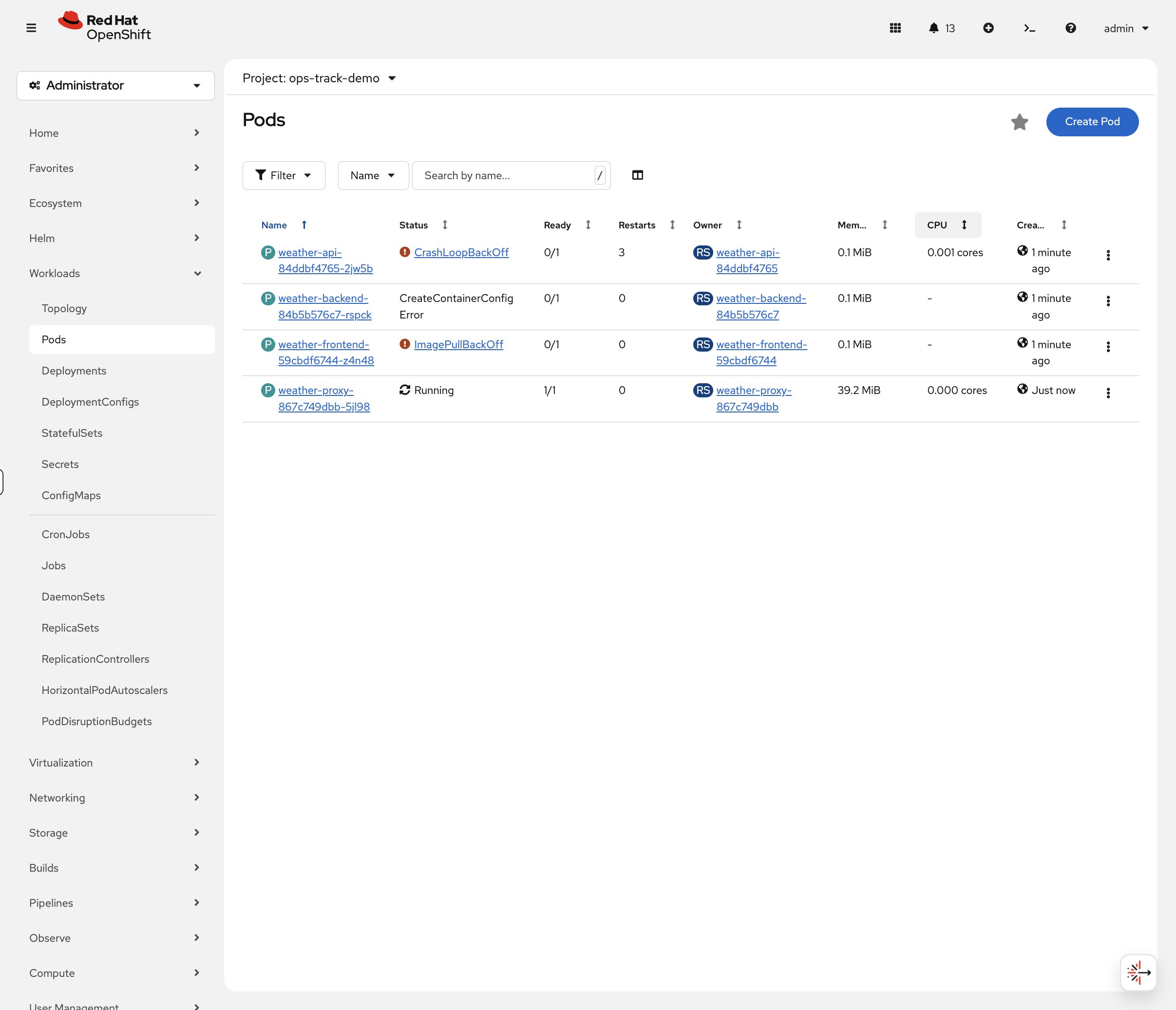
Switch to the OCP Console tab and navigate to Workloads → Pods (select project ops-track-demo from the dropdown). You’ll immediately see colour-coded status indicators:
-
Red —
weather-frontendinImagePullBackOff,weather-apiinCrashLoopBackOff -
Yellow —
weather-backendinCreateContainerConfigError -
Green —
weather-proxyshowsRunning(but has a hidden issue) -
Missing —
weather-cachedoesn’t appear at all
This is how real incident triage works — visual scanning of pod status to quickly identify what needs attention.
You can also verify via CLI:
oc get pods -n ops-track-demo
You might notice weather-cache is missing from the pod list — that’s one of the problems to investigate. Also, weather-proxy shows Running but has its own issue.
|
Your mission: Fix all five.
Problem 1: ImagePullBackOff (weather-frontend)
Diagnose
In the OCP Console, click on the weather-frontend pod. The Events tab at the bottom shows the error with colour-coded severity — you’ll see the image pull failure immediately.
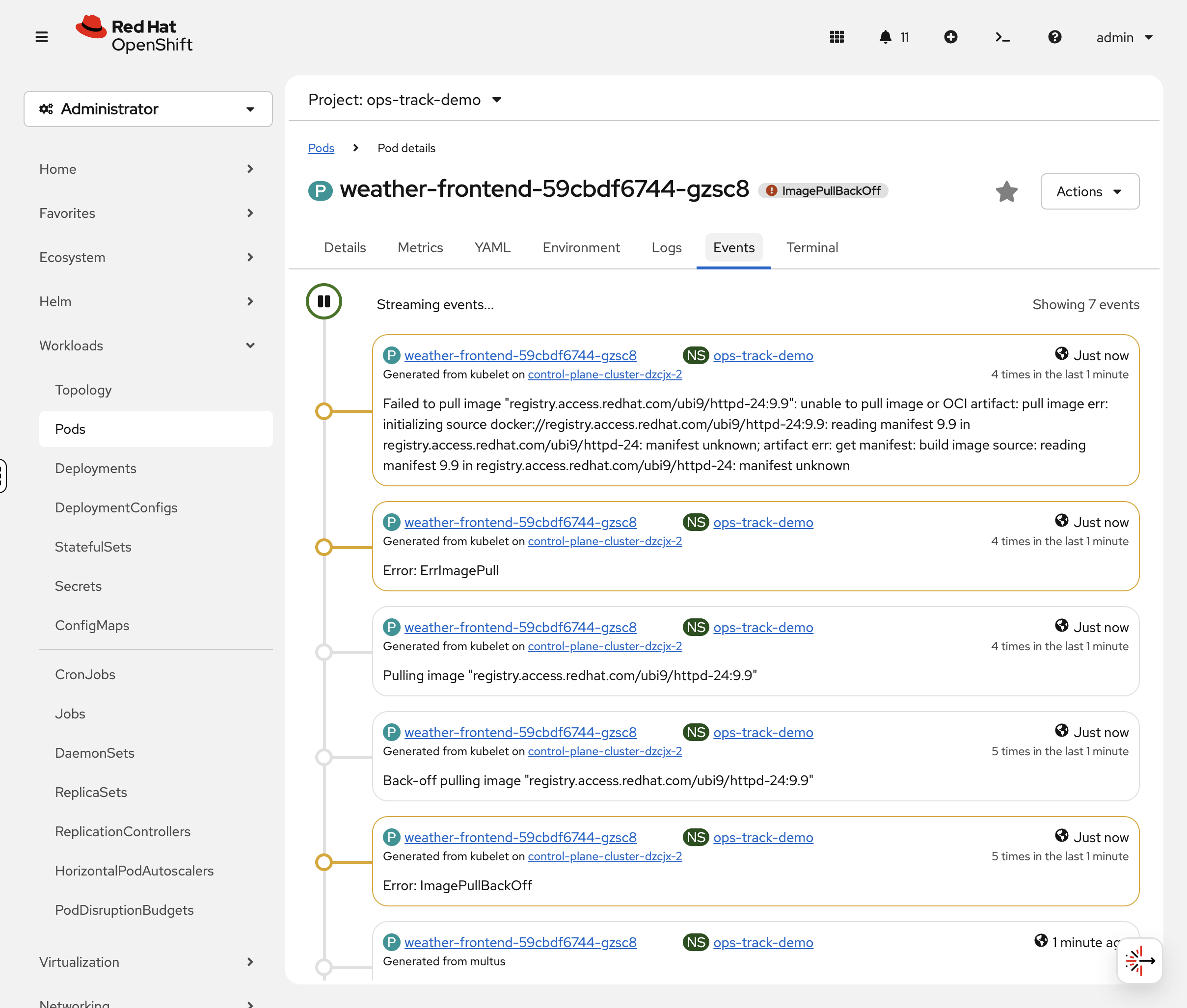
You can also check via CLI:
oc describe pod -l app=weather-frontend -n ops-track-demo | tail -10Look at the Events section. You should see:
Warning Failed Back-off pulling image "registry.access.redhat.com/ubi9/httpd-24:9.9"
The image tag 9.9 doesn’t exist. Let’s confirm the image reference:
oc get deployment weather-frontend -n ops-track-demo -o jsonpath='{.spec.template.spec.containers[0].image}'Problem 2: CrashLoopBackOff (weather-api)
Diagnose
The pod keeps starting and crashing. In the OCP Console, click the weather-api pod, then the Logs tab. The log viewer shows the error message with real-time streaming. If the pod has restarted, use the Container dropdown to select the previous container’s logs.
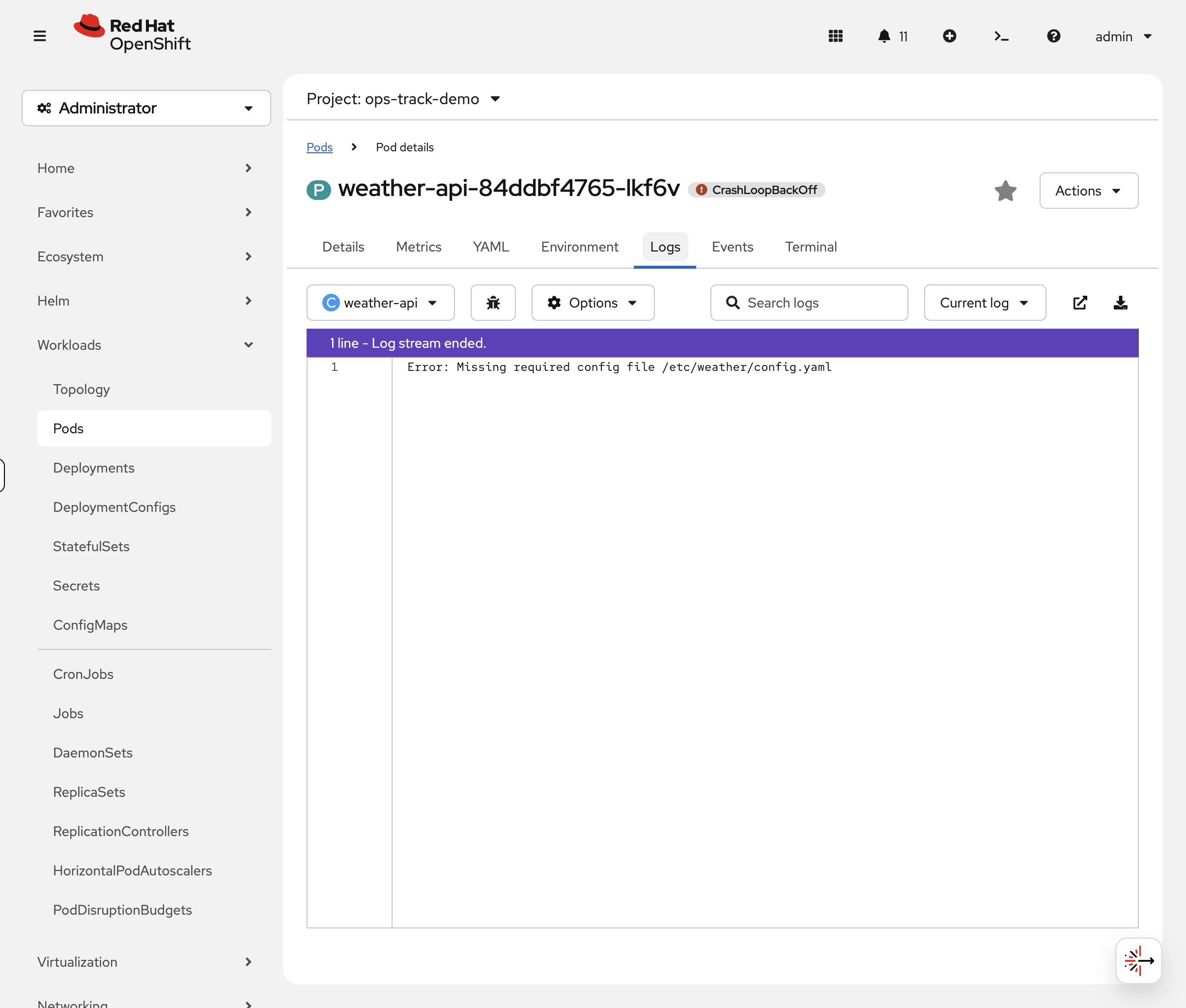
You can also check via CLI:
oc logs deployment/weather-api -n ops-track-demoYou should see:
Error: Missing required config file /etc/weather/config.yaml
The app is trying to read a config file that doesn’t exist.
Fix
Create the missing config file as a ConfigMap and mount it into the container. We’ll also fix the container command to run the actual application:
oc create configmap weather-api-config --from-literal=config.yaml="port: 8080" -n ops-track-demooc patch deployment weather-api -n ops-track-demo --type=json -p='[
{"op":"add","path":"/spec/template/spec/volumes","value":[{"name":"config","configMap":{"name":"weather-api-config"}}]},
{"op":"add","path":"/spec/template/spec/containers/0/volumeMounts","value":[{"name":"config","mountPath":"/etc/weather"}]},
{"op":"replace","path":"/spec/template/spec/containers/0/command","value":["/bin/sh","-c","cat /etc/weather/config.yaml && echo Config loaded successfully && sleep 3600"]}
]'Problem 3: Resource Constraint Violation (weather-cache)
Diagnose
You may have noticed weather-cache doesn’t appear in the pod list at all. In the OCP Console, navigate to Workloads → Deployments (project: ops-track-demo) and click weather-cache. The Events tab immediately shows the FailedCreate error explaining why no pod was created.

Let’s also check via CLI:
oc get deployment weather-cache -n ops-track-demoIt shows 0/1 ready — the pod was never created. When a pod can’t even be created, check the ReplicaSet events:
oc describe replicaset -l app=weather-cache -n ops-track-demo | tail -5You should see:
Warning FailedCreate ... maximum memory usage per Container is 2Gi, but limit is 1Ti
A LimitRange in the namespace caps containers at 2Gi memory, but the deployment requests 512Gi (a typo — should be 512Mi). Let’s confirm:
oc get deployment weather-cache -n ops-track-demo -o jsonpath='{.spec.template.spec.containers[0].resources}' | python3 -m json.tooloc get limitrange -n ops-track-demo -o yaml | grep -A4 "max:"Fix
Fix the memory typo — change 512Gi to 512Mi and 1Ti to 1Gi:
oc set resources deployment/weather-cache -n ops-track-demo --requests=cpu=100m,memory=512Mi --limits=cpu=500m,memory=1GiVerify
oc get pods -l app=weather-cache -n ops-track-demoYou should see 1/1 Running. The pod can now be created because the resource requests fit within the LimitRange.
Takeaway: When a pod never appears at all, check the ReplicaSet events (oc describe replicaset). LimitRanges and ResourceQuotas can silently prevent pods from being created.
Problem 4: CreateContainerConfigError (weather-backend)
Diagnose
oc describe pod -l app=weather-backend -n ops-track-demo | grep -E "Warning|Error|configmap"You should see:
Warning Failed Error: configmap "weather-config" not found
The deployment references a ConfigMap that doesn’t exist:
oc get deployment weather-backend -n ops-track-demo -o jsonpath='{.spec.template.spec.containers[0].envFrom}' | python3 -m json.toolFix
Create the missing ConfigMap with the keys the app expects:
oc create configmap weather-config \
  --from-literal=API_ENDPOINT="http://weather-api:8080" \
  --from-literal=CACHE_TTL="300" \
  -n ops-track-demo
You can verify the ConfigMap in the console at Workloads > ConfigMaps (project: ops-track-demo) — click weather-config to see its keys and values.
|
Restart the pod to pick up the new ConfigMap:
oc delete pod -l app=weather-backend -n ops-track-demoVerify
oc get pods -l app=weather-backend -n ops-track-demoYou should see 1/1 Running. Confirm the environment variables are injected:
oc exec deployment/weather-backend -n ops-track-demo -- env | grep -E "API_ENDPOINT|CACHE_TTL"You should see:
API_ENDPOINT=http://weather-api:8080
CACHE_TTL=300
| In the console, click the weather-backend pod and select the Environment tab to see the injected variables without shelling into the container. |
Takeaway: CreateContainerConfigError = a referenced ConfigMap or Secret doesn’t exist. Check oc describe pod for "not found" messages. Create the missing resource and restart the pod.
Problem 5: Service Routing Broken (weather-proxy)
Diagnose
This pod is Running — so what’s wrong? In the OCP Console, navigate to Networking → Services (project: ops-track-demo) and click weather-proxy. The Pods tab shows 0 Pods — immediately revealing that the service can’t find any matching pods.
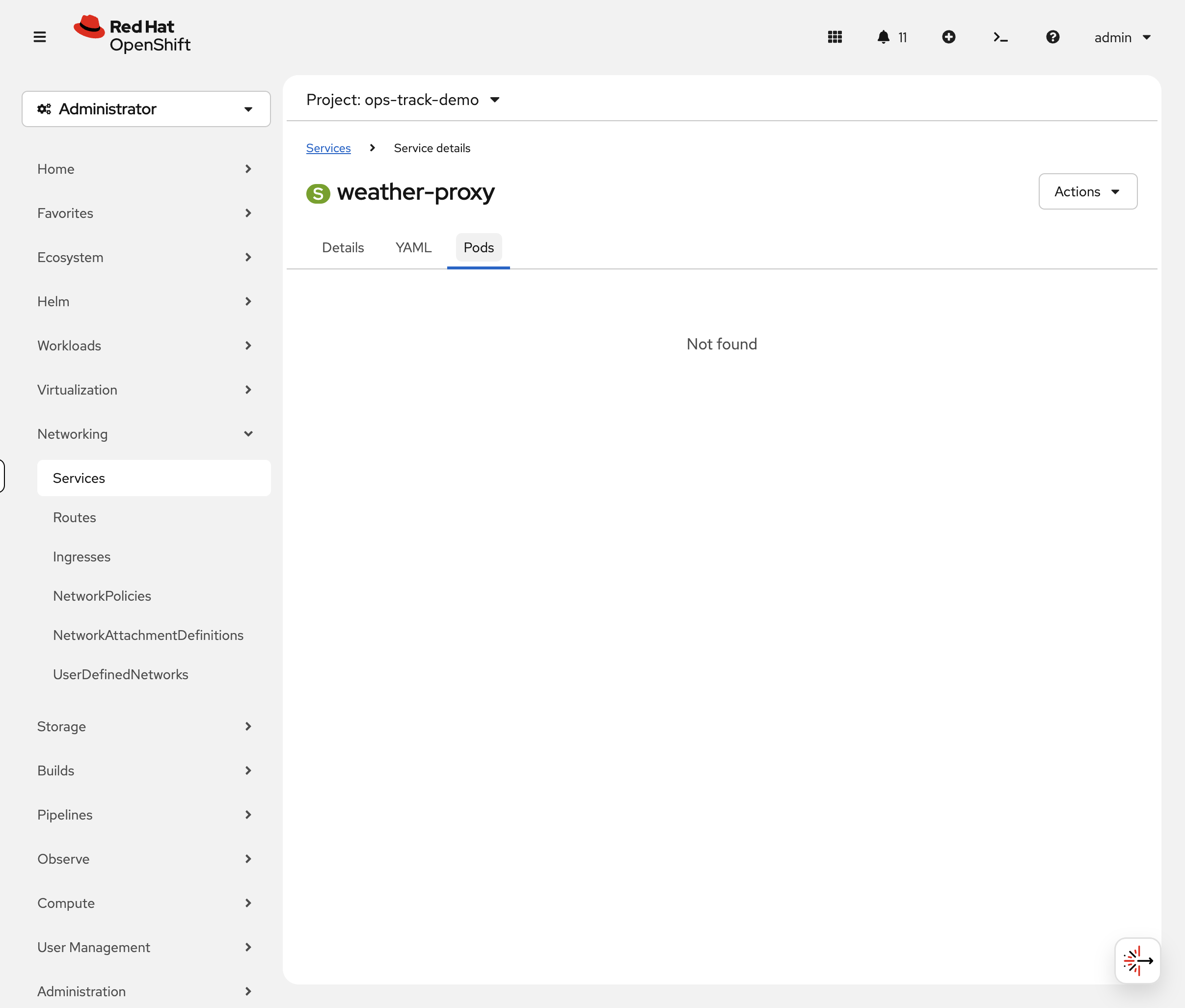
Check via CLI as well:
oc get endpointslice -l kubernetes.io/service-name=weather-proxy -n ops-track-demoYou should see ENDPOINTS is empty (<unset>). The service has no backends.
Compare the service selector with the pod labels:
echo "=== Service selector ===" && oc get svc weather-proxy -n ops-track-demo -o jsonpath='{.spec.selector}' | python3 -m json.tool && echo "=== Pod labels ===" && oc get pod -l app=weather-proxy -n ops-track-demo -o jsonpath='{.items[0].metadata.labels}' | python3 -m json.toolSpot the difference? The service selector says weather-proxi (typo) but the pod label is weather-proxy.
Fix
Patch the service selector to match the actual pod label:
oc patch svc weather-proxy -n ops-track-demo -p '{"spec":{"selector":{"app":"weather-proxy"}}}'Verify
oc get endpointslice -l kubernetes.io/service-name=weather-proxy -n ops-track-demoYou should now see the pod’s IP in the ENDPOINTS column. Traffic will flow to the pod.
Takeaway: When a pod is Running but the service isn’t working, check if the service selector matches the pod labels. A single character typo can break routing. Use oc get endpointslice to verify.
All Fixed
Switch to the OCP Console tab — Workloads → Pods (project: ops-track-demo). All five pods should now show green Running status. Compare this to the red/orange/yellow view you saw at the start — that visual progression is the troubleshooting workflow in action.
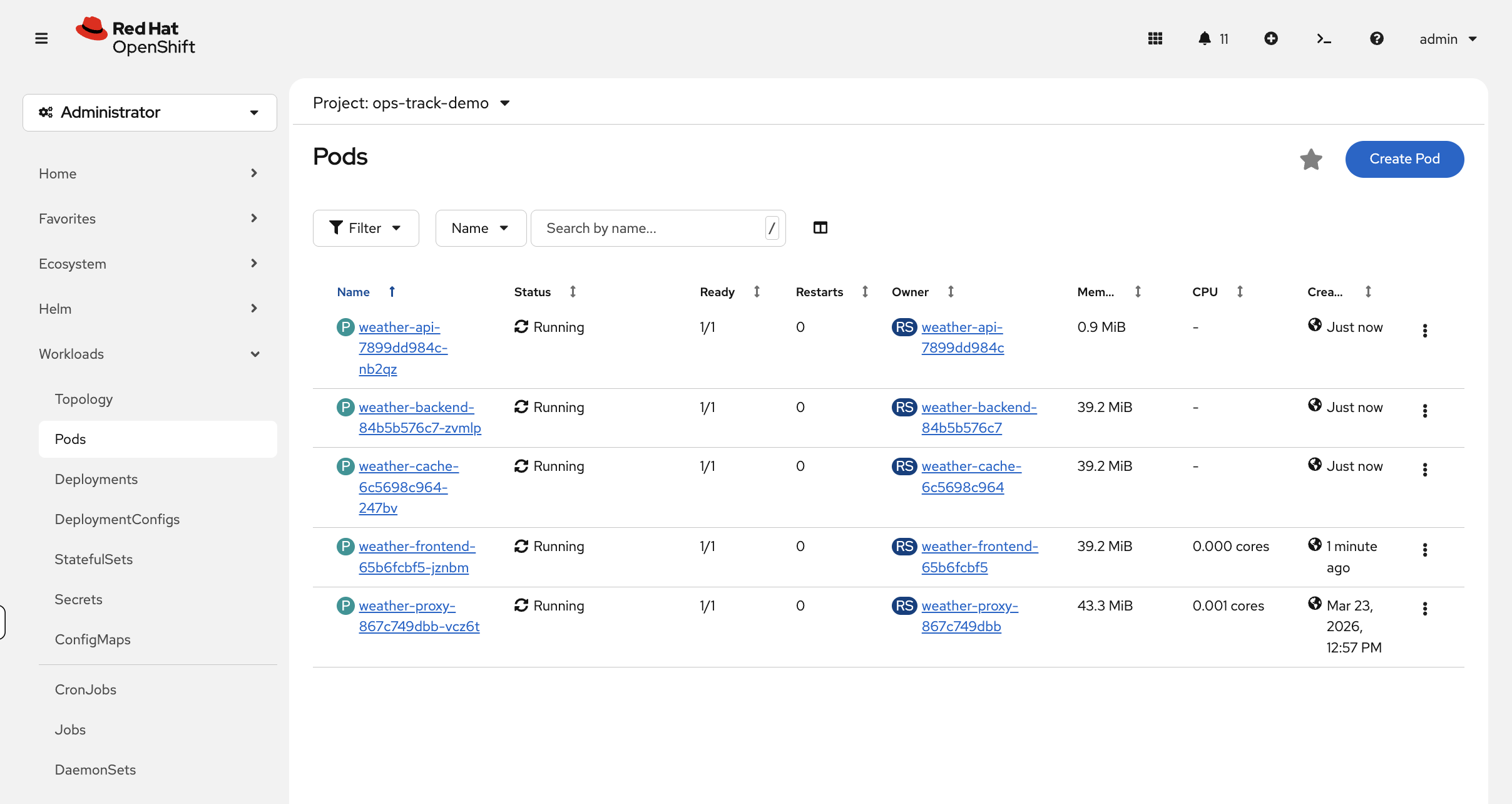
Verify via CLI:
oc get pods -n ops-track-demoAll five pods should now be Running:
NAME                                READY   STATUS    RESTARTS   AGE
weather-api-xxxxx                   1/1     Running   0          1m
weather-backend-xxxxx               1/1     Running   0          1m
weather-cache-xxxxx                 1/1     Running   0          1m
weather-frontend-xxxxx              1/1     Running   0          1m
weather-proxy-xxxxx                 1/1     Running   0          5m
Quick Reference
| Status | Meaning | First Check |
|---|---|---|
ImagePullBackOff |
Can’t pull container image |
|
CrashLoopBackOff |
Container starts then crashes |
|
CreateContainerConfigError |
ConfigMap/Secret missing |
|
No pod created |
LimitRange/ResourceQuota violation |
|
Pending |
Can’t schedule pod |
|
Running but not working |
Service selector mismatch or app bug |
|
PVC Pending |
Storage can’t be provisioned |
|
Summary
You diagnosed and fixed five common OpenShift issues:
-
ImagePullBackOff — wrong image tag (
9.9doesn’t exist) →oc set image -
CrashLoopBackOff — missing config file → create ConfigMap + volume mount
-
Resource constraint — memory typo exceeded LimitRange →
oc set resources -
CreateContainerConfigError — missing ConfigMap →
oc create configmap -
Service selector mismatch — typo in selector →
oc patch svc
The pattern is always the same: check status → describe pod/replicaset → read logs/events → fix → verify.