Using Variables
Extending our playbooks from the previous exercise, the focus turns to the creation and usage of variables in Ansible. You’ll learn the syntax for defining and using variables, an essential skill for creating dynamic and adaptable playbooks. Variables in Ansible are powerful tools for making your playbooks flexible and reusable — they allow you to store and reuse values, making your playbooks more dynamic and adaptable.
Understanding Variables
A variable in Ansible is a named representation of some data. Variables can contain simple values like strings and numbers, or more complex data like lists and dictionaries.
Variable Syntax and Creation
The creation and usage of variables involve a specific syntax:
-
Defining Variables: Variables are defined in the
varssection of a playbook or in separate files for larger projects. -
Variable Naming: Variable names should be descriptive and adhere to rules such as:
-
Starting with a letter or underscore.
-
Containing only letters, numbers, and underscores.
-
-
Using Variables: Variables are referenced in tasks using the double curly braces in quotes
"{{ variable_name }}". This syntax tells Ansible to replace it with the variable’s value at runtime.
Update the system_setup.yml playbook to include and use a variable:
---
- name: Basic System Setup
  hosts: node01
  become: true
  vars:
    user_name: 'Roger'
  tasks:
    - name: Install required packages
      ansible.builtin.package:
        name:
          - git
          - vim
        state: present

    - name: Create a new user
      ansible.builtin.user:
        name: "{{ user_name }}"
        state: present
        create_home: true
Running the Modified Playbook
Execute the updated playbook:
ansible-playbook -i hosts system_setup.yml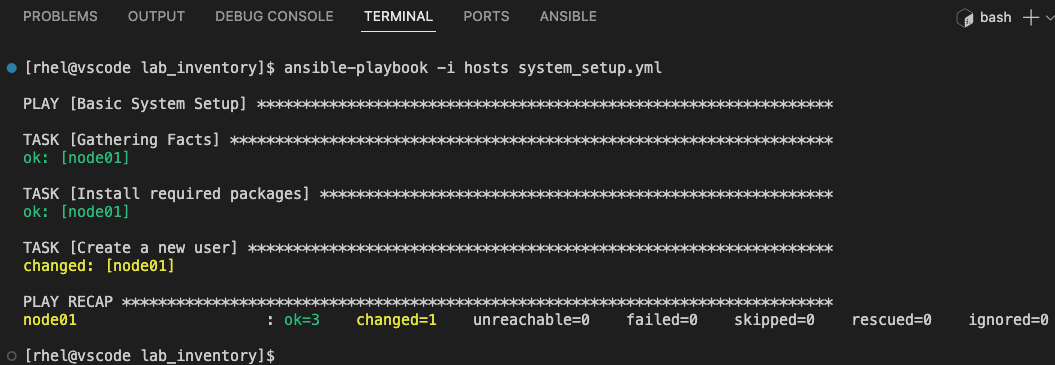
Notice how the updated playbook shows a status of changed in the Create a new user task. The user, 'Roger', specified within the vars section has been created.
Verify the user creation via:
ssh node01 id Roger
When prompted for a password, enter ansible123!
|
Advanced Variable Usage in Checks Playbook
Enhance the system_checks.yml playbook to check for the 'Roger' user within the system using the register variable and when conditional statement.
The register keyword in Ansible is used to capture the output of a task and save it as a variable.
Update the system_checks.yml playbook:
---
- name: System Configuration Checks
  hosts: node01
  become: true
  vars:
    user_name: 'Roger'
  tasks:
    - name: Check user existence
      ansible.builtin.command:
        cmd: "id {{ user_name }}"
      register: user_check
      changed_when: false

    - name: Report user status
      ansible.builtin.debug:
        msg: "User {{ user_name }} exists."
      when: user_check.rc == 0
Playbook Details:
-
register: user_check:This captures the output of the id command into the variable user_check. -
when: user_check.rc == 0:This line is a conditional statement. It checks if the return code (rc) of the previous task (stored in user_check) is 0, indicating success. The debug message will only be displayed if this condition is met.
This setup provides a practical example of how variables can be used to control the flow of tasks based on the outcomes of previous steps.
Run the checks playbook:
ansible-playbook -i hosts system_checks.yml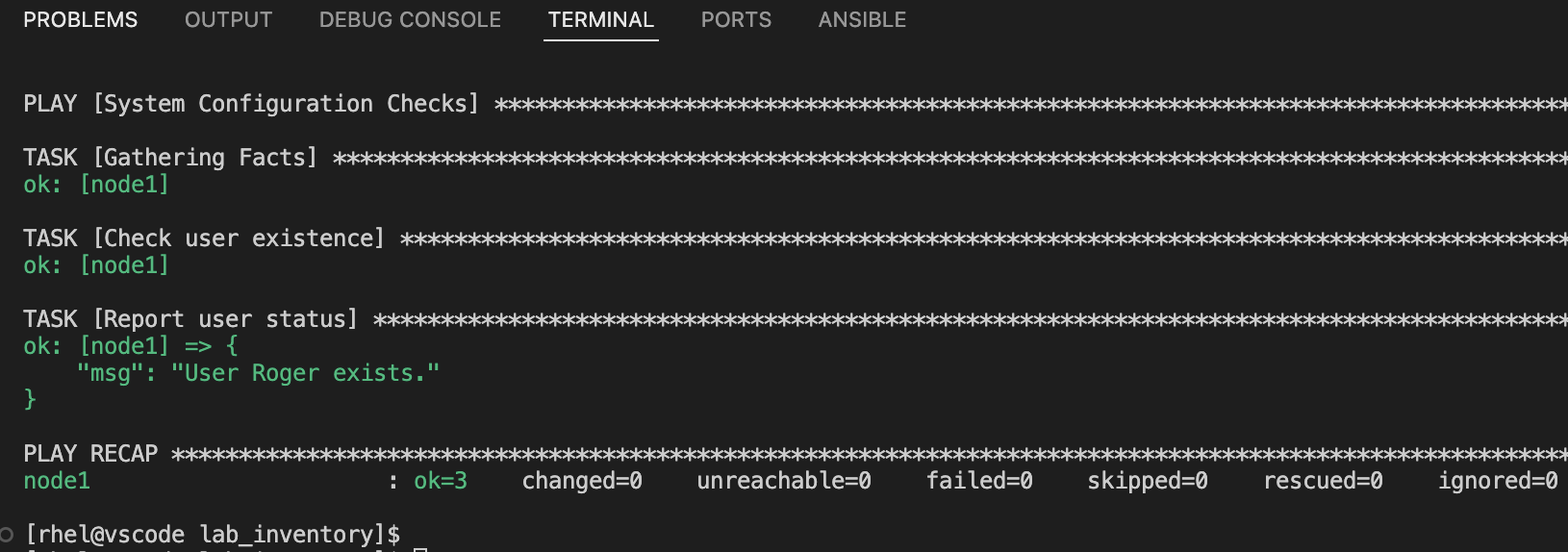
Review the output to confirm the user existence check is correctly using the variable and conditional logic.
Summary
You’ve successfully completed the variables exercises! You now have:
-
Learned how to define variables in the
varssection of a playbook -
Used variable syntax with
"{{ variable_name }}"to create dynamic tasks -
Implemented the
registerkeyword to capture task output into variables -
Applied conditional logic with
whento control task execution based on variable values