Debugging and Error Handling
This exercise focuses on debugging and error handling within Ansible. Building on the foundational knowledge from previous exercises, you will learn techniques to troubleshoot playbooks, manage errors gracefully, and ensure your automation is robust and reliable.
Introduction to Debugging in Ansible
Debugging is a critical skill for identifying and resolving issues within your Ansible playbooks. Ansible provides several mechanisms to help you debug your automation scripts, including the debug module, increased verbosity levels, and error handling strategies.
Utilizing the Debug Module
The debug module is a simple yet powerful tool for printing variable values, which can be instrumental in understanding playbook execution flow.
In this example, add debug tasks to your Apache role in the tasks/main.yml to output the value of variables or messages.
Implement Debug Tasks:
Insert debug tasks to display the values of variables or custom messages for troubleshooting:
- name: Display Variable Value
  ansible.builtin.debug:
    var: apache_service_name

- name: Display Custom Message
  ansible.builtin.debug:
    msg: "Apache service name is {{ apache_service_name }}"
Error Handling with Blocks
Ansible allows grouping tasks using block and handling errors with rescue sections, similar to try-catch in traditional programming.
In this example, add a block to handle potential errors during the Apache configuration within the tasks/main.yml file.
-
Group Tasks and Handle Errors:
Wrap tasks that could potentially fail in a block and define a rescue section to handle errors:
- name: Apache Configuration with Potential Failure Point block: - name: Copy Apache configuration ansible.builtin.copy: src: "{{ apache_conf_src }}" dest: "/etc/httpd/conf/httpd.conf" mode: '0644' rescue: - name: Handle Missing Configuration ansible.builtin.debug: msg: "Missing Apache configuration file '{{ apache_conf_src }}'. Using default settings." -
Add an
apache_conf_srcvariable withinvars/main.ymlof the apache role.apache_conf_src: "files/missing_apache.conf"
|
This file explicitly does not exist so that we can trigger the rescue portion from our |
Running with Verbose Mode
Ansible’s verbose mode (-v, -vv, -vvv, or -vvvv) increases the output detail, providing more insights into playbook execution and potential issues.
Execute Playbook in Verbose Mode:
Run your playbook with the -vv option to get detailed logs:
ansible-navigator run deploy_apache.yml -m stdout -vv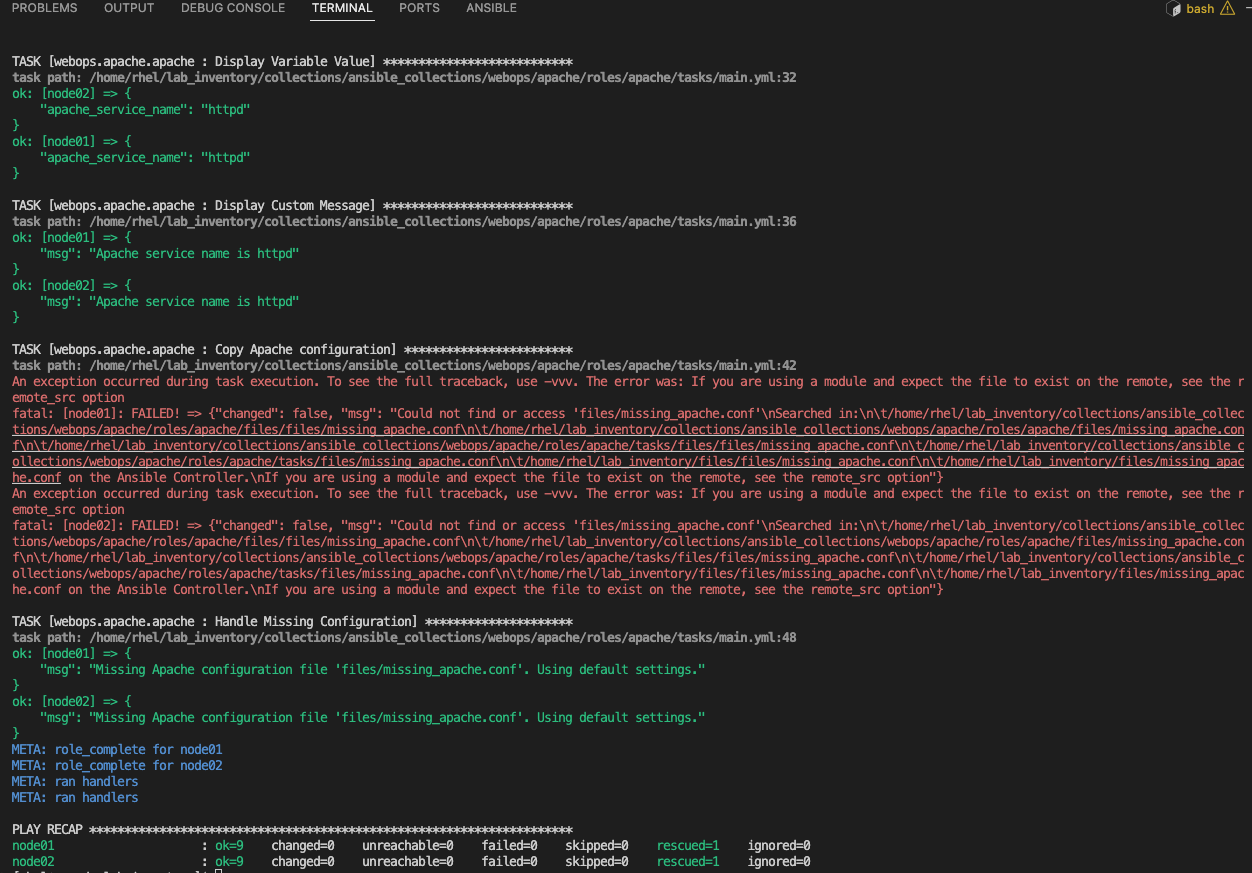
Notice how the playbook shows there was an error copying the Apache Configuration file but the playbook was able to handle it via the rescue block that was provided. If you notice the final task 'Handle Missing Configuration' details that the file was missing and it would use the default settings.
The final Play Recap shows us that there was a rescued block used via the rescued=1 per node in the web group.
Summary
In this exercise you:
-
Learned about Ansible’s built-in debugging mechanisms for troubleshooting playbooks
-
Used the
debugmodule to print variable values and custom messages during execution -
Implemented
blockandrescuesections for graceful error handling -
Ran playbooks in verbose mode (
-vv) to gain deeper insight into task execution -
Observed how the Play Recap reflects rescued errors via the
rescuedcounter