Using Conditionals, Handlers, and Loops
Building on previous exercises, this exercise introduces the application of conditionals, handlers, and loops in Ansible playbooks. You’ll learn to control task execution with conditionals, manage service responses with handlers, and efficiently handle repetitive tasks using loops. These are advanced features in Ansible that enhance control, efficiency, and flexibility in your automation playbooks.
Understanding Conditionals, Handlers, and Loops
-
Conditionals: Enable tasks to be executed based on specific conditions.
-
Handlers: Special tasks triggered by a
notifydirective, typically used for restarting services after changes. -
Loops: Used to repeat a task multiple times, particularly useful when the task is similar but needs to be applied to different items.
Conditionals
Conditionals in Ansible control whether a task should run based on certain conditions. Let’s add to the system_setup.yml playbook the ability to install the Apache HTTP Server (httpd) only on hosts that belong to the web group in our inventory.
|
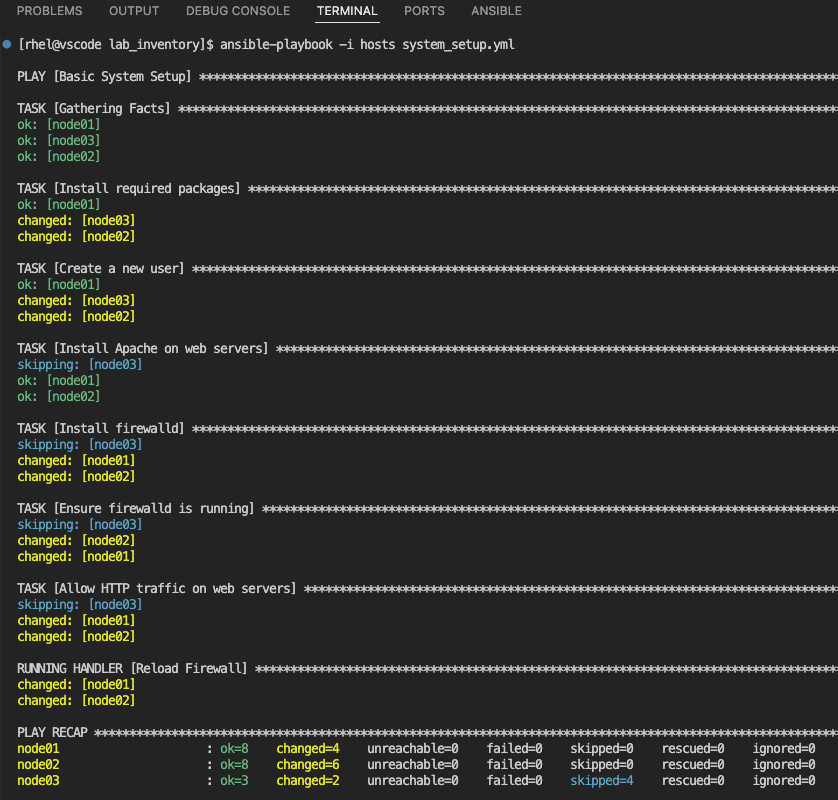
Previous examples had hosts set to node01 but now it is set to all. This means when you run this updated Ansible playbook you will notice updates for the new systems being automated against, the user Roger created on all new systems and the Apache web server package httpd installed on all the hosts within the web group. |
---
- name: Basic System Setup
  hosts: all
  become: true
  vars:
    user_name: 'Roger'
    package_name: httpd
  tasks:
    - name: Install required packages
      ansible.builtin.package:
        name:
          - git
          - vim
        state: present

    - name: Create a new user
      ansible.builtin.user:
        name: "{{ user_name }}"
        state: present
        create_home: true

    - name: Install Apache on web servers
      ansible.builtin.package:
        name: "{{ package_name }}"
        state: present
      when: inventory_hostname in groups['web']
In this example, inventory_hostname in groups['web'] is the conditional statement. inventory_hostname refers to the name of the current host that Ansible is working on in the playbook. The condition checks if this host is part of the web group defined in your inventory file. If true, the task will execute and install Apache on that host.
Handlers
Handlers are used for tasks that should only run when notified by another task. Typically, they are used to restart services after a configuration change.
Let’s say we want to ensure the firewall is configured correctly on all web servers and then reload the firewall service to apply any new settings. We’ll define a handler that reloads the firewall service and is notified by a task that ensures the desired firewall rules are in place. Add the following tasks to the existing playbook to install firewalld and enable firewalld and reload the service with the help of handlers.
---
- name: Basic System Setup
  hosts: all
  become: true
  vars:
    user_name: 'Roger'
    package_name: httpd
  tasks:
    - name: Install required packages
      ansible.builtin.package:
        name:
          - git
          - vim
        state: present

    - name: Create a new user
      ansible.builtin.user:
        name: "{{ user_name }}"
        state: present
        create_home: true

    - name: Install Apache on web servers
      ansible.builtin.package:
        name: "{{ package_name }}"
        state: present
      when: inventory_hostname in groups['web']

    - name: Install firewalld
      ansible.builtin.package:
        name: firewalld
        state: present
      when: inventory_hostname in groups['web']

    - name: Ensure firewalld is running
      ansible.builtin.service:
        name: firewalld
        state: started
        enabled: true
      when: inventory_hostname in groups['web']

    - name: Allow HTTP traffic on web servers
      ansible.posix.firewalld:
        service: http
        permanent: true
        state: enabled
      when: inventory_hostname in groups['web']
      notify: Reload Firewall

  handlers:
    - name: Reload Firewall
      ansible.builtin.service:
        name: firewalld
        state: reloaded
The handler "Reload Firewall" is triggered only if the task "Allow HTTP traffic on web servers" makes any changes.
| Notice how the name of the handler is used within the notify section of the "Allow HTTP traffic on web servers" configuration task. This ensures that the proper handler is executed as there can be multiple handlers within an Ansible playbook. |
Loops
Loops in Ansible allow you to perform a task multiple times with different values. This feature is particularly useful for tasks like creating multiple user accounts in our given example. In the original system_setup.yml playbook from the previous exercise, we had a task for creating a single user:
- name: Create a new user
  ansible.builtin.user:
    name: "{{ user_name }}"
    state: present
    create_home: true
Now, let’s modify this task to create multiple users using a loop:
- name: Create a new user
  ansible.builtin.user:
    name: "{{ item }}"
    state: present
    create_home: true
  loop:
    - alice
    - bob
    - carol
What Changed?
-
Loop Directive: The loop keyword is used to iterate over a list of items. In this case, the list contains the names of users we want to create: alice, bob, and carol.
-
User Creation with Loop: Instead of creating a single user, the modified task now iterates over each item in the loop list. The
{{ item }}placeholder is dynamically replaced with each username in the list, so the ansible.builtin.user module creates each user in turn.
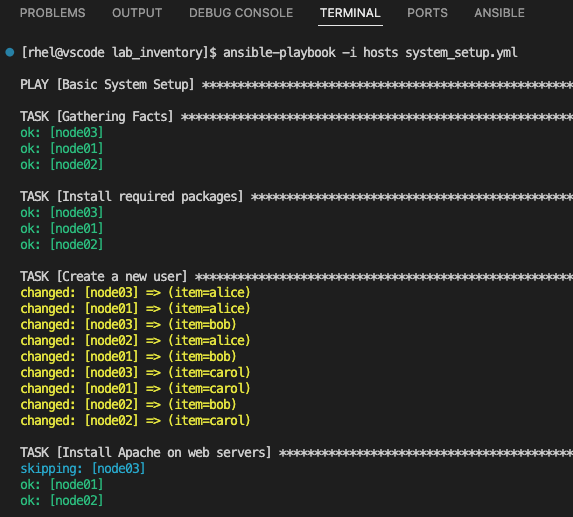
When you run the updated playbook, this task is executed three times, once for each user specified in the loop. It’s an efficient way to handle repetitive tasks with varying input data.
Snippet of the output for creating a new user on all the nodes.
Summary
You’ve successfully completed the conditionals, handlers, and loops exercises! You now have:
-
Used conditionals with
whento selectively install packages based on inventory group membership -
Implemented handlers with
notifyto reload services only when configuration changes occur -
Applied loops to efficiently create multiple user accounts in a single task
-
Combined all three features into a comprehensive system setup playbook